
AI Knowledge
Unlock the potential of artificial intelligence in your business with our comprehensive playbook, '🎯 Getting Started using AI in Business'.
Start ReadingWe’ll cover a framework for choosing what exactly to use AI on.
This can be applied in your own business. Or if you are an AI consultant then the framework can be used with clients.
Then we’ll look at what level of AI you should be building.
Not all jobs need the same level of AI automation. Do not systematise what does not need to be systematised.
We’ll cover:
Part 1: How to think about AI
Part 2: Ad hoc usage
Part 3: Prompt Libraries
Part 4: Custom GPTs
Part 5: Building AI apps
We’ll get rolling right after this word from our sponsor.
Brought to you by Dittto.AI
Fix your hero copy with an AI trained on the best landing pages. Easily generate high-conversion hero copy in a few clicks - for free.
👉 Get Started for Free 👈
Let’s get started:
AI is like magic.
When you first start using it in your business the natural reaction is “OMG this can do everything for me! I’ll be on the beach sipping Mai-tais in a week!”
Totally natural reaction!
We tend to go through this journey:
First up we’re excited - AI can do any task we throw at it in business.
But as we start to use it more we see the cracks and limitations.
ChatGPT starts producing generic responses, forgetting instructions or just making stuff up!
This destroys confidence. Some people even stop using AI at this stage - loudly proclaiming that “AI is an overhyped fad”.
The problem isn’t AI. It’s you!
We tend to i) expect too much and ii) not spend the time to learn the limitations of AI.
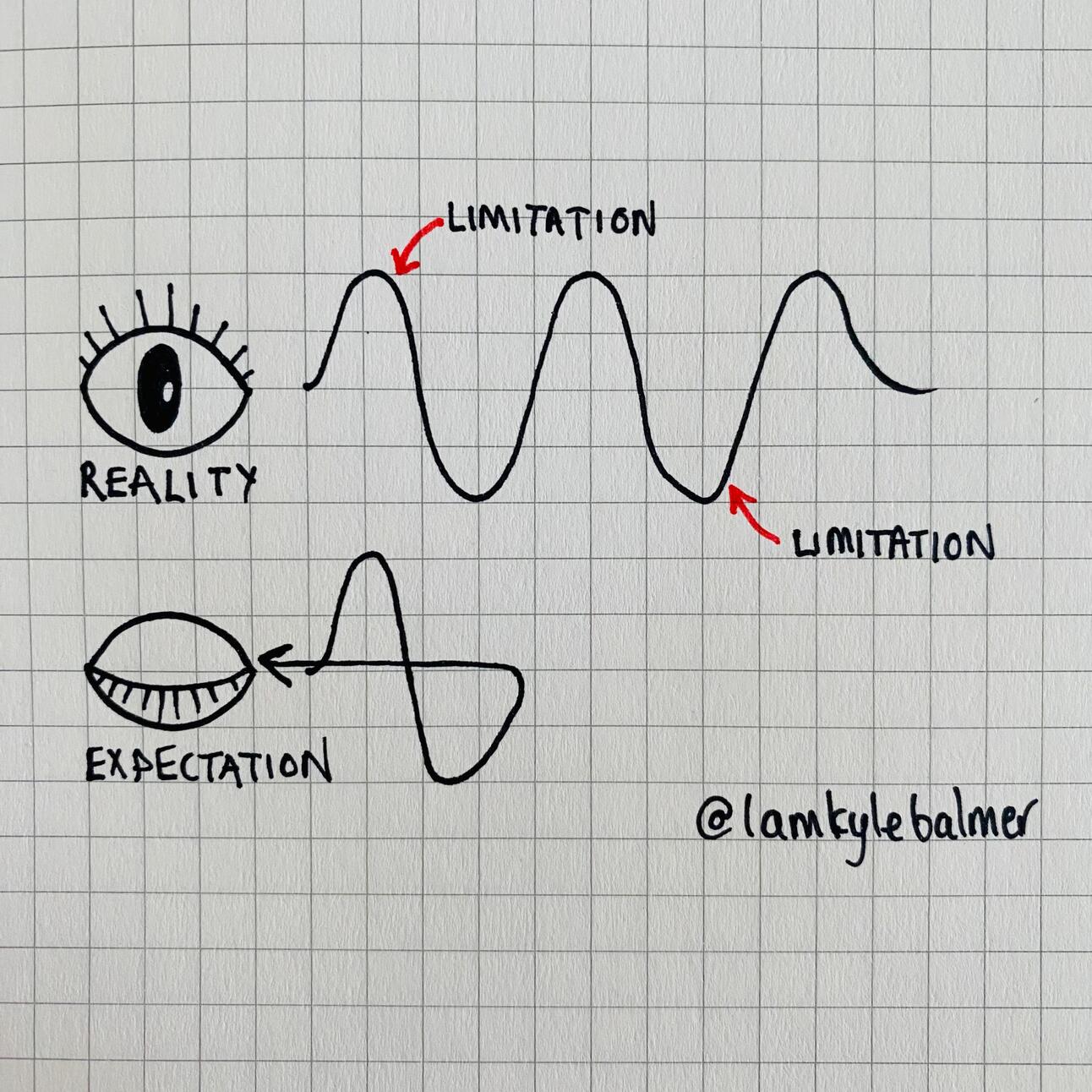
When AI doesn’t instantly do what our imagination expects it to we throw the baby out with the bathwater.
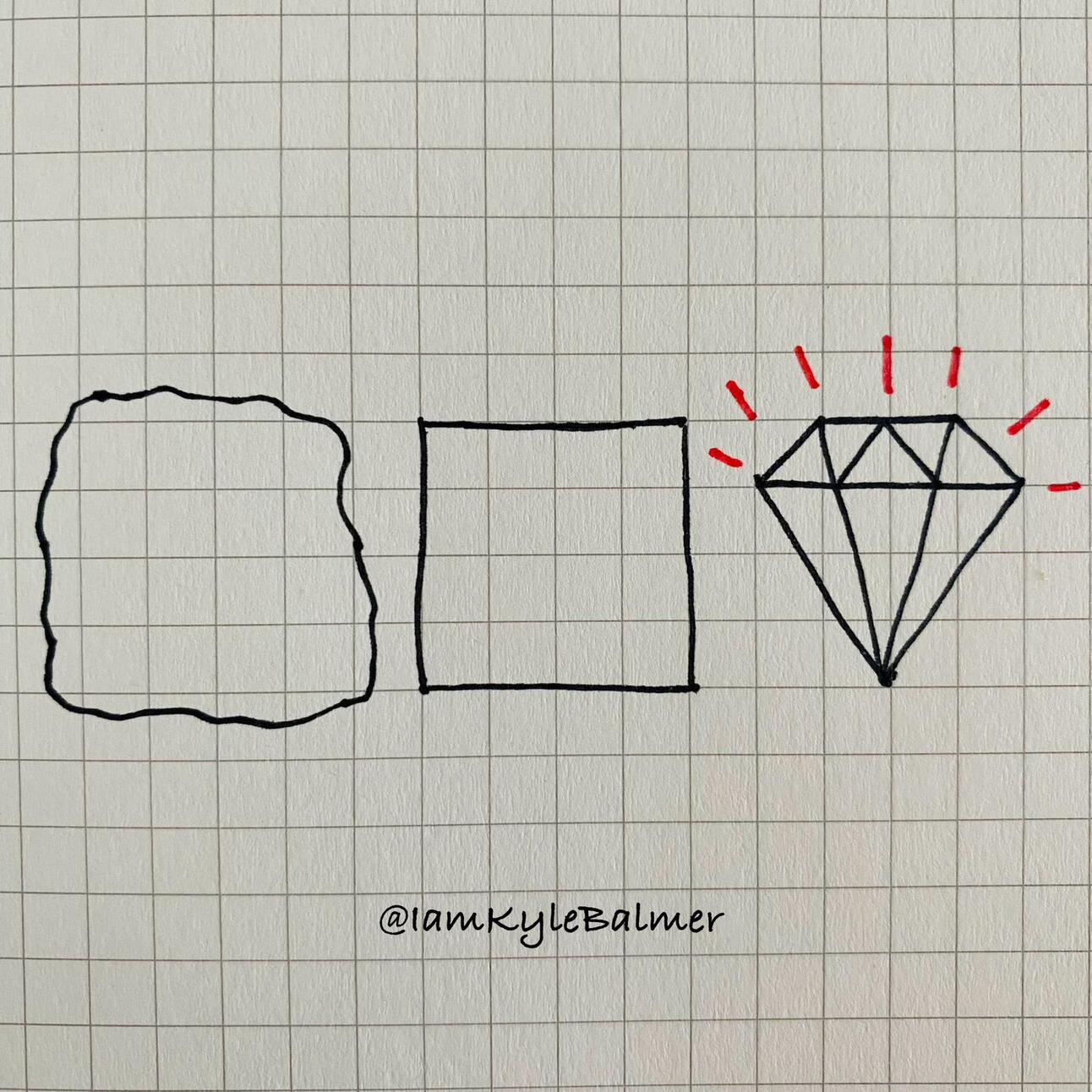
It reminds me of this bit:
Instead, treat AI as a hyper-intelligent human assistant.
They’ve just entered the job and don’t know the context of your business.
If this was a human new hire you’d:
prepare detailed instructions
provide context and background
be patient with their mistakes and tell them what they did wrong
We need to do this with AI to get best results!
Don’t expect AI to read your mind and know exactly what you want!
The key to this is prompting. Or if yo’ fancy: “prompt engineering”
This basically means “how to talk to AI”. That’s it.
It’s a communication skill. Not a technical coding skill.
In the next Part I’ll give you a framework for the Perfect Prompt.
Right now let’s review a decision matrix for what tasks we should be using AI on.
So we’ve got over our initial excitement with AI and realised that it’s a hyper intelligent assistant that still needs some guidance to produce the best results.
This imposes limitations.
We can’t just use AI on everything. It would be a disaster.
Instead we need to be selective. We need to decide the best tasks to deploy AI on.
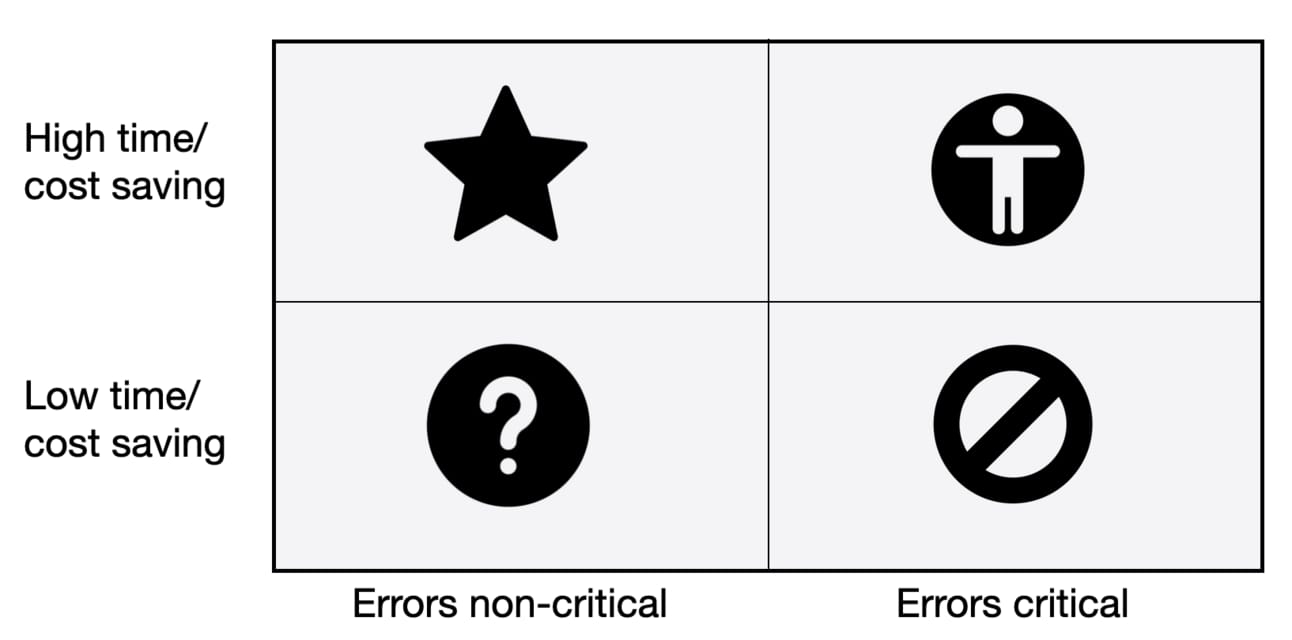
For this I’ve devised a decision matrix. Here it is:
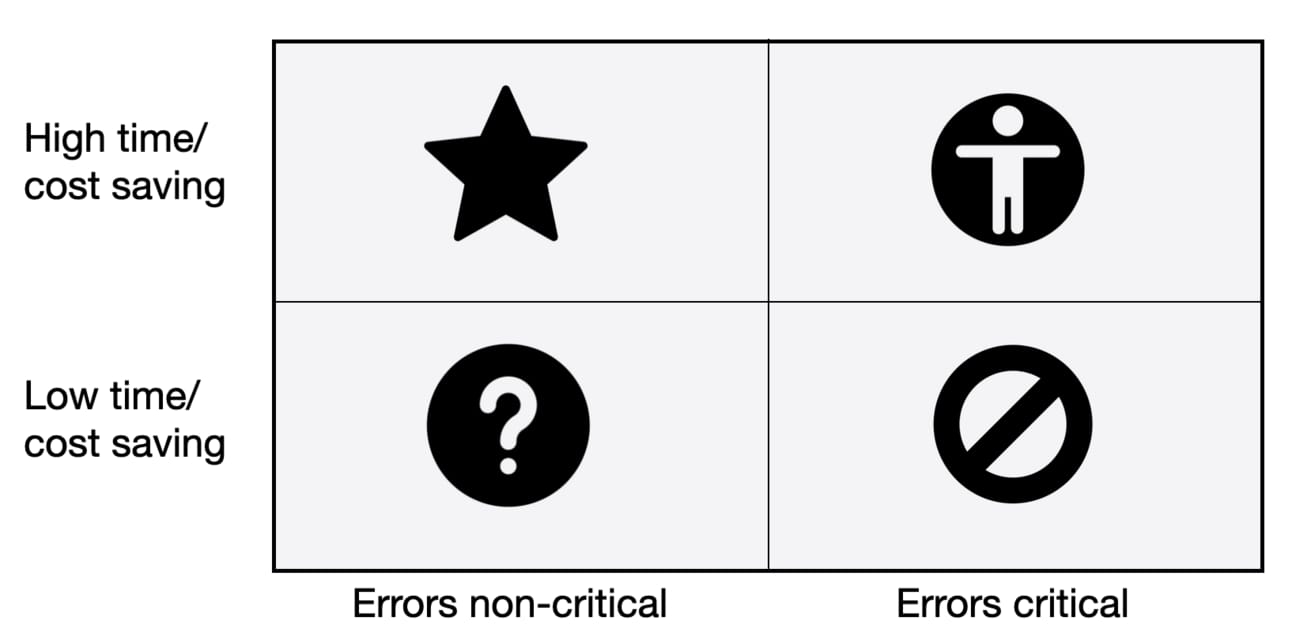
On the axes we have:
time and cost savings
how critical errors are
Tasks that take a lot of time and money might be things like meetings, reporting, customer service and all the myriad of time-consuming tasks a business has. Simple.
How critical errors are is a little more complex. Basically errors are not built the same. Errors in some tasks are not the end of the world.
For example let’s say you prepare a daily report you send to a team-member internally. If there’s an error your team member will just send it back and say “hey think you missed something here”. Embarrassing? Sure. Mission critical? Nope.
A critical error is one that affects the business as a whole. For example maybe that report wasn’t a daily send to a colleague but instead an annual report sent to all your key investors.
In this case making a similar error could be disastrous!
Using the matrix we can categorise all our business tasks into:
high time consumption, low error impact
low time consumption, high error impact
high time consumption, high error impact
low time consumption, low error impact
The tasks we want to focus AI on are high time consumption, low error impact. The Star category in the matrix.
Errors will happen but aren’t mission critical. And the tasks take up a lot of time and/or cost a lot of money. These are ideal candidates for AI automation.
Here’s the first step.
Audit your business tasks. What tasks are done by yourself and your teams on a daily basis? Weekly? Monthly?
Audit and track all of these tasks, working out how long each of them takes and how much each is costing the business.
Then go through this list of tasks and assign them to the quadrants in the matrix.
At the end of this process you’ll have 4 lists.
Focus on the Star list: high time/cash usage, low impact of errors. This is where we will have the most success with implementing AI.
We just looked at the primary focus for AI in our business.
But we don’t have to stop there.
The other quadrants are still of interest.

After the Star category we would want to look at the top right quadrant : high time/cost saving but errors critical tasks.
These are tasks that, if automated by AI, will still be highly valuable to the business.
But we need to be much more carful because of the high impact of errors.
For these we need to add “human in the loop” tactics:
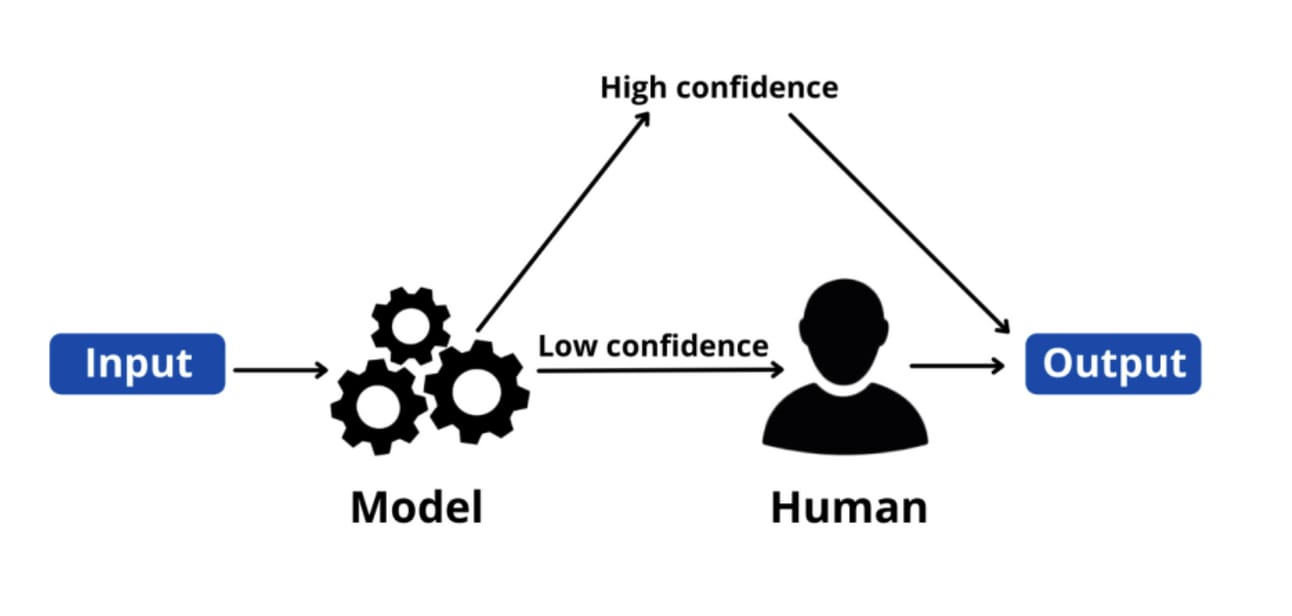
The basic idea here is that for any critically important task we keep human checks in place.
Honestly you should be doing this with any new AI workflow! But for these quadrant tasks we maintain the human beyond the initial testing.
This is as simple as building a human step into your work flow for a particular task. For example:
customer service support ticket arrives
AI prepares response
AI sends response to customer service team
customer service team make corrections and/or rewrite response if needed
customer service team send response to customer
Is this less efficient? Yes! The most efficient route is simply to respond directly to the customer using an AI.
But if we value the quality of our customer service response (hint: you should) we add a human check and corrections to ensure quality.
In this Part I’ve given a primer on how you as a business owner should be thinking about AI.
It’s not a magic pill that will solve everything.
But it will make your operations smoother, faster and cheap. If used correctly.
We looked at a decision matrix and how we can find the tasks most susceptible to AI automation.
In the next Parts - now that we know which processes we are focusing on - we’ll begin that automation journey.
Here’s a reminder of the week:
Part 1: How to think about AI
Part 2: Ad hoc usage
Part 3: Prompt Libraries
Part 4: Custom GPTs
Part 5: Building AI apps
Keep prompting,
Kyle
In this Part I’ll show you the foundational stage in all of your business’ use of AI.
By the end of this Part we’ll have a solid base from which to build up our business’ AI deployment.
First a word from our sponsor.
Brought to you by Dittto.AI
Fix your hero copy with an AI trained on the best landing pages. Easily generate high-conversion hero copy in a few clicks - for free.
👉 Get Started for Free 👈
Let’s get started:
Too many businesses jump in and deploy AI without thinking.
They get sold on the latest tool. Or some slick consultant convinces they that the need to build complex apps or even their own local AI.
They might need those solutions.
But more likely the person selling them that solution is the one who will do best out of the implementation!
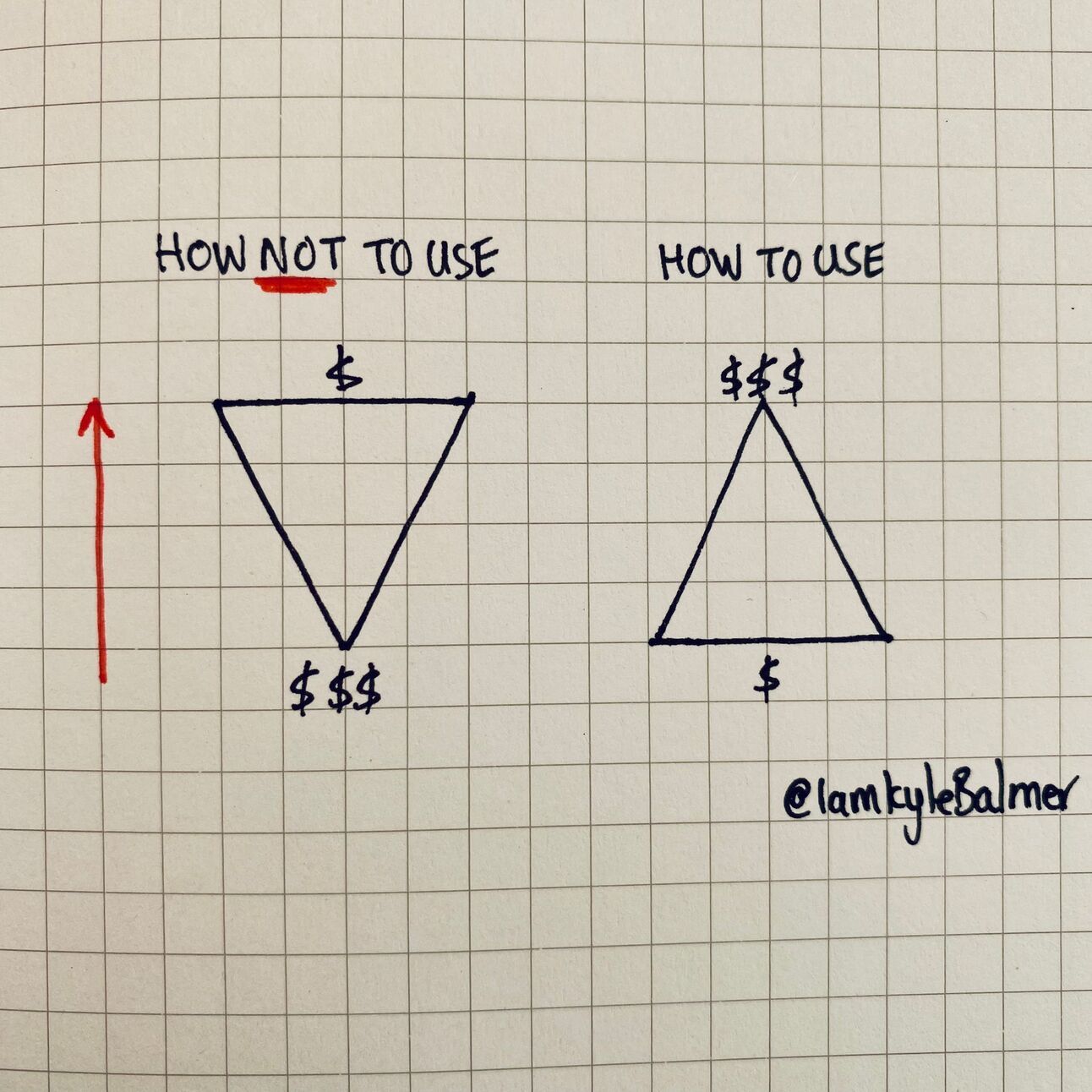
I instead suggest businesses and organisations start with basic ad hoc (when necessary) usage and then work bottom-up towards more complex solutions.
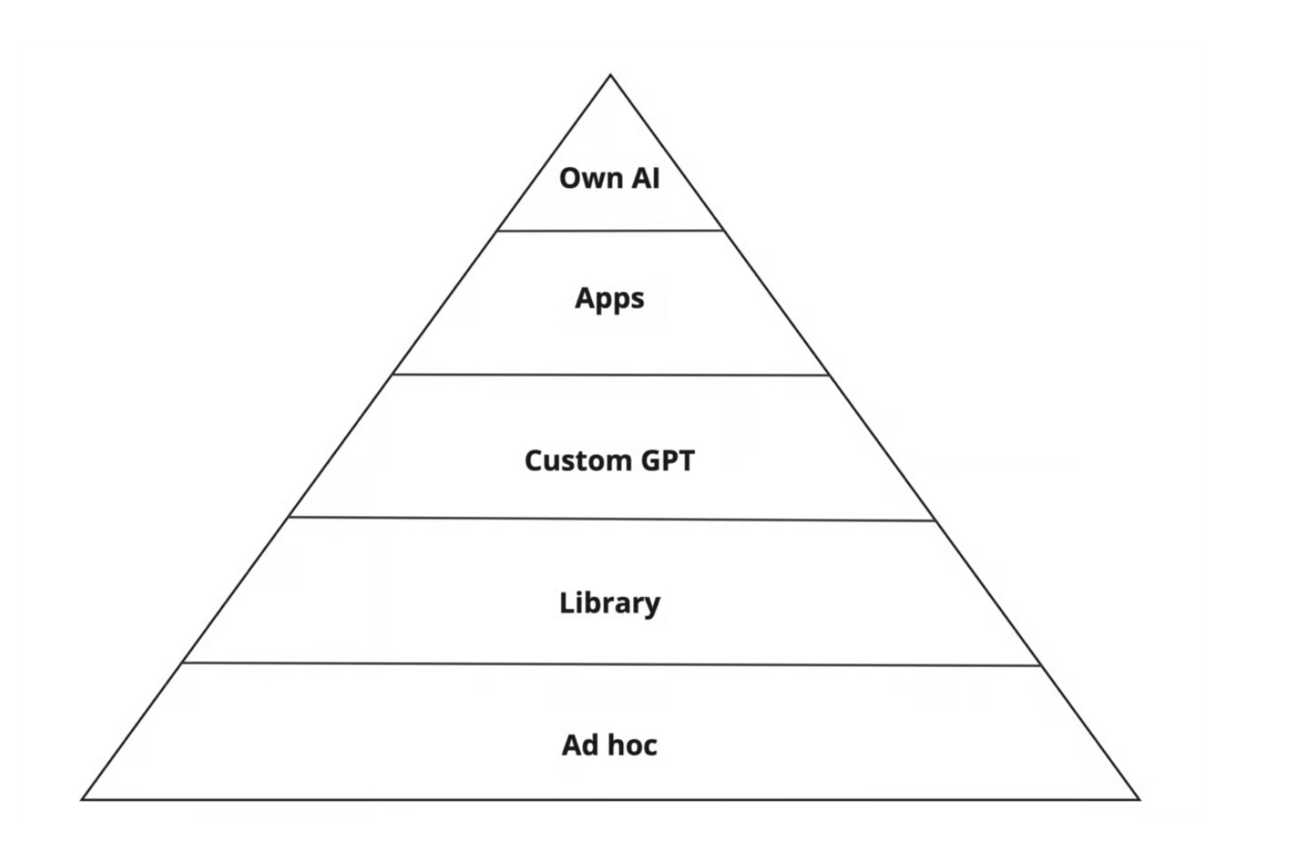
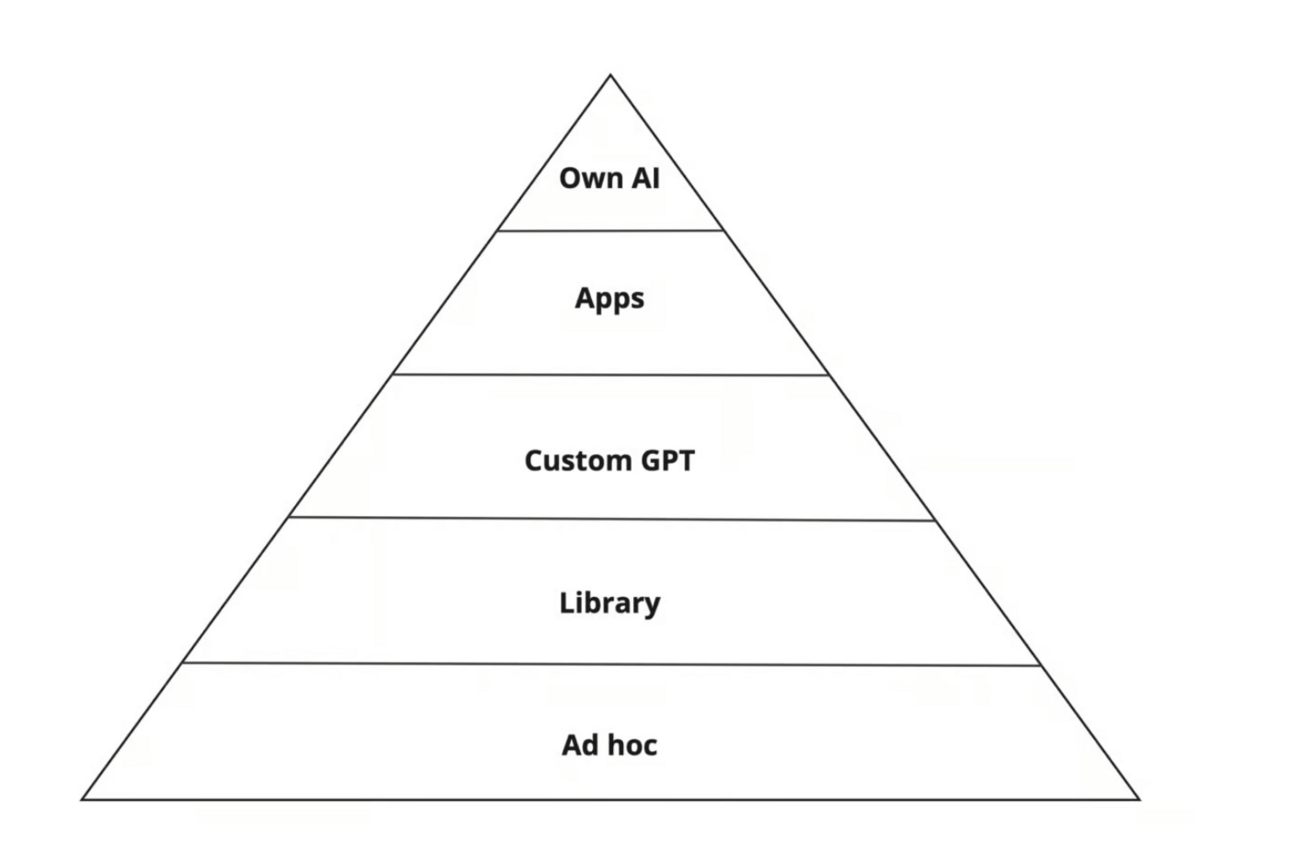
Here’s a chart showing the levels of AI:
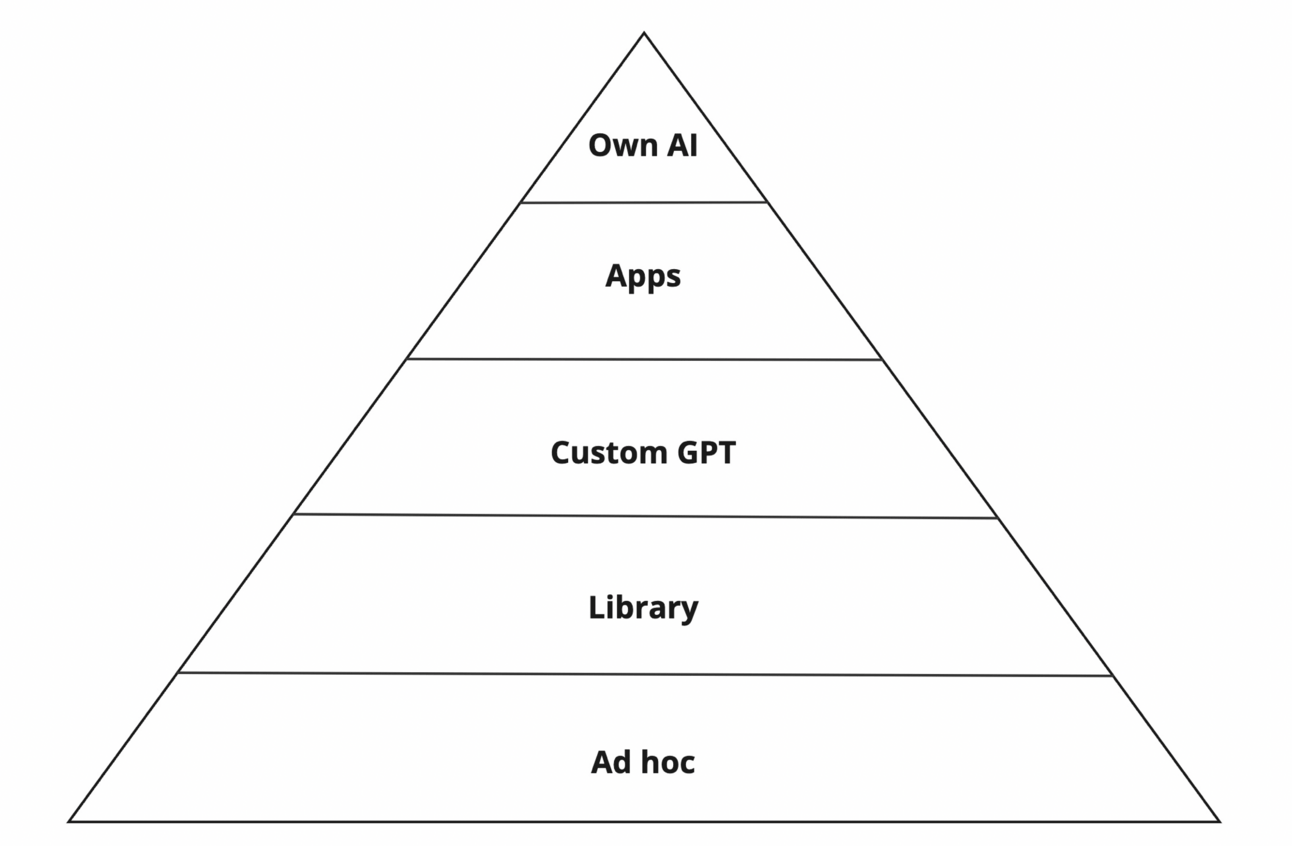
Ad hoc at the bottom is how most AI starts getting used.
When you are hopping onto ChatGPT on a web browser or phone and running some prompts this is ad hoc usage
This usage is building single-use disposable prompts that we use once and then never again.
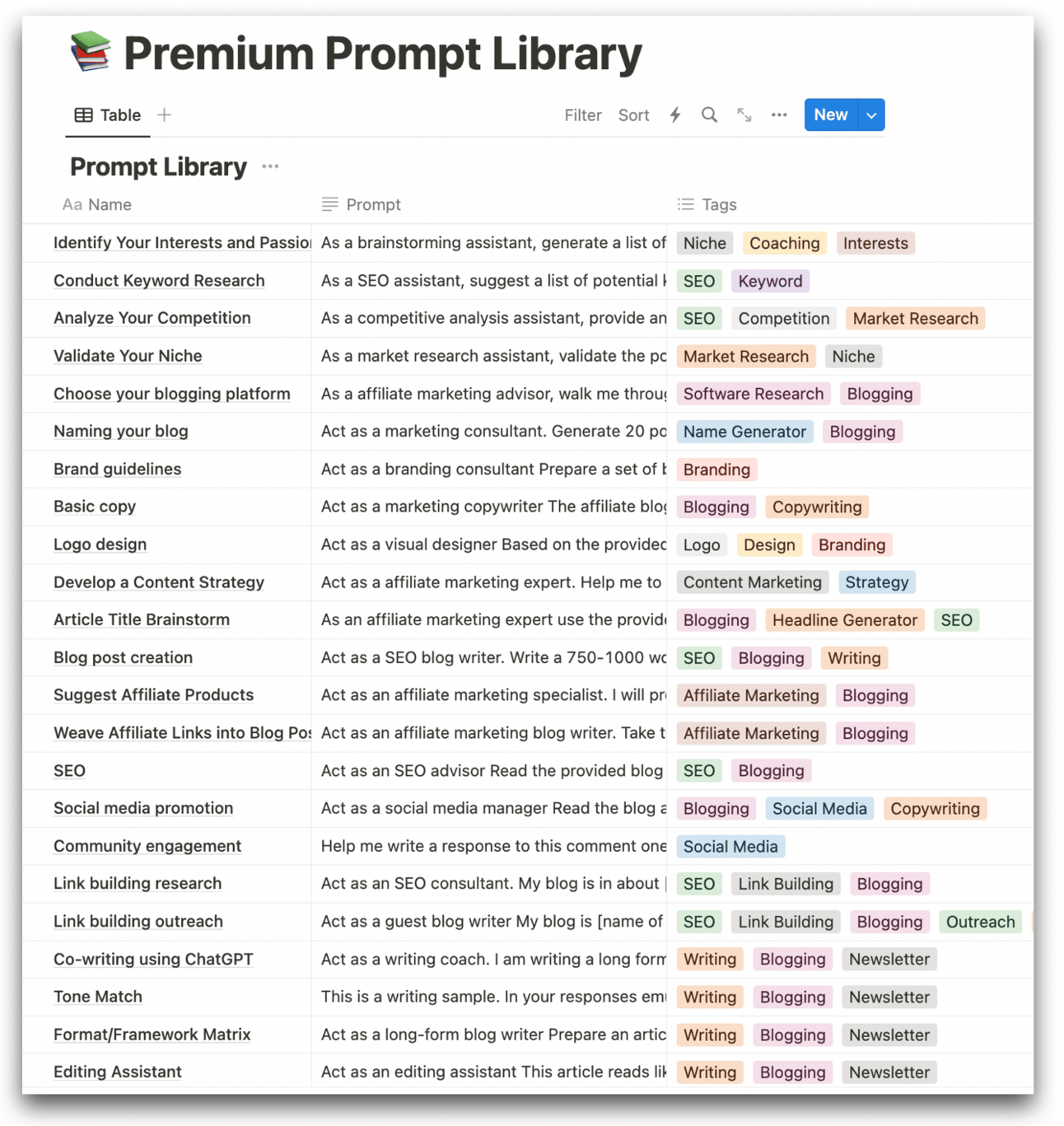
The next level up are prompts saved in a Library. These are prompts we find ourselves returning to again and again.
A good example here is the Premium Prompt library I’ve built:
If you find you are using the same library prompts again and again then we can move to the next level of AI: custom GPTs.
ChatGPT has made it relatively easy to package up our prompts as custom GPT.
Beyond this are the top levels of AI: building our own apps and even our own AIs.
All of this starts at the same foundational level - ad hoc prompts.
When working with organisations this is how I recommend they proceed:
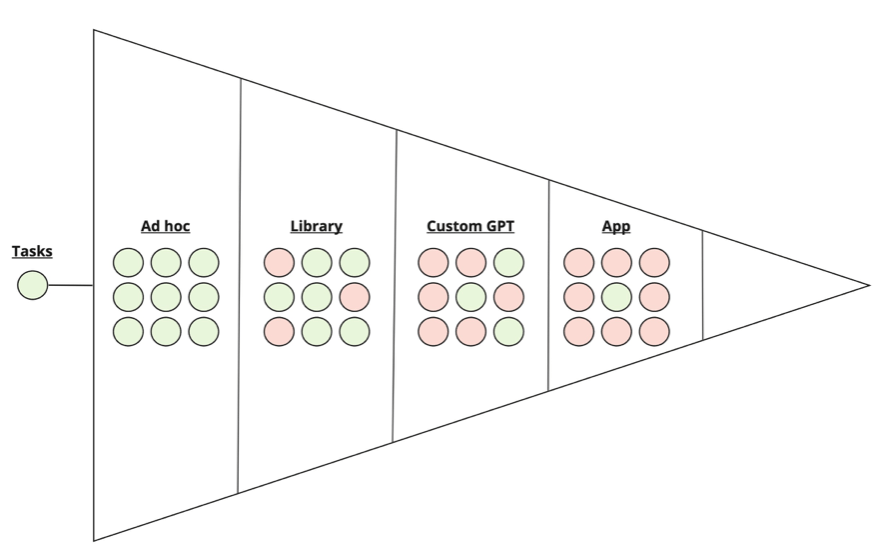
Work out the most valuable tasks to automate using AI.
Build ad hoc prompts for the tasks.
Keep a record of the most useful prompts in a Library.
Convert the most used Library prompts into Custom GPTs.
Convert the most used Custom GPTs into Apps.
This comes from the bottom-up. Not from the top-down.
It’s a grassroots approach where we only develop prompts that are valuable to the business. Only prompts that have proven themselves to be useful.
Before adding complexity first nail your basic prompts.
This comes from educating yourself and team members on prompt engineering - how best to communicate with AI.
I use the RISEN framework:
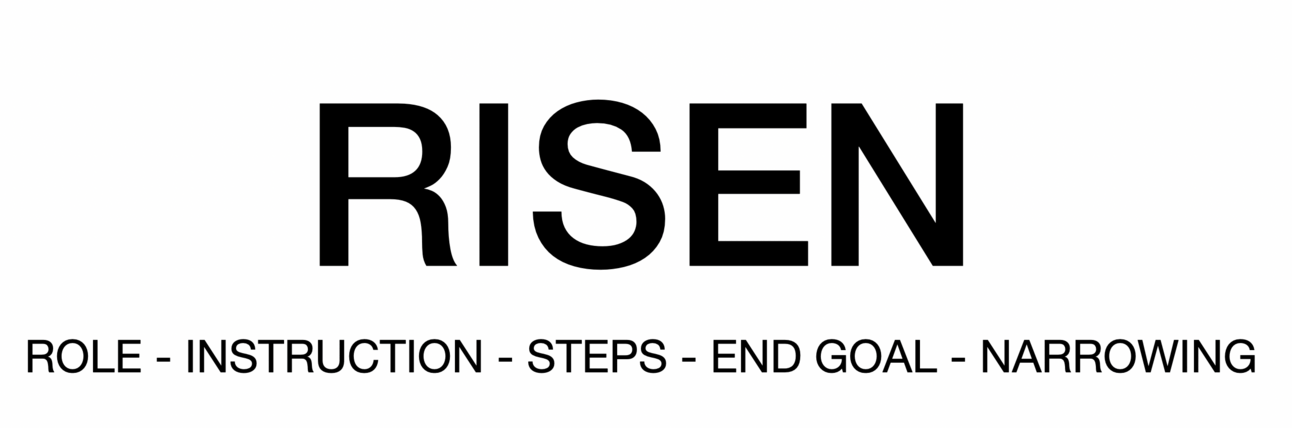
This is simplest with examples. I’ll keep adding additional elements of the RISEN framework.
Most people when they start to use AI will write very simplistic instruction-only prompts like:
Write a blog article on [topic]Very simple. Very basic.
With a prompt like this ChatGPT will give you a generic output. A generic blog article with very little personality. It will read like an AI wrote it!
Using the RISEN framework we can add specificity and get better outputs.
First up : ROLE.
Start your prompts with a role declaration. I use “act as xyz”. For example:
Act as an SEO blog author and write a blog article on [topic]ChatGPT can take on any role. So by giving it a specific role we are narrowing its focus. Place the Role declaration before the Instructions for best results.
Next: STEPS.
Instead of just giving ChatGPT a basic instruction like “write a blog article” you should give it the exact steps to do so. This again stops our results being generic.
For example:
Act as an SEO blog author and write a blog article on [topic]

Follow these steps:
1. Start with a hook sentence.
2. Provide 3 paragraphs with 3 main points.
3. Close the blog article with a call to action to subscribe to the newsletter.
Adding in Steps will help us craft the output and make it much more specific to our needs.
Next: END GOAL.
Too often we give an AI a basic instruction and then are unhappy with the result.
This happens a lot when just starting to use tools like ChatGPT.
The problem here isn’t ChatGPT. It’s us!
We need to tell the AI what we consider a good result. ChatGPT isn’t a mind reader (yet!).
If you are unhappy with the result then make sure you’ve actually specified the result you want!
For example:
Act as an SEO blog author and write a blog article on [topic]

Follow these steps:
1. Start with a hook sentence.
2. Provide 3 paragraphs with 3 main points.
3. Close the blog article with a call to action to subscribe to the newsletter.

Desired result:
1. SEO optimised article for this keyword: [keyword]
2. Optimised for time on page - don't reveal the most exciting point until the end of the article.
3. Brand building - focus on displaying thought leadership. Provide a controversial take and back up the argument with references.
Finally: NARROWING.
In this final stage we need to add tweaks to finesse our output.
Often we’ll first run the prompt a few times to see what the results are like. Then we add finesse statements at the end of the prompt to “correct” the result.
For example:
Act as an SEO blog author and write a blog article on [topic]

Follow these steps:
1. Start with a hook sentence.
2. Provide 3 paragraphs with 3 main points.
3. Close the blog article with a call to action to subscribe to the newsletter.

Desired result:
1. SEO optimised article for this keyword: [keyword]
2. Optimised for time on page - don't reveal the most exciting point until the end of the article.
3. Brand building - focus on displaying thought leadership. Provide a controversial take and back up the argument with references.

Constraints:
1. Keep the blog article between 750-1000 words
2. Use professional but human language. Avoid verboseness and floral language.
3. Do not mention competitors ABC and XYZ.
So over this process of using RISEN we’ve come a long way.
Remember we started with:
Write a blog article on [topic]and compare that to the final result above. World’s apart.
Apply this framework to your prompts and you’ll see the quality increase 10 fold.

The RISEN framework just provided is what we call “prompt engineering”.
I’ve written a full guide on this topic which will let you go deeper.
Here’s the direct link: Prompt Engineering 101
The RISEN framework gives you what you need to build a solid foundation of prompting.
We’re going to use this as we move up the levels of AI.
In the next Part we’ll look at building a Library of reusable prompts in your business.
Here’s a reminder of the week:
Part 1: How to think about AI
Part 2: Ad hoc usage
Part 3: Prompt Libraries
Part 4: Custom GPTs
Part 5: Building AI apps
Keep prompting,
Kyle
In this Part we’ll tidy up our prompts to make them reusable.
Then I’ll show you how I store my Library prompts and give you a template.
First a word from our sponsor.
Brought to you by Dittto.AI
Fix your hero copy with an AI trained on the best landing pages. Easily generate high-conversion hero copy in a few clicks - for free.
👉 Get Started for Free 👈
Let’s get started:
In the last Part we looked at using the RISEN framework to make high quality ad hoc prompts.
If you find yourself using the same ad hoc prompts over and over again then I’d recommend adding them to a library.
Before doing this though make sure you have the prompt polished.
There’s no point adding a poorly optimised prompt to a library if you’ll have to tweak it each time you run it!
I’ll show you how I polish a prompt. Then we’ll look at building a Library.
I’ll give you three basic methods I use to polish prompts I use myself and those I give you in my newsletter.
First up, the stress test.
Expose your prompt to lots of different inputs to make sure it continues to perform.
In the last Part we had a blog article generating prompt. To make it work we entered a [topic] each time.
To stress test this prompt we would try it with a whole range of topics. The key is to make sure that the prompt works regardless of the inputs we give it.
If it only works for very specific inputs then it’s not a useful prompt and probably not ready for us to save into a library. The whole point of it being in a library is that it is reusable - so if it works only in very specific situations it’s not worth keeping!
Second, do clean runs.
ChatGPT will remember all the previous instructions and feedback you’ve used in the chat so far.
For this reason it’s important to test your prompts in a new clean chat. This acts as a blank slate so the only information being used is from the prompt.
Having extra context from previous chat allows your prompt to draw on additional information and perform better. We want to see it in action without all that extra information!
Therefore make sure to run your tests in a clean new chat.
Third, ask for improvements. This is a more advanced technique that works wonders.
We’ll use a ChatGPT prompt to improve our ChatGPT prompts. Genius huh?
Here’s a prompt:
Below is a prompt I am working on

Suggest 5 specific improvements that will make the output of this prompt better

Do not give general recommendations but highlight specific parts and provide a rewrite

The prompt follows:
[copy/paste prompt]
Let’s run is using the prompt from the last Part. Here it is again for reference:
Act as an SEO blog author and write a blog article on [topic]

Follow these steps:
1. Start with a hook sentence.
2. Provide 3 paragraphs with 3 main points.
3. Close the blog article with a call to action to subscribe to the newsletter.

Desired result:
1. SEO optimised article for this keyword: [keyword]
2. Optimised for time on page - don't reveal the most exciting point until the end of the article.
3. Brand building - focus on displaying thought leadership. Provide a controversial take and back up the argument with references.

Constraints:
1. Keep the blog article between 750-1000 words
2. Use professional but human language. Avoid verboseness and floral language.
3. Do not mention competitors ABC and XYZ.
When run with the improvement prompt we get suggestions like so:
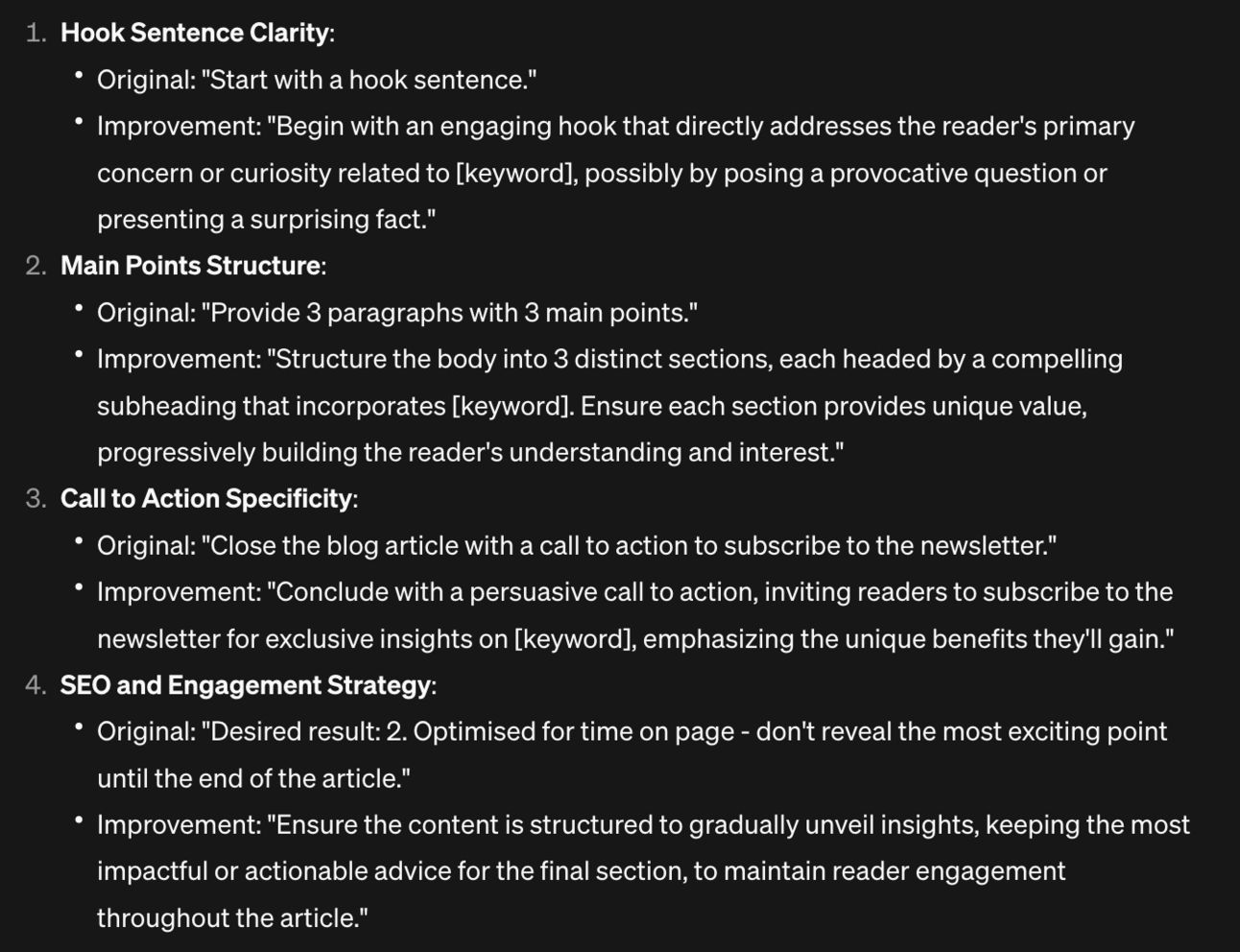
Review and implement the improvements manually or just ask ChatGPT to apply the suggested changes.
Then, and this is important, test the output of this new version of your prompt against how it was before! Don’t just assume it’s better but make sure to test.
Once you are happy with the final form of your prompt let’s save it in a library.
You’re library can be as simple as a Word/Excel document.
The main thing is having a place to keep your prompts that is:
Easy to copy/paste
Easy to find specific prompts
That’s sort of it. If an Excel works for you: great.
I personally have mine in Notion like this:
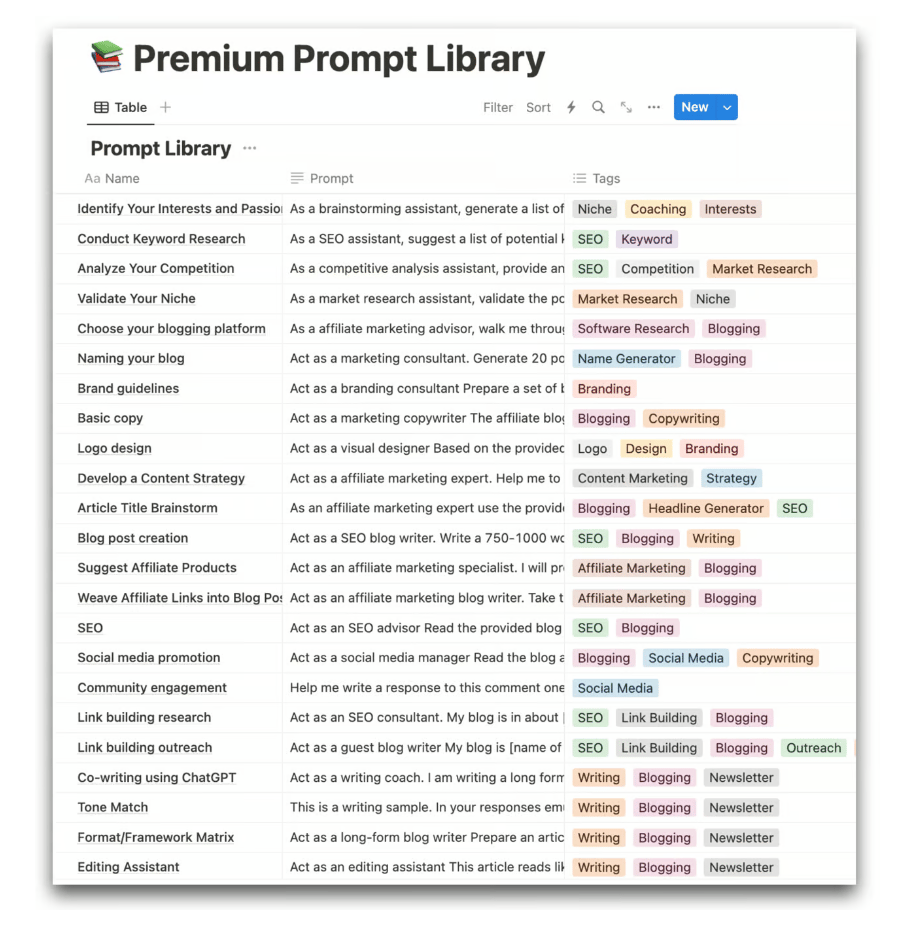
If you are a Premium Subscriber you have access to this.
If you want to use Notion I’d recommend something similar. Keep it simple:
name of prompt
the prompt
a tag
The tags allow you to categorise prompts which is helpful when your library grows.
What the tags are depend on what your prompts are for. Mine are digital marketing related and so I use blogging, newsletter, content marketing, SEO etc.
If you are building a customer service prompt library maybe your tags would be complaints, feedback request, review request, technical support etc.
Use whatever helps you sort and find your prompts. And keep the library system simple - don’t overcomplicate it!

As a Premium member you have access to my Library.
So for simplicity duplicate and adapt.
Here’s the Library link: https://aiwithkyle.com/catalog/premium-prompt-library
I’ve now made it Duplicatable so that you can make a copy.
Once you’ve duplicated your own copy you can delete my prompts and add your own.
For the tags you’ll need to remove mine (unless yours is also digital marketing/entrepreneurship related!) and add your own.
Click on the top of the Tag column and select Edit Properties from the menu.
You’ll see this:
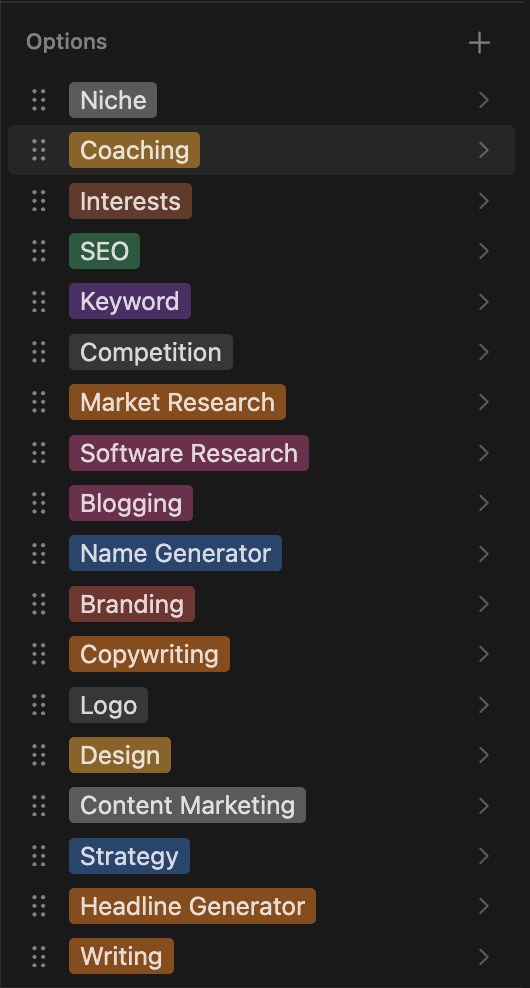
Tap + to add your own. And delete any of mine you don’t need.
Once that’s done you have a nice clean Library to work from.
We’ve now covered the foundations of AI for a business - ad hoc prompts and library prompts.
Honestly these will make up 80% of AI prompting in most businesses:
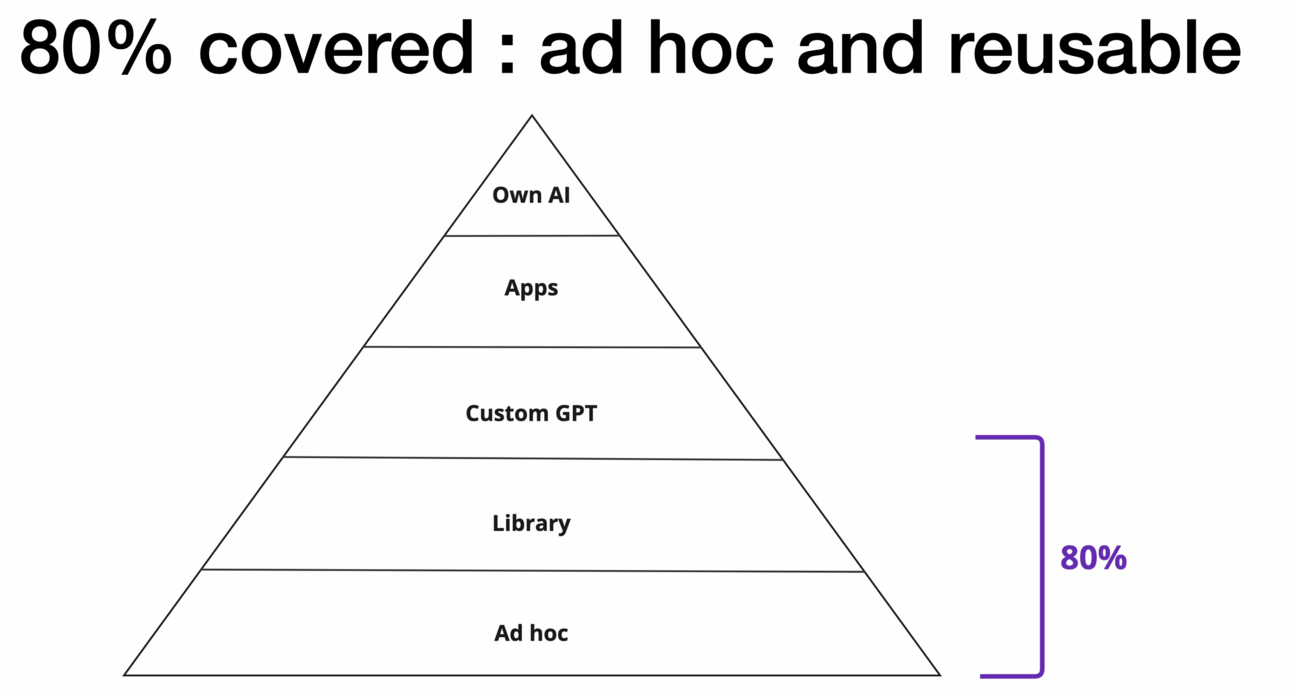
In the next Parts I’ll show you how we’d convert library prompts into Custom GPTs and then even into their own apps.
Here’s a reminder of the week:
Part 1: How to think about AI
Part 2: Ad hoc usage
Part 3: Prompt Libraries
Part 4: Custom GPTs
Part 5: Building AI apps
Keep prompting,
Kyle
Each specialised at doing one task that you hate doing.
All humming along working together.
That’s the goal today.
We’re moving up the levels of AI again. This next level is Custom GPTs.
Are you ready to build an army of agents working for you?
First up a word from our sponsor:
Brought to you by Dittto.AI
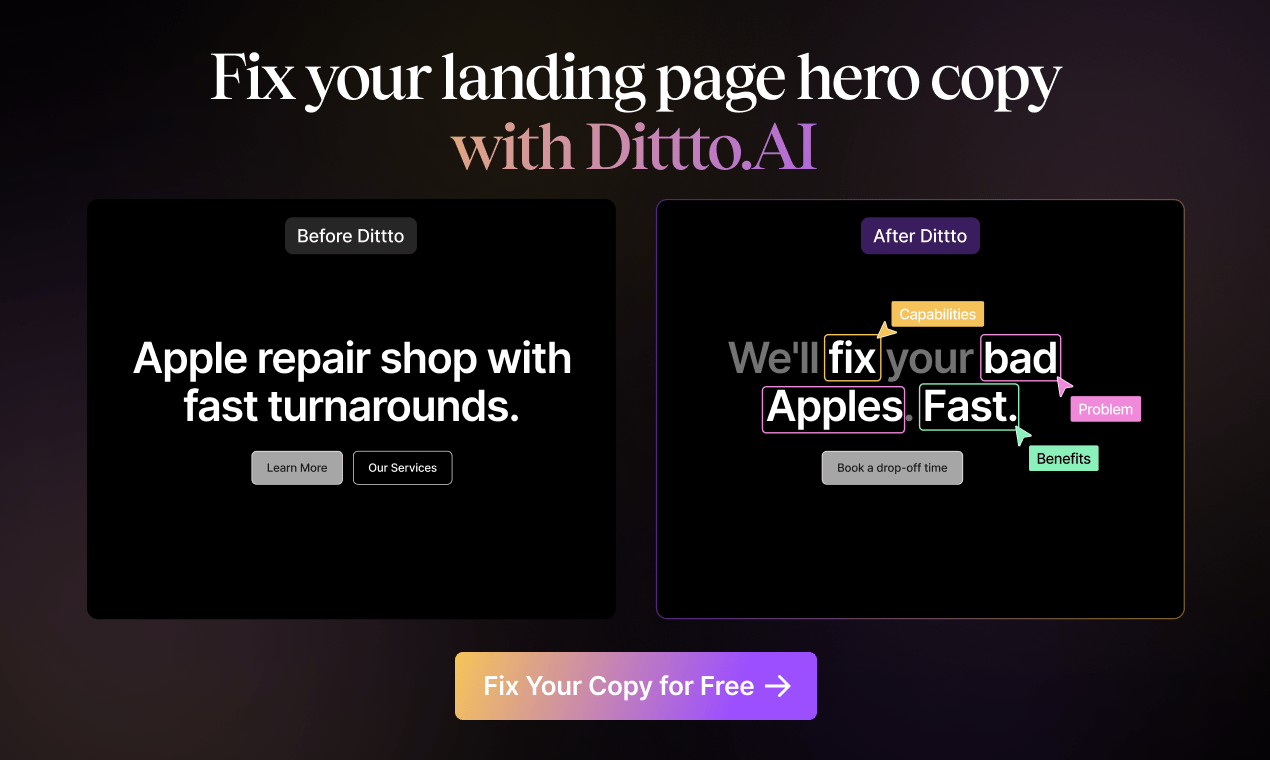
Fix your hero copy with an AI trained on the best landing pages. Easily generate high-conversion hero copy in a few clicks - for free.
👉 Get Started for Free 👈
Let’s get started:
We’re moving to the 3rd level of AI today: Custom GPTs.
Custom GPTs are like mini-AIs built for specific tasks.
ChatGPT has a GPT Store where you can find what others have built:
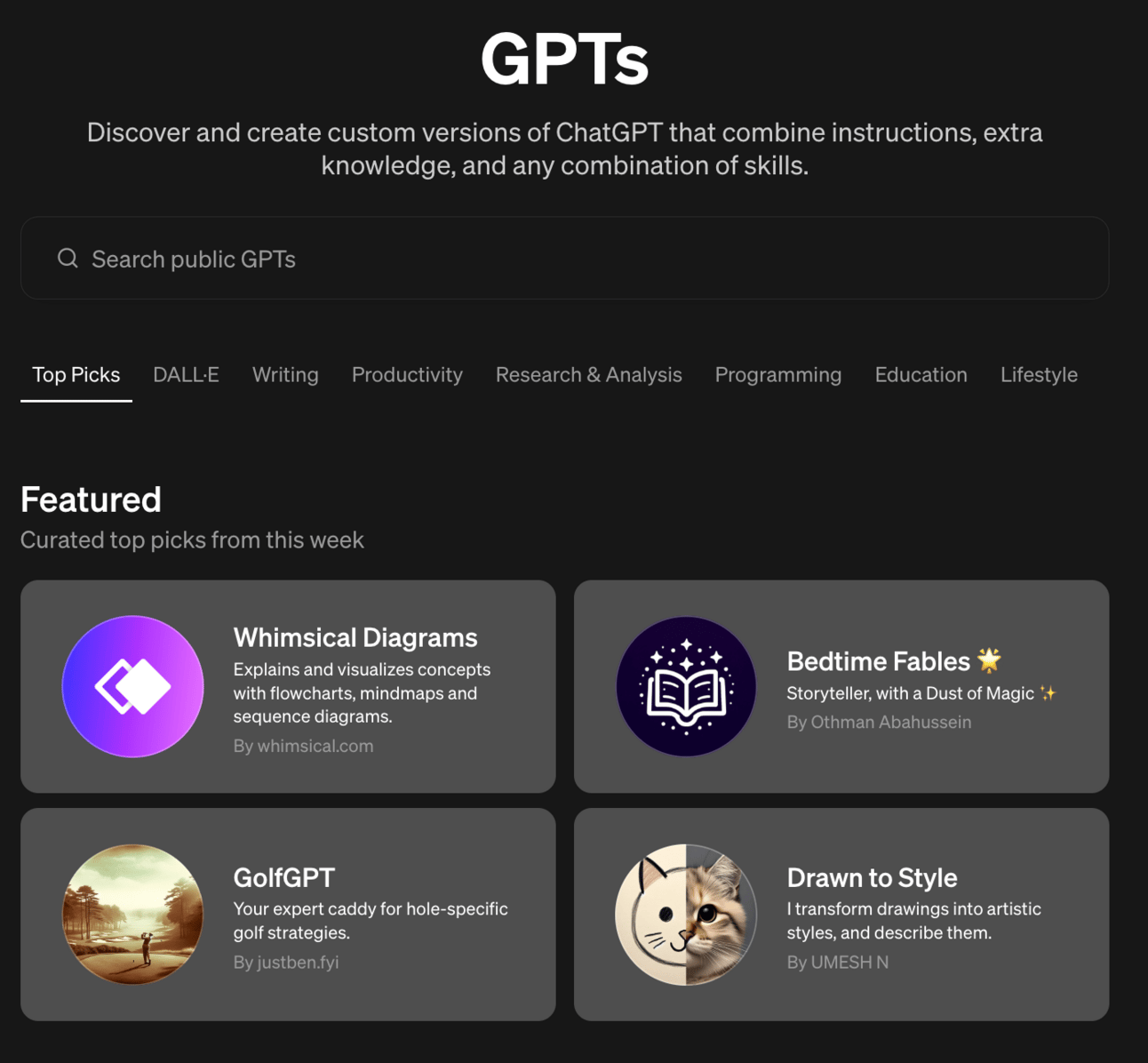
There are lots of fun tools here but what we need are GPTs built specifically for our business.
Anything another person builds won’t match our exact needs. Thankfully we can easily deploy a Custom GPT ourselves.
Do not build Custom GPTs just for the sake of it. Even if they are cool.
Getting one optimised takes time.
Remember this chart?
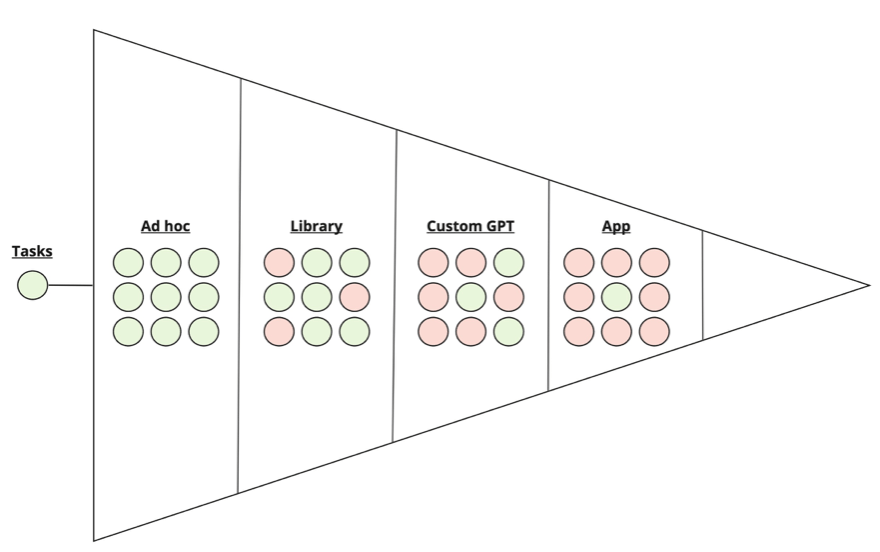
We started with tasks like writing blog articles, drafting press releases or answering customer service inquiries.
We initially used ChatGPT in an ad hoc way to deal with these tasks. And as time passed we realised that the same handful of ad hoc prompts had to be used again and again.
These most used prompts we added to our Library. We polished them to make them as efficient as possible and then stored them in an easy to use system like an Excel sheet or Notion document.
Now that we are building Custom GPTs we will follow the same basic pattern.
If there are library prompts that we use again and again and again let’s convert them into Custom GPTs.
We’ll use the blog writing example from before.
First up is finding the interface. It’s a little hidden.
When in ChatGPT Plus go to Explore GPTs and then Create (in the top right). Alternatively go directly to this link.
This’ll bring you to this interface:
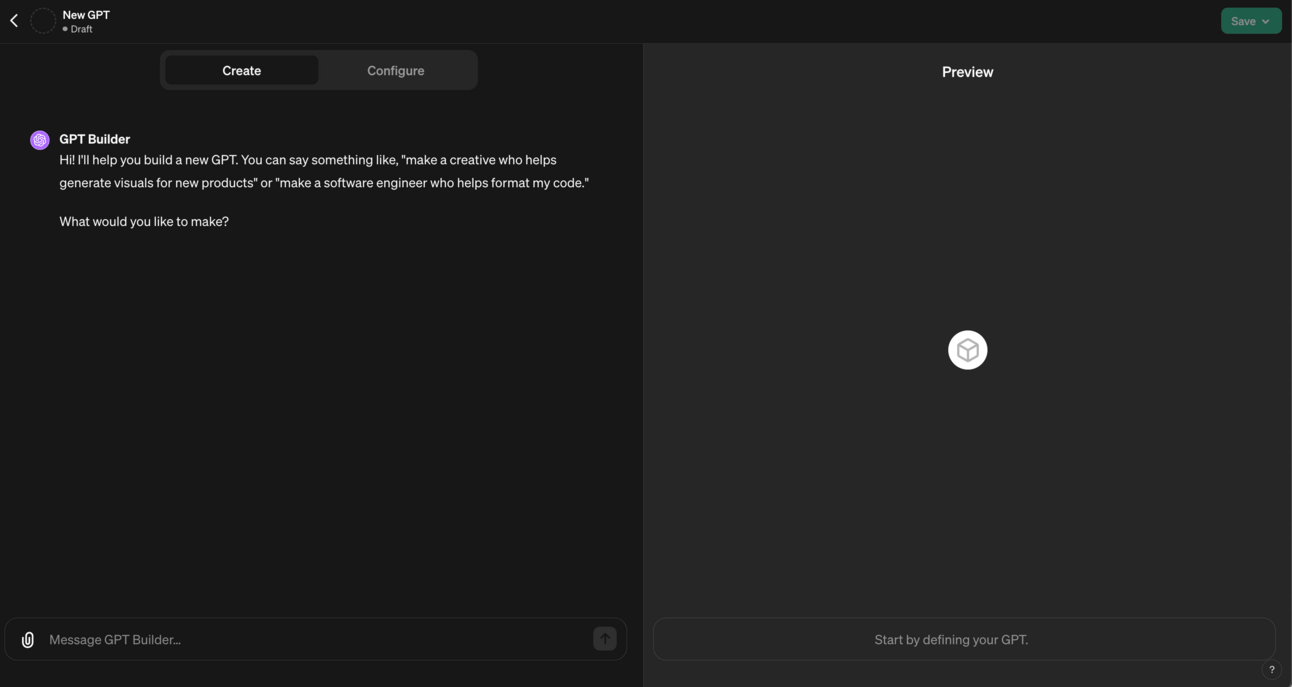
The main thing to note here is that you basically have two standard ChatGPT interfaces: one on the left, one on the right.
The one on the left is for creating your Custom GPT.
The one on the right is for testing your Custom GPT.
You’ll move between the two. Adding instructions on the left and testing the final product on the right. And then looping back to the left to add corrections and additional information.
It’s a lot like the prompt engineering we’ve already been doing. We are still talking to an AI. Now we are just doing so to make another AI!
ChatGPT will want to know the name and basic usage of your Custom GPT. It will also want to generate a picture for you.
Just follow the questions and let it get all this done. Otherwise it’ll keep bothering you!
Keep answering the questions with as detailed answers as possible until you get to a question like “How else can I improve results?”
At this point grab your library prompt from the last Part and bring it to the create screen. Type this:
Here is a prompt that captures what I wish this Custom GPT to do.

[copy/paste prompt]
This will feed all the work you’ve previously done using and polishing this prompt into the Custom GPT.
Once it’s ingested this information go ahead and test it using the panel on the right hand side.
For this particular blog-writing Custom GPT for example I’d type “please write a blog article on the topic of” whatever topic I wanted an article on.
The Custom GPT is primed to use the information I’ve fed into it already and will complete the task following those instructions.
Solid work - the Custom GPT is ready.
OK great you might be thinking. That’s kinda cool.
But…why don’t I just copy in my library prompt each time I need a blog article like this?
Why do I need to make a Custom GPT for this?
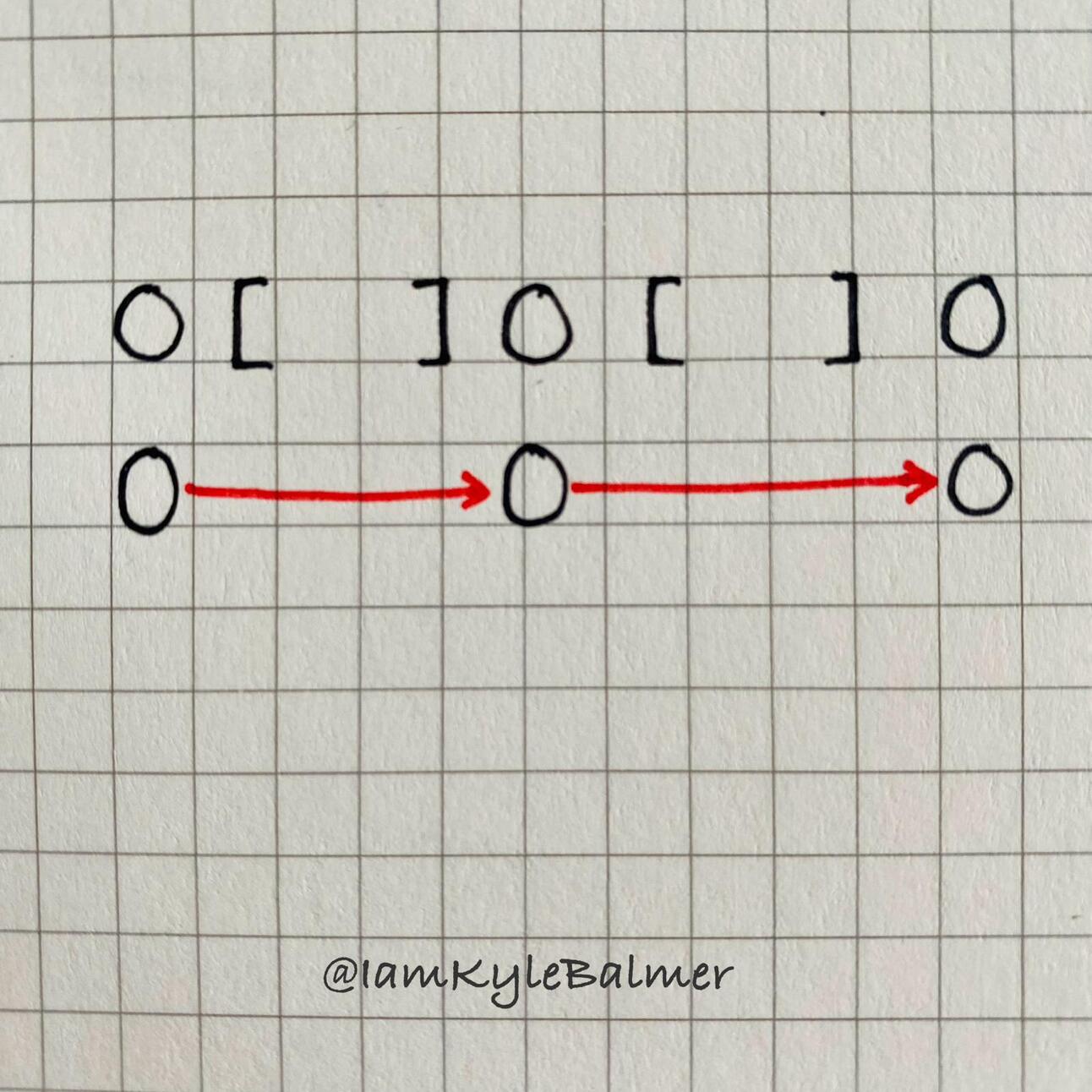
The answer: workflows.
We can chain Custom GPTs together and “call” on them within ChatGPT.
Let’s say I have a task that looks like this:
summarise an news article
write a blog article using the summary
check the blog article to make sure it matches my tone of voice
This process has 3 discrete tasks.
I can make one Custom GPT for each task.
I’d have a SummaryGPT, BlogWriterGPT and ToneOfVoiceGPT for example.
I can then “call” on these GPTs one at a time within ChatGPT .
I do this by typing @ and then selecting the GPT I want to use.
It looks like this:

This let’s me flow information all the way through, from one step to the next.
I’ll give SummaryGPT a news article. It’ll summarise it for me.
I’ll take the output of SummaryGPT and feed it into BlogWriterGPT as the input. It’ll generate a blog article for me.
I’ll then feed that output of BlogWriterGPT into ToneOfVoiceGPT as the input.
Instead of me juggling multiple prompts I can quickly call on these separate Custom GPTs and quickly chain together workflows.

First things first, as a Premium member here’s a link to a full Playbook on CustomGPTs. It’s more than we can cover in one Part so here’s a full guide.
Second, some best practices for chaining workflows.
The most important single lesson here is to make your Custom GPTs hyper-specific.
As soon as you try to take the scope of a GPT too wide it’s usefulness will fall off a cliff.
For example don’t try to create a GPT that can write any blog. Instead, for example, create one that is very good at creating List-style blogs in a certain style.
The more specific the task the more focused your prompts can be and the higher the quality of the output.
From this fact comes the next tip - take your complex tasks and break them down into small individual steps. Then make Custom GPTs for each of those small steps.
How best to break tasks down? Let’s use ChatGPT!
Act as a productivity engineer
Break this task down into its constituent steps.
The task is [wide description]
A successful outcome looks like [success]
Unsuccessful outcome looks like [failure]
Giving ChatGPT ideas of i) the rough task and ii) what success and failure look like will allow it to break up most tasks into small constituent elements.
Each of those elements can be a Custom GPT.
My advice here is to build each step one at a time, testing it out as you go. Don’t try to build it ALL and then test.
If your first step’s Custom GPT produces a good result - move to step two.
If it doesn’t then chances are the step is too complex and needs to be broken down again.
If that’s the case feed that single step into the prompt above to split it.
This can be time consuming but i) you’ll get faster as you practice the skill and ii) the CustomGPT workflow you create off the back of this will be very accurate and very valuable.
Custom GPTs put us firmly in the intermediate level of AI usage.
In the next Part we’ll go to Advanced - building our own AI apps.
Getting here will give your business an absolutely unfair advantage.
Here’s a reminder of the week:
Part 1: How to think about AI
Part 2: Ad hoc usage
Part 3: Prompt Libraries
Part 4: Custom GPTs
Part 5: Building AI apps
Keep prompting,
Kyle
Imagine you’ve built up a prompt that’s so good it saves you hours every week. Hell, maybe it even saved you from having to hire a freelancer.
Let’s say you’ve built a great blog writing prompt that knocks it out of the park every time.
You can now spin all that work into a fully fledged application.
Either for deployment in your business (as your IP, a massively valuable business asset) or even as an app you sell to others.
First up a word from our sponsor:
Brought to you by Bluedot

First AI Note Taker backed by Google that records your meetings without bots joining the call. Install Free Chrome Extension.
Let’s get started:
We’re moving to the 4th level of AI today: building your own App.
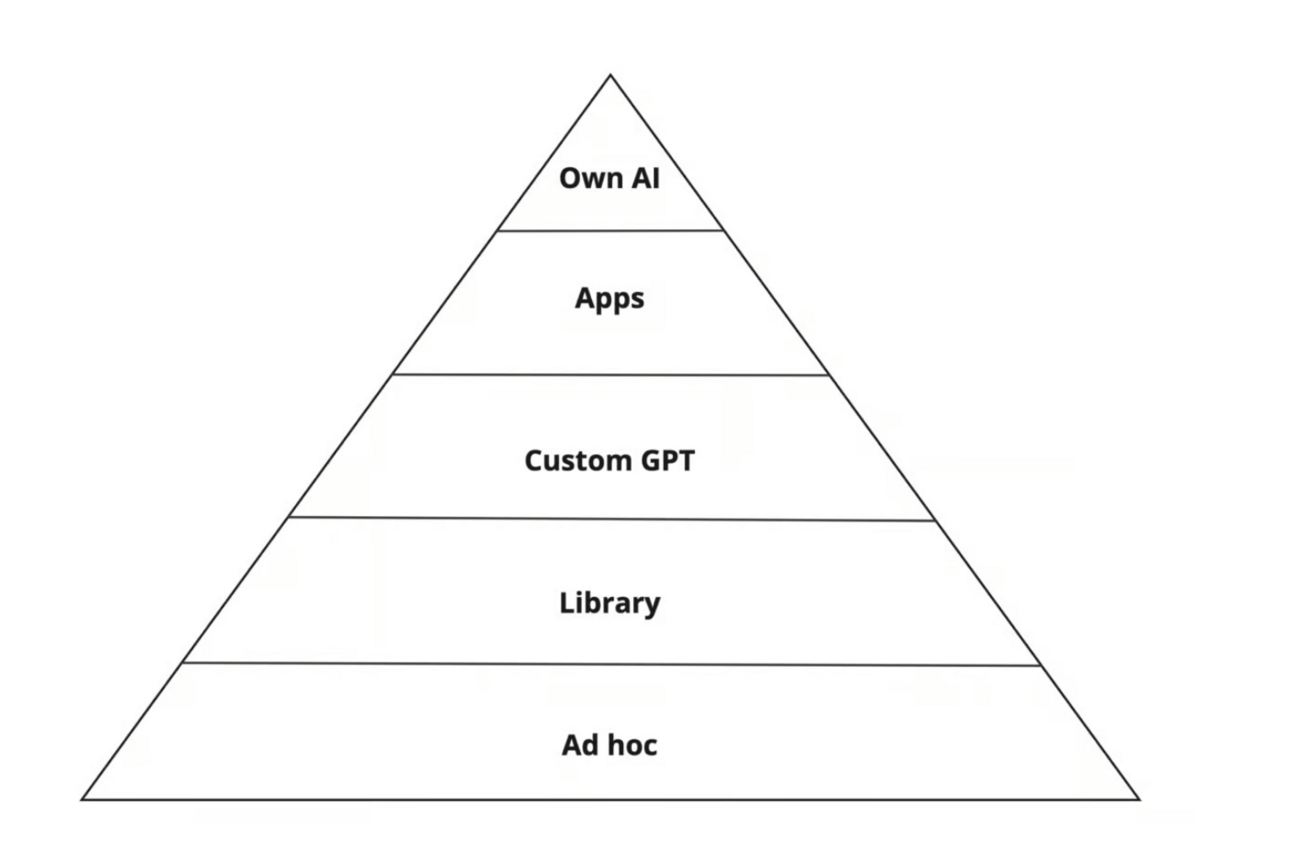
Again it’s important you don’t just try to build any old app. Going through all the previous stages and refining your prompts means that at this point you should have some really good foundational prompts written.
The good news?
These prompts can become the basis of your very own App, driven by AI.
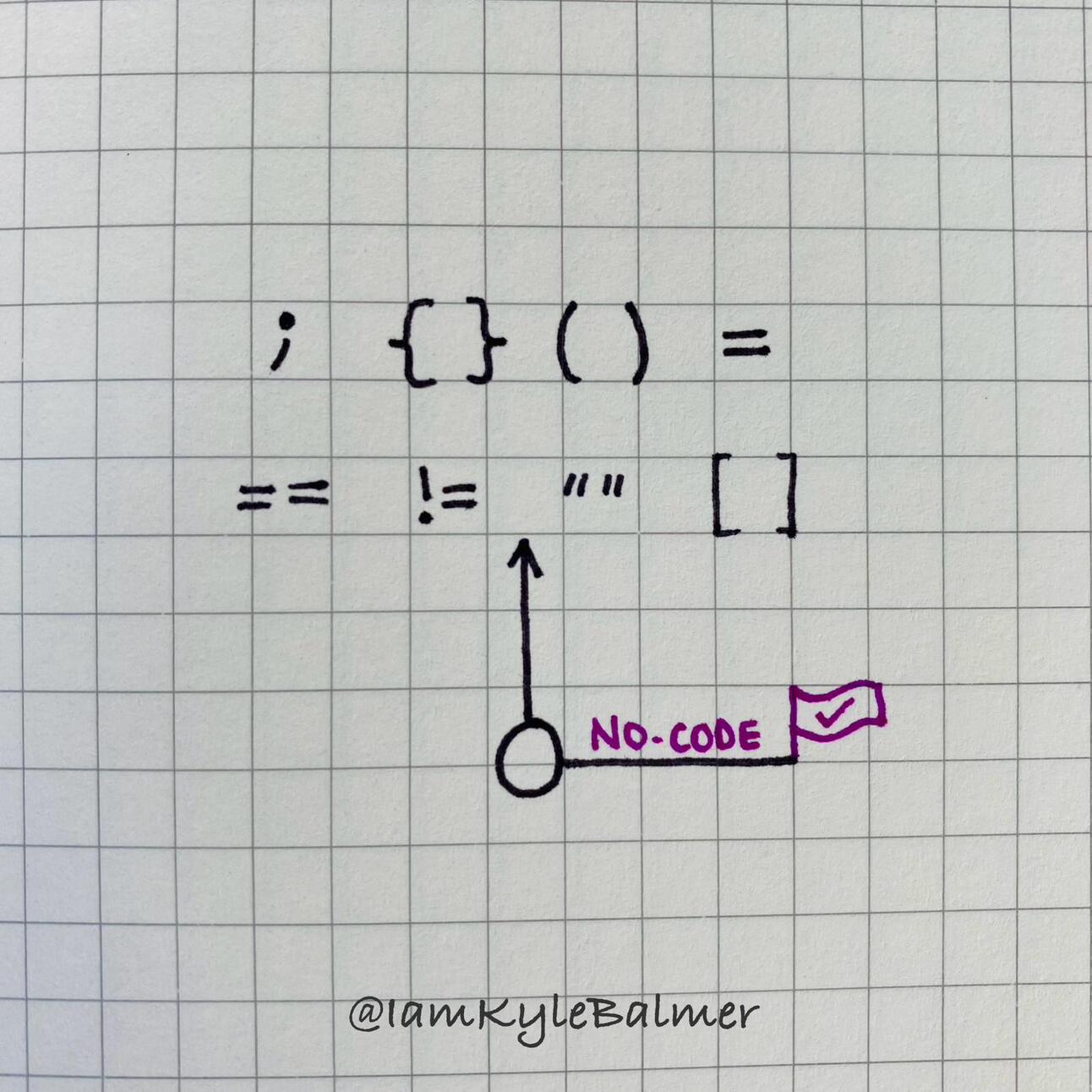
Important note here - you do not need to be a coder to build an AI app.
But I’m not going to start telling you that coding is dead. It’s not.
Does coding help you build an app? Absolutely!
And would your app be higher quality and value if you have coding skills? Very likely!
But coding is not a requirement anymore.
This puts us in a great position where as a non-coder we can put together a basic version of an app and then, if it’s worthwhile, either learn the skill required to develop it further or hire a developer.
The really hard part - working out if its valuable or not - will have already been done.
Even a non-coder can get started on the process of building.
Specifically by using a “no-code” tool. Clever name huh?
The no-code tool I personally recommend is bubble.io (not affiliate).
At the time of writing you can get a free account. It will try to upgrade you to the paid account (with a free trial) but ignore that and you’ll still have a free account to try out. You cannot deploy anything with a free account but it’s sufficient to play around with.
Bubble is no-code in that it allows you to build apps without needing to learn how to programme.
You basically drag and drop visual elements into place and then drag and drop “logic” behind each element. For example “if this is clicked then do such and such”.
That’s oversimplifying. But…not by much! That’s joy of no-code.
Despite not needing to learn how to code you will need to learn the basics of using Bubble.
For someone tech savvy this can be done in a couple of hours.
I’d recommend these resources:
Any one of these will give you more than enough of a foundation to build your prompt out into a full app.
Specifically you’ll be building something called an AI wrapper.
In short an AI wrapper is some prompts wrapped up in a nice looking package.
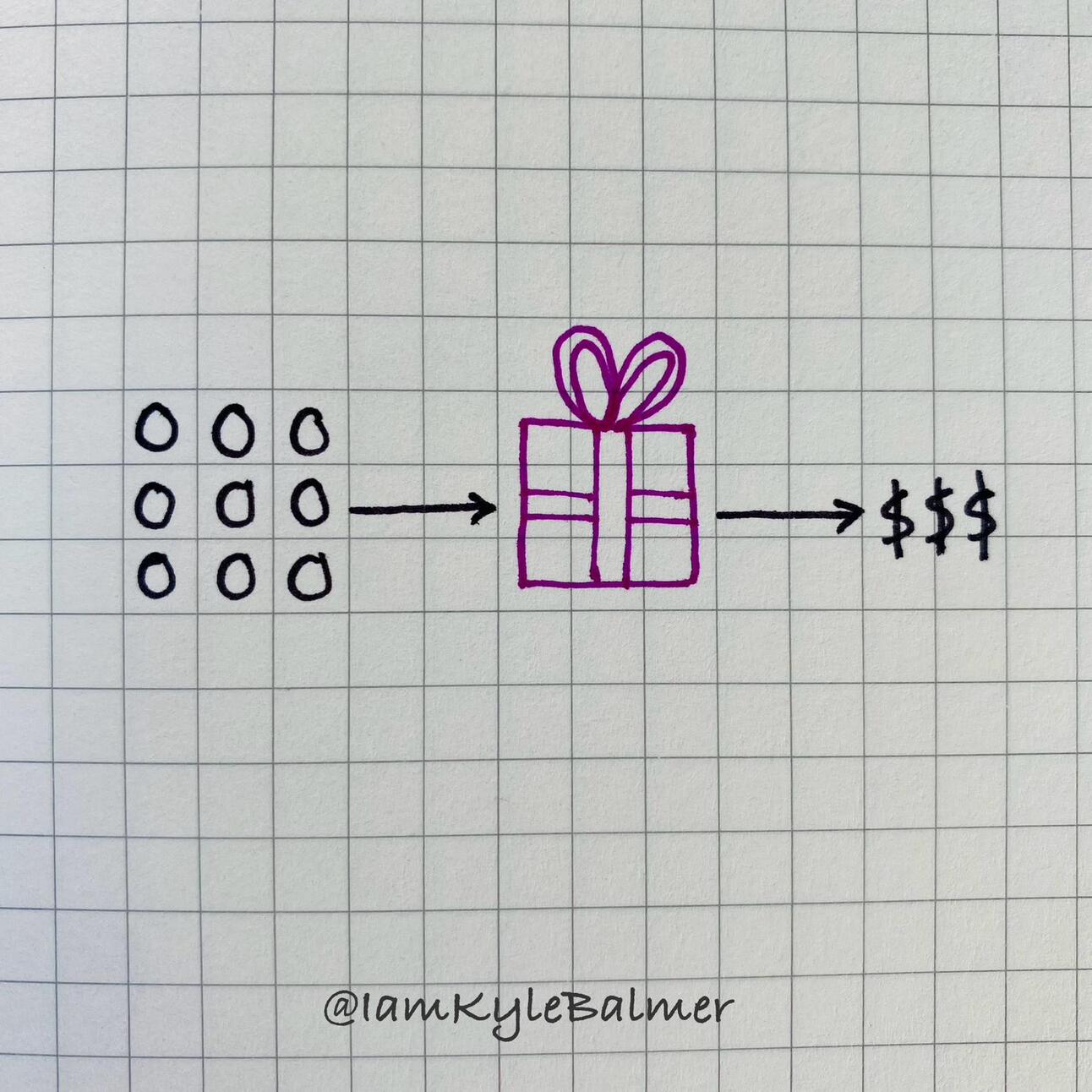
You may have heard some criticism of AI wrappers - basically what’s the point of wrappers when people could just go to ChatGPT, write their own prompts and do the same thing?
The easy answer for that is that most people out there won’t think to do so!
And even if they do they won’t necessarily have the well polished battle-tested prompt that you do.
This means that wrappers are still very powerful. They make your prompts easy to use by anyone.
Because of this once you’ve built an app you could look at making it public.
There are two main plays here:
Make it free and use it to collect emails
Make it paid and use it to generate revenue
We’ll look at the first because it’s a fascinating marketing tool. Here is an avatar generator that Dan Kulkov made:
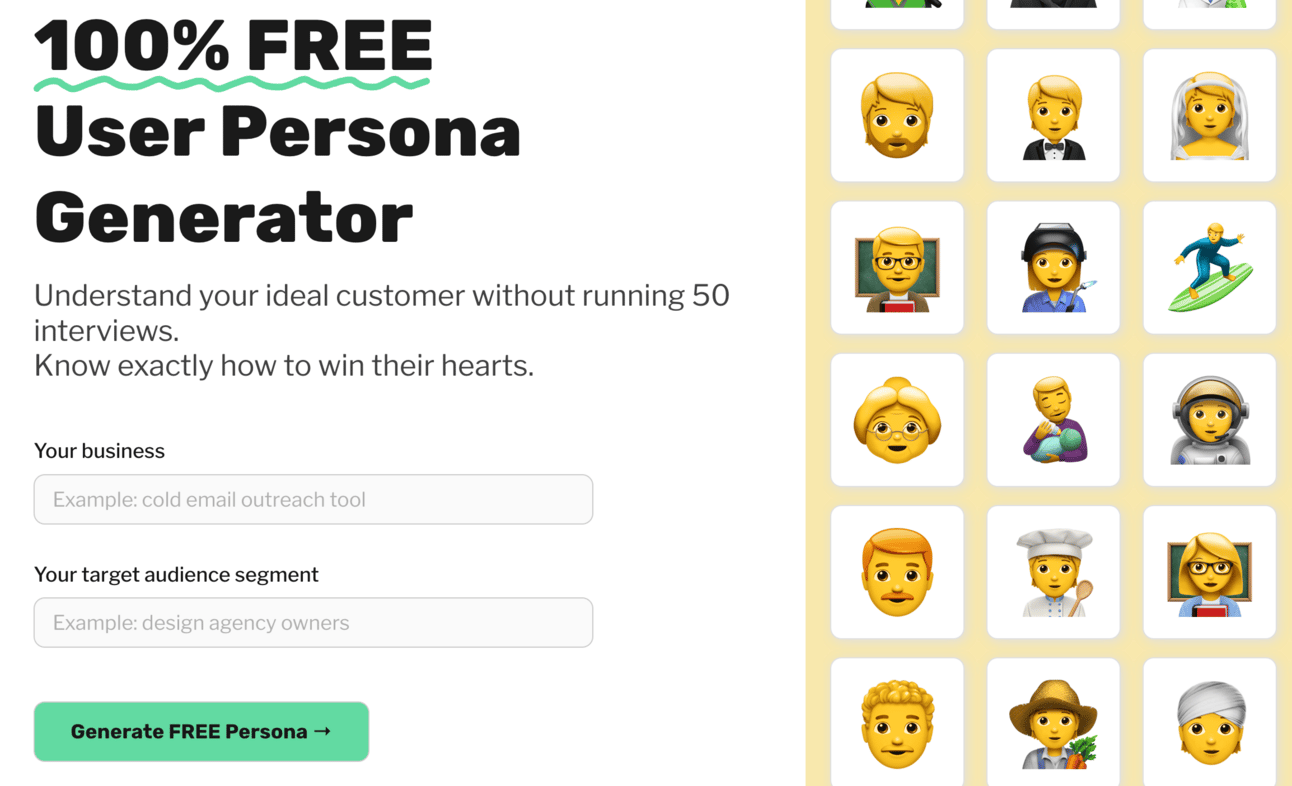
Here’s a link to the live version. I recommend you try it to see results yourself. It’s free.
I plugged in Prompt Entrepreneur as the business and for the target audience put “entrepreneurs who want to use AI to start a business”.
The tool returns:
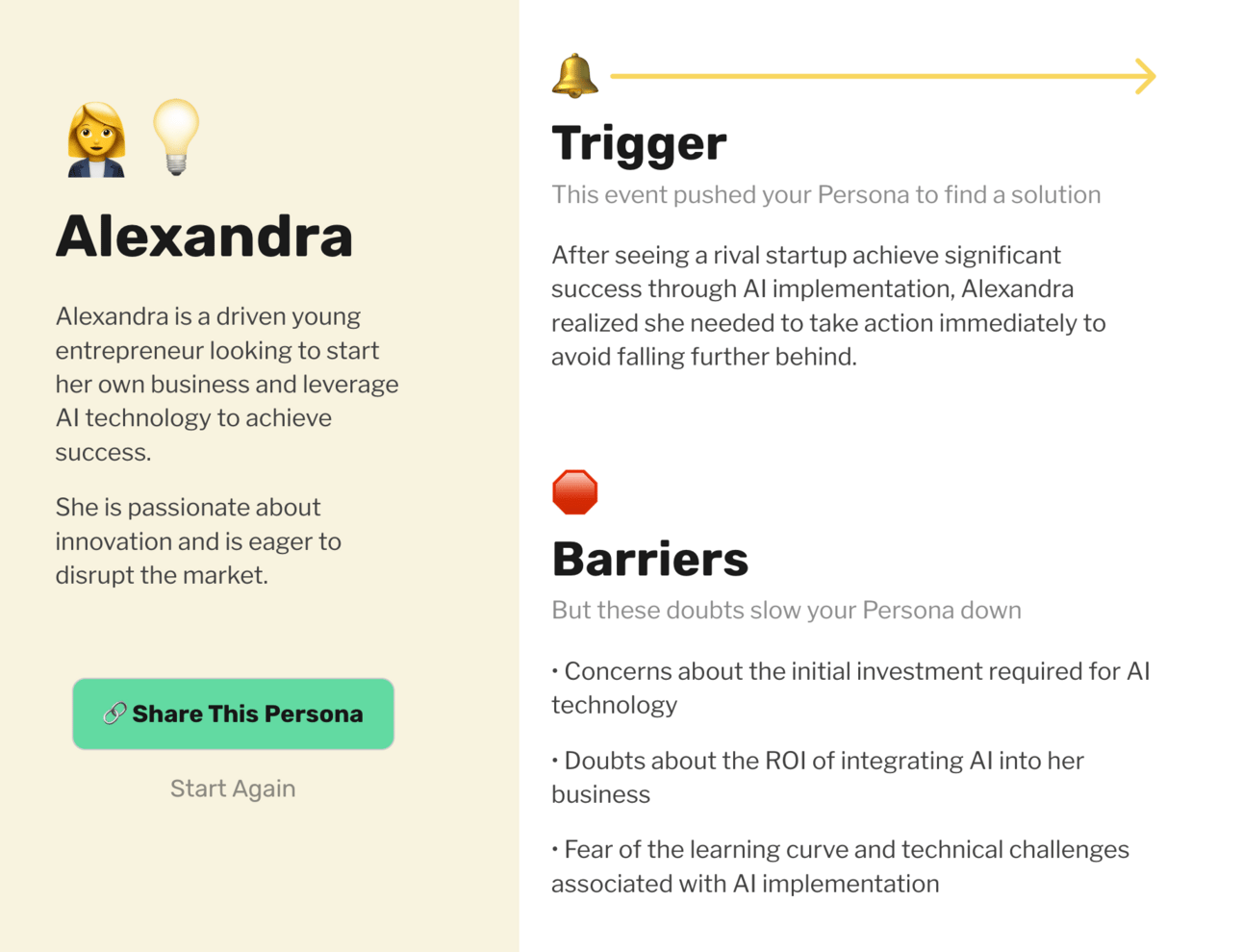
It gives a customer persona on the left and on the right some more details - a couple pages worth.
Then at the bottom:
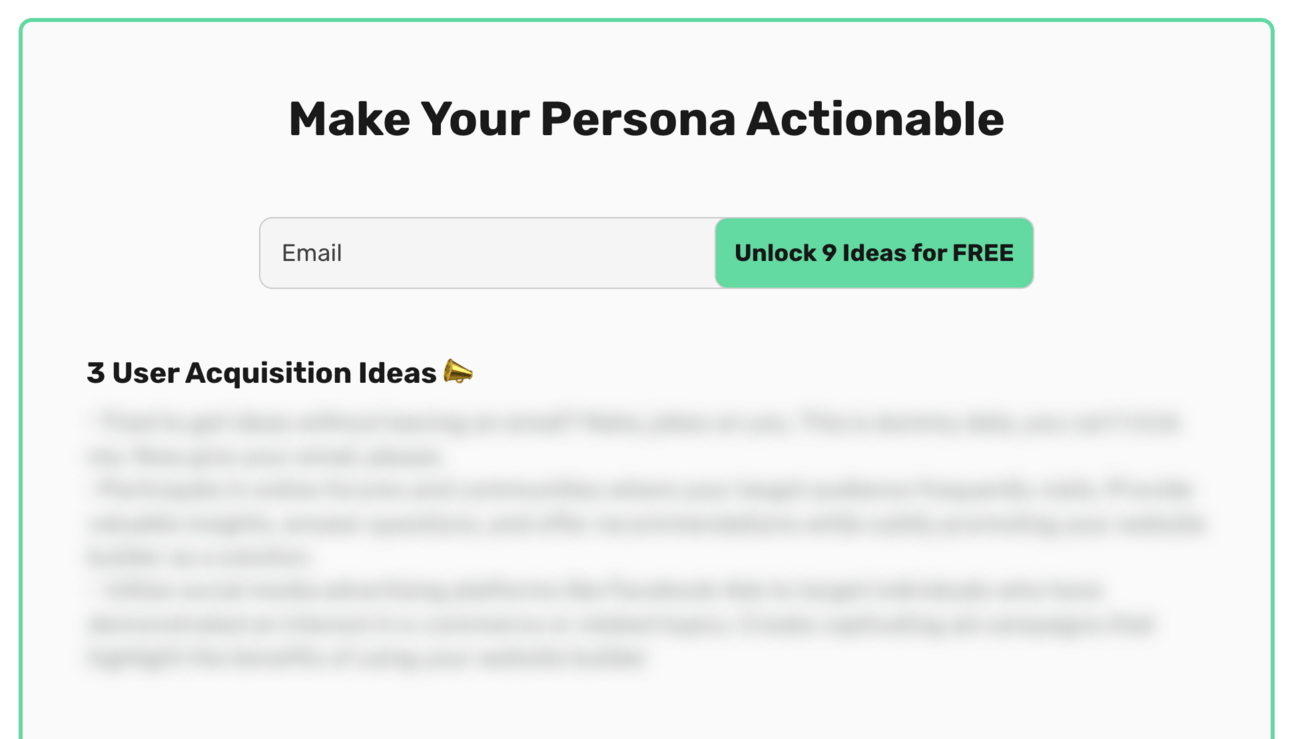
A gated section to get access to additional ideas! The visitors need to drop their email to get access.
Genius. Absolute genius.
It’s a killer lead magnet.
All powered by an AI prompt or two behind the scenes.
Could someone go and make their own customer persona prompt? Yes.
Could they make it as good as Dan’s? Given enough time sure!
But this free tool does all the work for them and saves them huge amounts of time. All it asks for in return is an email.
Have a think about which of your prompts would be of interest to your market. Could any of them be turned into lead gen wrappers?
If you like the lead-gen wrapper idea here’s a prompt to help brainstorm and structure some.
Here’s a prompt:
Act as a digital marketing strategist

Generate a list of lead-generating ChatGPT wrappers I could build to collect email addresses for my business
Focus on ideas with high SEO potential, namely those that answer commonly asked questions online
The wrapper should provide an answer for the question by collecting 1-2 inputs from the visitor and using AI to generate a valuable output
the full output will be gated behind an email collection mechanism

My customer's main problems are  [main problems]

Suggest 10 ideas that fit the above requirements and ask me to choose one

When I have chosen one of the 10 please generate
the inputs from the user
the outputs
the basic prompts required to translate inputs into outputs
and split the outputs between immediately visible to the user and gated behind email collection
the output must help solve the visitor's problems
Make sure to plug in your customer’s main problems.
I plugged in “how to start a first business”.
I’ll give you the full output:
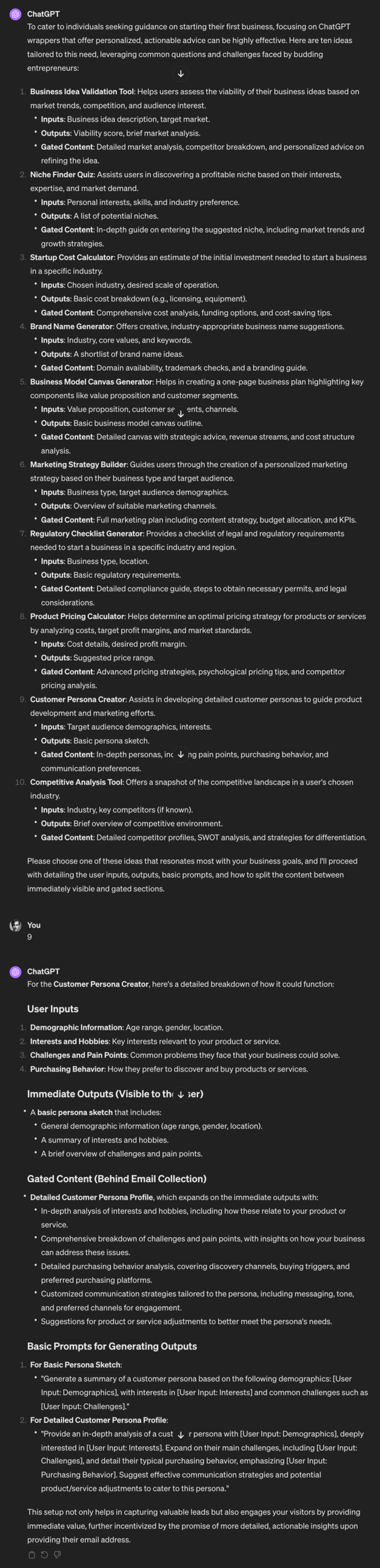
Notice here that one of the ideas was a customer avatar persona generator - a bit like the example I gave above.
I chose this to see what ChatGPT would give me as an output. Not a bad starting point!
The prompt is set up to give you the prompts you’d start with. Obviously adjust these and test them out!
Use this prompt to come up with lead gen ideas and to sketch out the basic shape and function.
Over this week we’ve gone from the lowly ad hoc prompt all the way through to talking about deploying our own AI apps.
Quite the journey.
The main takeaway here is that we can deploy AI at different levels.
And the level that makes sense depends on how valuable the task is.
We should only escalate prompts that we genuinely use a lot and that provide a huge amount of value to our business.
Here’s a reminder of what we covered this week:
Part 1: How to think about AI
Part 2: Ad hoc usage
Part 3: Prompt Libraries
Part 4: Custom GPTs
Part 5: Building AI apps
Keep prompting,
Kyle
Unlock the potential of artificial intelligence in your business with our comprehensive playbook, '🎯 Getting Started using AI in Business'. This guide is crafted to help you navigate the complexities of AI implementation, offering a structured framework to identify which tasks in your business can benefit from AI automation. Whether you're a business owner looking to streamline operations or an AI consultant aiming to enhance client services, this playbook will empower you to make informed decisions about AI integration, ensuring you harness its capabilities effectively and efficiently. Throughout this playbook, you will learn to approach AI as a valuable assistant rather than a magic bullet. By understanding its limitations and potential, you’ll be equipped to identify high-impact tasks that can be automated, allowing you to focus on strategic initiatives that drive growth. Dive into practical strategies that transform AI into a strategic asset for your business.
This playbook is designed for business owners, entrepreneurs, and AI consultants eager to leverage the revolutionary power of AI in their operations. If you're feeling overwhelmed by the myriad of AI options or uncertain about where to start, this guide will provide clarity and direction. Whether you face challenges in task automation, efficiency improvement, or simply wish to stay competitive in a tech-driven market, this playbook offers actionable insights tailored to your needs. It’s perfect for those who aspire to innovate and streamline their business processes using AI technology.
No prior experience with AI is required. This playbook is designed to be accessible for beginners and provides foundational knowledge.
Implementation time varies by business, but you'll find actionable steps that can be integrated into your workflow over a few weeks.
Yes! The principles and frameworks provided are applicable across various industries, making it versatile for different business models.
The playbook includes insights on common pitfalls and how to troubleshoot potential issues.
Absolutely! The frameworks and strategies can be directly applied to your client engagements, enhancing the value you provide.