
Every time I show someone NotebookLM, they come back saying "why is nobody talking about this?"
It's free. It's from Google. And it's brilliant for learning or teaching anything.
(And no, this isn't sponsored by Google. But hey Google, if you fancy it, hit me up!)
25-minute walkthrough of everything NotebookLM can do
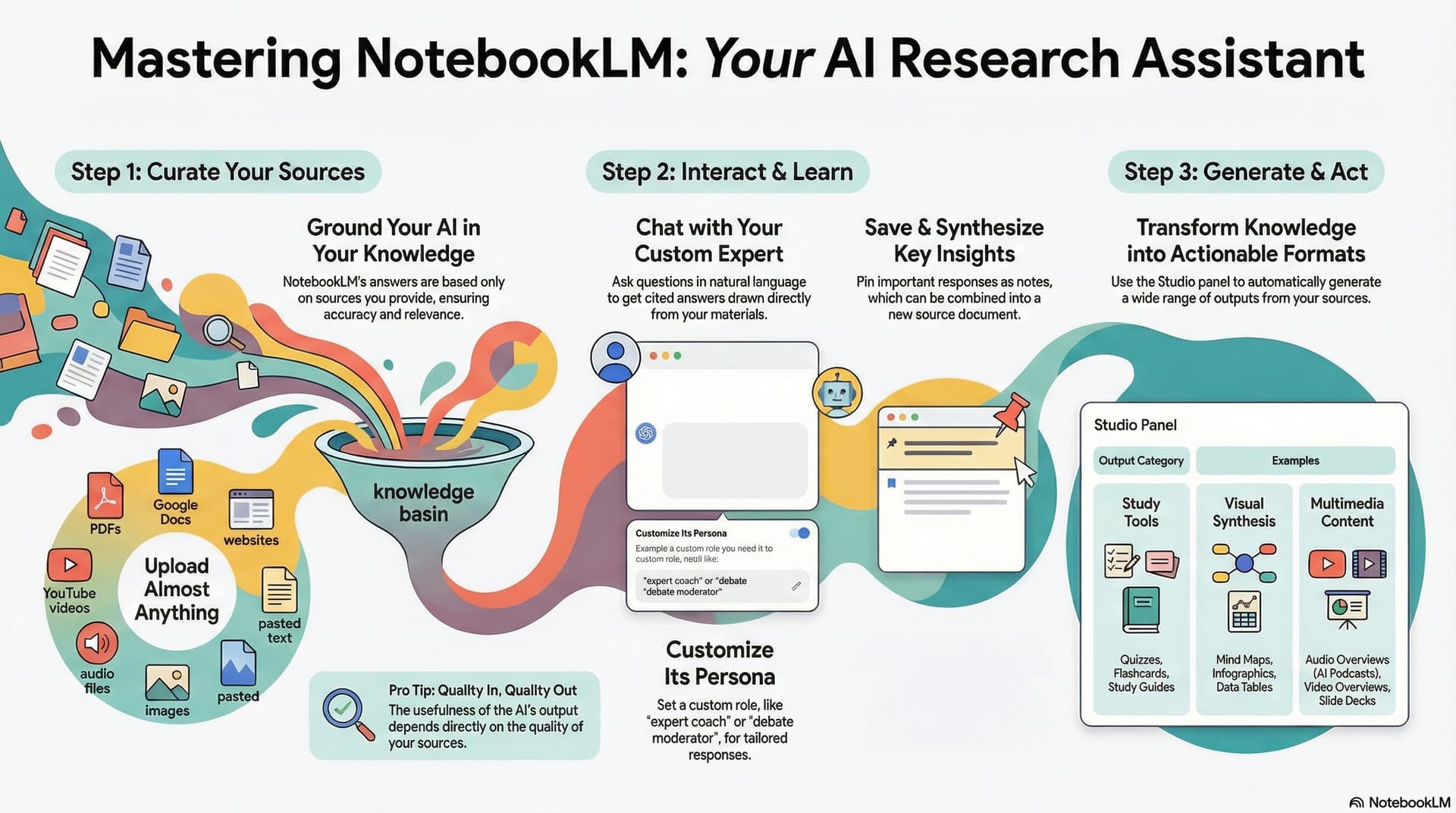
This infographic was generated using NotebookLM. Meta, I know...
Different from ChatGPT, Claude, or Gemini
NotebookLM is different from ChatGPT, Claude, or Gemini. Those tools pull from their massive training data. NotebookLM only works with sources you give it. This is the BIG difference and it makes NotebookLM very useful at certain tasks - like learning.
You feed it your materials - PDFs, YouTube videos, websites, Google Drive docs, audio files, images - and it does all its work based on those sources. It's grounded in what you provide, not what it was trained on.
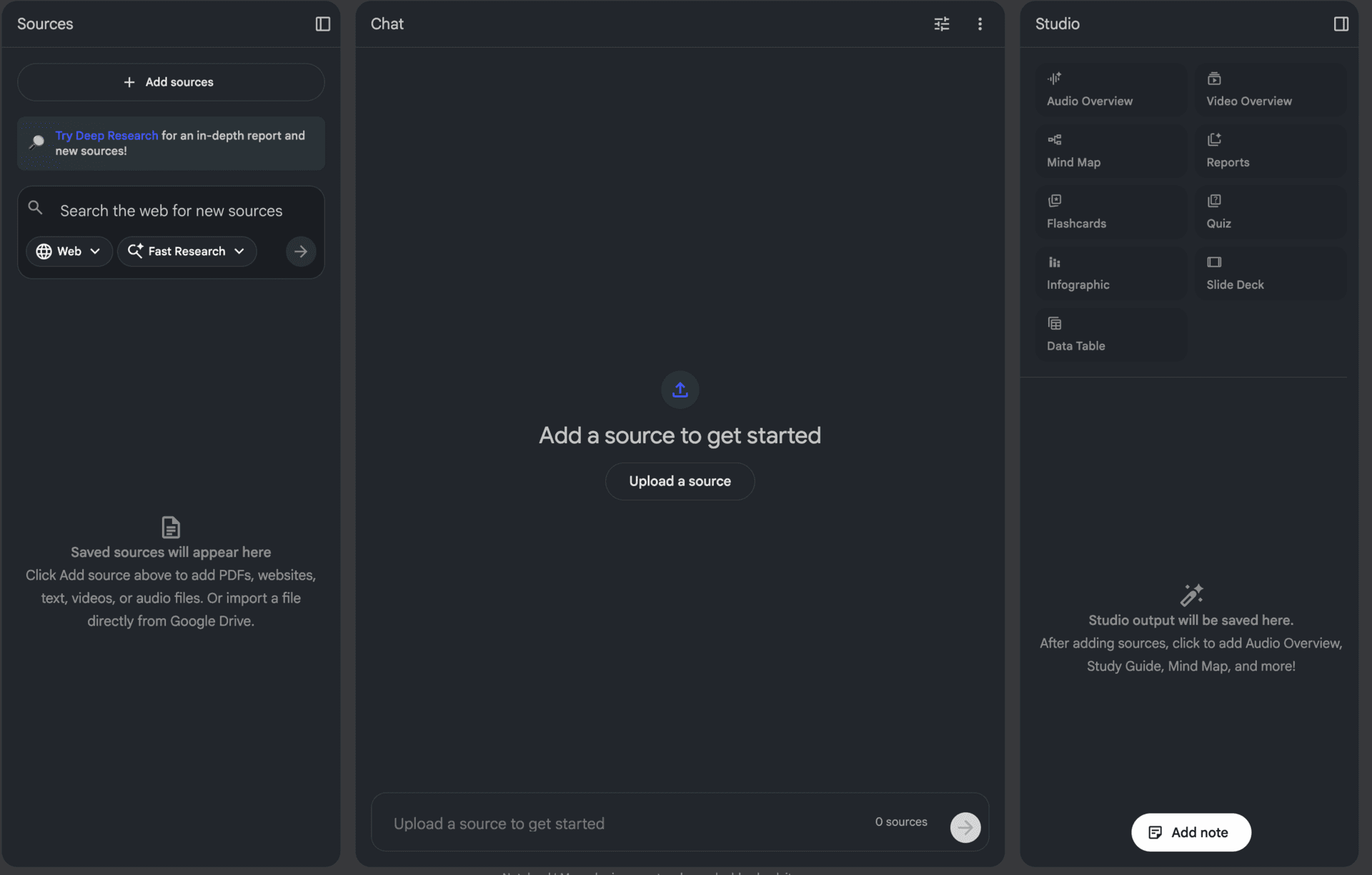
Your inputs - PDFs, videos, websites, docs
Ask questions grounded in your sources
The magic happens here - podcasts, slides, flashcards
GIGO - quality sources = quality outputs

You can add 50 sources per notebook and 25 million words. That's a lot. Like, a lot a lot.
Don't do that silly.
If you just dump everything in, you're basically using ChatGPT with extra steps. The power of NotebookLM comes from curating high-quality sources.
Go find the best websites. Find the best YouTube videos. Review them yourself. Then bring them in.
Example: For the live presentation I made about NotebookLM, I used only 4 sources - an official tutorial and a couple of good YouTube videos. That's all I needed to generate everything. Could I have added more? Sure... but at a certain point it's diminishing returns or even actively harmful.
This is where NotebookLM gets REALLY impressive
Fair warning: Google are always adding more stuff here. So there will be more than this shortly - but that's a good thing!
The presentation I used in the live was 100% AI-generated. Beautiful slides using Nano Banana Pro. Six months ago, getting accurate text in AI-generated slides was basically impossible. Now it just works.
Two voices (male and female) having a conversation about your topic. Download and listen on the go. There's also an interactive mode where you can jump in as a guest and ask questions. You can join the podcast... what sci-fi wizardry is this?
A video with animations and narration explaining your sources. Similar to the slide deck but fully presented by the AI. Downloadable and free.
Visual breakdowns of concepts from your sources. Great for understanding relationships between ideas.
Set difficulty, number of questions, specific topics. Proper active learning to cement knowledge.
Briefing docs, study guides, blog posts, infographics. They've just added a "detailed mode" in beta that creates more comprehensive versions.
It's a LOT. But... what's this all actually for?
From learning to teaching (the power move)
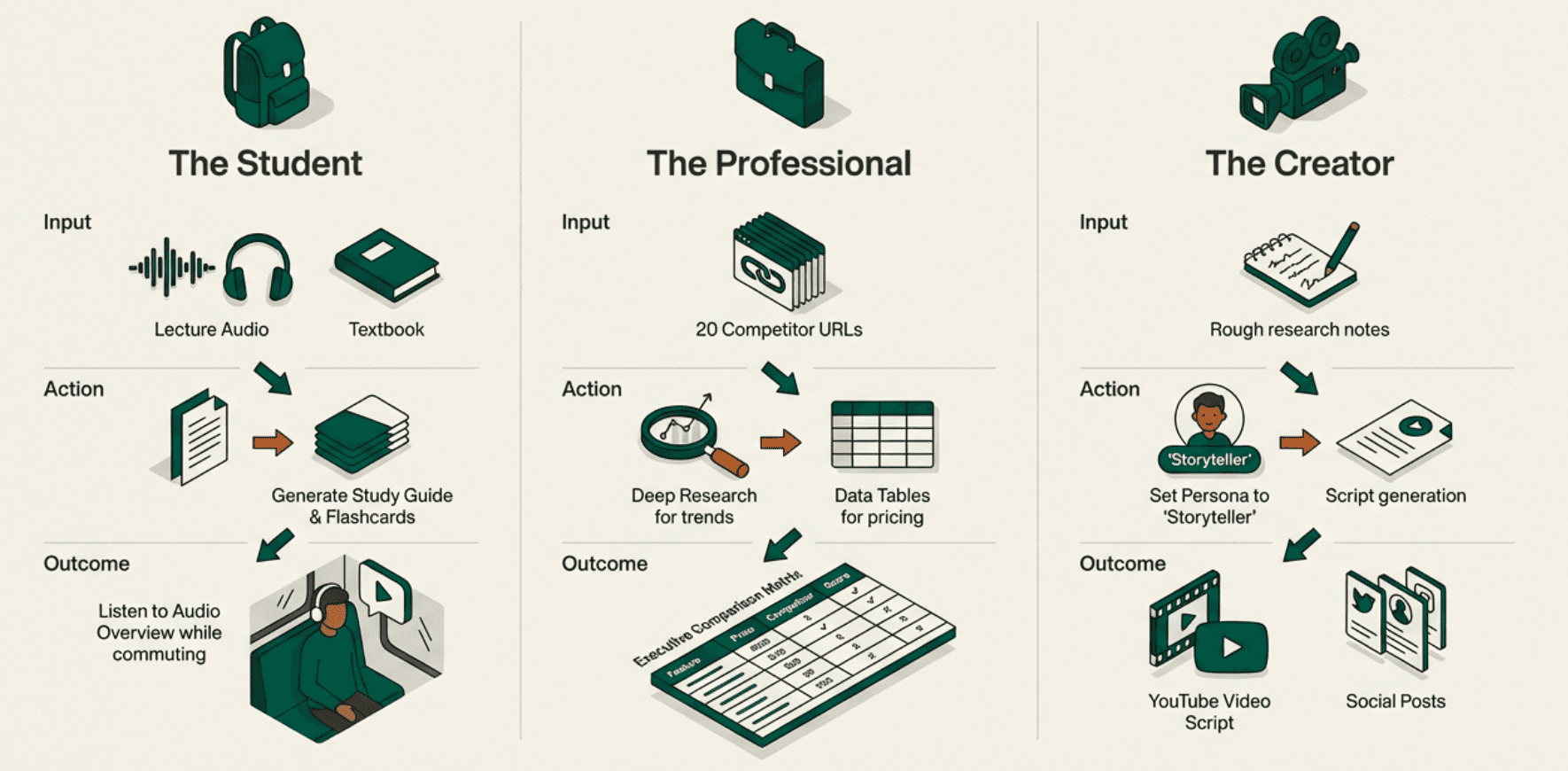
I use NotebookLM primarily to learn. The fact that it's constrained to the sources you give it makes it amazing at focused learning.
Watching a video explaining neural nets? Or a video explaining how VC finance works? You can chuck the YouTube video directly into NotebookLM, as well as any other documents and guides you think are useful, and then talk to your sources.
You go from just passively watching or reading to now getting the information in true multimedia. Presentations, videos, audio, voice chat, text chat, flashcards, quizzes etc. etc.
We all learn differently. I learn through visuals. Others need to listen. Some need quizzes to force active recall. NotebookLM lets you create whatever works for you. And you can layer on the learning by hitting a subject from every angle.
If you really want to get advanced though... use it to teach.
Richard Feynman said the best way to master something is to teach it.
NotebookLM makes this stupidly easy. Create a slide deck. Get on camera. Present it. Post it to YouTube or social media.
Real example: That's precisely what I'm using NotebookLM for. I can spin up a presentation about a topic and start teaching it in minutes. Before I'd need to do the research, prep the structure, build a slide deck and more.
Now? Nah. I can literally sit down in the morning with my coffee, realise there's not a huge amount of useful AI news and decide on the spot to pivot to teaching a subject. I can grab some sources, throw them into a presentation and hit Go Live. Basically magic.
Learning the material - deeply understanding through source curation
Cementing it by teaching - presenting forces deeper understanding
Building an audience at the same time - create content that helps others learn too
Yes. Well, I think so... ha!
Yes. I tried to find the answer and could not! I've never hit limits on either my personal account or my paid business account. I couldn't even find documentation on what the limits are!
Google aren't great at explaining these things. But it doesn't matter - you can get massive value for free. Just sign in with your Google account.
The full slide deck (yes, generated by NotebookLM)
Full transcript from the tutorial video
Good morning everybody. Good morning TikTok. So Notebook LM, what is it? I'll show you what it looks like. If you've never seen it before, you can find it very easily. Just Google Notebook LM, and you'll be able to access it using your Google account. You'll need a Gmail account to log in. It is free.
I think if you have paid access to Gemini, you maybe get some more usage. I've never hit any limits in it with either my personal account or my paid business account, so I think it might just be free. Do not quote me on that. I actually looked to find out if there's a way to pay for it or if there's any limitations and I could not find it.
This is what it looks like. You're gonna have three basic panels when you create a new notebook. On the left, Sources. In the middle, Chat. And on the right, Studio. Basically think of this as your inputs on the left hand side (the sources), and on the right hand side studio - those are your outputs.
The great thing about Notebook LM, and I think this goes unappreciated, is what it's doing - which is very unlike ChatGPT, very unlike Claude, very unlike Gemini - is Notebook LM is allowing you to bring your own sources and it's going to do all of its work based on those sources.
When you open up a new notebook, the first thing it asks is, okay, add sources. You can add sources from websites. You can give it a list of URLs. You can add sources directly from YouTube, because this is a Google product - you can add a YouTube video and it will pull the transcript and the information from that video. You can also pull in documents from Google Drive.
Or you can drop in your own sources: PDF, text, markdown, audio (it can listen to audio), doc, various image files - even webP which is always causing chaos. So you can pull the sources in and Notebook LM is going to be able to see and hear them, not just read them. It's gonna be able to work multimodal. Very, very cool.
If we are studying or we want to teach a subject, it is a very good tool for anything to do with knowledge, acquiring knowledge, or passing knowledge onto other people.
Personally what I recommend doing is going and finding high quality sources yourself. Whatever you want to learn about, go and find the best websites, go and find the best YouTube videos, review them yourself, and then bring them into Notebook LM.
If you just bring in as much information as possible, that is not necessarily gonna be the best way to use Notebook LM. You want to curate, because we can add a huge amount of stuff - we can add 50 sources per notebook, and I think we can add 25 million words per notebook as well. That is a lot.
However, if we do that, it's really not that much different from just using ChatGPT or from using Claude or from using Gemini. The really excellent part about Notebook LM is if we feed in high quality sources, it's gonna provide all of its answers, all of its chat, all of its studio outputs based on that high quality input that we've given it.
Garbage in, garbage out is extremely relevant with Notebook LM.
What is much more exciting than this chat mode is Studio. We can create the presentation. We can generate an audio podcast. We can create a video explainer. We can make mind maps, we can make various types of reports - briefing docs, study guides, blog posts. Or you can put in your own requirements: strategic memos, implementation concept, explainer, feature breakdown. We can create flashcards, we can create quizzes, we can create an infographic, slide deck, and data tables.
This has created a 17 minute long podcast. There were two voices - a male and a female voice - and they have a dialogue. They will talk about whatever topic you have given them, whatever topic you want to learn about. They will have a two person conversation about that topic.
If you need to listen to be able to learn, then this is a fantastic way for you to learn. You can also download it and then take it on the go with you to allow you to continue to learn.
They've done something else which is really interesting - they have an interactive mode with their audio, so you can jump in as the guest on their podcast.
If you are learning a subject, it's not generally enough for you to just read and consume the information - you need to actively test yourself. So we can do that. We have flashcards so we can use this. We have a quiz. So again, a way to cement and solidify our learning.
All of this and its utility depends on how you learn. We all learn differently. I learn primarily through visuals. Others need to listen to things. Others need to be more kinetic and kind of try things. And then all of us can be supported by things like flashcards and quizzes, because that's forcing us to not just have the knowledge passively, but to actively apply it.
I want to talk a little bit about Feynman. Richard Feynman was a physicist, but also talked a lot about education. You can use Notebook to study for yourself, absolutely. But what I would recommend is going on to the next step - when you have learned a topic, go ahead and teach it to others.
You can do that very easily using Notebook LM because you can now put together slide decks like this and then do exactly what I am doing, which is hop onto camera and record yourself going through a slide deck.
I think this is a really good way for you to cement your own learning and create content that is gonna help other people. You can post it up onto YouTube, you can post it up onto social media and start to build up a following around what you do.
You are basically learning and mastering the topic yourself, but also forcing yourself up to that high level by teaching it to other people. That is the Feynman technique. And at the same time, you can build an audience around what it is you are learning, because other people are going to want to learn with you.
Notebook LM just makes it so easy to do and very few people are using it in that way. I sat down this morning and I was like, "Oh, what am I gonna do my live on? There's not much AI news right now. Oh, I know - I'll just throw together a quick presentation about Notebook LM and show people what it can do and why they should be checking it out."
That would not have been possible a couple of months ago because I wouldn't have been able to create beautiful slides like this. So it's a huge opportunity if you want to create content, if you want to educate people, and if you want to do that whilst you are learning a new topic as well. Very, very cool.
Join 250,000+ smart professionals getting AI-ready with jargon-free training. No tech skills required.