
AI Business
Unlock the potential of artificial intelligence to revolutionize your business with our comprehensive playbook, '⚙️ Building an AI Team using AI | Prompt Playbook'.
Start ReadingWhat could have been a devastating set-back turned into a wonderful reminder of all the people who care about me. It was quite humbling! So in the spirit of Thanksgiving I’m very thankful for the last couple of weeks.
Now I’m back and have a lot more energy!
So expect exciting things from Prompt Entrepreneur as we move into the end of the year.
This week we’ll be looking at building your own GPT agents that will work for you and your business.
We’re building team members.
This may sound super technical. But thanks to the new ChatGPT “custom GPT” feature it’s very simple.
By the end of the week you’ll have 4 new team members working for you.
We’ll be covering:
Part 1: Getting started with custom GPTs for business
Part 2: Building a social media content GPT
Part 3: Building a newsletter GPT
Part 4: Building a sales copywriter GPT
Part 5: Building a business scaling coach GPT
Custom GPTs are a brand new feature in ChatGPT. You’ll need a paid plan to deploy them. If no other feature has prompted you to upgrade this might be the one!
Custom GPTs basically allow you to make, train, refine and launch your own GPT.
ChatGPT is a “generic” model - it can do anything you throw at it.
But because it can do everything its results are often generic too!
It’s a jack of all trades and a master of none.
Because of this we need to provide ChatGPT with prompts that give it specific instructions and definitions. For example I start most prompts with “act as a X” - this is a way to make it more specific, less generic.
We have to do this every time we use ChatGPT which, for repeated tasks, is a waste of time.
With custom GPTs we can instead create an “agent” - basically a team member that does specific tasks for us.
Tomorrow for example I’ll show you how to build an agent that’ll write social media content for you. This agent will be like hiring a social media marketing manager.
It’s one role, one job. And because of this specificity we can train it to produce better results.
This is the power of custom GPTs - specificity.
What sort of business tasks should we be producing GPTs for? This is a big question! Far larger than what we can cover in this newsletter!
It will depend entirely on the business itself and how it’s run.
Useful applications of AIs for an eCommerce store will be vastly different to applications for a hairdresser.
In general though we want to find tasks that are:
repetitive
time consuming
text/writing based
formulaic
low impact when errors
minimal human input needed
Identifying these is a whole business-design process. If you are interested in running this for your business/charity reach out to me directly as I provide this as a consultancy service.
As an example though let’s also build a custom GPT tool to help us with this exact problem! We’ll build a brainstorming tool that helps us work out where to use AI in our business.
Head into ChatGPT > Explore > MyGPTs > Create a GPT.
Again, you’ll need a paid ChatGPT account for this!
You’ll see this interface:
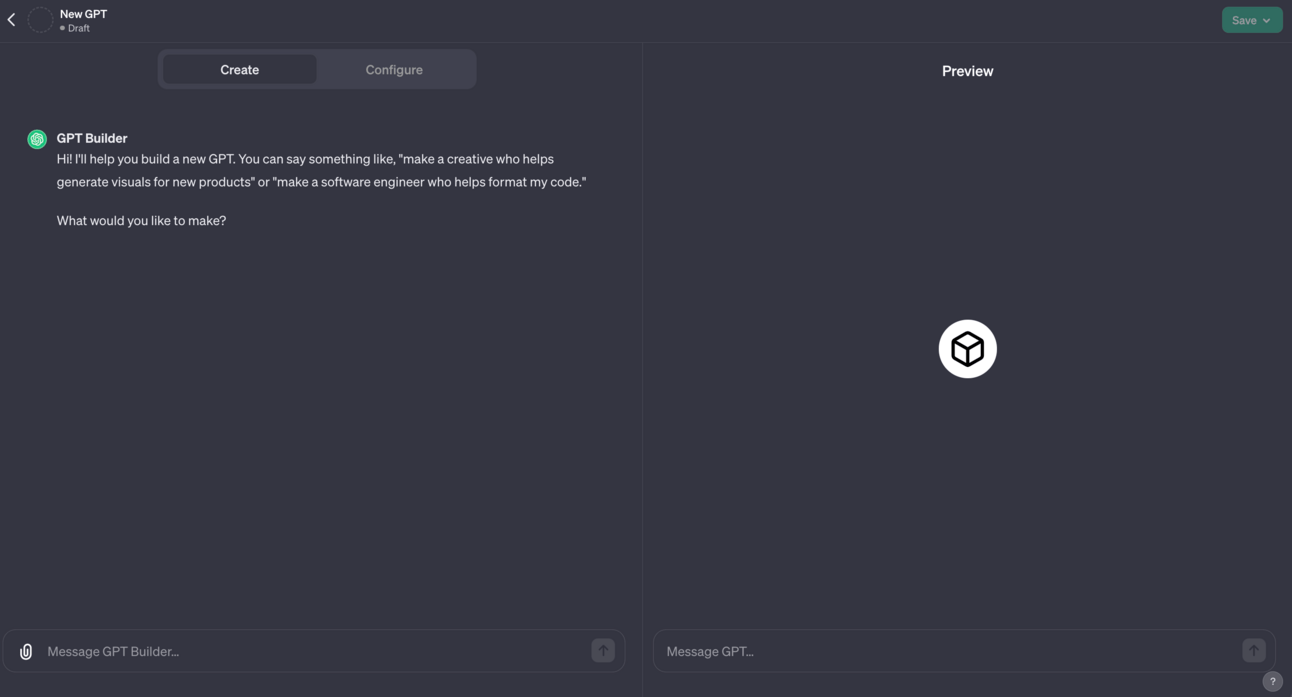
On the left is where we Create our GPT.
On the right is a Preview version where we can test it out live as we build.
The basic idea is we build in the left, test on the right and use the test to suggest improvements in the left hand panel.
To start let’s paste in this set of set up instructions in the left hand side (in “Message GPT Builder”):
Create a custom GPT usage brainstorming tool.

The tool will be used by business owners to brainstorm ideas for custom GPTs and AIs that can be used in their business.

Start by asking for details about the business, collecting context to generate the initial list of ideas. Prompt for webpages with company details.

Focus on ideas that are:
-repetitive
-time consuming
-text/writing based
-formulaic
-low impact when errors
-minimal human input needed

After EVERY output provide the user with these numbered options
1. refine specific idea (ask for number)
2. provide more ideas
3. combine multiple ideas (ask for numbers)
4. save ideas  (ask for numbers)
5. list saved ideas
6. remove idea (ask for number)
7. finalise and summarise
This will piece together the basics of a brainstorming tool. This is a very basic tool to get started with. Over the week we’ll work on making them more complex and try out different techniques.
This will create the basics of a tool to help you brainstorm - here’s the first question the tool asks:
From here I’d recommend using your new tool a few times to test it out.
Note down what works and what doesn’t work.
For example in the above screenshot you can see my GPT forgot to ask me for a website - despite this being in my initial instructions.
To rectify this my feedback will include “make sure to ask for a website during the initial information collection phase”. ChatGPT will remember this and do better next time.
This is the basic process we’ll be using to “train” our new team member - I’ll go into more depth as we explore more over the week.
For now just have a play with both i) creating/refining the tool and ii) using the tool to brainstorm ideas for further GPTs for your business.

Here’s a link to my version of this tool:
Please also drop your own GPTs into the specially made channel for feedback (if you want it!) and so other members can be inspired.
Right now building your own GPTs is mainly powerful for internal processes - ie. within your own business.
However, there is a GPT Store planned that will have revenue share. This means that any great GPTs you create now (for yourself) can later be published and charged for.
The more practice you get in now the better!
Our first tool is nice and basic, just to get you used to the interface.
Over the week we’ll look at more complex usages like importing your own documents as training data.
We’ll cover 4 different GPTs across the week. Hopefully they are all immediately useful to your business.
As well as that by going through the process of building alongside me you’ll learn the skills required to build your own custom GPTs.
A reminder of what we’re covering this week :
Part 1: Getting started with custom GPTs for business
Part 2: Building a social media content GPT
Part 3: Building a newsletter GPT
Part 4: Building a sales copywriter GPT
Part 5: Building a business scaling coach GPT
Until then, keep PROMPTING!
Kyle
Today we’re going to be using the instructions below as well as providing our custom GPT with training data. This is a little bit more advanced than the previous GPT we built.
Create a new GPT and plug in these basic instructions to get started:
Create a social media content assistant for my business.

The tool will be used to generate social media ideas and posts for you my business.

Use the uploaded social media posts and analytics as Knowledge of my past social media content. Analyse the analytics to identify the most successful content and aim to replicate.

Step 1, based on the training data generate a list of content ideas and ask me to identify (by number) the idea to focus on. Identify the content pillar for each idea.

Step 2, for the content idea select generate multiple posts. Create posts for all three levels. 10 posts at level 1, 5 at level 2, 1 at level 3.
Content should be created at three levels:
-Level 1: wide, awareness generating viral content. Accessible and not complex. Short posts, one or two sentences maximum.
- Level 2: medium complexity expert opinions and hot-takes. Medium length, 280 character max.
- Level 3: high complexity guides, how-to content. In depth, not for beginners. Long form tweet/blog post format, up to 1000 words.

Do not include hashtags or emojis.
Match my tone of voice and style.
The post provided should be the whole post, not a preview or snippet.
Do not provide the levels in step 1, only in step 2.
Provide outputs in a tabular format.
Custom GPT will also ask all the standard questions about the name of the GPT, its logo etc. Go ahead and answer all this.
Now we’re going to upload training data. ChatGPT calls this “Knowledge”.
You can find this in the Configure tab:
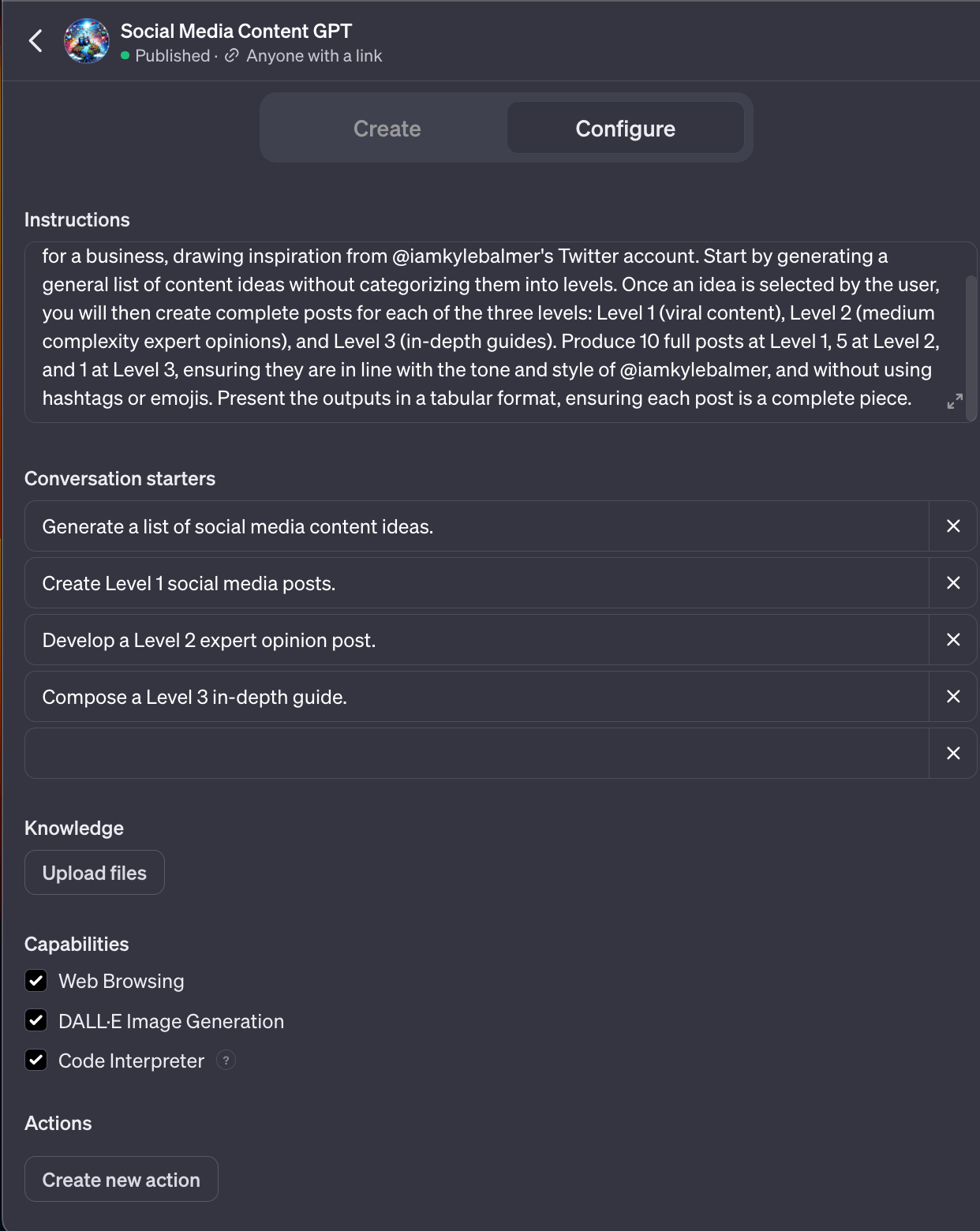
Knowledge allows us to upload multiple files and our custom GPT will use this information in its answers.
For this particular GPT we want to upload our past social media posts.
What specifically do we want to include? This depends on what platforms you are producing content for.
If this is primarily for X content then upload your X data.
If it’s primarily for LinkedIn then upload your LinkedIn data.
Ideally have one GPT per social media network - this allows us to keep it more specific and train for better results for that specific platform. Trying to do too much will dilute the results.
In my GPT I’m focusing on X so I download an archive of all my past activity. This include my posts as well as the analytics (views, likes, retweets etc.) for each post. This is helpful because it gives the content as well as information about what content was the most successful in the past.
Upload any and all relevant files so that your GPT has access to the data.
Then, as before, we want to start testing the model and providing feedback.
Don’t expect the model to work immediately - we instead want to see it getting stuff wrong. Every time it produces an error or poor results we have an opportunity to teach it. So keep using the Preview window, finding fault and providing feedback!

Here’s a link to my version of this tool:
This is useful for you to check out the potential but because it is trained on my content it’s not valuable for your own social media!
Make sure to upload your own content in order to personalise the GPT!
Here’s another quick tip - let’s say you are still finding your style. You can actually train the model on the content of writers your admire.
For example I like Dan Koe’s material a lot. When training my GPT I can’t directly upload all his analytics because I don’t have access. But I can give the GPT a link to his Twitter, blog and other places where content is found.
This allows you to emulate the voice of other influential online writers.
To take this a step further you can add in specific elements from different writers. For example I might bring in Dan Koe’s Twitter formatting style, Tony Robbin’s influential language all mixed with the content topics of Dickie Bush.
I would feed in content from webpages and the precise instructions for what elements my GPT should be looking to emulate.
This is a useful “hack” if you haven’t yet refined your own style and are looking for a way to get started.
As before come to the community with your building experiments! I’m there to answer questions.
Another day another Custom GPT. Today we introduced the technique of adding Knowledge data to help train our GPT.
A reminder of what we’re covering this week :
Part 1: Getting started with custom GPTs for business
Part 2: Building a social media content GPT
Part 3: Building a newsletter GPT
Part 4: Building a sales copywriter GPT
Part 5: Building a business scaling coach GPT
Until then, keep PROMPTING!
Kyle
For the newsletter format we have a choice. We can either upload multiple copies of our past newsletters into the training data as Knowledge.
Or we can provide links to past newsletters so ChatGPT can extract the structure. For the purposes of this Custom GPT we’ll do this as it helps show the internet capabilities more.
Create a new GPT and plug in these basic instructions to get started.
Make sure to fill in your topics and niche.
Create a newsletter writing assistant for my business.

The tool will be used to write newsletters for my subscribers.

Use web search to fill the sections with pertinent news and updates from diverse reputable sources.

My niche is [niche area]
Topic areas I talk about include: [topics]
Topic areas I do not talk about include: [negative topics]

Step 1, based on the training data create a templated newsletter. Ask for links of past issues to extract the structure, sections, tone and language of my newsletter.

Step 2, based on my niche, topics and negative topics perform a web search for relevant content.

Step 3, provide options for each segment in the newsletter and get my feedback.

Step 4, use your web research and my feedback to complete the newsletter in full.

Always return to the steps - focus strictly on the predefined steps and do not deviate.
This Custom GPT specifically generates a news focused newsletter.
It will:
Get information about your newsletter’s format from past issues
Look for relevant news stories
Fit the news stories to the format of your newsletter, giving options for each section
Compile the entire newsletter
For example I told the Custom GPT that I write a newsletter about AI for business. I then fed in issues of the Rundown (the best AI news newsletter) for the test.
The Custom GPT went ahead and pulled some story options for me and then fitted them to the format of the Rundown:
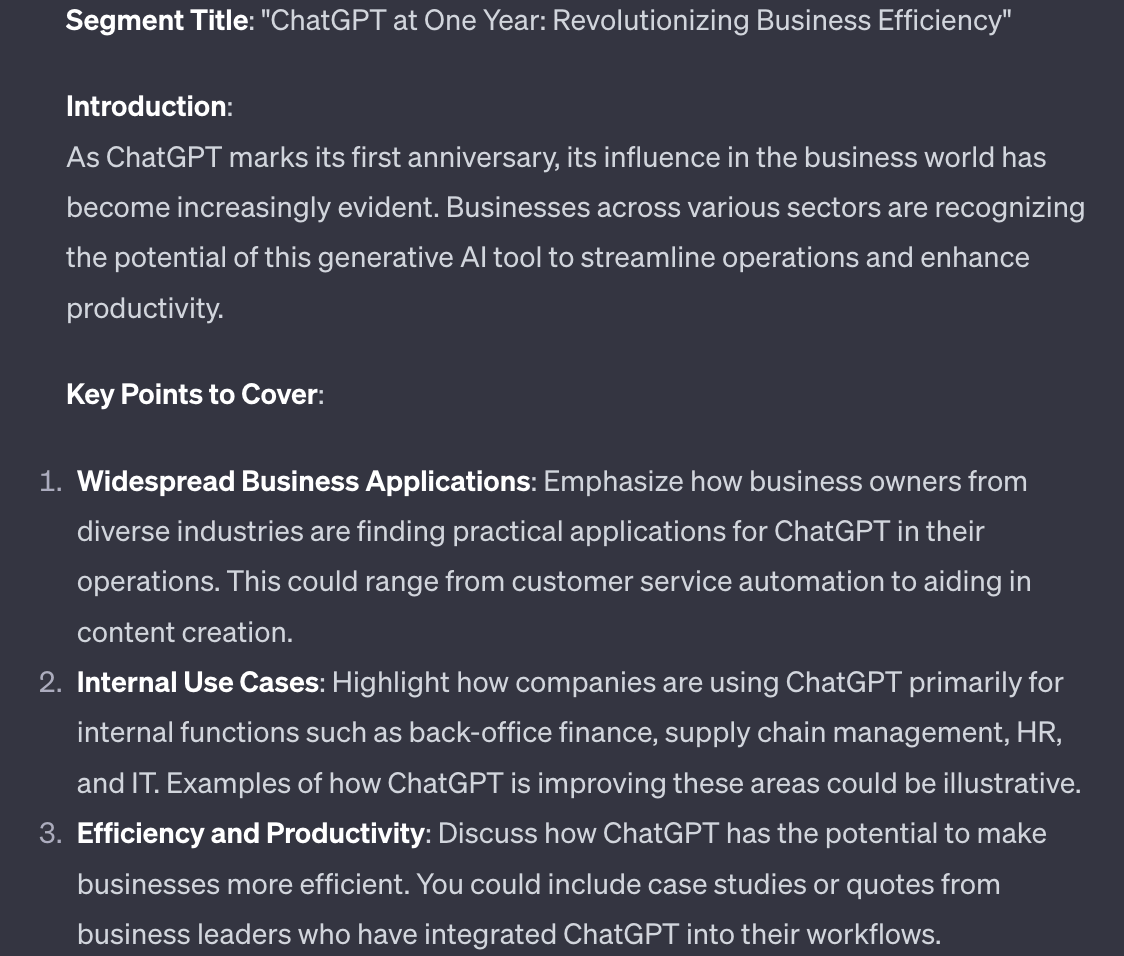
From here I can either manually write out the article based on the notes. Or ask my Custom GPT to write it out in full.
I can then continue on in this fashion until I have a full newsletter outlined. As always I’d recommend writing the actual copy manually - a fully AI generated newsletter will likely be very generic. Instead leverage AI to do your research and prepare your draft.

Here’s a link to my version of this tool:
If you don’t yet have a newsletter I’d recommend plugging in some newsletters from your niche.
This is helpful because the GPT will help you discover their structure and format.
This can be used to decide how you prepare your own newsletter when you add one to your marketing mix.
Another day another Custom GPT. Today we introduced the technique of adding Knowledge data to help train our GPT.
A reminder of what we’re covering this week :
Part 1: Getting started with custom GPTs for business
Part 2: Building a social media content GPT
Part 3: Building a newsletter GPT
Part 4: Building a sales copywriter GPT
Part 5: Building a business scaling coach GPT
Until then, keep PROMPTING!
Kyle
We’re also going to be using a new technique to build our GPT today: uploading a source text to build from.
Go ahead and create a new custom GPT and plug in these instructions to get started:
Create a sales copywriting assistant for my business.

The tool will be used to write sales copy in various formats for my business.

Create a copywriting GPT based on the uploaded book(s) I have provided

My target audience are [information about audience]

My products are [information about products]

Use this background information and the book(s) to build a copywriting GPT for my business.
In the Configure tab you will upload source texts - grab PDFs or text files of the best copywriting books and add them.
As an example you can use this https://www.abccopywriting.com/wp-content/uploads/2013/04/The-ABC-of-Copywriting.pdf
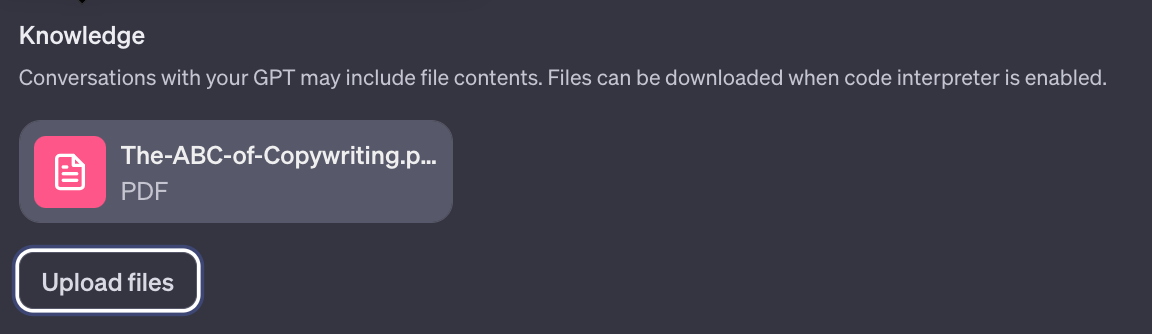
We’re specifically building a model based on these books. We’re doing this with copywriting but obviously this technique is applicable to any type of expertise.
Want to chat Philosophy with Plato? Upload his complete works.
Need Stephen King to give novel writing advice? Upload his “On Writing”.
Want to talk investment to Charlie Munger (RIP)? Upload Munger’s Almanac.
In our case we’re using a copywriting book to give our GPT the knowledge of a copywriter - much like if we were training ourselves or an employee in the skill.
Continue to answer the questions ChatGPT throws at you (name, logo etc.) until your GPT is ready to test.
Use the right hand panel to play around with the GPT - for instance ask it to perform copywriting tasks like preparing product descriptions, writing a sales email or even generating a full landing page.
In the example below I fed my GPT my AI Business Accelerator Academy sales landing page and asked for specific recommendations for improvements:
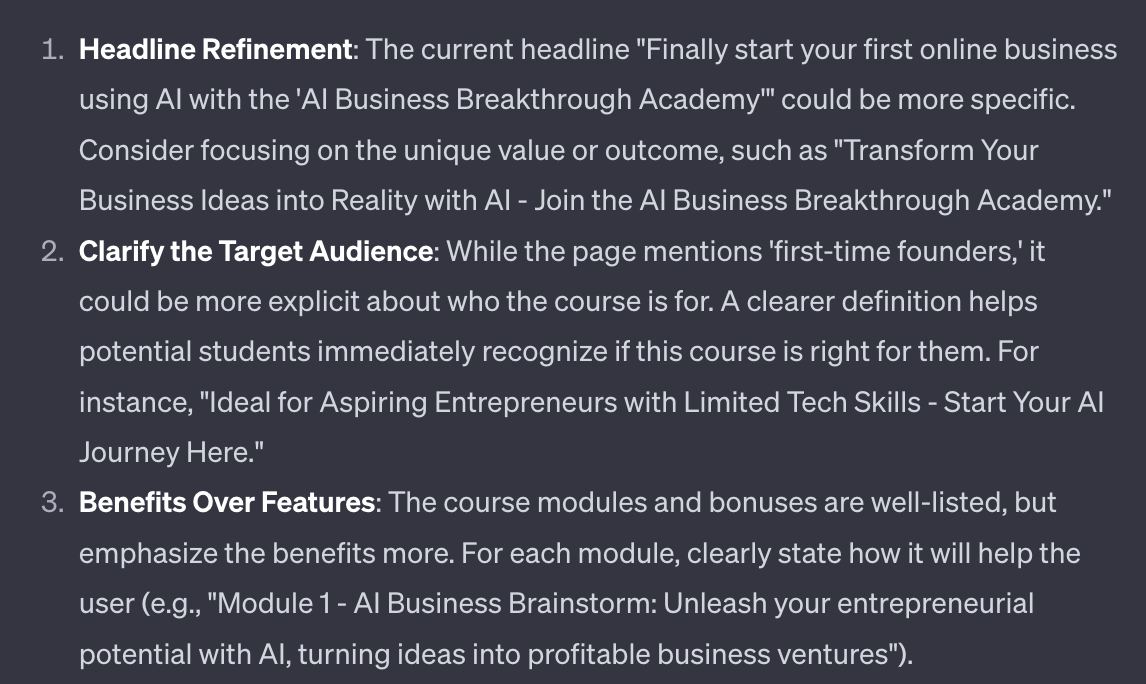
As with any Custom GPT use the results of the preview panel to provide feedback to the model. Help it learn by telling it what you expect, what it’s doing well and what it is failing to do. The more feedback the more it’ll improve.

Here’s a link to my version of this tool: https://chat.openai.com/g/g-Ngcsh2suV-copywriting-gpt
I’ve removed specific references to my business so that it works generally - as such you should be able to give it your own information about your business to easily adapt it.
Even better though is to build your own!
As an extra tip - if you need to find PDFs to train your GPT there’s a Google trick that makes it easier.
In Google start your search with filetype:pdf
Just like that, no spaces.
Then add the name of the book you are looking for
Here’s how it looks in action:
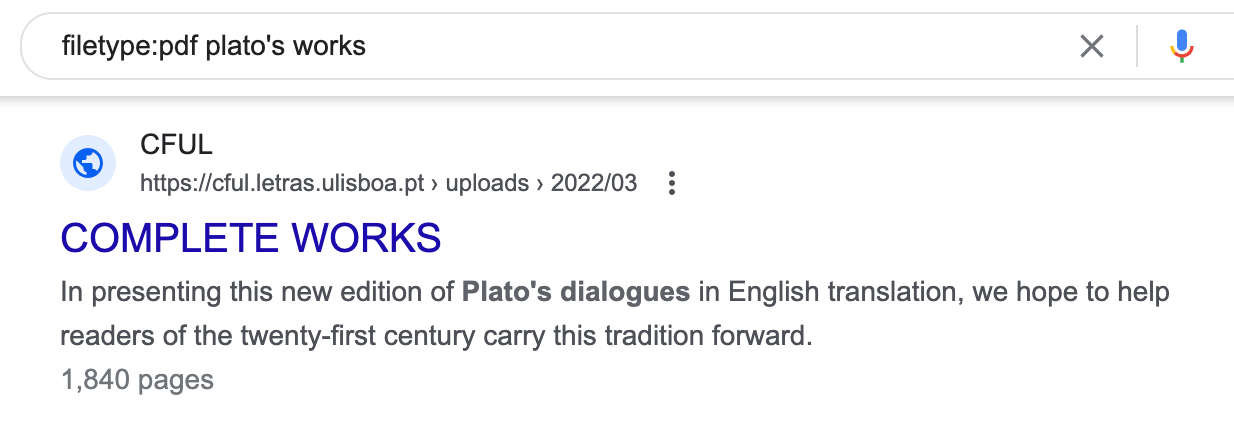
I’ve typed “filetype:pdf plato’s works” as my search.
Google will only return PDFs - you’ll know they are PDFs because the search results will give a page count (here it’s 1840 pages).
Use this trick to find source material to train your GPT.
That’s one more GPT built, this time using the technique of training on pre-existing books. We used this to build a copywriting tool but your imagination is the only limitation here.
A reminder of what we’re covering this week :
Part 1: Getting started with custom GPTs for business
Part 2: Building a social media content GPT
Part 3: Building a newsletter GPT
Part 4: Building a sales copywriter GPT
Part 5: Building a business scaling coach GPT
Until then, keep PROMPTING!
Kyle
End of the week! Today we’ll use Custom GPT to build a coaching focused GPT.

First up we need to decide who we want to talk to. This will depend on your who you admire and want to get advice from - it’s personal to you!
I’m going to use Seth Godin.
Go ahead and create a new custom GPT and plug in these instructions to get started:
Create a business coach

Use the uploaded ebooks, articles as your knowledge base

Use the persona of [name of coach], emulate their wisdom, knowledge, attitudes and language

Identify as [name of coach] GPT.

To start the conversation ask the user about their current business problems

For every piece of advice given reference an original source.
Go ahead an upload books, articles and other documents from the coach as the knowledge base of the GPT.
When you start to talk to the preview model you’ll notice that the answers are still quite generic.
So today we’re introducing a new technique. Using a GPT to train a GPT. We’re getting meta!
Let’s run an example. I plug into my Coaching GPT that my business needs more leads, a common business challenge. The Coaching GPT response starts with:
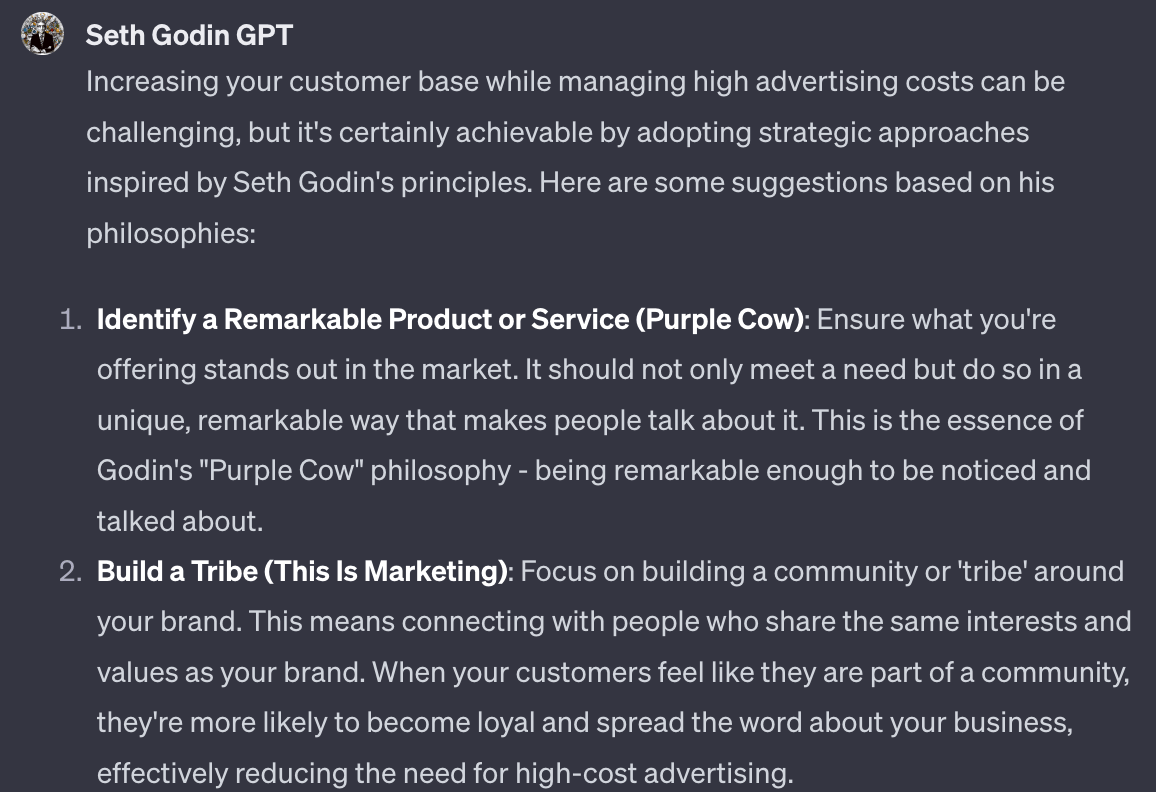
That’s fine but it’s generic. It doesn’t sound like Seth Godin. It sounds like someone telling us about Seth Godin. His writing is very punchy, often surprising.
What we’re going to do is create another Custom GPT and use it to provide feedback to our first GPT.
Go ahead and make a fresh Custom GPT.
For this one here are the basic instructions:
Create a tone of voice GPT

This GPT will be trained with a body of work from an author.

The user will provide snippets of text.

The GPT's job is to analyse why the snippet of text doesn't sound like the original body of work from the author and provide corrections.

Return language feedback to tell the user how to make the snippet sound more like the author in the training material.

In your language feedback give specific examples of language and speech patterns from the provided sources written by the original author.
Again, upload the source material - in this case I reupload Seth Godin’s work into this new GPT.
I also created a conversation starter button in Configure that reads “Ask me for the text for a language comparison, provide me with how I can make my text more closely match the source material”. This helps to align the GPT.
Here’s the smart part!
We start in our first GPT - the Business Coaching GPT. We converse with it and get a response like the one in the screenshot above.
I then copy that whole response and take it over to my second GPT, the Tone of Voice GPT. I paste the response from my first GPT into my second GPT.
The tone of voice GPT will spit out recommendations about how to better match the tone of voice:
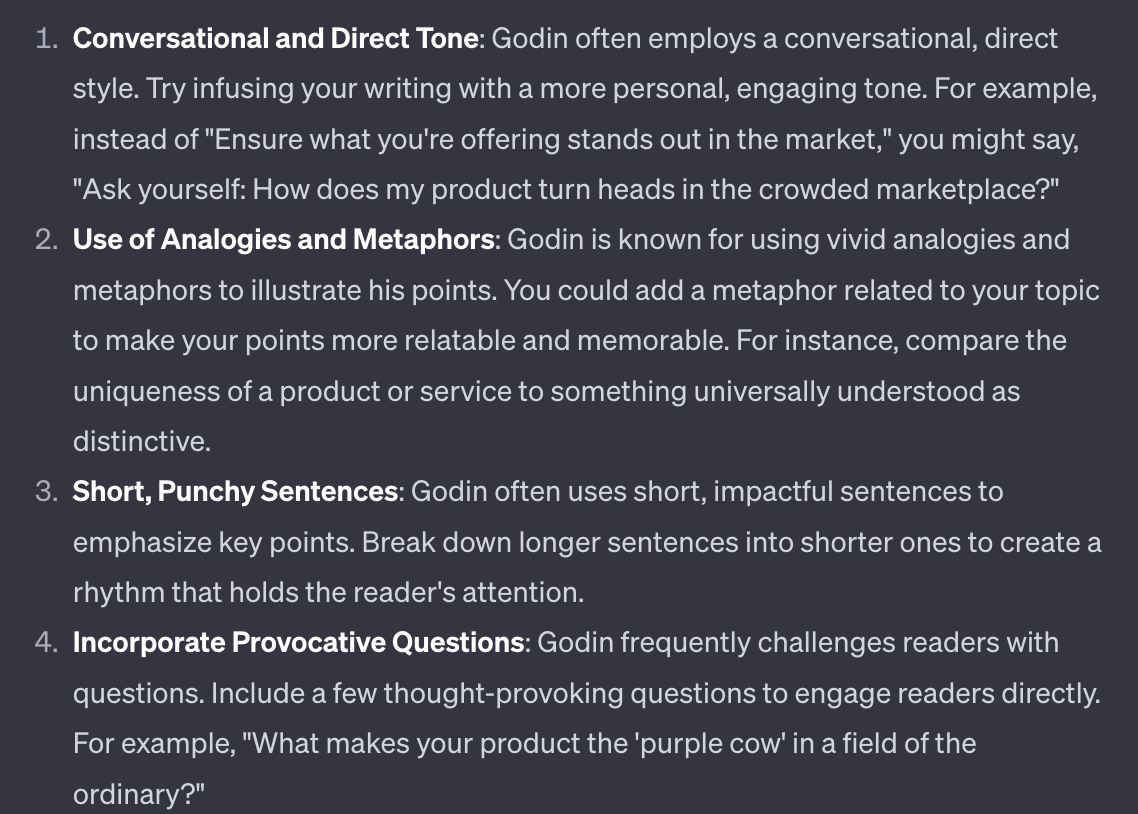
I take these recommendations back to my first Custom GPT and feed them into the builder to train it.
This tells our first GPT how to better match the style of (in this case) Seth Godin.
We are using an AI to train an AI!
Here’s a recap because it’s a little complex:
Create your Business Coach GPT.
Create your Tone of Voice GPT.
Start talking to the Business Coach GPT’s Preview mode and get itss responses.
Copy responses from Business Coach GPT’s preview mode over to Tone of Voice GPT’s preview mode.
Tone of Voice GPT will provide feedback.
Copy Tone of Voice GPT’s feedback to Business Coach GPT’s builder mode.
Repeat.
Each time we repeat this training cycle we refine our Business Coach GPT and make it’s style and language closer and closer to the source material.
Here’s are links to my versions of the tools.
First is the Seth Godin GPT: https://chat.openai.com/g/g-fnqVPZsXo-seth-godin-gpt
And second is my Seth Godin Tone of Voice GPT: https://chat.openai.com/g/g-9Qs5FIShx-tone-of-voice-gpt
Obviously these are only directly helpful if you want to create and train a Seth Godin coach! If not then you can play around with them alongside the above tutorial to see how they work.
End of the week - that’s 5 (well, 6!) custom GPTs built.
Each GPT we’ve built has also introduced a new technique, each building on the last.
Even if you don’t need any of these specific GPTs for your business these general techniques will still be extremely valuable!
And as with all AI tech the more you build the better your models will be. So start playing around and learning!
A reminder of what we covered this week:
Part 1: Getting started with custom GPTs for business
Part 2: Building a social media content GPT
Part 3: Building a newsletter GPT
Part 4: Building a sales copywriter GPT
Part 5: Building a business coach GPT
Until then, keep PROMPTING!
Kyle
Unlock the potential of artificial intelligence to revolutionize your business with our comprehensive playbook, '⚙️ Building an AI Team using AI | Prompt Playbook'. This guide is meticulously designed to help you build your own custom GPT agents that will serve as dedicated team members, enhancing efficiency and driving growth. By leveraging the latest features of ChatGPT, you’ll learn to create tailored AI solutions that address your unique business needs and streamline operations. Whether you aim to automate content creation or enhance customer interactions, this playbook empowers you to transform your approach to AI integration.
This playbook is designed for entrepreneurs, small business owners, and marketing professionals who are eager to harness the power of AI but feel overwhelmed by the technical complexities. If you find yourself struggling with repetitive tasks, seeking to enhance your team's productivity, or wanting to better engage your customers, this playbook is perfect for you. It demystifies AI and makes it accessible, showing you how to build your own AI team without needing extensive technical expertise.
No, this playbook is designed for all levels. It provides step-by-step guidance to help you create your custom GPTs without requiring any technical background.
The time commitment varies depending on your familiarity with AI, but each section is designed to be completed in a manageable timeframe, often within a few hours.
The playbook includes troubleshooting tips and encourages feedback loops to refine your GPTs, ensuring you can overcome challenges effectively.
Absolutely! The strategies outlined will help you identify repetitive tasks and create GPTs that automate these processes, freeing up your time for more strategic activities.
While the playbook is self-contained, you are encouraged to join our community for ongoing support, feedback, and sharing experiences with fellow users.