
AI Knowledge
Write prompts that give AI the context and direction it needs.
Start ReadingWhen I run AI workshops the room is generally split between those who “get” AI and those who don’t.
Some people tried AI for the first time and it clicked immediately. They got solid results. They continued using it. They skilled up, kept up to date. They have become power users and can’t imagine life without AI.
The others maybe gave AI a shot, didn’t get the results they expected and…gave up.
They are the ones who are likely to say “eh, AI is overhyped. It’s a bubble” and the like.
They are the ones who will fall behind.
When working with these two groups I’ll have them run a basic prompting exercise. So I get to see the sort of prompts that they are using with AI.
Without fail those who don’t think much of AI are using crappy prompts. Think “write me some good marketing copy” level of crappy prompts.
The difference between these two groups is not technical knowledge. The difference between the two groups - those who get good results and those who get bad results from AI - is how they prompt.
Prompting is, at its base, a communication skill. And as a skill it’s something we can refine and practice.
Some people naturally speak AI's language; others need to learn it. And all of us, without exception, can get better!
And that's exactly what we're focusing on in this Playbook.
Let’s get started:
Why prompting is fundamentally a communication skill
The difference between effective and ineffective AI communicators
The RISEN™ framework as one approach to clear communication
Common communication barriers that undermine AI results
How to adapt your communication style for better AI interactions
In the early days of personal computing, people spoke about being "computer literate" – having the basic skills to operate these new machines. Today, we're facing a similar divide with AI, but it's not about technical skills – it's about communication.
Some people naturally click with AI tools. They instinctively understand how to communicate their intentions clearly, frame their requests effectively, and iterate when necessary.
Others struggle, finding themselves frustrated by inconsistent or off-target results.
If you are in the first group you might sometimes find yourself wondering why other people find it so difficult. Are they just stupid?
This divide is not about intelligence or technical knowledge. I've seen brilliant developers struggle with prompting while non-technical folks get magnificent results. It's specifically about communication style and clarity.
Great news for those who are less technical. This new paradigm of working with computers opens up opportunities for communicators.
And good news for everyone: unlike coding or advanced technical skills, effective AI communication can be learned quickly. It's a skill that builds on capabilities many of us already have – we just need to adapt them for this new context.
To help bridge this communication gap, I've developed the RISEN™ framework – a straightforward approach to structuring your prompts:
R - Role: Establish who or what the AI should be. I - Instructions: Provide clear, specific directions. S - Steps: Break complex tasks into manageable pieces. E - End Goal: Clarify what success looks like. N - Narrowing: Add constraints to refine the output.
Here’s a video detailing the framework:
@iamkylebalmer You’re using chatgpt wrong. Learn this basic framework to instantly upgrade your prompt engineering and productivity #ai #artificialintell... See more
This framework isn't the only way to communicate effectively with AI, and you won't always need to follow it rigidly. Think of it as training wheels – a structure that helps build good habits until clear communication becomes second nature.
Let's briefly explore each element:
Starting your prompt by assigning a specific role to the AI immediately establishes context and perspective. It's like telling a colleague, "Put on your marketing hat for a moment" or "Think about this from an engineer's perspective."
For example, rather than asking: "How do I improve my sales pitch?"
Try: "As an experienced sales director who has closed deals with Fortune 500 companies, help me improve my sales pitch."
The role you assign shapes how the AI approaches your request, often leading to more tailored, relevant responses. It’s useful because AI can wear any hat which means it tends toward generic responses. By specifying what role we want it to take on right now we can refine answers.
After establishing the role, provide explicit instructions about what you want. The more specific, the better.
Poor instructions are vague: "Give me content ideas."
Better instructions are specific: "Generate 5 LinkedIn post ideas about artificial intelligence for small business owners, each with a surprising statistic or insight that highlights the practical benefits rather than the technical details."
The second example gives the AI clear guidelines about quantity, topic, audience, content type, and emphasis – all crucial elements for generating useful output.
For complex requests, breaking the task into sequential steps dramatically improves results. This is particularly effective for analytical tasks, writing assignments, or any request that requires structured thinking.
Instead of: "Analyze this marketing data and give me recommendations."
Try: "Analyze this marketing data by:
Identifying the top 3 performing channels by ROI
Highlighting unexpected trends or anomalies
Comparing this quarter's performance to the previous quarter
Recommending 3 specific actions based on these insights"
The best way to think about this is as if you were providing a complex task to a (human!) assistant. Sure, you know how to complete a particular task but maybe your assistant doesn’t - at least the first time. Because of this we break down the task for them. We’ll do the same with AI.
Always clearly state what you're trying to accomplish. What's the ultimate purpose of this prompt? What problem are you solving? What does success look like?
So many people get annoyed with poor results from an AI but at no point did they actually specify what success looks like… so, how is it to know??
A good prompt example might look like this: "The goal is to create an email template that increases our webinar registration rate by addressing our audience's pain points and creating urgency without sounding pushy."
Specifying your end goal helps the AI prioritise the most relevant information and approach the task with your desired outcome in mind.
After you get an initial response, the magic happens in the narrowing phase. This is where you add constraints, preferences, or additional context to refine the output.
For instance, if you receive a sales email that's too formal: "This is good, but please make it more conversational and friendly. Use shorter sentences, avoid jargon, and add a touch of humour that would appeal to creative professionals."
Narrowing is an iterative process that helps the AI better understand your expectations and preferences.
We can also keep a record of these narrowing constraints that we’ll use in similar prompts. Or indeed we build them into reusable prompts.
While the RISEN™ framework provides a helpful structure, the fundamental principle is clear communication. That’s all.
It’s not the only or best framework. And as you become more experienced, you may develop your own approaches or simplify your prompts while maintaining clarity.
The ultimate goal isn't to rigidly follow a framework but to communicate effectively with AI systems. It’s just a scaffolding to get you used to thinking about prompting (read: communication) more systematically.
Some situations might call for elaborate prompts; others might need just a few well-chosen words. Your ability to judge what's needed in each context will improve with practice.
Remember: even the most advanced AI systems can't read your mind. They can only work with the information you provide. The clearer and more complete your communication, the better your results will be.
Several patterns consistently undermine effective AI communication:
Assuming Mind-Reading Abilities: Many users unconsciously expect AI to fill in contextual gaps that seem "obvious" to humans. Remember, AI has no access to your prior knowledge or intentions unless you explicitly state them. To fix this think about what information you would provide to a human assistant and provide the same level of context to an AI.
Overcorrecting with Extreme Detail: Some users swing to the opposite extreme, creating prompts so long and convoluted that key instructions get buried. Clarity doesn't always mean verbosity. This is likely to happen when you start uploading loads of documents and supplemental material - all of that hides the actual core instructions.
Using Ambiguous Language: Phrases like "make this good" or "improve this" are too subjective to be actionable. Be specific about what "good" or "improved" means in your context. This is straight up communication failure - be precise!
Neglecting to Iterate: Effective AI communication is often a dialogue, not a one-shot interaction. Be prepared to refine your request based on initial responses. We’ll talk more about different styles of prompts and how to “cement” them into workflows over this Playbook.
Recognising these patterns in your own interactions is the first step toward more effective AI communication. Hopefully at least one of these pops out as something you do! If so…stop it! 😆
This Part was a gentle appetiser! In this Playbook we're building a comprehensive toolkit for effective AI communication. We just focused on foundational principles and we'll progressively explore more advanced techniques:
Part 2- We'll dive into specific prompting techniques including zero-shot, one-shot, and few-shot approaches, as well as system and role prompting strategies. You'll learn when to use each technique and how to manage AI's tendency toward agreeableness.
Part 3 - We'll explore output control and system design, covering temperature settings, API vs. GUI interfaces, and how to experiment with different input and output formats.
Part 4 - We'll compare different AI models and discuss how to select the right one for specific tasks, while also covering strategies for adapting to model updates.
Part 5 - We'll conclude with advanced reasoning techniques and best practices, including Chain of Thought, ReAct, and strategies for working with reasoning models.
Keep Prompting,
Kyle
If you've ever looked at a prompt engineering guide, you'll quickly find yourself in a world of strange terminology – zero-shot, few-shot, chain-of-thought, retrieval-augmented generation... it can get complicated fast, and maybe even a little intimidating.
In the last Part we talked about how prompt engineering is, at its core, about communicating.
All these layers of technical terminology get in the way of this fact.
You're probably already using many of these techniques intuitively – you just don't know the formal names for them!
I’ll describe ways of prompting and you’ll probably have a few “well, duh, I’m already doing that” moments. And that’s great!
We're going to explore this terminology for two important reasons: first, to expand our toolkit of options, and second, so you know what someone is talking about when they use these terms in articles or discussions.
But always remember that beneath all the technical jargon, it's still fundamentally about clear communication with AI systems!
Let’s get started:
Widening our prompting toolkit with established techniques
Zero-shot, one-shot, and few-shot prompting explained
The power of examples (both positive and negative)
Alternative ways to provide context beyond the prompt itself
Previously we covered the RISEN™ framework as a solid foundation for talking to AI. Today, we're widening out our approach.
You might already be using some of these approaches intuitively, but understanding their formal patterns and when to apply them gives you greater control over your AI interactions.
It’s sort of like learning a foreign language and not necessarily knowing the finer points of grammar. That’s fine - you can talk to people no problem. But layering in grammar helps you understand why things work a certain way
Most importantly, no single technique is universally "better" than others – each has specific strengths and ideal use cases. This is a recurring theme in this Playbook!
Think of these techniques as different tools in your toolkit, each designed for particular situations:
Need quick results for a straightforward task? Zero-shot prompting might be perfect.
Working on a highly structured output with specific formatting? Few-shot prompting with examples is likely your best bet.
Need to expand to a full knowledge base? File uploads, Projects and RAG are your friends.
The key is matching the technique to your objective – and often, combining multiple approaches for optimal results. Let’s review what we’re working with.
One of the most fundamental distinctions in prompting is how many examples you provide before asking for a specific output. This is commonly referred to as "shot" prompting, ranging from zero-shot (no examples) to few-shot (multiple examples).
Zero-shot prompting is the simplest approach – you provide instructions without any examples, asking the AI to perform a task it hasn't explicitly been shown how to do in your prompt.
For example: "Write a short poem about artificial intelligence."
Zero-shot works remarkably well for straightforward tasks, especially with more powerful models. It's quick and requires minimal setup. Most of your ad hoc quick queries with AI will be zero shot.
When to use zero-shot:
For simple, common tasks
When you're not concerned about specific formatting
For creative or open-ended requests
When you want to test the AI's default approach
When you're in a hurry and need a quick response
One-shot prompting involves giving the AI a single example before asking it to perform a similar task:
Here's an example of a product description:
"The Echo Dot is a voice-controlled smart speaker with Alexa. It has a sleek, compact design that fits anywhere in your home. Ask Alexa to play music, answer questions, read the news, check the weather, set alarms, control compatible smart home devices, and more."

Now, write a similar product description for the Philips Hue Smart Bulb.
This approach significantly improves consistency and helps the AI understand exactly what you're looking for in terms of style, tone, and format.
When to use one-shot:
When you have a specific format or style in mind
For tasks where consistency with previous work matters
When zero-shot responses aren't quite hitting the mark
When you want to guide the AI without extensive examples
One shot is still pretty fast especially if you are just copy pasting in an example.
As an aside it used to be recommended you place examples first in ChatGPT and last in Claude. And I’m certain that all the different models have different recommendations. Increasingly though it matters less and less - the models can work out what you are aiming for.
That said: try both before and after (in new chats) and see what works better. Then use that moving forward. Always test.
Few-shot prompting takes this concept further by providing multiple examples:
Here are three examples of professional email responses to customer inquiries:

Customer: "When will my order arrive?"
Response: "Thank you for your inquiry about your order status. Based on our records, your package is scheduled to arrive on [date]. You can track your shipment using the tracking number provided in your confirmation email. Please let us know if you need any further assistance."

Customer: "I received the wrong item in my order."
Response: "I'm sorry to hear that you received the incorrect item. We sincerely apologise for this inconvenience. Please provide your order number so we can resolve this issue promptly. We can arrange for a return of the incorrect item and ensure the correct item is sent to you as soon as possible."

Customer: "Do you offer refunds?"
Response: "Yes, we do offer refunds for items returned within 30 days of purchase in their original condition. Our full refund policy can be found on our website under 'Customer Service.' If you'd like to initiate a return, please provide your order number, and we'll guide you through the process."

Customer: "Can I change my shipping address after placing my order?"
Response:
and so on and so on…
This technique is powerful for establishing complex patterns. With multiple examples, the AI can identify consistent elements across variations, leading to more nuanced understanding of your expectations.
When to use few-shot:
For complex tasks with subtle patterns
When consistency is critical
When working with formats that have specific structural requirements
When the task involves multiple dimensions (tone, format, reasoning approach)
For specialised knowledge domains
Few shot is more advanced and requires more work to set up. Also, increasingly we don’t put all the examples in the prompt itself but instead we supply them "externally”. I’ll talk more about how later.
While the number of examples matters, their quality and what type are even more important. A couple of pointers:
Boring but important. A single well-chosen example often outperforms multiple mediocre ones. Your examples should clearly demonstrate the exact pattern you want followed, with all the elements you consider important.
Hint: you can use AI to help you brainstorm good examples.
If you provide multiple examples that are too similar, the AI might fixate on irrelevant patterns. Include variety to help the model understand which aspects should remain consistent and which can vary.
For instance, if creating customer service responses, vary the scenarios, customer tones, and specific solutions while maintaining a consistent professional tone and structure.
One of the most powerful but still underused strats is providing negative examples. Specifically showing what you DON'T want alongside what you do want.
GOOD EXAMPLE:
The quarterly report shows a 15% increase in revenue, primarily driven by our new product line which captured significant market share in the enterprise segment.

BAD EXAMPLE:
Revenue went up by 15% this quarter because our new products sold really well to big companies.

Please write a professional summary of our customer satisfaction survey results in the style of the GOOD example, not the BAD example.
Negative examples help define boundaries and clarify expectations, often resolving ambiguities that positive examples alone might miss. They're particularly valuable when you've received outputs that have specific flaws you want to avoid.
If you get some bad results back from the AI then you can feed them back as bad examples. Even better - explain why they are bad.
The "shot" techniques we've discussed are fundamentally about providing examples and context. But sometimes, including all necessary context directly in the prompt becomes impractical due to length limitations or complexity.
Beyond the "shot" techniques, there are several complementary approaches that help establish the foundation for your AI interactions. Increasingly you’ll use these tools rather than trying to put ALL the context into the prompt itself.
Think of these techniques as “external” to the prompt. We can have an external repository of examples and context that works alongside our prompts. These will (for the most part) replace few-shot prompting.
Many AI interfaces distinguish between system prompts and user prompts. System prompts define how the AI should operate throughout your entire conversation and even across conversations, while user prompts contain your specific requests.
System prompting involves establishing parameters that persist across the entire conversation:
For example: "You are an AI assistant helping with product design. Always approach questions from first principles, focus on user needs, and suggest specific, actionable next steps. Challenge assumptions when they seem ungrounded. Use simple language without jargon."
The main value here is allowing you to build context into all your interactions without having to repeat yourself.
All of these approaches serve a similar purpose: giving the AI more information to work with beyond what fits in a standard prompt. You can thus give many more examples than if you added them to the prompt itself.
File Upload lets you reference specific documents without copying their content into the prompt. When you upload a file, the AI can analyse it and respond to questions about it, making this ideal for working with specific documents, data sets, or images. Certain models have much higher context windows (think: memory) allowing you to upload many more and larger files - Google’s Gemini models in particular excel here.
Projects and Knowledge Bases create persistent collections of information the AI can access across multiple conversations. These might include company documentation, previous conversations, or specialised resources that inform the AI's responses without needing to be included in each prompt. Both ChatGPT and Claude have Projects directly in their webapps and phone app interfaces.
Retrieval-Augmented Generation (RAG) takes this a step further by dynamically fetching relevant information from a knowledge base when needed. Your content is stored in a vector database, and the system pulls only the most relevant information for each query, effectively extending the AI's knowledge with your specific information.
This is more for when working with the API rather than via the webapp. It’s a more advanced technique for sure.
These approaches all address similar needs:
Working with information too extensive to fit in a prompt
Maintaining consistent access to proprietary information
Keeping references up-to-date without rewriting prompts (simply add to or change the uploaded information)
The goal remains the same as with our "shot" techniques: provide the AI with the context it needs to generate accurate, relevant, and helpful responses. The difference is merely in how and where that context is stored and accessed.
And which you use depends entirely on how many examples and how much context is needed to do the task at hand well.
We've expanded your prompting vocabulary to include a range of established techniques – from zero-shot to few-shot and then how we can manage larger bodies of examples. Next, we'll explore how to control AI outputs more precisely, including the technical aspects of parameters like temperature and token management.
Keep Prompting,
Kyle
During our first AI Automation Accelerator, I made a silly mistake.
I try to always keep my educational material as simple as possible. Not requiring additional context wherever possible.
However, early on in the Accelerator jumped straight into discussing the ChatGPT API.
I was assuming that people knew what an API was (they didn’t) and how it was different to “normal” ChatGPT.
Oops. Mea culpa.
If you are currently thinking “what the hell is an API” then you’re in luck! We’re covering that today and why it matters.
For me, the distinction between the ChatGPT app and the API seemed obvious – I'd been building with APIs for years. But the confused messages from several participants quickly made me realise my error. What was second nature to me was completely new territory for many talented entrepreneurs.
That moment was eye-opening. I realised there's a fundamental divide in the AI world – between casual users of web interfaces and those building with APIs. And knowing which to use when is super important for how we build and how we prompt.
This fundamental difference changes everything about how we approach prompting. When we're just chatting with AI through a web interface, we can fudge our way through prompts and iterate until we get decent outputs. But when we're building with the API, we need solid, reliable prompts that work consistently – much closer to the "engineering" part of prompt engineering.
But I'm getting ahead of myself! First, let's look at what the app vs API distinction actually means!
Let’s get started:
Moving beyond web interfaces to API integration
API vs. App: When to graduate from chat interfaces to direct integration
No-code options for using AI APIs without programming
Temperature: Controlling creativity vs. consistency
Token length management and context windows
So far in our series, we've primarily focused on techniques you can use in the standard app versions of AI systems – that's the web applications like ChatGPT, Claude or their mobile app equivalents.
These apps are what we called GUIs (pronounced gooey, which is endlessly funny). GUI stands for Graphical user interfaces. It’s a term from the age of computing when having an graphical interface was actually novel. Before it was all text based (think DOS if you are my age or above!).
Instead of GUI we can just use the catch-all word “app” as it’s close enough. This includes web apps (via a browser like Chrome, going to a website like chatgpt.com) , phone apps like the ChatGPT iPhone app or even desktop apps like the ChatGPT you can install on your computer.
Either way these interfaces are where most people start their AI journey, and for many users, they're perfectly adequate.
Whilst these apps are great starting points, they have significant limitations that become apparent when you start using AI more seriously:
Manual Intervention: Every interaction requires someone to type prompts and copy-paste results, making automation impossible.
Inconsistent Parameters: Settings may change between sessions or updates, affecting output consistency.
Limited Integration: These apps mainly exist as islands, separate from your existing systems and workflows.
Restricted Customisation: You're limited to the features and controls the provider chooses to expose in the interface.
As your AI usage evolves from casual experimentation to core business processes, these limitations start to become real bottlenecks. When we want to start getting sophisticated therefore we need to move away from the apps and towards the API.
Oh great. Another acronym!
API stands for Application Programming Interface. Software engineers aren’t great at naming things so we’ll have to excuse these complex names!
APIs are basically a way for different software systems to communicate with each other. That’s it.
In the context of AI models, an API allows your software to connect directly to the AI service, send prompts and receive answers automatically.
No more fussing about in the app interface writing prompts. No more manual entry. Everything gets sent back and forth behind the scenes without you. VERY different. And essential when you are building automations and software tools that need to work when you aren’t around.
Let’s hammer this home with the key differences:
Automation: APIs allow your systems to interact with AI automatically, without human intervention.
Consistency: You can set and maintain exact parameters for every request, ensuring consistent outputs.
Integration: APIs let you incorporate AI capabilities directly into your existing software and workflows.
Volume: You can process hundreds or thousands of requests efficiently.
Cost: API requests are fractions of a penny. You pay per usage rather than a flat $20/month.
Customisation: APIs offer more control parameters and options than are typically exposed in apps.
Using an AI app is like ordering food at a restaurant counter – you're limited to what's on the menu board and how the staff is trained to serve it. Using an API is like having direct access to the kitchen – you can customise ingredients, cooking techniques, and presentation to your exact specifications.
This does not mean that the API is always better than using the app!! There are pros and cons here. Ordering via the menu is much easier and you know what you’ll get. If you head back into the kitchen then yes, absolutely you have more control! BUT you are also more likely to make a huge mess. 🤣
This transition from GUI to API fundamentally changes how we approach prompting. Here's why:
In the app, prompt engineering is often exploratory and iterative:
You can try different approaches in real-time
Immediate feedback lets you adjust on the fly
Inconsistencies might be annoying but aren't catastrophic
You can clarify or refine through conversation
Basically you can fudge your way through with a combination of zero, one and few shot prompting as we described before, mixed with providing context with file uploads and Projects.
We can get it done. Even if it’s a bit messy! The app versions give us this flexibility.
In API environments, prompt engineering becomes much more rigorous:
Your prompts need to work reliably without human intervention
Consistency across thousands of interactions becomes critical
Failures can affect automated systems and end users at high volume
Edge cases need to be handled gracefully without human supervision
This is where prompt engineering truly becomes engineering. You're no longer casually crafting messages – you're designing robust systems that need to work reliably at scale.
Your prompts need to work without you there nudging them along and fixing them on the fly. They need to work whilst you are sleeping. So we need to get more sophisticated. We’ll touch on this shortly, after I explain how exactly we use the API.
Once you decide to move beyond GUI interfaces, there are two main approaches to using APIs:
1. No-Code Tools: Platforms like Zapier, Make, and Bubble let you connect to AI APIs without writing code. You simply:
Get an API key (which looks something like "sk-ajhdf172kasdfy2...")
Connect this key to the no-code platform
Build workflows visually using drag-and-drop interfaces
This is perfect for automating straightforward tasks like generating content based on triggers, analysing incoming data, or connecting AI to other services like email or Slack.
This, by the way, is exactly what we do in the AI Automation Accelerator. We show you how to build your first API-based automation. And more than that how to build something you can actually sell.
2. Custom Development: For more complex needs, you can build custom applications that directly integrate with AI APIs. This requires some programming knowledge but offers maximum flexibility. Again, you'll need an API key to authenticate your requests.
Either way, the fundamental concept is the same: you're using an API key to send and receive messages directly to the model, bypassing the chat interface entirely. This direct connection is what enables automation and consistency. Allowing you to build actual products with AI.
When using the API we have some additional dials we can play with.
One of the most important controls at your disposal is "temperature" – the setting that essentially determines how “creative” or predictable the AI will be.
Temperature controls randomness in the AI's selection process. Without getting into the weeds when generating text, the AI assigns probabilities to possible next words or tokens. Temperature determines how funky it gets with those probabilities:
Low temperature (0.0-0.3): The AI almost always chooses the most probable next token, resulting in more predictable, consistent outputs. This is like following a recipe exactly as written.
Medium temperature (0.4-0.7): The AI sometimes chooses less probable tokens, introducing moderate variability. This is like a chef who mostly follows the recipe but occasionally adds their own twist.
High temperature (0.8-1.0+): The AI frequently chooses less probable tokens, creating more surprising, creative, and sometimes erratic outputs. This is like experimental cooking—exciting but not always successful!
When using APIs, temperature becomes especially important because you need to deliberately choose the right setting for each use case:
For factual tasks, structured outputs, or code generation, a lower temperature (0.0-0.3) provides consistency and accuracy.
For content creation, marketing copy, or ideas generation, a medium temperature (0.4-0.7) balances creativity with coherence.
For brainstorming, creative writing, or generating diverse alternatives, a higher temperature (0.8+) introduces more variety.
In API settings, you'll often set different temperatures for different endpoint functions within the same application – using low temperatures for data processing and higher temperatures for creative content generation.
How do you know which exact temperature will work best? You can use the above ranges as guidelines but ultimately: testing! When building prompts for repeat use we’ll test results at a range of temperatures and see which works best.
The next big consideration when using the API is dealing with context windows.
Every AI system has limits on how much text it can process at once—its "context window." In API settings, understanding and managing these limits becomes even more critical. Much more so than in the apps where we can just start a new chat!
The context window is the AI's working memory—everything it can "see" at once when generating a response. This includes your prompt, any examples, previous messages, and system instructions.
Context windows are measured in tokens. A token is roughly (don’t come at me!) 3/4 of a word in English, so a 4,000-token context window can handle about 3,000 words of combined prompt and response. Ish. Sorta. More a less.
In API settings, you need to manage context explicitly:
Cost Considerations: Most API providers charge per token. Larger prompts = higher costs. We could just use the maximum context in each and every prompt but we’ll rack up costs much much faster. So we need to be smart.
Performance Impact: Larger contexts generally mean slower responses and higher computation costs. This makes sense. If every prompt you send includes a whole brand book the AI needs to read first then you’re clogging up the works.
Error Prevention: Exceeding context limits in an API call causes errors that can break automated workflows. Go over this memory and the AI will “forget” parts of the context and your results will get real bad, real soon.
This means that when building with the API we need to actually pay attention to the volume of information we are putting in. How much additional context do we really need to upload? Before with the apps we just chucked everything in and hoped for the best but when building with the API we need to be more strategic.
The good news is that context windows have expanded dramatically:
When ChatGPT launched in 2022, its window was just 4,000 tokens (3000 words)
Current standard models typically offer ~128,000 tokens
Gemini models have context windows in the millions range.
Experimental systems like Magic.dev's LTM-2-Mini claim context windows of 100 million tokens
These numbers are shifting all the time - so whatever I write here will be out of date in a month or two! For the latest information on context window sizes, check comparison sites like Artificial Analysis (artificialanalysis.ai) that track capabilities across different models.
On a positive note though limits are expanding all the time: so the question of context window management may become moot as we move forward. That said efficient token usage will likely remain important for cost, performance and environmental reasons. Just because we could use 1M tokens to help us write a tweet does not mean we should!
All of this may sound intimidating. Sorry! Here’s a nice easy segue into working with this more advanced level of prompt engineering. I strongly recommend spending time in "playground" environments:
OpenAI Playground (platform.openai.com/playground)
Anthropic Console (console.anthropic.com)
Google AI Studio (ai.google.dev)
These interfaces offer the best of both worlds:
The user-friendly experience of apps
The parameter control and visibility of APIs
Playgrounds let you:
Experiment with Parameters: Adjust temperature, context limits, and other settings with immediate feedback. Basically you are given the dials within a nice GUI.
See API Calls: View the exact API code that would generate your results.
Test Prompts: Validate that your prompts work consistently before integrating them into systems.
Compare Models: Try different model versions side-by-side.
Think of playgrounds as training wheels for API usage. They let you experiment and refine your approach before committing to full integration. I highly recommend you go and kick the tyres of the API over on a playground to see all of this in action.
Today we've explored the transition from apps to APIs and how this shift fundamentally changes our approach to prompting. We've covered the technical controls like temperature and context management that become crucial when working with APIs.
Tomorrow, we'll examine model selection and optimisation, helping you understand when to use different AI models and how to adapt your approach based on the specific capabilities of each system.
Keep Prompting,
Kyle
It’s a REALLY hard question to answer because i) it depends on the goal and ii) my recommendation today will be different to my recommendation in a week or two.
Everything just moves so fast.
In a field moving this quickly, it's futile to rely on static recommendations. Rather than telling you "Model X is best for task Y" (which might be outdated before you even finish reading), I realised we need something much more valuable – a framework for evaluating models yourself, along with tools that stay current as the landscape evolves.
In this Part I’ll show you the tools you need to make this decision yourself.
Let’s get started:
Which AI model is best?
Why model recommendations become outdated almost immediately
Essential tools for comparing models yourself in real-time
Understanding the "capability cliff" and avoiding model overkill
The real-world implications of closed vs. open source models
How to create your own benchmark tests for your specific needs
Using variables and templates for consistent results across models
Strategies for handling model updates and changes
If there's one constant in the AI world, it's change. Here's a sobering fact: over the last 12 months, we've seen more than 50 significant model releases and updates from major providers. And that’s not including the hundreds (nay, thousands) of smaller models out there.
I keep up with this stuff for a living. And it’s overwhelming.
So for anyone out there also building a business and, you know, having a life…I can’t imagine how overwhelming it is!
What was state-of-the-art last quarter might be middling today, and what works best for summarisation might be different from what excels at code generation. It’s a LOT.
This rapid pace of development means that any article, guide, or newsletter (yes, even this one!) that makes specific claims about which model is "best" comes with an expiration date. And it’s less than a pint of milk.
I've learned this lesson the hard way. Last year, I wrote a detailed comparison of the top models for content creation, spent hours testing and benchmarking... and it was rendered largely obsolete just two weeks later when two major providers released updated models.
Does this mean we just give up? Nah.
Let's focus on equipping you with tools and frameworks that remain valuable regardless of which specific models are leading the pack this month.
I’m going to delegate the hard work here and just tell you the resources I personally use! This is a great starting point.
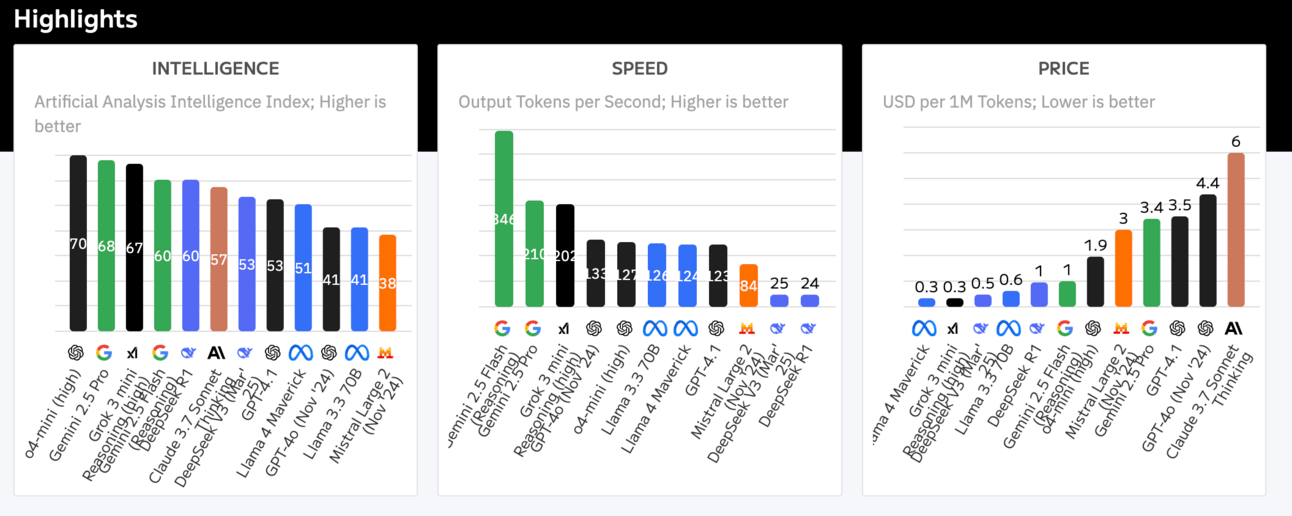
This site offers detailed comparisons across multiple parameters, with summaries of which models currently excel at specific tasks.
The platform allows you to filter models based on specific criteria like reasoning ability, factual accuracy, or creative writing – helping you quickly narrow down which models might be appropriate for your specific needs.
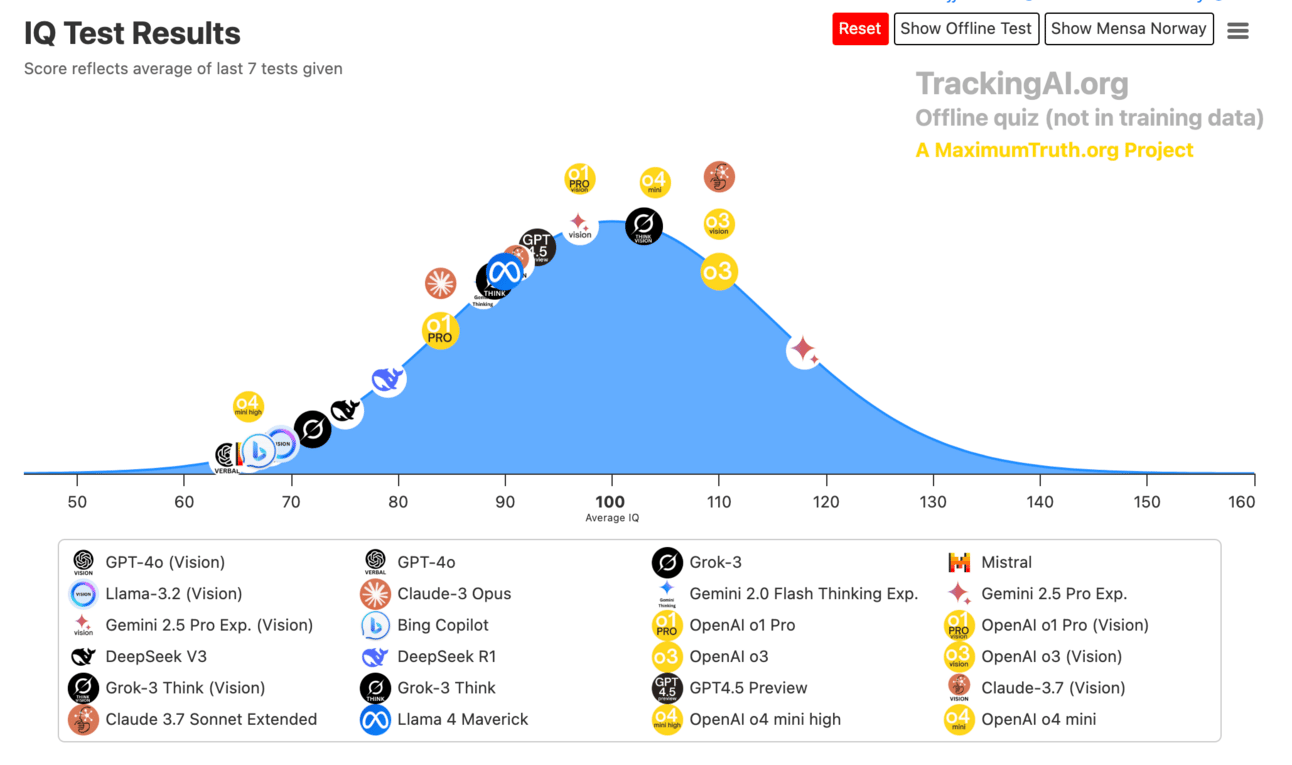
Tracking AI gives you a quick and dirty “what’s the smartest” model overview.
It regularly subjects AI models to IQ-style tests. Whilst this isn’t a foolproof benchmark (spoiler: there aren’t any) it’s a good quick look at the smarter models.
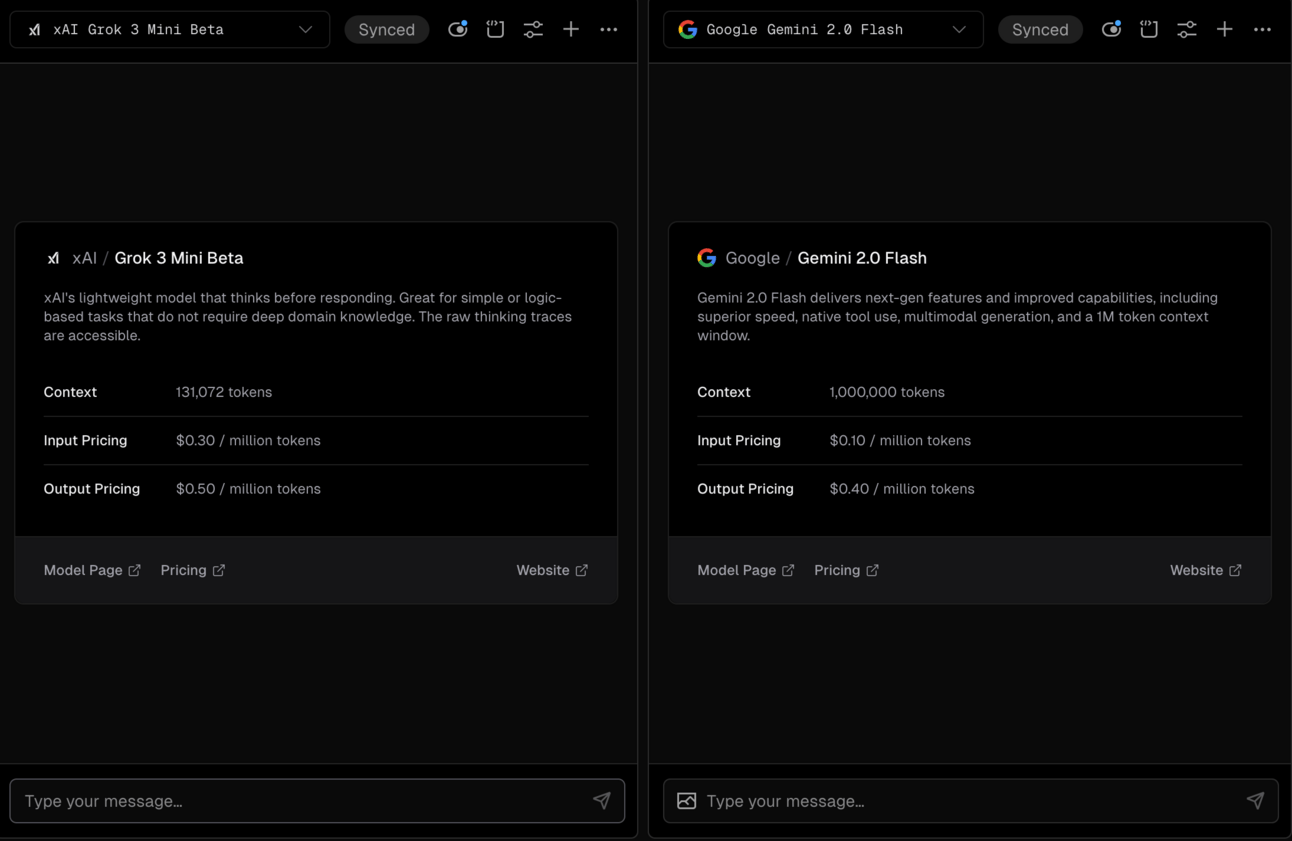
Getting a bit more hands on now. This tool let’s you run side by side tests on two models Rather than relying on generic benchmarks, you can test models on the exact tasks you care about, seeing how different models respond to the same input.
This site combines a comprehensive leaderboard with a side-by-side comparison tool, giving you both the big picture and the ability to run detailed comparisons.
As a user you can actually run prompts and tell LM Arena which model does the best job. This in turn helps LM Arena with the ranking of the models. Unlike the other sites here you actively contribute to the rankings.
These are all useful tools to hone in on potential models for your prompting task. Think of them as a way to give you a shortlist. From here we can further narrow down the options until we find the best model. First though a major warning!
One of the most important concepts to understand when selecting models is the "capability cliff" – the point at which a model becomes good enough for your specific needs. Paying for capabilities beyond this cliff often yields diminishing returns.
For example let’s say you want to build prompts and workflows to answer customer service emails. You would test the same prompt across several models:
Model A (basic): produced usable responses about 65% of the time
Model B (mid-tier): produced usable responses about 85% of the time
Model C (advanced): produced usable responses about 92% of the time
Model D (cutting-edge): produced usable responses about 94% of the time
Seeing this you might naturally think “OK, easy, Model D. We’re done here.”
But quality isn’t the only factor in play here.
Imagine the price difference between Model B and Model D is 10x. Yet the actual improvement in usable outputs was just 9 percentage points.
Huh. OK that changes things.
For the example workflow Model B represents the capability cliff – the point where the model was "good enough" for our needs. At this point (85% reliability at a very low cost) we don’t get much marginal improvement by spending an awful lot more.
We can instead focus on refining from that low-cost result.
To identify the capability cliff for your own use case here’s the rough outline:
Define what "good enough" means for your specific task. This depends on your business! Not on abstract AI benchmarks.
Test increasingly capable models until you reach that threshold
Calculate the effective cost per task for each model
Look for the inflection point where improvements no longer justify increased costs
The ideal model is not always the most advanced one – it's the one that satisfies your requirements at the lowest cost.
For simple content generation, older or smaller models might be perfectly adequate. For complex reasoning tasks, you might indeed need the most advanced options. The right option depends entirely on your goal. So don’t fall into the trap of falling off the cliff Wile E Coyote style!
The other BIG decision factor here is open vs. closed source.
Closed, proprietary models (like GPT-4, Claude, and Gemini) and open-source models (like Llama, Mistral, and various community models) have different pros and cons.
Generally the frontier models - the most advanced - are proprietary. That makes a lot of sense because these companies have a tonne of cash to throw into improving their models!
But for some uses we may want to use an open-source model.
If you're accessing models through their official APIs or web interfaces, the closed vs. open distinction matters less from a technical perspective. You're essentially consuming the model as a service, regardless of whether the underlying technology is open or closed.
What does matter is:
Pricing: Different providers have vastly different pricing models and costs
Data policies: How your inputs are handled, stored, and potentially used for training (may be a big deal for your organisation depending on sensitivity of data!)
Reliability: The guaranteed uptime and performance
For most businesses starting with AI integration, proprietary APIs often provide the path of least resistance, with well-documented interfaces and reliable performance. It’s much easier to spin up a tool using an existing API. The tradeoff is typically higher cost and less control over how your data is handled.
If you're deploying models yourself (or working with a team that is), the closed vs. open distinction becomes absolutely crucial:
Open-source models can be downloaded, run locally, fine-tuned on your data, and modified (via fine-tuning) to suit your specific needs. This gives you maximum control, cost savings at scale, and full data privacy. Llama (by Meta) is generally to go-to here.
Closed models generally cannot be self-hosted.
Self-hosting comes with significant considerations:
Hardware requirements: Larger models require substantial computing resources.
Technical complexity: Deployment and maintenance require specialised knowledge
Optimisation challenges: Getting decent performance will require significant fine tuning
Potential obsolescence: You may spend months fine-tuning a local model only for it to be blown out of the water by the next (closed-source) ChatGPT release
For businesses considering this path, previous Playbooks cover fine-tuning and deployment in more detail. But definitely hire an expert! The key insight is that this approach trades higher initial complexity for greater control and potentially lower long-term costs at scale. It’s a big business decision.
OK! Let’s pull all this together into an actionable decision tree.
If privacy/data sovereignty is paramount:
Consider open-source models that can be run locally or on a private cloud
Example choices: Llama, Mistral, or similar open models
If you need the absolute best performance regardless of cost:
First review whether you actually need the best model (hint: often you don’t!)
If you do, use the latest top-tier commercial models as they are typically at the cutting edge
Specialised tasks might have different leaders (certain models excel at longer content analysis, others at code) - use one of the resources above to hone in on this
If you're cost-sensitive but need good performance:
Consider smaller commercial models, ie. older versions of current top-tier models
Open-source models hosted on affordable platforms
For very high volume (ie. a b2c app), custom-hosting open-source models may be most economical
If speed is critical:
Smaller models generally offer faster inference times
Look for models specifically optimised for speed (again, use the sites above to start this search)
This decision tree provides a starting point, but remember that the landscape changes rapidly! Use the comparison tools we discussed to validate these decisions with current data. The only constant is change!
In this Part we’ve looked at how to navigate the constantly evolving landscape of AI models. Rather than giving you soon-to-be-outdated recommendations, we've focused on equipping you with tools and frameworks to evaluate models yourself based on your specific needs. Hopefully that’s more useful!
Tomorrow, we'll wrap up our week on prompting mastery with advanced reasoning. We'll dive deep into powerful techniques like Chain of Thought, Tree of Thought and reasoning models.
Keep Prompting,
Kyle
I recently had a call with a founder who was frustrated that the new AI models were “getting stupider”.
They were plugging in information as before but the AI was tripping over itself, thinking in loops and generally making a pigs ear of it all.
I asked them to show me.
Turns out they were adding "think step-by-step" to every prompt, just as they'd learned from countless prompting guides!
They weren't doing anything wrong per se. The AI landscape had simply shifted beneath their feet.
Increasingly we have so-called reasoning models.
What we're witnessing is fascinating – modern reasoning models now do much of their thinking internally, automatically breaking problems into steps before responding. Adding explicit step-by-step instructions can actually disrupt this process, like interrupting someone who's already deep in thought and asking what they are thinking about.
As we conclude this Playbook on prompting, let's explore how reasoning techniques are evolving and the new best practices that will keep you ahead of the curve.
Let’s get started:
Understanding the evolution of AI reasoning capabilities
What Chain of Thought actually is and why it revolutionised AI performance
The new approach to reasoning prompts in the modern AI landscape
Six best practices for working with reasoning models
Tree of Thoughts and other advanced techniques for complex problems
Wrapping up our week of prompting mastery
At its core, reasoning in AI is about breaking complex problems into manageable steps, considering multiple perspectives, weighing evidence, and drawing logically sound conclusions.
(Kinda the same with humans. But that’s a different discussion!)
Very crudely we have non-reasoning models and reasoning models:
Early AI models typically jumped straight to conclusions without methodically working through problems. This led to the development of techniques like Chain of Thought prompting, which served as external scaffolding to guide the AI toward more thorough analysis. GPT 3.5 and 4 are examples.
Modern reasoning models now have much of this analytical capability built in. They automatically:
Break complex problems into logical steps
Consider multiple approaches before settling on one
Check their work for errors or inconsistencies
Revise their thinking when they spot potential issues
This internal reasoning happens before you see the response – like the model drafts a detailed analysis, then edits it down to just the essential conclusions.
It’s pretty magical.
Understanding this evolution is crucial for effective prompting. What worked brilliantly with previous generations of models might now be redundant or even counterproductive. We need to adapt our techniques to match the capabilities of the models we're using.
Chain of Thought (CoT) prompting was one of the most significant breakthroughs in getting better performance from AI systems. Before we talk about how it's evolving, let's understand what it actually is and why it was so revolutionary.
At its simplest, Chain of Thought is a prompting technique that asks the AI to break down its thinking process into visible steps before providing an answer. Instead of jumping straight to conclusions, the model shows its reasoning – like working out a math problem on paper instead of just writing the answer.
Here's what CoT looks like in practice…
Standard prompt: "What's the average monthly payment on a £300,000 mortgage at a 4.5% interest rate over a 25-year term?"
This will (more often than not) go horribly wrong. Older models are a bit crap at this sort of mathematical/logical reasoning. You might run the prompt 10 times and get 10 different answers. No bueno.
Instead with a Chain of Thought prompt: "What's the average monthly payment on a £300,000 mortgage at a 4.5% interest rate over a 25-year term? Let's work through this step by step."
With the CoT prompt, the model might respond with something like this:
Let's work through this step by step:
First, I need to convert the annual interest rate to a monthly rate: 4.5% per year ÷ 12 = 0.375% per month
Next, I'll convert this to a decimal: 0.375% = 0.00375
The number of payments will be: 25 years × 12 months = 300 payments
Now I can use the mortgage payment formula: M = P × [r(1+r)^n] ÷ [(1+r)^n - 1] where:
M = monthly payment
P = principal (£300,000)
r = monthly interest rate (0.00375)
n = number of payments (300)
Substituting these values: M = 300,000 × [0.00375(1.00375)^300] ÷ [(1.00375)^300 - 1] M = 300,000 × [0.00375 × 3.0991] ÷ [3.0991 - 1] M = 300,000 × 0.0116 ÷ 2.0991 M = 3,486.36 ÷ 2.0991 M = £1,660.88
Therefore, the monthly payment would be approximately £1,661.
Chain of Thought transformed AI performance for several critical reasons:
1. Error Reduction: By breaking problems into steps, models became much less likely to make calculation errors or logical mistakes. Each intermediate step serves as a checkpoint, keeping the reasoning on track.
2. Complex Problem Solving: CoT allowed models to tackle much more complex problems than they could previously handle. Problems that require multiple steps of reasoning became solvable.
3. Transparency: The visible reasoning gave users insight into how the AI was approaching problems, making it possible to spot where things might be going wrong.
4. Educational Value: The step-by-step approach made AI outputs more useful for learning, as users could follow the reasoning process rather than just seeing the answer. It’s sort of like writing your “workings out” in a maths exam.
5. Confidence Assessment: Users could evaluate the soundness of the AI's reasoning, rather than having to blindly trust its conclusions. Traditional models give us an answer and we have to just hope it’s true! Which is tricky because hallucinations exist!
The impact of CoT can't be overstated – it turned models from simple text predictors into systems capable of sophisticated reasoning across mathematics, logic, planning, and more. It was (and is, in certain situations) a very clever hack to get better results from AI.
Now though we have models that do this for us: reasoning models.
Modern reasoning models now generate their own internal chain-of-thought before responding. Think of the o Series by ChatGPT - o1 and o3 for example. Or any AI that has a “Deep Research” function.
They think through problems step by step, check their work, and sometimes even revise their thinking – all before showing you a single word.
They are running a chain of thought process internally. With some bells and whistles of course!
This changes everything about how we should prompt these models. Rather than forcing the model to show every step of its reasoning, we can now focus on guiding its attention and shaping its output.
This is an evolving field so for now we’ll stick to best practices rather than hard and fast rules. As with everything in AI it’s fluid! Working with modern reasoning models requires a new set of best practices:
1. Guide, don't babysit The AI already “thinks”—just give it a clear job.
Example: "You're a growth-marketer. Suggest 3 paid channels for a $10k budget."
Rather than scripting every step of the thinking process (as we will do with non-reasoning models), focus on clearly defining the task and letting the model's internal reasoning take care of the rest. So in the context of the RISEN framework we can drop the S!
2. Lead with the role Start by telling the model who it is.
Example: "You're a CFO explaining cash flow to non-finance staff..."
Role-based prompting provides context that shapes how the model approaches the problem, without micromanaging its reasoning process. This remains valid with reasoning models - we’re just telling it who to reason as. We retain the R of the RISEN framework.
3. State the output first Spell out format and style before asking.
Example: "Return a 5-bullet checklist, each bullet < 20 words."
By clearly defining what you want the final output to look like, you can let the model handle the reasoning process while ensuring you get a result in exactly the format you need. This is the E of RISEN - still valid!
4. Prototype hot, deploy cold Tinker with loose settings, then lock them down.
Example: Draft ideas at temperature 0.7, final runs at 0.2.
When developing prompts, use higher temperature settings to explore different approaches. Once you've found what works, lower the temperature for consistent, reliable results. This is generally good advice for all prompt engineering but the great variability of reasoning models makes it even more powerful.
5. Budget tokens like cash Extra words = extra cost. Trim the fat.
Example: Paste the exec summary, not the 30-page report.
Since modern models handle reasoning internally, you can focus on providing just the essential information needed, rather than including verbose instructions. This is even more important than with non-reasoning models because of the additional costs associated with them.
6. Build your fallback Use cheaper models for easy jobs, premium for tough ones.
Example: Use advanced models for strategy, simpler models for spell-check.
This practice recognises that not all tasks require sophisticated reasoning – match the model to the complexity of the task. We talk about the capability cliff before. This is particularly the case with reasoning models which tend to be more expensive.
While basic reasoning is now baked into many models (via chain of thought), certain complex problems still benefit from specialised approaches. These are just additional ways to nudge how the AI to think “deeper”. They work with reasoning and non-reasoning models and are worth adding to your toolkit.
Tree of Thoughts encourages the AI to consider multiple solutions before committing to one – similar to how chess players evaluate different moves before choosing.
How it works:
For this [problem/challenge], please:
1. Generate 3 distinct approaches to solving it
2. Briefly evaluate each approach's strengths and limitations
3. Select the most promising approach and develop it into a full solution
This technique is particularly effective for:
Open-ended problems with multiple valid solutions
Creative challenges requiring exploration of different ideas
Complex planning scenarios
Situations where the initial approach might lead to dead ends
Step-back prompting asks the AI to consider the broader context before addressing specifics – like taking a step back to see the whole forest before examining individual trees.
How it works:
Before addressing this specific question about [topic], first consider the broader context, relevant principles, and frameworks an expert would apply. Then provide a focused answer.This approach works particularly well for:
Problems that benefit from contextualising
Situations where jumping to specifics might miss important considerations
Coding problems when the AI is hyper-fixating on something minor(!)
Self-consistency involves having the AI verify its own work using different approaches – like double-checking a calculation using a different method.
How it works:
I need a reliable answer to this problem. Please:
1. Solve it using your primary method
2. Verify the solution using a different approach
3. If there are discrepancies, determine which approach is more reliable and why
This technique is valuable for:
High-stakes decisions where accuracy is crucial
Problems with multiple valid solution methods
Questions where you've previously received inconsistent answers
If you are building workflows or software you might use a less advanced (read:cheaper!) model to check the work of the more advanced model.
These are just supplementals ways to get our AI to solve problems for us. Honestly these are solid human thinking methods! They just become prompting techniques because of the particular context. Rememebr, this is all ultimately communicating what we want the AI to do for us!
We've covered significant ground in our prompting mastery series in this Playbook:
Part 1: The RISEN™ Framework established the foundations of effective prompting through Role, Instructions, Steps, End goal, and Narrowing.
Part 2: Prompting Techniques & Patterns introduced various approaches like zero-shot, few-shot, and role prompting.
Part 3: Apps vs. API showed us the difference between GUI and API versions of AI tools and when to use each.
Part 4: Model Selection & Optimisation helped you navigate the complex landscape of AI models and make informed choices.
Part 5: Advanced Reasoning & Best Practices explored how reasoning techniques are evolving alongside advancing models.
The key insight tying these elements together is adaptability. The most skilled prompt engineers aren't those who memorise rigid templates, but those who understand foundational principles and can adapt them fluidly to different situations and models.
This stuff is always going to be changing. So my only goal with this Playbook was to give you foundations you can apply to whatever models happen to be current at the time you read this guide.
Remember: as AI capabilities continue to advance, the fundamental skill of clear communication with these systems will only grow in importance. A good communicator will have more and more leverage as the models improve.
Lock in now, get the fundamentals down and you will be in a very good position as AI accelerates.
Keep Prompting,
Kyle
Unlock the full potential of AI with '🔤 Prompting Fundamentals', your ultimate guide to mastering the art of communication with artificial intelligence. This playbook is designed to transform your approach to AI by teaching you how to craft effective prompts that yield exceptional results. Whether you're a novice looking to get started or a seasoned user seeking to refine your skills, this playbook will empower you to navigate the AI landscape with confidence and clarity. Dive into the principles of effective prompting and elevate your AI interactions from mediocre to magnificent.
This playbook is designed for business professionals, marketers, and content creators who are eager to harness the power of AI to improve their workflows and outcomes. If you've ever felt overwhelmed by the complexities of AI or frustrated by unsatisfactory results, this playbook is perfect for you. It addresses the common challenges faced by those who struggle with AI communication and provides practical solutions to help you become a proficient AI user.
No technical background is necessary! This playbook focuses on communication skills, making it accessible for everyone regardless of their technical expertise.
You can expect to see improvements in your AI interactions within a few days of applying the techniques outlined in the playbook.
The playbook covers a variety of AI tools and platforms, focusing on general principles that can be applied across different systems.
Absolutely! The insights and frameworks provided can be beneficial for training teams to enhance their AI communication skills collectively.
Yes, subscribers will receive updates and supplementary materials to keep up with the evolving AI landscape.