For the last two years, most of us have been using AI the same way: open a chat, type a question, get an answer, copy-paste it somewhere.
That's fine. But it's level one.
Today I walked through what level three looks like - and Anthropic just made it a LOT more accessible than it used to be.
The word is orchestration. And if you're running a business or trying to build one, this is the skill that turns you from a one-person operation into a one-person operation with a team.
From Prompting to Orchestration
Discussed at 00:25
Here's the progression:
Prompting - You talk to AI. It answers. You copy-paste the output. This is where 99% of people still are. It works. But you're doing all the driving.
Context Engineering - You get smarter about feeding AI the right files, the right memory, the right project context. MCP servers, skills, custom instructions. All that good stuff. The AI gets better because you give it better inputs to work with.
Orchestration - You design a system of specialist agents, manager agents, and review gates - all working in parallel. You're not doing the work. You're not even directing the work in real time. You're building the system and hiring the staff. Then you walk away.
This is new.
Lots of people talked about this in 2025. But it’s finally a reality.
The Restaurant Analogy
Discussed at 06:25
The difference between using AI normally and orchestrating agents is the difference between being a customer in a restaurant and running the kitchen.
Most people walk in, sit down, get served, and leave. That's fine.
But if you want the next level, you need to get into the kitchen. Design the recipes. Manage the chefs. Define the tools. Set the rules. Let the infrastructure run while you sleep.
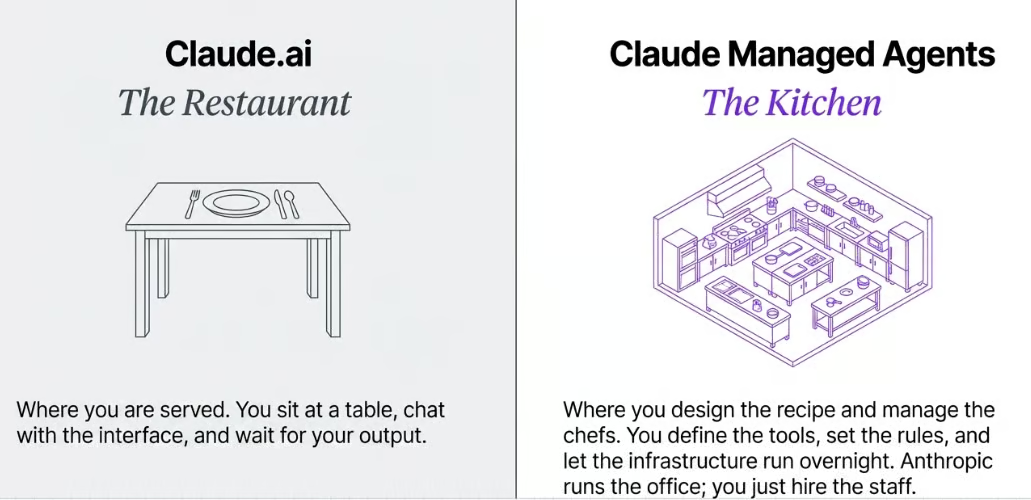
You don't cook every dish. You’re too busy for that. Instead you build the system that produces great dishes consistently. That's basically orchestration.
Cowork vs OpenClaw vs Managed Agents
Discussed at 07:40
This is where people get confused. There are now several ways to run AI agents. They're not the same. And honestly this is all a moving target. There is a lot of overlap. A lot of cribbing each others’ notes. A lot of change.
So I’ll focus on the big “names” for now to help you orientate.
Claude Cowork - An agent on your desktop. It controls your computer, opens windows, fills in forms. Good for sequential tasks. Falls apart if you try to do more than one thing at a time because the agents trip over each other. And it ties up your machine while it's running.
OpenClaw - An agent in your chat. Runs on a dedicated machine (Mac Mini or VPS). Can reach out to you proactively via WhatsApp or Slack. Works well for persistent tasks. But scaling it up or giving other people access gets fiddly fast.
Anthropic Managed Agents (new) - Agents in the cloud. Always on, even when your devices are off. Can run hundreds in parallel. Built for multi-user access. This is the business-grade option - and it just got a lot easier to set up.
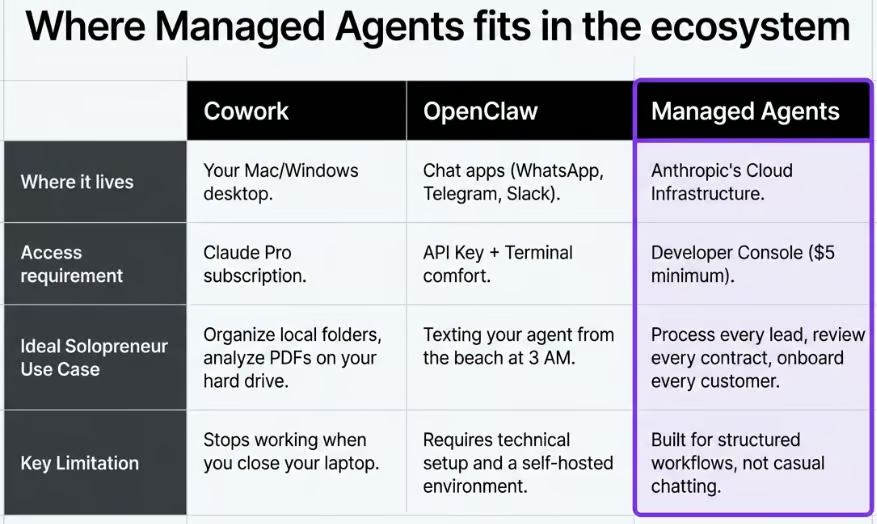
Each has its place. Cowork is great for quick desktop automation. OpenClaw is brilliant for personal always-on assistants. But if you're building something that needs to scale, run 24/7, or serve multiple users - managed agents are where you should be looking.
I use them all. Different tools for different tasks.
The Quick Start Nobody Knows About
Discussed at 14:05
Here's the thing that tripped me up when I first looked at Anthropic's agent platform. If you Google "Claude agents", you get the developer docs. Terminal commands, SDK setup, config files.
This is a screenshot from the “quick start” page:
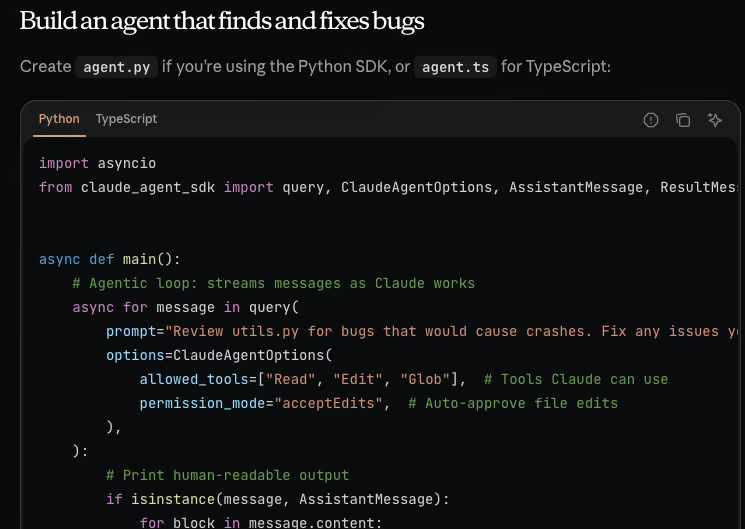
If you're a developer, that's fine. If you're not, you're immediately thinking "this is not for me." And you’ll bounce off.
But Anthropic quietly released a graphical interface inside the managed agents platform. It's a chat window. You just type what you want your agent to do and it builds the config for you.
It looks like this:
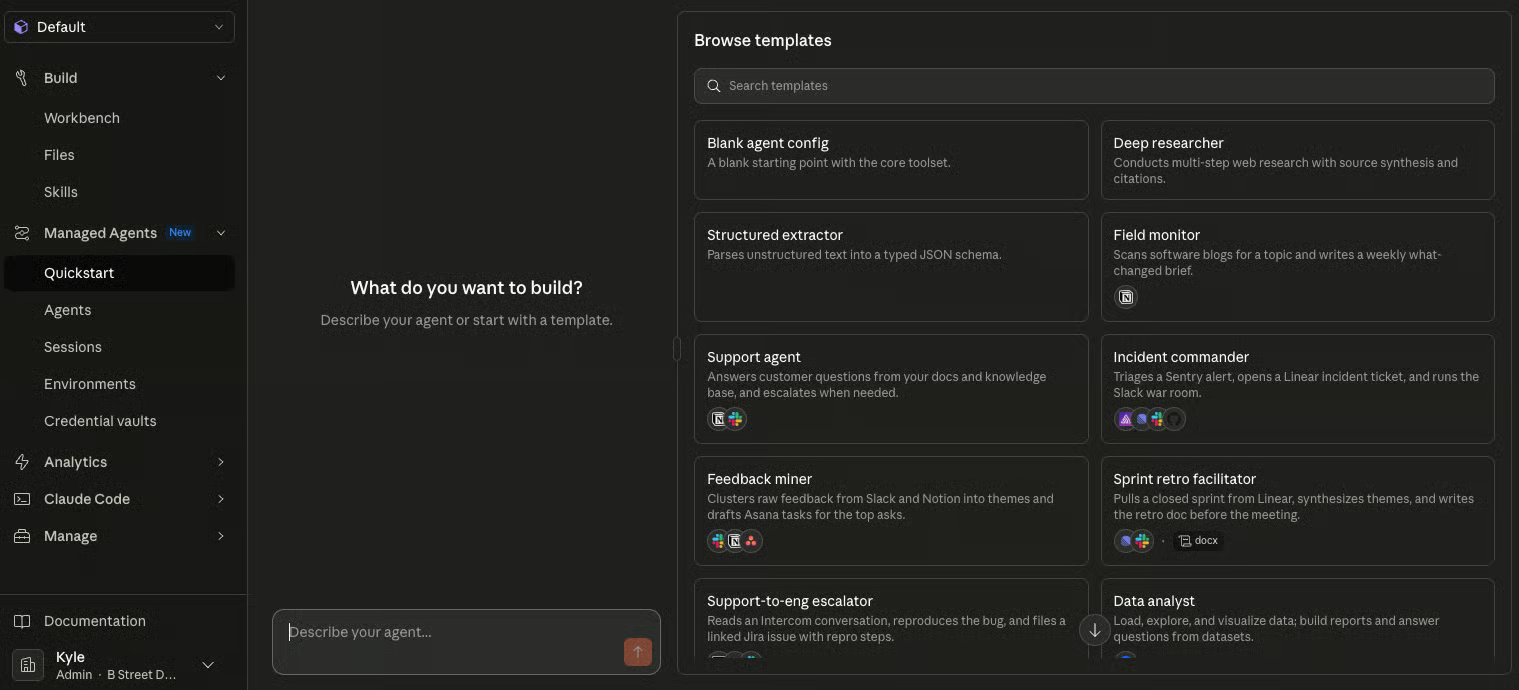
Yay! A chat window!
Go to platform.claude.com. Find Managed Agents in the left sidebar. Click Quick Start.
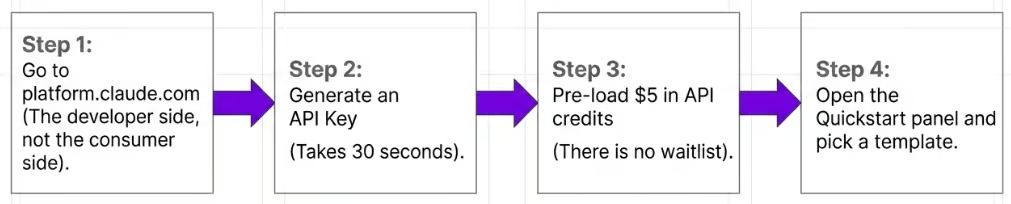
That's it. You describe your agent in plain English. It generates the setup. You click Create. You've got a managed agent running in the cloud.
I built a news scraper agent on stream in about two minutes. It wasn't perfect - Twitter scraping is always a pain - but the point is how accessible this has become. There's also a Guided Edit feature that lets you iterate on your agent through conversation.
This is a signposting problem from Anthropic. The Quick Start GUI is genuinely easy to use but it's buried behind developer docs that scare off non-technical users. If you've been avoiding the agent platform because it looked too complex - go look again. It's changed!
The Anatomy of an Agent
Discussed at 25:35
What you're actually building:
The Brain - Claude (Sonnet, Opus, or Haiku depending on your task and budget). This is your AI model sitting in the middle, doing the thinking.
The Sandbox - A cloud environment on Anthropic's servers. A little walled-off computer dedicated to your agents. It runs when you're sleeping. You control what goes in and out - so your agent can't go rogue and start posting to your social media.
Tools, MCP, and Skills - Everything you've learned in the Anthropic ecosystem applies here. MCP servers for connecting to external services. Skills for specialised capabilities. Files for context.
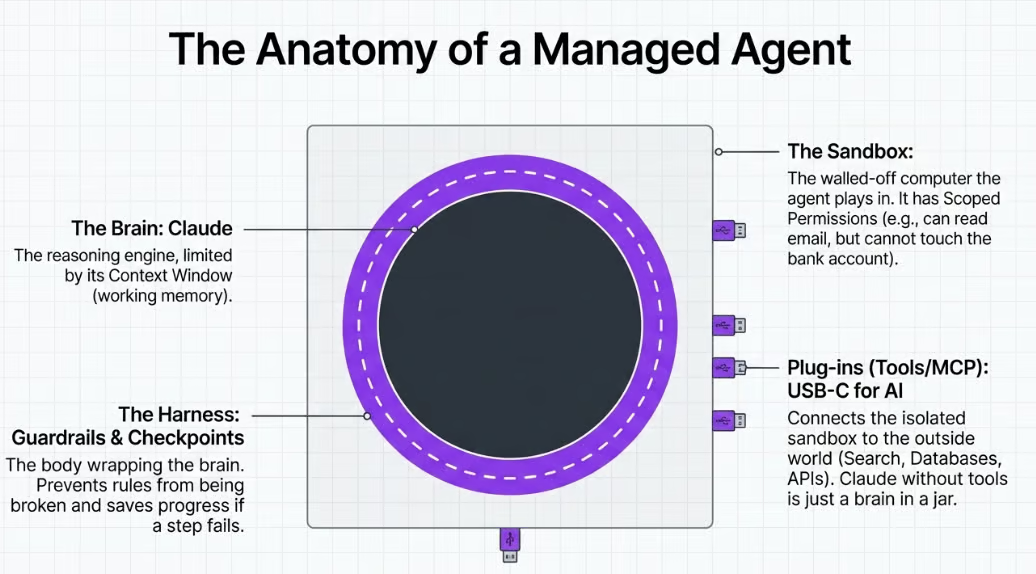
The sandbox is the bit that makes this different from just chatting to Claude. Your agent has a persistent home. It can store files, remember context, and work on schedules. It stays “on” even when you aren’t around.
Multi-Agent Orchestration
Discussed at 27:45
This is where it gets interesting for business.
You build specialist agents for individual tasks. Then you build a manager agent that oversees them all. The manager checks the work, sends it back if it's not good enough, and only passes the final result to you when it meets the standard.
Think of it as literally replicating a human team structure. You've got specialists doing the detail work and a manager making quality decisions. The loop runs until the orchestrator decides the output is good enough. Then it bumps the output over to you the human for final sign-off.
If you've ever managed people, those skills transfer directly. What does this person need to know? What's the quality bar? When do I escalate? Same questions, different team members. It’s just when you provide instructions and training you are talking to an AI not a human.
Someone asked me how to get better at thinking in systems. Some people naturally do it. Others are more detail-oriented.
My honest answer: play Factorio.
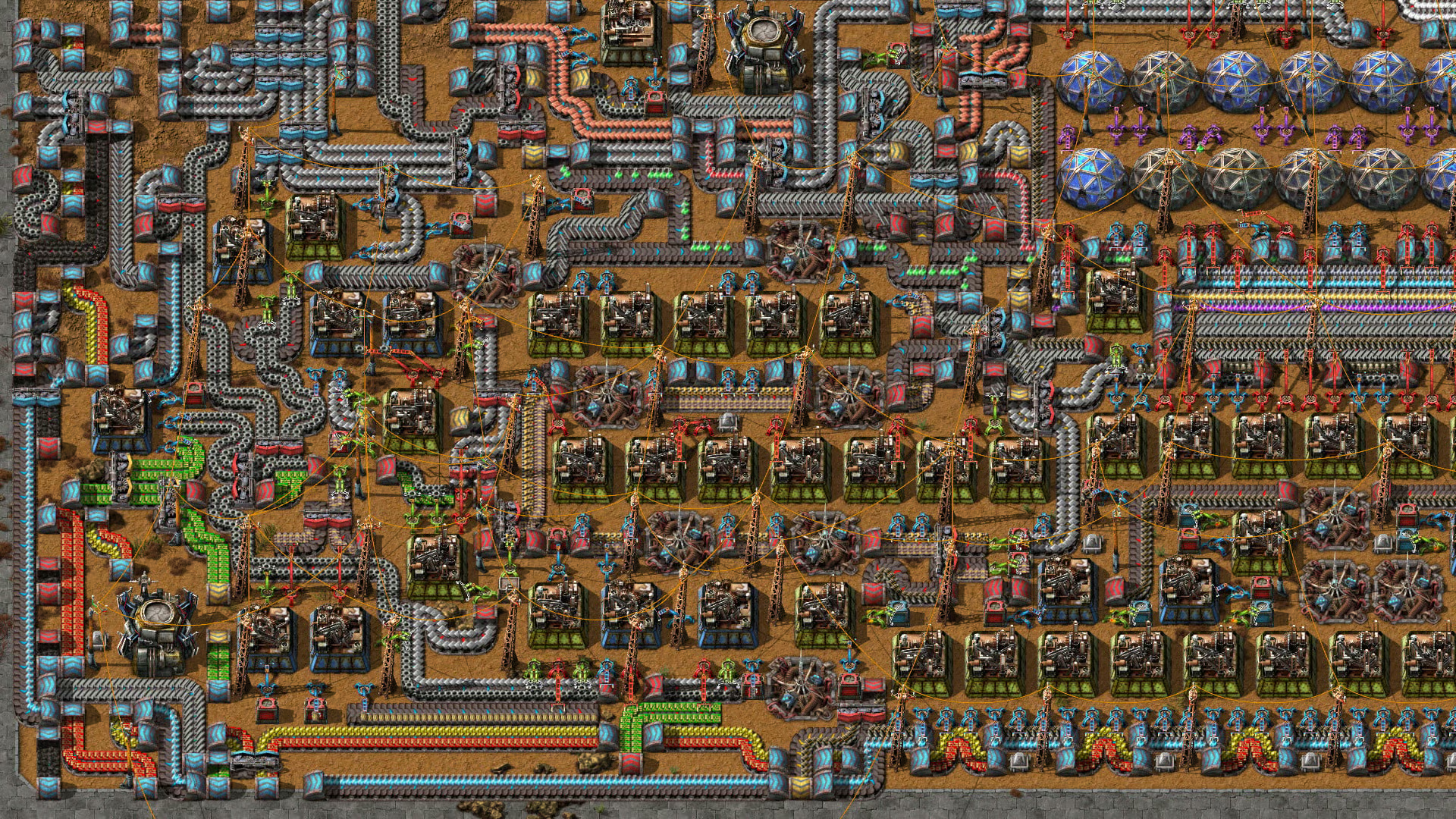
Look at this beautiful mess!
I know that sounds bizarre. But Factorio is a factory-building game that teaches you supply chains, logistics, input-output thinking, and how modules connect - in an incredibly intuitive way. You'll probably learn more about systems thinking in 20 hours of Factorio than in most MBA courses…
For a more traditional (less fun!) route - "Thinking in Systems" by Donella Meadows is the book on this topic. Short, clear, and widely considered the primer.
Orchestration is a different (complimentary) skill to prompting. Prompting is about crafting the right questions. Orchestration is about designing a system that doesn't need you to ask questions. If you naturally think in systems, you'll take to this fast. If you don't - start building that muscle now. It's going to matter.
The Entrepreneur Opportunity
Discussed at 34:00
Two ways to use this if you're building a business:
Build agents into your products. If you're selling a service or SaaS, managed agents can be the brain. I gave the example of company formation on stream - you could build an agent system that collects documents, checks for missing info, compiles everything, and only puts a human at the final review stage. That's a process someone is paying thousands for today.
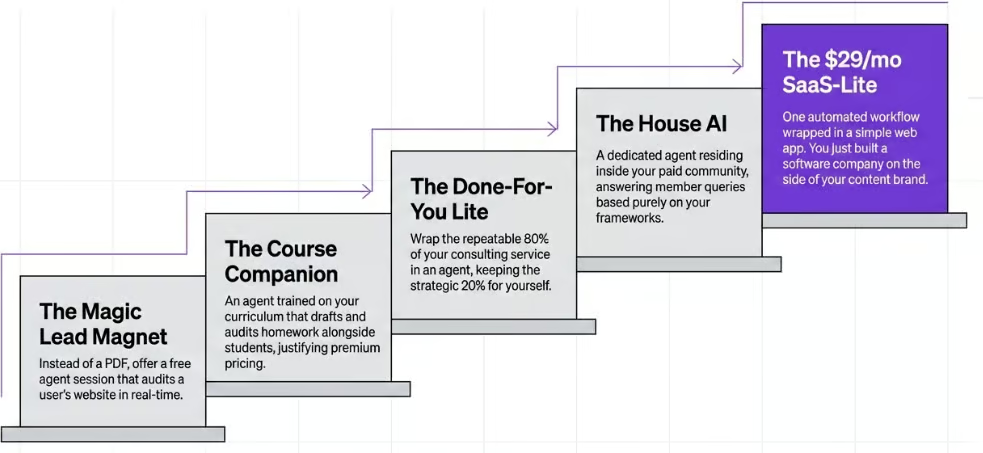
Some examples that would apply to my business
Use agents for your operations. Marketing, bookkeeping, customer acquisition, sales follow-up. The boring operational stuff that eats your time as a solo operator. Build agents for it.
And honestly - if you manage to automate your own operations with agents, start consulting. There's real money in helping other businesses do the same thing right now.
Member Q&A
Discussed at 48:50
Q: How do I get Facebook and Google Ads data into Claude for analysis?
Two pieces: an MCP server to pull the data, and a Skill to analyse it. There are MCP servers for both Google Ads and Meta Ads. For the analysis side, there's a skill by AgriciDaniel that runs 250+ checks across Google, Meta, YouTube, LinkedIn, and TikTok - weighted scoring, industry templates, creative generation. Link here: https://github.com/AgriciDaniel/claude-ads
Install both in Claude Code. Tell it what you want. It'll handle the connection and permissions.
Q: Web search doesn't work for finding tweets. What do I use instead?
Two options. Exa - a web search API that's much better at getting through to Twitter content. Or Apify - a scraping service with a dedicated tweet scraper. I built a tool yesterday that takes a tweet URL, scrapes it through Apify, and generates video scripts from it. Cost per scrape is basically nothing - $0.00004.
Kyle
Get the full daily digest in your inbox. Browse recent issues →