
I was at a VC event last week focused on AI and VC investing. The room was buzzing with talk about ecosystem plays, enterprise software, and nine-figure fundraising rounds. Fancy suits, impressive slides, and lots of talk about "AI-powered solutions."
And the whole time I was sitting there thinking: Yikes. These folks are missing something massive.
Why? Because the ground is shifting beneath the entire software industry in two fundamental ways:
First, new entrants can now spin up enterprise-grade software and compete with established players like Salesforce or Quickbooks almost overnight. The building limitations that once required teams of hundreds of engineers are collapsing. A small team – or even a solo founder – with the right AI tools can build sophisticated applications that would have been unthinkable just months ago.
Second, and perhaps more disruptive, end users themselves are starting to bypass SaaS products entirely. Tired of that stupidly expensive Typeform subscription? No problem. Just head to your AI coding tool of choice and say "Hey, I want to make my own form builder" and off you go. Sound like an exaggeration? It's not as far-fetched as you might think. I've seen non-technical entrepreneurs build custom solutions in hours that would have previously taken weeks and thousands of dollars.
AND, importantly, it’s getting easier and easier to build.
Nothing encapsulates this transformative trend better than "vibe coding" – the phenomenon we'll be exploring throughout this five-part Playbook series.
Let's get started:
What vibe coding is and why it matters
The collapse of traditional software development barriers
Real-world examples of vibe coding in action
Why entrepreneurs should care (and how to capitalise)
Limitations and challenges to be aware of
The term "vibe coding" was coined by Andrej Karpathy (former AI director at Tesla and co-founder of OpenAI) in February 2025. He described it as a new approach where you "fully give in to the vibes, embrace exponentials, and forget that the code even exists."
In practice, vibe coding means collaborating with AI to build software through natural language conversation rather than manually typing out code. You describe what you want – often conversationally or even verbally – and the AI generates, refines, and troubleshoots the code for you.
Like using ChatGPT normally but instead of information as the output you get software.
As Karpathy put it: "I just see stuff, say stuff, run stuff, and copy paste stuff, and it mostly works."
This is fundamentally different from traditional coding. Instead of needing to understand every line of code, syntax rule, and programming concept, you're focused on communicating your intent and desired outcome. The AI handles the technical implementation.
This doesn't mean the code quality is poor. In fact, the latest AI tools often produce clean, well-documented code that follows best practices. What's changed is who needs to understand that code at a detailed level.
For entrepreneurs specifically, this shift is nothing short of revolutionary.
Drastically Lower Technical Barriers: You no longer need to be a programmer – or hire a team of them – to build software. This democratises software creation for people with business expertise but limited technical skills. I’ll show you how you can spin up and deploy your own software within a couple of hours.
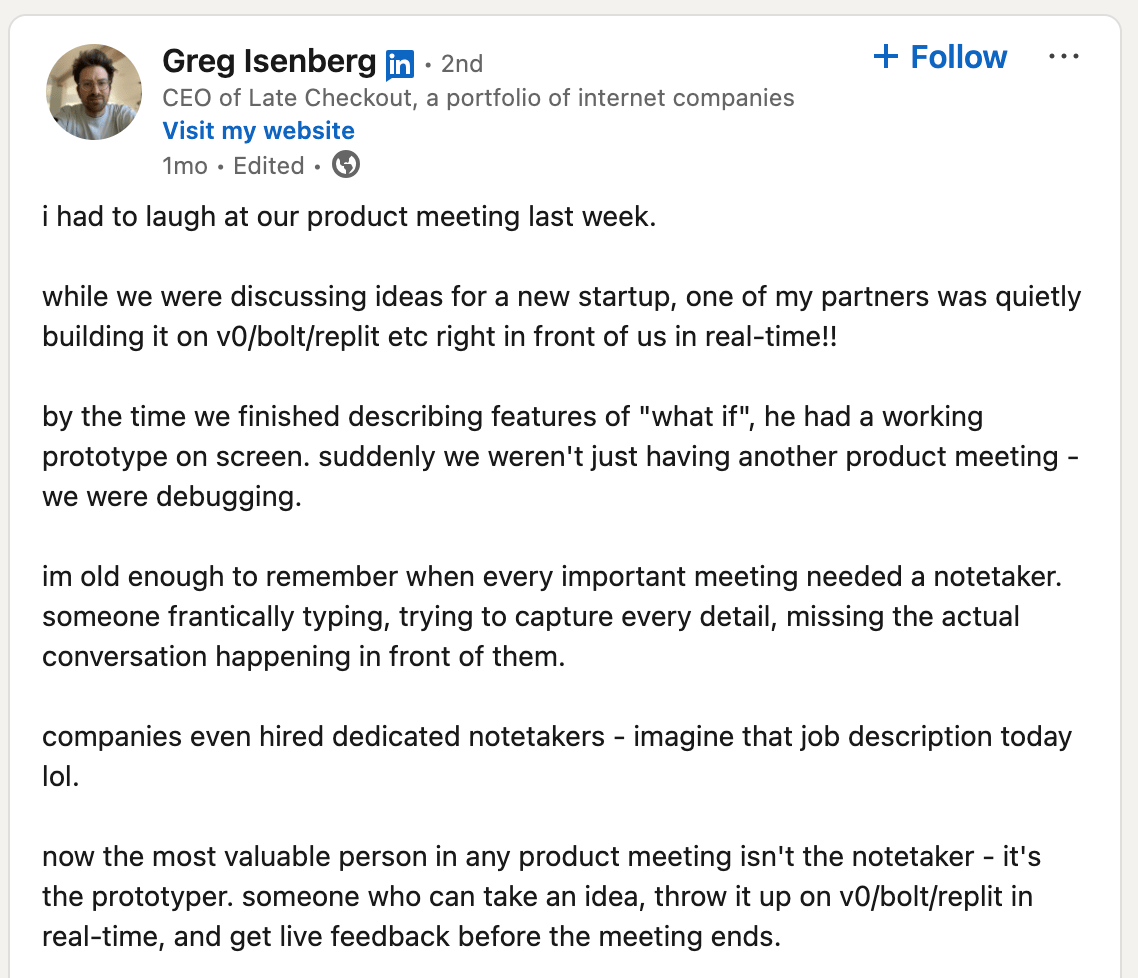
Accelerated Prototyping and Iteration: What might have taken weeks can now happen in hours or even minutes. This means faster feedback cycles and the ability to pivot quickly based on user feedback. You can go from “oooh it would be cool if…” to a functioning prototype in minutes:
Reduced Capital Requirements: Building an MVP no longer requires significant upfront investment in engineering talent. This changes the economics of launching a software business - it’s not about raising capital upfront and then building. It’s about building and generating revenue.
In March 2025, Jared Friedman of Y Combinator revealed that approximately 25% of startups in their current batch have codebases that are 95% AI-generated. That's a staggering statistic, suggesting we're at the beginning of a fundamental shift in how software gets built. This would have been inconceivable a year prior.
The skinny here for entrepreneurs is this: we are generally great at ideas but need help making them reality, especially for software where we need engineers. Now we can go from idea to a working tool ourselves, fast and cost effectively.
I can hear your brain humming with possibilities already…
Of course, vibe coding isn't magic even if “any sufficiently advanced technology is indistinguishable from magic!”
It comes with limitations and considerations.
Remember - as Karpathy put it: "I just see stuff, say stuff, run stuff, and copy paste stuff, and it mostly works."
That “mostly” there is doing some heavy lifting.
What kind of limitations are we talking about:
Complex applications may still require traditional coding approaches or at least a deeper understanding of the code being generated.
Some tools are just too “big” (the sheer amount in the codebase) for current AIs to be able to work on efficiently.
AI tools can generate bugs, security vulnerabilities, or inefficient code that requires human intervention.
For production applications, some level of code understanding is still valuable for maintenance and troubleshooting.
Not all types of software are equally suited to this approach (yet!).
These limitations are shrinking by the day as AI coding assistants become more capable. What was impossible six months ago is routine today, and the pace of improvement shows no signs of slowing.
But they are worth keeping in mind. This will be important especially when we choose our first project in the next Part - we’re not going to try to build a new Netflix right out of the gate.
The best way to understand vibe coding is to experience it firsthand. Tools like Cursor, Replit and Windsurf are making this approach accessible to anyone with an idea and a willingness to experiment.
I personally use Cursor but honestly all the tools are pretty solid! I’ll talk about options later.
Over the next four Parts of this playbook, we'll walk through:
How to identify the right project ideas for vibe coding
Selecting and mastering the tools in the vibe coding ecosystem
The step-by-step process of bringing your idea to life through vibe coding
Strategies for scaling, commercialising, and evolving your vibe-coded creations
By the end of this Playbook, you'll be equipped to harness this revolutionary approach for your own entrepreneurial ideas.
In Part 2, we'll dive into the ideation process. We'll explore how to identify problems that are well-suited for vibe coding solutions and how to scope your projects for success. This will make or break your first foray into vibe coding, hence spending some time here.
Whether you're a seasoned entrepreneur looking to build faster or someone with great ideas but limited technical skills, vibe coding opens up some really exciting new possibilities. We’ll cover this exciting (and very new) topic over the rest of the week!
Keep Prompting,
Kyle
I had the brilliant idea to build a video recording tool like TikTok but on desktop.
I LOVE the start/stop/start recoding interface of TikTok and Instagram because it lets you get a whole video done without needing to memorise the script. And bizarrely there’s no way to do it on a desktop/laptop - which would allow high quality camera to be used.
So I thought - I’ll just whip one up myself!
The project quickly spiralled into a nightmare of video capture APIs, encoding issues, and something called "transmuxing" (I still don't fully understand what that is).
After days of (sorta fun…) struggle, I did eventually get it working, but only because I'm pathologically stubborn and was actively trying to avoid doing my actual work.
Don't do what I did!
This experience taught me a valuable lesson: your first vibe coding project should be carefully chosen to set you up for success, not a multi-day exercise in teeth-grinding determination.
Let's get started:
Why your first project choice matters enormously
Criteria for selecting suitable vibe coding starter projects
Framework for evaluating your project ideas
Practical exercises to define your project scope
Ready-to-use starter ideas if you're stuck
The project you choose for your first vibe coding experience will largely determine whether you:
Finish it and feel empowered by the experience
Get stuck halfway and conclude this approach isn't for you
Abandon it within the first hour and never try again
This isn't about your intelligence or ability—it's about setting yourself up for success by choosing a project that aligns with the current capabilities of AI tools and your comfort level with them.
Honestly if we get this part right we’ve dealt with 95% of the struggle.
Once we have a solid basic project in place then the AI tools will do a LOT of the heavy lifting, allowing us to build both the project and confidence very quickly.
But if we choose the wrong project we’ll get crappy results and probably abandon the whole idea. No bueno.
We want option #1, where you finish the project, see tangible results, and build momentum that carries you forward to increasingly kick-ass projects.
OK that’s all well and good but what makes a good starter project.
I’m not just going to tell you to do a dumb “Hello World” project. AI tools and vibe coding let us actually build something genuinely awesome very quickly.
So here are a couple of criteria to think about follow by (of course) a prompt to bring it all together.
Choose something that solves a real problem you face regularly. It could be a small business or productivity issue you encounter daily.
Why? Because motivation matters. When you're building something with actual utility for yourself, you're far more likely to push through obstacles.
Like my stupid video recording tool. I pushed through for days because I knew it would save me countless hours of time later and allow me to up my video production quality.
Most textbooks give you random coding exercises. There’s no skin in the game - who cares if it works or not? An abstract exercise is easy to abandon when challenges arise, but a tool that will make your life better tomorrow? That's worth a bit of struggle.
As a bonus, you'll have a much clearer vision of what "good" looks like if it's solving your own problem. Because you’ll run it and know whether or not it’s fit for the job or…a. bit crap!
This could also be called “Don’t build a video recording app like me…”
For your first project, stick to applications that primarily deal with text—both as input and output.
Sure, it's absolutely possible to build apps that handle video, audio, or images (like thumbnail generators or screen recorders), but these involve additional complexity that's best avoided when you're just starting out.
Once you've got a text-based project under your belt, by all means, tackle those more complex media types in your next project. But for now, let's keep it simple.
This might sound counterintuitive. After all, we're using AI to code, so why not build an AI app?
The reason is straightforward: building an app that connects to OpenAI, Anthropic, or Gemini's APIs adds extra layers of complexity. You need to handle API keys, manage prompt engineering, and deal with token limitations and costs.
Again - all very doable but as a next step.
Instead, focus on creating a "static" application first—one that doesn't need to make calls to external AI services. We're using AI to create the app, but the app itself doesn't need to be AI-powered just yet.
Stick to building a “web app” (web application) for your first project, not an iOS or Android app. Web apps are significantly easier to develop, test, and deploy—especially for beginners. Don’t worry if you aren’t sure what this is.
With a web app, you can focus on core functionality without worrying about app store approvals, platform-specific requirements, or device compatibility issues. Plus, you can easily run it locally during development and deploy it simply with services like Vercel, Netlify, or Replit.
The tech stack is usually simpler too—typically HTML, CSS, JavaScript and perhaps a bit of Python. These are languages that AI coding assistants excel at generating.
Your first project shouldn't take more than a couple of hours from idea to functional prototype. This isn't the time to build your unicorn startup's entire platform.
You can always expand your app later. Starting small and growing is far more satisfying than starting ambitious and getting stuck.
Remember: Zuckerberg’s Facebook (sorry, The Facebook!) started as a profile page for drunk Harvard students. It took time to get to what we now know as Meta.

Here's a prompt to help you generate and evaluate some potential project ideas:
You are an experienced software developer and entrepreneur who specialises in helping non-technical founders build their first applications. I need your help identifying a small, useful project I can build as my first vibe coding experience.

Please ask me these questions one by one, waiting for my answer to each before proceeding:

1. What are 2-3 repetitive tasks or minor frustrations you encounter in your daily work or personal life?

2. Do you have any specific business or productivity tools you use regularly but find lacking in certain features?

3. Is there any information you regularly need to process, organise, or transform?

After I answer these questions, please:

1. Suggest 3-5 potential project ideas based on my answers, prioritising:
   - Text-based input and output
   - Practical utility in my daily life
   - Low technical complexity, single functionality, not a mobile app
   - No requirement for external AI API integration

2. For each idea, provide:
   - A clear title and one-sentence description
   - The core problem it solves
   - A simple explanation of how it would work
   - A "complexity score" from 1-10, where 1 is very simple and 10 is very complex
   - Why it's a good (or bad) candidate for a first vibe coding project

3. Help me choose the best option based on:
   - My level of technical comfort
   - The utility of the solution
   - The likelihood of completing it within 2-3 hours
Use this prompt with your preferred AI assistant to help you identify a suitable first project. Remember to be honest about your technical comfort level - it’s totally ok to say “I have no idea what I’m doing” because (as we’ll see) we can work with that when vibe coding.
Still not sure what to build? Here is a mega list of simple projects that make excellent first vibe coding experiences - https://github.com/karan/Projects
In Part 3, we'll explore the vibe coding toolkit—the specific tools and approaches that make this new development paradigm possible.
We'll also tackle an important question: "Do you need to learn to code?" (Spoiler: not exactly, but there's nuance here we'll unpack…)
Keep Prompting,
Kyle
This is the boring but important setup required to start vibe coding.
It’s also (annoyingly!) some of the more “technical” stuff.
We just need to break on through to the other side. And thankfully once you’ve done it with your first project next time is much simpler.
Let's get started:
Choosing the right tools for vibe coding
Setting up Cursor for maximum efficiency
Establishing ground rules for your AI pair programmer
From idea to technical plan: mapping your build
Do you really need to learn to code?
While there are many tools that can support vibe coding, they broadly fall into three categories:
AI Assistants: ChatGPT, Claude, Gemini, etc. You describe what you want, and they generate code for you to copy/paste.
AI-Enhanced Code Editors: Cursor, Windsurf, Replit, etc. These integrate AI directly into your development environment.
No-Code AI Tools: Bolt, Lovable, etc. These aim to generate entire applications from descriptions, with minimal technical involvement.
I've written an entire Playbook comparing these different tools, but for this series, I'll focus primarily on Cursor. It's what I personally use every day, and I've found it to be the most powerful option for serious vibe coding.
Helpfully it’s also what most tutorials and guides use so it’s a good choice for future learning once you’ve finished with this Playbook.
Cursor stands out for several reasons:
It's built specifically for coding with AI (not just bolted on as an afterthought)
It offers powerful code generation, editing, and debugging capabilities
It allows for natural conversation with your code
It supports a wide range of programming languages and frameworks…like, all of them?
Getting started with Cursor is straightforward:
Download and install Cursor from Cursor.com
Set up an account (free tier is available, though Pro offers better features)
Once installed, you'll notice Cursor looks like a regular code editor, but with some key differences:
A chat interface in the bottom panel (open with Cmd+L or Ctrl+L)
AI actions integrated throughout the interface
Special commands for AI operations (Cmd+K or Ctrl+K)
The basic workflow in Cursor follows these steps:
Create a new project or open an existing one
Use the chat panel to talk with the AI about what you want to build
Work with the AI collaboratively as it generates code
Before we start planning our project, let's establish some ground rules for how the AI should work with you. In Cursor, this is done through a feature called "Rules."
Think of rules as instructions that guide how the AI behaves throughout your project. By setting these up first, you'll have a much more consistent and helpful experience.
Here's how to set up rules in Cursor:
Open the command palette (Cmd+Shift+P or Ctrl+Shift+P)
Type "New Cursor Rule" and select it
Name your rule (e.g., "Vibe Coding Rules")
Paste in the rules below
Here's a comprehensive set of guidelines specifically designed for successful vibe coding:
# Vibe Coding Collaboration Guidelines

## General Approach
- Follow the user's requirements carefully and to the letter
- First think step-by-step - describe your plan for what to build in pseudocode, written out in detail
- Confirm understanding before writing code
- Break down complex tasks into smaller, manageable steps instead of trying to generate everything at once
- When unsure about requirements, ask clarifying questions
- Present multiple options when there are different valid approaches

## Code Quality
- Write correct, best practice, DRY (Don't Repeat Yourself), bug-free, fully functional code
- Focus on readable, clean code over being performant
- Write well-documented code with appropriate comments
- Use descriptive variable and function names
- Include error handling for robust operation
- Fully implement all requested functionality
- Leave NO TODOs, placeholders, or missing pieces
- Ensure code is complete and verify it is thoroughly finalized
- Include all required imports and ensure proper naming of key components

## Communication Style
- Be concise and minimize unnecessary prose
- Describe what you're doing and why at each step
- When suggesting changes, explain the rationale
- If you notice potential issues, flag them proactively
- If you don't know the answer, say so instead of guessing
- If you think there might not be a correct answer, say so

## Learning Support
- Explain key concepts when introducing new techniques
- Include brief comments explaining non-obvious code
- When using libraries/frameworks, explain their purpose
- Suggest resources for further learning on relevant topics
These rules strike a balance between guiding the AI to produce high-quality code and ensuring it communicates effectively with you throughout the process, regardless of your experience level.
Importantly it will also help you learn - the rules in the last paragraph see to this.
You can also use other sets of rules - there are whole libraries of them like this: Cursor.Directory
Now that you have your tool set up and your rules in place, it's time to transform your project idea into a concrete plan.
This means determining what technologies to use, how to structure your project, and what the steps to building it are.
Technically we can just give our idea to Cursor and let it have at it! There’s even a YOLO mode that gives it extra powers to build.
But this requires more confidence. First let’s build with Cursor and later we can test out the wilder modes.
Specifically we don’t want Cursor to try to “one-shot” our tool. That means doing it all in one go. It can work with very simple programmes but for anything beyond the base level it works better to carve up the build and deal with it piece by piece.
Here's a prompt to help you get a solid technical plan from Cursor:
I want to build [YOUR PROJECT DESCRIPTION].

Based on this idea, please help me create a technical plan. I'm looking for:

1. The simplest, most appropriate tech stack for this project
   - Recommend 2-3 options with pros/cons
   - Default to web technologies that are beginner-friendly
   - Suggest the easiest deployment path

2. A project structure outline
   - Key files and components needed
   - How data will flow through the application
   - Any APIs or external services required

3. A step-by-step building plan
   - Break this down into small, achievable milestones
   - Start with core functionality, then add features
   - Identify potential challenges and solutions

Please think through this carefully before responding, and help me understand the reasoning behind your recommendations.
As always with AI the more details about your project and end goals you give it the better. Don’t be afraid to absolutely info-dump Cursor!
This prompt will guide your AI assistant to help you transform your idea into a concrete technical plan. You'll get recommendations on programming languages, frameworks, file structures, and development steps.
And importantly it’ll explain why it is making recommendations.
The key here is working with AI in a collaborative, iterative way—don't just accept the first suggestion. Ask questions, explore alternatives, and make sure you understand the recommendations before proceeding.
If it’s the first time you’ve ever coded anything then you’ll probably go along with its suggestions. And that’s totally fine - it knows a lot! But as you gain confidence you’ll start to be able to push back and work more as a co-builder.
This is perhaps the most common question I get about vibe coding, and my answer might surprise you.
No, you don't need to be a programmer to start vibe coding—but you'll naturally become one through the process.
Traditional coding education often follows this path:
Learn programming concepts
Study a language's syntax
Practice with exercises
Eventually build something useful
With vibe coding, this process is inverted:
Start building something useful
Learn concepts as needed
Absorb syntax through exposure
Gradually understand programming principles
It's like learning a language through immersion rather than textbooks. You might not understand everything initially, but you'll pick up patterns and principles as you go.
Personally this has how I’ve always learned languages - when I wanted to learn Spanish I went and lived in Guatemala for 6 months. Mandarin? 3 years in Beijing.
Immersion and just “using” the skill works really well. However we need to be very careful to not pick up bad habits along the way.
In the case of coding I’d recommend also learning some basics so that you understand what Cursor is doing and telling you.
I would recommend learning some basic Python specifically.
Every coder will tell you something different here but Python is a solid place to start. It’s also the de facto language used in AI circles which is handy if you ever move in that direction.
Here’s a good Youtube to get started:
If prefer books then this one is great: Python Crash Course.
What you learn about Python can be adapted to other languages like JavaScript. Sure the syntax and particulars change but the basic idea behind most programming languages is the same.
Here’s the kicker though - I don’t recommend you pause building until you’ve learned Python!
Start building, hit problems and work out how to get through them.
Exactly the same method I preach for starting a business interestingly!
I’ve built some of this into the rules above but you can always ask Cursor for more assistance. Literally think of it as a tutor sitting with you - what a resource!
Here are some strategies to maximise learning while vibe coding:
Ask the AI to Explain: When Cursor generates code, ask it to walk through what it's doing and why. For example: "Can you explain how this function works?"
Use Tutorial Mode: Explicitly tell Cursor you're learning: "I'm new to web development. Can you explain this code as if you're teaching me?"
Take an Inquisitive Approach: Instead of asking for specific implementations, ask about options: "What are different ways I could implement this feature? What are the trade-offs?"
These are all general best practices when using AI so, as someone who has been using my Playbooks, this will all come naturally to you!
OK we’re set up!
In Part 4, we'll dive into the actual process of building your project through vibe coding. We'll explore effective prompting strategies, develop a structured approach to working with AI, and walk through handling errors and iterations.
We'll also look at how to use conversation tools like directly chatting (verbally!) with Cursor to make the development process feel more natural and collaborative.
Keep Prompting,
Kyle
Last time we set up our environment and created our technical plan. Now comes the really fun part – watching your app come to life through the power of conversation!
I can’t emphasise enough that you need to just try this.
Even if you’ve never coded a line in your life … this is doable.
And it’s legitimately magical to watch.
Let's get started:
Initiating the build through conversation
Conversational development techniques
Handling errors and the "whack-a-mole" challenge
Iterative refinement strategies
Practical tips for smooth vibe coding sessions
Before we dive in, a quick acknowledgment: every project is unique. The specific steps you'll take will depend on your project, your preferences, and even the idiosyncrasies of your AI assistant on a given day! So consider what follows as a flexible framework rather than a rigid formula. The beauty of vibe coding is its adaptability to your particular needs and style.
For this reason this particular Part will be fairly fast and loose - it’s a set of guidelines rather than a specific step by step.
Vibe coding is fundamentally a conversation, not a coding session. This shift in approach is what makes it accessible to non-programmers and faster for experienced developers.
Rather than focusing on how to implement features, think about what you want to achieve. Instead of getting lost in technical details ("I need to create an event listener on the form element that prevents default submission..."), just describe your goal in plain everyday language: "When someone fills out the form and clicks 'Add Task', I want to save their task and show it in the list."
This is a phenomenal shift in how we build.
The beauty of this approach is that you can express yourself naturally, building your application through a series of conversational requests:
"Can we make the task items look nicer? Maybe add some spacing and a border."
"I'd like to show the date when each task was created."
"Let's make completed tasks show with a strikethrough and faded colour."
Each request builds upon the previous one, creating a natural development flow.
The closest we had to this before was hiring engineers and developers and giving them instructions.
But unlike developers Cursor won’t get mad if you change a button’s design 7 times. It’s infinitely patient, works 24/7 and gives you results in seconds.
Certain conversation patterns tend to be particularly effective when vibe coding. These may come second nature to you but if not here are some useful phrases to test out:
The "How Would We" Pattern: Invites the AI to explain an approach before implementing it "How would we implement a feature that lets users categorise their tasks?". You are working alongside Cursor so can get thoughts before any actions are performed.
The "I Notice" Pattern: Focuses on observed behaviour and desired changes "I notice the tasks disappear when I refresh the page. How can we make them persist?"
The "Can You Show Me" Pattern: Useful when you want to learn as you build "Can you show me how to add a search feature to filter tasks by keyword?" This puts Cursor into a tutoring mode where it won’t focus as much on implementing your requests as it will showing you how to achieve something.
The "Let's Try" Pattern: Signals experimentation and encourages creative solutions "Let's try using a different colour scheme for the app." If you want Cursor to let its hair down a little go ahead and tell it to! It won’t know otherwise - like any other AI tool!
These conversational tactics help you guide the development process naturally, without needing to understand all the technical details yourself. Just imagine you are sitting with your technical co-founder and working through the build together. If you don’t know what’s happening: ASK.
It’ll all go swimmingly initially.
Until it doesn’t.
Suddenly what you are building won’t “work”.
A bug will occur. Some weird behaviour. Or maybe your app stops even loading.
Every development process encounters errors and obstacles. It’s often the majority of the work honestly…
In vibe coding, troubleshooting becomes more conversational and often more intuitive than traditional debugging.
The most basic is “um…it’s not working”.
But we can do better than that.
When you run into specific errors:
Copy and share the error message - "I'm getting this error when I try to run the app: [paste error message]. What's causing this and how can we fix it?". This is good practice when talking to an IT helpdesk anyway - show them what you are seeing. We do this with Cursor so it can know what the problem is and how to fix it.
Describe unexpected behaviour - "When I click the delete button, it's removing the wrong task from the list. Any idea why that might be happening?" This helps when there’s no specific error message. You have to describe what’s wrong. Again, the more detail the better!
Ask for alternatives - "This approach seems to be causing issues. Is there a simpler way we could implement this feature?" If you keep hitting similar issues then we can always ask for different ways to approach the problem.
One particularly common experience in Cursor (annoyingly!) is what I call the "whack-a-mole" problem – fix one bug, and another pops up. Sometimes the new bug is actually an old one that you thought was already fixed!
It’s…infuriating to say the least.
We can’t just yell “Oi, we fixed that one already” unfortunately.
If you find yourself in a fix-break-fix loop, try this approach:
"We seem to be in a cycle where fixing one issue causes another. Can you help me understand the underlying problem that might be causing these related bugs, and suggest a more comprehensive solution?"
Often, the AI will identify a fundamental issue in the approach or architecture that's causing these ripple effects. By addressing the root cause rather than individual symptoms, you can break out of these frustrating loops.
Now, this is where knowing code is very very helpful because you’ll be more able to dig yourself out. You’ll see what silly mistake Cursor is making and understand what needs to be done. Without this knowledge we can absolutely find a way out but we rely more on Cursor - tricky because it’s Cursor and the AI model making the mistakes in the first place!
Let’s fire off some more tips in no particular order. Sorry for the disarray - that’s vibes for you!
Start fresh for major features - The AI's context window can get cluttered after a long conversation. For major new features, consider starting a fresh chat.
Document key decisions - Ask the AI to add comments explaining important decisions: "Can you add comments to explain how the task sorting logic works?"
Capture valuable explanations - Take screenshots or notes when the AI provides especially useful explanations or approaches. Chats can get long and this can get lost.
Set expectations for each session - "In today's session, I want to focus on implementing the calendar view for tasks with due dates." This is as much for you as Cursor!
Learn as you build - "I don't understand how this local storage part works. Can you explain it to me simply?" Remember that Cursor is a super powerful tutor as well as builder. This will help you use Cursor better later too as you’ll understand more of what’s happening.
Be patient - Remember that vibe coding is as much about the journey as the destination. You're developing a new relationship with technology, one where you express your vision in human terms rather than code syntax. You’ll run into whack a mole bug loops often. And the more you do the better you’ll be able to deal with the situation - there is still a learning process.
In our final part of this Playbook, we'll explore how to take your vibe-coded creation to the next level. We'll cover deployment, scaling considerations, and transforming your personal project into something you can share with the world or even monetise.
Keep Prompting,
Kyle
So far, we've covered selecting the right project, choosing your tools, setting up your environment, and bringing your idea to life through conversational development.
Now it's time to explore what comes next – how to take your vibe-coded creation beyond a personal project and into something that can potentially scale, be shared with others, or even become a business.
Let's get started:
Moving from local to deployed
Scaling your application architecture
Planning for growth with vibe coding
Learning resources to continue your journey
The future of vibe coding and what it means for entrepreneurs
Once you have a working application on your local machine, the next step is often to deploy it so others can access it. Deployment might sound technical, but with the right approach, it can be just as accessible as vibe coding itself.
The key is to ask your AI assistant to guide you through the process:
"Now that our app is working locally, what's the simplest way to deploy it so other people can use it?"
The AI will likely suggest different options based on your project's complexity:
For simple web apps (HTML, CSS, JavaScript): Services like GitHub Pages, Netlify, or Vercel offer free hosting with minimal setup
For more complex applications: Platforms like Vercel, Netlify, or Render can handle applications built with frameworks like React, Vue, or Next.js
For applications needing a database: Services like Supabase, Firebase, or PlanetScale can provide easy-to-integrate database solutions
Again, none of this necessarily has to mean anything to you. If it does - great! If not we’re just going to ask Cursor for options and work through what it needs.
The beauty of vibe coding is that you can use the same conversational approach to handle deployment that you used to build the application:
"Can you help me set up deployment to Netlify for this app? Walk me through the steps."
Again stick with natural language and work through step by step.
Once you've built a working application and have a way to share it, you might be wondering: "How do I turn this into a business?"
We are of course AI entrepreneurs! I’m sure you are champing at the bit to build a product.
This is where vibe coding really shines for entrepreneurs. The same approach you used to build your app can help you transform it into a product or service that generates revenue.
A successful product isn't just the code—it's a complete package that includes:
The core application - The functional tool you've built
A compelling landing page - To showcase your product
Payment integration - To accept money from customers
User onboarding - To help new users get started
Customer support - To address questions and issues
The great news? You You can vibe code all of these elements! Here's how:
Cursor can help you build a professional sales page just as easily as it helped you build your app. Especially if we are using Claude as our coding model anyway - it’s also great at sales copy! Try a prompt like:
"Let's create a landing page for my app. I need it to include:
A compelling headline
Feature highlights with icons
Pricing information
A sign-up/purchase button
Social proof sections"
etc. etc.
The AI will generate the HTML, CSS, and JavaScript for a complete landing page with placeholders. You can furnish it with corrections and details and even iterate on design:
"Make the landing page more modern looking with a gradient hero section and rounded corners on the cards."
Or
"Let's add a FAQ section to address common questions about the product. Ask me for details."
You can do all of this work outside of Cursor in your favourite AI tool and then relay the information to Cursor or just straight vibe it inside Cursor.
This landing page can be deployed alongside your application or as a standalone marketing site. Again, ask for options!
Accepting payments might sound complex, but it's actually fairly straightforward with vibe coding. For example:
"I want to integrate Stripe payments into my app. Can you show me how to:
Create a simple checkout page
Process payments securely
Send confirmation emails to customers"
Your AI assistant will guide you through adding payment capabilities, explaining the process and generating the necessary code.
Word of warning - don’t try and build your own payment processor. We can do a lot with vibe coding but there are limits! Just integrate Stripe or Paddle or some over processor. It’ll primarily be providing API keys to hook it all up.
If you're aiming to build a full Software-as-a-Service (SaaS) business, vibe coding can help you add the necessary infrastructure:
User authentication and account management: "Let's add user accounts with email verification and password reset functionality."
Team/multi-user support: "How can we modify our app to support teams, where multiple users can access shared resources?"
Usage limits and tiers: "I want to implement three pricing tiers with different feature sets and usage limits. How would we structure this?"
Analytics and dashboards: "Let's add an admin dashboard where I can see customer signups, revenue, and usage statistics."
This is all definitely more complex and you may want to bring someone on board at this stage but you can still code it all up with Cursor.
One line in the sand I would draw is with security - get an expert to make sure your app is secure! This will be a problem once you’ve got proof that people want the product - and are paying you! - so you should have the funds to hire someone to tighten up security.
The most exciting aspect of vibe coding for entrepreneurs is the democratisation of opportunity. The technical barriers that once limited software creation to those with specialised skills or large budgets are falling away.
And this trend will continue. Probably even accelerate.
Here’s the thing though. This is a double edged sword.
Easier building means two things:
more supply
less demand
Oh oh.
More supply because now anyone can spin up a basic SaaS application. Will it compete with Salesforce? No - but it’ll start to nibble at the edges.
Because anyone can build these micro-SaaS companies though this means there’s a tonne of new competition. Making it harder for your new company to stand out.
At the very same time there will be a fall in supply. Why? Because end users, our customers, will also start to use these tools to build.
They need a new form software? Or signing software? They can go to Cursor and build one internally for their exact needs. No need to go to an incumbent or a new company.
So…you need more than the ability to build. You have to be able to market as well. Building an audience and distribution becomes the new game in town.
I don’t say this to dishearten. But to instead remind people that there are two components to AI Entrepreneurship. The AI and the entrepreneurship. Both are important!
Make sure you are doing both!
The AI Authority Accelerator helps with this: Learn More.
Vibe coding is a rapidly evolving field, and there are many resources available to help you continue developing your skills. One particularly valuable resource is cursor.directory/learn, which offers:
Tutorials: Step-by-step guides for building different types of applications
System prompts: Pre-crafted prompts you can use to guide your AI assistant
Example projects: Complete codebases you can study and adapt
Community resources: Shared knowledge from other vibe coders
Beyond this specific resource, here are other ways to continue developing your vibe coding skills:
Experiment with different AI models: Each has different strengths and capabilities
Join communities: Look for Discord servers, forums, or social media groups focused on AI coding
Study patterns: Pay attention to what types of prompts and approaches work best for different coding tasks. Don’t just keep hitting Accept All!
Teach others: Explaining vibe coding to someone else is one of the best ways to solidify your own understanding. Richard Feynman swore by this approach and he was pretty smart.
Throughout this Playbook series, we've explored the transformative potential of vibe coding—how it changes not just how we build software, but who can build it.
We started by examining why vibe coding matters and how it's disrupting traditional software development. We then walked through selecting the right project, setting up your environment, and mastering the conversational development process. Now, we've looked at how to scale and grow what you've built.
The most exciting aspect of vibe coding isn't just the technology itself—it's the possibilities it opens up for entrepreneurs, creators, and problem-solvers who previously couldn't bring their ideas to life due to technical limitations.
As you continue your vibe coding journey, remember that you're part of the first wave of people exploring this new frontier. The patterns, techniques, and best practices are still emerging. Don't be afraid to experiment, share what you learn, and help shape how we'll all build software in the future.
Keep Prompting,
Kyle
Welcome to 🤟 Vibe Coding, a revolutionary playbook designed to empower entrepreneurs and innovators to create software solutions with unprecedented ease. In a world where traditional coding barriers are crumbling, this playbook delves into the transformative concept of vibe coding—a collaborative approach that harnesses AI to translate your ideas into functional applications through natural language. Whether you're a seasoned entrepreneur or a curious beginner, this playbook will guide you through the process of turning your vision into reality, all while minimizing the technical hurdles that once held so many back. Throughout this engaging five-part series, you'll explore the fundamentals of vibe coding, the tools at your disposal, and real-world applications that illustrate its power. By the end, you'll not only understand the mechanics of vibe coding but also be equipped with actionable strategies to bring your software ideas to life, accelerate your prototyping, and potentially launch a successful business—all while bypassing the complexities of traditional software development.
🤟 Vibe Coding is designed for entrepreneurs, innovators, and aspiring tech creators who are eager to harness the power of AI in software development but may feel overwhelmed by the technical complexities of traditional coding. Whether you have a brilliant idea for a new app or are looking to streamline existing processes, this playbook will provide you with the insights and tools necessary to bring your vision to life. If you've ever felt constrained by your lack of technical skills or hesitated to pursue software projects due to high costs and lengthy development timelines, this playbook is perfect for you. By embracing vibe coding, you can transform your ideas into functional applications quickly, allowing you to focus on what truly matters—solving problems and delivering value to your customers.
No prior coding experience is necessary! 🤟 Vibe Coding is designed for anyone, regardless of their technical background. The playbook focuses on leveraging AI tools to simplify the process of software development.
The time commitment can vary depending on your pace, but many exercises can be completed in just a few hours. You'll be able to see significant progress quickly.
You'll need access to AI coding tools like Cursor, Replit, or Windsurf. The playbook will guide you on how to set these up and use them effectively.
Absolutely! This playbook will teach you how to build and deploy functional applications that can be monetized, complete with landing pages and payment processing.
Vibe coding is ideal for a wide range of projects, from simple web apps to more complex applications. However, the playbook advises starting with manageable projects to maximize your learning experience.