
AI Knowledge
Are you ready to elevate your understanding of AI and its practical applications in business?
Start ReadingEver find yourself diving headfirst into a new business idea, only to emerge months later wondering if there might have been an easier way to test it first?
Yeah, me too. Multiple times. Like, embarrassingly multiple times.
30+ and counting ha!
It’s taken a while to get into my thick skull but… we don't need to bet the farm on our first idea.
Instead, I've developed a framework that lets you test and build business ideas step by step, using AI tools of increasing sophistication at each level. In this Playbook I’ll walk you through how we move from stage to stage and (importantly!) know where to stop.
Five levels of implementation, from simple to sophisticated
Seeing one idea through all levels
Finding your perfect problem to solve
Choosing your path up the ladder
You know what's funny about building AI tools? Sometimes the best ones start with you just scratching your own itch.
Take me for example - I got fed up with recording videos using my phone's front camera. The quality was rubbish, even on my iPhone… whatever it is. One of the new ones but I wouldn’t be able to tell you the number if you had a gun to my head.
I wanted to be able to shoot video on my high quality webcam, via a desktop. But with the ability to record clip by clip and discard as I go. Like in Tiktok and Instagram. Those recording interfaces are SUPER powerful because of this feature (it means zero editing required) but limited to phone front camera to be able to use the interface. Annoying,
So I built myself a simple desktop recording tool that lets me use my proper camera, recording clip by clip like TikTok, but with actual decent quality.
Using AI, in a day or so.
Nothing groundbreaking, right? But here's the kicker - every time I mention this tool in passing, people's ears perk up. "Wait, you built what? Can I use that?".
That's when it hit me. What started as a personal solution (just some basic prompts and scripts) could potentially grow into a full-fledged application. Right now, it's at the simpler levels of our framework (ie. just me using it), but there's potential to take it all the way up to a proper desktop app if enough people want it.
And that's the beauty of starting with solving your own problems - you already know the pain point is real, and you can test solutions to fix it for yourself first.
Worst case scenario - you’ve made your own life better (and learned more about building with AI).
Best case scenario - you’ve built a multimillion dollar tool that people will bite your hand off to get hold of.
This week we’re going to run with this structure. We’re going to run one idea through a series of levels to get a feel for the framework whilst also (hopefully) building something useful!
Instead of immediately diving into full development (and the associated costs and complexities), we can start simple and scale up as needed. Each level uses AI tools in increasingly sophisticated ways, but also requires more technical knowledge and resources.
Let's use an example to make this concrete: a tool that takes news articles and turns them into viral video scripts. Perfect for creators and businesses wanting to jump on trending topics quickly (news-jacking).
This is something I personally do with my socials and it works well. Find a news article related to my niche, use AI to convert it into a script, shoot a 30 second video, post. Boom done. And with a solid chance of it taking off because its a topic in the zeitgeist.
Here's how this same idea might evolve through each level:
Level 1: Basic Prompting Simple - ChatGPT conversations to transform articles into scripts. Nothing fancy - just you copy pasting the article in and running a prompt to convert to a script. You'll be surprised how far this can take you! Perfect for testing if your idea has legs.
Level 2: Projects & Canvas - Moving to structured projects in ChatGPT or Claude. Now we're creating reusable templates and processes. Think of it as your workspace - more organised, more consistent, but still straightforward.
Level 3: Custom Assistant - Using tools like Launch Lemonade to create a dedicated AI assistant. This is where your solution starts becoming something others can use. Previously we couldn’t (easily) share. And we couldn’t charge people. Now we can. It's not just prompts anymore - it's a proper tool with its own interface.
Level 4: Standalone Application - Taking it up a notch with tools like Bolt. Now we're building something that others can use without needing to understand the AI behind it. A proper application with its own interface. And we can start to deploy it in different ways - a web app, phone app, desktop app? These are becoming viable.
Level 5: Full Deployment - The complete package - building a full-scale application using development tools like Cursor or Replit. Multiple users, saved user data, full payment systems and accounts etc. It’s not a fully deployed business product/service.
To make this more “real” let's see exactly how our news-to-viral-video tool would work at each level:
Level 1: Copy-paste an article into ChatGPT, use a prompt to transform it into a script. Manual work required each and every time, but quick to test if the output is valuable.
Level 2: A proper Project with multiple prompts working together - one to extract key points, another to structure the script, maybe a third to add viral hooks. More systematic, still DIY.
Level 3: A custom assistant that takes articles and outputs ready-to-use scripts. Potentially automatically pulling news stories from certain sources. Others can use it without understanding the prompts behind it - I can sell access. Starting to look like a proper tool.
Level 4: An actual application that can pull articles for users automatically, customizs their script preferences, and get formatted outputs. Clean interface, no prompt knowledge needed.
Level 5: A full web app with user accounts, script libraries, maybe even ability to generate videos for us. Ability to also spin off a phone application version and more if required.
The beauty of this framework? You can stop at any level. If Level 2 solves your problem perfectly, great! No need to build a whole app. But if you see potential for something bigger, you can keep climbing.
Ready to find your own idea to run through these levels?
You may already have an idea. Great - roll with it.
If not here’s a prompt to help you discover an idea to work with:
You are an AI specialising in identifying focused, solvable problems. Help me discover potential AI app ideas based on my experience and industry.

Please ask me these questions one at a time and wait for my response:

1. What tasks do you repeat daily/weekly in your work or personal life that feel like they could be automated?

2. What process in your industry consistently causes frustration or delays?

3. What do people in your field often complain about having to do manually?

4. What information do you frequently need to transform from one format to another?

5. What task would you love to have an "easy button" for?

Based on my answers, suggest 5 specific, focused problems that could be solved with AI. For each problem:
- Describe it in one sentence
- Explain why it's valuable to solve
- Rate its complexity (1-5)
Still nada? For the purposes of this Playbook you want something to work with - having a project always makes learning more valuable.
Therefore if drawing blanks still grab one of the (excellent) ideas from here and run with it:
30 STARTUP IDEAS TO BUILD IN 2025 (ai agents, saas, tools etc)
1. 99designs but done by agents, called 99agents. Everything costs $9.99. $100M/year opportunity.
2. Agent called second opinion dot com. When you need a second opinion on something, DM it, AI answers. $20/month.… x.com/i/web/status/1…
— GREG ISENBERG (@gregisenberg)
1:59 PM • Jan 11, 2025
Remember, we're not trying to build the next unicorn startup here (though hey, if it happens, I want an invite to the party). We're learning how to solve real problems using a systematic approach, with AI as our tool at each level.
In Part 2, we'll take your chosen problem and start with the basics - crafting the perfect prompt and setting up an AI project. No coding required, just good old-fashioned problem-solving with AI.
Keep Prompting,
Kyle
One of my students bounces up to me, practically vibrating with excitement.
I have that effect sometimes. Ha! No, they had a new business idea and they were buzzing.
"Kyle, I've got it! I'm going to build an AI tool that automatically scrapes social feeds, converts articles into every format imaginable, generates videos, and handles all my social media. It'll be amazing!"
Yeeeeeaaahh….sorry, no.
Not because it's a bad idea - it's actually brilliant. But it reminded me of my early days, trying to boil the ocean with my first AI projects.
Charging in trying to DO ALL THE THINGS and then being disappointed.
Here's what I've learned: the path to that amazing end-goal starts with nailing one simple transformation first.
Let’s get that done before moving up the levels of AI.
Getting your first prompt right (and why it matters)
The art of focusing your idea
Moving from basic prompts to proper projects
What to do when things don't work
That student's social media automation tool? Let's break down why it's both brilliant and problematic as a first project:
Brilliant because:
Clear value proposition (save time on social media yay!)
Solves a real problem (content repurposing is hella time-consuming)
Potential for monetisation (read: people and businesses would pay for this. We want that)
Problematic because it's actually multiple tools in one:
Content scraping system
Text transformation engine (article → various formats)
Video generation tool
Social media scheduling system
Engagement automation
Each of these could be a product in its own right. Trying to build all at once is a recipe for frustration. Instead, let's pick ONE transformation and nail it. In this case, maybe start with "news article → video script". One input, one output.
It’s still valuable. It’s just more focused.
Instead of doing a whole bunch of stuff poorly we’ll do one thing well.
This is where most people rush in with something like: "Turn this article into a video script"
And then wonder why the results are... meh.
That’s a PEBKAC issue : “Problem Exists Between Keyboard And Chair”.
Let's build this properly. I've developed what I call the RISEN™ approach. Let me show you how it works with our article-to-script example:
Role: Give your AI a clear identity:
"You are an expert video script writer specialising in transforming news articles into engaging social media video scripts."
Instructions: Set clear guidelines:
"Your task is to transform news articles into 60-second video scripts that hook viewers in the first 3 seconds. Focus on one key message."
Steps: Break down the process:
"1. Read the article and identify the most compelling angle 2. Create a hook that grabs attention in 3 seconds 3. Structure the main points in visual scenes 4. Add transitions between key points 5. End with a strong call to action"
End Goals: Define success:
"The final script should:
Be 60 seconds when read at normal pace
Start with a scroll-stopping hook
Present one clear message
Use conversational language
Include visual scene descriptions
End with viewer engagement prompt"
Narrowing: Test and refine
This is where we add constraints based on testing. Ie. we run the prompt, check the results and then go back and add fixes. Maybe we find our scripts are too long, or the hooks aren't grabbing attention. We adjust: "Hook must be a question or surprising statistic" or "Don’t include stage directions, only the script of the text”.
Before you even think about building anything fancy, get this basic prompt working!
I can't stress this enough: If you can't get good results at this level, adding more complexity won't help.
Adding more crap to weak foundations will not help.
A fantastic tool for testing prompts is Anthropic's Console (console.anthropic.com). It gives you a clean interface for:
Testing prompts systematically
Tracking what works and what doesn't
Refining your approach based on results
It’s a more advanced tool but well worth getting used to and adding to your arsenal - especially when building prompts for applications (that will be used again and again and again!)
Sometimes you'll find that even with a well-structured prompt, you're not getting the results you want. This usually means one of two things:
Your transformation is too complex. This is the most common problem that I see when I sit with students. Too much! Solution: Break it down further. Instead of article → video script, maybe start with article → key points → script structure → final script.
You're asking for something beyond current AI capabilities. Less common but sometimes AI just isn’t up to the task! (Yet) Solution: Adjust your expectations or change your approach. AI is not necessarily the best tool!
Once your basic prompt is working reliably, we can level up to a proper Project. This is where it gets interesting - because we can start adding context that makes our AI tool smarter.
In Claude and ChatGPT, we can create a “Project” that includes:
Your core prompt
Knowledge base
Think of a knowledge base as your AI's reference library. Just like you might have a collection of resources you refer to when working, your AI tool needs its own set of references to produce better results.
Obviously AI can technically access most of the world’s information (AIs were trained on the internet and generally have access to the internet too).
BUT sometimes we want to specify what knowledge we want our AI tool to draw on. This is where we use a knowledge base - to tell the AI “OK, I understand you know nearly everything. But for now here’s what I want you to focus on”
For example for our news article to short video tool it might include:
Your core prompt
Knowledge base of
great video scripts
hook examples that actually work
best practices for script writing
etc.
But here's the key - don't just dump everything you can find into your knowledge base. The more you give it the less importance it’ll ascribe to each individual item. Instead, be selective. Include:
Examples. Find the best examples of what you're trying to create. For our script tool, I'd include scripts that actually went viral, not just any old scripts.
Pattern Templates. Look for recurring patterns in successful outputs. In video scripts, maybe certain types of hooks consistently perform better. Add these patterns as templates.
Technical Guidelines. Include any technical constraints or best practices. For video scripts, this might be optimal word counts for different video lengths, or rules about scene pacing.
Common Pitfalls. Also document what doesn't work! If certain approaches consistently fail, include these as anti-patterns to avoid. This is super powerful especially as content you add over time as the tool is used more.
If still in doubt use this:
You are an AI specialised in analysing prompts and suggesting knowledge base enhancements. Review my current prompt:

[Paste your prompt here]

Identify areas where additional context or examples could improve results. Consider:
- What reference materials would help consistency?
- What examples would improve quality?
- What templates could speed up the process?
- What best practices should be included?
Remember, you don't have to move to Level 2 (Project) if Level 1 (Basic Prompt) is working for you!
Some of my most-used tools are still just well-crafted prompts in ChatGPT that I have saved for easy use. That’s perfectly fine! But if you want more consistency and power, Projects are your friend.
In Part 3, we'll look at taking your working prompt and turning it into a custom AI assistant using tools like Launch Lemonade. But for now, focus on getting that first prompt right. Without this foundation, nothing else matters!
Keep Prompting,
Kyle
A weird thing about AI tools is that the best indication something's working isn't the fancy metrics or user stats - it's when using your own tool starts driving you mad.
Huh?
After creating our video script prompt in Part 2, you might find yourself copying and pasting it into ChatGPT twenty times a day.
You’ve built a basic tool and it does the job. Well in fact. But having to load up ChatGPT and copy and paste in news articles manually is now annoying.
It’s only annoying because the tool works so well. And you are now hitting up against limitations of HOW we are using AI - we’re still stuck at Levels 1 and 2.
Sound familiar? That's when you know you're ready for Level 3 - turning your prompt into a proper AI assistant.
Why (and when) to build an assistant
Converting prompts to assistants
The art of simple interfaces
Testing and refining your assistant
Common mistakes to avoid
Prompts are brilliant. Hell, they are my bread and butter. People pay me $4000/hour to go and teach about writing good prompts.
They're quick, flexible, and perfect for testing ideas. But they have limitations:
Repetition: Copy-pasting the same prompt gets old fast
User Experience: Teaching others (ie, your VA) to use your prompt correctly is painful
Consistency: Even small changes to prompt format can affect results
Accessibility: Not everyone understands prompt engineering and what to do if it “goes wrong”.
This is where assistants shine. They're like putting your prompt into a nice, friendly package that anyone can use. We are wrapping up a prompt -hence the name that is often (wrongly) pejoratively used - “ChatGPT wrappers”.
An assistant is a nicely packaged set of prompts and knowledge that, and this is important, anyone can use. Not just us.
Before we dive into building, let's check if you're ready for Level 3. You might be ready if:
Your basic prompt is working reliably
You're using it frequently (10+ times a week)
Other people want to use your tool
You want to sell access or use it to collect emails
But stay at Level 1-2 if:
Your prompt still needs lots of tweaking
You're the only user and it's occasional use
You're still figuring out the best format
You need maximum flexibility for testing
Don’t cement into an assistant what isn’t worth cementing!!
Here's where Level 3 gets interesting - we're no longer just building for ourselves. Assistants open up new possibilities for sharing and, if you want, monetisation. You can charge for access - this is the beginning of turning it into a product.
You could sell at Level 1 and 2:
Level 1 prompts? Sure, you can share or sell prompt libraries, but it's a crowded space with (let’s be honest) limited value. This is why I’ve never sold “prompt packs” - it’s not terribly valuable.
Level 2 projects? Great for team collaboration if you're all on the same platform, but not easily shareable publicly. And forget about adding a paywall - I’ve tried and goodness me it’s a faff!
But Level 3 assistants? Now we're talking about something deployable. Something that can:
Be shared easily with anyone
Include proper access controls (ie. users make accounts)
Have a payment gateway (if that's your plan)
Collect emails for lead generation
Track usage and gather feedback
etc.
We're shifting from "tool" to "product". Not that everything needs to be a product - this is one of my bad habits! I try to make everything I do into a product or service. Plenty of assistants should stay as internal tools!
But if you're looking to expand your reach, collect leads or build a business, this is where things get interesting.
For Level 3, I’d suggest using Launch Lemonade - and there's a good reason why. Think of it as a way to package everything we've built so far into something others can easily use, while extending what's possible.
The technical learning curve is basically zero. Anyone can build.
The real power of Launch Lemonade comes from two things:
Multi-modal- we can use different AI models for different tasks
Web scraping capability - automatically pulls content from your website or knowledge store
Deployment ability - easy to add a paywall, user access, publish as a page or even embed on your own website
I’ve written 4+ Playbooks on building an AI assistant using Launch Lemonade. I’m also kicking off a free accelerator in early February to get you started so won’t go into the details here. If you want to join the free live accelerator here’s the waitlist.
Here's where most people go wrong - they try to add too much.
AI assistants are powerful. So it’s tempting to try to get it to do more.
Remember, we're trying to make this simpler than using raw prompts, not more complicated!
Just because it can do more doesn’t mean it needs to!
For our script assistant example, we really only need:
A clear welcome message explaining what it does
A way to input the article
Basic formatting options (length, style)
The output script
That's it! Don't add bells and whistles just because you can. (Not yet anyway!)
In Part 4, we'll look at taking your assistant to the next level - building it into a standalone application. But for now, focus on creating a simple, reliable assistant that makes your life easier. We can use this assistant to prove market demand before rushing off to build a full app!
And again - if you want to hop on our free AI builders’ accelerator here’s the waitlist.
Keep Prompting,
Kyle
In this Part we’re discussing a tool that replicates that “oh…wow” moment.
Today we're looking at Bolt - a tool that lets you build actual web apps just by describing what you want. No coding required.
Moving from assistants to apps
What Bolt does (and doesn't do)
Getting started (it's easier than you think!)
When to use Bolt vs other levels
Common pitfalls to avoid
Think of Bolt as ChatGPT for building web apps. Instead of writing code, you describe what you want, and it builds it for you. The interface will feel familiar - it's just like chatting with an AI.
But here's the magic: instead of just getting a response, you get a working application. One you can share with anyone. One you can deploy to the internet with a single click.
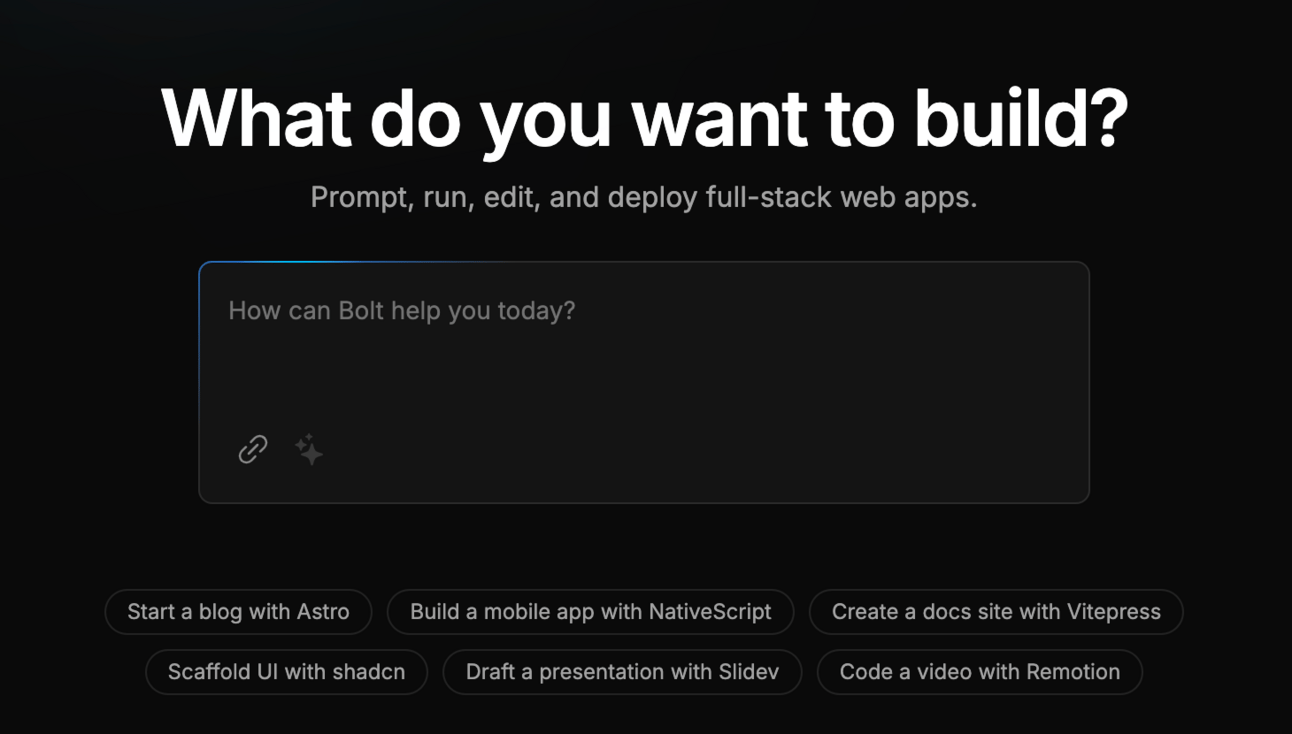
Getting Started (It’s legitimately this easy)
Go to bolt.new (not affiliate)
Click "New Project"
Describe what you want to build
That's it. Really. No setup, no installations, no configuration. Just start describing your app.
Now, ideally I want you to go and do that yourself. You’ll be able to experience the wow moment yourself. But I get that you are busy so let me do it for you in the hope that it’ll make you go and try it yourself!
Let's build something simple to see how it works. How about a basic note-taking app? Here's what you might type:
"Create a simple note-taking app where users can:
Write new notes
Save notes
View all their notes
Delete notes they don't want anymore"
Watch as Bolt starts building your app right in front of you. You'll see the code on the left (don't worry if you don't understand it) and a live preview on the right.
Here’s what it looks like:
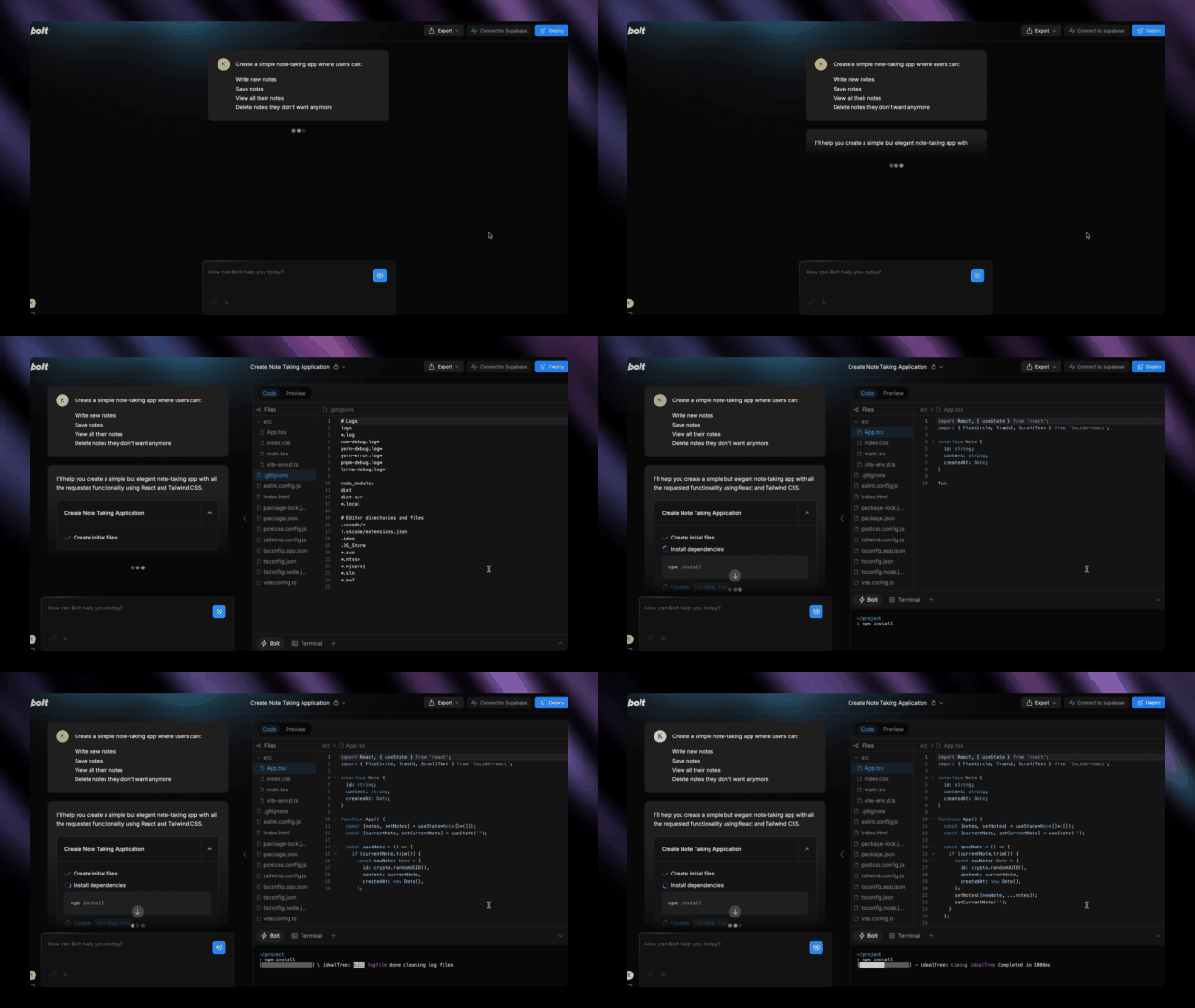
Looks fancy right? All that code!
But you aren’t writing it. Bolt does all the heavy lifting for you.
You can also view the live preview and immediately play around with it:
Not quite what you wanted? This is key.
You don’t have to jump into the code and rewrite. Instead you are going to speak to Bolt like you speak to ChatGPT - via chat.
Just keep chatting with it:
"Make the save button blue instead of grey"
"Add a dark mode toggle"
"Make the notes searchable"
Et voila:
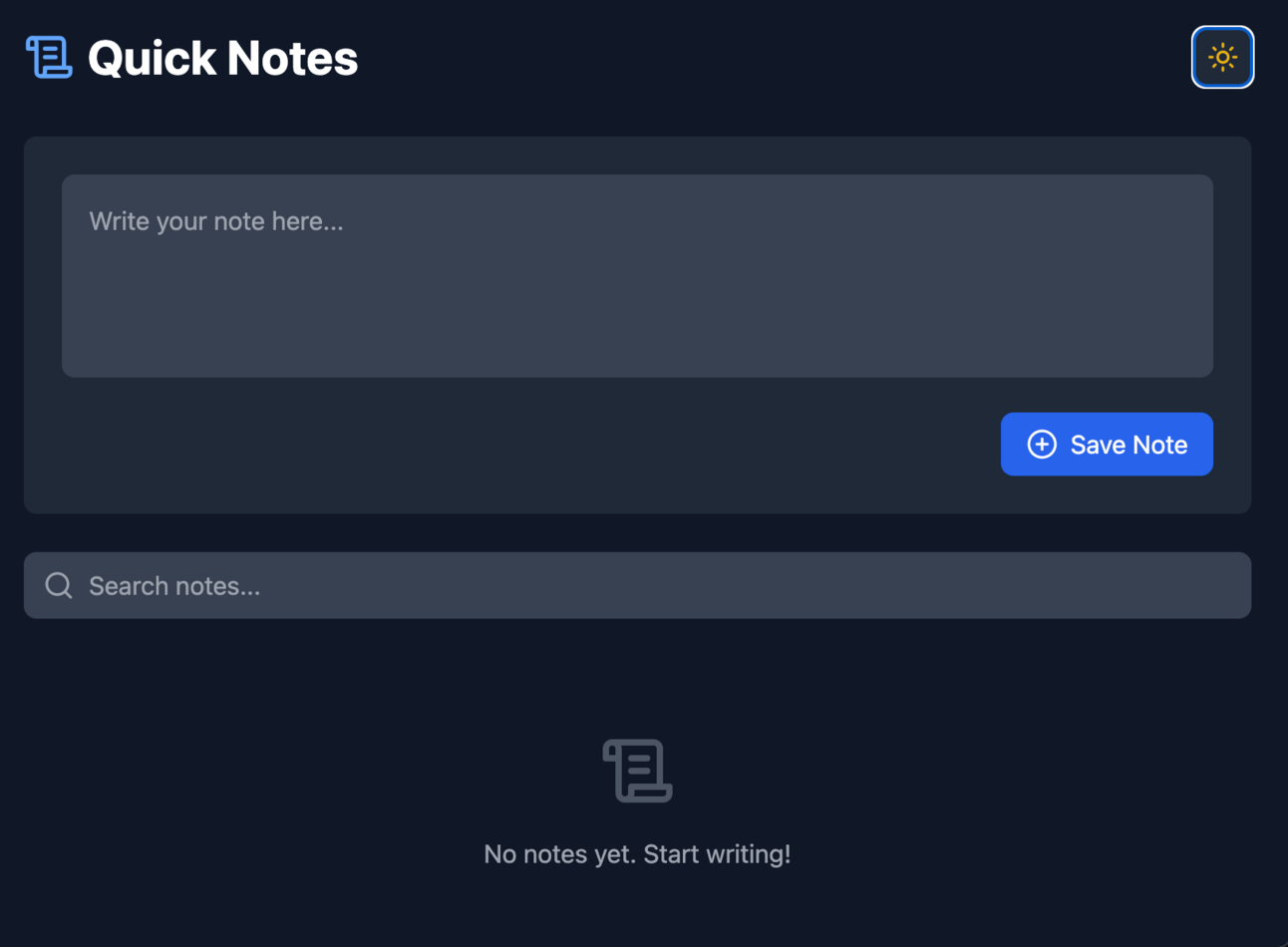
Dark/light mode toggle added. Save note button colour is blue. And a search bar has been added.
It's like having a conversation with a developer who can make changes instantly. You just go back and forth with the changes you want in natural language. Without it driving your developer mad!
Bolt shines when:
You want to build something quickly
It's a relatively simple web application
You need something you can share publicly
You want instant deployment
You're testing an idea before building something bigger
The sweet spot is small to medium-sized web apps. Think todo lists, simple calculators and basic assistants.
If you’ve been working through the previous levels then your scope is very likely right for Bolt. If we could put it in a Claude Project or a Launch Lemonade wrapper we can spin it up into a web app. The level of complexity is apt.
In terms of our project you want a project brief. We want to give Bolt as much information as possible going in. Here’s a prompt to draft a brief:
You are an expert in converting AI tools into web applications. Help me create a Bolt project brief based on my existing AI solution.

Please ask me these questions one at a time and wait for my response:

1. What is your current AI tool's main function? (Describe the input and output)

2. What steps does your current prompt/assistant take to transform the input into output?

3. Who is the intended user of your application? (Technical level, profession, needs)

4. What features of your current solution get the most positive feedback?

5. What are the main pain points or limitations of your current solution?

Based on my answers, create two things:

1. A list of essential features for the web app version
2. A list of potential additional features that could enhance the user experience

Then ask me to prioritize these features from must-have to nice-to-have.

Finally, create a Bolt project brief that includes:
- A clear description of the application's purpose
- The core functionality
- Key user interface elements
- Specific features to include
- Any particular styling preferences
- Deployment requirements (ie on website, standalone)

Present this brief in a format ready to paste into Bolt.new. No additional context.
This will get you started with a strong foundation. From there communicate back and forth with Bolt giving feedback and having it make changes bit by bit.
Now…this is all well and go. But you you have to go and try it to really see the power. There’s a generous free trial.
Go to bolt.new (not affiliate)
Build something simple
Deploy it and share it with someone
That's it. No setup, no complications. Just start building.
In Part 5, we'll look at Cursor - for when you need even more power and control. But for now have a play with Bolt. You might be surprised how much you can build just by describing what you want!
And again - if you want to hop on our free AI builders’ accelerator here’s the waitlist.
Keep Prompting,
Kyle
You’ve probably heard of Cursor. But maybe been too frightened to try it out.
In this Part we’ll demystify it and show you how to get started with this extremely exciting new development.
It’s basically the ultimate power tool for building with AI. But with great power comes... well, you know the rest.
Let's get started:
Understanding Cursor's place in the framework
The developer's workflow
Three crucial prompts for success
Getting started the right way
Wrapping up our framework journey
First things first: Cursor is not Bolt. While Bolt is an AI-powered app builder, Cursor is a code editor that happens to have powerful AI capabilities. This is a crucial distinction.
Think of it this way:
Bolt is like having an AI build you a house from a description
Cursor is like having an AI-powered set of tools to build the house yourself
The difference? With Cursor, you can build anything - web apps, mobile apps, desktop software, browser extensions, you name it. But you need to be more involved in the process.
This means that there is a higher technical level required.
It’s still basically magic - you can spin up working code using everyday language - but the way it all fits together and is deployed is more complex that in Bolt.
In Cursor, you can:
Chat with AI about your code (like in Bolt)
Ask for changes and improvements
Accept or reject AI suggestions
Manually edit files when needed
But here's the key difference in workflow: while Bolt is great for one-shot builds, Cursor requires a more methodical approach. You could try to build everything at once, but you'll get better results building step by step, testing as you go.
You need to work as a coder. Even if you can’t code.
(Oh, btw if you can code then Cursor - or a similar tool - is an absolute no-brainer. But you probably know this already!)
Now…Cursor can “one-shot” projects in a similar way to Bolt. Basically taking initial instructions and building everything you need.
But. And it’s a big but. Because of the increased complexity of Cursor projects this method is often disappointing. This is an human problem really - it’s hard for us to capture everything in that initial prompt!
Before starting a new project I recommend running these three prompts. We'll use ChatGPT or Claude for the first two (use the most powerful “thinking” model you have access to) rather than inside Cursor.
First up let’s specify our project. This is similar to the last Part where we worked with Bolt but now we can deploy our project in other formats - not only webapps.
Want an iOS app? Sure. A Chrome extension? No problem. A full Windows desktop tool? Yup, can do.
Because of this increased range we need to step back a little and define what we are building:
You are an expert in software development planning. Help me create a detailed project specification.

Please ask me these questions one at a time and wait for my response:

1. What is the core purpose of your application?
2. Who are your target users?
3. What are the main features needed?
4. What are the inputs and outputs?
5. What platforms need to support this (web, mobile, desktop)?
6. Any specific technical requirements or constraints?

Based on my answers, create a comprehensive project specification including:
- Core functionality
- Feature list (prioritised)
- User interface requirements
- Technical requirements
- Success criteria

Present this in a clear, organised format suitable for development planning.

Then ask me clarifying questions and retrieve feedback.
Once we’ve got our specification in hand we want to work out HOW to build our AI tool.
If we’ve decided to build a webpage based tool we need to know if we’re building Javascript or Python? What’s the backend (data storage) look like? How will it display - any particular frontend framework? Etc. etc.
You don’t need to know what any of this is (technically!) but it’ll help. Remember you can always just ask ChatGPT and get it to give you the rundown.
For now though use this prompt to convert our specification into a build strategy:
You are a technical architect helping plan software development.
I will be building in Cursor with AI assistance.

Review my project specification:

[Paste specification here]

Please ask me:
1. My level of technical expertise
2. Any preferred programming languages/frameworks
3. My development timeline
4. Any budget constraints for tools/hosting

Based on my answers, provide:
1. Recommended technology stack
2. Development approach
3. Potential challenges and solutions
4. Resource requirements
5. Step-by-step development plan

Focus on practical, achievable recommendations based on my experience level. Give a range of options (with pros and cons) and ask for me to choose then complete the strategy.
This will come up with the how to build. Specifically it’ll give you a handful of options to choose from - your choice will depend on your technical comfort.
OK last step - a project brief to use inside Cursor:
You are a senior software developer helping me build this project. Here's my specification and build strategy:

[Paste both previous outputs]

Please:
1. Ask any clarifying questions you need
2. Create a detailed project plan
3. Confirm you'll work through this step-by-step
4. Wait for my confirmation at each major stage
5. Help me test functionality as we go

Important: Don't try to build everything at once! Let's work methodically and ensure each piece works before moving on.
This will take all of our previous work and relay instructions to Cursor. Importantly it will also set parameters for how we’ll work moving forward.
Based on this you are now set up to work step by step through the project alongside Cursor.
Once you have your prompts sorted, here's how to approach development in Cursor:
Start Small - Begin with the core functionality. If you're building our news-to-script app, start with just the input form and basic text processing. Get the basics done first.
Test Everything - After each new feature, test thoroughly. Talk to Cursor, approve its edits, test. Relay errors by copying them back to Cursor.
Build Incrementally - Add features one at a time. Don't move on until each piece works perfectly. Better to catch issues early before adding more problems!
Document as You Go - Keep notes about what works and what doesn't. This helps with future projects.
Here's the truth : building in Cursor requires more patience than previous levels. You might spend an hour setting up your development environment before writing any code. That's normal! This is real development, just with AI assistance.
But remember that compared to learning to code this is still light-speed! Instead of taking a few years to get the basics and then building you can start building and pick up coding skills as you build.
Again, a question we have to ask. Do you really need Cursor's power? Stay at lower levels if:
Your project works fine in Bolt
You need quick prototypes
You're not ready for the technical learning curve
You don't need custom functionality
Remember, this framework is about using the right tool for the job, not always reaching for the most powerful option. If an early level gets the job done then leave it at that. That’s fine. Don’t overcomplicate!
Remember also that tools will change. Bolt, Cursor, and others will evolve. In 6 months this guide might be laughably out of date. Everything is moving so fasr! New platforms will emerge.
But the principles of this framework should remain solid - start at low level basic prompts and build up only when required.
The key is knowing when to move up and when to stay put. As AI tools evolve, these levels might blur or shift, but the progression from simple to sophisticated will remain valuable.
This concludes our journey through the framework, but it's really just the beginning of yours.
Start at Level 1, move up when needed, and don't feel pressured to reach Level 5 if you don't need to.
The future of AI development is exciting, and now you have a framework to guide your journey through it.
And again - if you want to hop on our free AI builders’ accelerator here’s the waitlist! See you in there.
Keep Prompting,
Kyle
Are you ready to elevate your understanding of AI and its practical applications in business? The '🪜 Levels of AI' playbook is your essential guide to navigating the complex landscape of AI implementation. This playbook offers a structured framework that empowers you to test and refine your business ideas using AI tools, allowing you to innovate without the risk of overwhelming complexity. Whether you're a beginner or looking to scale your existing solutions, this playbook will provide you with the insights and strategies needed to leverage AI effectively.
This playbook is designed for entrepreneurs, business owners, and innovators who are eager to integrate AI into their operations but are unsure of where to start. If you've ever felt overwhelmed by the thought of developing an AI solution or worried about the potential costs and complexities involved, '🪜 Levels of AI' is perfect for you. It addresses the challenges of understanding AI's capabilities and provides a clear, actionable path for turning your ideas into reality, step by step.
It's designed for entrepreneurs, business owners, and anyone interested in leveraging AI to enhance their business ideas.
No! The playbook is structured to help you understand and implement AI at various levels, regardless of your technical background.
Results will vary based on the complexity of your idea and commitment to the framework, but many users can start testing their ideas within weeks.
The playbook includes practical guidance on how to identify problems worth solving and provides a structured approach to developing your solutions.
Absolutely! Established businesses can use this playbook to innovate and streamline processes by integrating AI solutions effectively.