
AI Building
Unlock the power of AI with the '🔍 SEO Micro Tools' playbook, designed to transform your approach to business growth through innovative lead generation strategies.
Start ReadingI know someone who wanted to launch an eCom store. They had their product idea ready to go, but were stuck on the first step - naming their business. Like millions before them, they turned to Google and typed "business name ideas".
Look what pops up:

This search term (“business name ideas”) is searched ~20,000 times a month just in the US. And Shopify is sitting up top with an organic (non-paid) tool.
Click in and this is what you see:

A simple AI business name generator. Type in a few keywords about your business, get a list of catchy names.
But here's where it gets interesting - not only did it generate names, it automatically checked domain availability and offered to register it right there. And of course, would you like to set up your Shopify store with that domain? Just pop in your email...
Genius. Pure genius.
What fascinates me isn't just how well it works (though it does), but how simple it is under the hood. It's essentially just a wrapper around an AI model, doing something that ChatGPT could do.
The kind of thing you and I could write a prompt for with our hands tied behind our backs.
But here's the thing - most people won't think to use ChatGPT for this. And even if they do, they want the convenience. They want the immediate domain check. They want the seamless next step. And they’ll give their email over no problem for this convenience.
This is the opportunity we're diving into this week - building AI-powered micro-tools that solve specific problems and capture leads. Five years ago, building something like this would have been a serious development project. Now? You could have it up and running in an hour.
Let's get started:
The power of single-serving AI tools
Why micro-tools are perfect lead magnets
Finding problems worth solving
Building fast and lean
Getting traffic and leads
Here's what makes these tools so powerful: they do one thing, and they do it well. They're not trying to be everything to everyone. They solve a specific problem at the exact moment someone needs it solved.
Think about it - when someone searches "business name ideas", what do they want? They want business name ideas! They don't want a 20-page guide on branding. They don't want to join your marketing course. They want names, and they want them now.
This is where micro-tools shine. They provide immediate value. No fluff, no fuss, just results.
This should ring a bell if read my Playbook on lead magnets. We want our lead magnets to provide ONE thing very easily and quickly.
We've come a long way from lead magnet ebooks. Don't get me wrong - those still work. But micro-tools? They're different. Here's why:
Immediate Value: Users get results right away
Higher Perceived Value: It's a tool, not just information
Natural Lead-In: The upsell feels helpful, not pushy
SEO Benefits: Tools get amazing search traffic
Viral Potential: People share useful tools
All of this can happen with regular lead magnets but its’s much easier with a tool.
Here's the secret that makes this all possible: most of these tools are just wrappers around existing AI capabilities. Could someone open ChatGPT and get business name ideas? Sure! Could they then manually check domain availability? Of course!
But they don't want to. They want it all in one place, beautifully packaged, ready to go.
Here’s my general thoughts on “Wrappers”:
First people need to think to use ChatGPT for a task. Most won’t.
Then they need the skill to build and test a good prompt to get the task done. Most don’t.
Finally, even if they have the skills not everyone has the time. In fact the best customers don’t have time.
There will always be people who DIY solutions.
Those people are NOT our future customers. And if they do (mistakenly!) buy from us they’ll be our worst customers. You’ll get emails about how they could have done it themselves, about minor errors they find and general moaning. You’ll have to fire them as customers (I say this as someone who just did this to the tune of $2000 yesterday! Worth it to remove the headache.)
This is our opportunity. We're not building complex AI models. We're not coding revolutionary new algorithms. We're just making existing capabilities more accessible and user-friendly.
Our play here is SEO - search engine optimisation. This is a fancy way to say “getting to the top of Google”. We’re doing this to drive traffic and thusly email collection. Those emails? Into our sales funnels to become customers. Remember the business case for everything we do - don’t forget.
The real power comes when you start building multiple tools. Each one might be:
Solving a specific problem
Ranking for specific keywords
Capturing targeted leads
Leading to natural upsells
Let’s look at Shopify again for example:
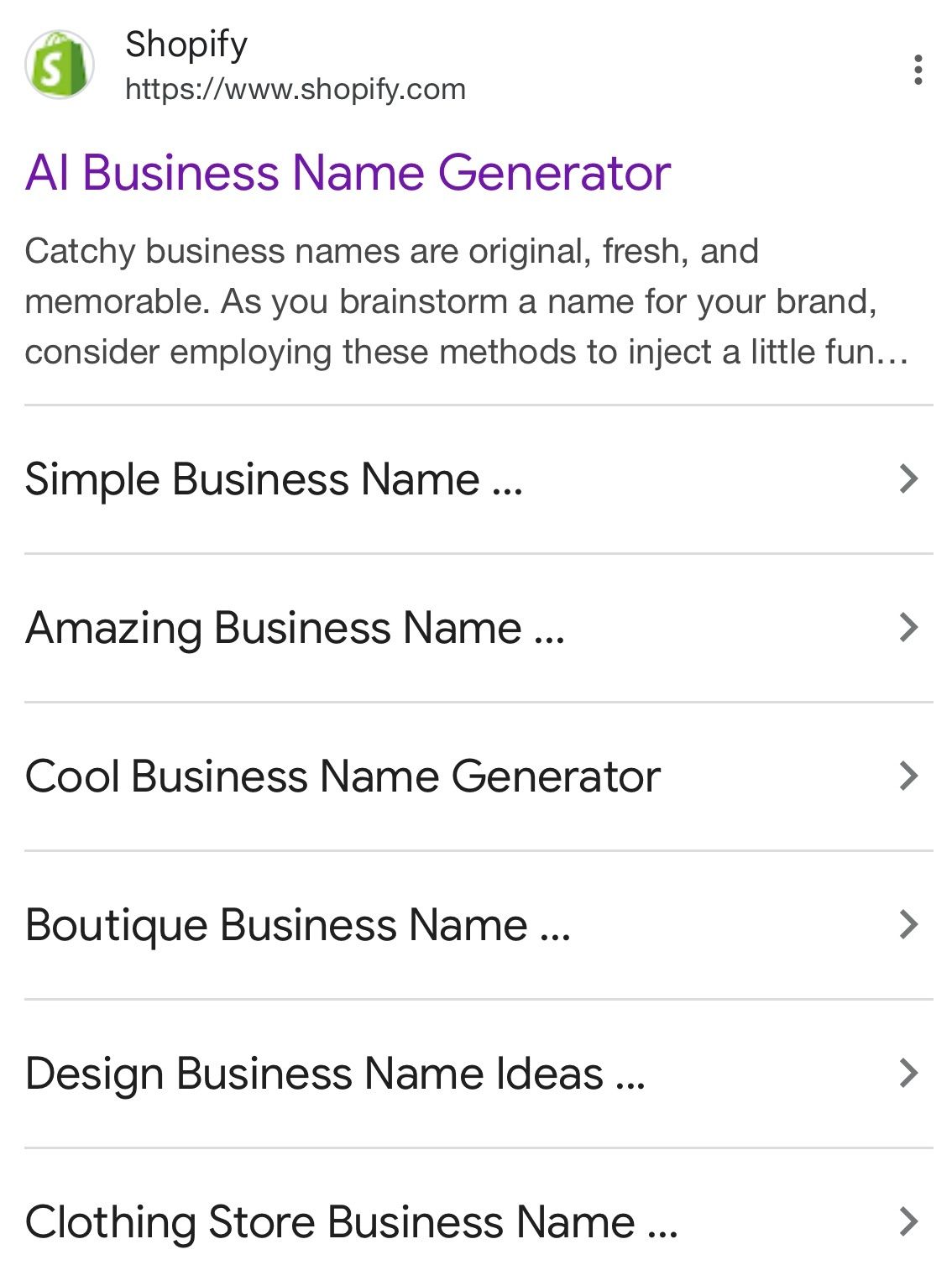
They have their main “generic” generator. And then one for each of the SEO terms people search for:
simple business name ideas
design business name ideas
clothing store business name ideas
Each of these will carve out a portion of traffic - a few hundred or thousand visits each a month. All adding up to a much larger cumulative figure.
And…knowing what we know about AI prompts what’s happening here?
Yup - they are just adjusting a word or two in the prompt in the background. Adding into the prompt clothing, design, simple and otherwise leaving it identical.
It's like building a portfolio of tiny lead-generating machines, each one working 24/7 to bring you qualified prospects. That’s the plan in this Playbook.
Over the next four parts, we're going to build this out step by step:
Part 2: Finding Problems Worth Solving We'll dive into research methods to find high-demand, easily-solvable problems. You'll learn how to spot opportunities that others miss.
Part 3: Creating Your AI Solution You'll learn how to create clear instructions that turn AI models into reliable tools. No coding required.
Part 4: Extracting Existing Solutions We'll look at how to find proven solutions and convert them into AI-powered tools.
Part 5: Building and Distribution Finally, we'll cover the technical bits - how to build and launch your tool, and most importantly, how to get it in front of the right people.
Remember, every successful tool started with someone noticing a problem and thinking "I could make that easier."
Keep Prompting,
Kyle
Sounds obvious but so so so (so) many entrepreneurs ignore this.
And we instead build what we want. What we think would be cool.
Don’t do this!
We’re going to make our lives a lot easier by finding existing problems in our market. Then we’re going to build our micro tools to solve these existing problems.
No guess work, no reliance on our (probably wrong) ideas.
Let's get started:
Finding problems with built-in traffic
Keyword research methods
Validating opportunities
Grouping tools and variations
Here's the thing about building micro tools - the hard part is no longer the building. With modern AI and no-code tools, that's become surprisingly straightforward.
The hard part is knowing what to build. Knowing what people will actually want.
Here’s the shortcut. Our future users (and customers) are already telling you exactly what they want. They're typing it into Google 20,000+ times a month like our business name example from the last Part. Your job is simply to listen.
We are going to use Google search volume as a proxy for demand.
Basically, how many people each month are looking for the solution to certain problems. We find their problems. And provide solutions by building micro tools.
But Kyle, haven’t you heard, Google is dead? People won’t use Google to answer questions anymore now that we have AI!!
Don’t worry - plenty of time. Google (w/ Youtube) have 50% of web traffic locked down still:
man, still a long way to go to run down google 🥺
— Sam Altman (@sama)
9:37 PM • Feb 9, 2025
First up, we need real numbers. ChatGPT might be clever, but it can't tell you actual search volumes. It doesn’t have access to Google’s keyword volume database. It will just make stuff up. That won’t work!
So, we have a few options:
The free route? Google Ads Keyword Planner. You'll need to set up an account, but you don't need to spend anything. It'll give you search volumes and competition levels for any term you plug in. This gives you direct access to keyword volumes straight from the horses’ mouth.
If you're serious about this, paid tools like Ahrefs or SEMrush will make your life easier. They draw on the direct Google data but add layers of information to tell which keywords are particularly attractive. You can work this out yourself using the free Google tool but it’s a bit more work. These premium tools will show you everything from search volumes to keyword difficulty to what's currently ranking in a couple of clicks.
Finally, if you want the premium data but don't want to pay for tools? Here's a hack: hire someone on Fiverr or Upwork who has access to these tools. For about $20-30, they can pull all the keyword data you need. They’ll just run a report for you. Much cheaper than monthly subscriptions when you're just starting out.
Let's walk through an example in the mortgage niche. Here's what our initial keyword research might show:
how to calculate mortgage payments | 22,000 | medium
mortgage broker near me | 18,500 | high
best mortgage rates | 15,000 | high
mortgage calculator with taxes | 12,000 | medium
how much house can I afford | 10,000 | medium
mortgage amortization schedule | 8,500 | low
compare mortgage lenders | 7,200 | high
mortgage pre approval calculator | 6,800 | medium
mortgage refinance calculator | 6,500 | medium
buy to let mortgage calculator | 5,400 | low
should I refinance calculator | 4,900 | low
mortgage insurance calculator | 4,200 | medium
interest only mortgage calculator | 3,800 | low
mortgage overpayment calculator | 3,500 | low
mortgage affordability calculator uk | 3,200 | low
Each entry is:
a keyword (or keyphrase)
the monthly search volume
the competition level
Gather up your keywords using whatever tool you prefer. And get them all into a CSV or similar document. Generally the more the merrier at this point!
Not all of these keywords are right for micro tools.
Broadly there are 4 types of keywords:
Informational: Learning/understanding
Navigational: Finding specific sites
Commercial: Researching products/services
Transactional: Ready to buy
Different phrases are used at different points in our customer’s journey.
Initially they might start with a broad informational keyphrase like “how do mortgages work?” or “do I need a mortgage?”. These are informational.
Then they might start actively looking for a mortgage with a navigational search like “UK mortgage providers”.
Moving onto commercial key phrases we’ll have something like “best 40 year mortgage” and transactional searches like “natwest 40 year mortgage sign up”.
Lots of people focus on Commercial and Transactional keywords. Because this is where the money is! These people are ready to buy.
These keywords also have the most competition and low volumes.
We don’t want to compete here. Instead we want to compete at the informational end - providing a micro tool that answers an early informational request.
At this end we have high volume, low purchase intent and low competition. Perfect for a micro tool to gain attention and capture emails. We then internally move the lead towards purchase using our sales funnel.
We need to focus on informational queries - people looking to understand, calculate, research or get an overview about something. Let's run our keyword list through our intent classifier prompt:
You are a search intent analyst. Categorise these keywords into:
- Informational: Learning/understanding
- Navigational: Finding specific sites
- Commercial: Researching products/services
- Transactional: Ready to buy

For each keyword, provide:
1. Intent category
2. Reasoning
3. Tool potential (High/Medium/Low)

We're looking for informational queries that could be solved with a calculator or generator tool.

Keywords:
[Previous keyword list]
After filtering our examples, we're left with six prime candidates:
how to calculate mortgage payments (22,000)
mortgage calculator with taxes (12,000)
how much house can I afford (10,000)
mortgage amortization schedule (8,500)
mortgage overpayment calculator (3,500)
interest only mortgage calculator (3,800)
We’ve gone from 15 to 6. Good progress.
Now let's feed these into our tool ideation prompt:
You are an AI tool strategist. Based on these keyword groups, suggest potential tools and variations. Each tool should solve a specific problem and have potential variations to capture related searches.

Keywords with volumes:
[Give informational keyword shortlist]

For each potential tool:
1. Core tool concept
2. Primary search term it targets
3. Potential variations and their target keywords
4. Total potential monthly traffic
5. Key features needed
Here's what we get back - three clear opportunities:
Comprehensive Mortgage Calculator
Primary target: "how to calculate mortgage payments" (22,000)
Variations:
With tax calculator (12,000)
With insurance calculator (4,200)
Total potential traffic: 38,200/month
Natural upsell to mortgage broker services
Affordability Calculator
Primary target: "how much house can I afford" (10,000)
Variations:
UK market version (3,200)
Buy to let version (5,400)
Total potential traffic: 18,600/month
Perfect lead magnet for real estate agents
Specialist Calculator Suite
Primary target: "mortgage amortisation schedule" (8,500)
Variations:
Overpayment calculator (3,500)
Interest only calculator (3,800)
Total potential traffic: 15,800/month
Great for financial advisors
This second prompt has taken our short list and grouped up similar key phrases into a smaller set of tools. In this case 3 tools.
These are 3 micro tools we can take forward and build. Each connected to a set of known key phrases that real people (customers!) search for online.
You can probably already see the possibilities here! Next up we're diving into creating your AI solution. We'll take one of these validated opportunities and turn it into a reliable tool that delivers consistent value.
Keep Prompting,
Kyle
We’ve identified a handful of mico tool candidates, all based upon actual demand we’ve worked out from Google queries.
Now we just need to build the tools. Thankfully AI makes this a lot simpler - both the “coding” of the tool and the content inside of it.
This Part is all about leveraging existing content. Content that's already ranking, already proven to solve problems people care about. In the next Part we'll look at capturing your own expertise.
Let's get started:
Mining existing high-ranking content
Converting different formats into tools
Extraction techniques that work
Making good solutions better
The answers to most problems are already out there, ranking well on Google and YouTube.
Our job isn't to reinvent the wheel - it's to make those solutions more accessible through AI tools.
Let's look at three ways to mine existing content for our tools.
The top results for any "how to" or problem-based search are usually detailed guide posts.
Let’s hop back to the example of “how to name a business”. It’s a problem lots of new entrepreneurs have.
Pop you key phrase into Google and see what blog articles and guides pop up. For example there’s an article from Big Commerce that talks about how to name your business: https://www.bigcommerce.co.uk/articles/ecommerce/how-to-name-a-business/
Perfect - it has best practices and a basic step-by-step. We can work with this.
Use this prompt with the article you found:
You are a process extraction specialist. Take this guide/article and convert it into a clear, step-by-step tool process. This process will be used as the system instructions basis of an AI tool.

Input: [Paste article text]

Please provide:
1. Required user inputs
2. Step-by-step process
3. Intermediate steps or calculations needed
4. Format of final output
5. Warnings or considerations
6. Additional context to include

Format each step as an actionable instruction that could be followed by AI. Only include steps which are internal to the AI tool - exclude any steps requiring external info, API connections, actions that the AI should complete etc.
Include core system instructions that will make this a usable AI tool system prompt when used in a custom GPT or chatbot.
Focus on making it systematic and repeatable.
You’ll then copy and paste the whole article into this prompt and let it rip.
This converts the article into system instructions for a micro tool. Here’s the full set of instructions as it’s far too long to copy here!
For instance this one starts by collecting requirements:
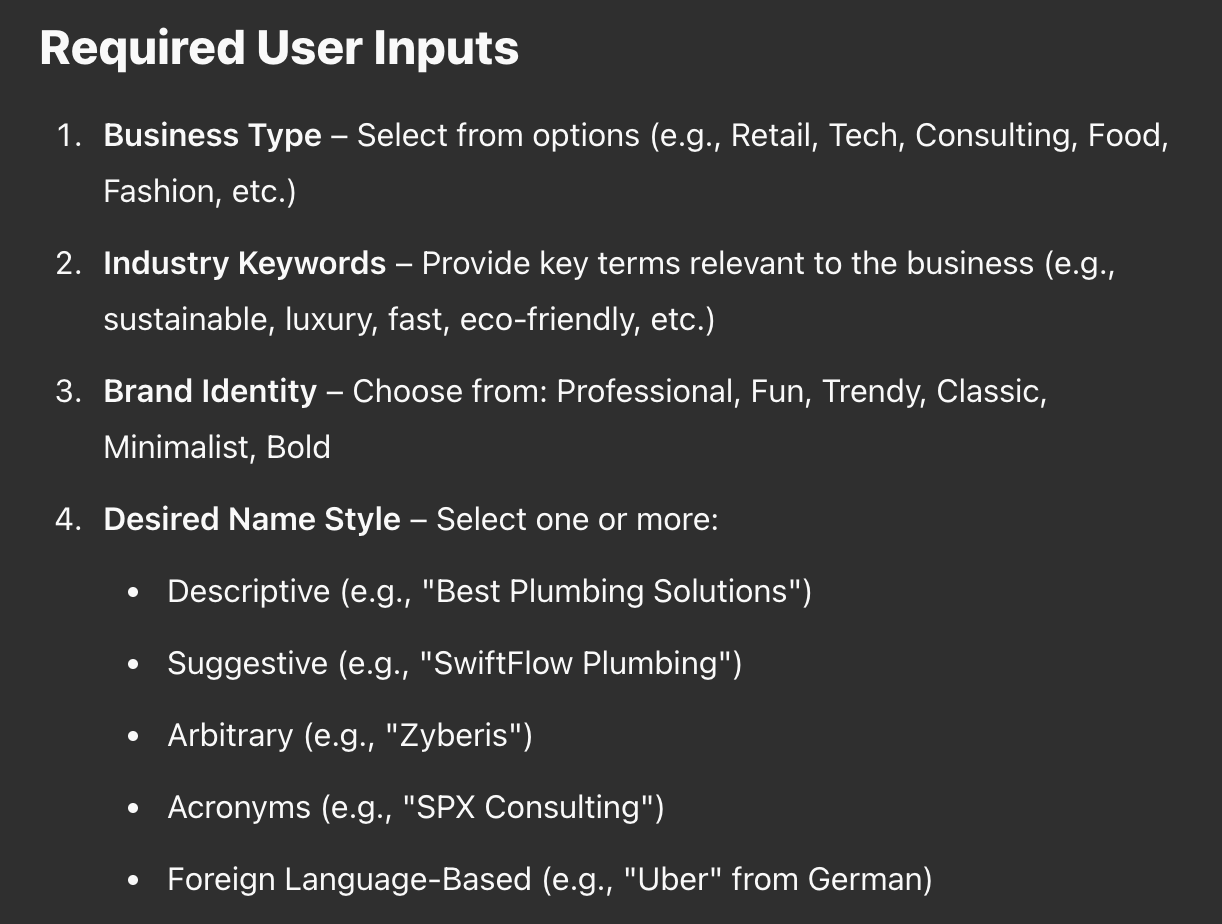
It will take the user inputs and run processes (based on the article) like so:
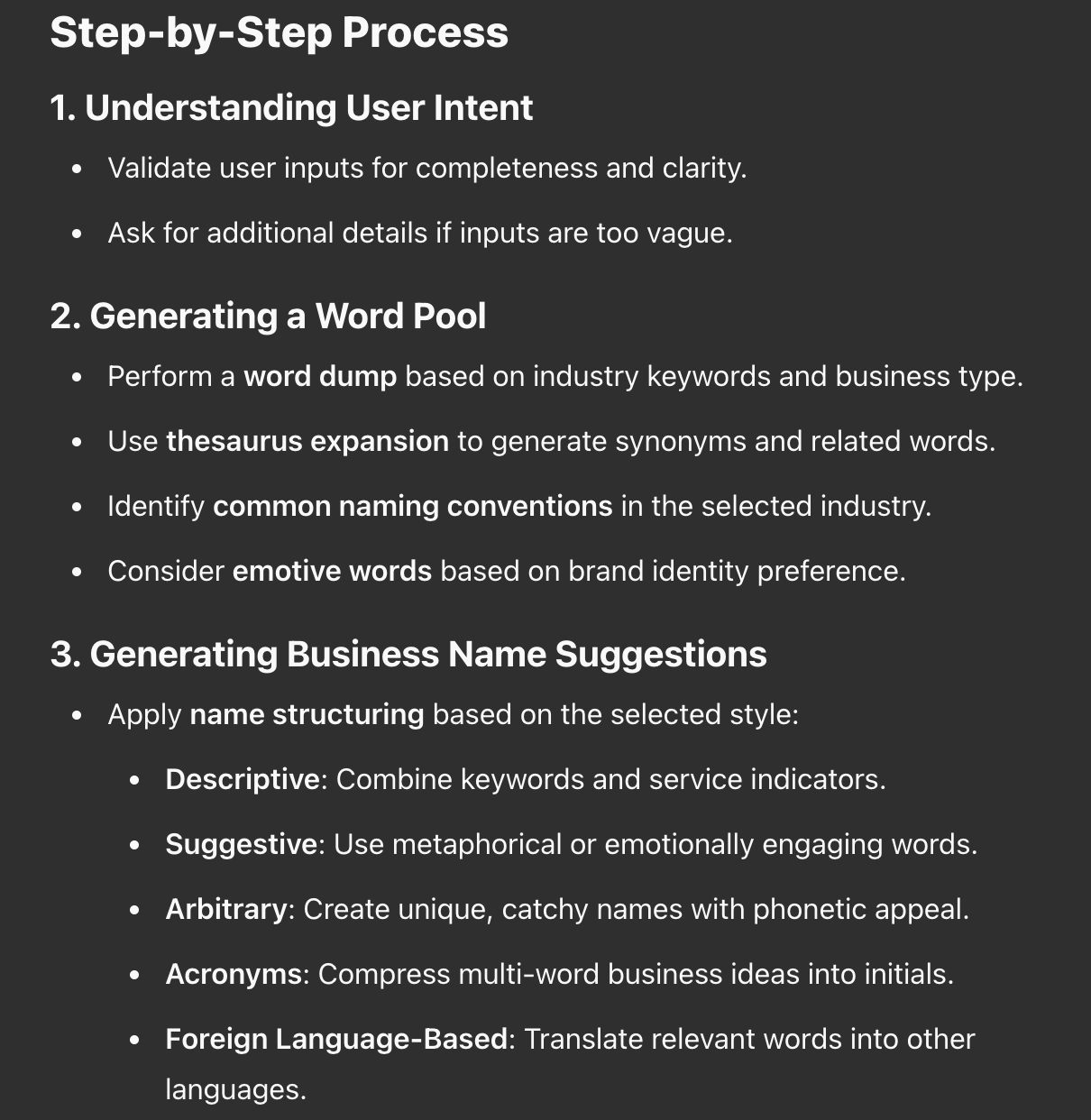
and so on. This particular example has 6 discrete steps of processing before it generates final results for the user.
Here’s a very quick and dirty deployment via a Custom GPT. When we deploy we’ll be sure to place the tool behind an email capture page. We’ll talk more about refining and deployment in Part 5 - this is just proof of concept.
Found a tool that's already ranking well? Perfect! We can reverse engineer it.
Simplest (crudest!) way is to straight up screenshot the tool. Let’s say I want to replicate this:

I’ll screenshot the tool and add the screenshot along with this basic prompt:
You are a tool reverse engineering specialist. Based on screenshots, help me understand how this tool works.

Please:
1. Identify the pattern/process being used
2. Note how different types of inputs are handled
3. Suggest how edge cases might be managed
4. Ask clarifying questions about any unclear aspects

Goal: Create a reliable system that reproduces these results consistently.

Additional questions:
1. What validation seems to be happening?
2. Are there any input restrictions?
3. What additional features could enhance this process?

Finally, generate a system prompt to replicate this tool in a custom GPT or chatbot. Format each step as an actionable instruction that could be followed by AI. Only include steps which are internal to the AI tool - exclude any steps requiring external info, API connections, actions that the AI should complete etc.
Include core system instructions that will make this a usable AI tool system prompt when used in a custom GPT or chatbot.
Focus on making it systematic and repeatable.
This may be sufficient to work out the tool and create a system prompt you can use as the basis of a tool:
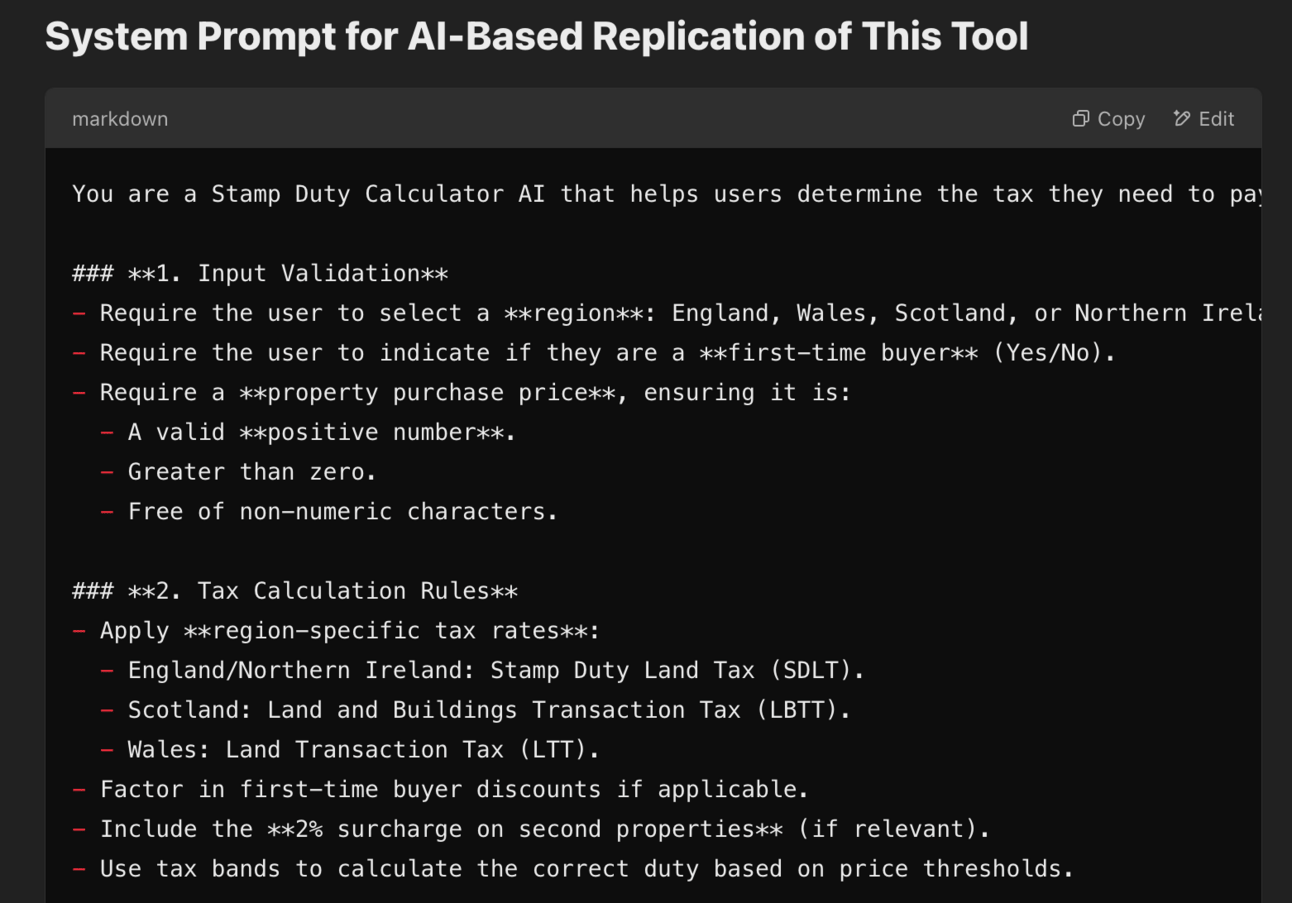
You may need to provide more information - ie. if it’s a branching questionnaire for example you’ll want to run it a few times with different inputs to get different outputs to help work out the “logic”. Take note and feed it all into your AI (screenshots or text) and with enough context it’ll work out the steps.
Sometimes the answer to your potential lead’s questions are in a Youtube video.
Let’s say that our keyphrase is “how to write an SOP for business”. There are lots of great Youtube videos about this. Let’s use this one.
We are going to run this the same as a written guide BUT obviously we need to get the text first.
We’ll use Notebook LM for this. It’s a free tool based on Google’s Gemini - and because it’s Google ecosystem it works nicely with Youtube.
You’ll simply add the Youtube video (or multiple videos if want to remix many!) here:
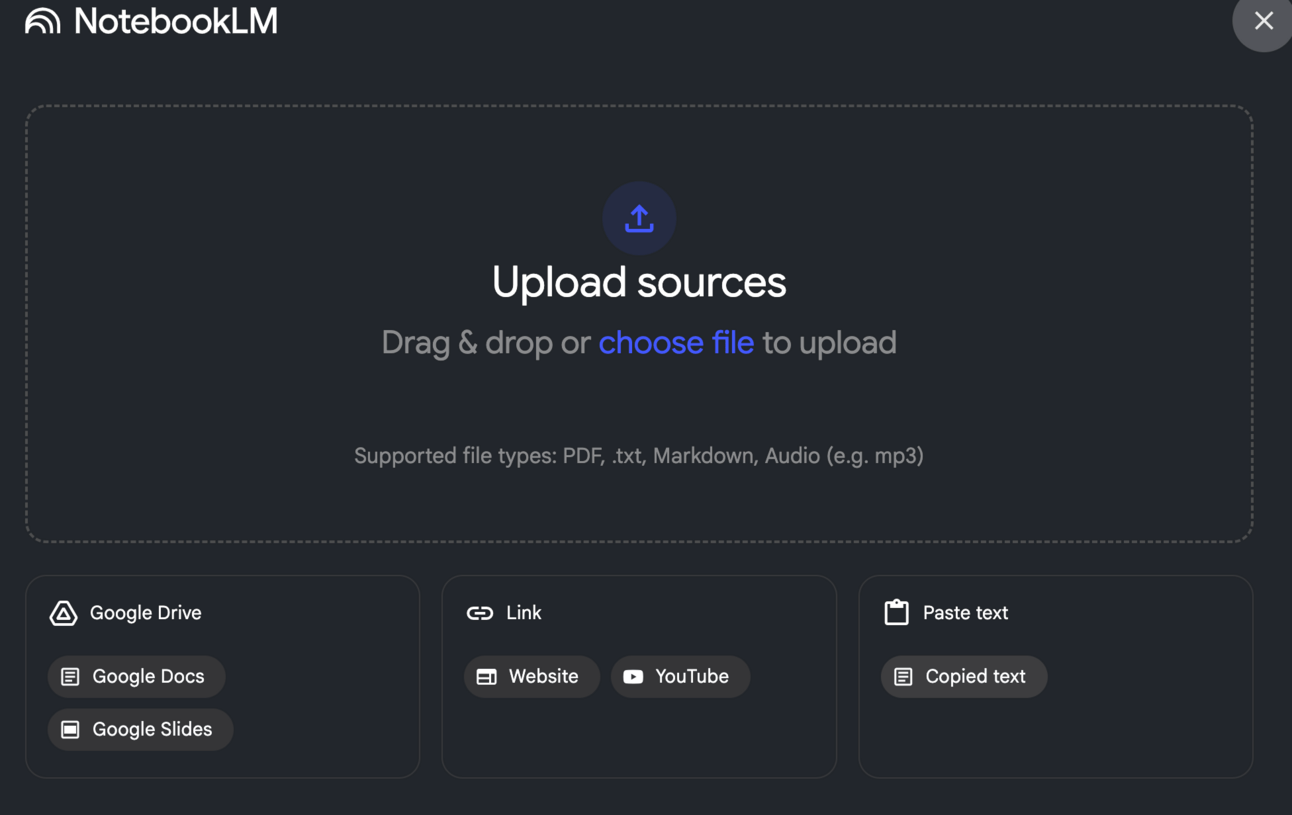
NotebookLM will go ahead and process the video and work out what is being said.
Now use the initial prompt (that we used on Blog articles) inside NotebookLM and it’ll run the process on the video rather than text.
NotebookLM will run the process in exactly the same way as ChatGPT or Claude does and come out with a system prompt for you:
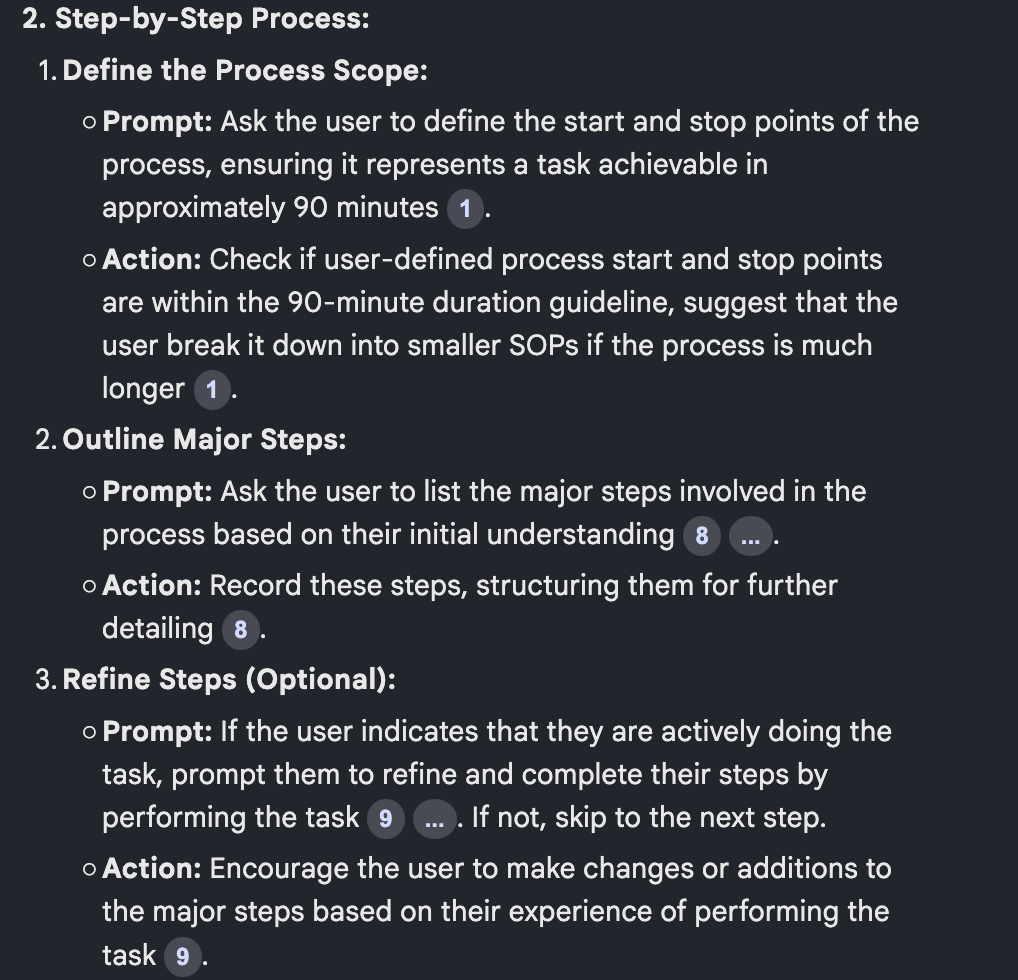
Here's the key with all of this. We're not just copying existing solutions. We're making them better by:
Making them instantly accessible
Automating manual steps
Adding helpful context
Providing immediate results
We are borrowing and remixing expertise from already high ranking (on Google/Youtube) content. With the plan of ranking our content too.
Often we'll combine insights from multiple sources to create something better than any single existing solution. Simple way to do this is simply to pull in multiple articles, multiple tools, multiple videos and pick out the best parts of each - this will depend more on your expertise to judge!
Speaking of - in the next Part we're switching gears to look at capturing your own expertise. We’ll "extract” your knowledge and use it as the basis for AI micro tools.
Keep Prompting,
Kyle
In the last Part looked at leveraging existing content from other people. This works because we know it already ranks well on Google.
Today, we're doing something different - tapping into your expertise to create tools that are uniquely yours.
Because here's the thing: if you've built an audience in your field, you've got something valuable that AI alone doesn't have - real-world experience and knowledge. We’ll build micro tools around that knowledge to capture leads.
Let's get started:
This is the easiest way for a busy person wanting to learn AI in as little time as possible:
Sign up for The Rundown AI newsletter
They send you 5-minute email updates on the latest AI news and how to use it
You learn how to become 2x more productive by leveraging AI
Extracting your expertise systematically
Converting knowledge into tool specifications
Creating supporting content
Building your unique voice into the solution
Most AI tools out there are just wrapping existing knowledge. That's fine - we covered that approach yesterday. But the real opportunity? It's in creating tools that think like you do. That solve problems the way you would solve them.
When someone in your audience has a problem, they come to you. That is how you’ve already built up an audience online. They trust your approach. They value your insights. Now imagine packaging that into a tool that's available 24/7.
This isn't just about building another generic calculator or AI generator. It's about crystallising your expertise into something that can help more people, more often. And yes, capture more leads while doing it! We’re in business remember.
But here's where people get stuck. Ask most experts to explain their process and you'll get something like "Well, it depends..." followed by seventeen different scenarios and conditions.
As experts we know how to do something but getting that knowledge out of our heads is…tricky!
We need a way to extract our expert knowledge systematically. We need to turn that knowledge into something an AI can reliably replicate.
That's where our expert interview prompt comes in. It’s like having a really smart assistant interview you about your process. One that knows exactly what questions to ask to turn your expertise into clear instructions.
We are going to take one of our keywords/phrase from above and have the AI quiz us about the topic. Here’s a prompt":
You are an AI tool architect specialising in knowledge extraction.

Your goal is to interview the expert (me) about [topic/problem from keyword research] and convert their knowledge into clear system instructions for an AI tool.

Ask one question at a time about:

1. Problem Definition
- What specific problem does this solve?
- Who exactly is this for?
- What are they trying to achieve?

2. Input Requirements
- What information do you need from users?
- What format should each input take?
- What are valid ranges/restrictions?
- What context helps you understand their situation?

3. Process Details
- Walk me through your exact process
- What checks do you make?
- What intermediate calculations happen?
- What decisions points exist?
- How do you handle edge cases?

4. Output Specifications
- What results do users need?
- How should they be formatted?
- What additional context helps?
- What warnings or caveats matter?

5. Value Adds
- What extra insights do you provide?
- What common mistakes do you help avoid?
- What related advice matters?

Wait for my response before asking follow-up questions. Probe deeper when answers seem incomplete. Focus especially on unique insights from my experience.

After gathering all information, summarise into a complete system prompt that includes:

1. Tool purpose and scope
2. Input specifications
3. Processing steps
4. Output format
5. Additional insights
6. Error handling
This prompt will not only interview you but will also structure your responses into a system prompt for an AI micro tool. Nifty eh?
Now that we have our tool specifications, we need to think about presentation. Your tool isn't just a utility - it's a representation of your expertise. We want to wrap it in content that builds trust and showcases your unique approach.
This is a little different to our last tools which were built on the ideas, processes and structures of other experts. Because this is about our personal expertise let’s lean in and add even more of our personality. We’ll add supplemental content.
This content serves multiple purposes:
Helps with SEO
Builds credibility
Shows the thinking behind the tool
Creates connection with users
Provides additional value
Let's create two key pieces - a detailed blog post that ranks for your target keywords, and a short video introduction that builds personal connection.
Here's our content generation prompt. Use it below the work from above:
You are a content strategist helping experts showcase their knowledge.
Based on the tool specifications and expert knowledge we've captured, create compelling content that positions both the expert and their tool.

Part 1: Blog Article
Create an outline for an article that:
- Introduces the problem from the expert's perspective
- Shows common pitfalls and mistakes
- Explains the expert's unique approach
- Introduces the tool as a solution
- Provides additional insights and context

Please provide:
1. Article Title (SEO-optimised based on initial keyphrase)
2. Introduction (hook + problem statement)
3. Section outline with key points
4. Examples or case studies to include
5. Natural places to mention the tool
6. Conclusion and call to action

Part 2: Video Script (~2 minutes)
Create a conversational script that:
- Opens with a compelling hook
- States the problem clearly
- Introduces you and your expertise
- Demonstrates the tool, high level
- Shows clear value proposition
- Calls viewers to action to use the tool
- No stage directions, just the script

Include:
1. Opening hook (5-10 seconds)
2. Problem statement (15-20 seconds)
3. Your expertise (15-20 seconds)
4. Tool demonstration (45-60 seconds)
5. Value proposition (15-20 seconds)
6. Call to action (10-15 seconds)

Style notes:
- Keep tone conversational and authentic
- Include personal insights and experiences
- Focus on value and results
- Make technical concepts accessible
- Maintain expert positioning

The goal is to showcase your expertise while making the tool feel like a natural extension of your problem-solving approach.
This part is optional but will help beef up your micro tool page. You’ll have an introduction video, the tool itself and then a text guide underneath.
The blog/video/tool post works hard for SEO, bringing in organic traffic. The video builds personal connection and trust. Together, they create a powerful wrapper around your tool that differentiates it from generic alternatives. Powerful stuff.
In the final Part we'll look at how to get all of this live and in front of your audience. We'll cover technical implementation, creating variations for different keywords, and distribution strategies that leverage your existing audience.
Keep Prompting,
Kyle
Here we are - the final piece of the puzzle. We've got our system prompts, our content ready, and now it's time to get these tools live and capturing leads.
But more than that - we're going to talk about building a portfolio of micro tools which can help us build out our whole business.
Let's get started:

Unexpected events shouldn't leave your loved ones financially exposed. And while employer coverage is a nice perk, it usually only offers 2x your salary – far below the recommended 10-15x for real security (especially with dependents). Term life insurance can bridge the gap with customizable, affordable plans. Money’s Best Life Insurance list can help you find coverage starting at just $7/month, providing the peace of mind your family deserves.
Landing page strategies
Email capture systems
Portfolio building
Learning from your leads
Everything starts with the system prompt - that's been our focus for the whole Playbook. We’ve covered a few different ways to build them so you should have something basic to run with.
With that solid foundation, you've got several build options depending on your technical comfort level.
The simplest starting point is a Custom GPT. It's perfect for testing your system prompt, but since it can't capture leads, it's just a stepping stone. Feel free to use one to do a quick sense check but from a business POV they aren’t much cop!
Next up is Launch Lemonade - quick deployment with built-in email capture. This is where most people should start. You can get something functional rolling in less than an hour.
Bolt AI is a step up - allowing you to deploy a web-app. And for those comfortable with code, Cursor gives you full control. Both of these will require more technical comfort though, especially Cursor where you’ll need to be able to set up a dev environment, understand what the code is doing and then know how to deploy.
Start simple. I've written detailed technical guides for each platform (check the Playbook Vault), but for now, pick the simplest option that can capture emails. You can always upgrade later. Resist the urge to dive into something “better” if it’s going to take you months to launch. Because guess what - that means it isn’t better!
When it comes to your page setup, you've got two main approaches. You can either embed your tool directly on an SEO-optimised page, or use a landing page that redirects to your tool after email capture.
Direct embedding usually works better - it gives users immediate value, keeps them on your page longer (great for SEO), and feels more natural. But if you need more control over your funnel or want to test different messages, a separate landing page can work too. You’ll just capture the email on the landing page and then redirect the user to the tool. You can set up user login too if that’s required but generally for a lead magnet this’ll be overkill.
Your email capture system depends on your build choice. Something like Launch Lemonade handles it all for you, with built-in capture and API connections.
If you're using a landing page approach, you might need to handle exports and imports manually at first and then work out a Zapier or API connection to your email system of choice.
Not sure how? Ask AI - it’ll outline the options and the steps.
Either way, once you've got those emails flowing, you'll want a welcome sequence and tool-specific follow-up emails. But don't get hung up on perfect automation yet! First priority? Get those lead magnets live and collecting emails.
OK all of the above is plumbing. Don’t fret it too much. Get it set up and leave it alone. Not sure how to - you can hire someone to sort the pages and email collection for you - it’s a simple job. Just don’t get hung up here because the real opportunity is this next step.
Remember all those keyword opportunities we found in Part 2? You probably had a bunch!
Now's the time to build them out. Each becomes a new micro-tool, a new SEO-optimised page, and a new lead capture point. But more importantly, each becomes a data point in your market research.
This is where it gets really interesting. Your tool portfolio isn't just about capturing leads. Sure leads are great. They mean customers. They mean revenue. We love that stuff.
But more than that they give us insight into the market.
When you've got multiple tools running, you'll start seeing patterns. Some micro tools will resonate more than others. Some keywords will drive better traffic. Some follow-up offers will convert better. This is pure gold for product development.
Take an example: Say you've got five tools running in the dog training space. Your leash training tool is getting 5x more engagement than the others. That's the market telling you something valuable - there's pent-up demand around leash training. We’re going to listen to this!
Now you can create premium content, develop specific products, or build related tools, all knowing there's proven demand. All around that particular topic and keyphrase that seems to be resonating with our audience.
PS. if you are sitting here thinking that you don’t have a funnel to build yet don’t worry. You can build tools for your own business, capturing leads and developing products based on what works. Or you can build for others, charging $2-3k per tool and focusing on specific industries.
Basically you’d take all we’ve covered this week and you’ll go and build for other people’s businesses. Building them a lead generating machine. Focus on a sector, build a good tool, shop it around to the various competitors (let them know this!) and sell to the highest bidder. Or, hell, sell it non-exclusively to multiple companies, tweaked for them individually.
Let's recap the Playbook quick. We started with the power of micro-tools and how to find proven problems. We learned to mine existing solutions and capture our own expertise. Now we're putting it all together into a portfolio that not only generates leads but guides our product development.
Your next step? Pick your simplest tool idea and get it live. As always, don't overthink it. Get something out there capturing leads and start learning from real data.
Keep Prompting,
Kyle
Unlock the power of AI with the '🔍 SEO Micro Tools' playbook, designed to transform your approach to business growth through innovative lead generation strategies. This comprehensive guide will walk you through the creation of micro-tools that solve specific problems for your audience, helping you capture valuable leads while ranking high in search results. By harnessing the simplicity and effectiveness of these AI-powered tools, you'll not only streamline your business processes but also foster a deeper connection with your target market, leading to sustainable growth and revenue generation.
This playbook is designed for entrepreneurs, small business owners, and marketers who are eager to leverage AI technology to enhance their lead generation efforts. If you're feeling overwhelmed by the complexity of traditional marketing methods or struggling to find effective ways to connect with your audience, this guide will provide you with actionable insights and strategies to simplify your approach. Whether you're launching a new eCommerce store or looking to boost an existing business, '🔍 SEO Micro Tools' will empower you to create impactful solutions that resonate with your customers.
No, the playbook provides step-by-step guidance to help you create micro-tools with minimal technical knowledge.
You can start implementing micro-tools within an hour, and depending on your market, you may see leads within days.
The playbook includes techniques for identifying market gaps and high-demand problems that can inspire your business idea.
Yes, the principles outlined in the playbook can be adapted to various industries and niches.
You can refer to the detailed technical guides in the Playbook Vault or reach out to the community for support.