
AI playbook
Unlock the potential of your online presence with the '🔎 Search Engine Optimisation with AI | Prompt Playbook'.
Start ReadingYou can grab a Kindle copy of the Newsletter Business Prompt Playbook for free
This week only until Friday, $5.99 down to $0.00.
Link here »» https://amzn.to/3OzJQLW
This week’s focus though will be Search Engine Optimisation, or SEO for short.
Here’s a rundown of the week.
Part 1: What is SEO + Keyword Research
Part 2: SEO structure and setup
Part 3: Long form content
Part 4: Short form content
Part 5: SEO optimisation
Search Engine Optimisation is a very fancy term for “getting to the top of Google”.
Google is a search engine. Optimisation is the process of building and tweaking a website so that Google recommends our site.
Of course there are other search engines like Bing. But because Google is so dominant (in most but not all countries countries) SEO is primarily focused on optimising for Google.
When a page is well optimised it will “rank”. Ranking is where Google finds our website, decides the material valuable and increases our ranking on Google. A #1 Google result is the first webpage that shows up for a specific term.
Let’s say for example you run a high end tennis shoe shop in London. Ranking well for the search “best tennis shoe shop London” would be very valuable for your business. More people searching for tennis shoes will find your website and thus buy from you.
SEO is the work we do to make this happen.
The great thing about SEO is that once the work is done Google will send a lot of traffic to us for free. Google rewards those who provide valuable content and it wants to make sure its searchers find your webpage.
The downside of SEO is that it takes a lot of upfront work and often takes time to show any results. Compare this to running online advertising - once I turn on adverts I get results within hours. SEO can take months before we see any real movement.
If you are hiring an SEO agency this can be very frustrating. You’ll be paying them $1000+/month and not really seeing any results for 6 months!
The purpose of this guide is to show you how to DIY your SEO or provide you with a Playbook to give to your team members so they can run the process internally.
Thankfully SEO has been made much simpler through the use of AI. We’ll be running through how exactly to deploy AI for SEO in this Prompt Playbook.
A quick note here though - AI is an existential threat to Google. Google’s main job is to filter the large amounts of information out on the internet. They act as the world’s search engine which means lots of people use their products. Because people use their products Google can sell advertising, which is their main revenue source.
AI could potentially 1000x or more the amount of information out there on the internet and make it increasingly difficult for Google to index and provide us with the best results. Google’s whole reason for being could be undercut.
Because of this, Google are actively trying to work out how to deal with AI content. They want to be able to identify and deprioritise it in their search algorithms. They have, as yet, failed to do so.
Additionally a number of large AI companies have publicly given up on even trying to identify AI content - the speed of AI generation improvement is outstripping the speed of AI detection improvement.
This is an ongoing battle. In the meantime however AI can be used very effectively for SEO.
I will be cautioning against a 100% AI approach though. Anyone who has read my previous guides know I also recommend mixing AI with human intervention for higher quality, sustainable value. This guide will be no different.
We’re going to hop straight into the process of SEO.
Rather than write out a whole course on the ins-and-outs of SEO theory we’re going to start with practicalities. And as we progress I’ll explain why we are doing certain actions.
If you do want a full outline of SEO though I recommend Moz’s Beginners Guide to SEO. It’s free and very easy to read.
We’re going to push straight into working out our keywords.
A search term is a word or set of words that a person enters into Google.
For example when looking for tennis shoes I’ll type “best tennis shoes shop London”.
A keyword (or keyphrase) is the word or set of words that we target during SEO to capture the traffic from the search term.
In this case the keywords could be:
tennis shoes
tennis shoes shop
tennis shoes shop london
best tennis shoes shop london
We want to gather up lots of potential keywords for our business website.
We will then (in the next steps) filter and refine to a smaller set of keywords that we will be targeting.
Note: There are some great SEO tools out there that do all of this for you. If you are interested in these my personal recommendation would be SEM Rush. Plans start at $130/month. Because these tools are pricey I’ll focus this guide on using free and low cost tools instead. You can then choose to speed up your process using paid tools if you have the budget.
First let’s begin to gather up keywords.
Head to https://ads.google.com/ and set up an account. We are using Google’s own tools so we don’t need to pay $130+/month for a premium tool.
This is Google’s advertising platform. We are not running adverts - we just want to access the platform’s keyword research tools.
You will need to add a credit card to access the service but we’re not paying anything.
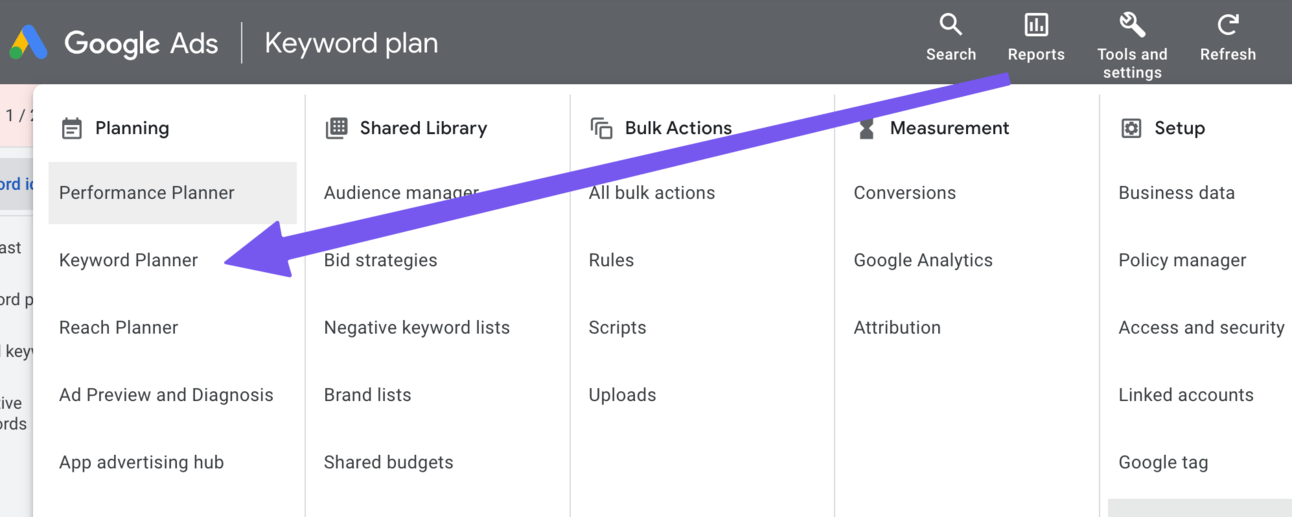
Once you have an account head to Tools and Settings and then Keyword Planner:
Then Find New Keywords:
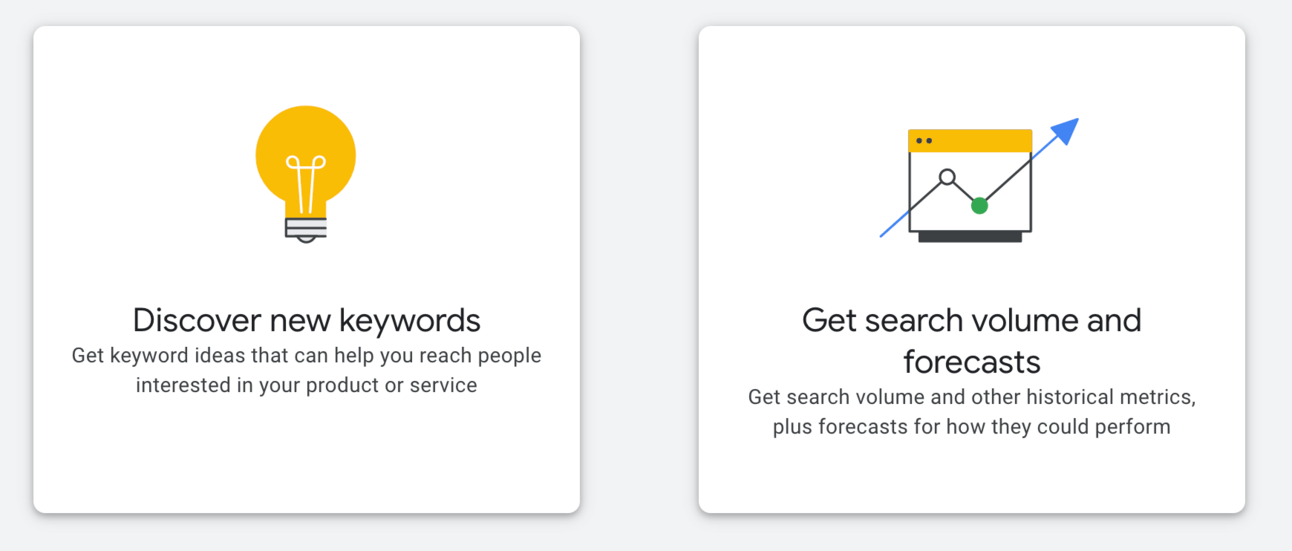
We’ll now be in the main keyword tool and will have two main options:
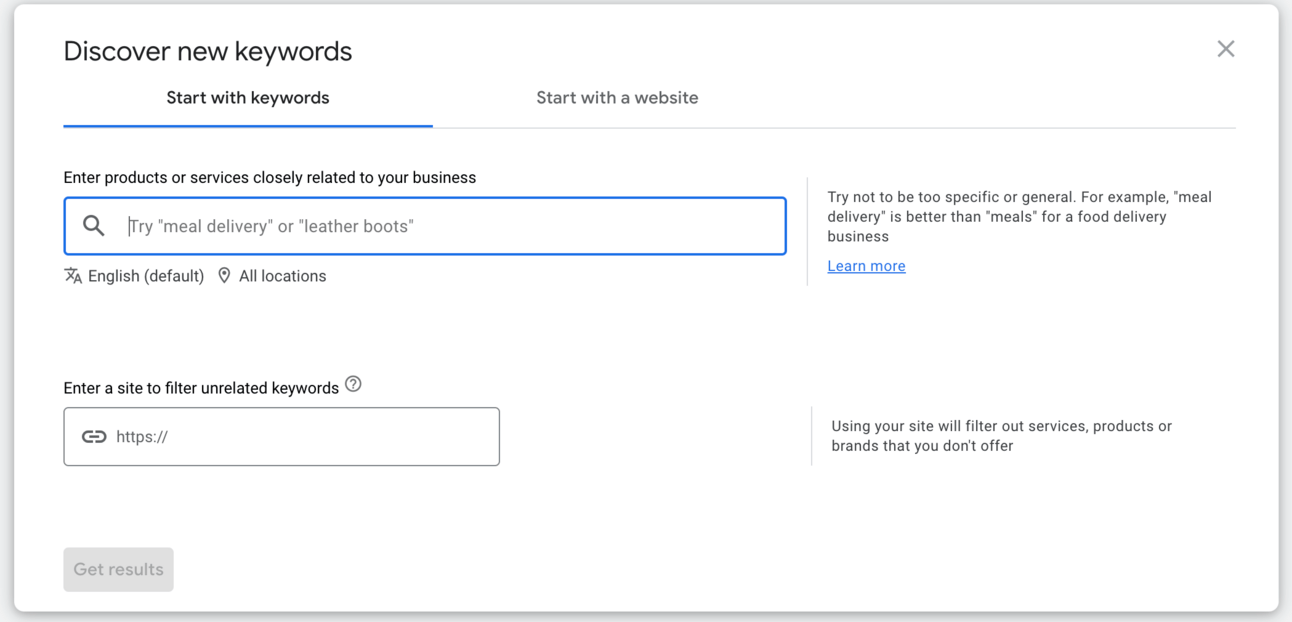
Notice there are two options here - start with keywords and start with a website.
Let’s start with a website to get moving - specifically your competitors websites.
For this example I’m going to be building a website that is about AI business and making money with ChatGPT.
I google “making money with ChatGPT” and find a top competitor is this website: https://openaimaster.com/how-to-make-money-with-chat-gpt/
I put that web address into the Keyword tool in the Start with a website section.
Google Ads will run the numbers and throw up a result like this:
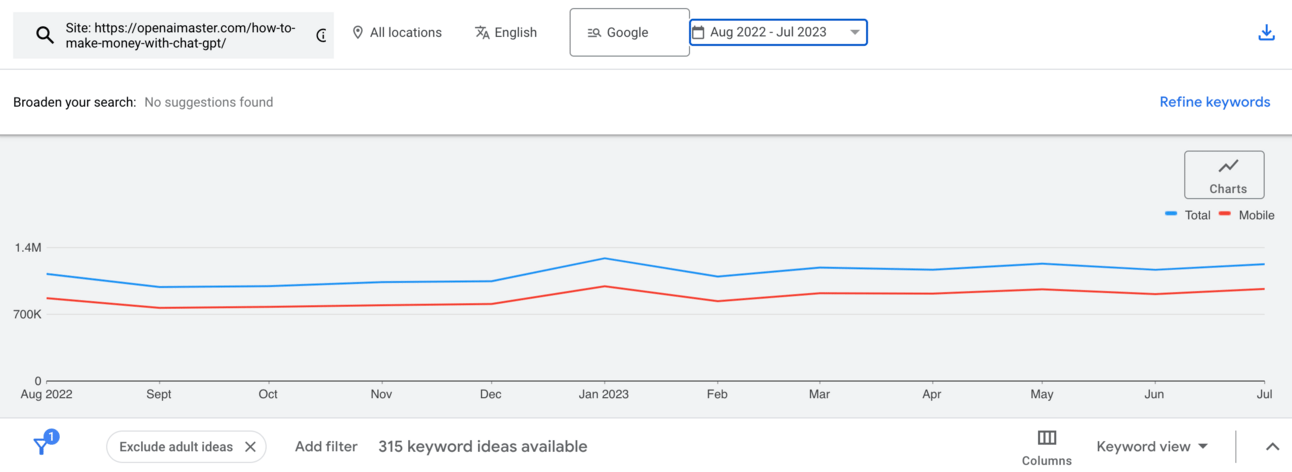
A quick rundown:
at the top you can see the location - currently set to All Locations, ie. worldwide.
you can also see the date range of the date - currently set to 1 year.
the graph shows the amount of traffic of all the related keywords. Red line is on mobile phones, blue line is mobile and desktop.
Scroll down and you’ll see the keywords:
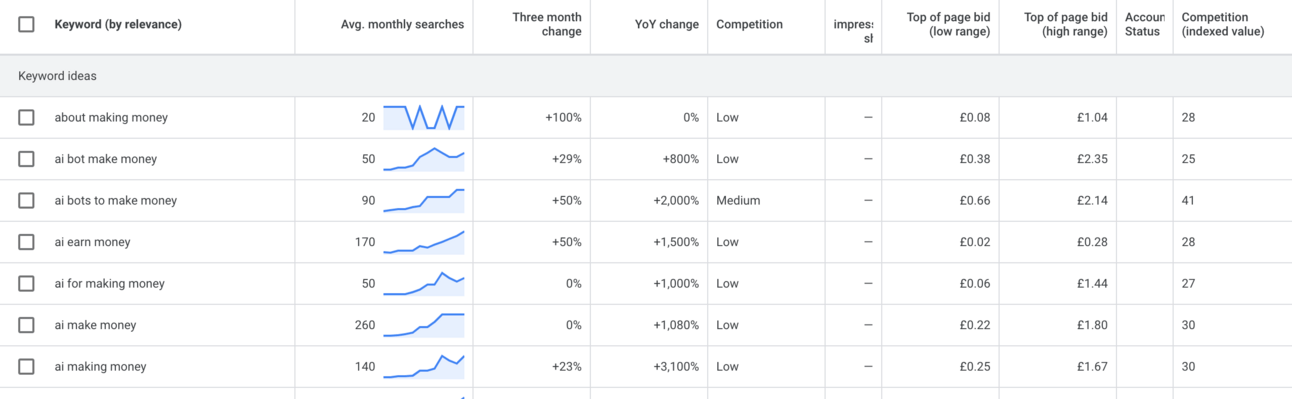
From left to right:
the keyword or keyphrase, ordered by relevance to the website we entered
the average number of monthly searches as well as an overview graph of the traffic trend. These show upward trends which is good
Three month change. Another indicator of whatever the topic is trending up or down.
Year on Year change - here we can really see the high growth in this area with some keyphrases have +1000% growth.
Competition - Google categorises keywords by High, Medium and Low traffic.
Impressions - if you are running advertising then your website’s % of impressions (how often people see your site for the keyword)is shown here
Top of page bid (high and low) - the amount it would cost to buy an advert for this keyword.
Competition (indexed value) - an index of how competitive a keyword is.
You may have different columns - you can adjust them using the columns button and then modify columns.
You’ll notice that there is a LOT of information here. We’re going to be using ChatGPT to analyse this all thankfully.
For now click the checkbox in the top left of the keyword table then select all and finally Add keywords to create plan:
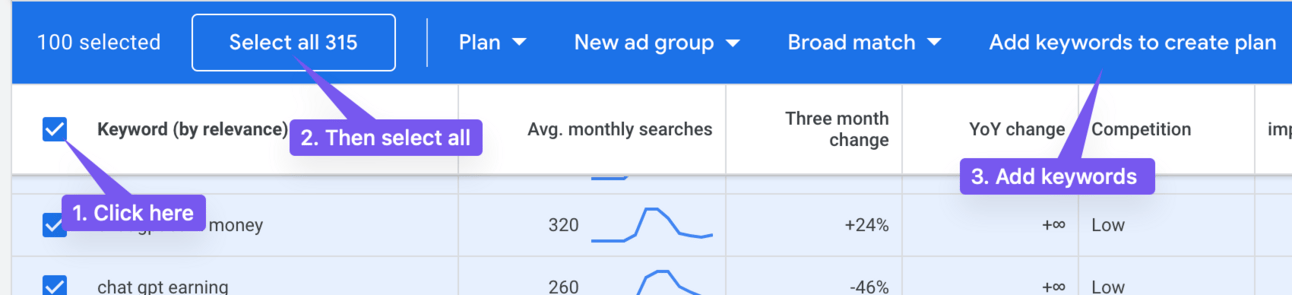
This will save all the keywords into a plan for you.
Now repeat this process with other competitors.
Important tip: Use competitors that are focused on your nice rather than wider interest sites. For example I’m using ChatGPT business specific websites rather than CNBC or Forbes articles that talk about ChatGPT businesses.
If you already have a site include your website’s URL too.
Also feel free to use the other keyword tool (start with a keyword) to expand your selection. Using competitors is the fastest way but manually adding also works.
Continue to accumulate keywords like this until you have 1000+ in your Plan
Once we’ve collected up a bunch of keywords we’re going to turn to ChatGPT to analyse them
Navigate to Keyword Plan > Saved Keywords and then find the download icon in the top right.
It’ll ask if you want forecasts or historical. Choose historical data in the .CSV format.
Now we’re going to head over to ChatGPT and use the Code Interpreter in GPT-4 to run an analysis for us.
First prepare the file by altering the format in the .csv.
Specifically delete row 1, 2, 4 & 5.
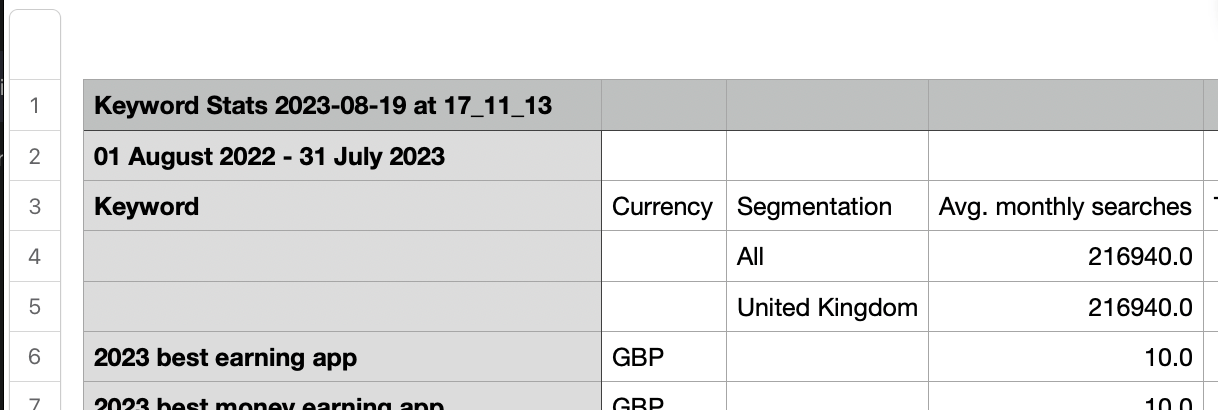
This will bring the actual header row (3) to the top of the .csv.
This is weird formatting quirk in Google Ads’s export and will cause all sorts of problems for ChatGPT.
Now plug this prompt into ChatGPT (Code Interpreter):
The enclosed file includes keyword data from Google Ads

Use it to design a tiered SEO structure for a website about [niche] focusing on keywords that are relevant.

For the homepage choose 3 high volume core keywords. These are the primary keywords or the whole website. They should be high volume, minimum 10,000/month.

Then choose 10 keywords to act as categories, each of which is varied enough for different content but can contribute to the core keyword.

Under each category give me 50 content keywords for content ideas (blogs).

When choosing all keywords prioritise higher volume and lower competition where possible.

For each keyword include its monthly traffic and competition index

Give me CSV output with the core keywords, category keywords and content keywords.
Add your niche to help focus the prompt and filter to only the relevant keywords.
ChatGPT will run through a long process of analysing the data and working through step by step.
Here’s the top of the output.
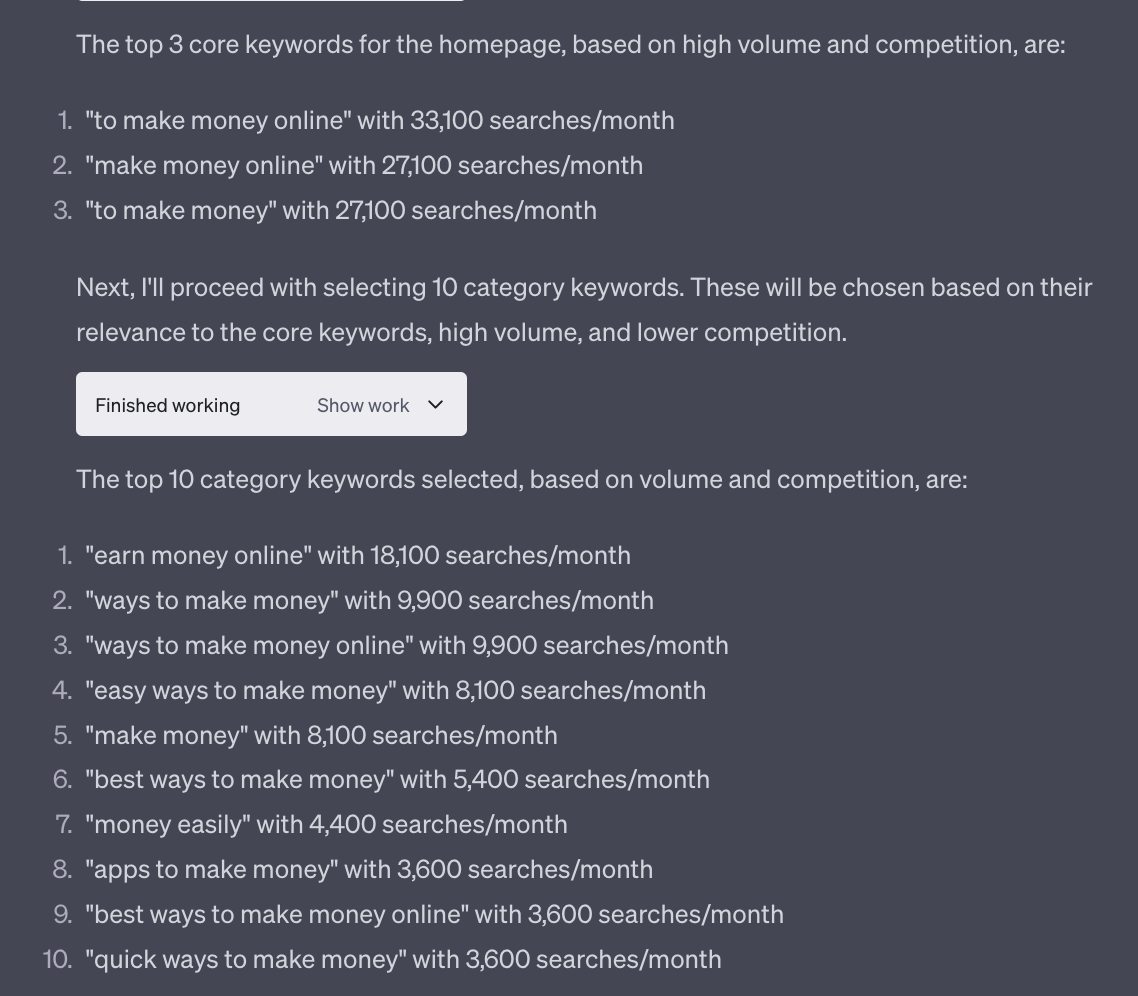
ChatGPT will also give you a downloadable .csv at the end
Here’s the top of the .csv for my example analysis:
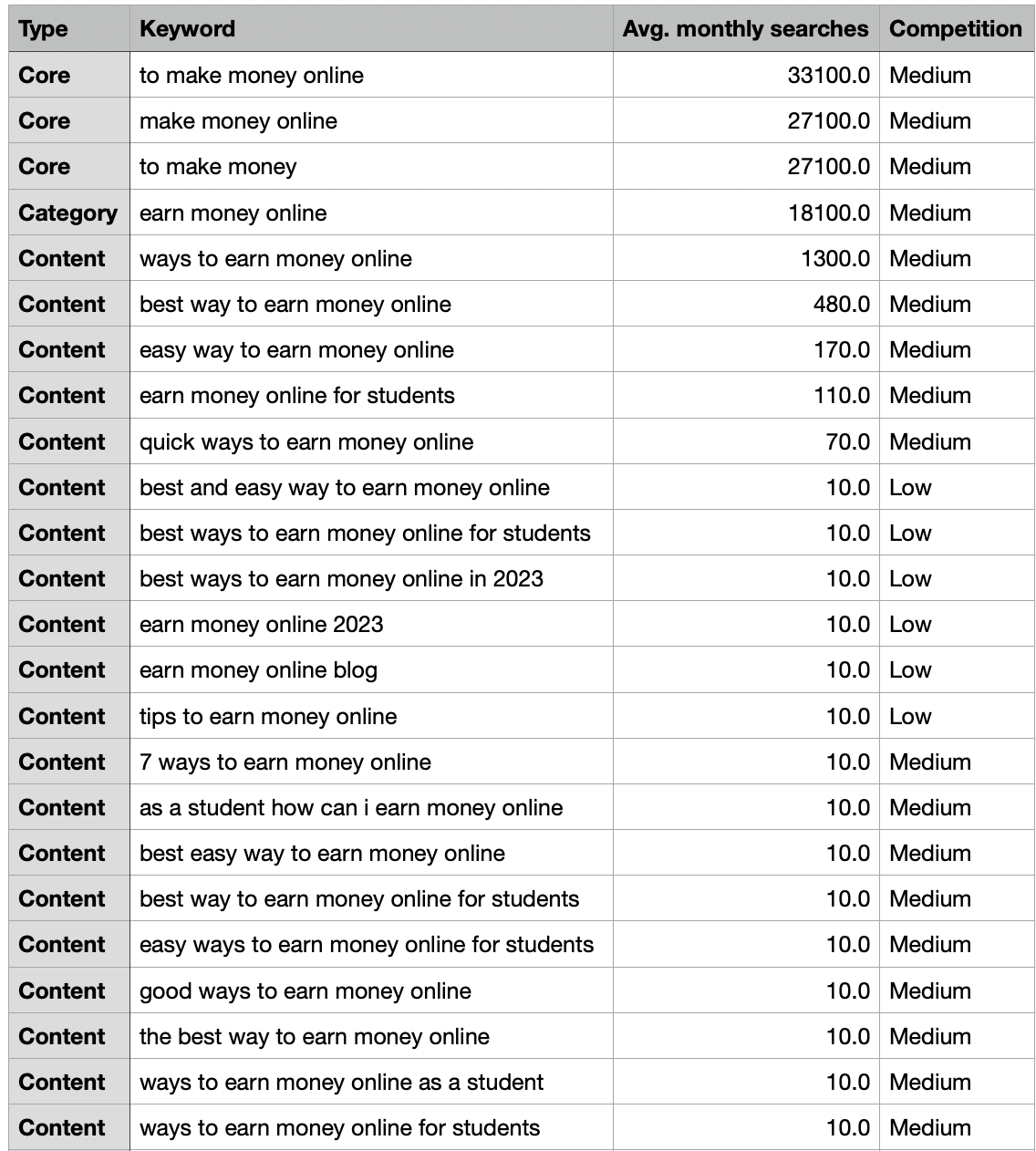
Review your outputs and see how close to your niche they are.
If you find a lot of irrelevant keywords adjust your niche in the initial prompt.
Also experiment with adding a line like “do not include any keywords related to [keyword]” to remove results you do not want.
Run the analysis as many times as you need to until the keywords match up with what your business niche is about.
We’ve had a quick look at what SEO is and begun the keyword research process.
Hang on to the results you’ve just produced as they’ll be vital for all the subsequent steps we take.
In the next step we’re going to start structuring your SEO optimised website with of the help of the work we’ve just completed.
Download the single page Checklist for this whole week.
A reminder of this week:
Part 1: What is SEO + Keyword Research
Part 2: SEO structure and setup
Part 3: Long form content
Part 4: Short form content
Part 5: SEO optimisation
See you tomorrow Prompt Entrepreneur!
Until then, keep PROMPTING!
Kyle, Harms and 🤖
PS: Remember to refer a friend to our newsletter and unlock Facebook Advertising Mastery using AI 👇.
Engine
You can grab a Kindle copy of the Newsletter Business Prompt Playbook for free
Until Friday only $5.99 down to $0.00.
Link here »» https://amzn.to/3OzJQLW or search “newsletter business prompt playbook” in your Amazon app.
In the last step we finalised our keywords into the following tiers:
Core keywords
Category keywords
Content keywords
Now we’re going to map these onto the actual structure of your site.
Here’s a diagram (courtesy of Ahrefs) of what we are aiming for:
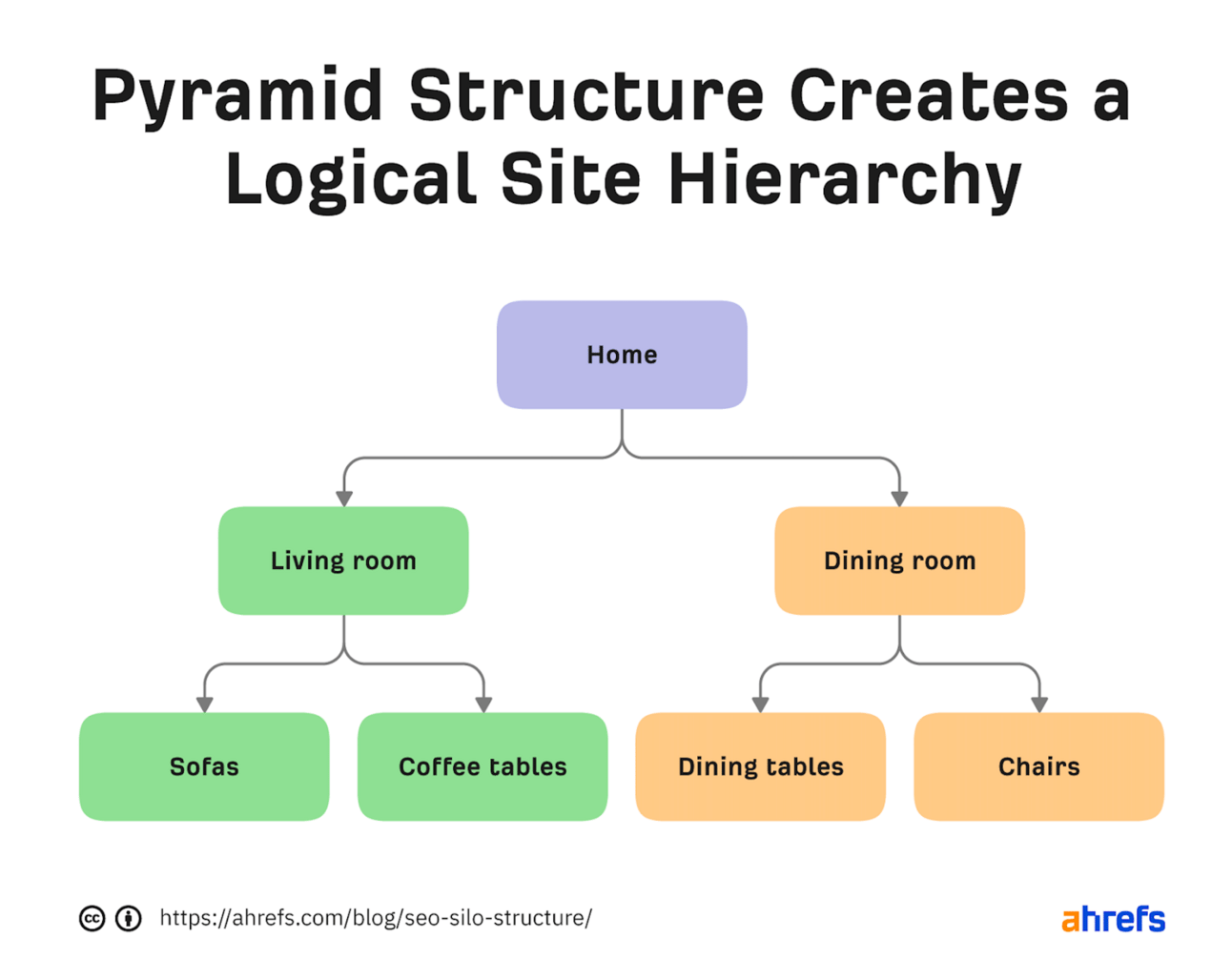
In our case:
Core keywords = Home
Category keywords = Living Room, Dining Room
Content keywords = sofas, coffee tables, dining tables, chairs
Here’s what this looks like in practice over at security.org.
The home page looks like this:
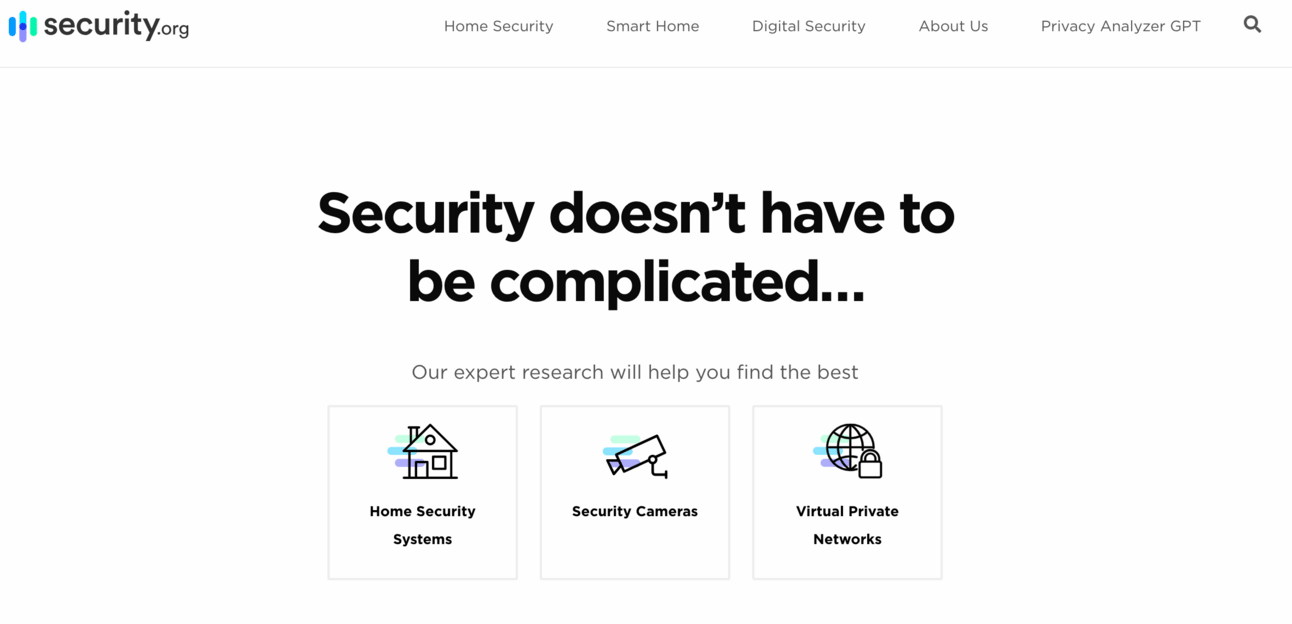
A simple headline and then three navigation elements to Home Security Systems, Security Cameras and VPNs.
These three selections are the Categories. In the above diagram they are Living Room and Dining Room.
We click on Home Security Systems and get a very long detailed page all about home security systems. It’s so long in fact that adding a screenshot here makes no sense. Instead you can visit the site here: https://www.security.org/home-security-systems/
This is a great example of an SEO-optimised Category page as it goes into so much depth about a specific category keyword.
Underneath this page there are are also Content pieces. There are too many on this page to enumerate so here’s a screenshot of a particular section that focuses on Comparison content pieces.
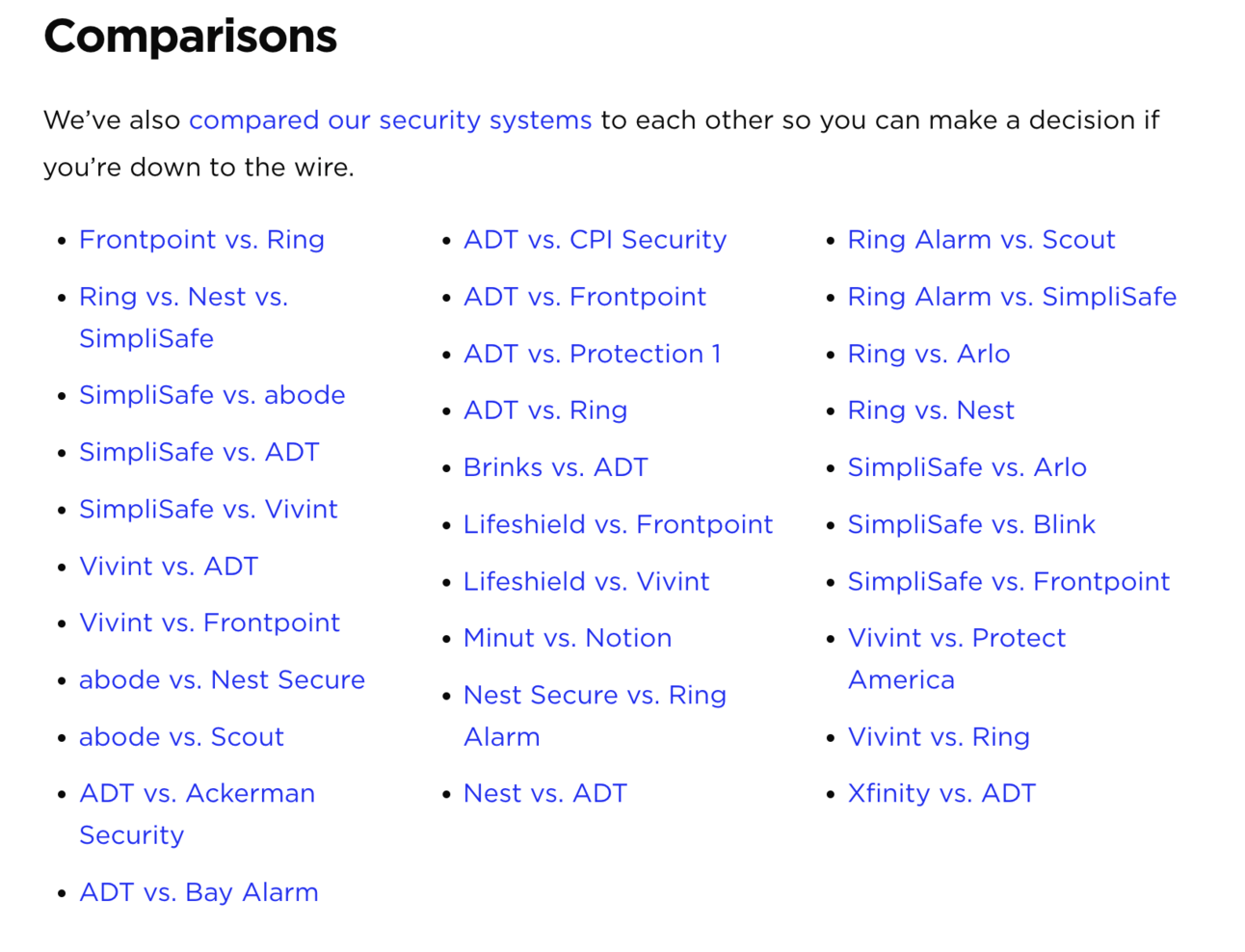
Each of these is a link to a specific content piece: a blog post, review, feature or, as here, a comparison piece.
These are the sofas, coffee tables, dining tables, chairs from the diagram above.
What this structure does is create a logical page flow from one page to the next.
If I, as a visitor, arrive at the home page I can be guided to the specific content by the structure of the site. I flow from one page to the next until I find the specific content I want. This happens from top to bottom.
At the same time having all these unique content pieces gives me more coverage on Google.
If I only focused on big keywords on my homepage (the Core keywords) I wouldn’t be able to rank. The big keywords and always the most competitive.
So I need lots of smaller keywords (we often call them long-tail) to build a base of SEO juice up.
We use the small keywords like “Vivint vs. ADT” to start capturing small amounts of traffic. But we do this with many many content pieces, each capturing 100, 1000 visits a month. This builds up quickly.
What’s more: because these smaller content pieces link upwards to the category pages which then link upwards to the home page there’s an upward pressure that starts ranking the website for the bigger category and content keywords.
Again if you want to go deep into how SEO works the free guide by Moz is excellent. It’s available here: https://moz.com/beginners-guide-to-seo
You already have your site structure from the last prompt we used in Part 1.
Here’s an example:
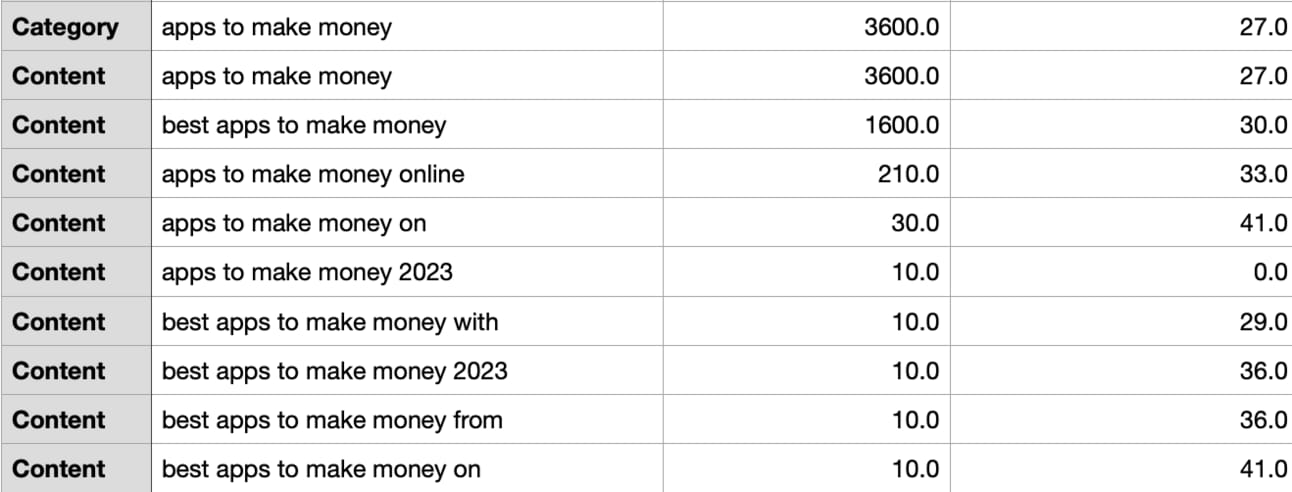
Here the category is “apps to make money”.
Under that are content pieces like:
“best apps to make money” traffic 1600/month, 30/100 competition
“apps to make money online” traffic 210/month, 33/100 competition
“apps to make money 2023” traffic 10/month, 0/100 competition
Go through your exported document from the last Part and you should see a similar structure. Each time you see Category in the first column that’s a new category keyword, followed by the content keywords in order of traffic potential.
We now need to set up our page structure to reflect this.
You may already have a business website. If so great - your main job will be in setting up the category subpages and then adding content pieces, all of which being SEO optimised used advice we’ll be covering.
If you do not have a website yet though you’ll need one!
How to build a website is far too deep a topic to go into here.
I would say that if you want specific advice on your particular business needs reach out to me on Twitter/X here: iamkylebalmer.
In general though here are my recommendations:
No idea what you are doing? Hire someone.
Basic technical skills and have money? Use a page builder like Squarespace or Wix.
Solid technical skills and have more time than money? Use self-hosted Wordpress.
Good technical skills? Use Webflow.
In each case you can set up the hierarchy we’ve talked about before.
Every tool will have a main page called Homepage.
All tools let you set up other pages. These are your category pages. In Webflow you’ll use Collections here.
All tools let you add content pieces. They’ll have different names but generally they’ll be called “Posts” or blog.
However you set up your site we’ll need an SEO optimised Homepage and Category pages.
We’ll cover these in this Part before deep diving into Content pieces in the next 2 Parts.
Act as an SEO expert.

Create a SEO-optimised homepage

The primary keywords for the home page are:
[keyword 1], [keyword 1], [keyword 1]

Provide an SEO optimised page slug

Include these keywords according to SEO best practices whilst maintaining human readability

Provide 5 SEO title and subtitle alternatives.

The homepage should have navigation elements to the following subpages
[copy paste Category keywords]
For each subpage suggest write a keyword optimised header, a description and suggest an image.
In the example I fed in the core keywords: “how to make money online make money online make money”
And “earn money online, apps to make money, money making ideas, quick ways to make money” as categories.
Include all of your categories - I’ve truncated for space in the output.
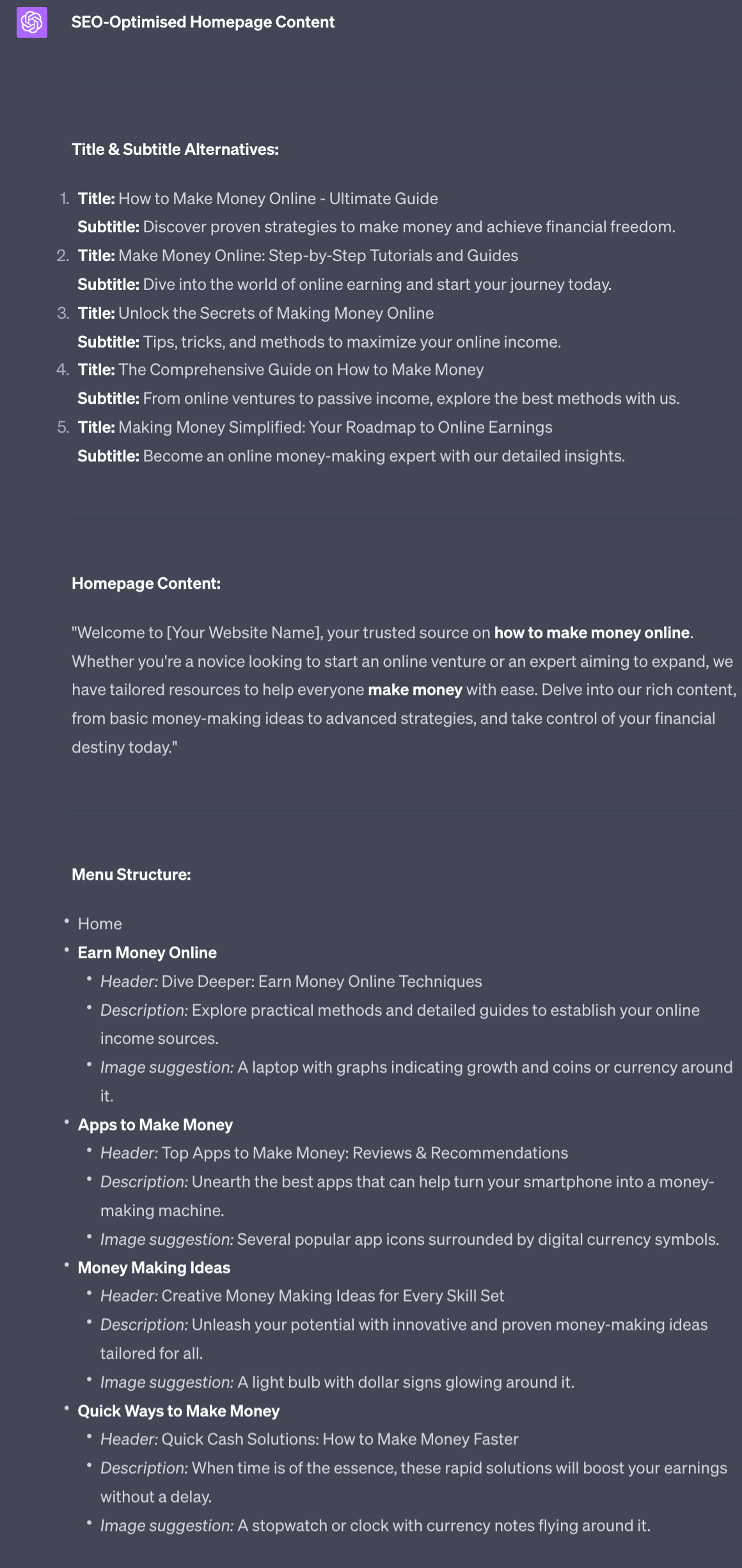
This provides a handful of headlines for you to choose from. As always manually edit and adjust your outputs for this and all other elements you aren’t happy with.
If you need additional elements to fit your page template simply ask for text to the element under this prompt.
Let’s say for example your Homepage template has an FAQ (Frequently Asked Questions) section with 5 questions and answers. Use “Create 5 FAQs with expert answers for this page” to fill out the section.
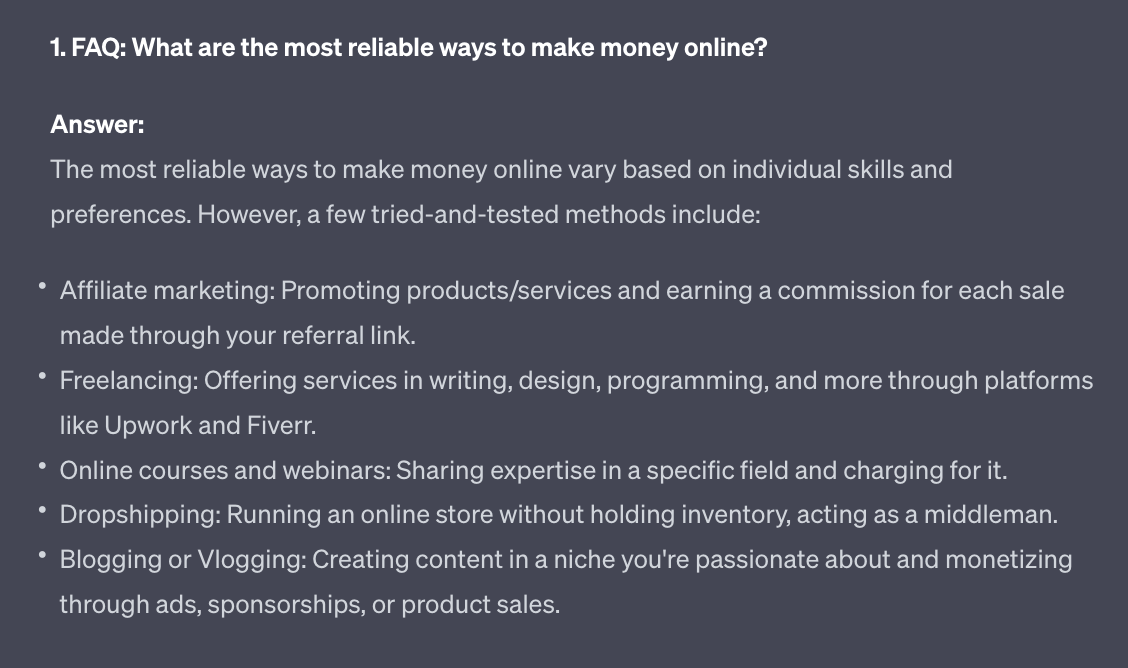
Don’t just follow my prompts blindly - make sure to use AI to go further!
The category pages will be sub-pages under our Homepage.
Whilst the Homepage is primarily for navigation the category pages will have a lot more detail to help us rank on Google.
Use this prompt:
Act as an SEO expert.

Create a detailed SEO optimised long form page about the  keyword : [keyword]

Provide an SEO optimised page slug

Create 5 headlines and subheadline variations.

The objective here is a readable long form page that provides valuable information about the keyword.

Include these sections:
- introduction
- what is it?
- why does the reader need this?
- why is this information valuable
- why listen to me
- common beginner's questions and answers x 5
- common methods/features of keyword
- common benefits of keyword
- common costs of keyword, tabular breakdown
- top brands/names in keyword
- top influences in keyword
- recap

For each section give me a readable SEO friendly title.
In each suggestion add imagery suggestions.

Aim for 3000+ words.
Just plug in the category keyword. I’ve used “make money online” in the example.
Note you hit ChatGPT’s output limit. If it suddenly stops mid-sentence type “Continue” and it’ll resume.
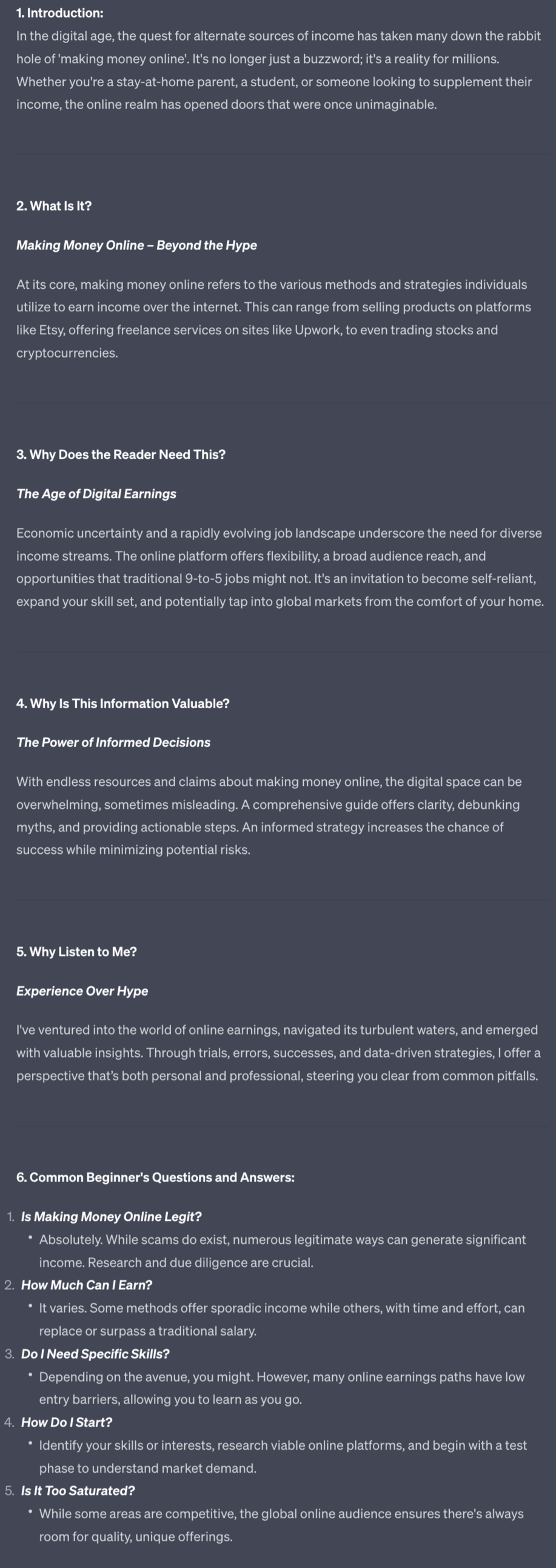
This first part of the page gives us lots to text to start with.
ChatGPT will include the section names. Don’t use those - use the titles it has also generated. For instance don’t use “Why Listen to Me?” as the sub-header - use “Experience over Hype”.
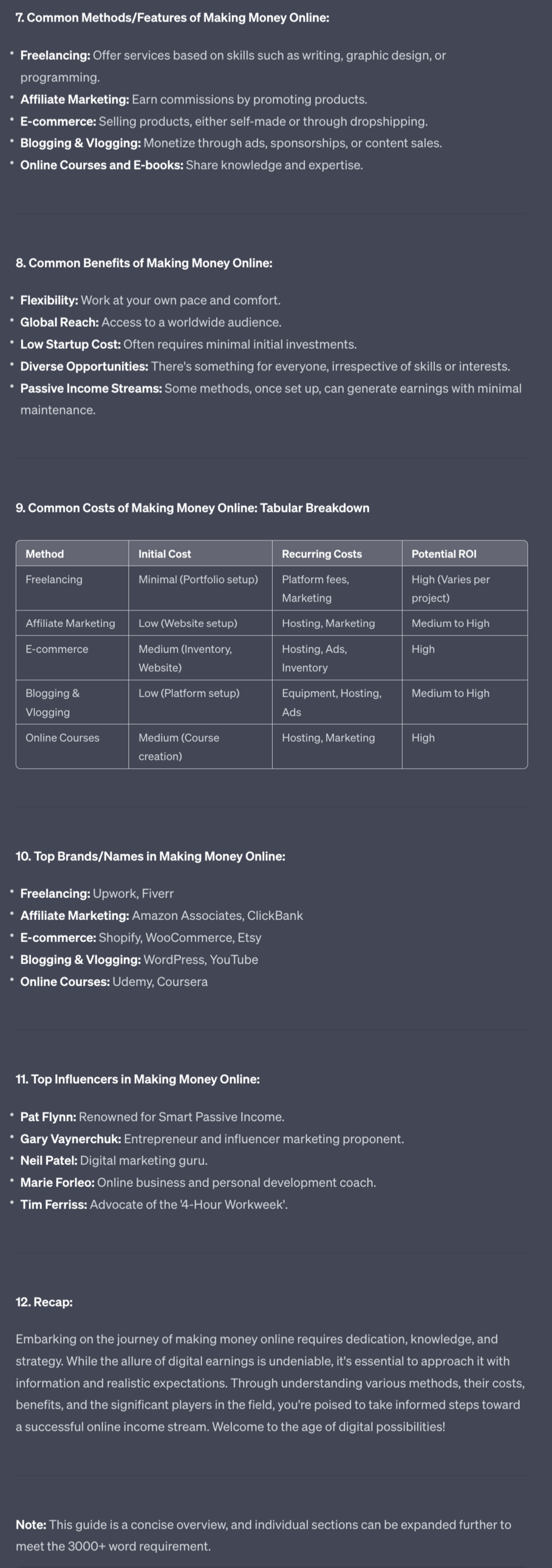
In this second part we have most Lists than fleshed out paragraphs.
For these I’d recommend choosing the interesting and most relevant and asking ChatGPT to expand. For instance I might want more details on the top Brands in my niche - if so I’d ask for this section to be expanded.
On this category page length is a good thing. The more text we include the more Google has to work with.
That does not mean to stuff with meaningless content though. Keep everything organised and relevant. Just don’t fear length!
You now have the basic structure of the site as well as copy for the Homepage and category pages.
You are already in a solid position to start ranking even with this basic work complete.
What we’ll dive into next though will add fuel to the fire - we’re going to start producing, en masse, content pieces to sit underneath each of the categories.
This will be the meat of this Playbook - we’ll spend two Parts talking about content creation.
A reminder of this week:
Part 1: What is SEO + Keyword Research
Part 2: SEO structure and setup
Part 3: Long form content
Part 4: Short form content
Part 5: SEO optimisation
Download the single page Checklist for this whole week.
See you tomorrow Prompt Entrepreneur!
Until then, keep PROMPTING!
Kyle, Harms and 🤖
PS: Remember to refer a friend to our newsletter and unlock Facebook Advertising Mastery using AI 👇.
Engine
Our first type of long form content is a how-to piece.
This content is primarily educational and it fulfils one of the main reasons people come to Google: to solve problems.
For example I recently needed to reseal a sink. I had no idea how to do this so Googled “how to seal a sink”.
The top results were guides showing me what tools I needed and then a step-by-step guide to sealing the sink.
Check your keyword list and you’ll see lots of keywords with “how” in them. These are the perfect candidates for How-to contents.
Don’t limit yourself to only those keywords though - you can basically place “how” in front of any keyword and come up with a relevant guide topic.
For example if a keyword is “cold brew coffee” that can easily become “How to make Cold Brew Coffee at Home” or a similarly titled guide.
Here’s the prompt:
Act as an SEO expert.

Write a long form how-to guide on the topic: how to [keyword]

Give me 5 SEO optimised titles and subtitles that use the keyword.

Use SEO optimised subheaders throughout.

1. Introduction
Grab the reader's attention with an interesting fact or story relating to the topic
Briefly explain what the guide will cover and why it's useful

2. Necessary Materials/Ingredients
Make a list of any tools, ingredients, or materials needed to complete the task

3.Step-by-Step Instructions
Break down the process into clear, sequential steps
Number each step and explain it in detail
Suggest helpful visuals like photos, diagrams, or screenshots as needed
Provide tips, warnings, or troubleshooting advice where relevant

4.Conclusion
Summarize the main steps briefly
Reiterate the benefits of following the guide
Invite the reader to get in touch with any questions
Some additional sections you could include:

5. Background information or context to help readers understand the topic
A frequently asked questions section to address common issues
Variations or customizations for how to tweak the process
A glossary defining key terms
Related resources for more information

Write in an educational, highly readable tone. The goal is to move the reader from one sentence to the next easily.

The whole piece should be 2000+ words

Give me the entire piece, do not ask me to expand.
For this example I used the keyword “make money from freelancing” which turns this into a “How to Make Money from Freelancing” article.
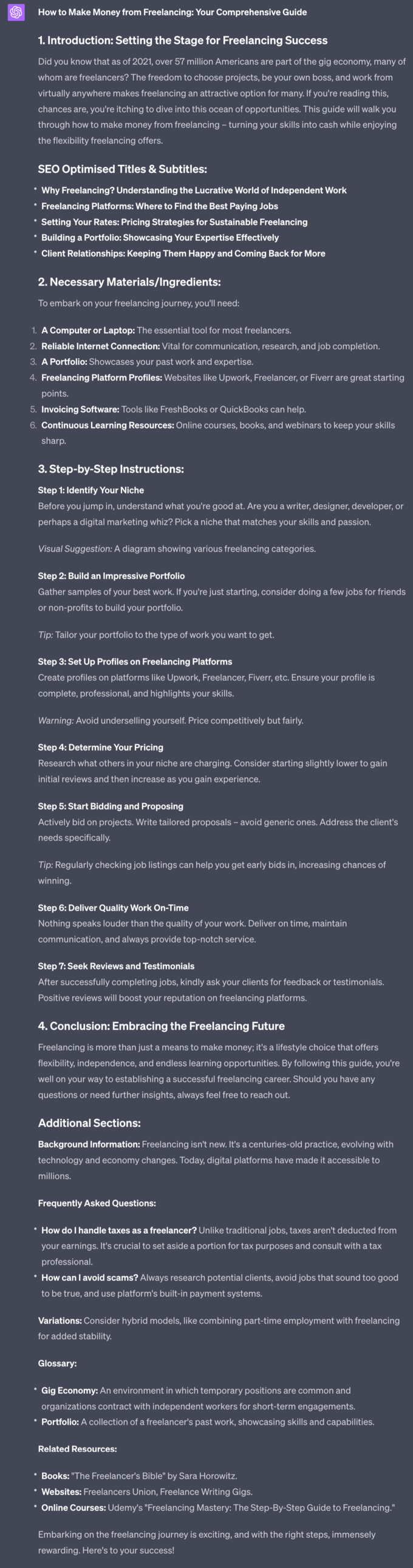
ChatGPT will create a detailed how-to guide with required resources, step by step instructions, FAQs and additional resources.
This is ready to go as a basic post. However feel free to expand on sections. For instance I think those step by steps are a bit sparse so I’d ask ChatGPT to expand using “Expand on the step by step instructions so that each step has it's own instructions to follow. Be detailed so that the reader can follow through without requiring additional research”
That gives me a much more detailed output. For example Step 1 is fleshed out as so:
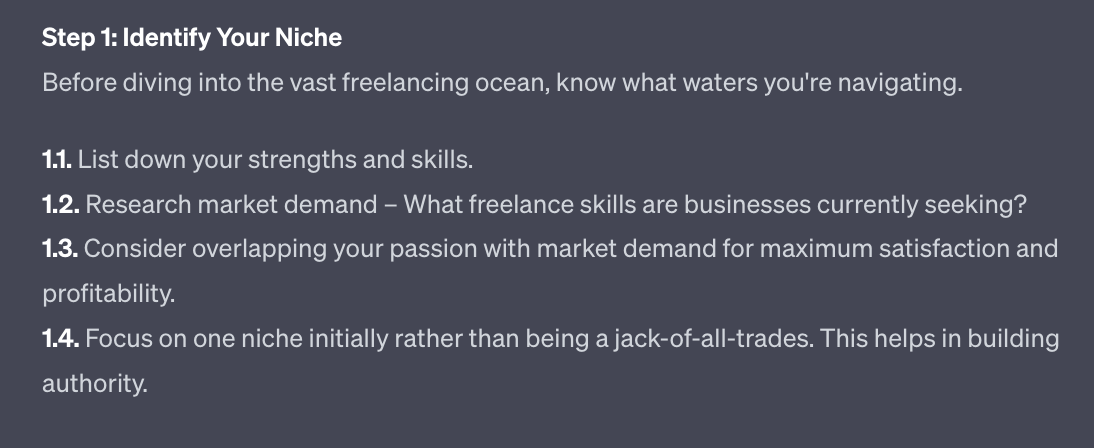
These sub-steps can also be fleshed out if required. There’s no limit to how deep you go.
In fact each of these sub-steps could actually be its own blog article.
Another long form post you can create is talking about other websites and influencers in your niche.
This seems counterintuitive. Why would we want to talk about others rather than ourselves?
Doing so allows us to build authority in the eyes of our readers. If we just try and sell them stuff they’ll be turned off. If instead we discuss other people in the industry and how great they are we are putting ourselves into a position of expertise.
Better than this if we link out to other people in our market they may also link back to use or give us shout outs in the future. Win-win.
Here’s the prompt:
Act as an SEO expert

Write a long form shout out post to highlight experts on the keyword : [keyword]

Give me 5 SEO optimised titles and subtitles that use the keyword.

Use SEO optimised subheaders throughout.

1. Introduction
Explain the topic area and why you want to highlight experts in this field
Share your criteria for who qualifies as an "expert" in this domain

2.Featured Experts
For each expert profiled, include:
Brief background/bio
Description of their work (books, podcast, blog, etc.)
Notable ideas, insights or contributions they've made
What makes their perspective unique or valuable
Examples of their best or most influential content
Organize and group experts logically, such as by platform, experience level, niche topics, etc.
Include quotes, key takeaways, or examples directly from the experts on the topic
Synthesize and discuss their perspectives on various aspects of the topic
Encourage readers to check out the featured experts' work
Provide links, podcast episode titles, book recommendations, etc. to help readers dive in
Suggest ideas for who to follow, listen to, or read next based on their interests

3. Conclusion
Recap the key benefits of paying attention to experts and thought leaders
Express excitement about learning from these and other experts in the field
Invite readers to connect with you to continue the conversation

Write in an educational, highly readable tone. The goal is to move the reader from one sentence to the next easily.

The whole piece should be 2000+ words

Give me the entire piece, do not ask me to expand.
I plugged in the keyword “making money online” to generate a piece. The below example is a snippet.
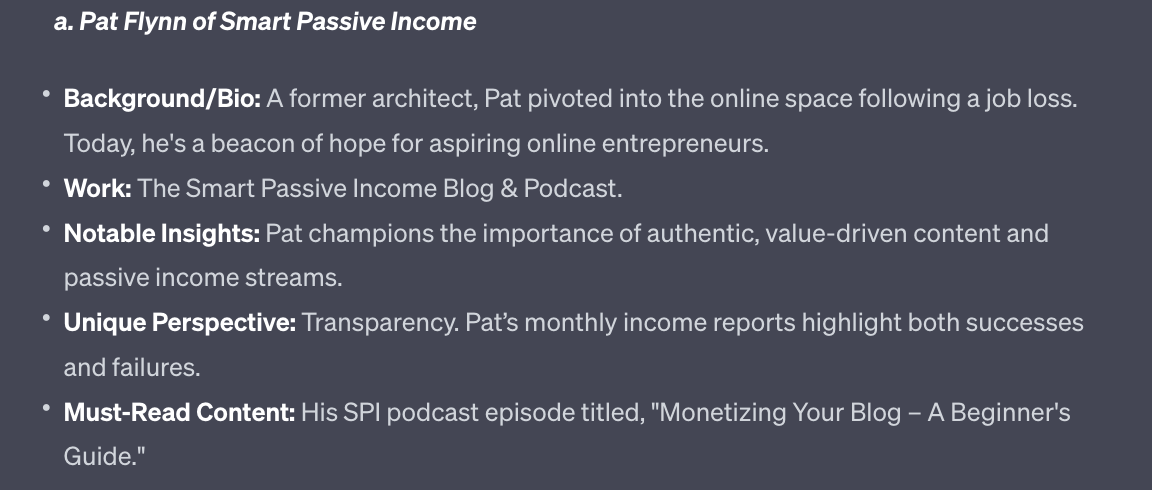
Here’s just one (of many) influencers highlighted in ChatGPT’s output.
I recommend setting up links to the expert’s work. You can use Google to find the examples given by ChatGPT.
Alternatively, and if you have access, use Claude 2 for this job due to its ability to better provide web addresses.
As before if you want to expand any particular sections go ahead and ask ChatGPT to do so.
Skyscraper content is a concept taught by Brian Dean of Backlinko. This is a great article that goes into depth about how it works.
The basic idea is you want to find a piece of content that a competitor has created that lots of people find valuable.
Then you create a “better” version of the same thing.
Better here could, for example, be longer.
If the competitor has an article on “15 ways to make money online” you could make an article with “99 ways to make money online”.
Better could also be specificity. If a competitor has an article on "how to make money online" you could have a more specific version “how to make money online from Indonesia in 2023”.
In both examples you are making a bigger, better skyscraper.
How to find an article to improve?
The simplest method is simply Googling your keyword.
If I put “how to make money online” in Google I get this as a top result: 40 easy ways to make money quickly.
Nice easy way to skyscraper this is to increase the number to 65 easy ways. Not rocket science!
Act as an SEO writer

Create a blog article called [blog title]

Focusing on the keyword: [keyword]

Use the formatting and content style of the example piece I will provide.

Give me 5 SEO optimised titles and subtitles that use the keyword.

Use SEO optimised subheaders throughout.

Write in an educational, highly readable tone. The goal is to move the reader from one sentence to the next easily.

The whole piece should be 2000+ words

Give me the entire piece, do not ask me to expand.

##Example piece begins##

[copy paste competitor content here]
Plug in the original keyword - here it was “make money online”.
Give it a new title to skyscraper the content. Instead of 40 ways I use “65 ways to make money online”
Finally copy paste the whole of the competitors article below the prompt. You may need to use Claude 2 for its larger text input. Alternatively put the text of the website into a .txt file and upload it into ChatGPT’s Code Interpreter along with the original prompt. Either will allow you to work with more text.
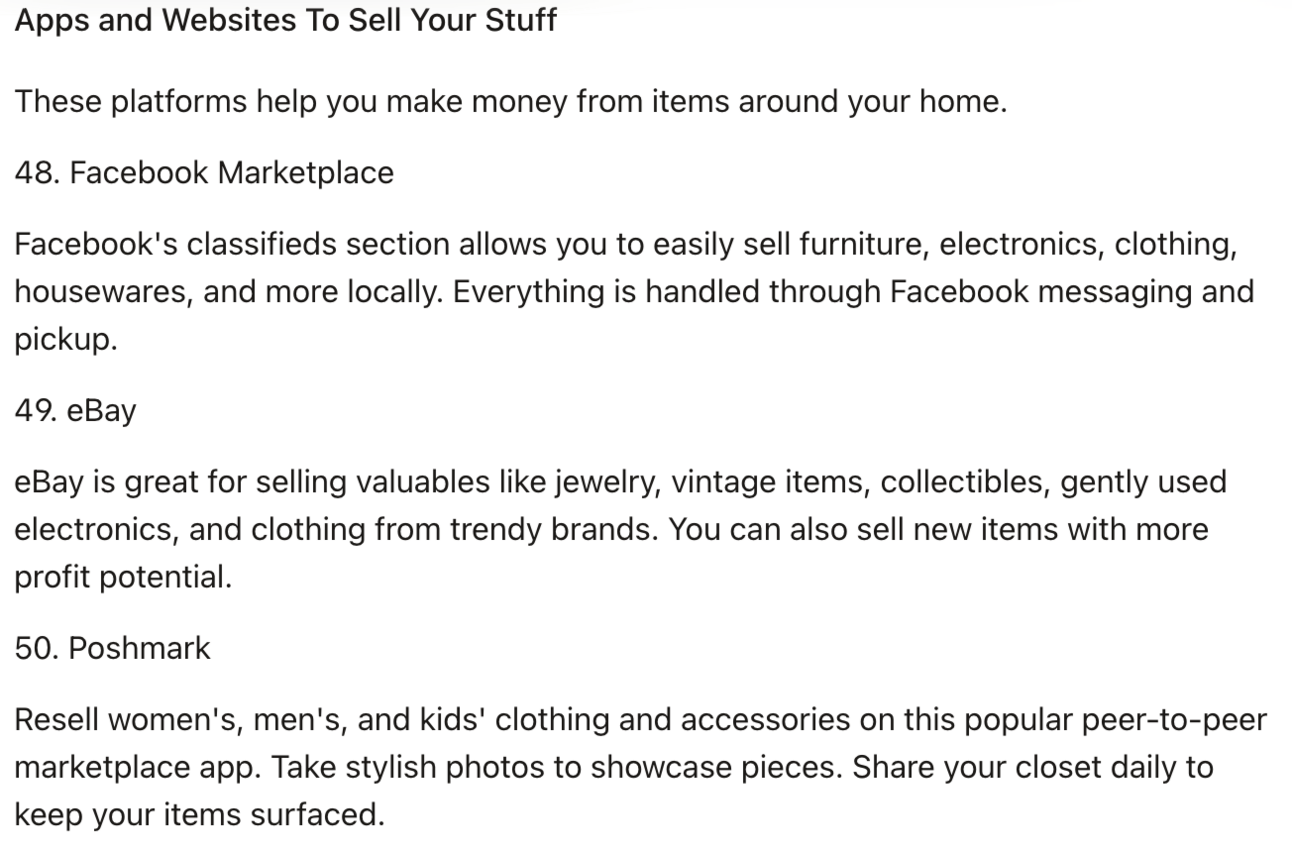
In this output you can see we’ve gone beyond the initial 40 ideas that were in the competitor’s original article.
Use this method to outmanoeuvre competitors by doing what they have done … better!
We’ve just covered three powerful methods to make long form valuable posts for your readers and for Google.
A question I always get here is which format you should apply to each keyword.
One answer here is that you can actually apply multiple formats to a single keyword.
I could for example have a how to guide, a suggested expert list and a skyscraper post about “how to make money online”. That’s just more valuable content on my website.
What you’ll tend to find as you work through your list is that certain formats work better with certain keywords. This will depend on your niche so use your judgement here.
We’ll talk more in the final Part about how many posts to create and on what schedule. So for now just experiment with producing content and getting it published.
A reminder of this week:
Part 1: What is SEO + Keyword Research
Part 2: SEO structure and setup
Part 3: Long form content
Part 4: Short form content
Part 5: SEO optimisation
See you tomorrow Prompt Entrepreneur!
Until then, keep PROMPTING!
Kyle, Harms and 🤖
This is where we want a short form piece to either:
answer one question
make one point
Looking at my list of keywords I might choose “what is an online business” as a keyword. This is a quick definition type piece where I don’t need 1000s of words to make the point.
In fact going into a long guide about what exactly an online business is is not helpful for the reader - they just want a quick answer!
Use this prompt:
Act as an SEO expert.

Write a short form blog article on keyword : [keyword]

Give me 5 SEO optimised titles and subtitles that use the keyword.

Use this structure
1. Introduction (100-150 words):
Hook - Intriguing fact/statistic
State the term being defined or question being answered
Explain importance or common misconceptions
Preview main points

2.Main Body (500-800 words):
2a Definition or Background (100-150 words)
Concise definition or context about the topic
Origins or history briefly

2b Key Details (100-200 words)
Main attributes, qualities, components, or examples
Use lists/bullets for clarity as needed

Common Confusion (100-150 words)
Address frequent questions or misconceptions
Provide straightforward answers

2c Relevance (100-150 words)
Discuss modern day usage, applications, or prevalence
Share relevant statistic or data

2d Tips or Best Practices (100-150 words)
Tips for properly applying the knowledge
Recommendations related to topic

3 Conclusion (50-100 words):
Summarize key points in 1-2 sentences
Final thought on significance or call to action

Write in an educational, highly readable tone. The goal is to move the reader from one sentence to the next easily.

Do not include the structuring guidelines. Instead provide SEO optimised subheaders throughout. Write in prose rather than all in bullet points.

The whole piece should be 500-1000 words

Give me the entire piece, do not ask me to expand.
In the example below I use “what is online business” as the [keyword]. Enter your own keyword in the prompt.
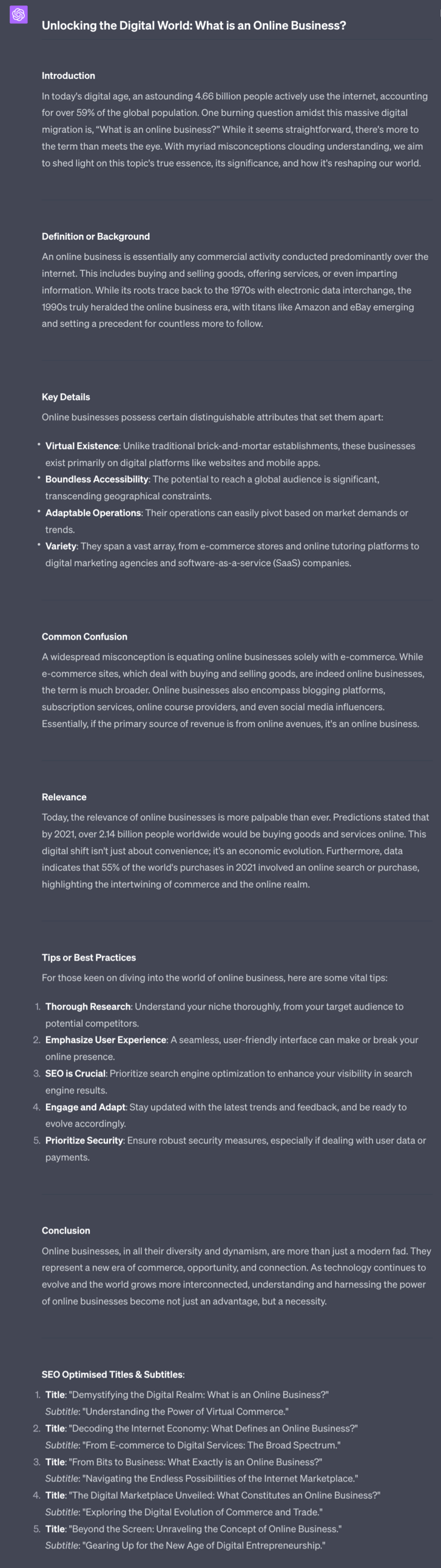
Not bad! This is a solid length, focused on one specific topic. It gives some definitions, helps with common confusions and even gives some best practices. It’s a fine piece of work that you can use as a jumping off point for your final piece.
In the last Part I briefly mentioned this. Now it’s time to loop back.
Remember this image?
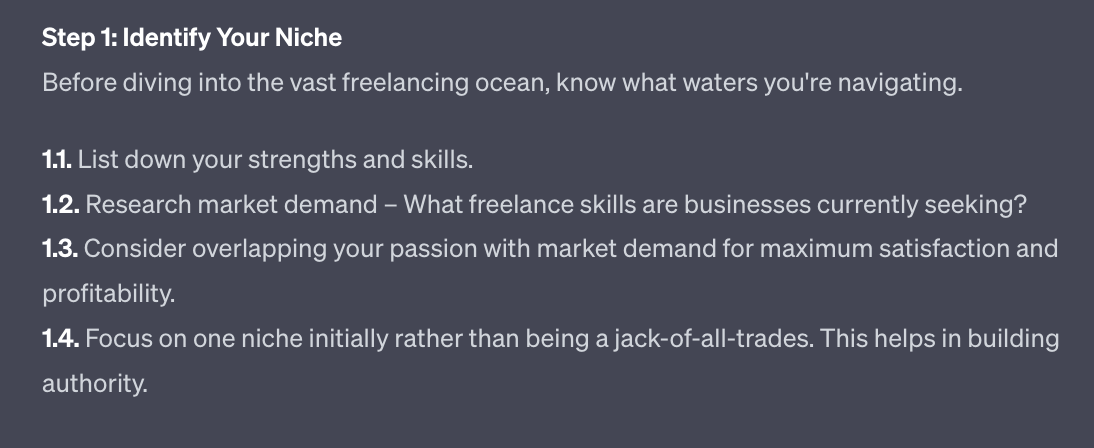
At the end of Step 1 (How-to Guide Format) I mentioned how when expanding out content you could actually create separate blog articles.
I mentioned how any of these sub-steps could actually be its own blog article.
Let’s close that loop!
For instance here I could write a whole blog article about “listing your strengths and skills”
I would then link this new article to the step 1.1 above. So anyone reading the long form guide could choose to come to the blog article about strengths and skills.
This creates an even deeper layer of content by building links between your long form and short form content. We call this “internal linking” - basically links between different parts of your website to help visitors find their way around.
We have two options here:
Create the short form piece from scratch then link back up to the longer form post OR
In the same chat as the long form piece generate the short form expansions.
The second option is easier. Make sure you are in the same chat window as the long form piece and use this prompt:
Act as an SEO expert.

Write a short form blog article on [portion of longer article]
Use the context of the main article.

Give me 5 SEO optimised titles and subtitles that use the keyword.

Use this structure
1. Introduction (100-150 words):
Hook - Intriguing fact/statistic
State the term being defined or question being answered
Explain importance or common misconceptions
Preview main points

2.Main Body (500-800 words):
2a Definition or Background (100-150 words)
Concise definition or context about the topic
Origins or history briefly

2b Key Details (100-200 words)
Main attributes, qualities, components, steps or examples
Use lists/bullets for clarity as needed

Common Confusion (100-150 words)
Address frequent questions or misconceptions
Provide straightforward answers

2c Relevance (100-150 words)
Discuss modern day usage, applications, or prevalence
Share relevant statistic or data

2d Tips or Best Practices (100-150 words)
Tips for properly applying the knowledge
Recommendations related to topic

3 Conclusion (50-100 words):
Summarize key points in 1-2 sentences
Final thought on significance or call to action

Write in an educational, highly readable tone. The goal is to move the reader from one sentence to the next easily.

Do not include the structuring guidelines. Instead provide SEO optimised subheaders throughout. Write in prose rather than all in bullet points.

The whole piece should be 500-1000 words

Give me the entire piece, do not ask me to expand.
Put in the specific part of the longer article you want to expand into a separate post.
In this example I used “Step 1.1 List down your strengths and skills” .
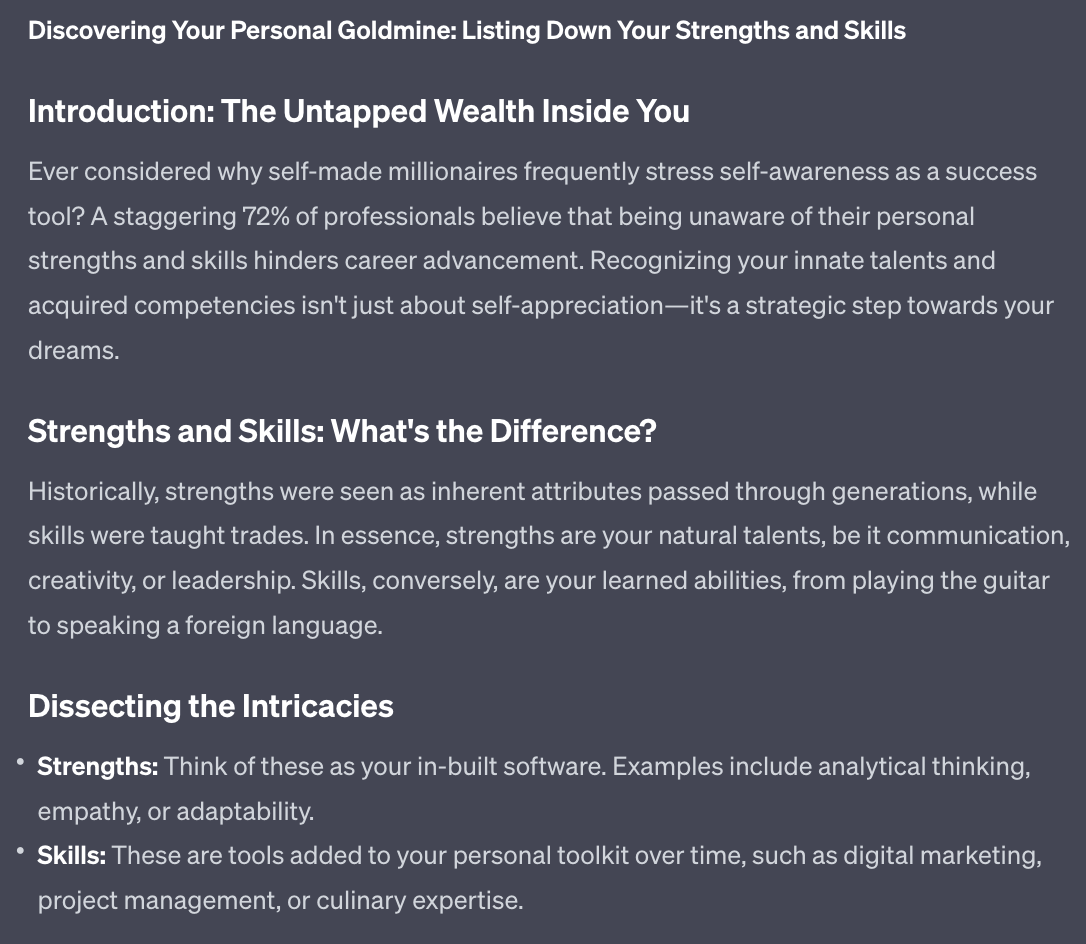
This is just the first couple hundred words - ChatGPT will generate the whole piece for you.
Turn this into its own shorter blog article and then link from the longer piece to the new blog article to build valuable internal linking.
Another perfect subject for a short form post are product and service reviews.
These are most relevant if you website focuses on other company’s products and services - for instance if you do affiliate marketing.
Act as an SEO expert.

Write a review post on [product/service]

Give me 5 SEO optimised titles and subtitles that use the keyword.

Use this structure

Introduction (100-150 words)
Name the product/service being reviewed
Brief background on product/service and company
Set expectations on what will be covered in review

Key Features (150-250 words)
Provide an overview of the main features and specifications
Highlight most notable or important capabilities

Performance & Quality (150-200 words)
Assess how well the key features deliver as advertised
Rate the overall quality and durability based on your experience
Provide examples testing different use cases

Ease of Use (100-150 words)
Evaluate the learning curve and intuitiveness
Share examples of workflows or tasks you accomplished
Note any friction points or areas for improvement

Value (50-100 words)
State the price/cost of product/service
Determine if it provides good value for money
Compare price to competitors or alternatives

Pros & Cons (150-200 words)
List 3-5 pros such as highlights, standouts, benefits
List 2-3 cons like frustrations, limitations, or downsides

Conclusion (50-100 words)
Summarize overall thoughts and recommend or not
Reiterate who would find it most useful
Share where to learn more or make a purchase

Write in an educational, highly readable tone. The goal is to move the reader from one sentence to the next easily.

Do not include the structuring guidelines. Instead provide SEO optimised subheaders throughout. Write in prose rather than all in bullet points.

The whole piece should be 500-1000 words

Give me the entire piece, do not ask me to expand.
For this example I dropped in “Kindle Money Mastery - Make Money with Kindle Publishing Stefan Pylarinos” which is an online course in the “making money online” niche.
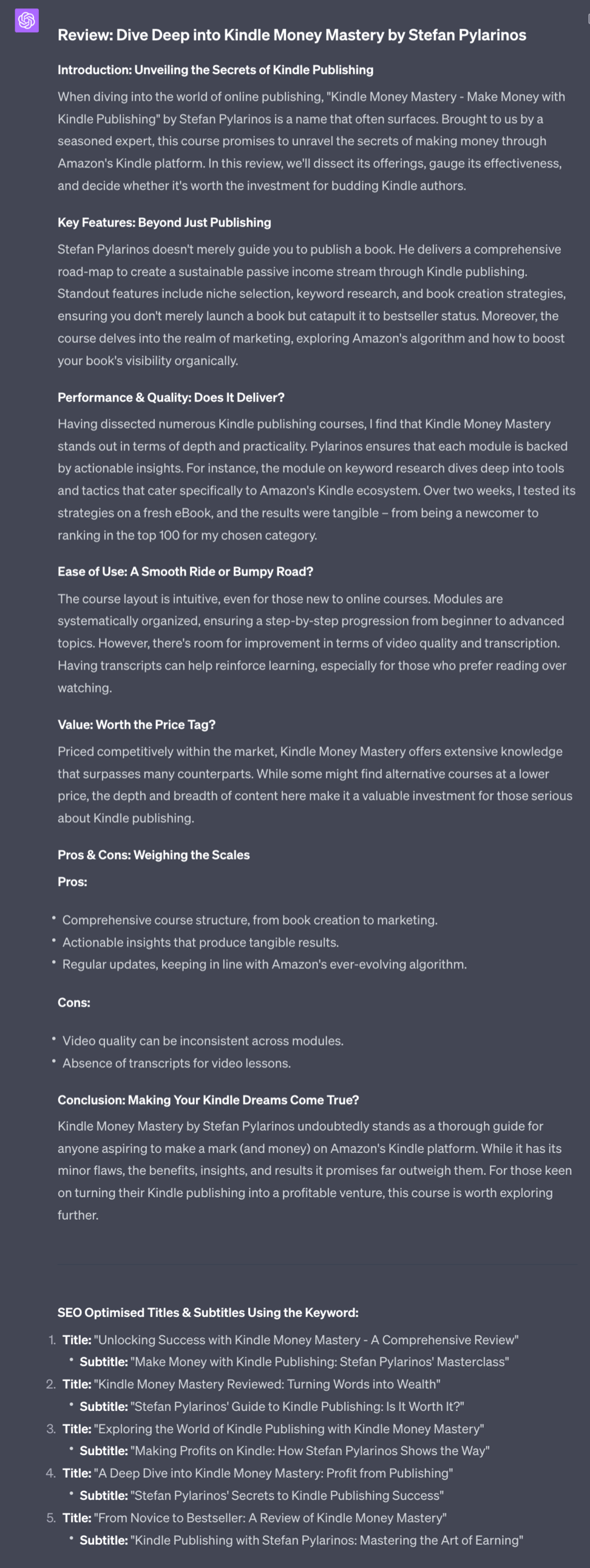
Ideally combine these review structures with your own experiences. The best reviews of course come from personal experience. If you do have experience with the product make sure to add these details into the prompt to create the best output.
These three basic short formats will help supplement your long form content.
These three options allow you to create new content directly from your keyword list, from products/services you want to review and by expanding certain topics from other pieces into their own post.
As with long form content apply the most applicable format. This will depend on your niche so just experiment until you find fit.
In the next Part we’ll discuss your content plan, balancing out long form and short form content and how to continually optimise your SEO work.
A reminder of this week:
Part 1: What is SEO + Keyword Research
Part 2: SEO structure and setup
Part 3: Long form content
Part 4: Short form content
Part 5: SEO optimisation
See you tomorrow Prompt Entrepreneur!
Until then, keep PROMPTING!
Kyle, Harms and 🤖
Moving now into the final Part we’re going to give you a system for continuously improving your website’s SEO.
You’ve now got all the prompts needed to become an SEO powerhouse. It’s about applying everything in a sustainable way now so that Google can recognise your work and start ranking you.
Hi there - LAST CHANCE today.
You can grab a Kindle copy of the Newsletter Business Prompt Playbook for free
Tomorrow it goes back up to $5.99
Oh oh spaghetti-os
Link here »» https://amzn.to/3OzJQLW or search “newsletter business prompt playbook” in your Amazon app.
˶^•ﻌ•^˵ k bye
First up we need to set up everything so that Google i) knows about our site and ii) we can get information back from Google about how our site is doing.
We are going to use two Google services for this. They are both free.
First up go and set up a Google Analytics account at https://analytics.google.com/analytics
Google has an in-depth setup process that you’ll be walked through when you sign up. In case you get confused though ChatGPT can assist.
Act as a Google Analytics integration specialist

I am using [website technology] to build my site

Give me a detailed step by step guide to installing and configuring Google Analytics GA4 on my site.
Just add Wordpress, Squarespace, Webflow etc into the prompt to get instructions customised for you.
Once you have Google Analytics set up we will set up Search Console. This is a different Google tool available here https://search.google.com/
Again follow the instructions. When it asks you for a verification method choose Google Analytics - this will allow you to use the Google Analytics account you just created to finalise setting up your Search Console.
OK what have we just done?
Google Analytics is a tool that lets you analyse all the traffic coming to your site. It’ll show you where the traffic comes from, how long they stay on your website and how visitors interact with your site. It’s an extremely powerful tool.
We are primarily interested in it because it’ll show us which content is the most popular. We can tell this from the number of visits and how long people spend on the content. As data starts to be collected you’ll be able to tell what the most popular content on your website is.
Once you know that: make more of it!
For instance if you see that lists of resources do really well and gain lots of traffic then make more lists!
The second element we added was Search Console. Search Console lets us tell what exact terms people typed into Google to find our website. For some reason it’s a different tool to Google Analytics - no idea why!
This is handy because it gives us the exact language that our visitors are using to find our content. This further helps us understand the audience and make more content for them.
That’s super useful but right now Search Console has another use: it allows us to submit sitemaps.
A sitemap is basically a short text document that says to Google “hey here are all the pages on this website. Here is how they are structured. I want you to check these pages out and rank them please”.
Generating a sitemap depends on what tool you are using to create your webpage. So again let’s use this prompt for detailed instructions:
Act as a Google Analytics integration specialist

I am using [website technology] to build my website

Give me a detailed step by step guide to generating and uploading my sitemap
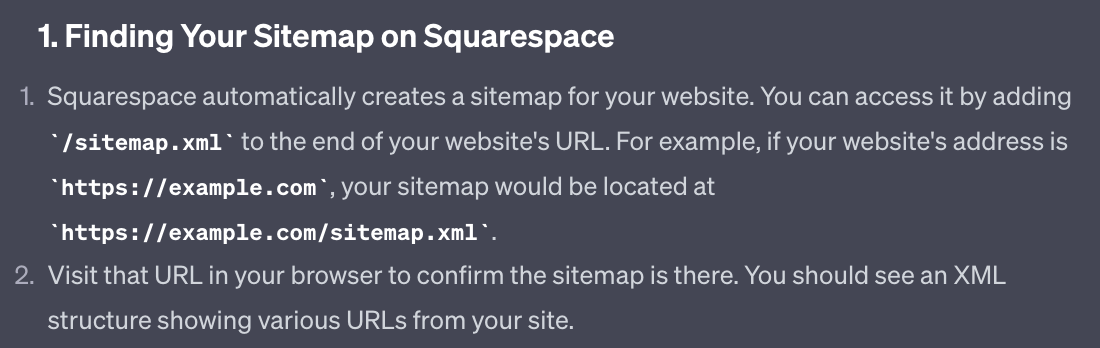
Plug in your particular web site technology to get detailed step by step instructions.
Here for example ChatGPT is telling you exactly where to find your sitemap if using Squarespace:
Once you’ve got your sitemap uploaded you are done with the technical Google setup. This bit does get a bit fiddly so if you are struggling post on X and tag me and I’ll jump in to assist. You can follow me here.
We’ve cracked the content creation portion of SEO in the last two Parts of this Playbook.
One big question is how much content and when to post it.
The simplest answer here is : as much as possible, as often as possible!
But obviously that’s unhelpful. AI does make content creation much easier but it still takes up time.
The key here is consistency - finding a routine that you can keep up and stick to. Google values consistency: putting out new content each day, week or month on a regular basis.
I’d recommend the following:
For the first push create your Homepage, all the category pages and 1-3 content pieces per category. This will give you a solid chunk of content to start with.
Each week try to publish 1 long form and 1-3 short form posts.
If that’s doable increase the rate.
You may find it easier to batch produce, just working down your keyword list plugging everything into ChatGPT. If so great. Just save all the results either as a draft post on your website or in a document ready to be imported into your website. Then drip feed all that content out on a regular schedule.
Work down your lists, focusing on high volume, low competition keywords. They should already be in order of most to least attractiveness.
Need more keywords? First up - great job! We made a lot at the beginning!
Just go through the process we did in Part 1 but focusing it on areas you want to expand into.
Internal linking is creating links between our content pieces. This not only allows visitors to navigate between our pages naturally but also helps Google know what pages are connected to one another.
This helps because if one page is ranking well it will boost up the pages that it links to. This is an oversimplification but approximately true.
We did a little bit of internal linking in the last Part when we created short form blogs that linked out from longer form blogs. That was an example of internal linking.
However, every once in a while it’s useful to go through all our material and create links.
To do so there are premium tools (especially for Wordpress) but we’ll keep it free and use ChatGPT.
You need to create a Google Sheet and put all of your blog articles in it first.
This is a bit of a process but it’s worthwhile. Also, keep the same sheet and just add the new blog posts to it from that point on. It becomes a running record of pages and and their internal links.
Use these headings in the Google Sheet:
Blog url | Blog Content | Link 1 text | Link 1 URL | Link 2 text | …
etc. until Link 5
Then use this prompt in Code Interpreter, uploading the Google Sheet as a csv:
Act as an SEO expert.

Read the attached csv.

It contains contents from my Blog.
The first column is a blog article's url followed by its full content.

The document contains multiple blog articles.

Suggest internal links between the blog articles by analysing the text of each blog and finding natural places to link to the contents of other blogs.

For each give me the text snippet (1-2 words, ideally a keyword) and provide a URL of the content I should link to.

Repeat this so that every blog article (every row) has 5 links to other articles.

Append results to the CSV file provided.

ChatGPT will go through each content piece and cross reference it against all the others. It will then suggest 5 links from each content piece to others, along with the text snippet where to add the link and the link itself.
Go back into each post and add in the links.
The more posts you have for ChatGPT to analyse the better this process will be as it’ll have a larger pot to choose from.
Another critical element of SEO is gaining external links, also known as backlinks.
These are links from other places pointing to your website.
These external links tell Google that your content is valuable and that Google should show it to more people.
There are, roughly, two types of links here:
Social media links
Links from websites
For social media make sure to share your content from your webpage out onto your social media channels. Don’t have them built up yet? I’ve written a handful of Prompt Playbooks on using AI to grow on channels like X and LinkedIn.
For websites we’ve actually already built a long form piece that is perfect for this: the “expert shout out” format we talked about in Part 3.
In that format we highlighted other experts and influencers in our niche.
Every time you publish one of these make sure that all the people you mentioned know you featured them. To do this send them a quick message either by email or their social media platform.
Here’s a prompt for the outreach message:
Act as a cold outreach expert

Write a short outreach message to [name]

Inform them that I've featured them in a piece about experts in [niche]

The link is [link]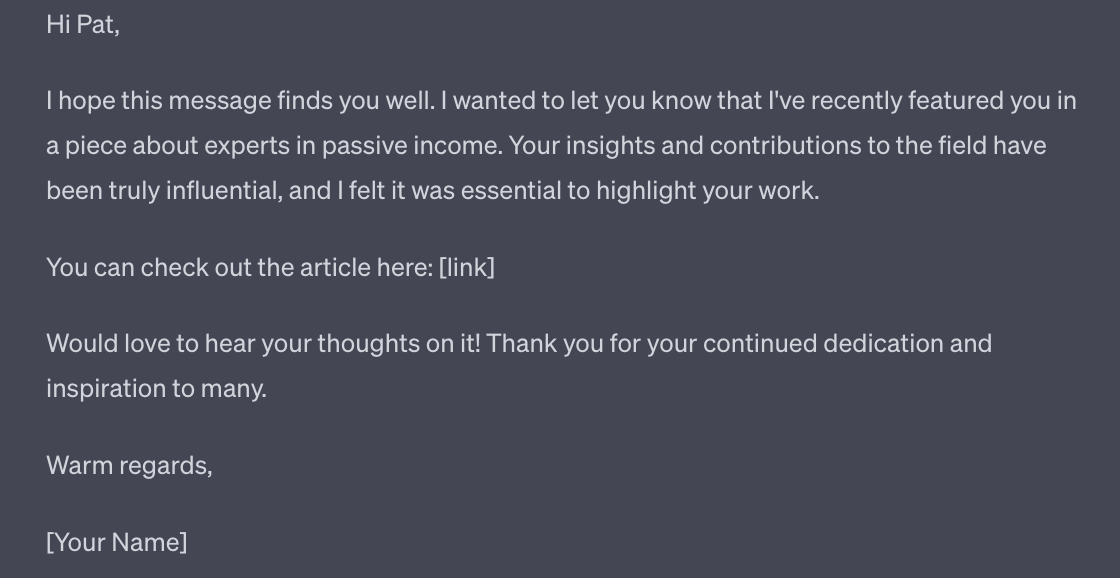
Don’t include any requests for a backlink or for them to share it with their followers. If it’s valuable they’ll do that anyway - people like to share wins and being featured as an “expert” is a win they’ll be happy to spread.
Because each of your “shout out” articles include a number of experts you have a higher chance to get a hit from at least one of them.
This should help to kickstart your external links. As more people start to find your website via SEO you’ll naturally start getting linked to.
This Part concludes this Playbook, giving us the remaining parts of the SEO puzzle.
The core of SEO is your content. That’s why we spent the majority of this Playbook discussing how to create content. Get that right and the rest is easy.
Hopefully I’ve now equipped you with the basics required to set up a high ranking SEO website. And by using AI we’re taking a lot of the grunt work out of the job.
Remember though that SEO is a long game. Don’t expect to throw up a site and immediately be flooded with traffic. Instead get your systems in place and continuously publish for 6 months before expecting to see results.
Simple is not the same as easy.
But once the SEO is up and running you will receive a large amount of traffic, for free, from Google for a long time. It’s a beautiful and abundant well - it just requires the effort to drill down deep enough.
A reminder of what we’ve covered in this Playbook:
Part 1: What is SEO + Keyword Research
Part 2: SEO structure and setup
Part 3: Long form content
Part 4: Short form content
Part 5: SEO optimisation
See you tomorrow Prompt Entrepreneur!
Until then, keep PROMPTING!
Kyle, Harms and 🤖
Unlock the potential of your online presence with the '🔎 Search Engine Optimisation with AI | Prompt Playbook'. This comprehensive guide is designed to equip you with practical strategies to enhance your website's visibility on search engines like Google. Learn how to leverage AI tools for SEO, simplifying the complex world of search engine optimization while driving organic traffic to your site. With actionable insights and a clear roadmap, this playbook will transform you from a novice to an SEO powerhouse, ensuring your content gets the attention it deserves.
This playbook is designed for small business owners, content creators, and marketers who are eager to improve their online visibility but feel overwhelmed by the complexities of SEO. Whether you're a beginner looking to understand the basics or someone who has dabbled in SEO but hasn't seen results, this guide offers practical solutions tailored to your needs. By harnessing the power of AI, you'll be able to overcome the common challenges of SEO, such as time constraints and technical know-how, allowing you to focus on what you do best: creating valuable content.
No prior experience is necessary! This playbook is designed for beginners and provides step-by-step guidance to help you understand and implement SEO strategies.
The time commitment varies, but we recommend setting aside a few hours each week to read, practice, and implement the strategies outlined in the playbook.
Absolutely! The playbook simplifies the use of AI tools and provides clear instructions, making it accessible even for those without technical expertise.
Yes! Even established websites can benefit from fresh SEO strategies and insights. The playbook will help you optimize further and adapt to changing algorithms.
Yes, the principles of SEO discussed in this playbook can be applied to various types of websites, including blogs, e-commerce sites, and service-based businesses.