
AI playbook
Unlock the potential of your LinkedIn presence with our comprehensive playbook, '💼 LinkedIn Growth with ChatGPT | Prompt Playbook'.
Start ReadingWe’ve got our basic LinkedIn profile set up and optimised for our niche.
We’re now going to begin creating content. I’ll walk through a few different methods you can use to get your content machine up and running.
First we’re going to use ChatGPT to generate a content matrix with potentially unlimited content ideas for us to work with:
Act as a social media manager.

Create a content matrix with the following parameters

Core Topic = [Your large topic from Part 1]
Secondary topics = [Your medium topics from Part 1]
Tertiary topics = [Your small topics from Part 1]

All content pieces should be about the core topic. Include secondary and tertiary for variety, with preference for secondary.

For each content piece generate a post with the following formats/tones:
-Question for audience
-Controversial opinion
-Inspiring
-Entertain / joke
-X vs. Y comparison
-Expert opinion
-Listicle

Generate 10 content pieces on the vertical axis, each piece in all 7 formats/tones.

Return results in a tabular format.
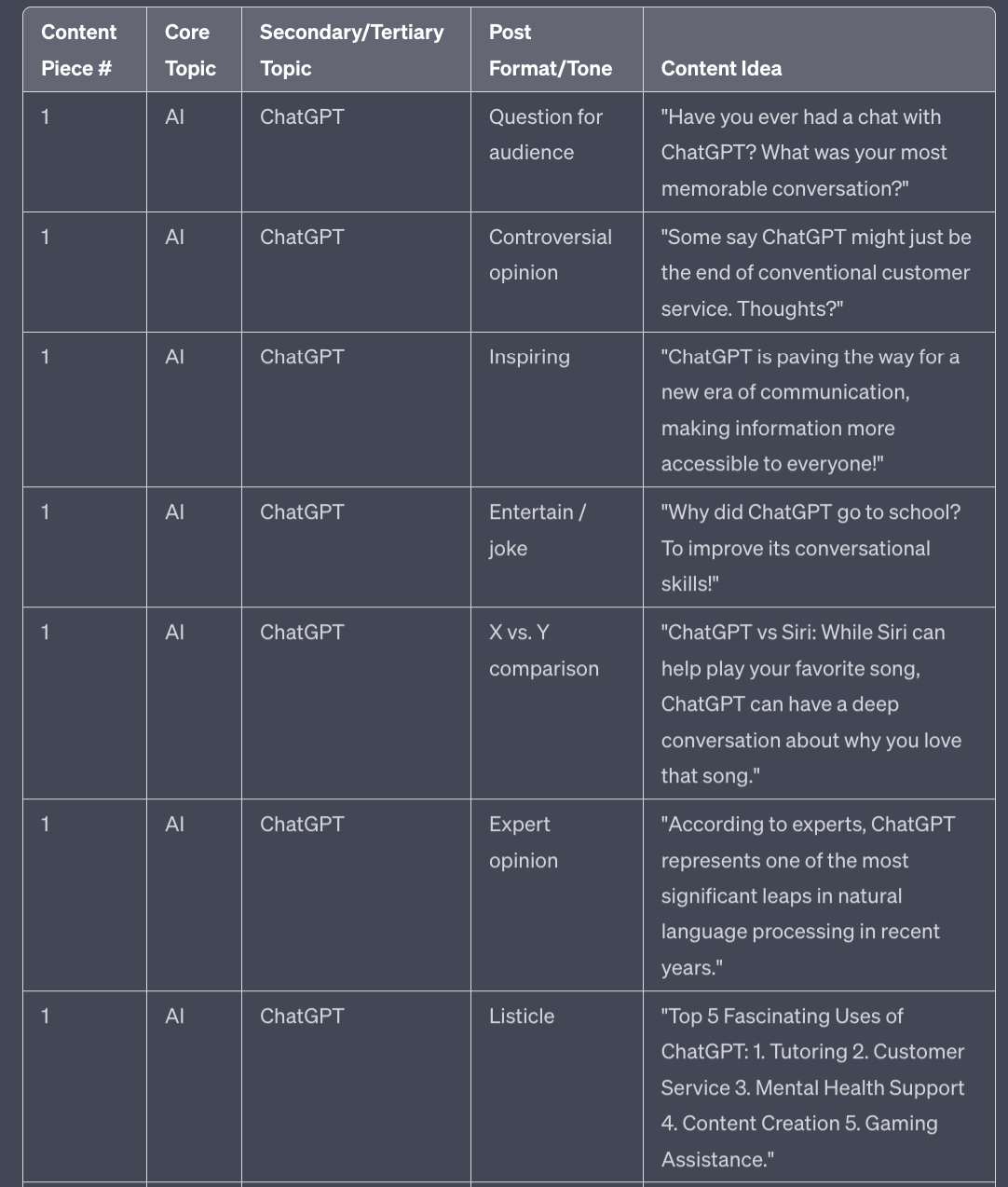
This output shows the large topic (AI) mixed with my first medium topic (ChatGPT). The full output will include all of your medium and small topics giving you ~50-100 post ideas depending on how many topics you put in.
If you find the ideas a little generic I suggest adding some more information about your target audience. For example if I add in a line saying “Target audience = business leaders and owners” all ideas are immediately tweaked to address this audience.
These ideas are only the starting point - use them as a jumping off point rather than simply copy/pasting.
For example:
"Have you ever had a chat with ChatGPT? What was your most memorable conversation?"
I would rewrite as “Do you remember losing your ChatGPT virginity? What was your first ever conversation like?”
Similar idea but rewritten to add more bite.
Additionally, these topics can now be addressed in a quick text post or in a different format. For example each of these could be a quick video, a set of images or even a longer form LinkedIn blog post.
You can convert any of these ideas into these formats with a quick ChatGPT prompt to “reformat as a video script", “ reformat as image slides” or “reformat as a blog article”.
This second method involves finding content that is killing it on LinkedIn and rewriting it for you particular niche.
Do not just copy wholesale. It’s lazy and won’t work.
Instead we want to find content that we can truly adapt and make our own. We are just building off the format and style of existing posts to help guarantee reach and engagement for ourselves.
In Part 1 we followed a number of top LinkedIn influencers in your topic area. As you use LinkedIn you should be seeing their content in your feed.
If you see anything that resonates with you and that you’d like to cover keep a reminder. You can do this using LinkedIn’s built in Save tool (tap the … at the top right of the post and hit Save) or by copy pasting the link to your note taking software.
I like to save up 10+ posts like this and then batch rewrite once a week. Do what works best for you.
To rewrite head to ChatGPT or Claude 2 (I prefer Claude 2 for this specific task) and use this prompt:
Act as a LinkedIn expert writer.

Rewrite this post.

Rewrite it so that the primary topic is AI.

Use a professional and authoritative expert tone of voice.

Remove links, mentions and hashtags.

#Post begins#
[Copy/paste post]
#Post ends#
For the example I’ve used this post:
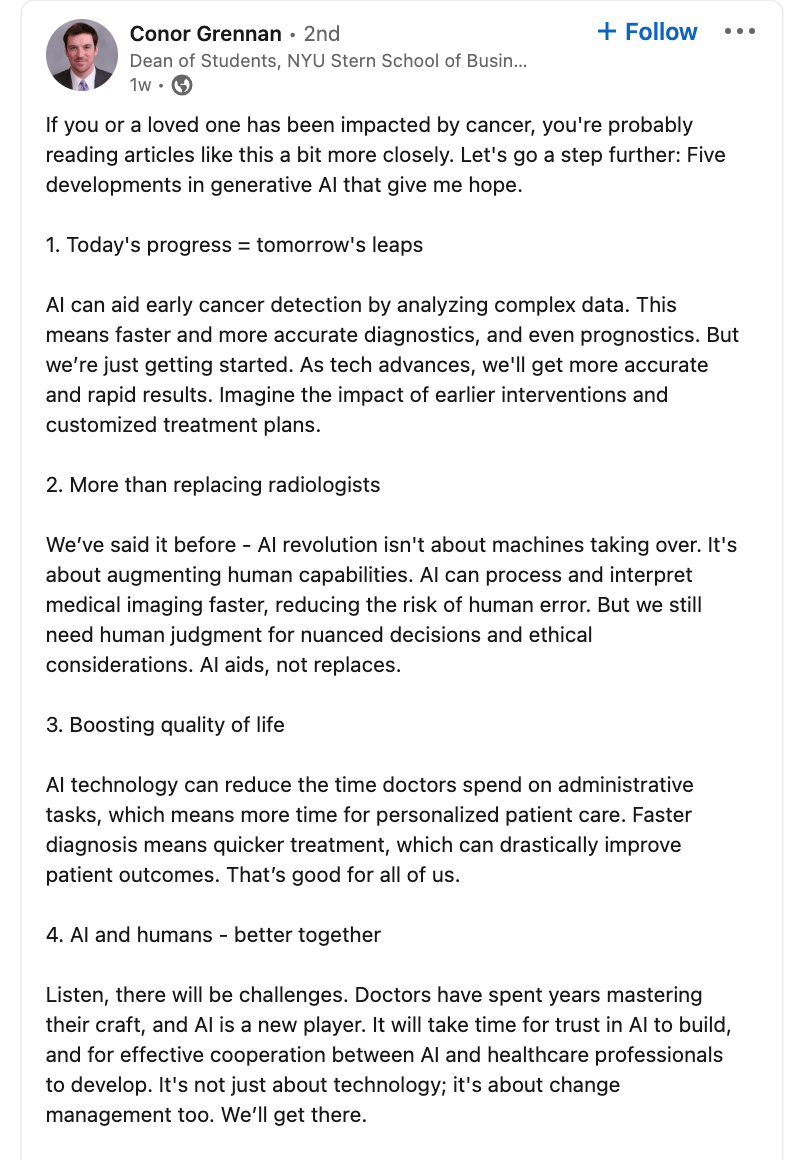
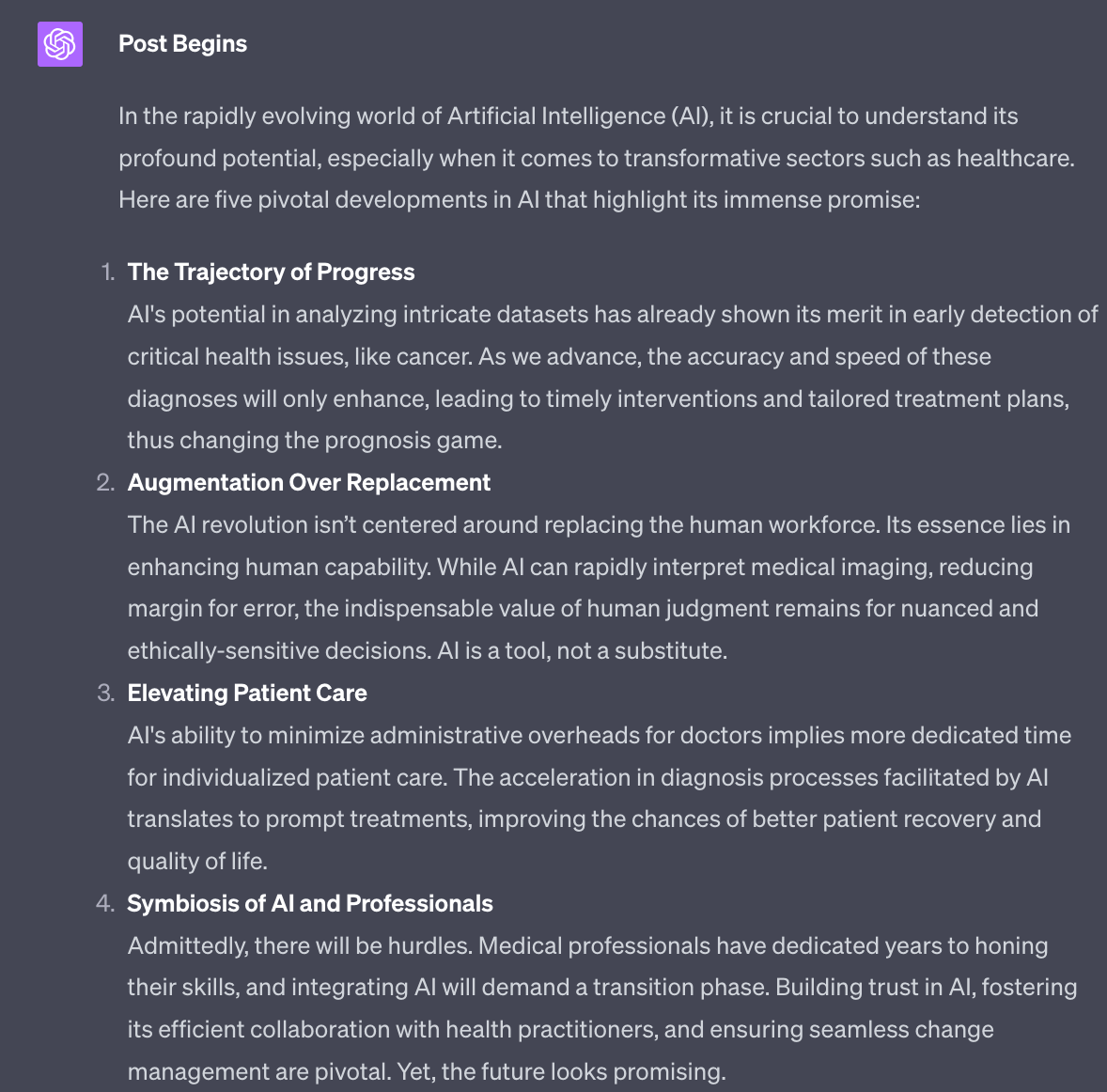
As always, rewrite rather than simply copy and paste.
Better yet convert the format. This is more work obviously but this means you are converting not only the content itself but also the formatting. This can work especially well if you are comfortable with video creation.
Another expert play is to stay on top of updates in your field and quickly convert new developments into social posts.
Very few people have the time to keep up with all new developments. So having someone quickly drop a “here’s what you missed today” post can be extremely valuable.
To do so you’ll need to have a set of sources. Industry specific websites, newsletters and Reddit are great sources. You want to find somewhere that has new developments early. Once you have found these add them to an app like Feedly to keep everything in one place.
Use this prompt:
Act as a content writer

Read the provided article and generate a summary for use on social media

Follow these structure guidelines

#structure guidelines Begin#

Introduction: Introduction to the core topic, emphasizing the primary subject or event. Use a hook to engage attention.

Link to Content: Source link, video, or external reference that the content is derived from or related to.

Deep Dive into Main Topic:
-Description of the main event, phenomenon, or development.
-In-depth details or backstory about the participants, stakeholders, or the origin of the event.
-Interactions, collaborations, or conflicts that define the main topic.

Consequences or Impacts:
-Specific examples or cases showcasing the implications or manifestations of the main topic.
-Broader societal or industry-wide effects, indicating long-term importance.

Responses or Reactions:
-Responses from authoritative entities, organizations, or experts about the event.
-Emphasis on immediate or future actions that might be taken.
-Warnings, concerns, or projections for the future.

Do not use these instructions as headers - instead create engaging, readable subheadings from the content.

#Structure guidelines end#

#Article begins#
[Copy paste article]
#Article ends#
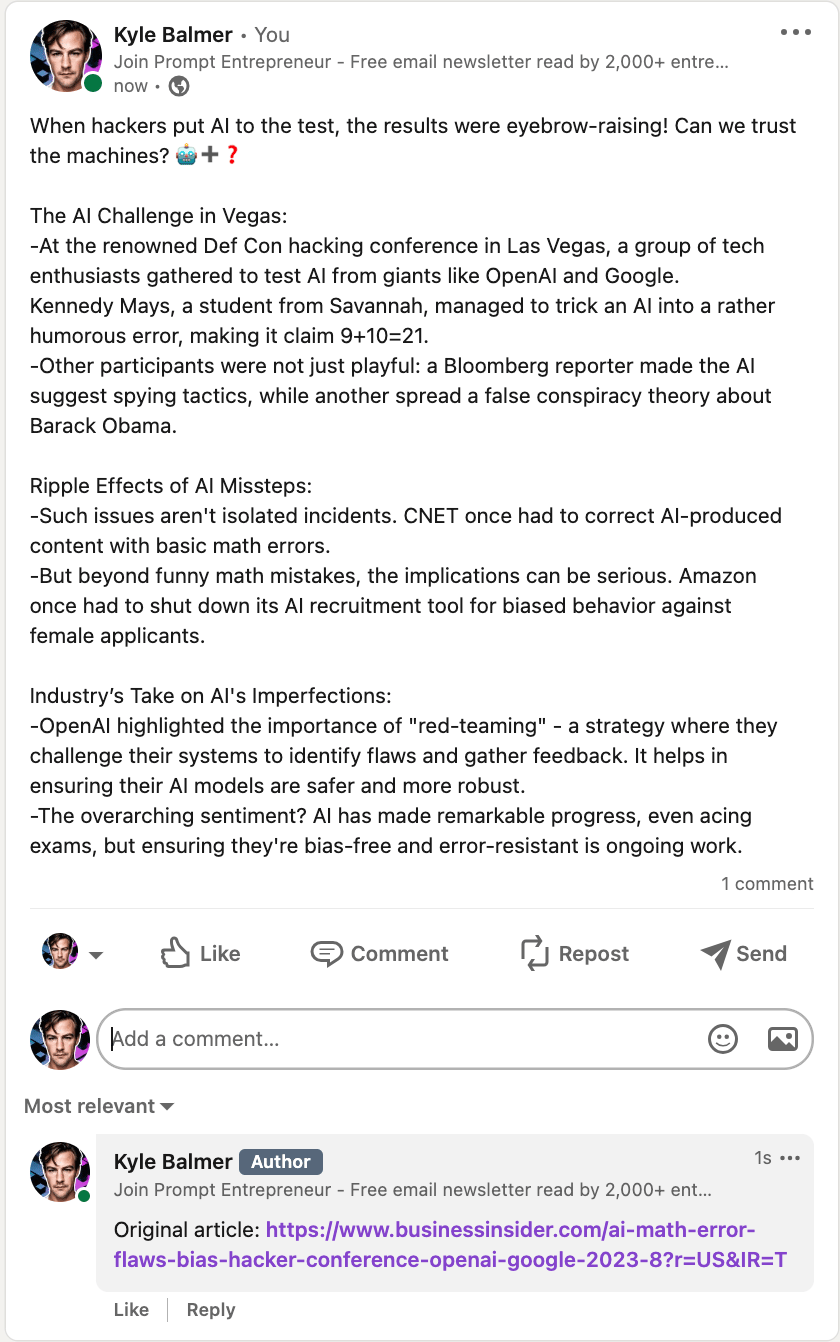
The output becomes a ready to go summary of the article itself.
Make sure to link to the original article - do so in the Comments not the actual post. This is because LinkedIn’s algorithm deprioritises posts with links.
Don’t just try to pass off the content as your own - instead link back to the content and be clear that you are simply summarising and surfacing the information for your LinkedIn followers.
Unlike most social platforms hashtags are still relevant and used on LinkedIn.
You researched hashtags when looking at Topics in Part 1 so should have a list.
Stick to your large, medium and small topics as we previously discussed and add the most relevant of them to each post.
Aim for 3-5 maximum, don’t try to stuff hashtags. Just add them to the bottom of your post. Use your large topic in all your posts followed by 1-2 medium topics and 2-3 small topics. Make sure they are relevant to the actual content.
Also think about adding a call to action into your posts. Don’t do this on all posts - only perhaps 20% or so.
This call to action could be to Follow you on LinkedIn or to DM for introduce yourself and say hi. It could also be to sign up for your newsletter or a free lead magnet. Don’t sell in your posts - we’ll talk about monetisation in Part 5. But feel free to add a small low-commitment action for the reader to follow.
When and how often to post are always big questions for anyone starting out on a new social platform.
The true answer only comes from analysing your data. For example I know I get the most views and engagement on Tuesdays. Why? I don’t know - and it doesn’t really matter why. The main thing is the data shows me that so I make sure that Tuesdays’ content is top form.
We’ll look at how to analyse your data using ChatGPT in Part 4.
However, to get started we need some guidelines.
Aim first for consistency above all things - you want to be posting daily at minimum. I personally post 3-5 times per day now I have a system.
There’s a lot of talk about LinkedIn punishing overposting but I’ve never personally seen a downside - the more quality I post the higher the reach and the higher the engagement. I’ve also never seen an in-depth analysis to show that lower posting volume is preferable.
Just maintain quality and you should be fine.
Our “best day” to post therefore become irrelevant - post consistently everyday.
The best time of day to post tends to be around lunchtime. LinkedIn is a “professional” platform so people often use it at work. But they seem to use it around lunch hour rather than in core working hours.
This holds if your audience is in one location. If they are global then really all bets are off. For example the majority of my audience is USA but because I’m UK based and have a fair few Chinese and Indian followers I’m basically spread across all time zones!
Again, posting 3-5 times a day everyday allows you coverage over the multiple time zones and makes timing posts exactly less of a priority.
Thankfully LinkedIn has a built in scheduling tool (praise be!) so you can easily schedule posts to go at different times of day.
If you want something a little more sophisticated though I suggest Taplio (Affiliate link, fyi). It’s what I personally use and recommend if you want something more robust than the built-in LinkedIn scheduling. It also has AI assistance for writing content and a lot more.
You are now equipped with 3 basic methods for creating content for LinkedIn : original content, rewriting and curation. All aided by ChatGPT using the prompts above.
Experiment with the methods to work out which you like best and then start posting. We need to start building up a streak of consistency for the LinkedIn algorithm to kick in.
Initially schedule one post a day just to get a nice base of consistent content. As you become more comfortable and faster you can begin to increase your output.
You should start seeing you views and engagements kick off within a couple of days. If not keep pushing and wait for the algorithm to notice you.
In the next part, we will discuss how to start connecting with others on LinkedIn to reach more people and start building relationships.
Part 1: LinkedIn Niche
Part 2: LinkedIn Content Creation
Part 3: LinkedIn Audience Engagement
Part 4: LinkedIn Growth
Part 5: Monetising LinkedIn
See you tomorrow Prompt Entrepreneur!
Until then, keep PROMPTING!
Kyle, Harms and 🤖
PS: 🎁 GIFT BOX! Prompt Playbooks: Share our newsletter with a friend and unlock business ideas supercharged by AI prompts. 🔓 Refer 1 friend and unlock: Facebook Advertising Mastery AND Start an Affiliate Marketing Blog AND Start an Email Newsletter Business. All using AI.
In this Part we start to build out and engage our audience. Now we have a strong, optimised profile and content starting to roll out we begin to grow our following.
The first thing we need to do is find the people who already talk to our audience.
For example because I’m in the AI space I’d want to find LinkedIn accounts that talk about ChatGPT and Artificial Intelligence that have high numbers of followers.
I will then build relationships with those accounts. Doing so makes me visible to their followers.
Here’s an example to make this clearer:
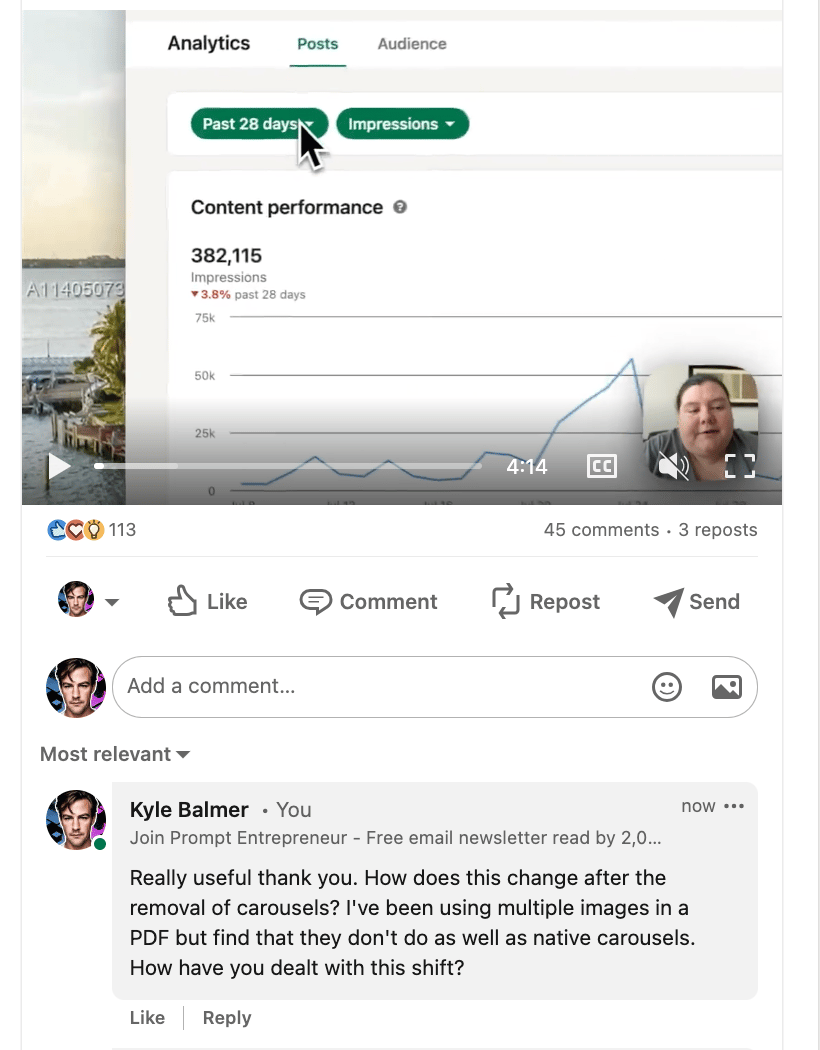
In this example I’ve found an account that has 45,000+ followers. The account owner talks about topics like ChatGPT and gets good reach. When I find a post that I can add value to I leave a comment.
That comment will now be seen by the 100s or 1000s of people who follow this account. A % of them will come to my account. And a % of those who visit my account will choose to follow me.
We make sure that the accounts we do this with are i) large and ii) in similar topic areas to us so that there is an overlap.
In the previous Part we started this process with our research. You should have already started to follow people. Continue this process to fill your Feed with large, high quality, similar niche accounts for you to interact with.
If you want to add more topic areas use the Search bar to find keywords. Search for keywords and not the # hashtag version. Doing so will let you see the “people who talk about X” search result, which lets you identify large accounts.
Once you have filled your Feed with high quality accounts you need to consistently show up.
Here’s the basic order of operations:
Follow the account
Like all their posts
Comment on posts you can add value to
Repost extremely valuable content
Get them to Like your work
Get them to Comment on your work
Initiate a conversation via DM
You want to move through this order with all the big accounts you are following. It’s a process but it well worth it.
The majority of the work here is simply commenting on their posts. We’ll focus here.
Here’s a basic prompt to generate a valuable comment:
Act as a social media manager

Write a valuable, concise, easy to read response comment to this post.

2-3 lines max.

Add spaces between lines to break up the text.

Use natural conversational language. Do not overly praise.

Include a single minor formatting error as if writing manually on a phone - do not correct or reference the error.

Do not use hashtags.
Do not use emojis.
Do not sell.

#Post Begins#
Simply copy/paste the original post under this prompt.
Here’s the example post I’ve used in the Output below.
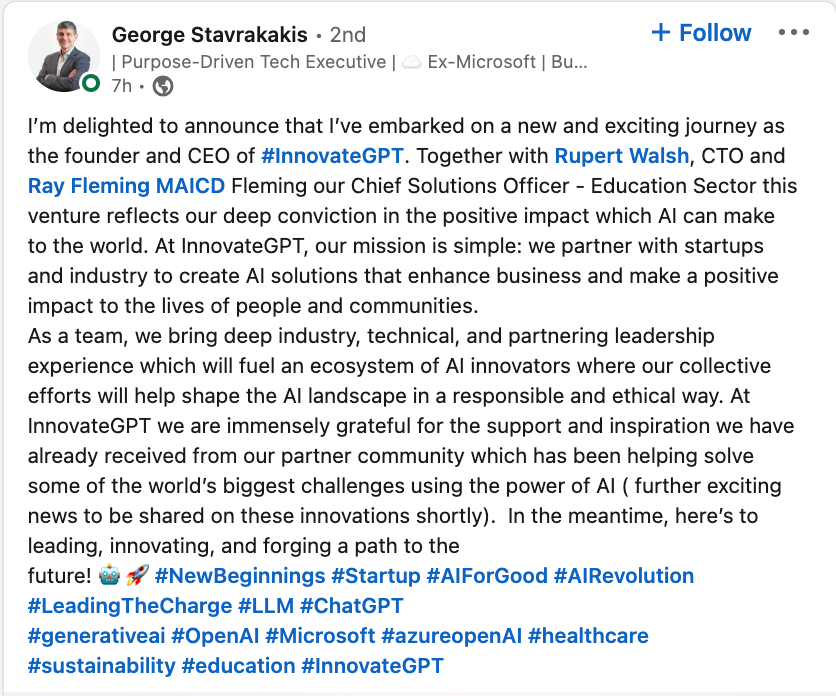
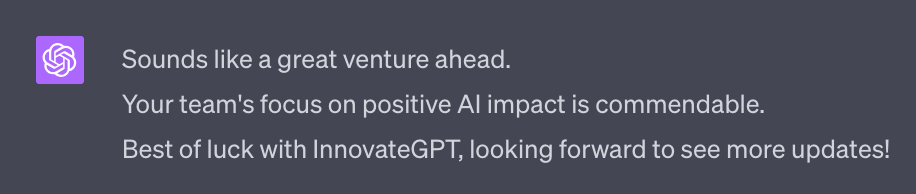
All of the constraints in the prompt above ensure that the comment doesn’t sound like ChatGPT - otherwise ChatGPT will write a long, complicated but meaningless comment.
Noticed I’ve also asked for a single error- this will be something like missing a capital letter or a full stop at the end of sentence. This makes the comment much more human, as if it was written from a phone. Feel free to remove this.
As always review and edit the comment before sending it.
Also add genuine expert value to the comment if you can. Good examples include referencing how their post has helped you or how you wish you had known sooner about what they talk about.
The above technique of leaving comments to increase your reach can also be used in LinkedIn groups.
LinkedIn groups is an interesting beast. Most are trash. But there are a handful of gems hidden in the rough.
Use the Search bar with your topics to find groups:
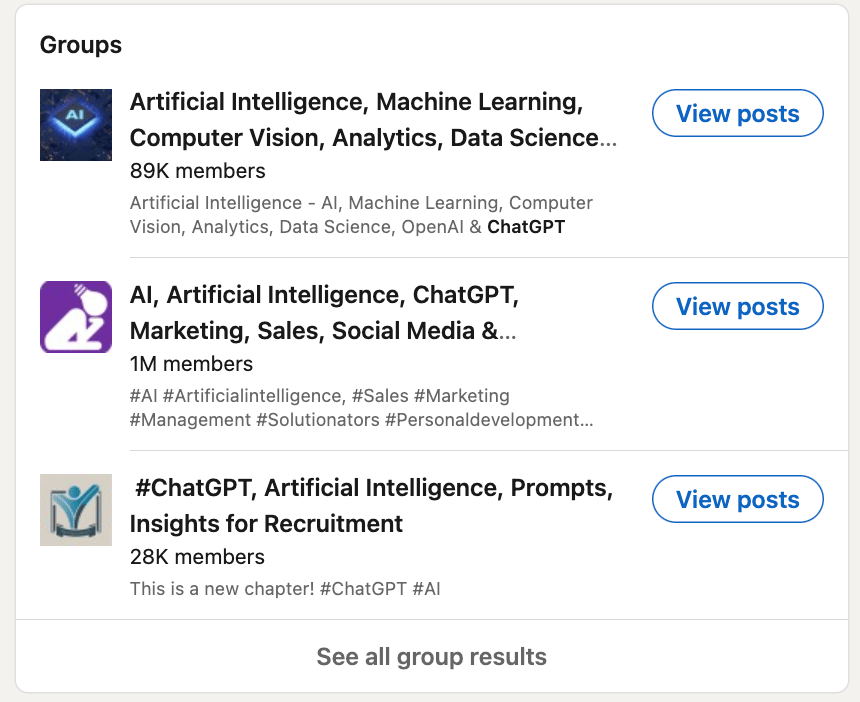
Go through the groups and try to find the engaged genuine groups.
You’ll know immediately if a group is rubbish. For example the group in the screenshot with 1M members is already ringing alarm bells - that’s too many members for it to be cohesive.
A quick check inside shows that it’s full of spam posts. It can be ignored.
You’ll need to manually check and join the ones that do seem to be legitimate. Often these will be closed and require you to apply. This is a good thing - it means less spammers!
Once in you can often write a Welcome message- make sure you do. Talk about what you do and how you help people. Invite others to connect with you. Do not sell in your welcome message - that’s the quickest way to immediately get kicked out. We’ll get to selling in Part 5.
I’d recommend finding a small number (5-10) of groups to check in with daily.
Anymore and this becomes too much of a burden. Be very aggressive with cutting groups - if they don’t work, leave the group.
You can do two things in groups:
Post the content that you are creating, directly into the group to improve visibility of your content.
Comment on other people’s successful content in the group to increase visibility of you profile.
Do the first sparingly and only if people are reacting well. Start slow and build up.
Do the second as much as you can - depending on your time. And only continue if you comments are getting seen and liked.
Through your profile optimisation, content creation and engagement with larger accounts and groups you should start to see account growth.
In the next Part I’m going to show you how to really turbo-charge this growth.
First though let’s talk about how to deal with people who start to follow you. Before we press the accelerator we need to make sure our engine is in good order.
As soon as anyone comments on one of your posts make sure to return the engagement. Like their comment and also respond with a reply.
This not only shows engagement to the LinkedIn algorithm (which will lead to expanded reach) but also helps you cement relationships with the commenter.
Here’s a basic prompt:
Act as social media marketer

Write a response to a comment on my post. 2-3 lines maximum, separate each line with a line break.

Thank the responder and further elaborate on their point. Do no undercut them at any point but instead make them feel valuable.

Refer to the content of the original post and their comment for context.

Keep the language simple and natural.

Do not use hashtags. Do not use emojis.
I used this original post (a poll) and the pictured comment in the output example:
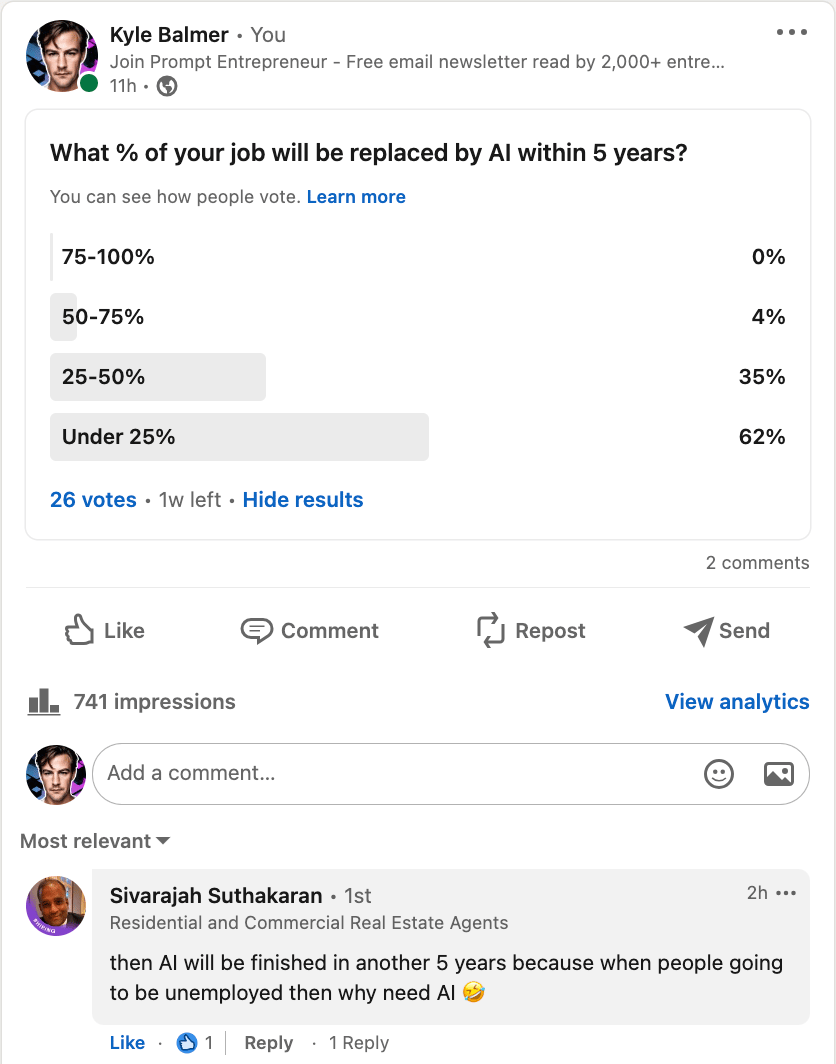

Nice and basic. Notice that even if I disagree with the point being made the response is polite and professional.
Of course if you want to add a more personal point (or even argue back!) then go ahead! That’s even better engagement. The purpose of the AI response (as always) is a jumping off point.
One additional powerful method to engage your followers is using Polls.
LikedIn (and LinkedIn users) love polls!
These are a great way to engage existing followers as you can find out more about them directly.
Want to know what their level of experience with the topic is? Ask.
Want to know what tools they use in your field? Ask.
Want to know what their burning desires are? Ask.
It’s a strong way to learn more about your followers and what they want. Use this insight to adjust your content moving forward.
What about creating polls? We can use this ChatGPT prompt to give us lots:
Act as a LinkedIn Expert.

Give me 10 potential polls I can ask about [topic]

Make each poll question a curiosity hook so people want to engage and find out the answer.

Each poll will have 3 or 4 answers. Use an emoji with each potential answer.

Provide a table with all ten polls, the question and 3/4 answers per poll.

The questions shouldn't be "quiz" style.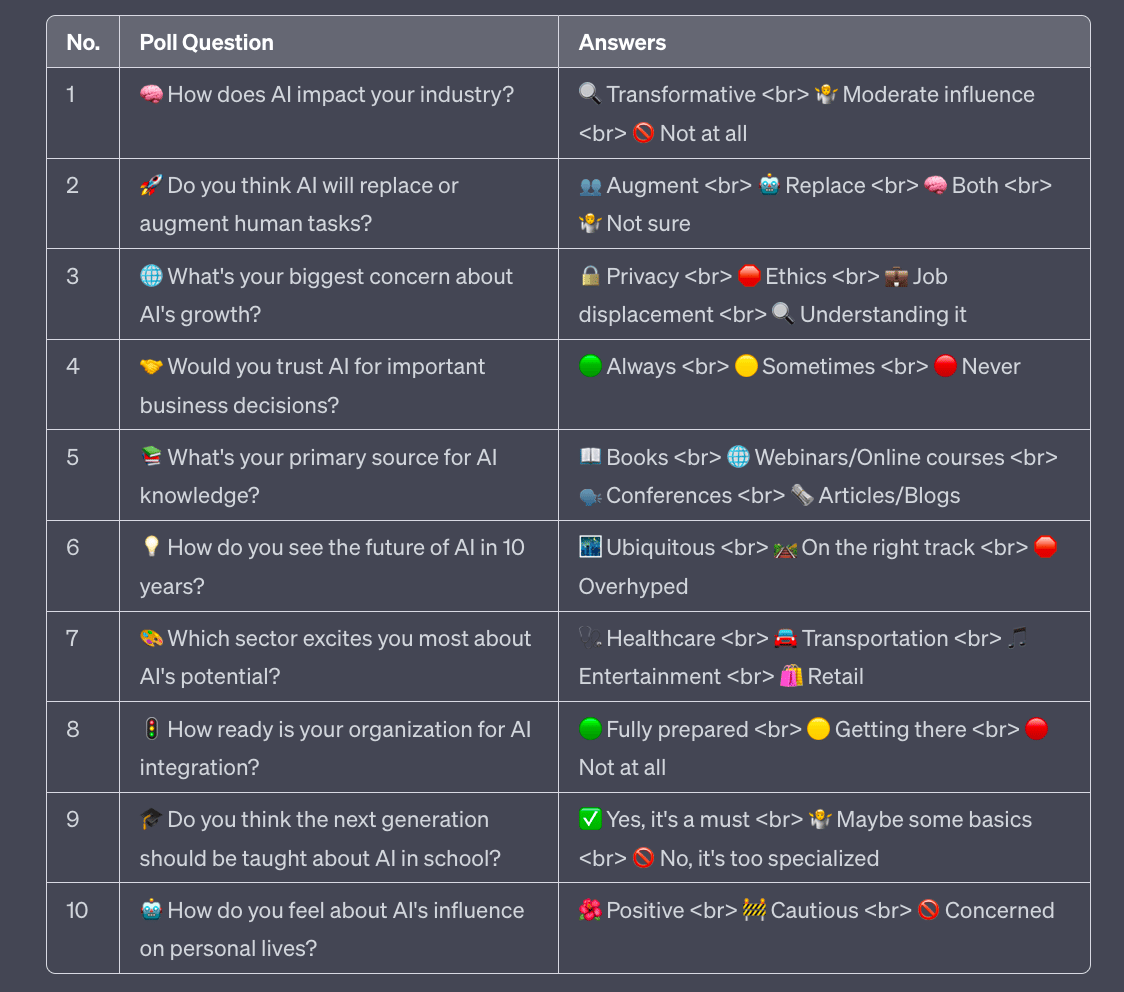
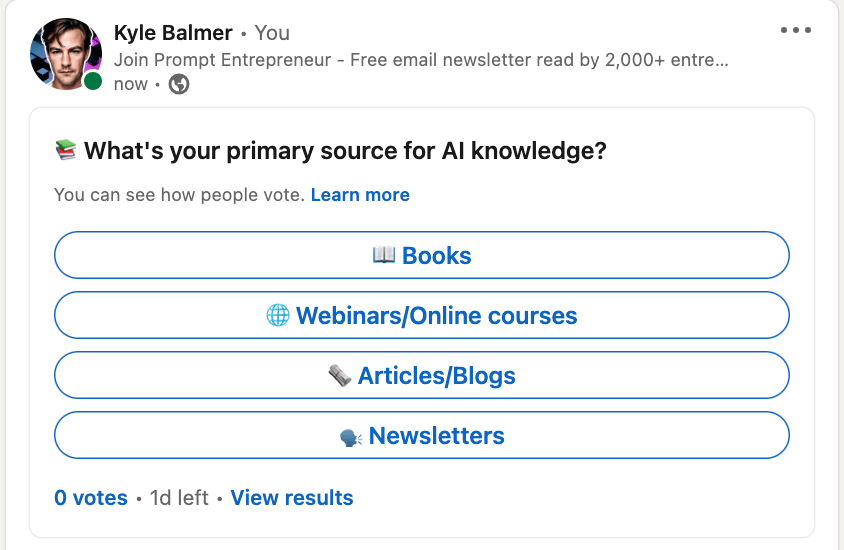
which will format nicely into LinkedIn like this:
One last point before we wrap up.
It’s important to keep the list of people you follow clean and tidy.
The reason is we’re using our Feed to find content to engage with. If that feed is full of trash content that we don’t want to engage with it takes us longer to do our engagement work.
You can use premium tools like Taplio (affil) to make this process easier but I want to present the free option so everyone can follow this guide. This means keeping our following list clean is important.
Two basic methods to do this.
The first major method is to be aggressive with the unfollow button whilst scrolling your Feed.
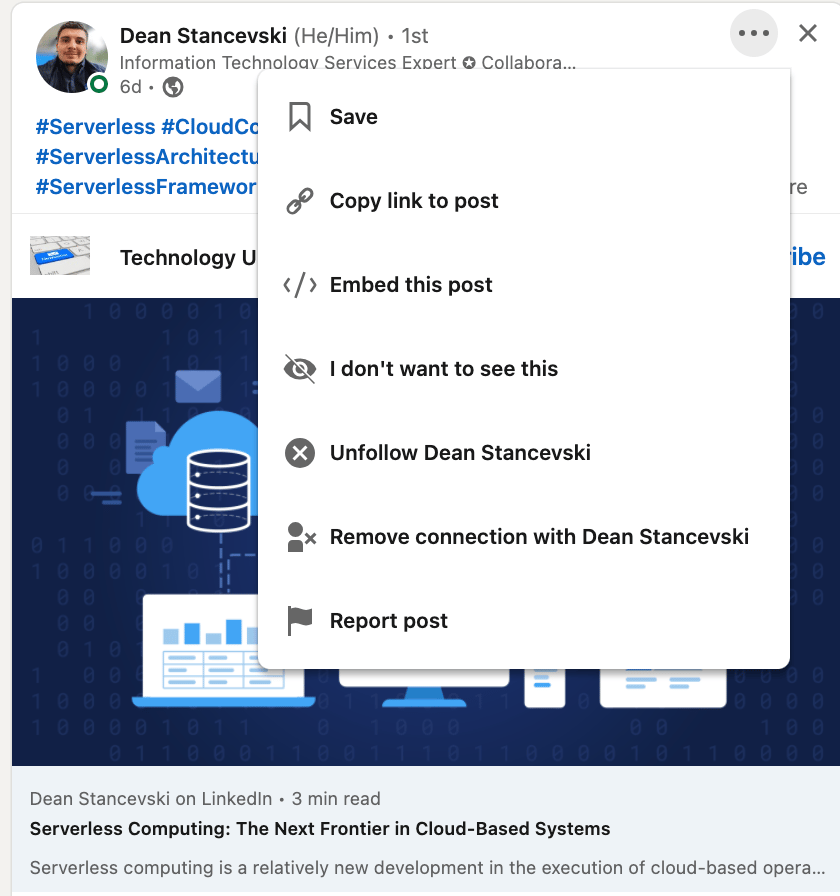
You have three options once you see a piece of content you don’t like.
You can either simply click the X button at the top right of any post. That won’t unfollow but it will tell LinkedIn that you want to see less of that sort of content.
Alternatively you can click the … button and click Unfollow or Remove connection.
I’d recommend Unfollow - that will stop their content appearing but you’ll still have a connection via LinkedIn. That serves our purpose without shrinking our network.
The other major method to tidy our Following is to navigate to My Network > Following and Followers > Following.
From there you can see everyone you follow and quickly unfollow as required.
I recommend doing this quite consistently so that you don’t end up following 1000s of people and having a long and painful process to unfollow!
We’ve looked at both how to engage with other accounts in order to grow our following and how to interact with our direct following.
I recommend doing all of this consistently, even if it’s just for a few minutes per day. Consistency beats splurges of engagement.
In the next Part I’m going to talk about methods for much more rapidly expanding our reach and our Following. We’ve now got all the basics in place are in a good position or hyper-growth.
Part 1: LinkedIn Niche
Part 2: LinkedIn Content Creation
Part 3: LinkedIn Audience Engagement
Part 4: LinkedIn Growth
Part 5: Monetising LinkedIn
See you tomorrow Prompt Entrepreneur!
Until then, keep PROMPTING!
Kyle, Harms and 🤖
PS: 🎁 GIFT BOX! Prompt Playbooks: Share our newsletter with a friend and unlock business ideas supercharged by AI prompts. 🔓 Refer 1 friend and unlock: Facebook Advertising Mastery AND Start an Affiliate Marketing Blog AND Start an Email Newsletter Business. All using AI.
In this Part we start to build out and engage our audience. Now we have a strong, optimised profile and content starting to roll out we begin to grow our following.
The first method is to work out what content is working for us and do more of it. Sounds simple but LinkedIn doesn’t give us this information easily.
LinkedIn provides some information via their Analytics page but it’s quite limited. We can use AI to expand on these details.
First up head into LinkedIn on desktop and go to the Dashboard. It should be at https://www.linkedin.com/dashboard/ and then Analytics (Post Impressions).
If you have difficulty getting there with the link then go to your Feed > Post Impressions > Analytics (Post Impressions).
The Post Analytics page gives you the rundown of your overall reach and top posts. It’s useful but not enough to make decisions with.
Look in the top right of the screen for the Export button.
This allows you to export your data as a .csv file.
LinkedIn will export the data type and date range you select so set it to 365 days and Engagements like so:
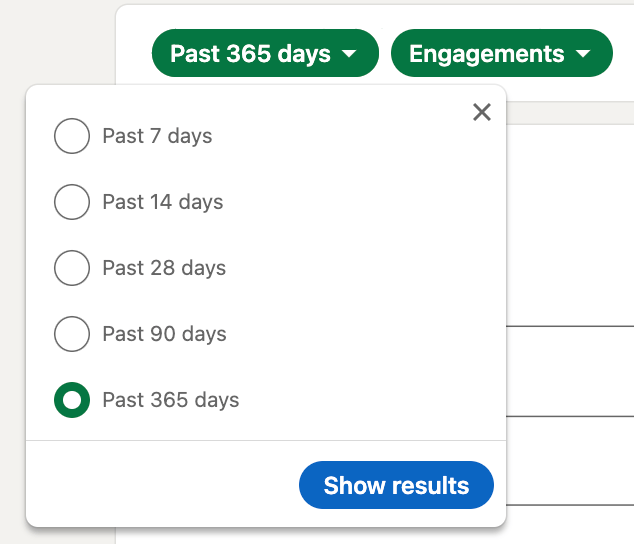
Grab a copy now.
Head to ChatGPT’s Code Interpreter. It’s in ChatGPT 4 > Code Interpreter.
This allows you to upload files for analysis.
If you don’t have access to ChatGPT 4 and the code interpreter and you can try https://claude.ai/
Either way upload your LinkedIn Data and use this prompt:
Act as a social media data scientist.

Analyse all the tabs in the attached file: ENGAGEMENT,  TOP POSTS, FOLLOWERS, DEMOGRAPHICS

Which posts lead to the most engagement? Provide the original URLs.

Which posts led to the most follower increase? Provide the original post URLs.

Which posts had high engagement but low follower increase? 
There’s a chance that the links ChatGPT provides will not work - this has happened to me and students a few times. If so just use “the links provided do not exist in the dataset” and ChatGPT will go back and fix the links - just a weird bug.
The post links provided will give you a guide to what content is working best to drive engagement and follows. The later is particularly important because LinkedIn doesn’t give you this information normally.
Some limitations : LinkedIn groups all the posts of the day and will only provide the last 50 posts. Still - this gives you a basic idea of what’s working and what is not. Far better than the default LinkedIn tools.
LinkedIn has a unique mechanism where it shows you who has visited your profile.
I’m sure you’ve had this happen to you before. The natural response is curiosity - who is this person and why are they checking me out?
We can leverage this human curiosity to drive visits to our profile.
This can be done manually or via automated tools. I’ll touch on the automatic methods after going through how to do this manually. Knowing how it works manually allows you to do this without paying for a tool and helps you understand what exactly the tools are doing for you. Then you can choose whether to use manual or automated.
The basic manual process is:
Find a list of accounts you want to follow you
Visit the accounts
Optionally ask to connect
How far you take this is up to you. It depends on how aggressively you want to grow and how much time you have to dedicated to this process.
First up, find accounts that you want to follow you.
Sometimes big influencers leave their Contact lists public. If this is the case you can click on their Contact list (just below their profile headline) and see everyone.
However this is rare so we need other ways to locate accounts.
One of the best methods is to get to the Search page without using the Search bar.
Huh? Why’s that then?
Basically when we use the Search bar to get to the Search page it will be filtered to that keyword. We want a clean, unfiltered Search page. Head to https://www.linkedin.com/search/results/people/ to get there directly.
You should see this:

939,000,000 results is all the people on LinkedIn. Solid.
Now we can use the All Filters button to perform our search on all members of LinkedIn.
I can now search for Connections or Followers of certain people:
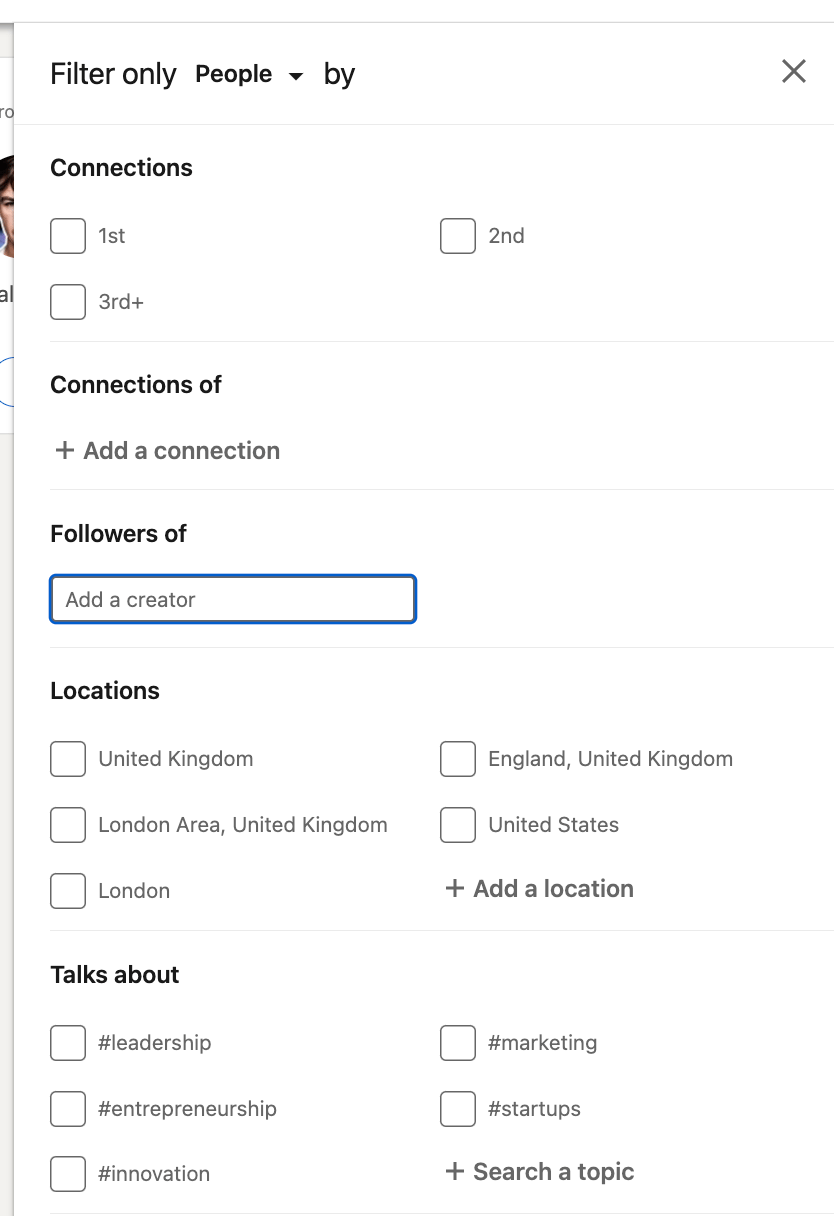
Use Followers and a large influencer name to get access to their follower list.
Or use Connections if you are connected to an account already and want to see their connections.
You can also search via topics.
Here’s an example where I’ve pulled up the 6,400 followers of Rowan Cheung who runs the excellent Rundown AI newsletter. I’ve also set a filter to only give me people who are in the UK. This returns 399 results:
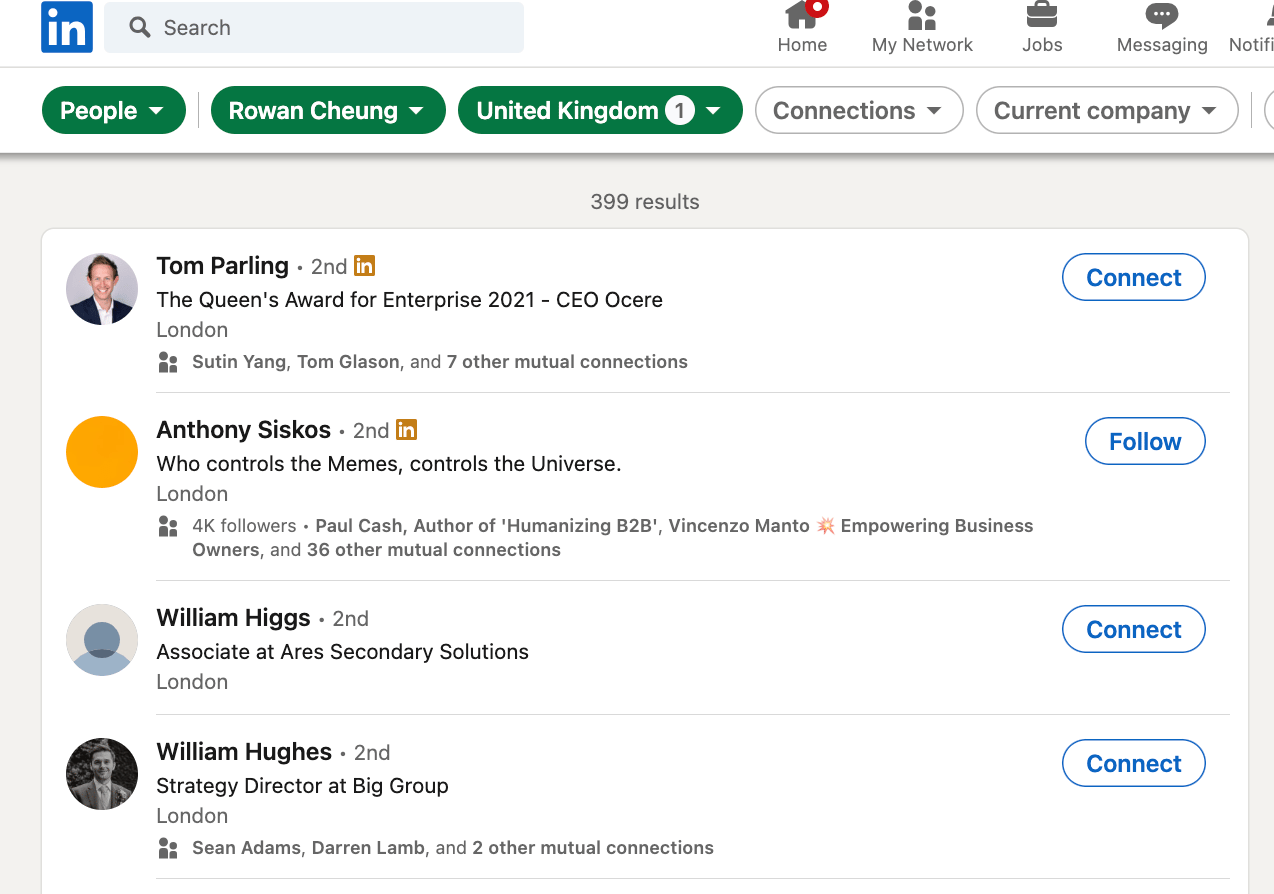
I know these are AI interested people in the UK. I could even filter to just the people with the title “founder” or “CEO” to further refine.
This can be done on a free account. If you have Premium or Sales Navigator you can do a lot more.
Once you have a target list go ahead and visit all the accounts.
Doing so manually is time consuming - this is the main reason you’d want to automate.
Once you visit the accounts they’ll receive a visit notification. Some will come back to your account. And, because you’ve been following this guide, they’ll like what they’ll see.
You’ve optimised your profile and have been publishing great content. Once they see your content is valuable a percentage of them will follow you or send a connection request.
This is a numbers game. You need to visit a lot to get a lot of growth. But it does work.
More aggressively you could choose to connect with people rather than simply visit. Or maybe a mix - connecting with the accounts that seem like solid prospects for either networking or selling your products and services to later.
To do this we visit their profile and send a connection request message.
Use this prompt:
Act as a LinkedIn expert

Write a 2-3 line connection request to the provided profile

Use these guidelines:
1. Identify and mention common interests or affiliations.
2. Maintain a professional tone; avoid personal or non-business compliments.
3. Personalise your message: use their name, mention company details, job title, or skills to show genuine interest.

My bio: [insert headline or full bio]

Provided Profile
[Copy/paste target profile]
For the target profile details grab the profile header information
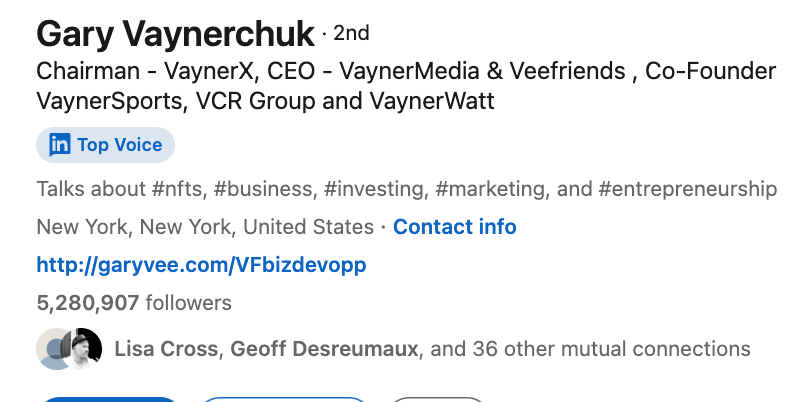
as well as their About section. The more information you feed into the prompt the better.
Then use the output as a personalised connection message.
If you repeat the “search, visit, connect” loop on a regular basis your account will definitely grow.
Make sure to use this on top of creating content though. Too many people rely purely on outreach and not enough on creating value.
The above process is effective but time consuming.
There are a range of tools available that allow you to do this process on autopilot.
They are generally grouped under the name “LinkedIn automation”.
Fair warning: LinkedIn Automation is against LinkedIn’s terms and services. So you can get your account restricted or even shut down if you abuse automation.
If you are interested in exploring more my personal preference is Meet Alfred. The best part is that it’s cloud based so can run on autopilot throughout the day without you having to have LinkedIn open on your computer.
Other (cruder tools) use Chrome extensions to automate clicking on buttons in your browser. These are fine but once you’ve tried a cloud version you’ll never go back.
Meet Alfred starts at $29/month and can be used on the free LinkedIn plan. However for real scale you’ll likely need LinkedIn Premium and a higher tier Meet Alfred plan.
In this Part we’ve looked at how to get the most from LinkedIn analytics with ChatGPT as well as delved into the world of visiting/connecting for growth. We then touched briefly on how we’d automate this process for the best effect.
Again, make sure you are applying these techniques on top of your content creation. Automation tends to make people lazy and stop creating value. Do both though and your account will rocket.
That’s good news because in the next part we’re going to look at how to drive your business and monetise your LinkedIn following.
Part 1: LinkedIn Niche
Part 2: LinkedIn Content Creation
Part 3: LinkedIn Audience Engagement
Part 4: LinkedIn Growth
Part 5: Monetising LinkedIn
See you tomorrow Prompt Entrepreneur!
Until then, keep PROMPTING!
Kyle, Harms and 🤖
PS: 🎁 GIFT BOX! Prompt Playbooks: Share our newsletter with a friend and unlock business ideas supercharged by AI prompts. 🔓 Refer 1 friend and unlock: Facebook Advertising Mastery AND Start an Affiliate Marketing Blog AND Start an Email Newsletter Business. All using AI.
In this final Part we look at how we can leverage our LinkedIn audience to build our business.
Obviously the exact methods we use will depend on our business and our particular niche. I’ll provide a set of methods with details to help you decide which are most applicable to your business.
One important factor here is that direct monetisation is not possible on LinkedIn in the same way as it is on Youtube (via ads), X (sponsorship and ad revenue share) or other social media platforms that have built in methods.
Therefore we need to be a bit smarter on LinkedIn and work on moving prospects off-platform.
I’ll run through some potential methods, ending on the most important.
One of the strongest plays using LinkedIn is to move followers into your newsletter.
Newsletters work particularly well on LinkedIn as its an expert based platform formed around certain niche (professional) topics.
If someone is enjoying your content then chances are they’ll be interested in your newsletter too.
Once you have someone in your newsletter you can more directly monetise as you have a direct line to them.
Pushing sales-y posts on LinkedIn itself doesn’t work well but in your own newsletter you have much more latitude with your content and sales.
Vitally you’ll also have their email address. So any changes to LinkedIn’s algorithm down the line will not affect you. On LinkedIn (or any social media platform) you don’t own your audience - but with email you do.
Don’t have a newsletter? There’s a whole Prompt Playbook about setting up a a newsletter business if you want to go deep.
In that guide we talk about setting up a newsletter business using a third-party tool called beehiiv. It’s the best in class for setting up a newsletter.
However, in the case of LinkedIn there’s an additional factor in play. LinkedIn actually has its own newsletter functionality.
You can write, publish and build an audience for you newsletter fully inside LinkedIn.
Some benefits of doing so:
Ease of use - it’s right there in the interface so there’s no need to learn a new tool.
Cost - LinkedIn newsletters are free whereas setting up with a dedicated newsletter service will come with some cost.
Initial blast - the first time you launch your newsletter LinkedIn will message everyone in your connections. When I launched a newsletter on LinkedIn I had 10,000 connections - I immediately got 1000+ newsletter subscribers just from this initial push.
Inbox delivery - unlike other LinkedIn messages and notifications newsletters go straight into your followers’ email inboxes. Normal notifications are limited to in-app LinkedIn notifications rather than the email inbox.
Disadvantages:
No email addresses - you do not get access to your subscribers’ email addresses. These means if you want to move to another platform later you cannot migrate the email addresses. Arguably they are not "your” subscribers because of this. This is the main disadvantage.
Limited tool - the LinkedIn newsletter tool is fine for basic text and images but if you want to do anything advanced like polls, referrals gifts, recommendations etc. you are out of luck.
No newsletter monetisation options - platforms like beehiiv allow for premium subscription levels which allow subscriber revenue. LinkedIn doesn’t have anything similar.
Whichever tool you decide to use getting people into a newsletter is a strong step in building your relationship with them and moving prospects towards becoming customers.
LinkedIn supports the ability to schedule and promote events to your followers.
There are a few options here but webinars are the most direct route to monetisation.
Webinars are also a common tool in B2B (business to business) sales which aligns with the audience type on LinkedIn. Lots of the people on LinkedIn will be used to attending and making purchasing decisions based on webinars.
Writing a webinar is beyond the scope of this guide. I recommend you check out Russell Brunson’s Secrets Trilogy for a full walkthrough.
Here however is a basic prompt using Brunson’s Perfect Webinar Script to give you a basic webinar structure:
Act as a sales webinar expert

Follow the guidelines below

For the user required elements refer to the work of Russell Brunson to ask me for inputs. Ask for each input individually, wait for user input then move to the next required input.
For each requirement explain the concept, provide a description and example. Assume I do not know what you are asking for.

Follow the perfect webinar guidelines below to structure the webinar.

#Perfect webinar guidelines#

The webinar has 3 main sections:

1. Introduction (5 mins)

Big Promise: Describe the main benefit the audience will get from the webinar.
Hook to End: Offer an incentive for attendees to stay until the end.
Command Attention: Ask attendees to close other tabs and focus.
Qualify Yourself: Explain why you're qualified on this topic.
Future Pace: Help the audience imagine their future after implementing what you teach.

2. Content (60 mins)
The One Thing: The main idea/benefit of the webinar.
The 3 Secrets: 3 supporting points that back up the One Thing.

3. Close
Transition: Ask permission to make a pitch.
The Stack: List all the bonuses/items included in the offer.
If/All: Justify the price by linking it to the key benefits.
Price Reveal: Reveal discounted price compared to higher starter price.
To generate a custom webinar script, the user would need to provide:

The topic/niche
The One Thing main benefit
The 3 Secrets supporting points
Bonuses/items to include in The Stack
Benefits to mention in If/All section
Pricing details for Price Reveal section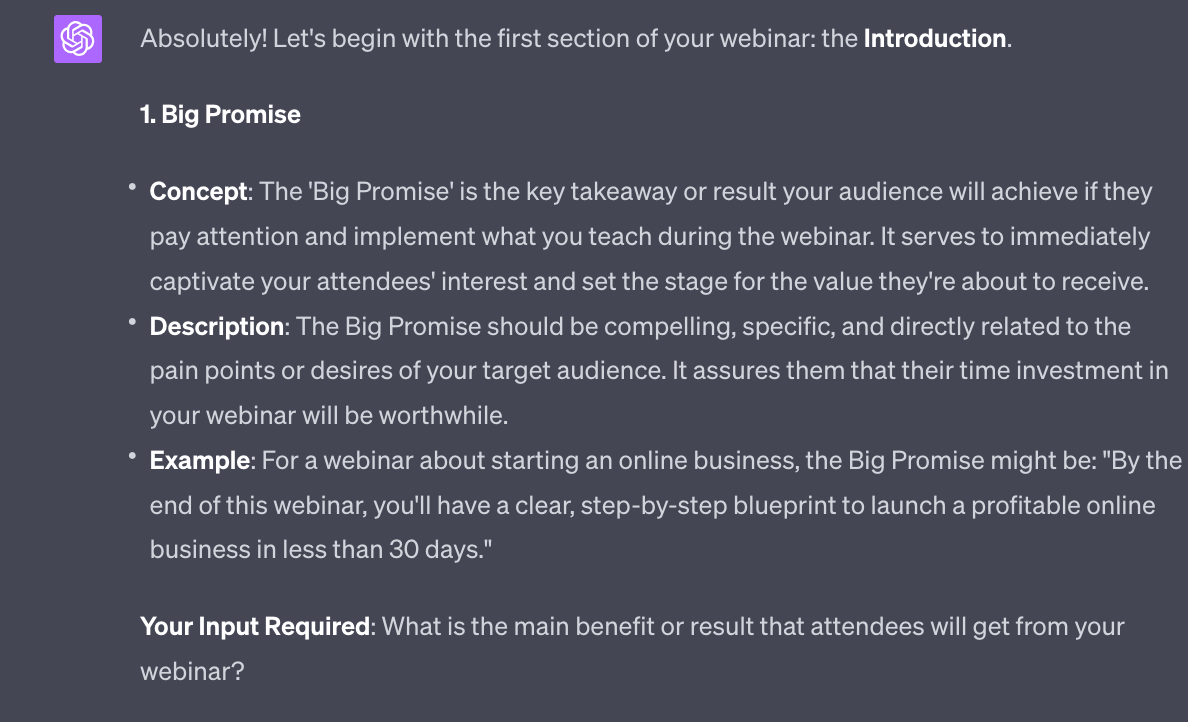
The prompt will walk you through step by step how to construct a webinar. The output above shows just the first step - ChatGPT will continue with similar explanations, examples and questions until it has all the information it needs to construct your sales webinar.
After that’ll you need to either deliver the sales webinar live or pre-record it as an “evergreen” webinar. I recommend doing it live the first few times so that you can adjust and improve your content - once it is tight you lock the content down in a recorded version.
Once you have a large enough following in a particular niche you’ll begin to receive offers to sponsor your posts. Companies want to be visible to your audience and will be willing to pay for this visibility.
This will happen naturally as you become known in your niche but you can also speed the process up with outreach.
Draw up a list of targets and use LinkedIn InMail to direct contact marketing managers at those companies. Use this prompt to generate a basic introduction:
Act as a cold outreach expert

Generate a compelling outreach message for me to use on LinkedIn to get a company to sponsor my posts.

This is the introductory message.

Think about what the company would want to hear from me and include placeholder areas for me to fill in the details. 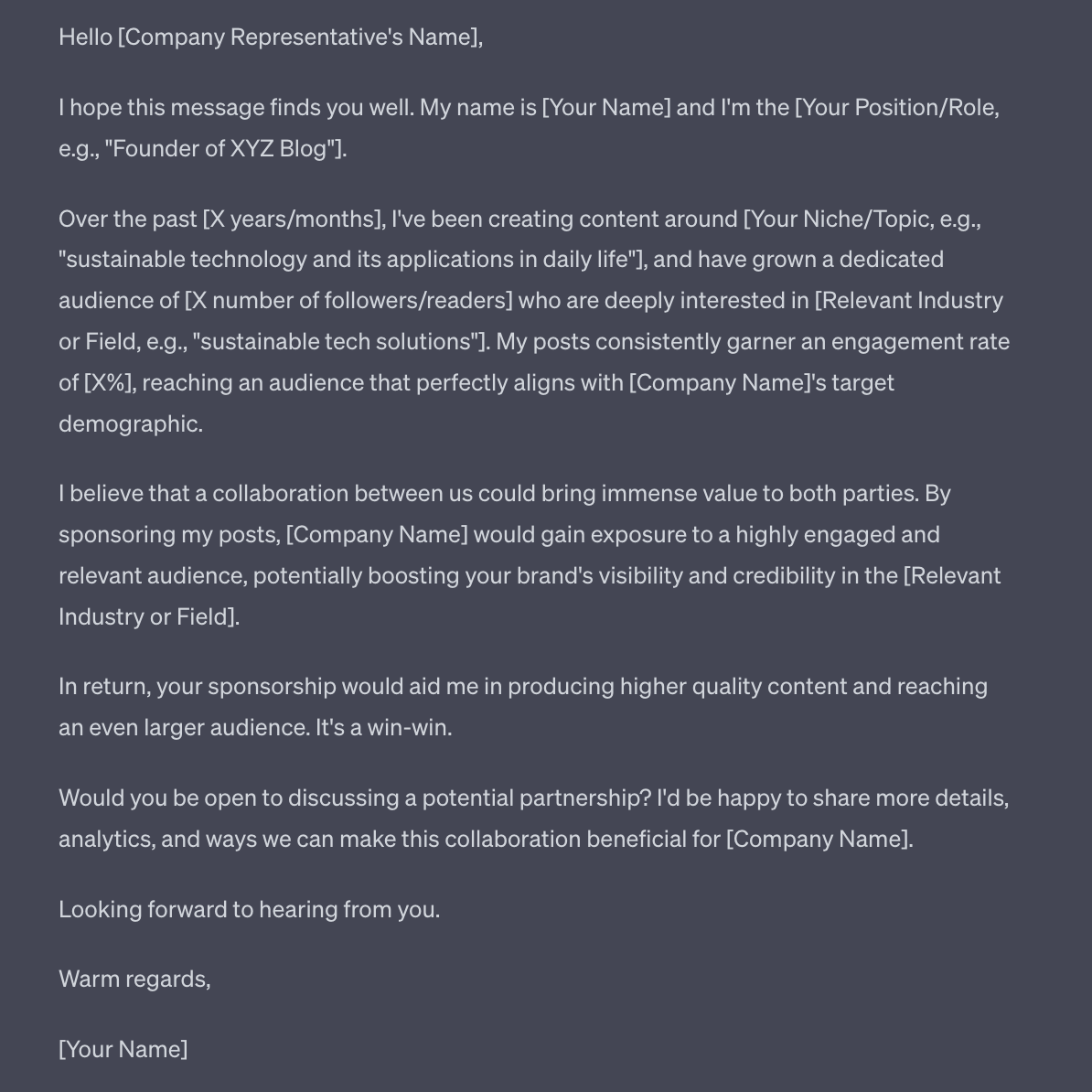
The most important LinkedIn sales and marketing technique is direct outreach.
LinkedIn is rare in that it allows us to send direct messages to individuals who work at certain companies.
For instance if my goal is to sell to UK based digital marketing agencies with over 100 staff I can use LinkedIn to find those companies and then the exact individuals who I need to talk to at the company.
There are two basics ways to do this:
Connect with the prospect and then message them
InMail
InMail is a premium feature that allows you to send messages to anyone on LinkedIn even if you are not connected. InMail is part of paid LinkedIn accounts and you only use up InMail credits when the prospect reads it.
Both InMail and standard messages have basically the same outcome: allowing us to connect with prospects and deliver a direct message that we use to begin a sales conversation.
Obviously if you are following this guide and growing your connections via your content and engagement you have a better chance of being able to directly chat without having to use InMail. This is a major benefit of building a following.
You can choose to send manual messages to people you want to talk to - to do this we basically follow the search methods outlined in Part 3 where we talked about engagement. Instead of visiting profiles and sending connection requests though we send messages. Nice and simple.
However, if you want to automate this process and make it more efficient you have two options:
Use a semi-manual tool like Taplio to create prospects lists and make it easy to send tailored messages.
Use a full automated tool like Meet Alfred to message en-masse
Both are effective - it’s really a question of whether your offer is niche and specific or wide and general.
If niche and specific use Taplio for a more accurate, focused approach. Each prospect counts so you don’t want to burn them using a blanket message.
If your offer is broader you can use automated messaging via a tool like Meet Alfred.
Either way you’ll need a basic sequence of messages. In Taplio (or if doing this manually) you’d customise more.
If using a wider approach you’d do less customisation of the sequence.
Use this prompt to get the first draft of your outreach sequence:
Act as a LinkedIn cold outreach expert. Give me a 5 message campaign to send to a prospect, including the timings.

Prospect details: [add prospect details]
Offer details: [add offer details]
My details: [add own details]

#Guidelines#
Research the prospect to find commonalities that can serve as an ice-breaker. Look for mutual connections who can introduce you.
Keep messages short, around 3 sentences focused on sparking interest.
Provide social proof by mentioning big name clients you have worked with.
Offer something valuable for free like an ebook or case study, with prospect's consent.
Send your portfolio to showcase your work if relevant.
Personalize messages instead of just using templates.
Use a CRM to track leads and follow up at optimal times.
Follow up persistently over 1-2 months if needed, offering value like free consultations.
Space out follow-ups strategically instead of bombarding prospects.
#Guidelines end#
In this example I used
Prospect details = marketing managers for AI projects who might be interested in sponsoring a newsletter about the use of AI for entrepreneurs
Offer details = free guide, call, paid consultation in that order.
My details = copy, paste of my entire LinkedIn profile
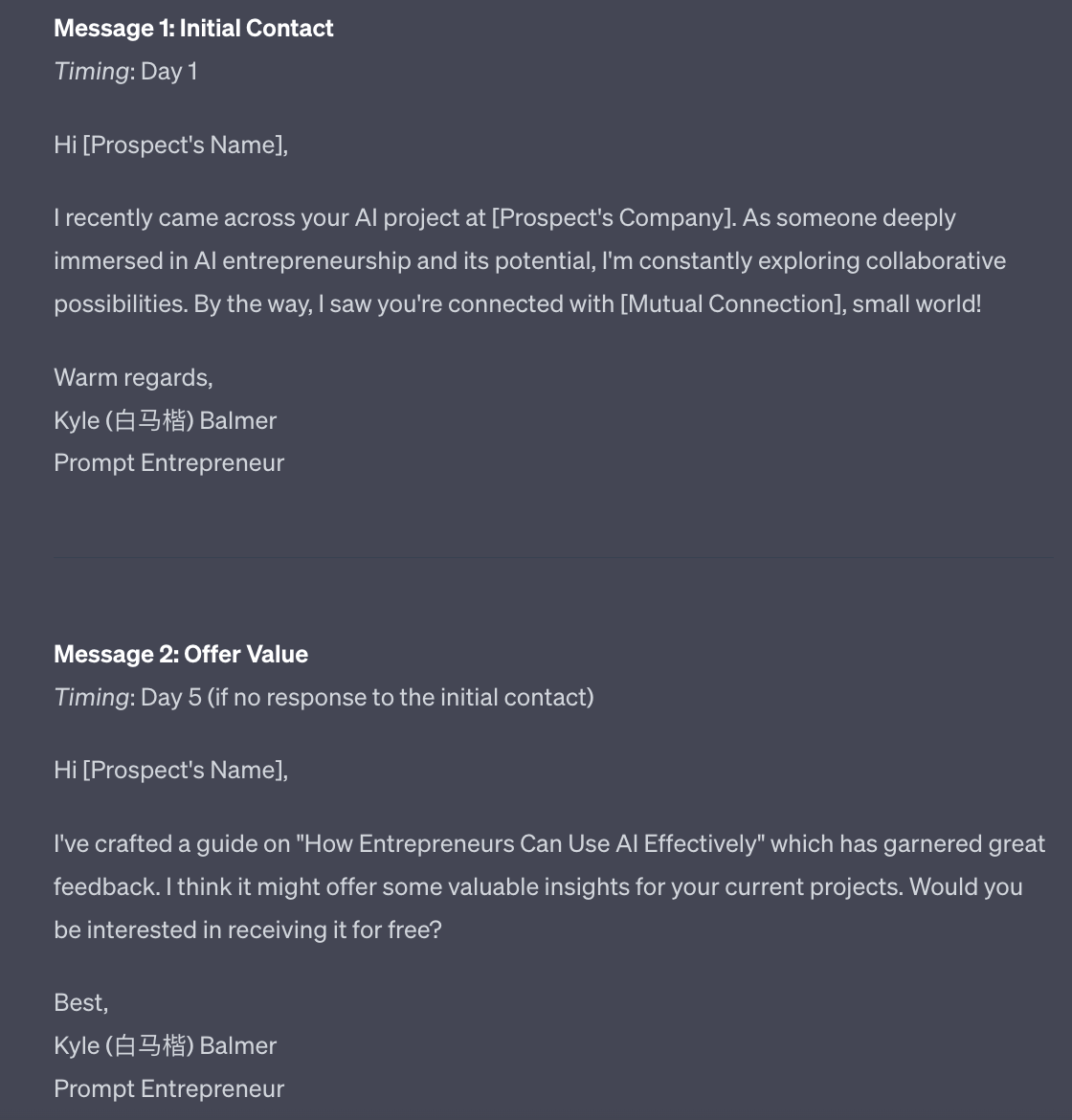
The prompt will generate 5 messages, each with a time delay.
If you want to be even more specific you can use an individual’s profile in the prospects details input.
As always edit to your preferred style and tone of voice.
LinkedIn can be a powerful platform for building an engaged audience around your niche. While you can't directly monetise followers on LinkedIn like other platforms, with some strategy you can leverage your audience into sales and subscribers. We’ve talked about some ways to do so in this Part.
The key here is to view LinkedIn not as a standalone platform, but as a launch pad to build relationships that you can transition off platform.
Remember to always lead with value on LinkedIn. This is why we started with content and engagement before moving into growth strategies and monetisation.
High-quality content builds authority and trust. Automation like messaging tools are the accelerator, not the engine.
LinkedIn is just one powerful piece of the entrepreneurial puzzle. We discuss other element in the newsletter and other Prompt Playbooks.
But used strategically, LinkedIn can become a cornerstone of a successful inbound marketing and sales process, especially in B2B niches. Pull all these techniques together into a cohesive strategy, and you'll be well on your way to building a profitable business accelerated by LinkedIn.
See you tomorrow Prompt Entrepreneur!
Until then, keep PROMPTING!
Kyle, Harms and 🤖
PS: 🎁 GIFT BOX! Prompt Playbooks: Share our newsletter with a friend and unlock business ideas supercharged by AI prompts. 🔓 Refer 1 friend and unlock: Facebook Advertising Mastery AND Start an Affiliate Marketing Blog AND Start an Email Newsletter Business. All using AI.
Unlock the potential of your LinkedIn presence with our comprehensive playbook, '💼 LinkedIn Growth with ChatGPT | Prompt Playbook'. This guide offers a step-by-step approach to harnessing the power of AI in content creation, audience engagement, and business growth on LinkedIn. You'll discover innovative strategies to create captivating content, engage your audience effectively, and ultimately drive business results. Transform your LinkedIn profile from a static page into a dynamic hub of professional connections and opportunities with actionable insights and practical tips that you can implement right away.
This playbook is designed for business leaders, entrepreneurs, and content creators who are looking to elevate their LinkedIn game. If you're struggling to produce consistent, high-quality content or find it challenging to engage your audience effectively, this playbook is your solution. With the right strategies, you can transform your LinkedIn presence into a powerful tool for networking, brand building, and business growth.
No prior experience is necessary! This playbook is structured to guide you through the basics and advanced strategies, making it suitable for both beginners and seasoned users.
The time commitment varies based on your current LinkedIn activity level, but you can start seeing results from just a few hours a week dedicated to content creation and engagement.
Absolutely! By effectively leveraging LinkedIn’s features and creating valuable content, you will attract the right audience, leading to increased engagement and potential sales opportunities.
Yes! The strategies outlined in this playbook can be adapted to any industry, focusing on targeting the right audience and creating relevant content.
The playbook provides easy-to-follow prompts and examples, making it simple for anyone to use AI tools, even if you're not tech-savvy.