
AI Building
Unlock the power of AI to transform your business with our playbook, 🤘Getting Started with Vibe Coding your Business.
Start ReadingDo you remember the first time you used ChatGPT? That moment when you realised you were having a proper conversation with AI and it actually understood what you wanted? That slightly surreal "bloody hell, this is mental" feeling?
“Any sufficiently advanced technology is indistinguishable from magic”
I've not had many of those ChatGPT moments since, despite being completely immersed in AI.
You get used to the magic, don't you? It becomes routine.
Until I tried vibe coding.
The first time I tried vibe coding I described a content analysis tool that I wanted to build in plain English. And then watched the AI build a complete web application - frontend, backend, database, AI integration - all working within 20 minutes.
No code written by me. Just conversation.
That's “vibe coding” - a term coined in early 2025 by Andrej Karpathy (former AI director at Tesla and co-founder of OpenAI ie. quite smart).
Vibe coding is essentially building software by describing what you want rather than coding it yourself.
The great thing about it? It allows even non-coders to get started making software using natural language.
This week, we're diving deep into vibe coding to build your MVP from last week's spec. By Friday, you'll have a working application that real people can use.
Let’s get started:
What vibe coding is and why anyone can get involved
The Plan → Prompt → Scaffold → Debug → Deploy framework
Breaking your Week 3 spec into buildable components
Why Lovable dominates alternatives for non-technical founders
AI-powered project planning session
This week follows the Plan → Prompt → Scaffold → Debug → Deploy framework. We're taking your validated idea from Week 3 and turning it into functioning software using Lovable.dev (fyi: this invite link will get your extra credits)- without you needing to learn programming.
Vibe coding means collaborating with AI to build software through natural language conversation. Instead of writing code, you describe what you want. The AI handles all the technical implementation.
As Karpathy put it: "I just see stuff, say stuff, run stuff, and copy paste stuff, and it mostly works."
There's a new kind of coding I call "vibe coding", where you fully give in to the vibes, embrace exponentials, and forget that the code even exists. It's possible because the LLMs (e.g. Cursor Composer w Sonnet) are getting too good. Also I just talk to Composer with SuperWhisper
— Andrej Karpathy (@karpathy)
11:17 PM • Feb 2, 2025
For entrepreneurs, this is revolutionary. The technical barriers that once required teams of developers have collapsed. You can now go from idea to working application in hours, not months.
I’ve been in the scene for a while and there has always been a massive disparity between non-technical founders and technical founders. People were always looking for a technical co-founder to help “make their dream a reality”.
Well…we can do that ourselves now. Or at least the first steps so we can prove the idea has legs.
But here's what's crucial: you still need to approach this systematically. Vibe coding isn't foolproof - it's a new way of building that requires different skills. This week we’ll build that skill.
There are several vibe coding platforms emerging. Here's how they compare:
Cursor is brilliant for experienced developers who want AI assistance. If you already know how to code, Cursor is incredibly powerful. But it assumes technical knowledge you probably don't have.
I personally use Cursor the most. But I do not recommend starting here. It’s extremely good but also has a much higher learning curve.
And even when I do use Cursor I will often start prototyping in Lovable and then shift my project over to Cursor.
Bolt excels at rapid prototyping. You can build things quickly, but deployment and production readiness are challenging. Great for demos, tricky for real applications. I’ve found that it peters out and fails me far quicker than alternatives.
v0 (Replit) creates beautiful UI components but lacks full-stack capabilities. It's more about designing interfaces than building complete applications.
Lovable occupies the sweet spot for non-technical founders. It's accessible enough for complete beginners yet powerful enough for production applications. You get visual editing, integrated backend (ie. database) services, and professional output without needing technical expertise.
Here’s an invite link that gets you an additional 10 credits on the free plan: Lovable.
I’ve tried a bunch of these tools and Lovable still remains my fave. But by all means try others! And if you want to carry out this week’s work with another tool that’s all good. Most of what we’ll over will be relevant across all tools - I’m focusing on the skill of vibe coding rather than the particulars of the platform.
I’m going to lift this straight from Lovable because it’s a great framework. Also because we’re working with their tool!
This five-phase approach transforms your business idea into working software. It also fits out weekly schedule very nicely!
Plan (today): We’ll transform your Week 3 spec into development-ready components. Break down your idea into buildable pieces and understand what you're actually building.
Prompt (Tuesday): We’ll look at how to communicate with your AI development partner. Learn to describe what you want clearly and iterate through feedback effectively.
Scaffold (Wednesday): We’ll build your application's foundation. Create the basic structure, core functionality, and user interface that solves your validated problem.
Debug (Thursday): We’ll work through problems that rear their head, refine and polish your application. Fix issues, improve user experience, and ensure everything works reliably.
Deploy (Friday): Finally we’ll make your application live and accessible. Get a working URL that you can share with real users.
Each phase builds on the previous one, so you'll have a functioning application by the end of the week. Promise!
OK! Today's main task is translating your business specification into development components. This requires thinking about your solution from a user's perspective whilst preparing for technical implementation.
Start by identifying your core user journey. What exact steps does someone take to get value from your application? This becomes your development priority.
Next, identify your data requirements. What information does your application need to store and process? User inputs, AI-generated outputs, settings, preferences?
Then consider your integrations. Does your MVP require AI processing, external APIs, or third-party services? Understanding these early prevents roadblocks later. Don’t worry if you aren’t really sure what these are - we’ll use the prompt below and Lovable to work out the details.
Finally, prioritise ruthlessly. Even with your validated spec, you need to decide what to build first. Focus on the core problem-solving functionality - everything else can be added later.
Use this prompt to transform your Week 3 spec into a development-ready plan:
You are an expert product manager helping a non-technical entrepreneur plan their MVP development using Lovable.dev.

My validated business idea: [Insert your Week 3 spec here]

Help me break this down for development by:

1. CORE USER JOURNEY: Describe the exact steps a user takes from landing on my application to getting the main value. Keep it simple - what's the minimum path to solving their problem?

2. DATA REQUIREMENTS: What information does my application need to store? Think about user inputs, AI outputs, settings, and any content users create.

3. INTEGRATION NEEDS: Does my MVP require AI processing (OpenAI, Claude), external APIs, or third-party services? List what's essential vs. nice-to-have. Explain what they are!

4. BUILD PHASES: Break my MVP into 2-3 development phases, starting with the most basic version that still solves the core problem. Each phase should build on the previous one. Each should be complete in and of itself.

Format your response as a clear development plan I can use with Lovable.dev. Remember I am a non-technical entrepreneur so do not assume anything - explain your reasoning and suggestions.
Use this prompt in your usual AI, not Lovable! Especially because this is where we’ve done all our prep work up until now.
This prompt will give you a structured development plan that bridges your business vision with technical implementation.
Importantly it’ll also explain what is going on.
There’s a tendency to just unthinkingly rely on AI to build our products. But it’s important that we know what it’s up to - even a high level understanding. For this reason the prompt here adds additional instructions for the AI to explain itself.
Before tomorrow's build session, spend time tonight setting up your Lovable account and reviewing the platform. Try typing in a basic prompt like “create a basic time tracking app” and see what happens. We’ll get to our real project tomorrow but for now feel free to kick the tyres in Lovable to see what it can do. It’s fun, believe me!
Tomorrow, we talk about how we communicate with Lovable. You'll learn how to describe what you want clearly, iterate through feedback effectively, and get exactly the functionality you need.
If you can prompt AI already (and you can!) then this will be a cinch.
Keep Prompting,
Kyle
Remember your first week with ChatGPT? You probably typed something like "help me with my business" and got a generic essay about entrepreneurship. Completely useless.
Fast forward to now, and you can get ChatGPT to write specific emails, create detailed strategies, and solve actual problems. The tool didn't get better - you learned how to talk to it.
I recently chatted to a student who was struggling with Lovable the same way. Three hours of "make it look more professional" and "fix the design issues." Each time, Lovable made changes. Just not the ones he actually wanted.
The problem wasn't Lovable. It was the same communication mistakes we all made with ChatGPT in the early days.
Just like you learned to wrangle ChatGPT with better prompts, examples, and specific requests, you need to learn the language that gets results from Lovable. The difference is that instead of getting better text, you get better software.
Most people treat AI development tools like search engines - throw in vague requests and hope for the best. But Lovable isn't Google. It's your tech co-founder. And cofounders need clear briefs, not wishful thinking.
Let’s get started:
Why vibe coding communication differs from normal AI chatting
The non-techie's guide to asking the right technical questions
Using AI outside Lovable for planning and problem-solving
Common communication mistakes that waste hours
Your technology advisor prompt for complete beginners
Before we dive into communication best practices, let's get you actually building. First, use this prompt in ChatGPT (or wherever you’ve been doing your prep work) to create your Lovable starter prompt:
You are helping me create a clear, specific prompt to start building my MVP in Lovable.

My validated business idea: [Insert your Week 3 idea and target audience]

My main user problem: [What specific problem does this solve?]

Core user action: [What's the one main thing users do in your app?]

Create a simple, specific prompt I can copy-paste into Lovable to start building. The prompt should:
- Focus on just the core functionality that solves the problem
- Skip user accounts, payments, or complex features for now
- Be specific enough that Lovable knows exactly what to build
- Include a simple, clean design direction

Format it as a prompt I can directly copy into Lovable to get started.
This will give you a custom Lovable starter prompt based on your specific idea. Copy that output and paste it straight into Lovable to begin building.
Two things can happen now:
Either Lovable absolutely nails it. Congratulations! Your initial idea was simple and focused enough for Lovable to understand exactly what it needed to do. This is why we did all the preparation work.
OR you'll get something that's 70% right and 30% "not quite what I wanted." This is also completely normal, especially if your idea is more complex.
If this happens, don't panic. Take a moment here. It's easy to get caught up with "it's not working" negativity. I've seen people immediately decide vibe coding is rubbish because it didn't nail their vision instantly. Don’t be that person.
Take a breath and appreciate that any amount of coding was completed using natural language based on an idea from your head. That's pretty magical.
Now let's get it properly working.
Vibe coding is about communication. But it’s subtly different to communicating with ChatGPT.
Here's the fundamental difference: ChatGPT gives you information. Vibe coding tools give you functioning software.
With ChatGPT, vague questions work fine. "Tell me about marketing strategies" gets you a helpful overview. You can get better results by being specific, but you'll be in the right ballpark even with a weak prompt.
Vibe coding is different because we're creating something from nothing. It's a more complex task requiring more complex interaction. Any lack of focus or clarity leads to obviously poor outputs.
Commands like "make my app look professional" give your AI development tool nothing actionable. What does "professional" mean? Clean and minimal? Corporate and formal? Modern and edgy?
Think of it like hiring a developer. You wouldn't say "build me a good website." That’s insufficient. You'd provide wireframes, examples of websites you like and specific requirements. AI development tools need the same clarity.
The more specific you are, the better your results - not because these tools are limited, but because precision eliminates guesswork. Remember that they can’t read our minds (yet!).
Thankfully, vibe coding tools excel at iterative development. We have a conversation with the tool and work to make our project better and better. Your first request creates the foundation. Subsequent prompts refine and improve. If the tool doesn't nail your build immediately, that's fine - we're going to have a conversation until we’re in a better place.
Good iteration pattern:
Ideally you give short, specific tasks for Lovable to work on. For example:
"Create a content creation form with title, description, and category fields"
"Add character count displays for each text field"
"Include a preview pane that updates as users type"
"Add save draft functionality with auto-save every 30 seconds"
Each step builds on the previous one. You test and check it’s working at each stage before adding complexity.
Bad iteration pattern:
"Build a complete content management system with everything I need"
This creates overwhelming scope and unclear requirements. This is what most people do. And then are surprised when it doesn’t work!
Here are some general best practices when working with a vibe coding tool. Obviously I don’t know the specific issues you are having but these guidelines will help you avoid a lot of issues.
Start with context, then get specific. Begin with your application's purpose: "For my content planning tool targeting small businesses..." Then specify the change you want.
Use progressive detail. Get the big building blocks down first, then focus on details. Don't worry about logos being too small until the core functionality works.
Reference existing elements. "Make the submit button match the styling of the navigation buttons" is clearer than describing style from scratch.
Specify user experience, not just features. Instead of "add a search function," say "add a search bar in the header that filters content as users type, showing results below." Then Lovable can work out the best way to get this done.
On the flipside here are some bad habits to avoid.
Mistake 1: Asking for "improvements" without specifying what needs improving. "Make this better" forces guessing. Try: "Increase the contrast between text and background for better readability." Specificity always wins.
Mistake 2: Mixing multiple requests in one prompt. "Fix the header, add a footer, and improve the colour scheme" creates confusion. Make one change at a time. Make sure it works. Then the next.
Mistake 3: Using emotional language instead of descriptive language. "This looks ugly" doesn't help. It’s tempting, especially when you keep hitting the same problem - but it won’t help you sort the issue. "The buttons are too small and the spacing feels cramped" gives actionable direction.
Mistake 4: Not providing examples when you have a vision. A command like "Make the dashboard similar to Notion's layout" is incredibly helpful because it gives Lovable something to work towards.
Mistake 5: Forgetting to test each change before requesting the next. Build incrementally, test, move on if working. Otherwise you can end up with a stack of errors and not know where the problems started. Very common.
Sometimes Lovable will spit out a whole bunch of technical details. When Lovable suggests "using React with TypeScript and Tailwind CSS," your eyes might glaze over. Fair enough.
It’s tempting to just say “ok yeah sounds good”. But that’s fully abdicating our knowledge to the AI. Instead we can use this as a chance to learn as well. This will make us a better builder moving forward.
Here's how to get answers without feeling stupid:
Feel free to use AI outside your vibe coding tool as your technology advisor. Before development, chat with ChatGPT or Claude about your technical options. Hash out strategy there, then return to Lovable with clear instructions.
Always ask "what does this mean for my business?" Instead of purely trying to understand what a technology like TypeScript is, ask things like: "How does this choice affect my ability to add features later?" or "What does this mean for hosting costs?".
A powerful question (always!) is “what are my other options?” You can never ask this too often!
Example workflow:
Get stuck on user onboarding design
Ask ChatGPT: "What are best practices for user sign ups?"
Review examples, talk it through with ChatGPT. Ask for different options, ask what they mean for your business. Make a decision. Ask ChatGPT to write up the instructions for Lovable.
Return to Lovable with the suggestions from ChatGPT: ie. "Add a 3-step user sign up flow with email verification, profile setup, and tutorial walkthrough following these best practices and these technologies"
Tomorrow, we start scaffolding your application's foundation. You'll use today's communication strategies to build the basic structure that solves your core problem.
If you already have a working first version: amazing! If not we’ll work our way up to it.
We're starting simple: core functionality first, polish later. By the end of tomorrow's session, you'll have a working application that demonstrates your solution.
Keep Prompting,
Kyle
Saw this tweet from AI researcher Gary Marcus yesterday: "what every amateur who has been sold bullshit about vibe coding is eventually going to encounter”:
what almost every amateur who has been sold bullshit about vibe coding is eventually going to encounter
— Gary Marcus (@GaryMarcus)
6:58 AM • Jul 8, 2025
Charming as always!
Thing is…Gary isn’t wrong per se.
He's not wrong about the "just talk and hope" approach. I've watched countless people dump massive requirements into Lovable expecting it to build their entire vision in one go, then get frustrated when it produces a mess.
But Gary's missing the point. Vibe coding isn't about magical one-shot generation. It's about systematic scaffolding - building piece by piece, setting clear rules, and learning as you go.
Sure, we’ll start with vibes but we’re not dumbasses. We’re going to learn what’s what. What works and what doesn’t. We’re going to upskill ourselves.
I believe I’m fundamentally more optimistic than Gary (check his past tweets and you’ll likely agree!). And I fundamentally believe that you - yes, you reading this - are a smart cookie.
So today we're proving him wrong by building the right way. Not with wishful thinking, but with proper methodology that actually works.
Let’s get started:
Why "one-shot YOLO" building fails (and how to avoid it)
Setting up project rules so Lovable stays focused
Building core functionality: Input → AI Processing → Output
Understanding API keys and secure AI integration
What to build now vs. what to add later
Gary Marcus's criticism hits home because too many people treat vibe coding like a magic wand. They dump their entire business plan into Lovable and expect a complete application.
Exactly how people naively use ChatGPT.
Here's what actually happens: Lovable (or whatever tool you use) gets overwhelmed by scope, starts making assumptions, adds features you didn't ask for, and produces something that's 30% right and 70% confusing mess.
But the problem problem isn't the tool - it's the approach. Hell, if we yelled “make me a diet and fitness app for vegans” at a developer and then just left them to it then would your be surprised if the result was unimpressive?
In practice this’ll look something like this:
The wrong way: "Build me a complete content management system with user accounts, payment processing, analytics dashboard, AI content generation, social media scheduling, team collaboration, and advanced reporting. GO!"
The right way: "Build a simple form where users can input text and get AI-improved versions back. Nothing else for now. We’ll swing back to additional features later when I say so."
We're taking the systematic approach: clear rules, focused building, step-by-step progress. No more YOLOing.
Yesterday I asked you just to start playing around with Lovable and have fun. That’s all good. The purpose was to get you familiarised before we get serious.
Now: fun’s over. (Only joking).
Before we start building, let’s give Lovable clear guidelines about what we're building and what to ignore. This prevents feature creep and keeps development focused.
In Lovable, there's a "Knowledge" section in your project settings where you can add custom instructions. This is just like giving ChatGPT or any other AI system instructions - these become the rules Lovable follows throughout development.
Use this prompt in ChatGPT (or whichever AI you’ve been working with) to create your custom project rules:
You are helping me create project guidelines for Lovable development. These guidelines will keep my AI assistant focused and prevent feature creep.

My project: [Insert your Week 3 validated idea]

Core user journey: [The main thing users do in your app]

Target completion: [One sentence describing success - "Users can input X and get Y back"]

Create concise project guidelines that I can paste into Lovable's Knowledge section. The guidelines should:

1. State the core purpose and what success looks like
2. Specify what NOT to build (no user accounts, payments, analytics, etc. until core works)
3. Define the design aesthetic (clean, simple, focused on functionality)
4. Set rules about staying focused on the core user journey
5. Emphasise building one feature at a time

Keep it under 200 words. Format as clear, actionable guidelines that an AI can follow consistently.
Copy the output and paste it into your Lovable project's Knowledge section.
Specifically you can find that here:
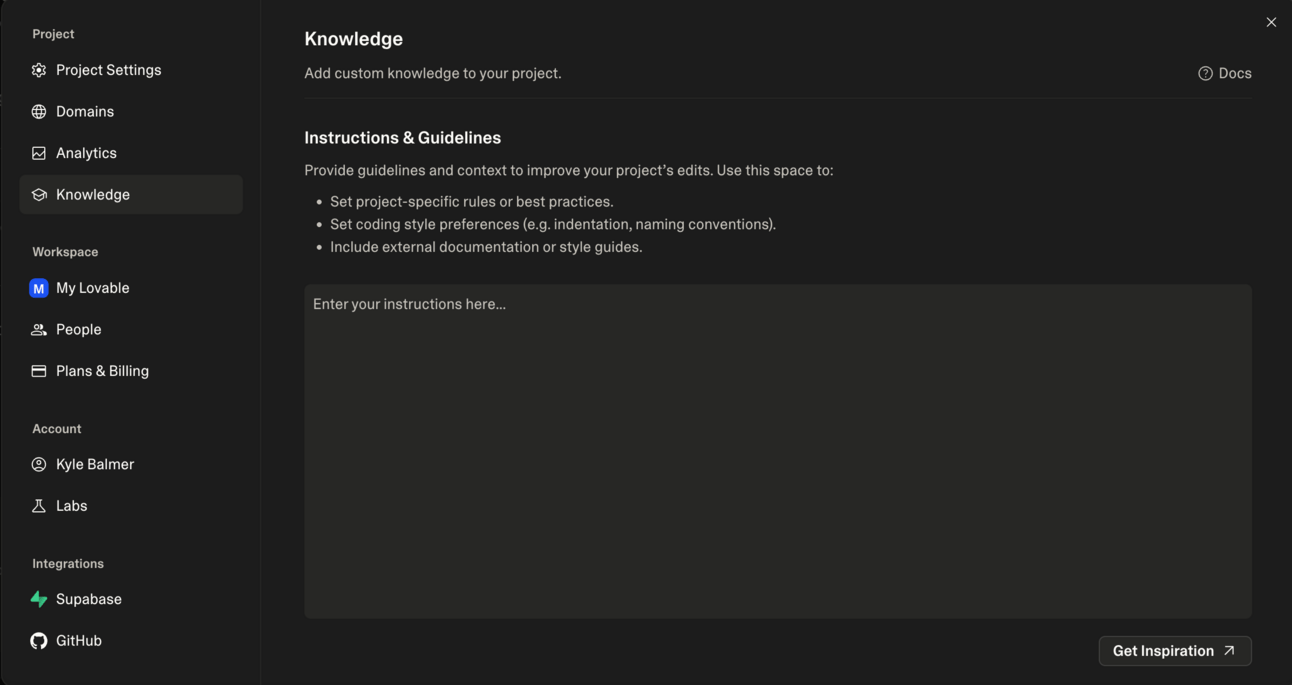
Settings > Knowledge > Instructions
The prompt above (plus your previous work) will create something like this:
PROJECT: AI Content Enhancer for Small Business Owners

CORE PURPOSE: Users paste rough content, get professionally polished versions back instantly.

SUCCESS METRIC: User can input rough text and receive improved version within 10 seconds.

BUILD ONLY:
- Simple text input form
- AI processing with OpenAI
- Clean output display
- Copy-to-clipboard functionality

DO NOT BUILD (until core works):
- User accounts or login
- Payment systems
- Analytics or tracking
- Multiple content types
- Team features or sharing
- Settings or customisation

DESIGN: Clean, minimal interface focused on the text transformation. No distracting elements.

DEVELOPMENT RULES:
- One feature at a time only
- Test each change before adding more
- Prioritise functionality over aesthetics
- Keep the core user journey simple: paste → enhance → copy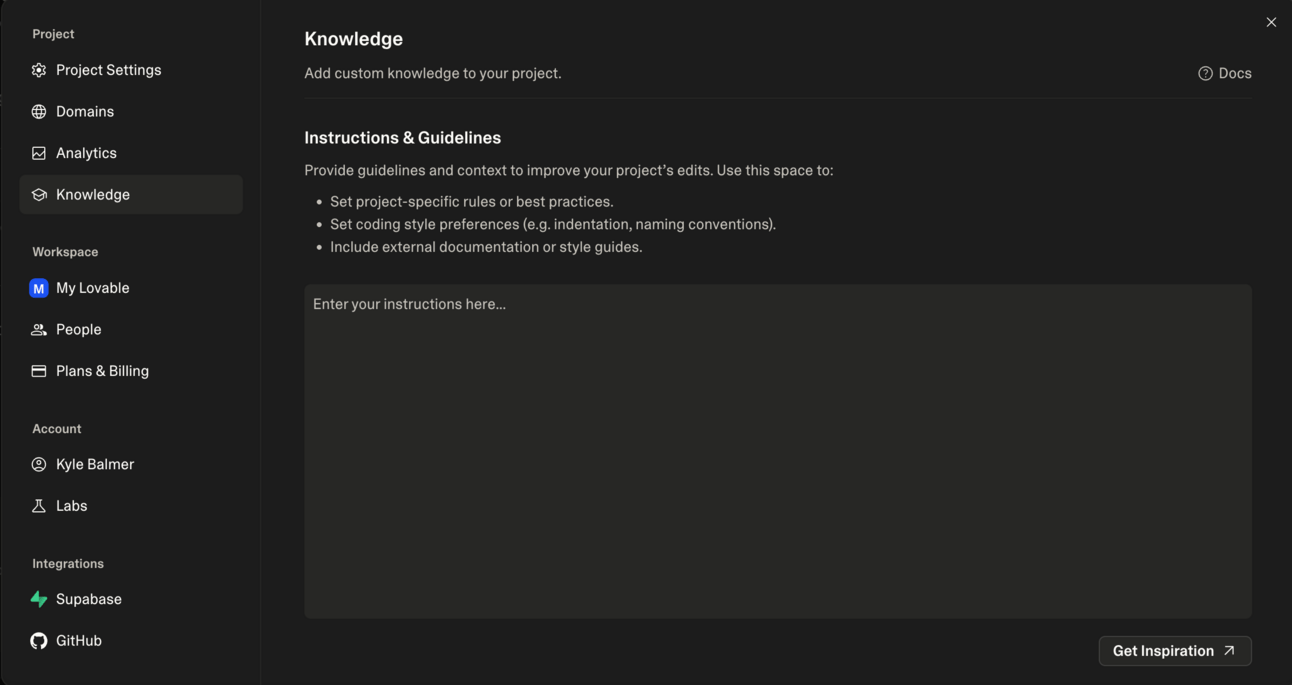
Most AI applications follow a simple pattern: users input something, AI processes it, users get results back. That's your starting point.
100% they get more complex. But if we don’t nail this initial value delivery process then there’s no point adding more.
So the basic steps will be something like this (depending on what you are building!):
Step 1: Build the input interface Start with a simple form where users can enter their input. No fancy features, no multiple options - just the core input that drives your solution.
Step 2: Create the processing pipeline This is where AI magic happens. Users submit input, your app sends it to an AI service, and returns improved results.
Step 3: Display the output Show users their results in a clear, useful format. Make it easy to copy, edit, or use immediately.
That's it. Three components that prove your concept works.
Use this prompt in Lovable to start building your core functionality:
I want to build the core functionality for my MVP: [describe your app's main purpose].

Build a simple interface with:
1. An input form where users can [describe the main input action]
2. A submit button that processes their input
3. A results area that shows the output clearly

For now, just create the interface structure. Don't worry about AI integration yet - we'll add that next.

Keep it simple and focused. No user accounts, no extra features, just the core input → output flow.
Now just let Lovable do its thing. It’ll start building in front of your eyes. It’s pretty magical. Also you can read its “thought processes” as it works - just check the chat and see what it is up to.
Now because we are building an AI app specifically we need to connect an AI.
This all gets a bit meta. Bear with me here!
We are using Lovable (an AI app) to build an AI app. And we need to let our AI app connect to an AI service like ChatGPT. And we’ll make that connecting by instructing Lovable (an AI app) to get it done.
Ugh. Exhausting. Using an AI to make an app that uses AI.
The closest parallel I can think of is Squarespace. It’s a website you use to make websites….thankfully that’s not their slogan eh? 🤣
The way we add AI into your app is by connecting to an AI service like OpenAI or Claude. This is different from using ChatGPT normally, so let me explain what's happening.
Normally when we use ChatGPT we are using the chatbot. Technically ChatGPT is a chatbot. That’s the consumer facing way to access AI via their website https://chatgpt.com/ or the phone app.
That’s how 99% of the world uses ChatGPT.
We’re going down a level. It’s like Inception. But much less exciting.
We’re going to be using the ChatGPT API.
“OK Kyle, you said no acronyms and tech nonsense!” I’ll be quick don’t worry!
What's an API key? Think of an API key like a special password that lets your app talk directly to AI services. Instead of you typing into ChatGPT's website, your app sends requests automatically and gets responses back. No human needed, just an app talking to ChatGPT directly.
Why do you need one? When someone uses your app, you want the AI processing to happen instantly without them needing their own ChatGPT account. Your API key makes this possible.
How's this different from normal ChatGPT?
Normal ChatGPT: You type, you pay monthly, you see responses
API usage: Your app types, you pay per use, your users see responses
You're basically letting people use AI through your app instead of directly
There is a cost to using the API but it’s very very (very) cheap compared to the consumer $20/month accounts. We’re talking fractions of pennies for each message.
Later we’ll talk about pricing etc. so that the cost of usage outweighs our AI costs. Right now we just need to get set up to build and test.
Getting your API key:
Go to OpenAI's developer platform (platform.openai.com not chatgpt.com !)
Create an account if needed
Add some credit (start with $10-20)
Generate an API key
Keep it secret - this is like your password
Security note: Never put your API key directly in your app's frontend code. Lovable handles this properly by storing keys securely in the backend through their OpenAI integration (check lovable.dev/integrations/openai for the full setup guide).
Use this prompt to add AI processing to your app:
I want to add AI processing to my app. Here's what it should do:

[Describe exactly what transformation the AI should perform on user input]

Set this up securely so that my API key stays protected.

The AI should:
- Take the user's input
- Process it with [OpenAI/Claude]
- Return the improved version
- Handle errors gracefully if the AI service is down

Add a loading state so users know processing is happening.

First, walk me through the API integration step by step.
Lovable will then walk you through connecting up your ChatGPT API securely. It’ll hold your hand throughout thankfully!
Continue with the chatting process, asking for changes, fixes and amendments until you get the basic functions working. Remember this is a chat with Lovable - the more you communicate the better your results will be, as per the last Part.
In the next Part we’ll talk about debugging and getting everything shipshape. Right now just get as close as possible. Don’t aim for perfection yet!
As we build I highly recommend staying curious.
Don't expect to understand everything immediately. Vibe coding is about learning development concepts as you need them, not mastering everything upfront.
For example the talk about APIs above may have been totally new to you. That’s fine! We can ask ChatGPT (or directly in Lovable) about the topic and learn as we go. This lets us grow at the same time as we build - rather than purely abdicating knowledge to the AI.
Also, enjoy the process. You're not just building an app - you're learning how software development actually works. Guess what…like any skill the more you do it the better you’ll get. The first time you vibe code an app it’ll probably be a mess. That’s fine. The next time will be better. You’ll learn best practices and how best to use the tools.
Tomorrow, we debug and polish your application. We'll fix the inevitable issues, improve the user experience, and make sure everything works reliably.
Keep Prompting,
Kyle
My first proper debugging session with Lovable was a nightmare.
I'd fix the header styling, and suddenly the footer would disappear. Fix the footer, and the AI integration would break. Fix that, and the header would revert to its original broken state.
Classic whack-a-mole debugging. Hit one problem down, another pops up. Then another. Then the original problem returns like it never left.
I spent four hours going in circles, getting increasingly frustrated, until I finally gave up and closed my laptop in defeat. The tendency when this happens is to bounce off completely - decide vibe coding is rubbish and go back to whatever you were doing before.
Don't.
If this hasn't happened to you yet, congratulations - it will!
The difference is that you’ll have strategies for breaking out of these loops.
Let’s get started:
Why the debug loop is normal (don't bounce off)
When Lovable gets stuck in loops and how to break them
Going outside Lovable for fresh perspective and solutions
Best practices from real users who've solved this
Testing your app like an actual user would
Here's what's actually happening: vibe coding tools like Lovable have context window limitations. They can't see your entire codebase at once, so when they make changes, they sometimes miss how it affects other parts of your app.
Traditional human developers can see all their code simultaneously and understand the connections. Well, good developers do at least! AI tools are (at least for now) working with partial information and making educated guesses about how things fit together.
This creates the whack-a-mole effect more frequently than normal coding. Fix one component, but the AI doesn't realise it connects to three other components that now need updating.
Signs you're in a loop:
Lovable suggests the exact same fix repeatedly
Each "Try to Fix" attempt makes identical changes
Error messages stay exactly the same
You see the same code being added and removed
When you hit the debug loop, your natural instinct is to keep hammering away at the problem. "Just one more fix and it'll work." But that often makes things worse.
Instead, step back. Recognise what's happening. Then use systematic approaches to break out of the loop.
Method 1: The "Three Strikes" Rule Try the "Try to Fix" button maximum three times. Sometimes Lovable will just shake itself out of whatever problem it was having and work out the solution. BUT don’t just mindlessly keep hitting “try again” because if anything Lovable is more likely to turn your code into spaghetti. Three is sufficient. If it doesn't work by then, move to Method 2.
Method 2: Start Fresh Chat The easiest and most effective solution: start a new chat session. When Lovable gets stuck, it's often because the conversation context has become muddled. How to do it properly:
Take screenshots or note down your current issue
Note exactly what you were trying to achieve
Start completely fresh chat session
Describe the problem clearly (using notes+screenshots) without referencing previous fix attempts
Let Lovable approach it with fresh perspective
This gives Lovable a clean context window (memory) to work from and stops it from trying the same fix that didn’t work beforehand.
Method 3: Chat Mode Investigation If a fresh chat doesn't work, switch to Chat Mode to discuss the problem without making changes:
I'm getting this error: [paste exact error message]

This is what I was trying to do: [describe your goal]

Don't make any changes yet. First, explain what this error actually means and why the current approach might not be working. Then suggest a different strategy.
This will let us talk it out with Lovable and try to work out a new solution before rushing in and applying changes. Often Lovable will just got for it so we need to tell it to hold on, help us think it through and then try the new changes.
Method 4: Go Outside Lovable When you're still stuck after trying the above, step outside Lovable and use other AI tools to analyse your problem. This is basically the same as method 3 but we’re getting a “second opinion”! Generally you’d take your problem to ChatGPT or Claude.
Taking your problem to ChatGPT or Claude:
Take screenshots of the error
Copy the exact error message
Describe what you were trying to build
Ask for diagnosis and alternative approaches
Tell it to ask supplemental questions and to gather context if needed
Here’s an example external debugging prompt:
I'm building an AI-powered content tool using Lovable. I'm getting this error: [error message]

Here's what I'm trying to do: [your goal]

The AI has tried fixing this several times but keeps making the same changes that don't work. [Provide examples of Lovable's failed attempts if relevant]

What might be causing this error? What are some alternative approaches I could try?
Bringing solutions back to Lovable: Once you get insights from external AI, return to Lovable with specific instructions based on the new understanding. Ask your AI to provide instructions to take back to Lovable.
Version Management: Pin and Revert Pin every stable version as you build. When something breaks, don't keep pushing forward - revert to the last working version instead. This gives you a clean foundation to try a different approach rather than building on top of broken code. Otherwise we end up a few layers deep and don’t know where things went wrong.
Lock Critical Features When fixing one issue, explicitly tell Lovable not to touch working components: "Please don't touch component A, layout B, or shared logic unless necessary." This prevents the AI from accidentally breaking working parts while trying to fix unrelated problems. We’re explicitly telling it not to mess with parts that are good to go and only to focus it’s efforts on the task at hand.
Test One Thing at a Time Fix one issue, test it, confirm it works, then move to the next problem. Don't try to solve multiple issues in a single prompt. This prevents creating new problems whilst fixing old ones and helps you identify exactly what's causing issues when they occur. This is probably the most important rule!
For now keep working with Lovable and get your basic basic version into a decent shape. Do NOT start adding features! Please!
Tomorrow, we deploy your application and make it live and available for real users. By then, you'll have a working MVP that demonstrates your core concept.
Keep Prompting,
Kyle
A couple weeks’ back I helped a friend deploy his first app. He'd spent ages building it, debugging every detail, making sure it was perfect. But when it came time to actually share the URL with someone, he froze.
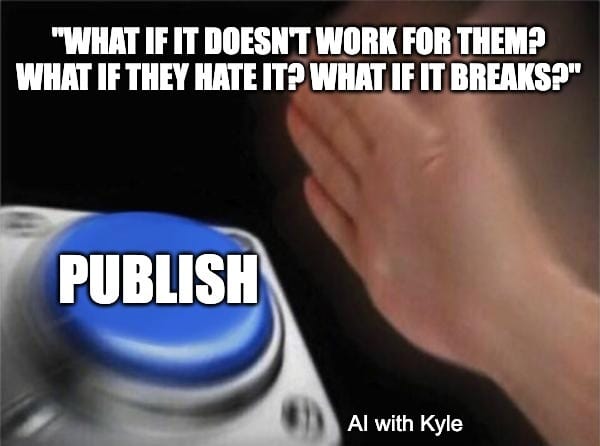
"What if it doesn't work for them? What if they hate it? What if it breaks?"
I had to press the damn button for him eventually.
I watched him refresh the page twenty times, test it on three different browsers, and ask me to check it worked on my phone before finally sending the link to his first real user.
And it was great! More importantly though it was done.
That moment - sharing your URL for the first time - is terrifying and exhilarating. It's when your project stops being yours and becomes something “real” people can actually use.
Today, we're crossing that line. From builder to publisher.
Let’s get started:
Publishing to Lovable hosting with one click
Getting your live URL and testing it properly
What NOT to worry about yet
Basic testing to ensure it works for real people
Deployment with Lovable is refreshingly simple. No complex server configurations, no deployment pipelines, no DevOps headaches. Just click "Publish" and you're live.
Believe me the process is waaaay easier than this used to be. If you’ve never experienced deployment before I envy you.
Here's what happens when you publish:
Lovable generates a live URL (yourapp.lovable.app)
Your app gets automatic SSL certificates (the padlock in browsers)
It's hosted on professional infrastructure with CDN optimisation
Updates require manual republishing, but it takes seconds
All that good stuff! Done for you.
Once you have your live URL, the real testing begins. Your app needs to work for people who aren't you, on devices that aren't yours, with internet connections that aren't yours.
Annoying right?
Basic accessibility checklist:
Does the core functionality work when you visit the live URL?
Does it work on mobile phones (most people will try it on their phone first)?
Are there any obvious breaking points or confusing elements?
Can someone use it without any instructions from you?
Cross-device testing: Open your live URL on:
Your computer's browser
Your phone's browser
A different browser (if you built it in Chrome, test in Safari)
Ask someone else to try it on their device
Thankfully Lovable will tend to make your project “responsive” right out of the box. Responsive basically means it’ll respond to the particular screen size and look correct on whatever device you happen to use.
This isn't about perfection (yet!) - it's about ensuring the core functionality works reliably for real users on whatever device they happen to be using. Hopefully it’s not a Blackberry…
Here's what you absolutely don't need to stress about right now:
Analytics and tracking: Don't waste time setting up Google Analytics, user tracking, or detailed metrics. You're about to get direct feedback from real users, which is infinitely more valuable than anonymous data points. We’ll do other analytics stuff later don’t worry - I just don’t want you to get hung up here.
Custom domains: Your .lovable.app URL is perfectly fine for testing and early users. Custom domains are a nice-to-have that can wait until you've proven people actually want your product.
Performance optimisation: Unless your app is genuinely slow (taking more than 10 seconds to load), don't worry about speed optimisation yet. Functionality beats performance at this stage.
Advanced hosting options: Lovable's hosting is professional-grade and handles everything you need. Don't get distracted by Vercel, Netlify, or other hosting platforms until you have users demanding specific features.
Perfect design: Your app doesn't need to look like a Silicon Valley startup's homepage. It needs to solve the problem you identified. Polish later, after validation.
The only thing that matters right now is whether your app solves the core problem for real users. Everything else is distraction.
Take a moment to appreciate what you've accomplished. Five days ago, you had a specification document.
Today, you have a basic product that real people can use.
Is it perfect? Nope! But it’s “real”. You’ve just build a real product. Pretty amazing if you ask me?
Monday: You planned systematically, set up project rules, and learned the Lovable framework
Tuesday: You learned how to talk to Lovable and got your first version building
Wednesday: You scaffolded core functionality and added AI integrations
Thursday: You debugged issues and learned to break out of loops
Friday: You deployed a working application
From plan to live application in five days. Using natural language instead of code. That's the power of vibe coding when approached systematically.
Hopefully you can see the potential here!
Your app isn't perfect - it doesn't need to be. It's functional, accessible, and ready for real users to test. That's exactly what Week 5 is about.
Next week, everything changes. You stop being a builder and become a user researcher. Week 5 is Manual Beta Testing - finding your first 10 real users through direct outreach.
You'll reach out to people in your target market, get them using your app, and collect detailed feedback. This is where you discover whether you've built something people actually want.
Remember the difference between successful and failed products is not the quality of the code or beauty of the design. It's whether real people with real problems find real value in what you've built.
Your live URL is your ticket to finding out.
Keep Prompting,
Kyle
Unlock the power of AI to transform your business with our playbook, 🤘Getting Started with Vibe Coding your Business. This comprehensive guide takes you from concept to deployment, allowing you to build software using natural language instead of traditional coding. Whether you're a seasoned entrepreneur or just starting out, this playbook empowers you to create functional applications quickly and efficiently, breaking down the barriers that have historically separated technical and non-technical founders. Get ready to harness the magic of vibe coding and watch your ideas come to life in just a week!
This playbook is designed for aspiring entrepreneurs, small business owners, and innovators who want to leverage AI technology but lack technical expertise. If you've ever felt overwhelmed by the prospect of coding or have struggled to find a technical co-founder, this guide is perfect for you. It provides a clear path to transforming your ideas into reality, allowing you to focus on what you do best—building and refining your business concept.
No coding experience is required! This playbook is designed specifically for non-technical founders, guiding you through the process of building software using natural language.
The playbook is structured over one week, with daily tasks that can typically be completed in a few hours each day.
The playbook includes a debugging phase to help you troubleshoot and resolve issues, ensuring your application works smoothly before deployment.
We recommend using Lovable.dev, which is user-friendly and specifically designed for non-technical users to vibe code effectively.
Absolutely! The playbook emphasizes deploying your application for real users, allowing you to gather valuable feedback that will inform future iterations.