
AI playbook
Unlock the potential of AI in course creation with our comprehensive playbook, '▶️ Course Creation using AI | Prompt Playbook'.
Start ReadingThis week we are once again embarking on a new AI enhanced business model.
Before we dive in though, I have a favour to ask.
It’s also a gift to you…so that works out nicely!
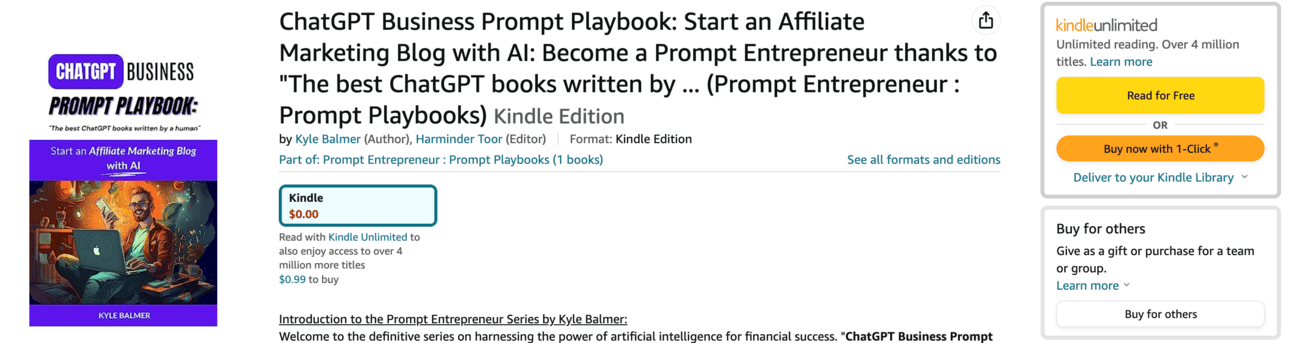
🥳 I’ve published my first ChatGPT ebook over on Amazon:
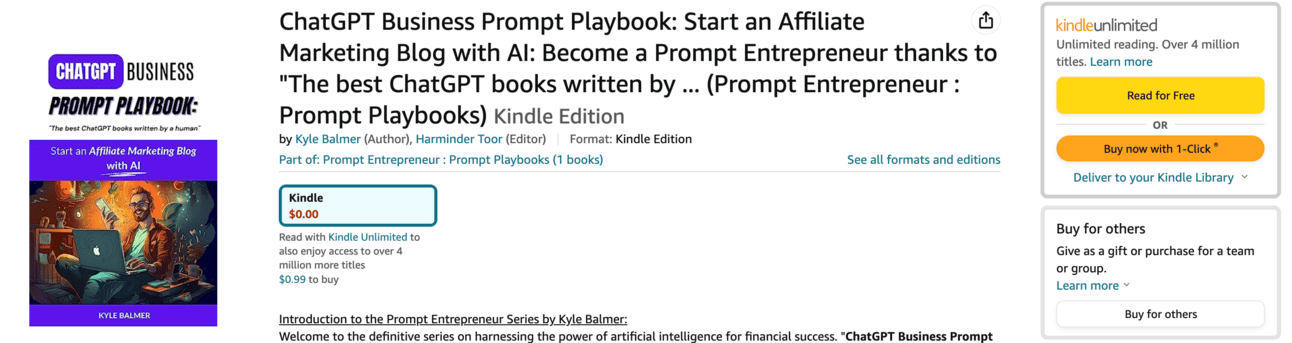
This week, from Monday to Friday it is totally FREE.
No coupon needed. Just head to Amazon and the price will be $0.00.
Amazon allow you to have 5 “free days” when you can give away copies to fans - and that’s happening this week only.
Why is this a favour for me? It helps the book do well on Amazon after the first launch week. If you like my work this would really help me out. Even if you don’t read it!
Why is it a gift for you? Well, it’s a free book! Yay!
You can grab your free copy here: https://a.co/d/aUoYxjk (That should redirect to your local Amazon, if not you should see an option to switch to local store).
OK back to our regular programming:
This week we’re looking at course creation.
With this business model you package up your expertise into a course which you sell to people who want to learn from you.
Over the week we’re going to go into detail about:
Part 1: Course Topic Selection
Part 2: Course Structure
Part 3: Course Scripts
Part 4: Course recording and editing
Part 5: Course marketing
We’re going to be focusing on Udemy in particular, but these lessons are more widely applicable to Coursera, Skillshare, Youtube or self-hosting your own course.
I’m focusing on Udemy because it has the largest learning base. We’re going to be tapping into that existing audience of learners rather than building an audience from scratch.
Also, this is the platform I’ve personally had the most success on and so am therefore most qualified to talk about. Better than me making stuff up!
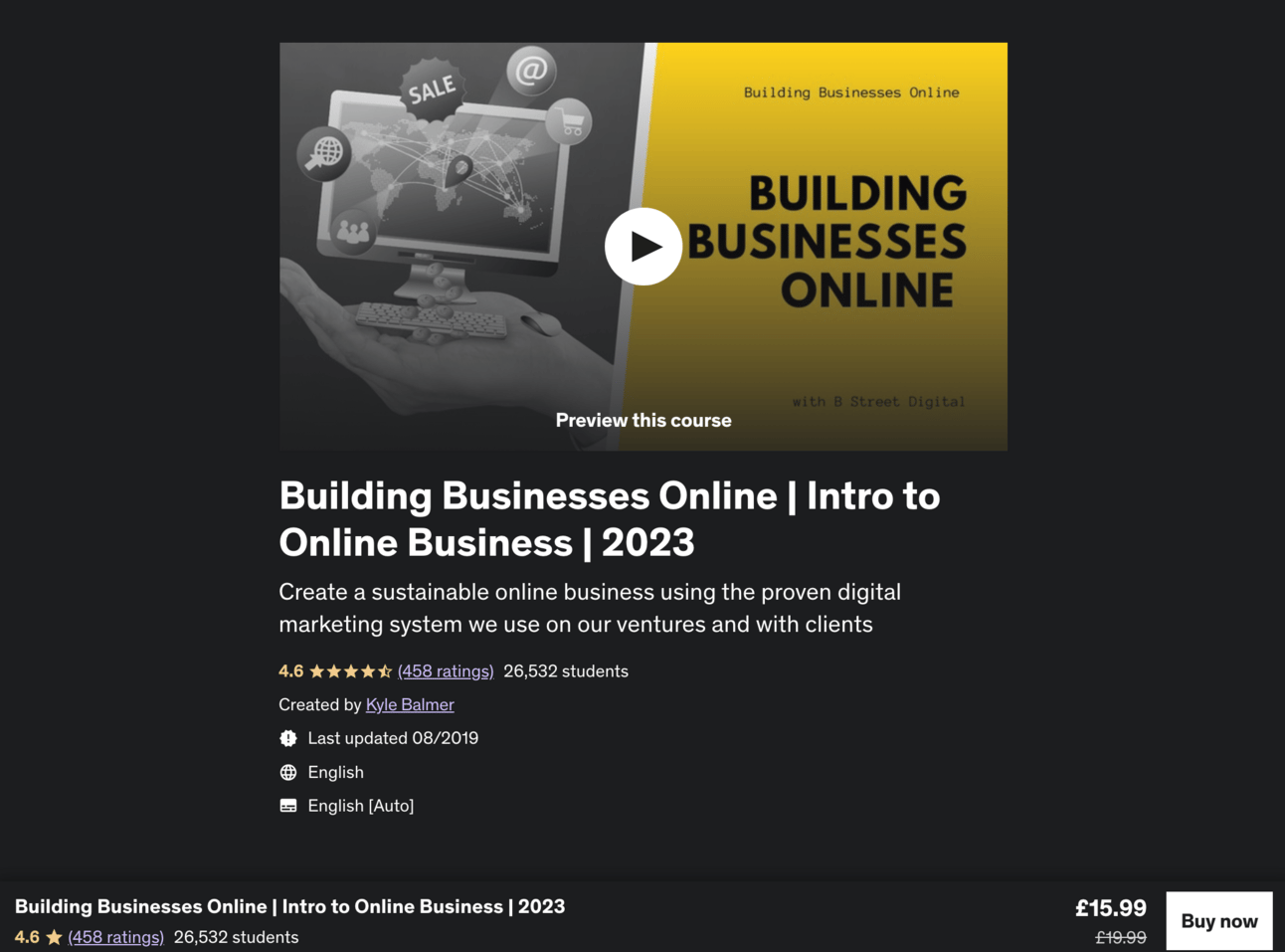
Here’s one of my courses on Udemy which has 26,000+ students and 4.6 star average review on 458 ratings.
Once you’ve created your course though you can test it out on different platforms. Or publish it on multiple platforms - just make sure to check the T&Cs on each platform for exclusivity clauses.
Today we’re going to focus in on what exactly your course is going to be about - the topic and your particular unique selling point.
You could create a course about something you don’t know anything about.
AI will allow you to do this.
However, the end result will be uninspired, dull and probably full of errors!
Instead we’re using AI to help us with the process of creating a course - not to do all of the work for us! Therefore the course we are creating should be a topic that we have both knowledge and skills in.
You may already know what this is. If so great; skip to the next step. But if you are at a loss we’ll use ChatGPT to help come up with ideas.
Let’s start with a simple prompt to start thinking about topics.
Act as an online education specialist.

I am preparing an online course and want assistance with the course ideas.

My areas of expertise are in: [insert skills/knowledge]

Generate 10 unique course ideas related to each area of expertise.

Please also suggest a key learning objective for each course.
Where the prompt says [Insert skills/knowledge] add as many of your areas of expertise as possible. The more you add the more ideas ChatGPT will throw at you.
These can be professional expertise from your work or more personal skills and knowledge from hobbies and interests. Don’t limit yourself at this point - we want to go wide and get the creative juice flowing.
Here is an example output for “digital marketing” which is one of my areas of expertise.
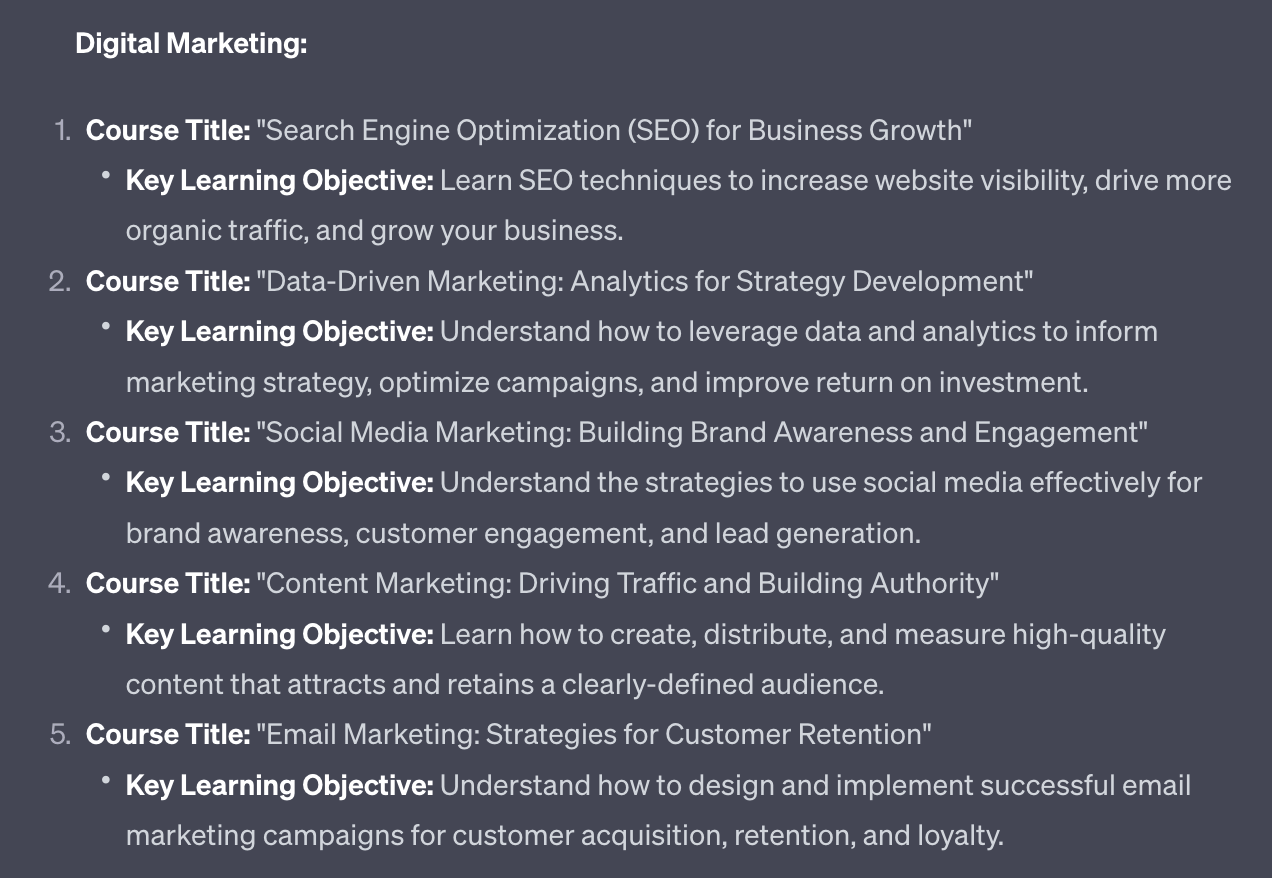
Note the multiple topics here: SEO, data-driven marketing, social media marketing, content marketing, email marketing etc.
These are the sort of topic ideas we want to extract and use in the next step. So note down any that are of interest and we’ll be finding out which are good course ideas to pursue.
Once you have a handful of potential course topics in hand we need to check how the market looks.
It’s not enough to build a course that we are interested in. It also needs to be something that:
Has lots of interested learners
Has competition we can beat
For this we’ll use Udemy’s Marketplace Insights tool.
You’ll need an Instructor’s account on Udemy to do this. This is free and quick to set up here. Go ahead and make an account.
Once you are in your instructor’s account go to Tools > Marketplace Insight tool. You’ll see a search bar like this:
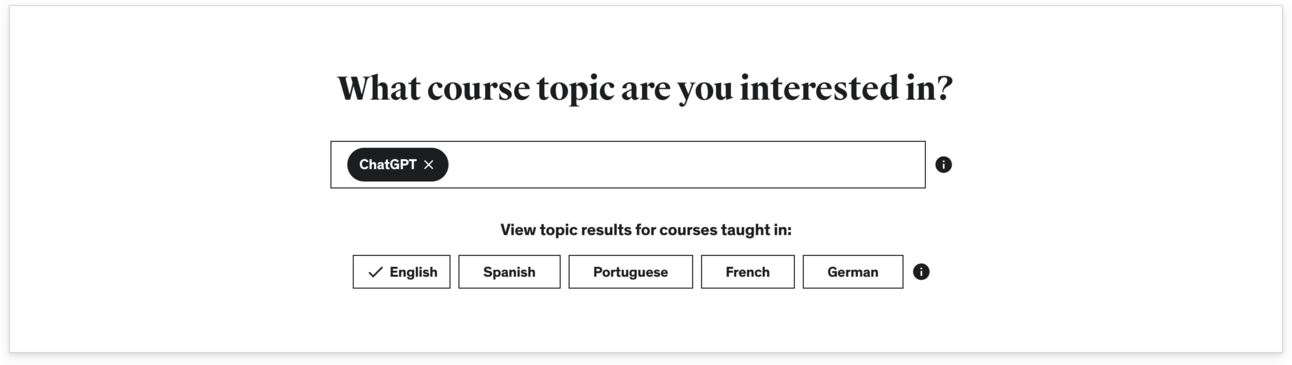
Go ahead and type in one of the topics from step one. Chances are it’s a topic on Udemy - if not try variations of the word and you’ll find it. Udemy has a huge range of topics.
You’ll be presented with a HUGE amount of information about the topic.
For the topic “ChatGPT” for instance I can see that demand and competition is high. Unsurprising considering the top teacher makes $65,000/month.
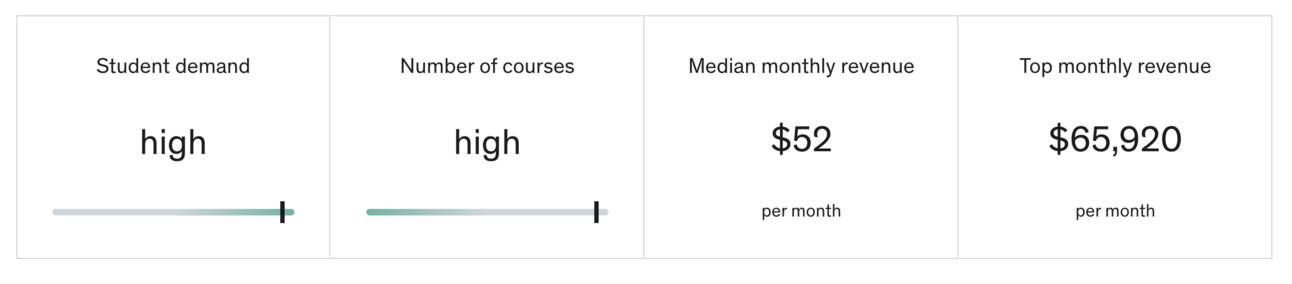
I can also see the top keywords people use to find the content as well as related topics:
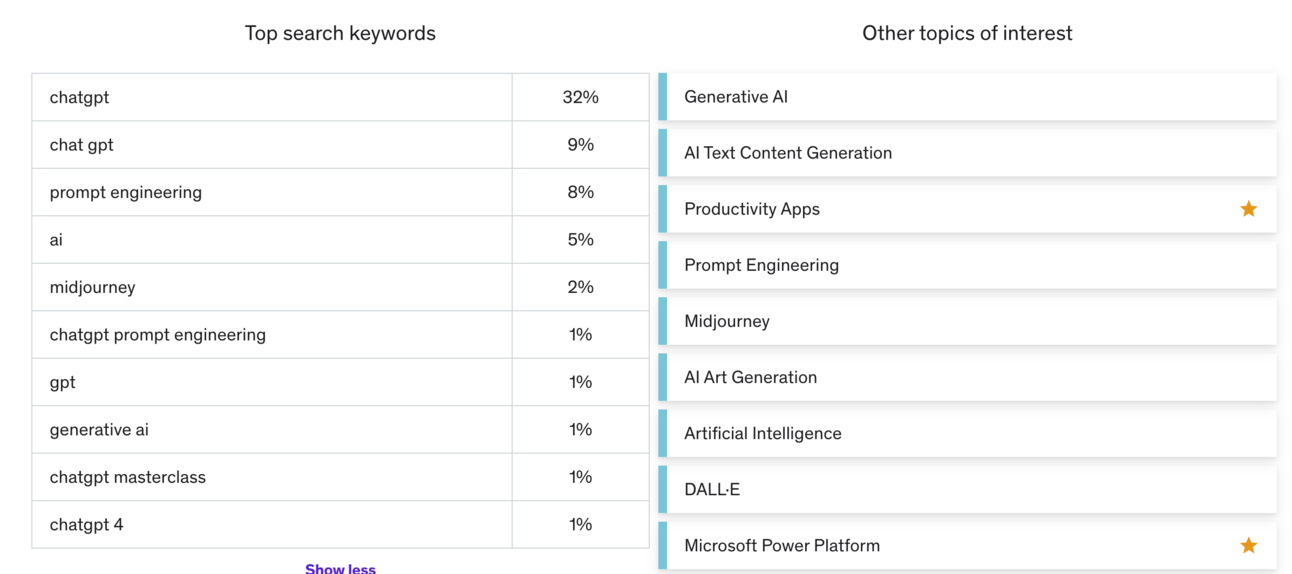
Make sure to investigate those other topics if they are relevant to your skills. Especially those with stars - those have high demand and low competition.
Further down the page you’ll also be shown the top courses in the topic, their number of sales and their average review ranking.
Lots and lots of valuable market information that we'‘ll be using to decide our topic.
Right now go through your topic list from step 1 and look for high demand topics that (ideally) have low or medium competition. These will be the sweet spot.
Collect up a few of these as your shortlist. Feel free to choose a topic now or continue to the next step with a few options if you are still uncertain.
Once you have one, or a small handful, of topics we want to do some competitive analysis.
This process takes some time so ideally do it with less than 5 topics.
In Udemy’s Marketplace Insight tool scroll down to the Top Earning Courses section. You should see 5 courses here. These are the most successful and the ones we want to emulate.
Open up new tabs/windows for each course.
Act as a course creation strategist.

I will provide you with the details of 5 courses around [topic]

Review each of these courses and output in a table a competitive analysis

The columns are:
- number of students
- number of reviews and star rating
- length of course in hours
- relative strengths of course
- relative weaknesses of course
- unique content in this course not available in other courses

I will provide 5 courses worth of details. Please prompt me for each course one at a time until you have all five and then perform the analysis.
For each course copy/paste the
What you learn
This course includes
Description
The description text may be too long for ChatGPT to process. If so take the first few paragraphs as they should be the most important.
Make sure to add in the [topic] in the prompt and hit enter.
ChatGPT will then ask for details for each of the 5 courses.
If you provide information but ChatGPT is still missing info it will prompt you for more.
Keep going until you’ve added information about all 5 courses. Then ChatGPT will begin its analysis. It may need to be told to begin the analysis after the 5th course- just say “start” or “ok” and it’ll begin.
The output will look like this:
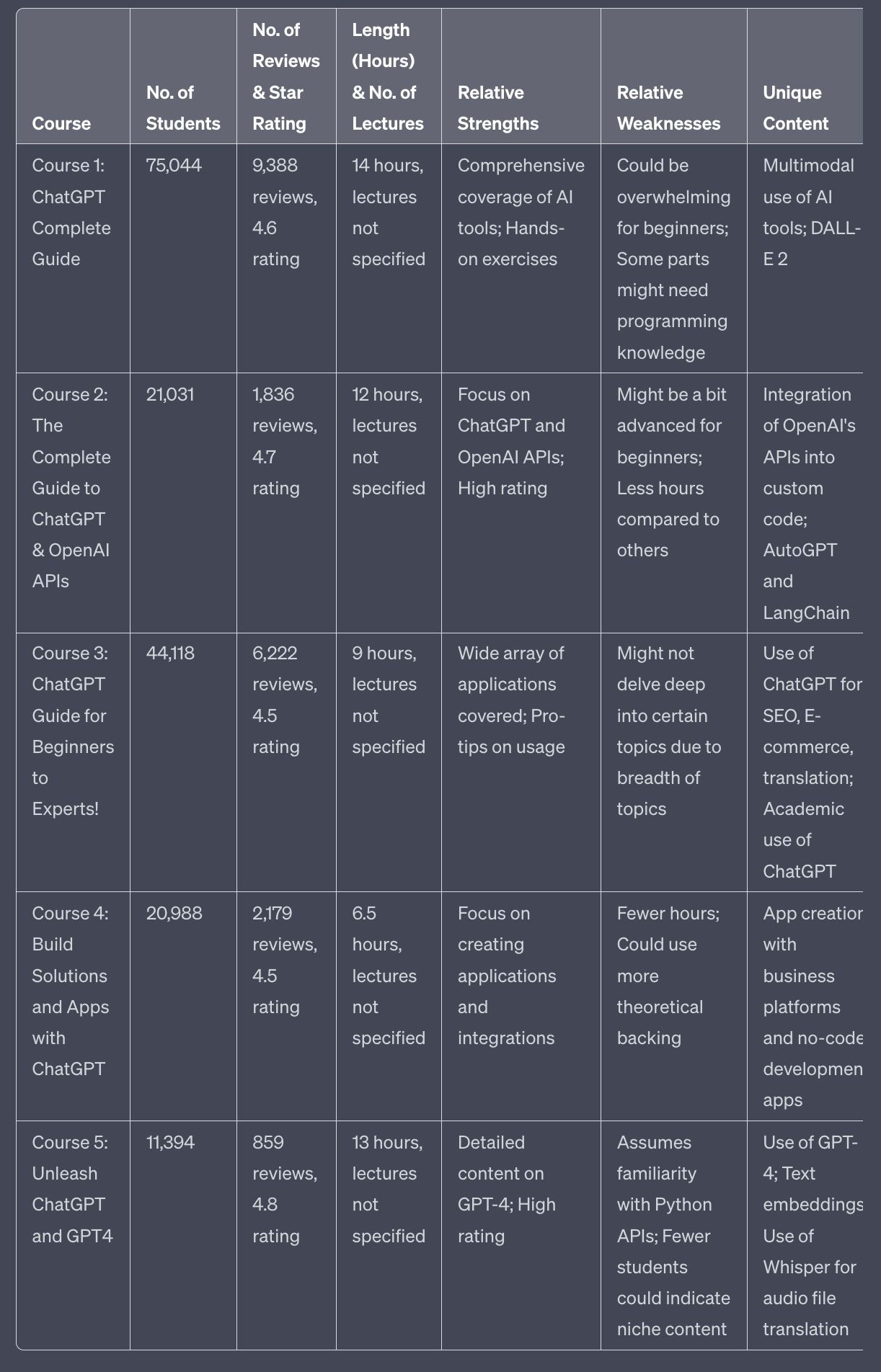
This gives us a comparative analysis of the top 5 Udemy courses in our niche.
Because these are the top 5 they are doing something right - we want to learn from them. So this is invaluable information. In the next step we’ll go a little further with this competitive intelligence.
In the same prompt window go ahead and add this prompt below the comparative table.
If you have navigated away from the previous chat look in your chat history to find the comparative analysis again.
Now use this prompt:
Based on the comparative analysis you just completed, propose a course that takes the best from each, and avoids the weaknesses.No additional info needed - ChatGPT will take all the information it needs from the comparative table above.
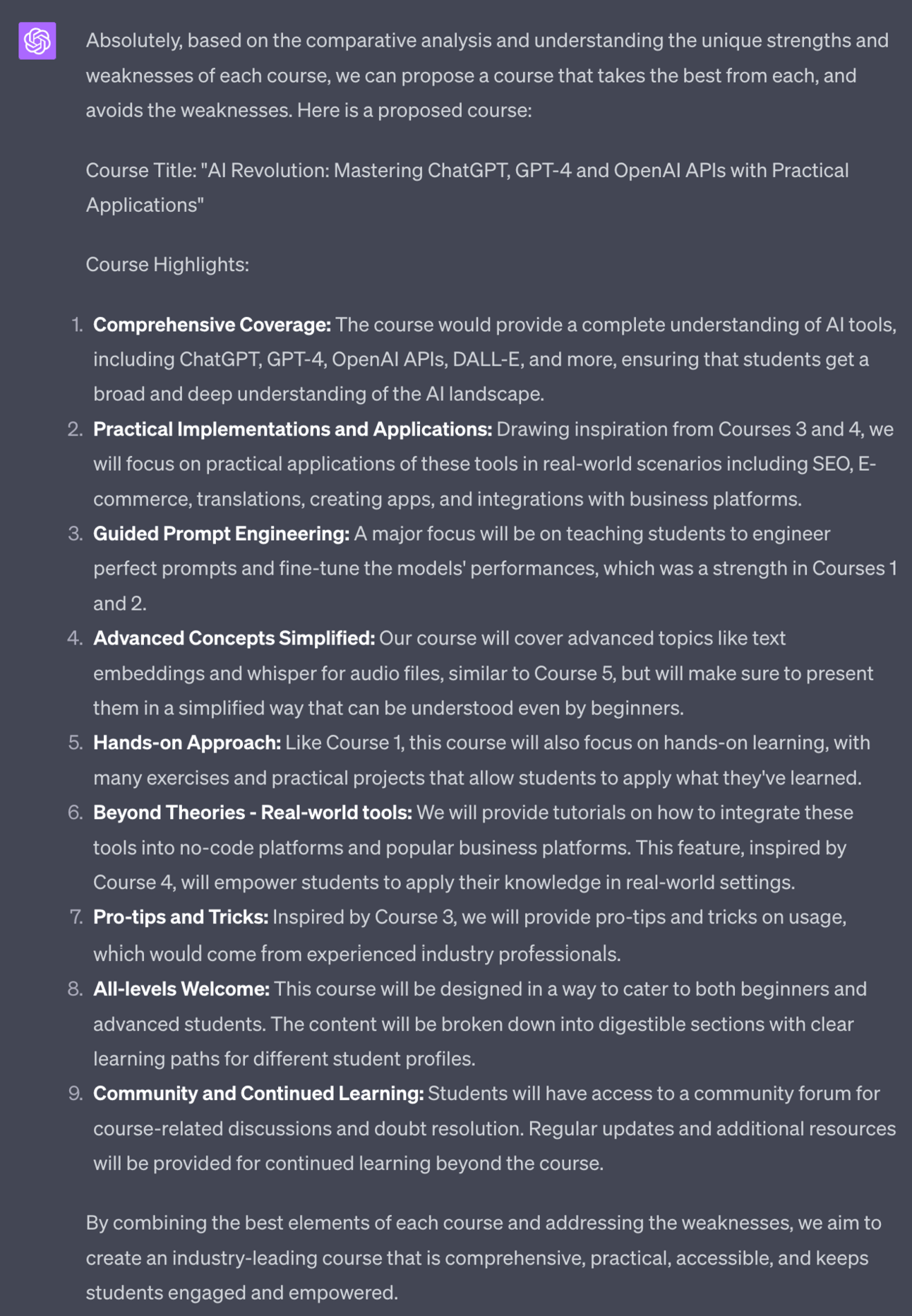
This prompt takes all of the competitor information you provided, all the strengths and weaknesses, and suggests a course that is better than the others.
We will use this list of highlights later when we come to structure the course. So make sure to keep a copy.
Next we want a handful of potential titles for our course.
Use this prompt:
Provide me 10 more potential titles.

Try to include keywords from this list, ordered from most to least important: [keywords]
For the keywords refer back tot the Udemy Marketplace Insights tool and the top search keywords.
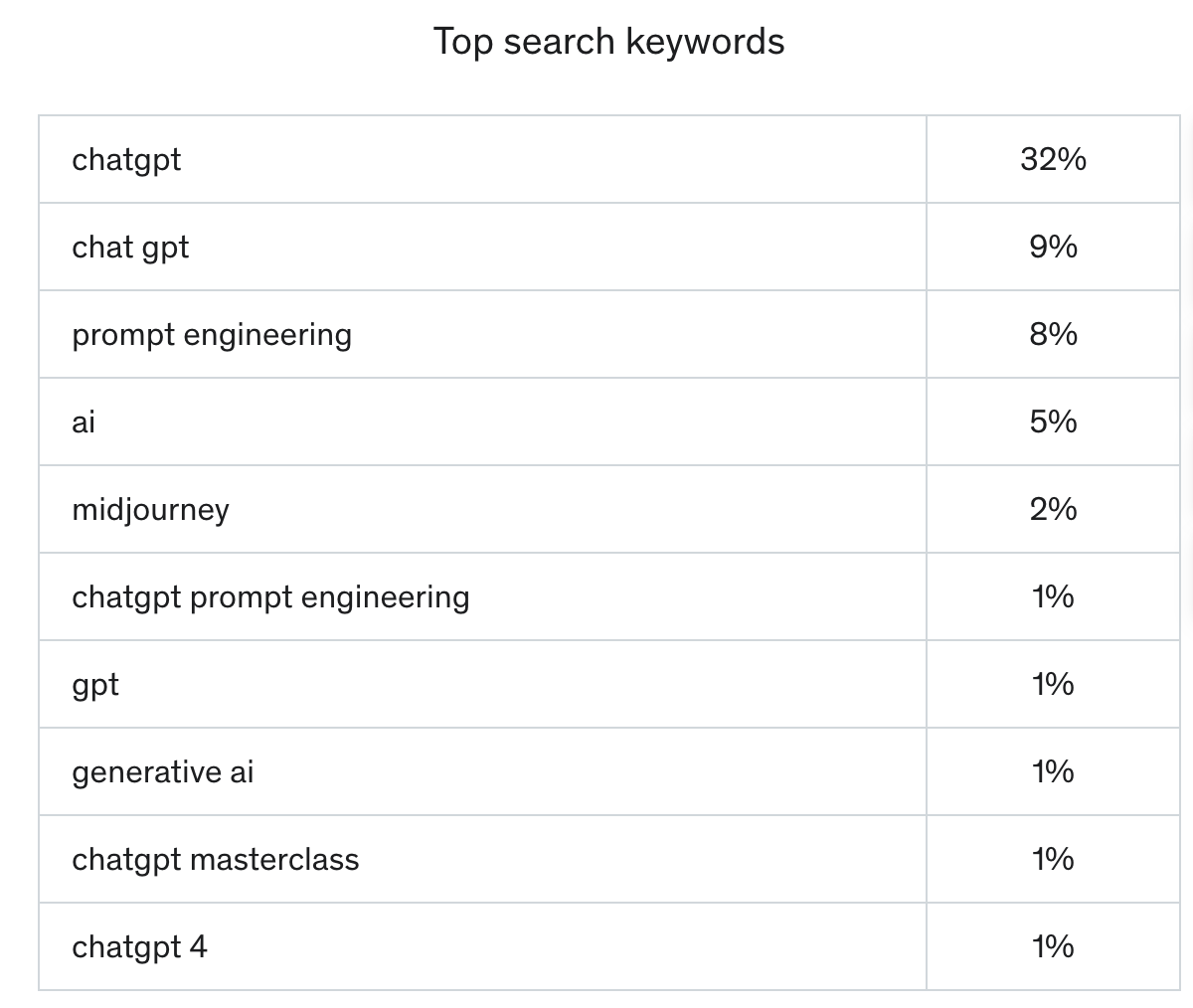
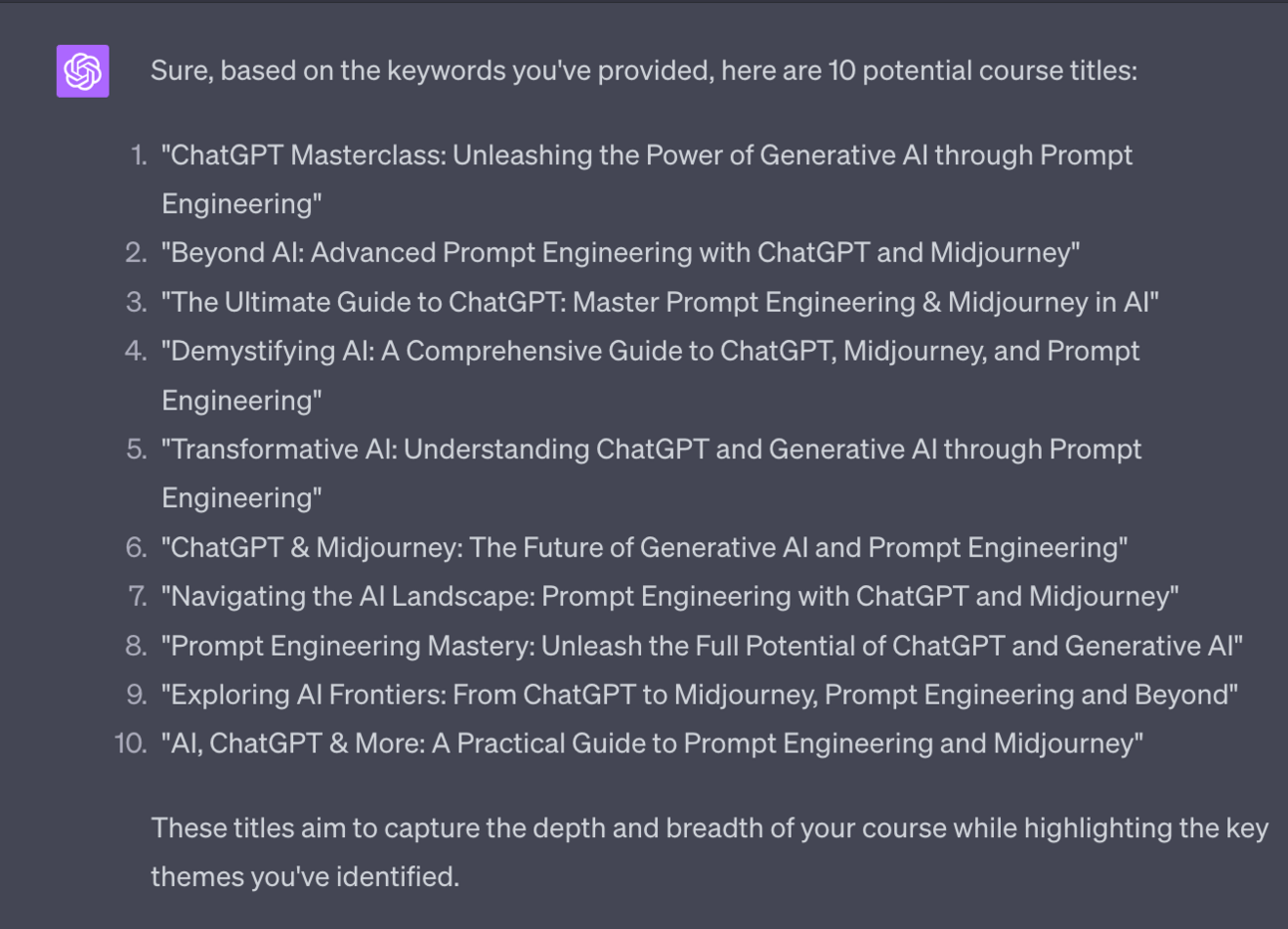
Choose one that includes the keywords but also sounds good. You’ll be better than ChatGPT at choosing this.
Phew!
In this part we started with idea generation, worked through market and competitive research and came out the other side with a set of guidelines for the “perfect” course as well as a name to go along with it.
That’s a lot of work done. In fact, the most important work.
We’re going to build on these elements, especially the set of guidelines for the perfect course, in the next Part as we start to structure and write the course.
For that, I’ll see you tomorrow!
This week:
Part 1: Course Topic Selection
Part 2: Course Structure
Part 3: Course Scripts
Part 4: Course recording and editing
Part 5: Course marketing
Keep prompting,
Kyle
Welcome to Part 2 of our deep dive into course creation using AI.
Before we begin:
Yesterday I told you about my first ChatGPT ebook over on Amazon:
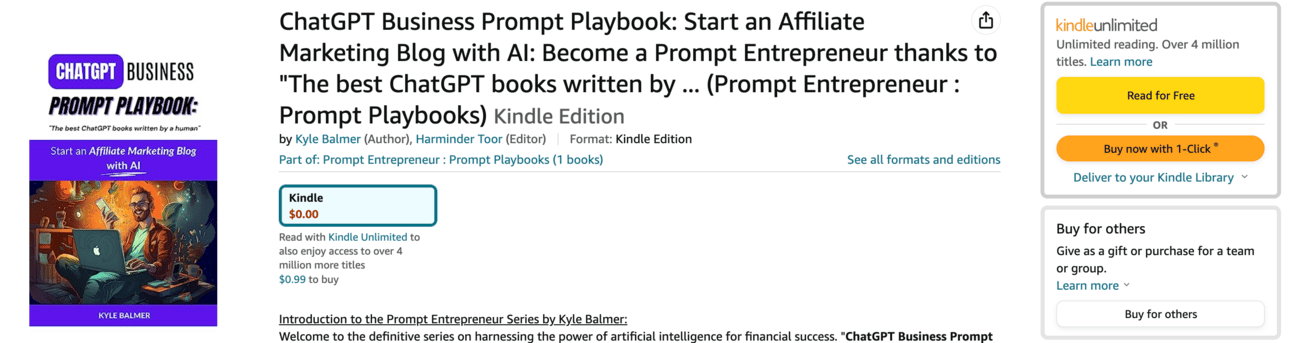
This week, from Monday to Friday it is totally FREE.
30 of your grabbed a copy on Monday. Thanks so much! I’m hoping to get it out to as many people as possible.
No coupon needed. Just head to Amazon and the price will be $0.00.
You can grab your free copy here: https://a.co/d/aUoYxjk
Today we’re going to be focusing on structuring and planning our online course.
This is a big and complex task but I’ve written an equally big and complex prompt to do the heavy lifting for you.
/
Before we beginning structuring everything we need to know the length of the final course.
First question: do you want to make the course free?
Why would you want to make it free?
If you have other products/services or simply want to build up an audience then you can use a free course on Udemy to get to a lot of people. Then you take them from the course over to your social media and email list and sell them your other products and services.
Making the course free gets it into the hands of the most amount of people - thus driving your other business further down the line.
If you want to do this then the course has to be under 2 hours. That’s the limit for free courses on Udemy. So your course length should be 2 hours.
Don’t want the course to be free? No problem - here are the next considerations.
If you want the course itself to be the income generator then you can have any length of course.
If this is the case look at the length of the top selling courses in your Topic and replicate this.
In AI for instance they are all around 15 hours so for a paid course I’d go for around 15 hours.
A caveat to this : if your competitive analysis and perfect course guidelines (from Part 1) came up with suggestions to make your course longer or shorter then follow these suggestions.
The final thing to keep in mind is your time. A longer course will take longer to make- obviously! If this is your first course think about keeping it shorter at a couple of hours rather than a marathon 20 hours course!
In any case, for this step come up with a final number for how long you want the course to be. We’ll be using this to help structure the course.
Using all of our work so far we can now plug into this chunky course structure prompt. I’ll work through it piece by piece after so you understand what’s going on here.
Use this prompt in your existing chat that contains data on the 5 competitor courses you analysed.
Why? Your perfect course guidelines will likely refer to the 5 competitors so use the same chat so that ChatGPT has sufficient context:
Act as an online course expert

I'm preparing a course about [topic]. You will decide the Sections and Lessons this course will contain and build a course structure.

The course title is [title]

The total length of the course should be [total length]

The course structure should be split into Sections, each section containing multiple Lessons. Adjust as necessary to fulfill the total course length. Each section should end in a Quiz.

Each lesson should be no more than 10 minutes. There should be 5-8 minimum lessons per section. Split the sections into multiple lessons accordingly, making sure to hit the total course length.

Make sure that the total course length adds up to the total length provided above.

The course structure should follow these guidelines

#begin perfect course guidelines#
[paste perfect course guidelines]
#end perfect course guidelines#

Provide me with a course structure in tabular format containing:
Section, Lesson title, Brief description, Lesson learning outcome, length of lesson in minutes, total cumulative course length
Plug in your Title, Topic, Total Length and the guidelines created in Part 1 about creating a perfect course.
ChatGPT will create a table of your course’s structure. This will be very long - so here’s just a sample of the top of my table:
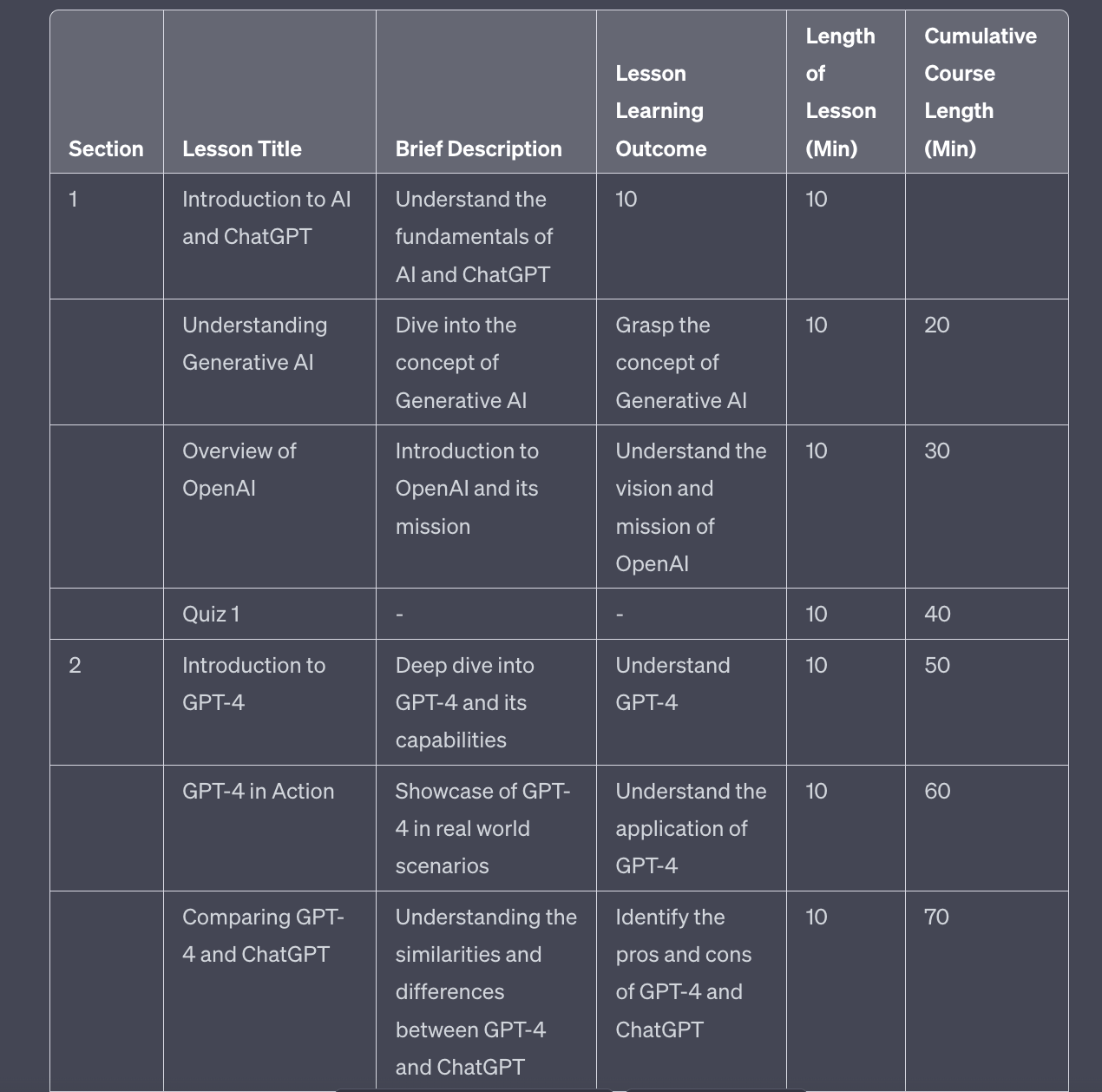
Remember in the last Part where I suggested choosing a topic you are familiar with and have skill in? Here’s why.
Now you need to go through the structure you’ve been provided and give feedback to ChatGPT
For example in the image above I see a lesson called “Comparing GPT-4 and ChatGPT”.
That’s not a helpful lesson - GPT-4 is a version of ChatGPT which means this comparison isn’t a helpful one. I’d want to drop this lesson.
Go through your course structure and note the lessons you want to delete. For these tell ChatGPT to drop or delete these lessons.
For other sections and lessons you might want to reorder the content. Again, just type this into ChatGPT (“reverse the order of lesson x and lesson y”).
For some you may think ChatGPT hasn’t added enough detail or has too much detail. Ask it to add or subtract extra lessons until it’s a bit more balanced.
This editing process is crucial to make your course valuable and needs to be done by you, a human expert. Thankfully editing a course outline is much easier than creating it from scratch.
Once you’ve got your basic structure in a place you are happy with we’re going to flesh out the details of each lesson.
We don’t want to do this before the editing as we’ll just end up with lots more information we need to get rid of later.
Use this nice simple prompt after your existing structure:
For each lesson add 3 main content bullet points.

Add these into the existing table.Here’s a snippet:
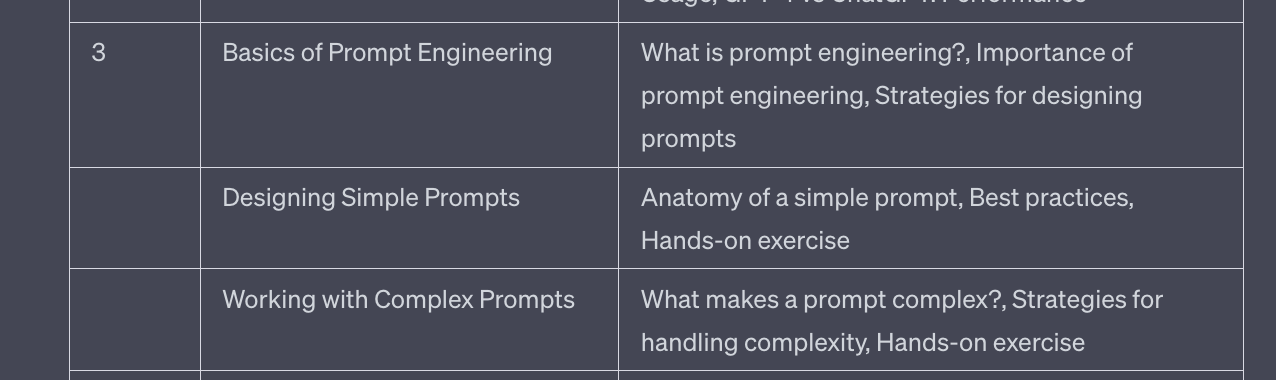
This is a nice simple prompt that will give you more detail on each of the lessons that ChatGPT has added into the structure.
Again, go through and manually tweak, asking ChatGPT to add/delete or edit as required.
The more we do now with our structure the better our results in tomorrow’s Part 3 where we start to generate content.
Today has been a big day but hopefully the one large prompt I’ve provided will do a lot of the heavy lifting.
You still had to edit based on your own knowledge but doing so is easier than working from a blank page.
And rest assured that any editing work you’ve just done will pay back dividends in the next Part when we start to generate content. The more specific and focused your structure the more unique and engaging our final course content.
Speaking of - that’s tomorrow’s topic! For that, I’ll see you tomorrow!
This week:
Part 1: Course Topic Selection
Part 2: Course Structure
Part 3: Course Scripts
Part 4: Course recording and editing
Part 5: Course marketing
Keep prompting,
Kyle
Welcome to Part 3 of our deep dive into course creation using AI.
Some of the more eagle eyed yesterday probably noticed I left an error in the issue. I left some placeholder text in and didn’t catch it during editing.
My fault sorry!
On the upside: now you know I’m definitely not an AI. I wouldn’t have made such a dumb mistake if I was!
Here’s a link to the corrected version:
Course Creation using AI PART 2
Create a successful online course with ChatGPT. In this issue we look at
promptentrepreneur.beehiiv.com/p/course-creation-using-ai-part-2
Before we begin:
The last two days I told you about my first ChatGPT ebook over on Amazon:
This week, from Monday to Friday it is totally FREE.
Over 80 of you have grabbed a copy! Thanks so much! And it’s actual hit #1 position for “Human Computer Interacton” on Amazon UK! 🎉
If you haven’t yet the link is https://www.amazon.com/dp/B0CCJZ9CGJ
No coupon needed. Just head to Amazon and the price will be $0.00.
ALSO: if you have a copy and you like my work please leave a review!
I’m looking for i) feedback and ii) reviews help the book rank.
Unless you hate the book. You are excused from having to leave a review!
PS: next week I’m looking at encapsulating the whole Kindle book process for you in a deep dive. The same process I’ve used to get this to #1 in a week. Just a sneak peek of what’s ahead!
Today we’re going to be focusing on fleshing out our course outline and generating the scripts.
Initially I did build you a GIANT prompt that would automatically plough through your structure and pump out individual lesson script.
It was a thing of beauty. So complex. So complete.
It would have made this process real fast and hands-off.
The problem: the scripts it made were rubbish!
ChatGPT made perfectly fine scripts but they were not interesting or engaging enough for the limelight.
Instead I’ve come up with a workflow that takes a little longer (sorry!) but outputs far higher quality course scripts
First we’re going to generate a rough first pass of a script. We’re going to do this one at a time because the following steps will make your final script far superior to batch production.
Here’s the prompt:
Act as an online course expert

Create a video script for [lesson] title

The lesson should be [x] minutes long

Using the information from above

Provide image/video suggestions

Provide timecodes
Use this below the rest of your work from Part 2 so that ChatGPT knows the full lesson details. If you’ve lost those details copy paste them into a new chat then use this prompt.
I’ve suggest adding in the length of the video manually because ChatGPT was extremely inconsistent here. Adding it manually overrides any inconsistency.
Otherwise, simply plug in the title and ChatGPT will do the rest.
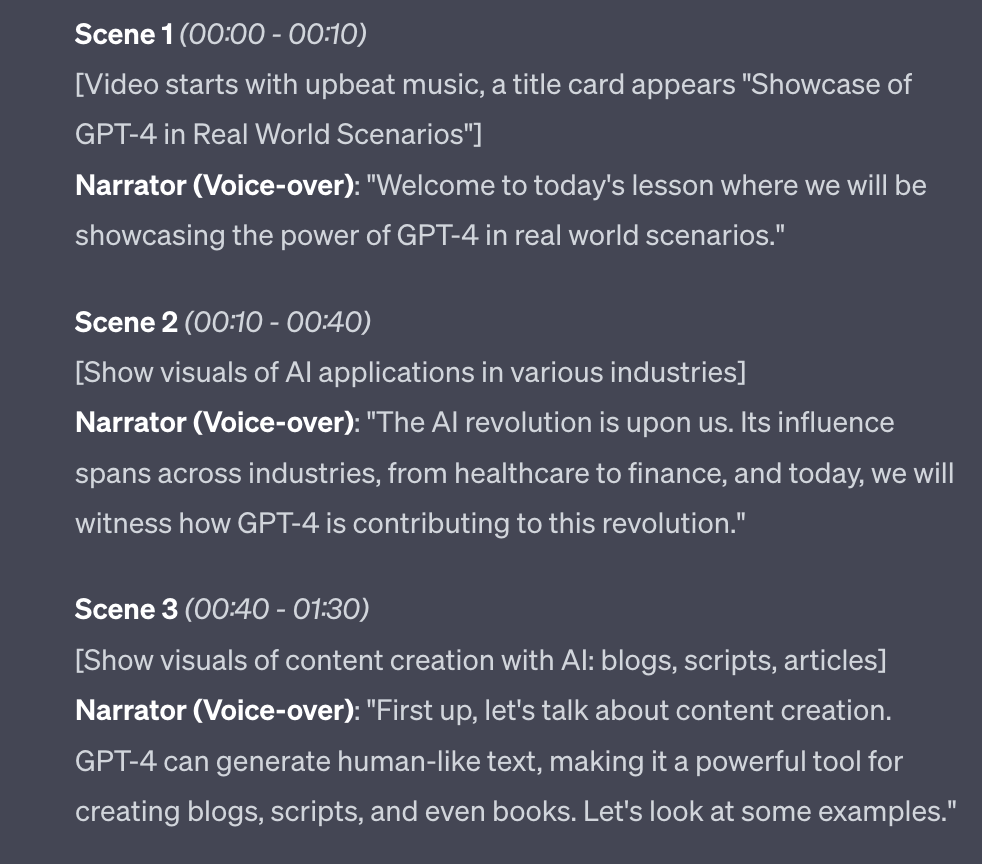
ChatGPT will give us a basic draft of a script, hitting the learning outcomes and main points that we set up in the structure in Part 2.
If you just used this script the end result of the course would be…underwhelming.
It would feel like a course written by ChatGPT. And we don’t want that!
Instead we’ll use the first draft that has been generated and tell ChatGPT to make adjustments.
Use your knowledge of the subject here.
For instance I got a lesson that including topics that I think are too detailed:
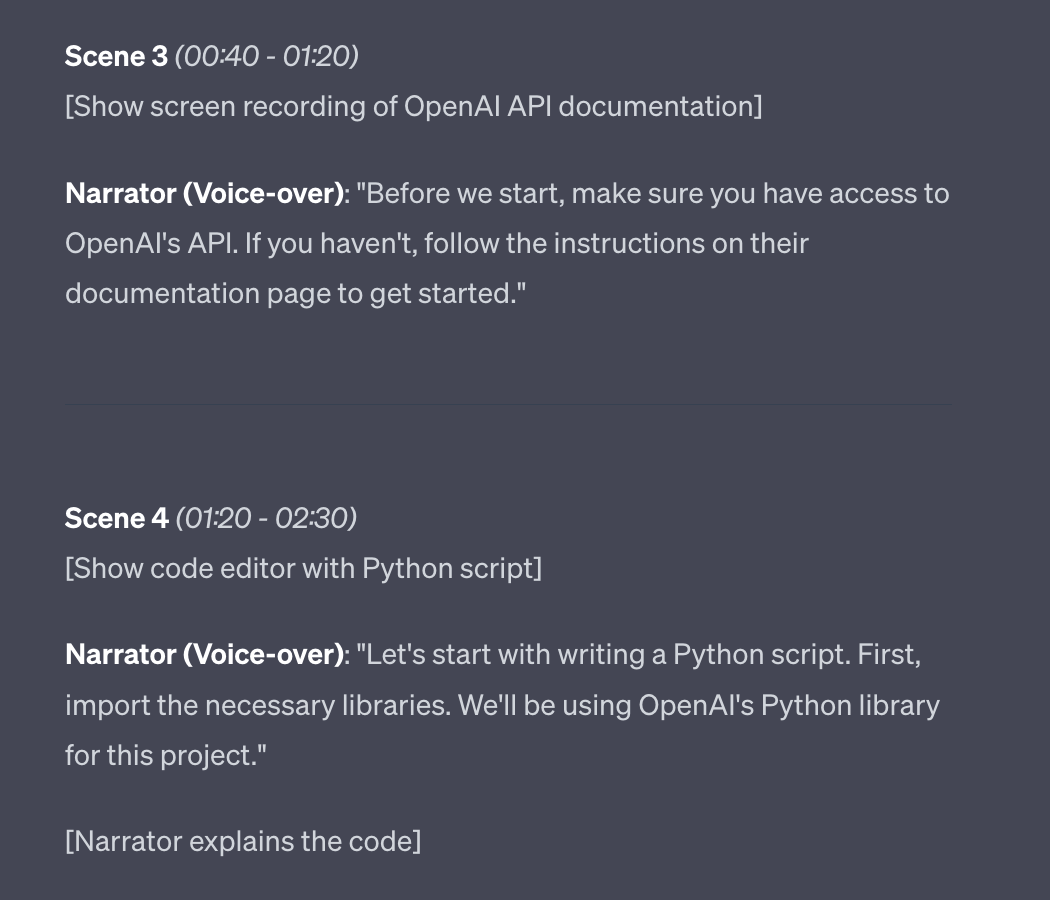
API and Python would be too complex for the course I am designing. Therefore I’d simply tell ChatGPT this.
In this case I’d add a new prompt saying “API and Python are too complex for this course. Rewrite this lesson without reference to these topics”.
ChatGPT would then rewrite, hitting the same learning objectives and main points but without mentions of APIs and coding languages like Python.
This is just an example - you’ll need to read through and make similar suggestions directly to ChatGPT based on your knowledge of the subject matter.
Do this as your first pass of the script before moving onto the next steps where we refine the lessons.
The first refinement we want to add is the use of metaphors.
When you have the basic content of the script in place via manual editing - and not before! - we want to ask ChatGPT to come up with a nice metaphor to encapsulate the meaning of the lesson.
This is a teaching technique that will make the content easier to consume. You don’t need to use this on all lessons but definitely try it on the more complex or abstract lessons you create.
Use this prompt:
Encapsulate the main point of this lesson in a metaphor that will aid the learner's comprehension and retention

add this metaphor into the script and give me an updated version of the script.
In the following output this was the initial version:
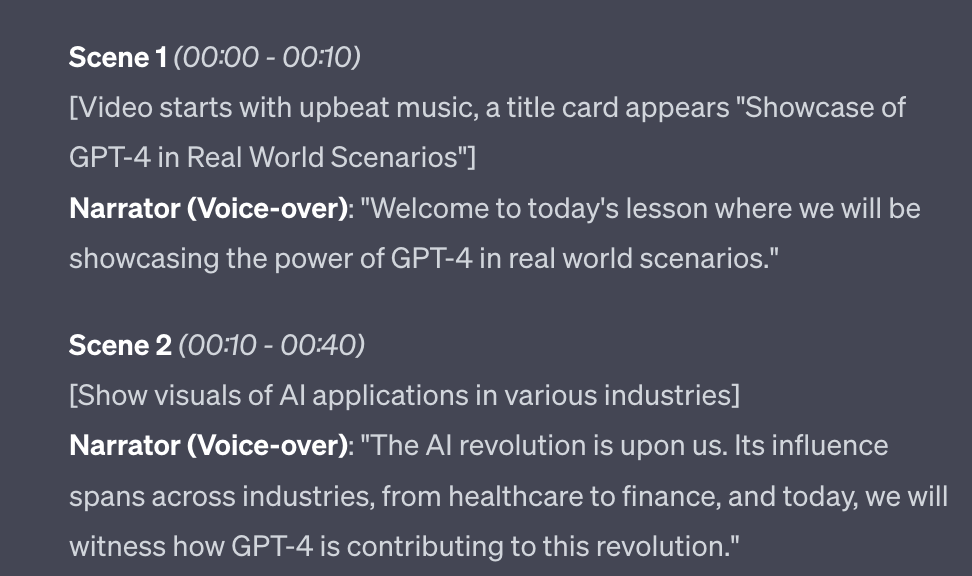
Which leads to this version with metaphor added:
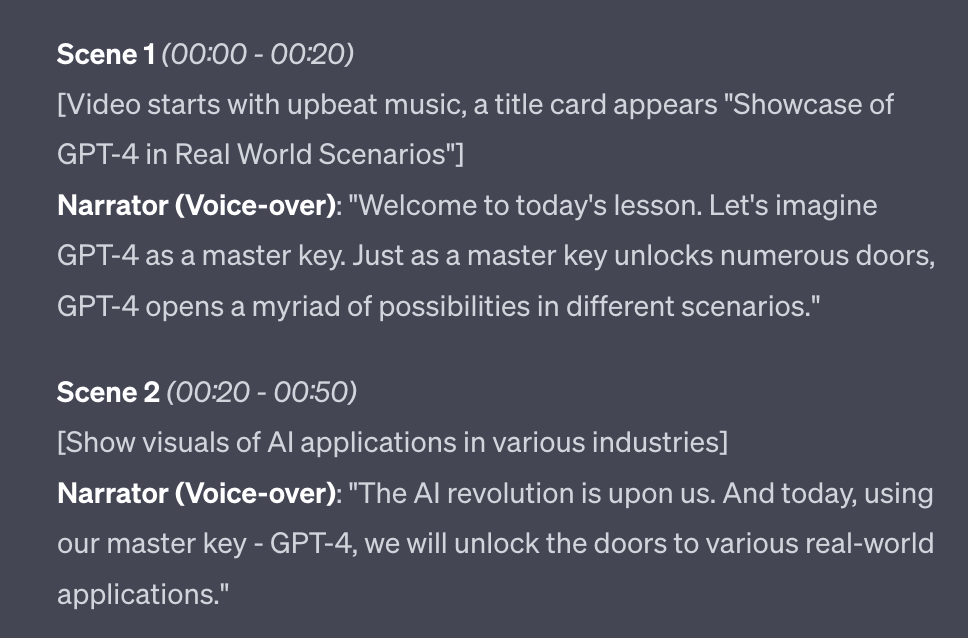
Don’t like the metaphor ChatGPT uses? Ask for another. Or, ask for a specific type of metaphor. You can have some fun with this - here for instance is a nautical metaphor:
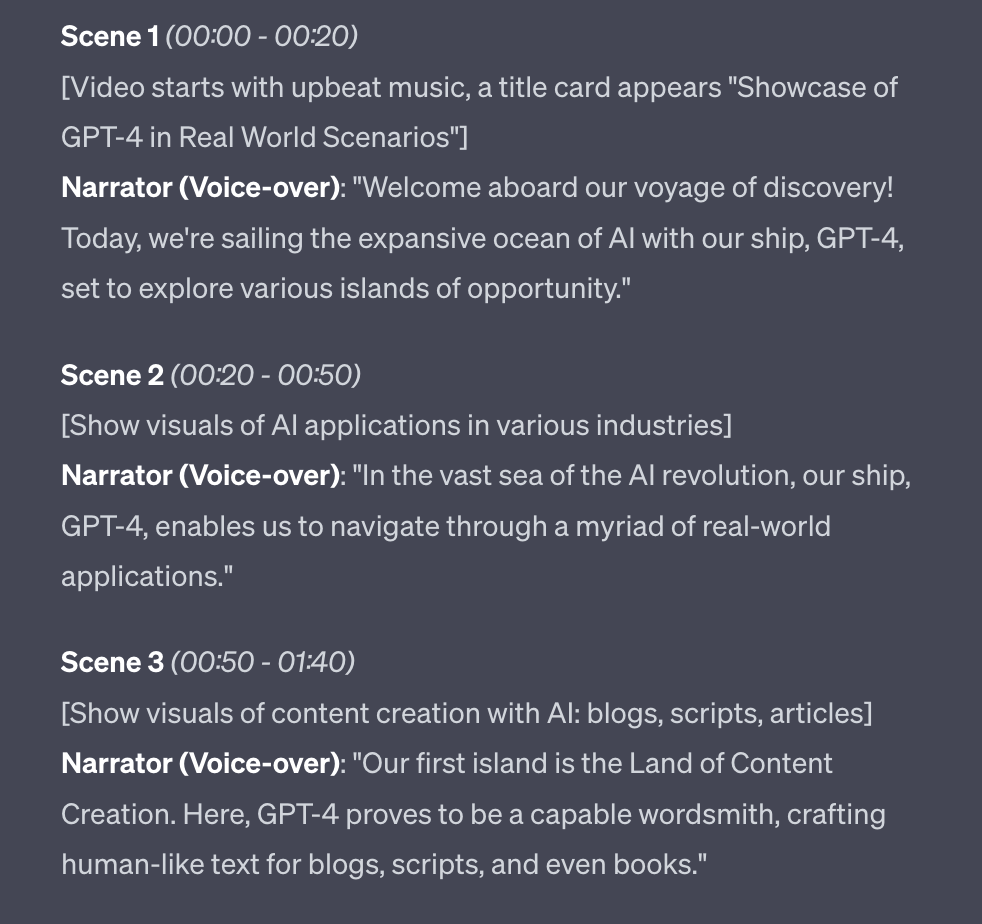
Another way we can increase engagement and retention of our material is by putting information into frameworks with easy to remember acronyms.
What do I mean by this?
One of the most famous example is SMART goals. This is a framework for goal setting where goals are:
Specific.
Measurable.
Achievable.
Relevant.
Time-bound
ChatGPT is really good at coming up with frameworks once it has your information.
I’ve got one for ChatGPT prompt engineering that I use in my material: RISEN.
Role: The role or entity you want the AI to simulate.
Instruction: Commands or instructions given to the AI.
Steps: Sequence the AI should follow if applicable.
End goal: The desired result from the AI's response.
Narrowing: Constraints such as length, tone, etc. within which the AI should operate.
Whilst I had the basics of this framework in my head it was ChatGPT that helped me come up with the acronym that makes it much easier for students to learn.
Act as an education specialist

Analyse the lesson in the script and construct a framework into which to put the information

Apply single letters to each piece of the framework so that an acronym is formed. The acronym must be a word.
I’m going to apply this to a lesson on Pro Tips for Using ChatGPT.
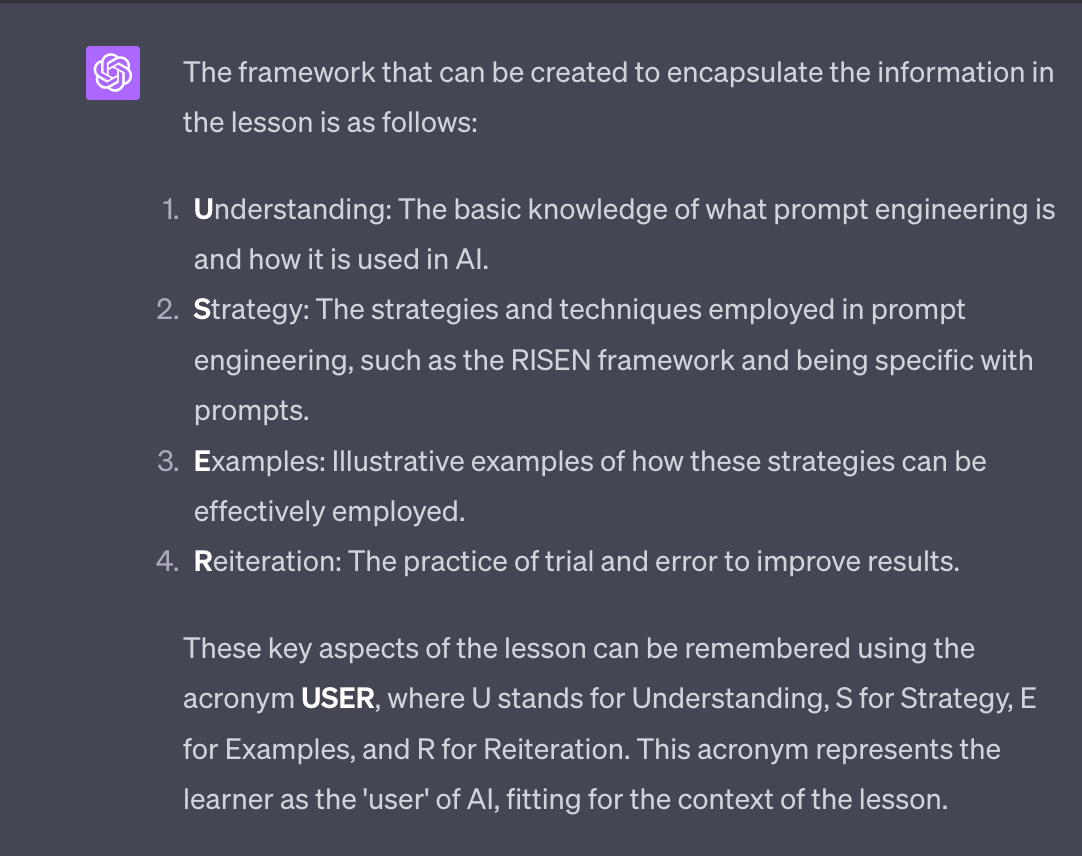
This is nice little acronym as it’s also about users, who are the people “using” ChatGPT! That works nicely.
Even more powerfully you can ask ChatGPT to come up with more variations. One such variation would be FACE, where F stands for Fundamentals, A for Approach, C for Cases, and E for Experimentation.
Alternatively if you like most of the acronym but one letter doesn’t work for you just ask for an alternative for that letter. The rest will be kept the same.
Including these sort of frameworks (and acronyms) is most powerful in lessons where there is a sequence of instructions you want the learner to be able to remember.
These sort of frameworks are also great because they’ll be your intellectual property (IP) - they are unique ways of presenting information that you can use in your courses, eBooks, blog, newsletter and social media. They are extremely powerful IP assets.
Once you are happy with the script for your first lesson we need to copy/paste it somewhere safe.
I personally use Notion. It’s free and an excellent place to organise information for projects like this.
Here for example is my Notion for a (work-in-progress!) course on using ChatGPT:
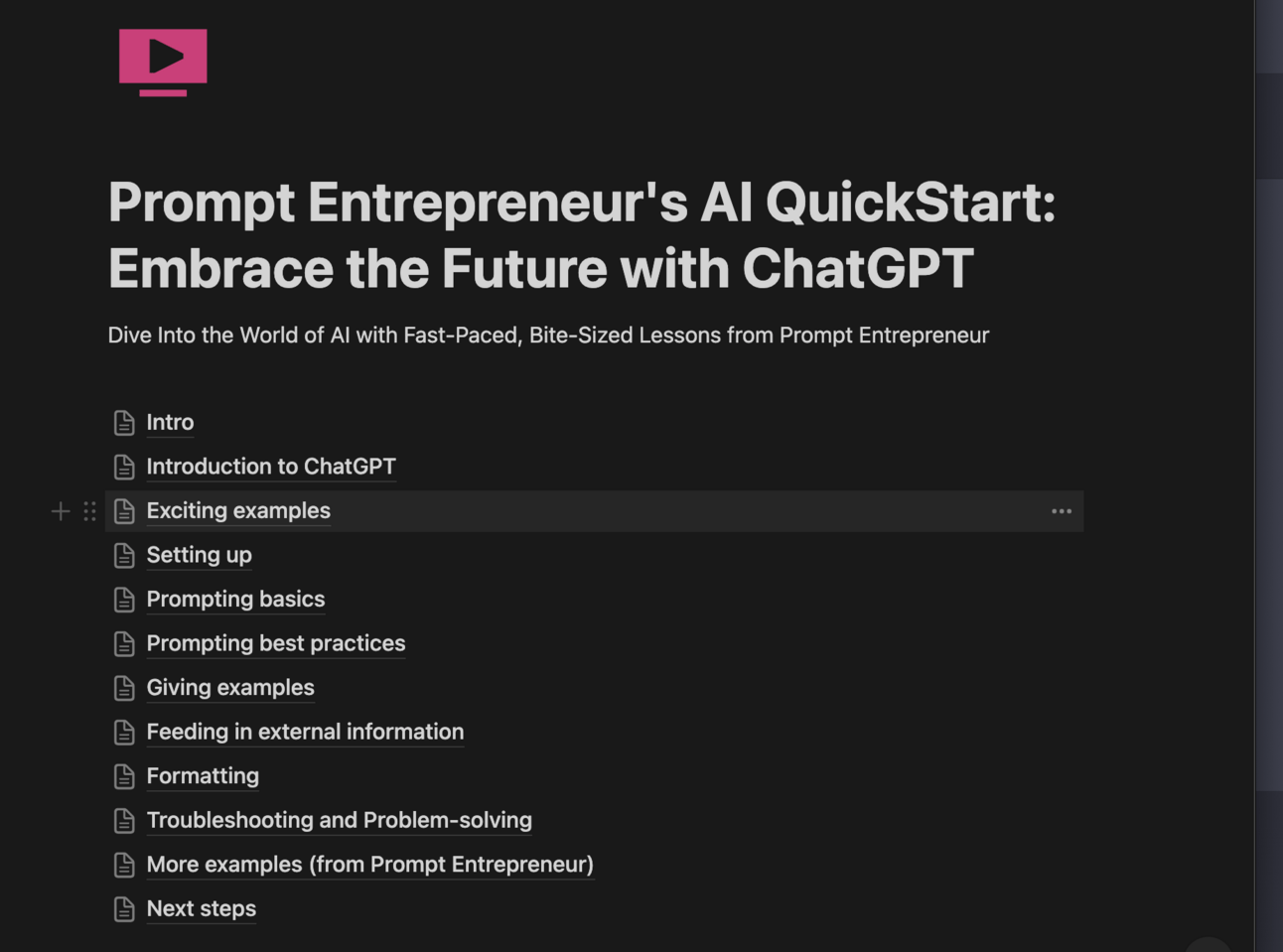
Each of those entries like Intro, Setting Up etc. are sections of my course
Each section has separate lesson documents inside it:
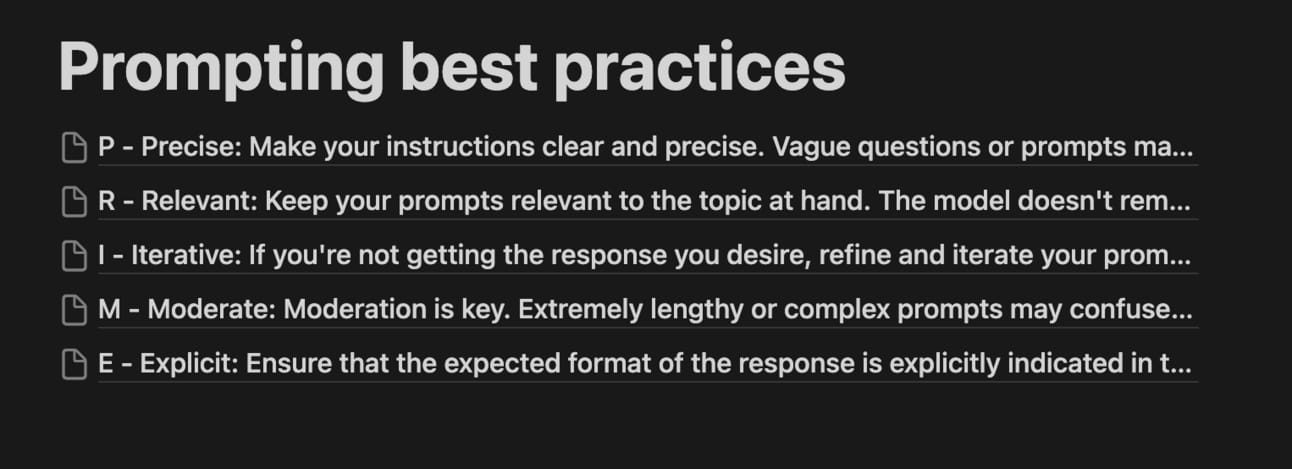
You can also just use Notes or a Google Doc but Notion allows you to have a hierarchy of Course > Sections > Individual Lessons.
Once you’ve decided where to keep your scripts simply copy/paste them out of ChatGPT, saving them into your note taking system of choice.
We’ll need to come back to them in the next step when we create our videos and having them all organised neatly now will save huge amounts of time. You don’t want to be searching for each lesson’s script in ChatGPT!
Today we’ve looked at how we flesh out a script and get it to a place where we are happy with its quality. I’ve also added in tips on adding metaphor or building a learning framework into the lesson to really up its value.
Your job now is to run this process with each of the lessons in your course.
This may take a little time - depending on the length of your course.
Remember though the alternatives. Either:
Writing everything from scratch. Very time consuming.
Auto generating everything from ChatGPT. Poor quality.
Instead we are leveraging ChatGPT and our knowledge to find a happy medium of speed and quality.
Next up we’re pushing on to the actual creation where we turn these scripts into videos.
This week:
Part 1: Course Topic Selection
Part 2: Course Structure
Part 3: Course Scripts
Part 4: Course recording and editing
Part 5: Course marketing
Keep prompting,
Kyle
Today we’re going to finally start to put together our videos for our online course.
We’ve done a lot of prep to get to this point to make sure that our content is actually good quality.
There’s no point spending time producing videos of crappy content. Therefore we focused on nailing the script first.
I used to produce TV/Film and you definitely want to work out the kinks when it’s pen and paper and not video files! Scripts are a lot easier to work with than video footage believe me!
Let’s get started:
Video production is a HUGE topic.
So I’ve been struggling to break this down into my usual “here’s exactly what to do” approach.
This is make even more true by the fact that I want to balance your time and money input. For some people using paid for tools to produce video will be an efficient use of money. Whereas for others using free tools and putting in more personal work will be the answer.
I’ve debated this! I really have.
Here’s the deal. I’m going to run through the options now and give you one that I’m choosing to detail.
I’ll give you reasons and also more resources to use other tools if you aren’t happy. It’s hard to please everyone here so I’m aiming for the majority!
a) The first method is to record and edit manual.
I’ve done this before, notably on my https://learnchinesecharacters.academy/ videos as well as my early Udemy courses.
The basic steps are:
make a slide deck from your script in Powerpoint or Keynote
screen record yourself going through the slides on a webcam using a tool like Loom
edit using a free editor like iMovie, adding in stock videos and imagery from free sources like Pexels and Stocksnap.io
This is entirely doable and uses free or low price tools.
The main cost is instead your time.
I’ve done this process a few times and creating a video course takes months.
b) Descript
Descript is an amazing tool for recording and editing. It’s a complete suite of tools that can replace all the free versions I mentioned above.
Basically, creating a course in Descript would be the more premium version of the manual approach above. It costs about $12 or $24 dollars a month for the version of Descript you would need.
It still requires lots of work but the tool itself makes each sub-process smoother. You can expect to turn out a course in a couple of weeks.
c) Pictory
Pictory is a new kid on the block and uses AI to produce videos much faster than if you were manually putting them together.
You upload your script and it automatically picks out suitable videos and images, adds written subtitles and generates AI voice over.
It has a free trial to play with and costs $19-39/month for a premium account, depending on how much you need to export.
d) Synthesia
Synthesia is the ”big boy” in AI video generation. It produces high quality corporate style videos, including custom AI avatars who can present your course like a real human being.
The quality of Synthesia is extremely high. As is the price. There’s no free trial and the paid account is ~$30/month for 10 credits. Each credit gets you 1 minute of video! So we’re talking $3/minute. Wowzers.
These are a few of the big options you have.
If you have zero cash to invest into this then the choice is easy - you’ll need to go with the manual free route.
However, we’re Prompt Entrepreneurs. We want to use the best AI tools available to us to get the work done efficiently.
As such this Part of the guide will be focusing on using Pictory.
This will allow you to create your whole course in a matter of days for ~$40, a sum of money that will be quickly recouped once you launch your course.
First up head over to Pictory to sign up.
It has a free trial. Yay!
It also doesn’t need a credit card. Double yay!
You can sign up at https://pictory.ai/
Once in you’ll see this:
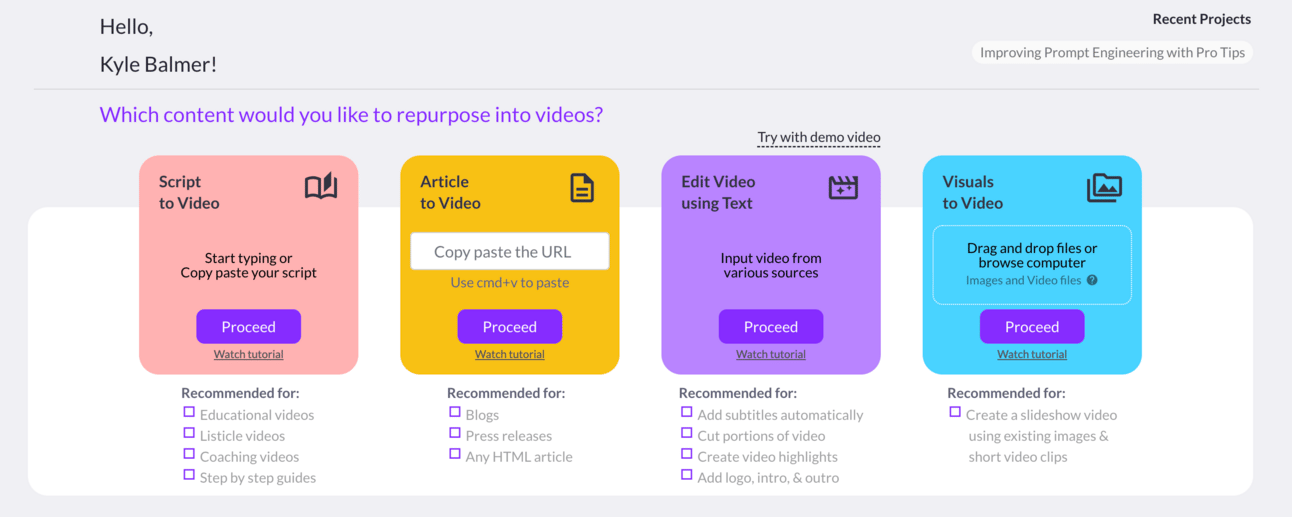
We want to go for Script to Video. Go ahead and click Proceed and you’ll get the script editor.
Here it is with a script that I’ve copy pasted in.
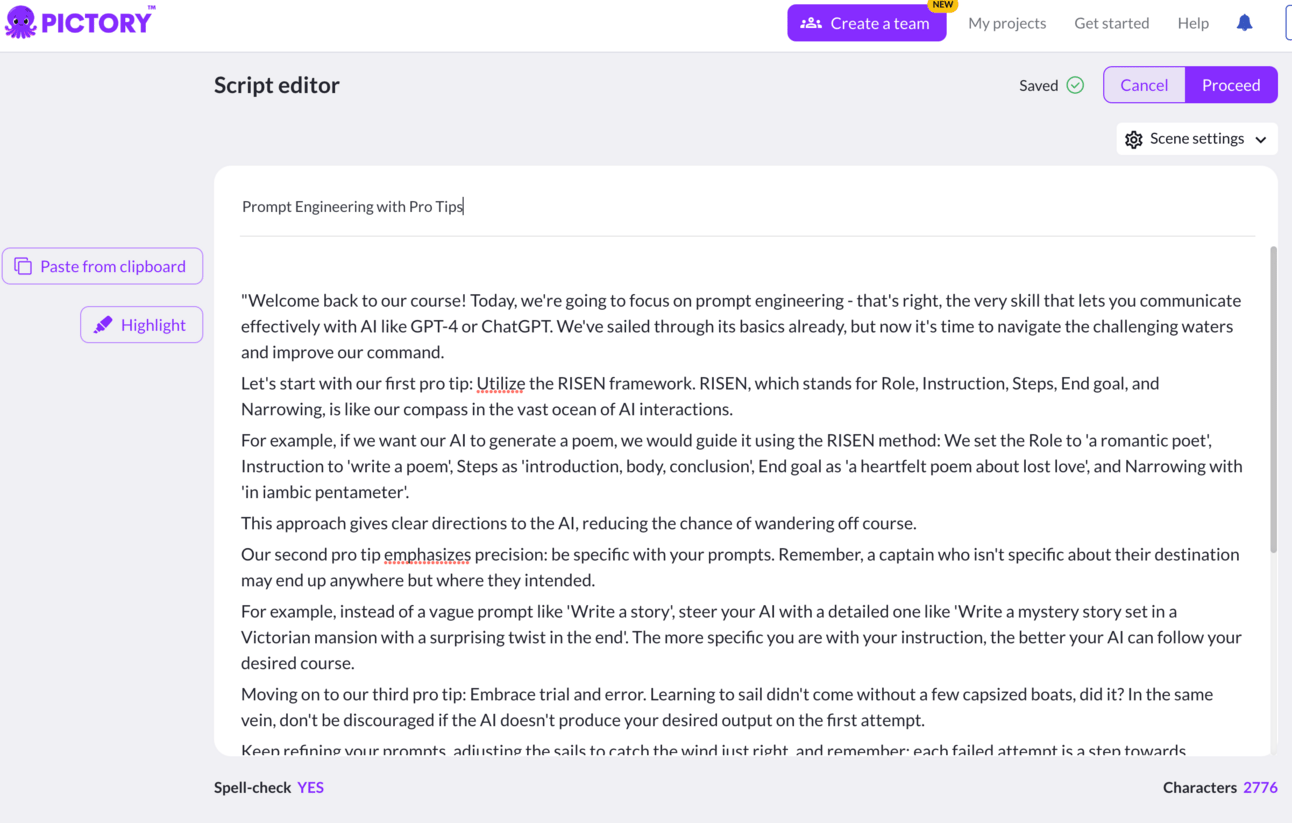
Notice that I’ve stripped the timecodes and description out of the script.
The scripts we have prepared, complete with image suggestions and time codes, are fleshed out enough to be used in any format. The extra detail will be invaluable in manual editing in particular. When using AI tools like Pictory though we’ll just strip that info out quickly.
Go ahead and drop your script into ChatGPT and use the prompt
Give me this script but remove timecodes and images suggestions
Provide spoken script only
Copy this stripped down version of the script into Pictory and hit Proceed.
Next, Pictory will give you a selection of templates. Don’t sweat this too much as we can change it in the editor later. It’s not final so just choose one you like the look of for now.
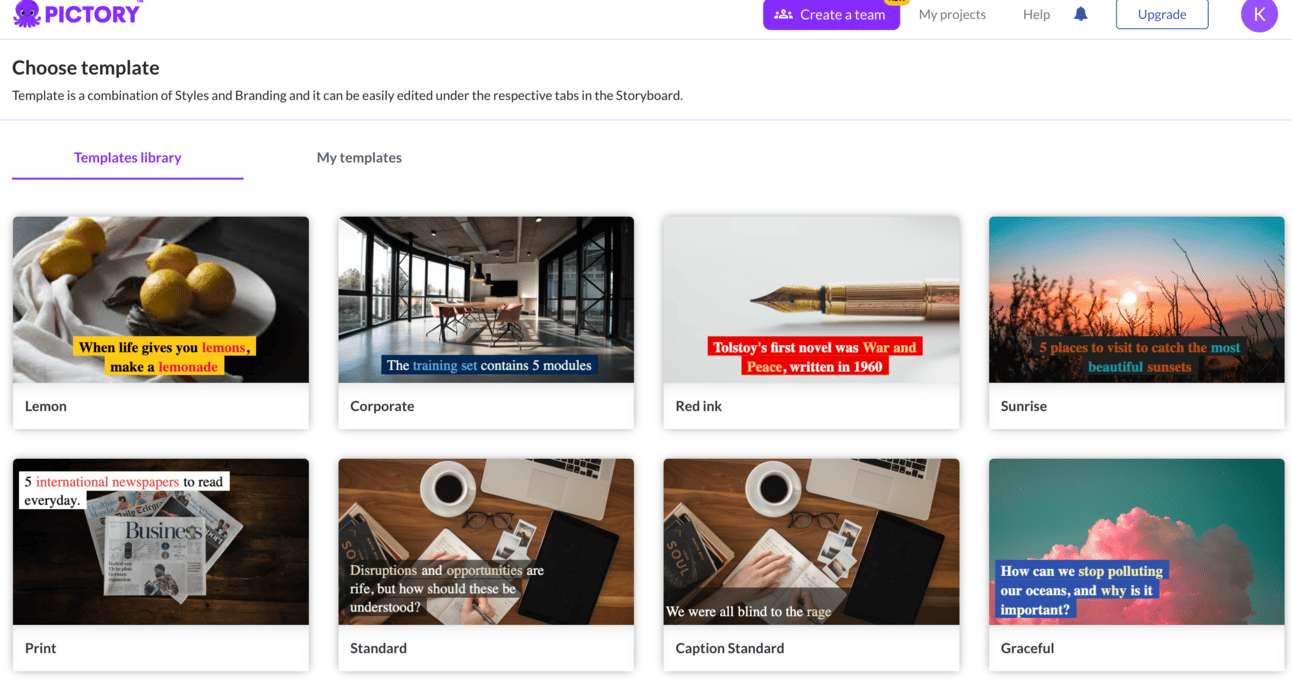
Pictory will now process the video. It doesn’t take long - less than a minute. Once done it will spit out a first draft:
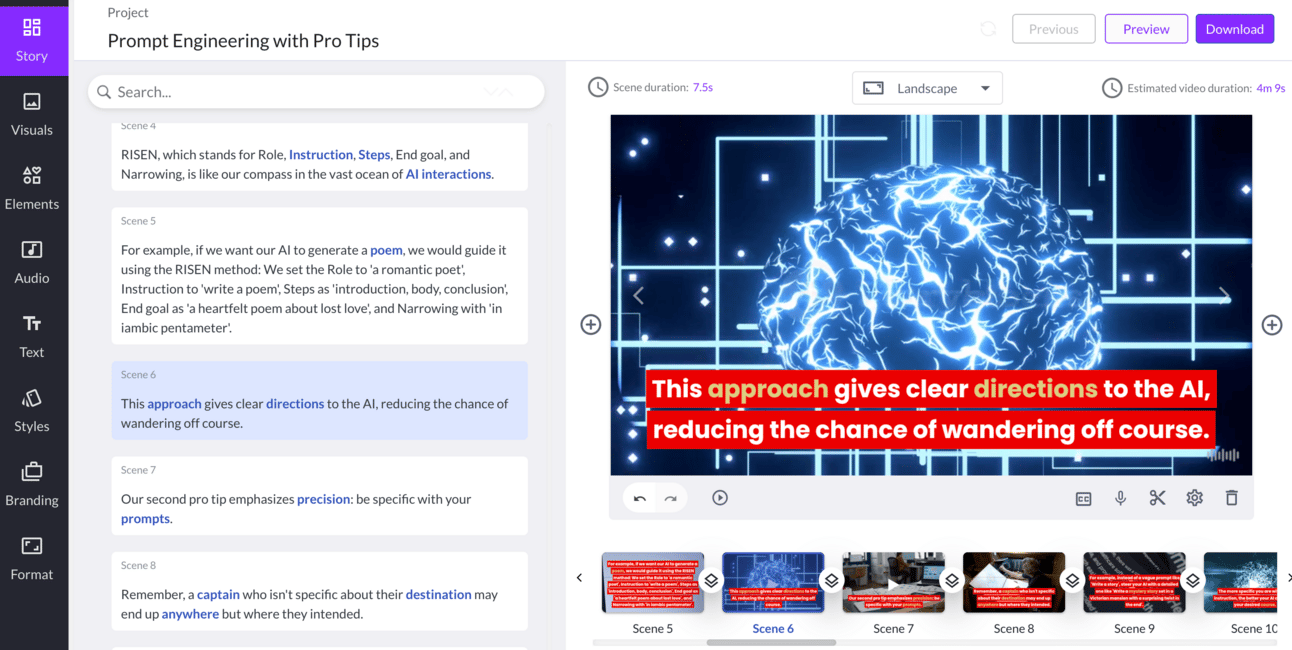
If you’ve ever manually prepared video content then chances are right now that your mind is blown.
Compared to manually preparing a similar video the speed Pictory works at is phenomenal.
Remember though: this is a first draft.
Like with all AI tools we’re working with the tool. We aren’t totally replacing ourselves.
The left sidebar in Pictory gives us access to the tools to refine our video. Take some time to explore the interface.
First we’ll start by switching out images that don’t make sense. Pictory will make a best guess about what videos and images to place in the video but sometimes it gets it wrong or the images are uninteresting.
Here’s an example:
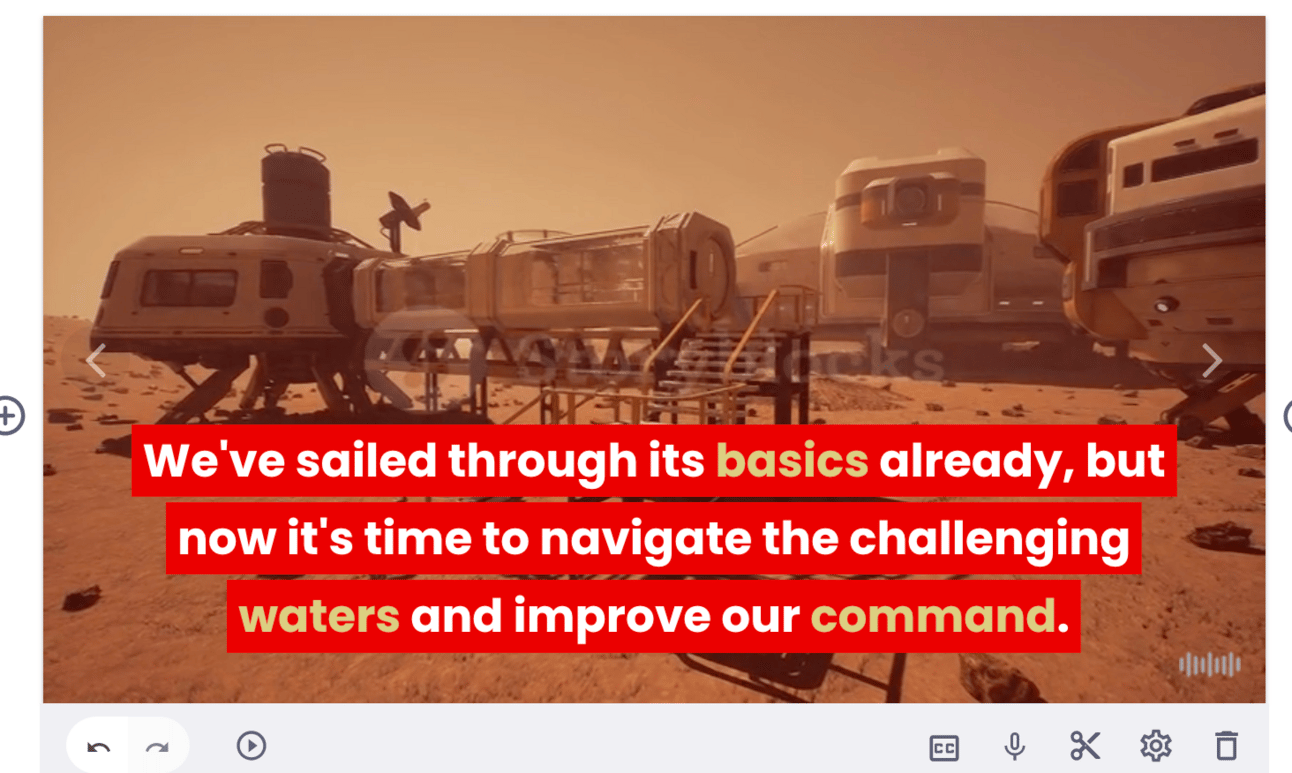
This part of the video is about moving from easy topics to more challenging topics. For some reason Pictory has chosen a video of a Martian space base. Let’s switch that out.
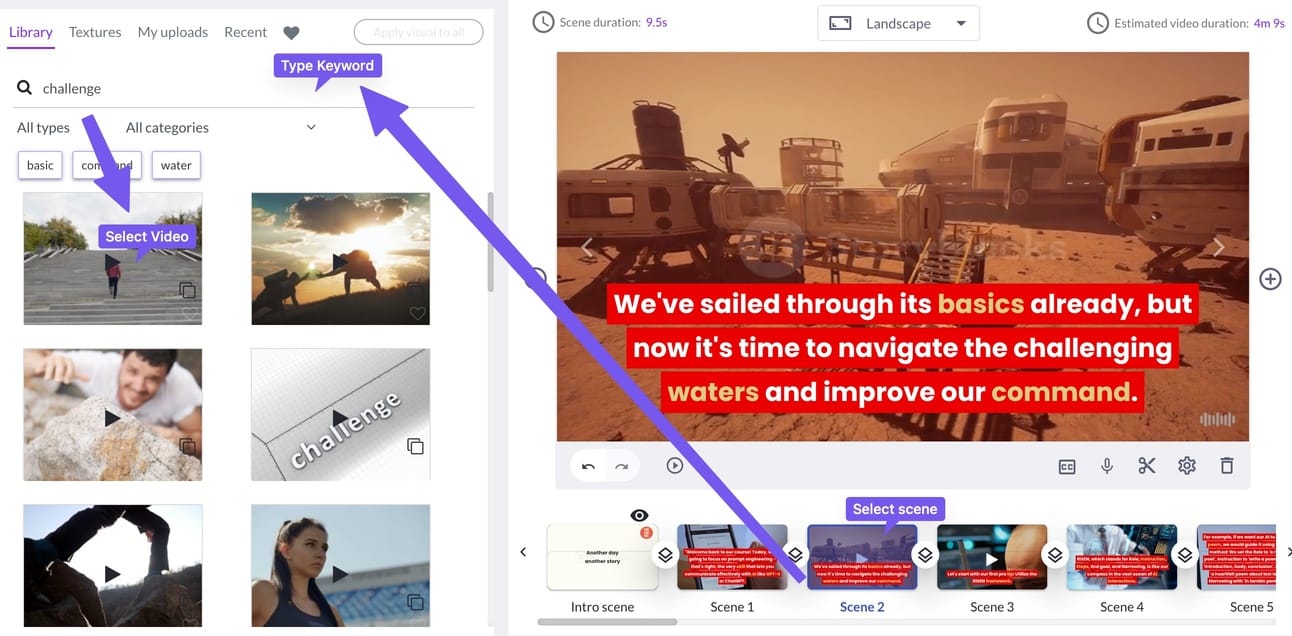
To switch this:
Select the Scene at the bottom
Type a keyword in the top left search bar within Library
Select the video you want to use
This automatically switches the video and cuts the new video to length so it fits in the same Scene.
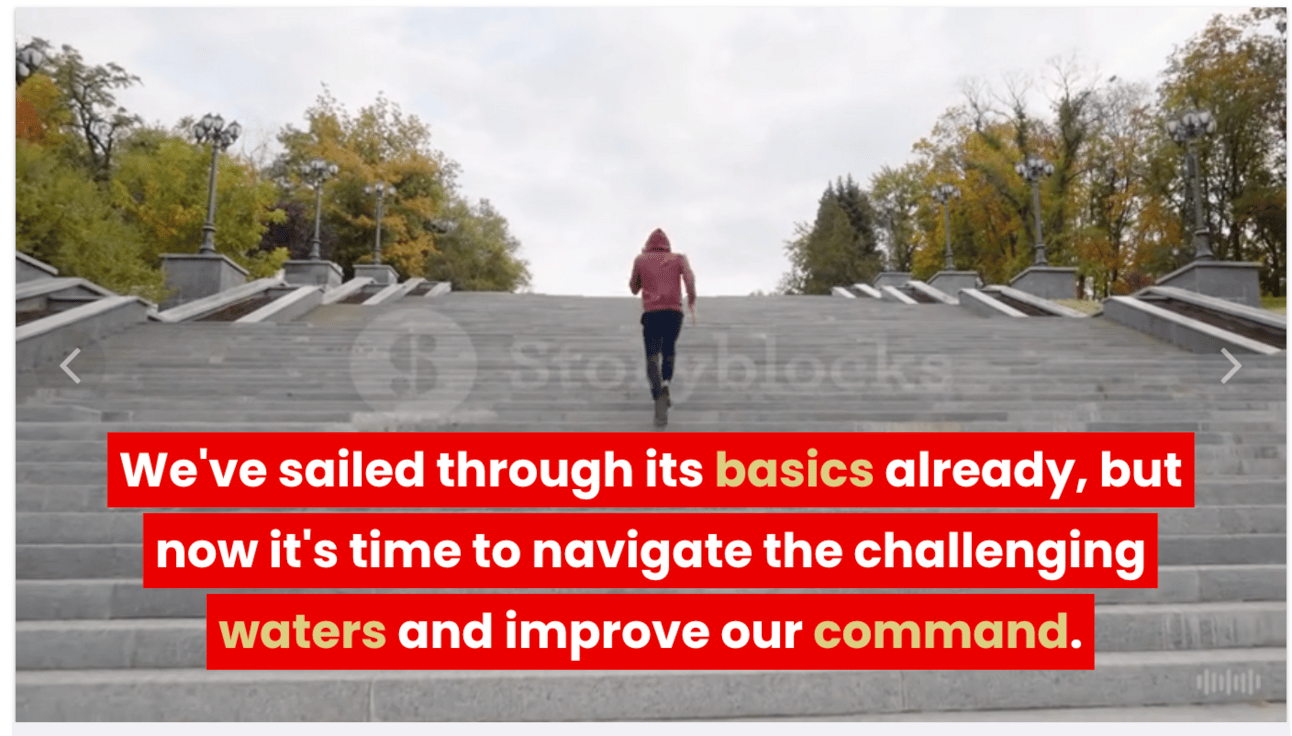
Do this for each of the Scenes until you are happy with the overall results.
Next up, we want to add a voice over.
It’s decision time now. You can either use one of Pictory’s built in AI voices or record your own narration.
If you have a decent audio setup (a microphone or at least high quality headphones like Airpods) and you are comfortable recording you should.
AI voice-overs save a lot of time but aren’t particularly engaging. They sound like AIs! The technology is improving all the time though.
Test out Pictory’s built in AIs and see what you think. Also record some of your own narration so you can do a comparison.
Here’s how to record narration:
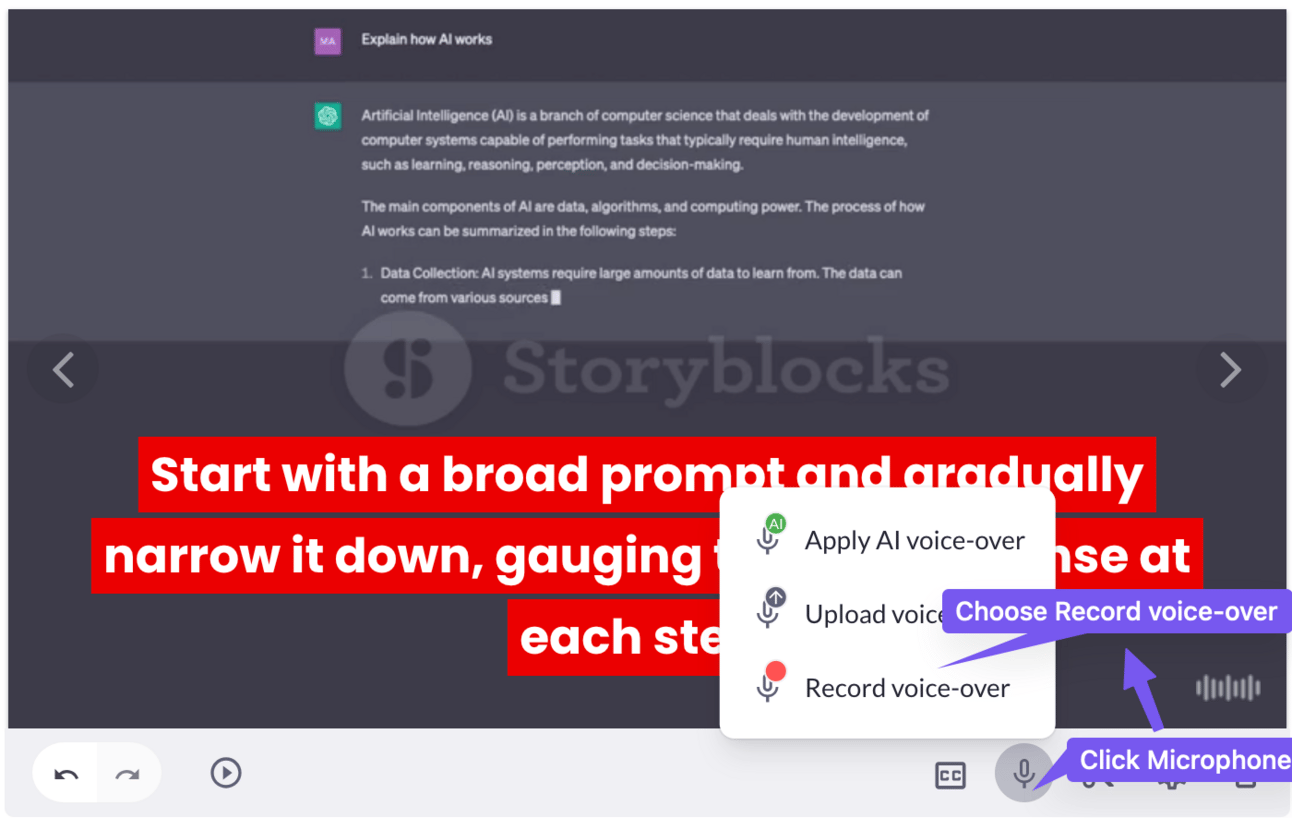
First click the microphone icon at the bottom of a selected Scene. Then choose Record Voice-over.
This will pop up a recording interface where you can record.
Importantly Pictory will match this up with the scene, saving you time trying to synch audio and video. Another massive time saver.
Speaking of sound, you probably have noticed that Pictory has chosen some background music.
If you don’t want any music go to the Audio tab in the left sidebar then Background music. You’ll see one music track has the word “Applied” next to it. To clear that music click the cross (x) to delete.
Alternatively you can replace the music with something more fitting. There are drop downs for selecting mood, purpose, genre and length. You can use these to filter the large music library and find something appropriate.
Generally it helps to have some music in the background and it fills empty space between narration. Just make sure that the volume isn’t overpowering compared to the narration. Pictory does a good job of balancing thankfully.
Finally, some of you might be wanting to add your beautiful faces into the video. There’s a nice simple way to do this. Just record the scene you want to replace using your camera, speaking the part of of the script in that scene. Then replace the visuals in that scene with the video and turn off any AI narration.
Once you’ve got the video customised hit the Preview button. That will show you the results of your work with all the changes applied.
Don’t export just yet though!
Before you export your videos it’s helpful to set up branding for your course. This branding will be applied across all your videos so it’s helpful to set this up before you start exporting any videos.
Branding is set up in the left hand sidebar tab Branding. Good name eh?
We specifically want an Intro and Outro.
Keep them extremely short, maybe 1 or 2 seconds tops. These should simply state the title of the lesson and have a quick animation.
For the Intro follow these steps:
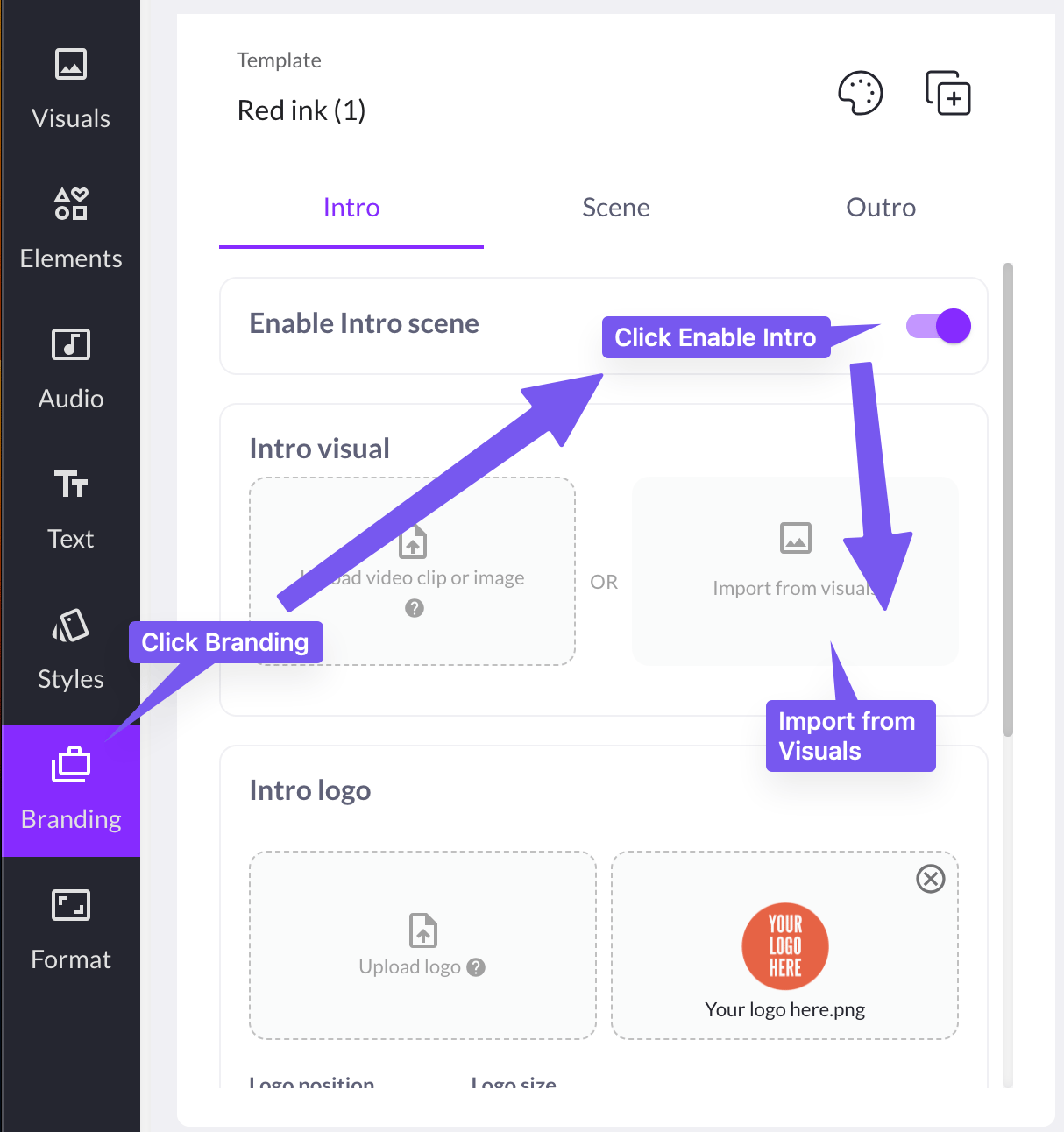
First go to Branding in the left sidebar.
Then Enable Intro toggle on.
There may already be an intro template in place. Delete the default and choose Import from Visuals.
This will take you to the video search we used before to find visuals for our Scene.
Here’s a clever tip: now just search “intro” and you’ll get lots of nice background animations.
Once you’ve found one you like make sure to edit the Title (text is at the bottom) and upload your logo.
Do the same with the Outro but searching “outro” in the search. Or alternatively use the same animation as the intro.
Alternatively you can get intro and outro videos professionally made on Fiverr.com for a reasonable cost. This would be a good investment to increase the quality of your production very cost effectively.
Now go back to the Preview and check the results. Happy? Go ahead and export.
The free version will allow you to export a limited number of projects and they will all have water marks - so you will need a paid version eventually.
Just rest assured that you have saved thousands of dollars in hours by using an efficient tool like this.
Also, if you get all your videos processed in 30 days you only need to pay for one month. Not bad!
Seems like a lot today.
But considering we covered a topic as complex as video creation this is pretty tight! This topic could have taken up the whole week if we were doing it the old way.
I for one am glad to not have to be making Powerpoint slide decks and screen recording everything in real time. Tools like Pictory make the process much faster - especially if it’s your first time producing a course.
Instead of being a course creator and video producer you can focus on the course itself and let the technical parts be handled by tech.
Production will still take time, especially if you follow the Refinement steps outlined above. But course creation is now in hand and can begin.
We’re moving into the back end of the process now. Tomorrow we look at packaging everything up, getting it published on Udemy and marketing.
This week:
Part 1: Course Topic Selection
Part 2: Course Structure
Part 3: Course Scripts
Part 4: Course recording and editing
Part 5: Course marketing
Keep prompting,
Kyle
In the final Part of this guide we’re going to finalise our course and set it up for success on Udemy.
Most of the marketing will be done by Udemy themselves once we have published the course.
However it’s useful to get some early good reviews on your course to help it become more visible on Udemy. For this we’ll do a little external marketing in addition to relying on Udemy.
We’re going to let Udemy do the majority of the marketing for us.
Remember that this is why we chose to use Udemy rather than building a course on YouTube or a self hosted website.
This is because Udemy has a built in audience and will push your course for you.
But to make sure Udemy shows your course to its audience we need to ensure we’ve filled in as many details as possible about our course and optimised our course description.
First let’s get our course online.
Log into the Udemy Instructor’s interface. We created an Instructor’s account back in Part 1 so refer to that if you don’t yet have an account.
The majority of the set up process is simple: Udemy has a great course creation tool that walks you through everything you need to do.
First up hit New Course and start to fill in the basic details. You created a course title previously - go ahead and use that. For category just choose the one closest to your topic.
The main course creation interface looks like this :
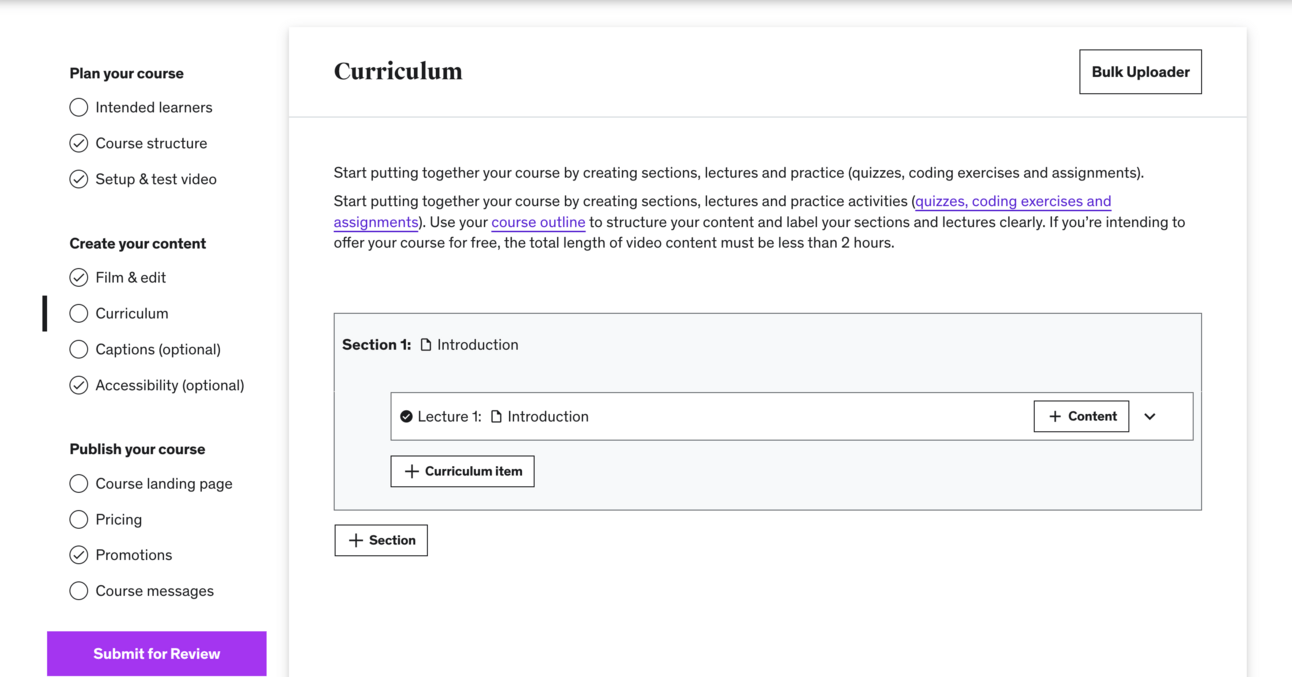
On the left you’ll see the steps required.
You’ve already Planned your course and filmed everything so the first entry you’ll be interested in will be Curriculum (shown in image).
In this interface you can import all of your content.
For simplicity I recommend
Creating and naming all your sections as per your course structure
Creating and naming all your lessons
Bulk uploading all your videos using the bulk upload tool
Assigning videos to each lesson
Add descriptions for each lesson from the course structure
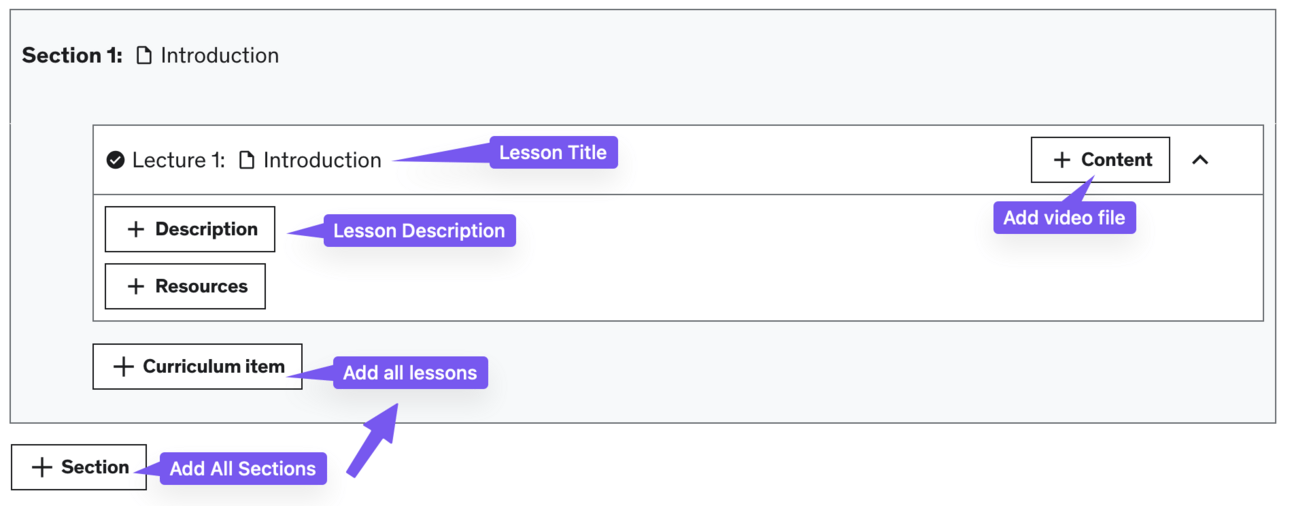
Refer back to the course structure we created in ChatGPT for all the text details you need. This includes the lesson description - just copy paste in the descriptions from the ChatGPT course structure table.
This process still takes some time but thankfully you have everything ready in a nicely formatted table.
Additionally if you titled your videos in Pictory your video file names will have the same lesson title. This makes assigning videos to lessons much faster.
This step is optional but adds a lot of value.
In Udemy you can add quizzes to reinforce student learning. This isn’t required but it adds a lot of value to your course and increases engagement.
Crucially we also have a tool to help us make quizzes!
Udemy accepts multiple-choice quizzes. You can either make quizzes for every lesson or just one for each section - it’s up to you.
To make a lesson quiz use this prompt
Act as a teacher.

Analyse this lesson and give me 3 multiple choice questions that would reinforce student learning.

Provide the question and 3 potential answers per question, 1 right, 2 wrong.

Write a description of the quiz

#copy/paste lesson script#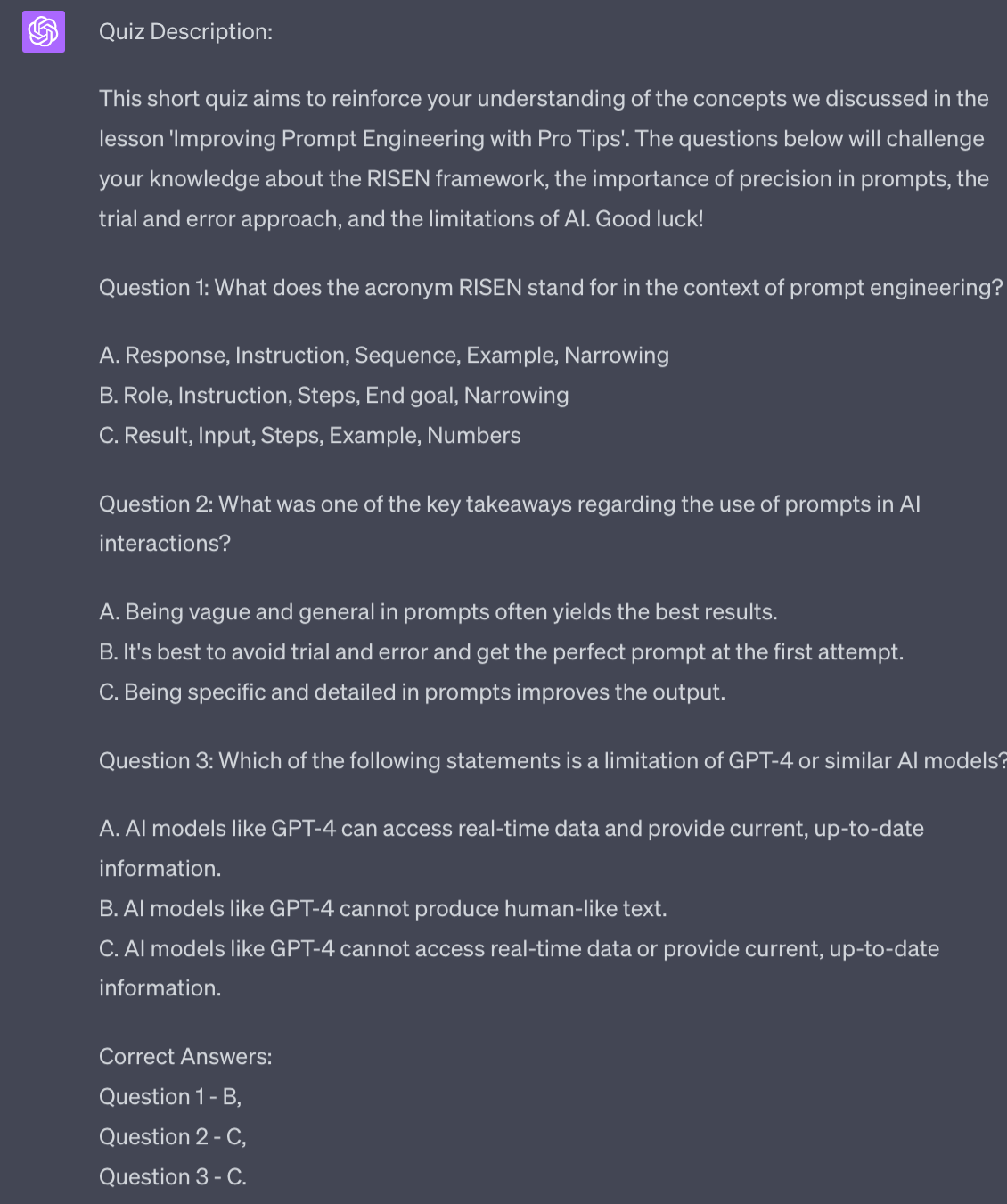
Then simply copy paste these quiz outputs into the Udemy interface.
If you want to do one quiz per Section (instead of per lesson) then adapt the prompt so suggest one question per lesson and provide all the scripts below the prompt.
Next up is the landing page. This is the most impactful part of our Udemy marketing.
Our landing page text is where we performs SEO (search engine optimisation) to ensure we show up in Udemy.
We’re going to pull in information from multiple places to write this text.
Here’s the prompt:
Act as a SEO copywriter

Write a course description that will be on a landing page for my course on Udemy.

The goals are SEO visibility and an accurate description for potential customers.

Focus on these keywords : [udemy keywords]

Build upon this course basic description [description]

Include this course structure [course structure]

Include learning outcomes.

Use formatting including bold, italics, numbered lists and bullet points

Generate at least 2000 words of description.
It’s a big prompt pulling from multiple sources. This ensures the output will be unique and tailored to your course.
Plug in details from previous parts. As much as possible.
You may find that ChatGPT can’t handle all the information in one go - this will depend on how long your course and all its structure is.
If this is the case copy paste the prompt in and immediately hit enter. Don’t fill in any missing details. ChatGPT will then ask you for the missing details.
This allows you to add details piece by piece so you won’t hit limitations.
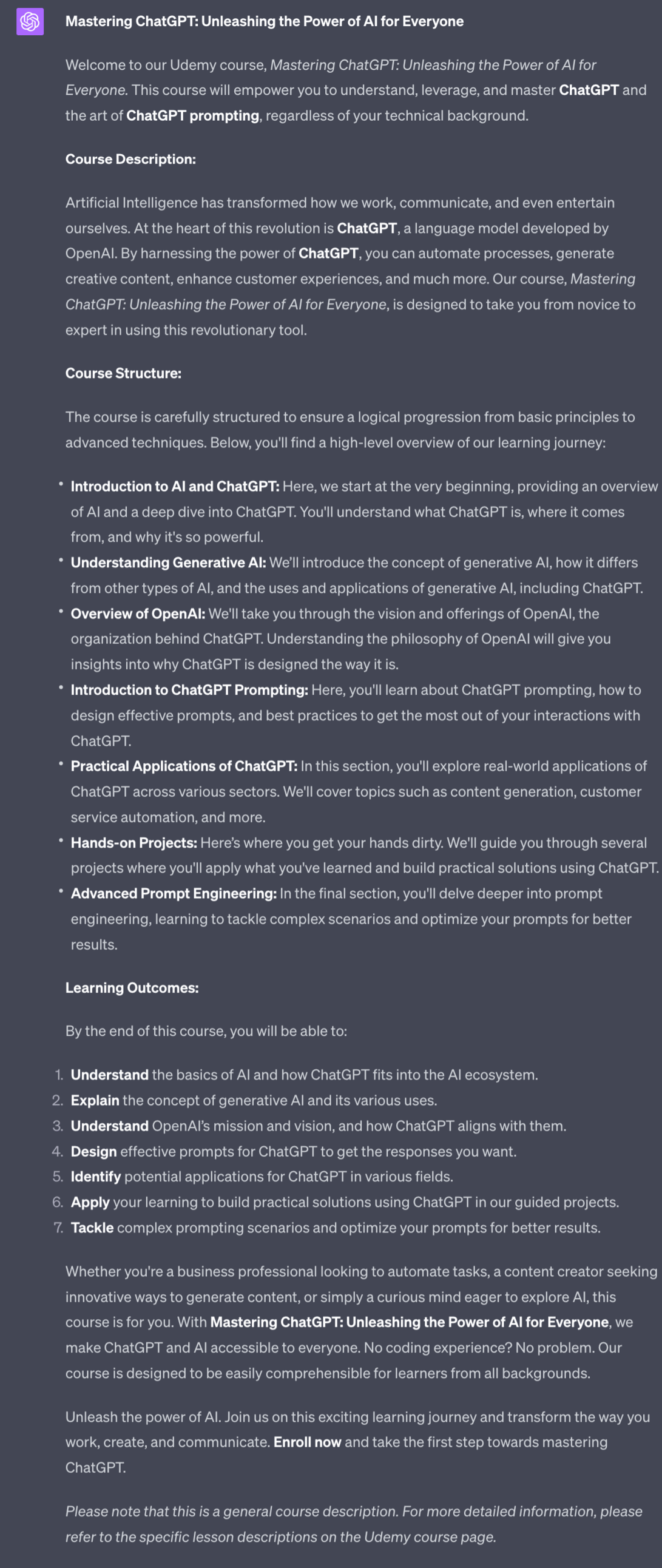
As always read the output and ask for changes as required.
This is the main element of your landing page covered - it’s the course description that most determines search-ability.
For your course image I recommend Canva - just make sure to match Udemy’s required image size. Alternatively you can easily hire someone on Fiverr to do a course image for low cost.
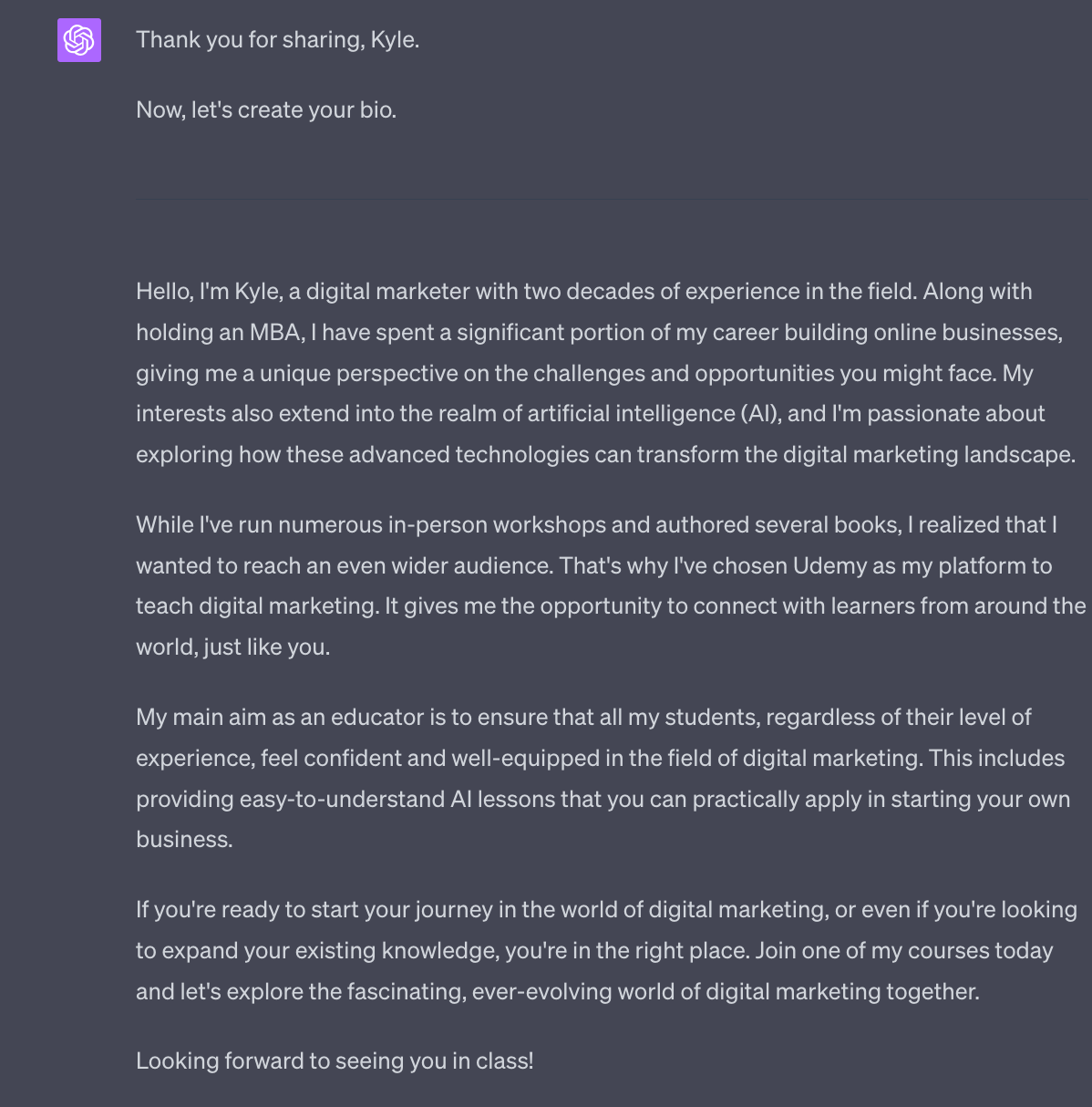
Next is your instructor bio.
Writing about yourself can be hard so I’ve written up a script that will coach you through the process and generate a bio.
You are a brand manager who works with educators. You will help me write a bio about myself by guiding me through a set of questions.

Ask these questions sequentially, not at the same time. Once you have collected an answer from me continue to the next question. Continue until all questions have been answered and then prepare the bio.

The questions are:

-name and main occupation ?
-professional experience in the field you are teaching ?
-personal hobbies and interests related to field you are teaching
-what brought you to udemy to teach?
-how will you best help your students?

Once the questions have been answered you will prepare a professional yet approachable bio, written in the first person, intended to make people trust me and want to buy my courses.

End with a gentle call to action to enrol in one of my courses
Once initiated ChatGPT will ask questions - just work through the questions and give as much information as possible.
At the end ChatGPT will generate a bio containing all the information.
Choosing a price on Udemy can be tricky.
Here’s the key though:
90%+ or Udemy sales are at a discount from the price you put - nearly nobody buys a course at full price. Instead Udemy constantly discounts courses.
This may seem annoying but it’s the key to selling at volume!
It also means we set a high price, knowing it will be discounted.
For your price I recommend you first check competitors and their pricing bracket. Find courses that are a similar length to yours.
Now, take your price down 1-2 brackets from their price.
Why? Because you have zero reviews! They can sell for more because they have lots of happy customers and social proof - you don’t yet.
So for now use their pricing as a guide and knock down 1-2 price brackets. Once you have a good amount of reviews you can increase the price.
We chose Udemy specifically because they take care of most of the marketing.
However, it’s useful to “prime the pump” and get some early positive reviews.
If you already have social media, blog, newsletter, podcast or other audiences great! You just need to make sure they know about your new course. I’m not going to worry about you guys too much as you already have a following!
If you don’t have a following yet here are a couple of options.
First up, tell me about your course on Twitter. If you prepared it using this guide I want to help you out. I’ve got an audience and will use your course as a case study - that helps get the word out.
Second, tell family and friends. You can get your first handful of sales here easily. For launch set your price as low as possible (free if the course is under 2 hours) and give your friends and family members the cash to buy your course. They purchase, you reimburse. They leave a verified review. This is a nice simple way to get your first 10 or so 5 star reviews!
Third, do a community blitz. In preparation for your course launch (weeks before) find and start to participate in a community who will be interested in the course.
Where this community lives will depend entirely on your topic. Generally though there will be a community on Reddit, Twitter or LinkedIn Groups.
Begin participating, commenting, being helpful. Don’t shill your course. Just become known and liked.
As you approach course launch mention that you have a course and want some feedback. Again, don’t sell - genuinely seek feedback from the community.
As you approach launch maybe start to mention it’s coming and offer some discount codes (Udemy allows you to do this).
Because you’ve only just joined this community you need to play this very cool - don’t sell hard, don’t spam. For the next launch make sure you have strong links or your own community!
Using one or a handful of these methods ought to get you the first handful of reviews which will help kickstart real sales.
Well done for making it this far.
This week:
Part 1: Course Topic Selection
Part 2: Course Structure
Part 3: Course Scripts
Part 4: Course recording and editing
Part 5: Course marketing
Boom 💥!
We’ve covered a lot. This is a complex topic.
Creating a course is definitely a time investment but once it’s up and running it’s a great passive income earner.
From here you can also branch your course out onto Skillshare, Coursera and other platforms.
And importantly you are now building an audience of students. Do what you can (within platform rules) to move your students onto your social media accounts and your newsletter if you have one.
Doing this allows you to start multiplying your business in unexpected ways. You’ll find you can sell your course students your ebooks, newsletter, coaching etc. once they are in your ecosystem.
And vice versa you can sell ebook readers, newsletter subscribers and coaching clients your courses!
Whilst building each pillar of your business takes time once a handful are operational you will begin to see exponential results.
And we can use ChatGPT and other AI tools like Pictory to radically accelerate our progress!
That’s all for now Prompt Entrepreneurs
Keep prompting,
Kyle
Unlock the potential of AI in course creation with our comprehensive playbook, '▶️ Course Creation using AI | Prompt Playbook'. This resource guides you through the entire process of transforming your expertise into an engaging online course. From selecting captivating topics to marketing your finished product, this playbook is designed to help you leverage AI tools effectively, ensuring your course stands out in a crowded marketplace. Whether you're a seasoned educator or a passionate expert in your field, this playbook will empower you to create impactful learning experiences that resonate with students.
This playbook is tailored for professionals and educators who want to monetize their knowledge by creating online courses. If you're struggling with where to start or how to engage learners effectively, this resource is perfect for you. It addresses common challenges such as topic selection, course structuring, and marketing, providing actionable insights that will help you overcome these hurdles and achieve your goals in the e-learning space.
No prior experience is necessary! This playbook provides step-by-step instructions to guide you through the entire process.
The timeline varies, but with dedicated effort, you can create and publish your course within a few weeks.
Absolutely! While the playbook focuses on Udemy, the principles and strategies are applicable to other platforms like Coursera, Skillshare, and self-hosted courses.
You will need a computer, a reliable internet connection, and a willingness to learn and experiment with AI tools.
Yes! We offer a satisfaction guarantee, ensuring that you can confidently invest in your course creation journey.