
AI playbook
Unlock the potential of artificial intelligence with our comprehensive playbook, '👨💻 Building Online Services with AI | Prompt Playbook.' This guide is designed to empower entrepreneurs and service providers to leverage AI in creating, marketing, and scaling their online service offerings.
Start ReadingAnother close vote - we voted between cold outreach (email/DM) and building a service offering.
We’re going ahead with service offering, which is a perfect complement to the digital products we just covered last week.
This week we’ll design, deploy, market and scale up a service offering for your business. All using AI to aid our progress and operations.
It’s worth quickly talking about the difference between services and products.
This will help us focus on what a service should achieve - and thus let us design better services.
Both products and services deliver a valuable outcome to the customer.
Customers make a purchase because they want a certain outcome - for example they want to lose weight, look cooler, be more educated.
And they value this outcome enough to pay us for it.
The main different between a product and a service is how this valuable outcome is delivered.
Some products - like a book or a hammer - are easy to identify.
Some services - a haircut or car service - are equally identifiable.
But what about something like Squarespace. It’s sort of a product and a service. Online lines get blurred.
I like to use a scale of DIY, DWY and DFY here.
Products and services all sit along this scale.
DIY you probably know - Do It Yourself.
Most products are DIY. You buy the product and use it yourself. If it’s a book you read and absorb it’s information. If it’s an Ikea wardrobe you buy the kit and make it yourself.
There’s no outside intervention with DIY products - you are on your own.
DFY is Done For You.
Most services are Done For You. A haircut for example you turn up and the hairdresser provides the service for you. Your input is minimal as you let them do the work for you. A massage is another DFY service.
These two are nice and obvious and represent pure products and pure services.
But there’s a middle group - DWY or Done With You.
These are more hybrid products/services. They offer DIY and DFY elements.
In web design for example we have:
DIY - creating your website from scratch.
DWY - using a service like Squarespace.
DFY - hiring a web site designer.
A service like Squarespace sits in the weird middle ground between product and service.
It’s a productised service - neither a pure product nor a pure service. You have access to all their tools, templates, infrastructure and support (service) but still need to do the actual work yourself (product).
The course I’m preparing at the moment is another example.
There are DIY elements of a product (the course material for you to work through at your own pace) but also DWY elements like a community where you can talk with me and get guidance. It’s mixing service and product.
Increasingly it’s helpful to think of your offer in these terms - not just black and white product and service but instead allowing for hybrids.
The keystone here is what helps your customer achieve their valuable outcome.
This is all that matters.
Because both products and services are aimed at achieving specific outcomes for a customer we should be combining them to best get our customer that outcome.
My recommendation is this.
When first starting a business start with a service not a product.
This is because with a service you can:
start with very little required cash
launch quickly
immediately solve customer problems
learn what customers commonly struggle with
refine your offer as you learn
Products take longer and cost more to develop and deploy. Which means it’s a riskier way to start a business.
With either a product or a service launch we need to be flexible and adapt quickly to what our customers are responding to. This is simply much easier to do with a service than it is with a more fixed product.
Once we have a service offer that is working and popular we then look to create a product that captures the same value and solves the same customer problems.
An example is helpful.
I work with charities and companies who want to deploy AI in their operations. I sit with them and consult as a service.
Once I had consulted with enough companies I could see the same problems coming up again and again.
Based on this knowledge I then created products that addressed these problems.
If I had instead developed products I would not have had all the experience and learnings about my customers that come from providing a service.
Once the product is deployed what happens to the service? Great question!
The service now becomes my more premium offer.
I decrease availability and raise prices. The product becomes the lower cost, entry offer.
I use the product to drive leads to my service.
This strategy is quite complex so here’s a summary:
Deploy a service offer first
Use learning from the service to build a product
Increase price of the service and make it our second offer
Use product as the first offer
Put up-sells in the product to sell the service
We’ll be using this strategy in this Playbook as we develop our service offering.
The service we design now will initially be our first offer.
Then it’ll shift and become a premium offer as we scale up our business.
First we need to hone in on what problems our customers’ actually have.
The only way to know this is to ask them.
You can run polls on Twitter/X, LinkedIn and in your newsletter.
But for a service offering I would recommend interviewing potential customers.
Sounds like a lot of work?
It is.
But it’ll save you countless months of chasing the wrong objectives.
Doing these interviews in person or on a call is ideal. This lets you hear their unfiltered language, which is key. We need this to know how to speak to them about the offer later. But you can also send over the questions via email if you really have to.
Here’s a prompt for generating interview questions:
Act a market research expert

I am doing interviews to help me design a service offering

The service offering should help the customer solve a problem

The service offering niche is [topic]. Tailor to this niche.

Generate 10 questions as well as guidelines for the interviews
For the example I plugged in “AI for entrepreneurs” as the topic.
💬 Prompt Output
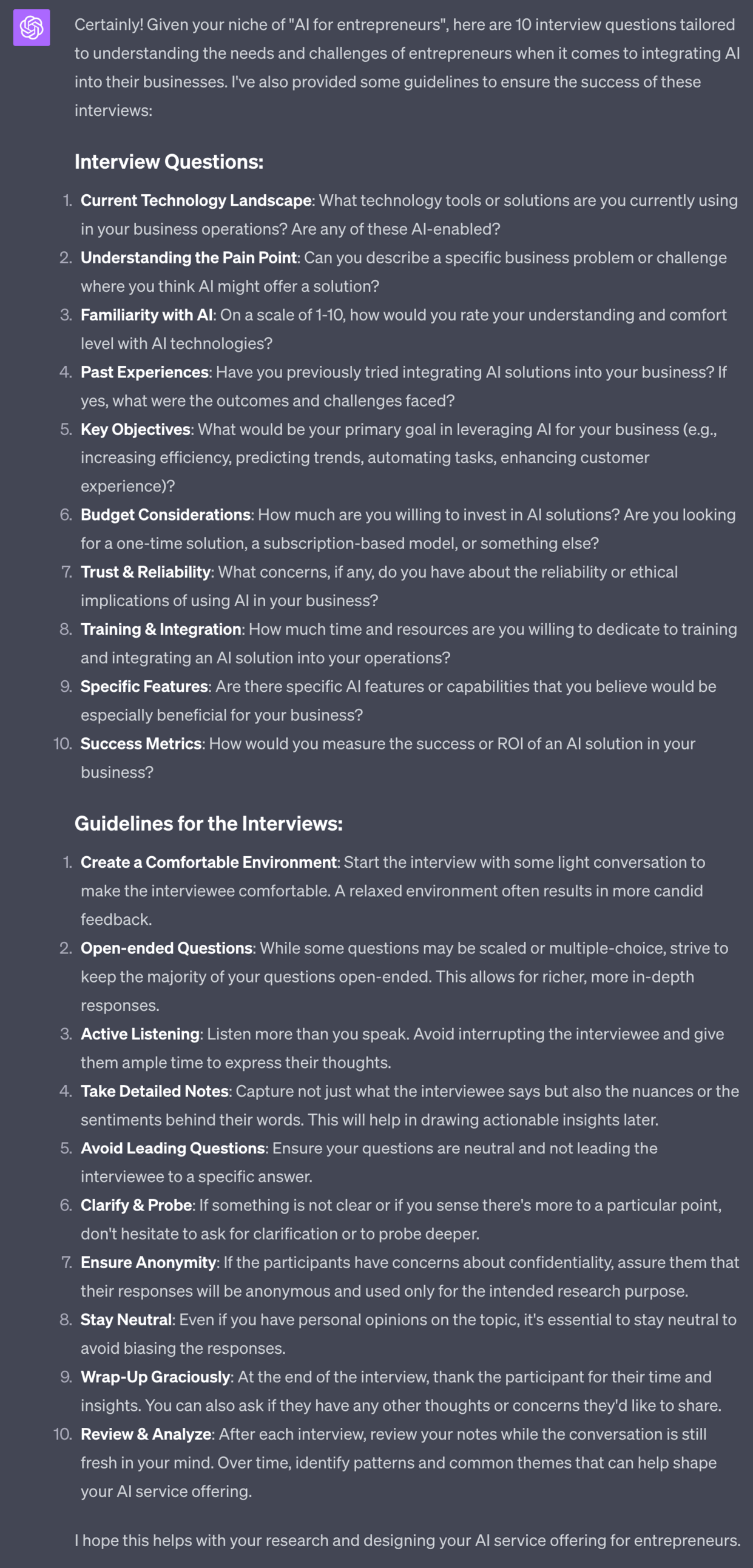
This generates not only niche specific questions but also some basic guidelines for carrying out the interviews.
Once you’ve carried out your interviews we want to distill to the problem areas that recur across our customers.
The more interviews you do the more data you’ll have.
You may already have a fair idea of the problem areas just from talking to customers. But let’s feed all the data back into ChatGPT to extract the problem areas.
Put all of the interviews into one document and upload it to GPT-4’s Advanced Data Analysis tool if you have lots of data.
Otherwise just copy paste it all in.
Let’s then use this prompt:
Act as an expert market researcher

From these customer interviews extract the primary problem areas

If possible rank them by their importance to the customers

Use the customer's language to name the problem areas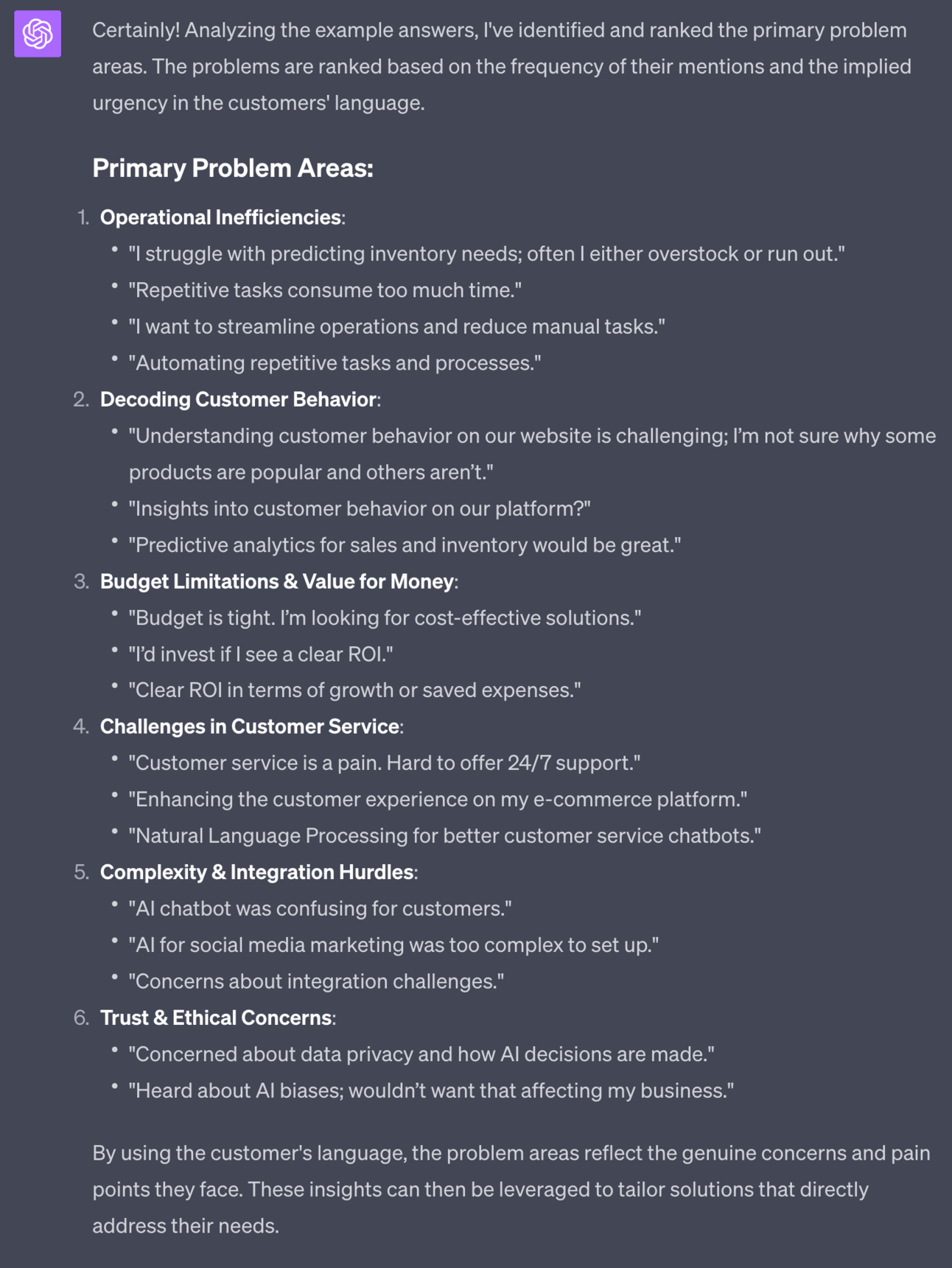
The prompt pulls the problem areas out of my data and orders them by their frequency. The most mentioned are at the top of the list and are presumably the most important to our customers.
Let’s now take our customers’ problem areas and convert these into potential service offer ideas.
We’ve done most of the hard work so now we use a simple prompt to brainstorm.
Use this prompt:
Act as a service design specialist

Based on the identified customer problem areas generate a list of 10 service offerings I could provide.

For each provide name, description, hours required to provide, price to charge, scalability, low/medium/high value offer based on interview data.

Aim for a range of services with low to high price.

My hourly rate is [$], build in a 3x profit margin.
Use this prompt below the problem area output from the last prompt.
Make sure to add in your hourly rate to help price up the services too.
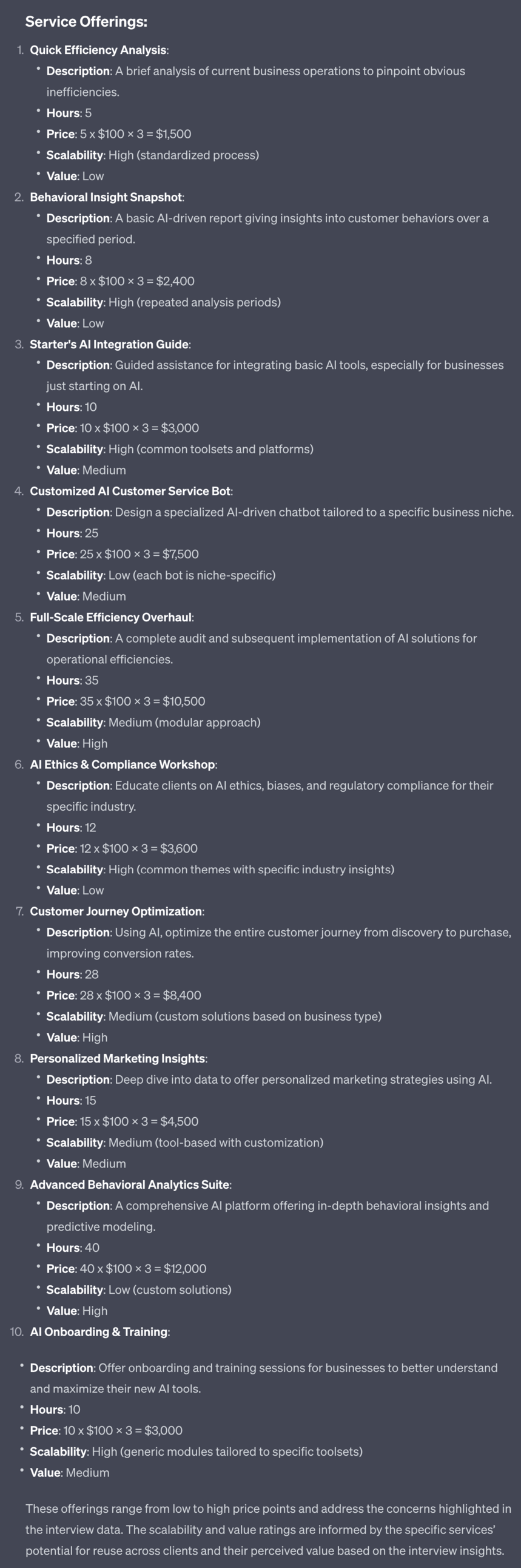
ChatGPT will take all your research and generate 10 potential service offerings.
These are aligned with what your customers perceive to be their problems. These service offerings will therefore be simple to market to customers.
I’ve also set up the prompt to give a range from low cost to higher cost to give you options.
Your job now is to review the options and decide which services i) you have the skill for and ii) you would enjoy providing. These are the most basic criteria for making a selection.
Tomorrow we’re going to start to design the offering based on the idea you choose.

Subscribe to the Premium Membership to read today’s Premium Prompt on how to add high-ticket services to our product mix.
A reminder of what we’re covering this week :
Part 1: Service offer ideas
Part 2: Design your service offer
Part 3: Deploying your service offer
Part 4: Market your service
Part 5: Premium service offer expansion
See you tomorrow Prompt Entrepreneur!
Until then, keep PROMPTING!
Kyle
In the last Part we began to identify what our service offer will be.
We’ll now take those ideas and build out your value ladder and offer stack.
By the end of this Part we’ll have our first service fleshed out and ready for release.
In the previous Part we generated a set of potential services we can provide.
Hopefully you decided on a core service out of the list - this will depend on what you feel you are best suited to deliver so combine the ideas with your own skills and experience.
We now want to generate a stack of offers from that chosen service.
For the example to follow I’ve chosen:
Starter's AI Integration Guide:
Description: Guided assistance for integrating basic AI tools, especially for businesses just starting on AI.
Hours: 10
Price: 10 x $100 x 3 = $3,000
Scalability: High (common toolsets and platforms)
Value: Medium
This is a solid service offer that I know I can provide.
It’s 10 hour of work, priced at $300/hour for a cost of $3000.
This will be my core service in the examples to follow.
I’m now going to use this service offering in the next prompt:
Act as a business strategist.

Design an offer stack of services that solve the same problem for my customer

My customers main problems are [problem areas]

My core offer is [copy/paste service]

Design a low cost entry point service and a high cost premium service to complement this core offer.

The entry point should be highly scalable. The premium should not be scalable.

Design my service offer stack from entry point to core to premium so that I can move customers from level to level.
I’ve used the problem areas of operational inefficiency, decoding customer behaviour and budget limitations from the previous Part.
The output from ChatGPT is long and detailed so I’m breaking it down here.
First ChatGPT gives us the low cost entry level offer:
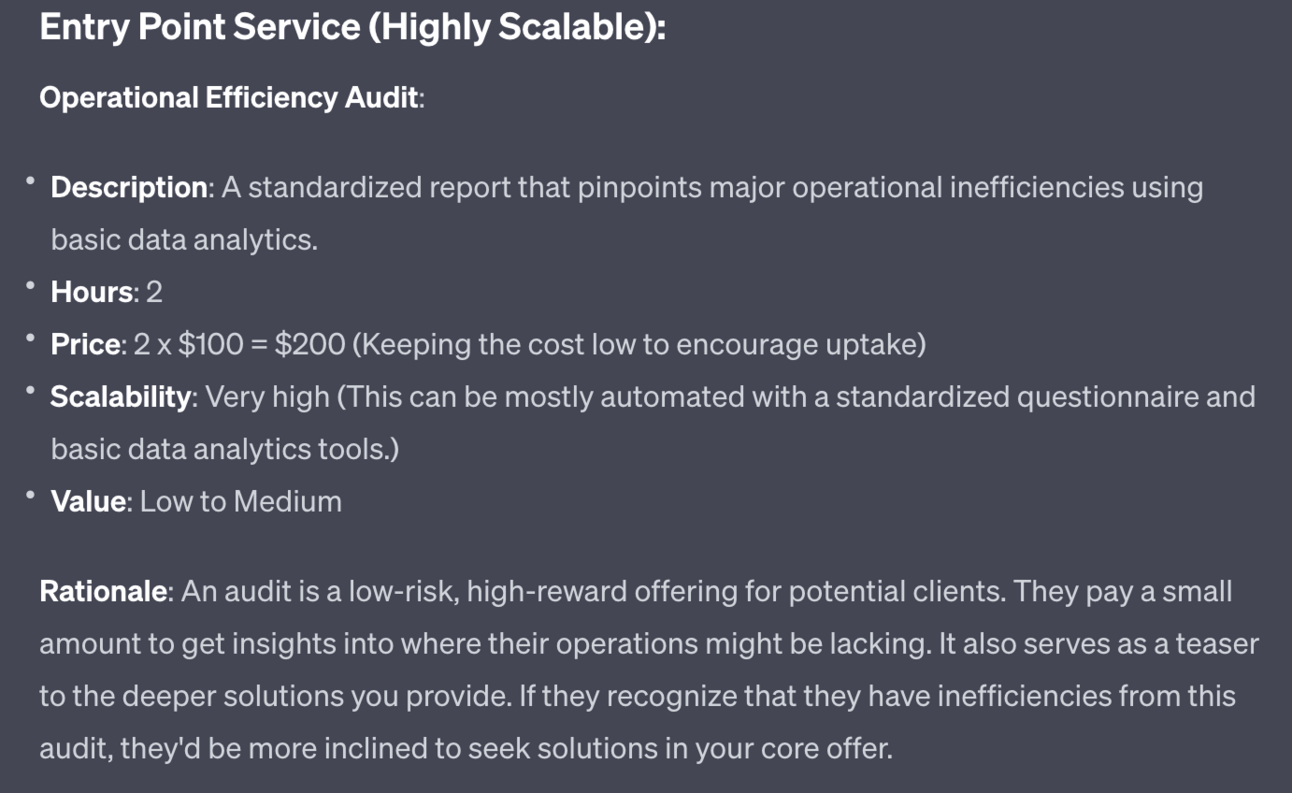
Notice that this is a very low cost service offering to help hook clients. Keeping the cost low means we also need the process to be very simple and very focused - it needs to be something we can do automatically or with very little personal time impact.
Second, ChatGPT repeats back our core offer. We used that in the input so do not need to repeat here.
Third ChatGPT designs a premium offer to top off our value stack:
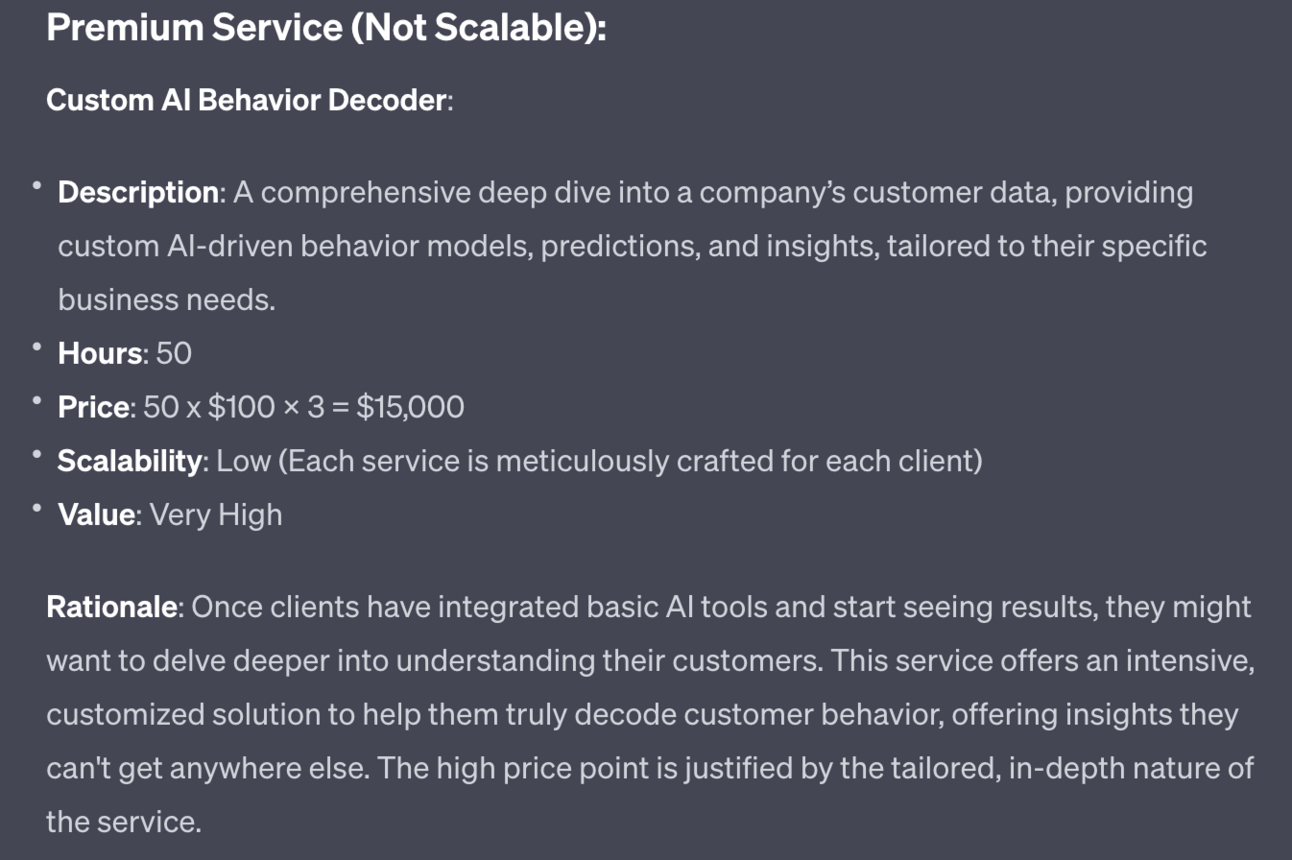
This offer is designed to be non-scalable, massive value and high cost.
Finally ChatGPT gives a quick run down of the strategy:
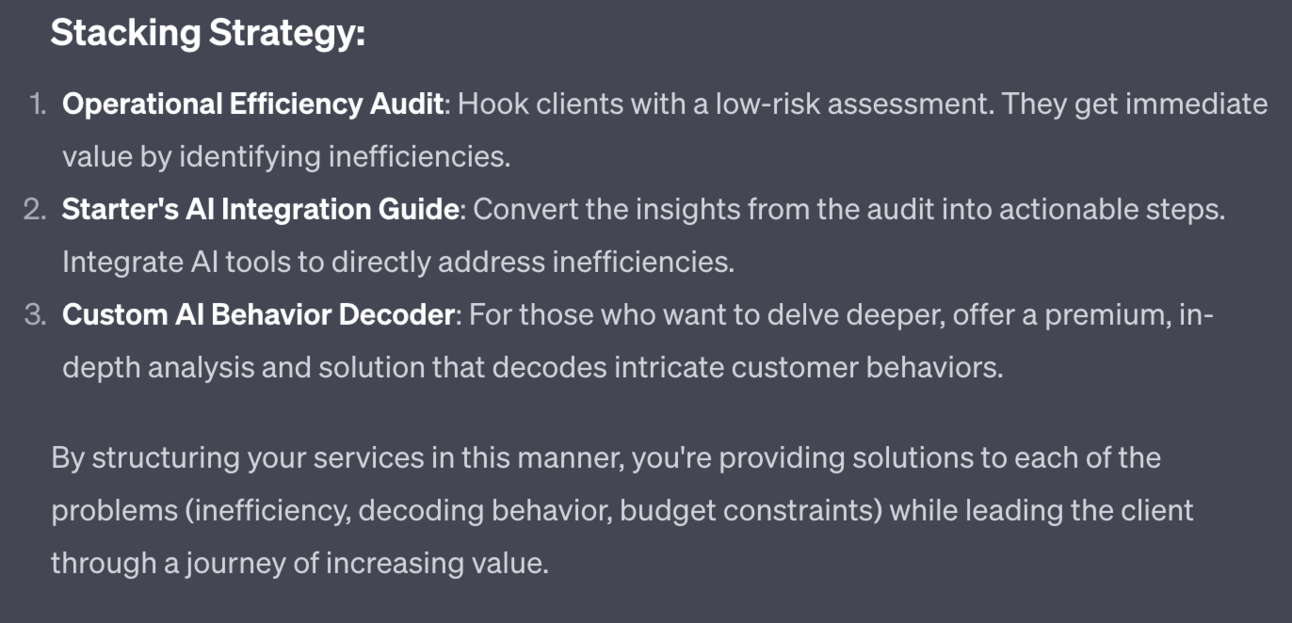
Notice how ChatGPT has, as per the prompt, designed each step to flow into the next.
The primary strategy here is to hook customers in with a low cost offer and use that to make the second core offer a no brainer.
If we went straight in with the core offer we’ll get turned down a lot. This way gives a low-friction way for a client to test us out, see what value we can offer and then decide to move to the core offer.
The premium offer is for people who want to go a step further. It’ll make the impact of the core offer even stronger or in some way make the process easier for the customer. And because of this we charge higher accordingly.
As always if any of these offers don’t work go ahead and tell ChatGPT to revise.
For instance I’m seeing the $15,000 of the premium service and immediately thinking “that’s too cheap”. Adjust accordingly.
Next we want to create and test our entry level.
We want to test the entry level before the core offer because it’ll be faster to deploy.
Remember that all these services are focused on the same problem areas. So if we can test and refine our entry level offer we can then apply those learnings to building the more in-depth core offer.
Use this prompt to get started under your previous offer stack prompts:
Act as a service provider

Develop the structure/SOP of the entry level service

Provide a list of the assets needed to deploy the offer

Provide a list of skills required

Provide a script for performing the serviceAgain we’ll get a very long output so I’m breaking it up.
First, we get the overall structure or Standard Operating Procedure:
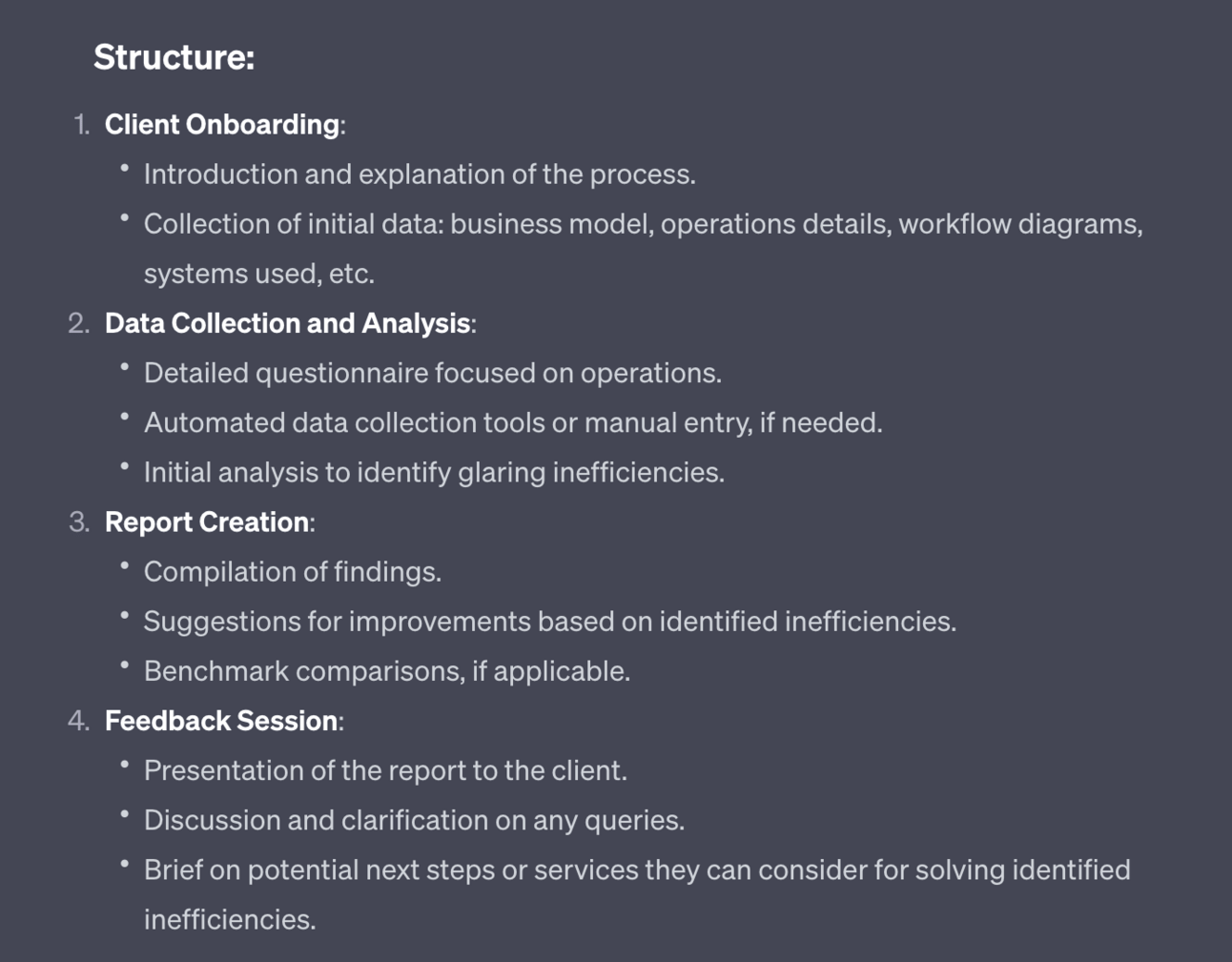
I like to build out a Trello chart with these as steps. Use whatever project management tool you normally use to capture this standard procedure and then run through it with each new client. I’ll cover this in the next Part.
Second, ChatGPT will give us the assets we’ll have to build before delivering the service:
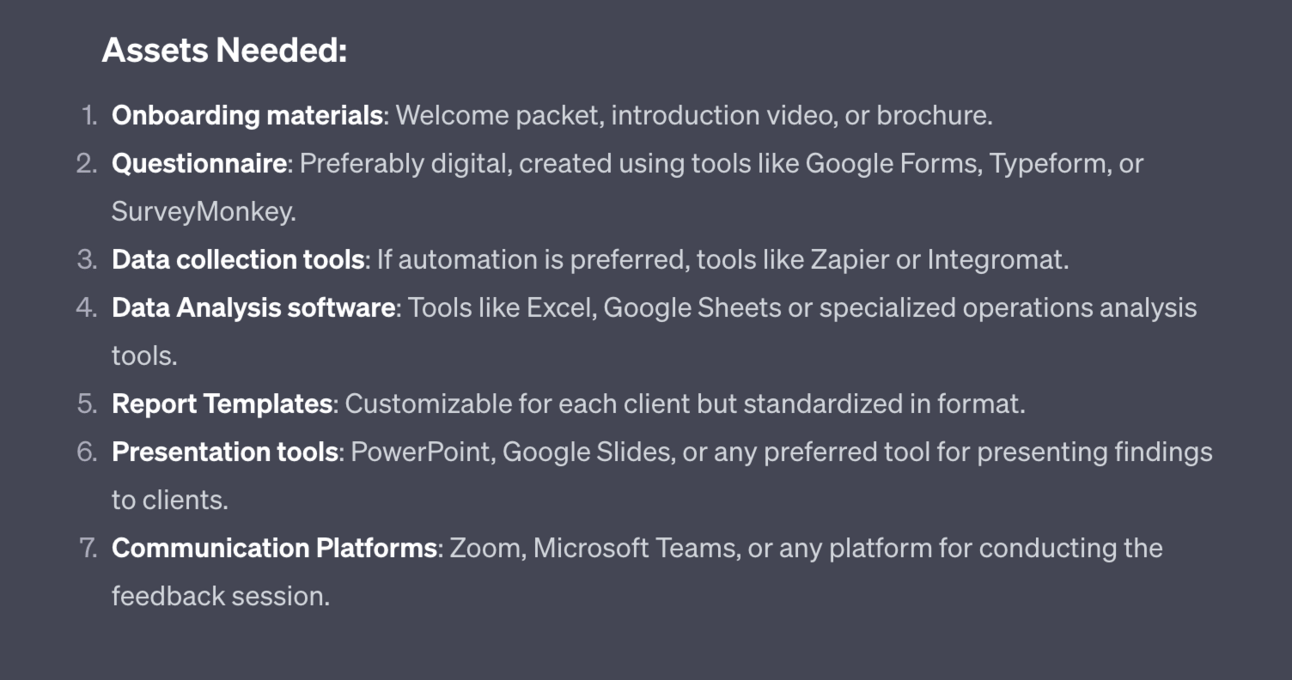
You will need to pull together these assets yourself using your expertise.
Of course though use ChatGPT to help structure and develop them. For instance simple ask “Give me an outline of the Questionnaire” to get a draft that you then load up into Google Forms.
Third, skills required:
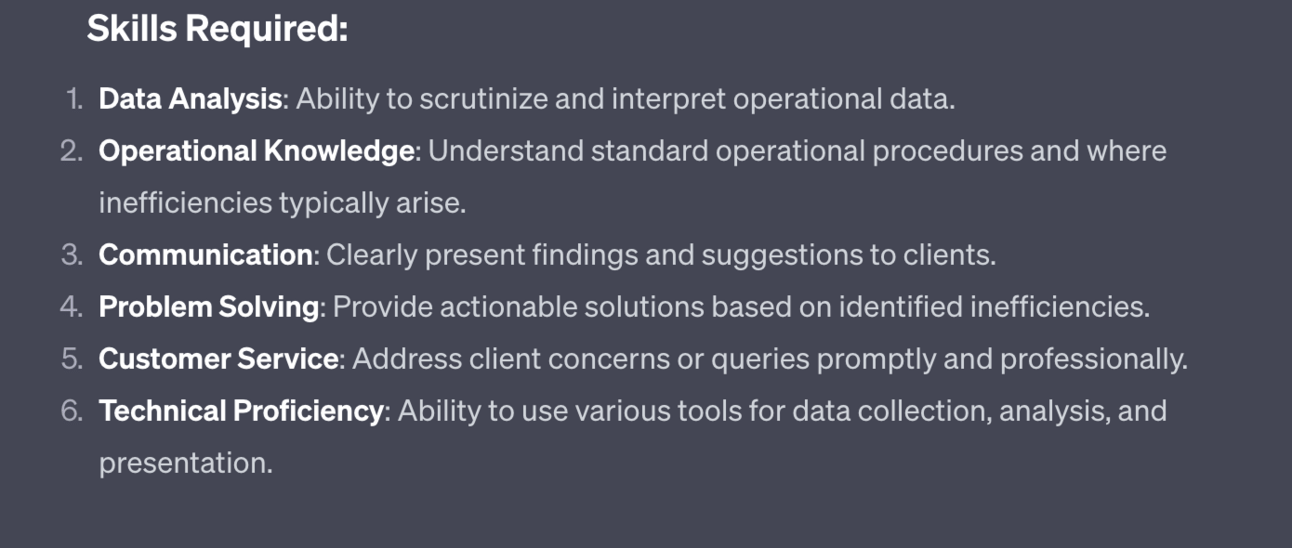
This is here as a sense check to make sure you can provide the service.
If any skill gaps are visible then ask ChatGPT or a learning plan and it’ll provide steps and resources to plug that gap.
Finally ChatGPT will output scripts for delivering the service:
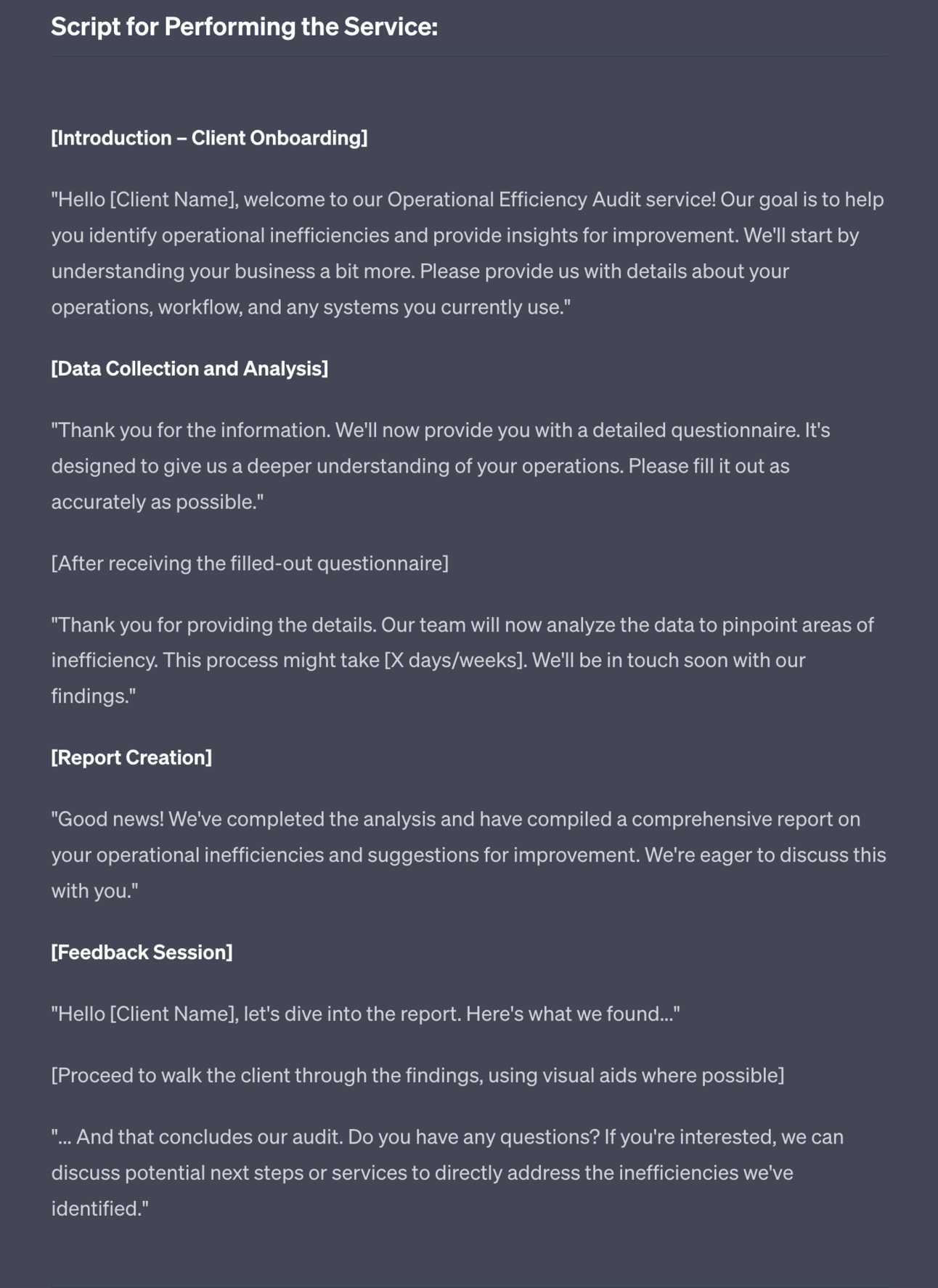
These are obviously very high level and should be tweaked to your needs. But they give you the general flow of the communications required.
Go ahead and use all these as a jumping off point to design your first version of the entry level.
Once you have the basics in place get some willing test subjects!
Head to your socials and ask for people who are willing to give their time and feedback in exchange for a free session.
You then perform your entry level service for them and collect feedback.
Keep it super simple and don’t worry about complex scheduling tools or anything like that. All you need is Zoom (or Google Meet for free) to carry out the calls.
Use this feedback to improve the entry level service. Don’t ignore it!
Here’s a quick prompt for the ask:
Act as a social media manager

Write a short post recruiting beta testers for my entry level product

Exchanging a free session for honest feedback

No emojis/hashtags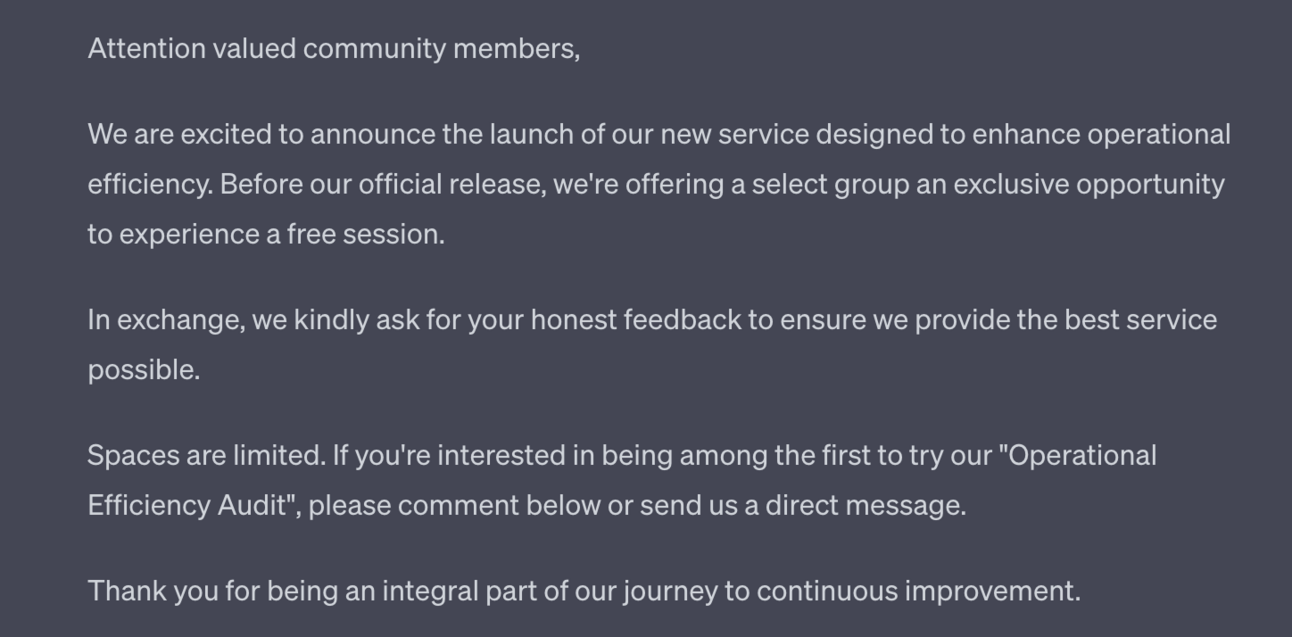
Limit the number of testers to 5-10 or so.
This should be sufficient to gather the feedback you need without draining your time. After 5 you should see recurring patterns.
Note, this pre-launch beta testing is also early marketing. We’re starting to tell our community that we are working on a new service.
The small beta test group also means it is exclusive. Some will be left out that wanted to participate. Those will be early customers.
Before we launch our entry level offer we want to have our Core Offer lined up and ready to go.
It doesn’t need to be perfect but should be 80% ready at least.
The reason for this is that once we open the doors to the entry level service we’ll have people who want to move onto the next step.
We need to strike whilst the iron is hot and thus need our core offer to be ready.
We re-use the prompt from before, simply on our Core Offer:
Act as a service provider

Develop the structure/SOP of the core offer service

Provide a list of the assets needed to deploy the offer

Provide a list of skills required

Provide a script for performing the serviceHere’s the Structure output - the rest removed for brevity:
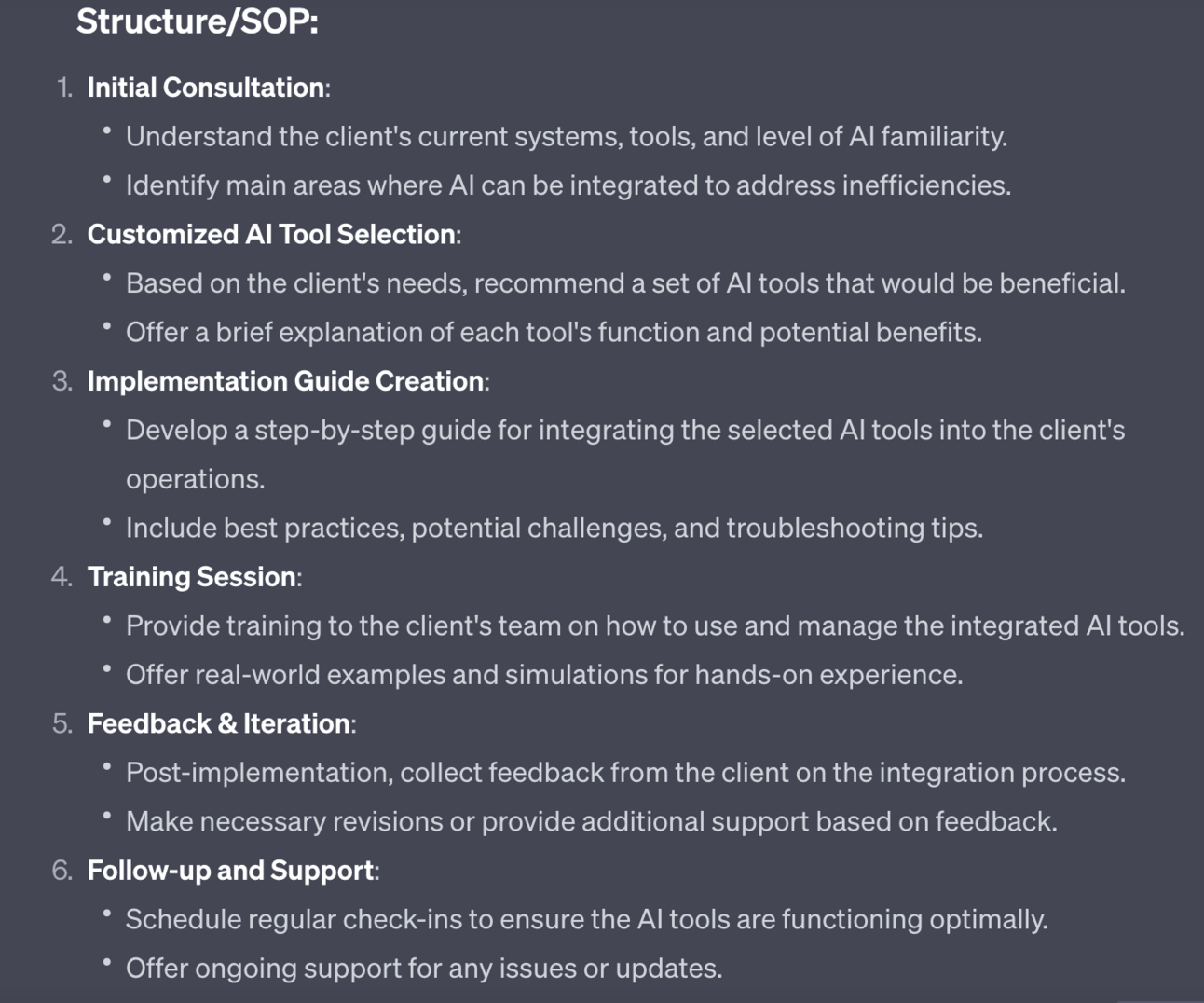
Again use the outputs to prepare the assets, skills and scripts for delivering the service.
This will be a much larger task because it’s your core service but once done that’s the core work out of the way.

Subscribe to the Premium Membership to read today’s Premium Prompt on how to add high-ticket services to our product mix.
In this Part we’ve gone from service ideas to actually having our first two service levels ready to rock and roll.
In the next Part we’ll cover how to set up the systems you’ll need to make sales, book in sessions and deliver your service.
A reminder of what we’re covering this week :
Part 1: Service offer ideas
Part 2: Design your service offer
Part 3: Deploying your service offer
Part 4: Market your service
Part 5: Premium service offer expansion
See you tomorrow Prompt Entrepreneur!
Until then, keep PROMPTING!
Kyle
In the last Part we prepped up our Service offer.
Before we launch we need some of the background mechanics in place.
If you already have a premium tool then a lot of this Part can be skipped over - simply use the premium tools to book in clients, take payments and deliver your service.
However, Prompt Playbooks always focus on accessibility and making sure that everyone can reasonably deploy these businesses.
As such I'll be showing you how to deliver your service for free or very low cost.
To host a meeting you’ll need to send a link to the customer for them to join.
There are many video call hosting tools.
Zoom you probably already know. Zoom is great because your customers will know how to use it. Never underestimate how important this is - you don’t want to spend the first 20 minutes of your 60 minute call helping the customer to connect their microphone.
Zoom has some limitations unless you pay. Therefore either get a paid Zoom account or use Google Meets. Meets is free and is a solid tool.
Most service offerings need a way to book in a time to talk to your customer.
You can obviously do this by playing email tennis back and forth until you decide on a slot you can both do.
But this is inefficient and annoying for the customer. It also doesn’t scale as your schedule starts to fill.
Instead we want to use a scheduling tool like Calendly.
Calendly has a free plan which will be sufficient for what we’ll be building. As you scale up though you may want to get their paid plan for additional functionality - thankfully it starts at a very cost effective $8/month.
For now grab a free account and go through the basic setup process.
Most important is adding your calendars.
Go to the Account dropdown in the top right then Account Settings
From here Availability > Connected Calendars > Add your calendars
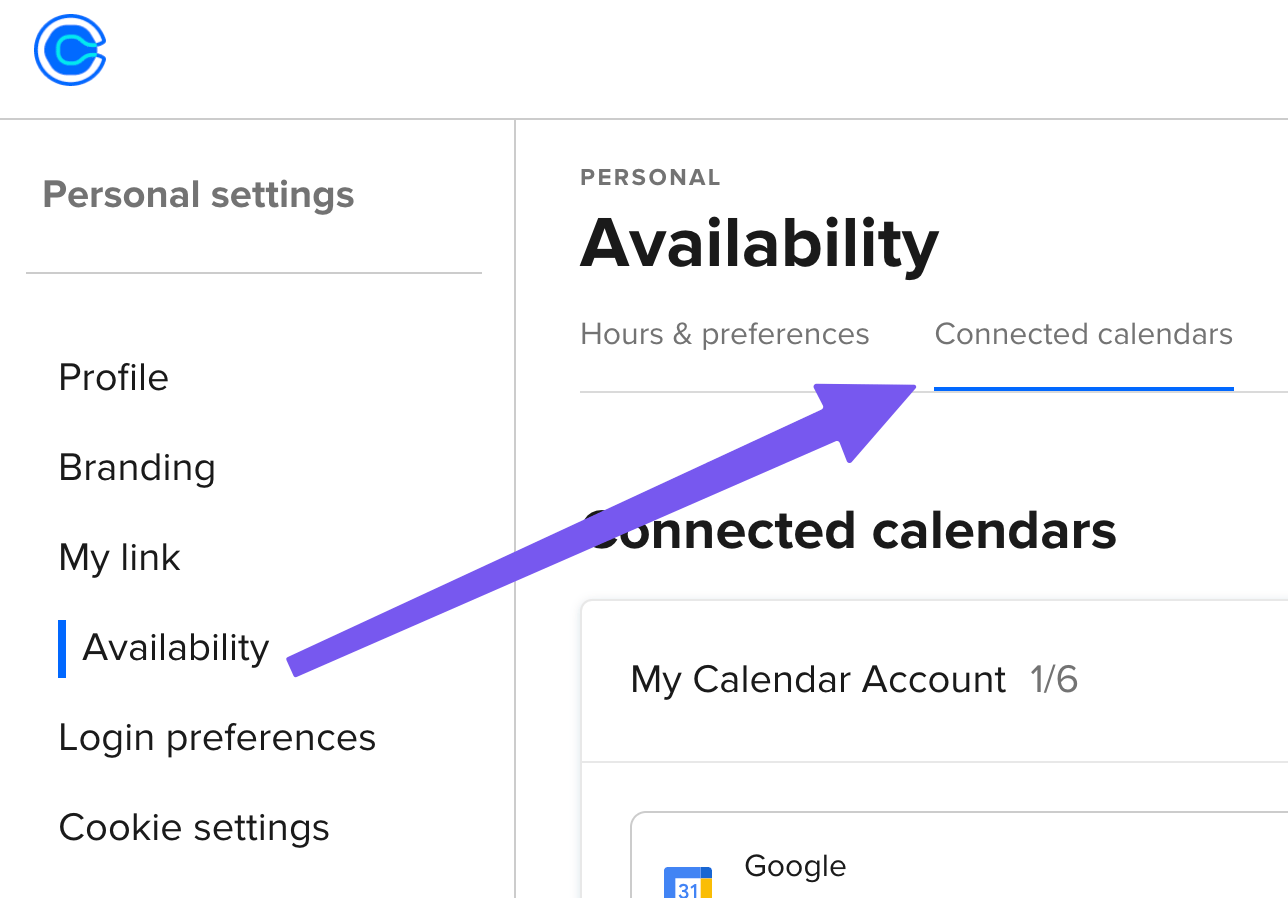
Once you’ve got your calendars hooked up go to the main dashboard and hit +Create > One-off meeting:
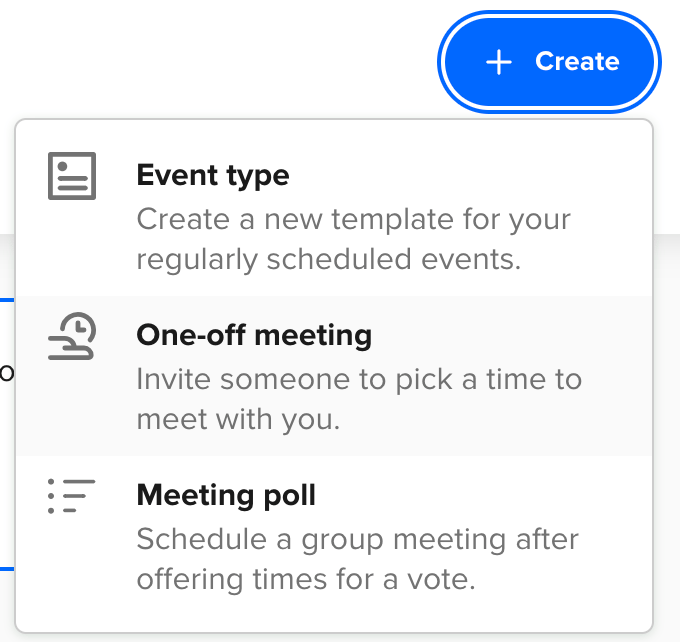
Once in this interface you can set the length of the meeting and then put in your free slots.
On each date click the Add Times button to fill in times that are available.
Thankfully Calendly will block out any times that your calendars show you are busy making this a very powerful tool.
If any of those times become unavailable later as you add to your calendar then Calendly will remove them from the availability.
Once you’ve set your times we need to choose the “location”:
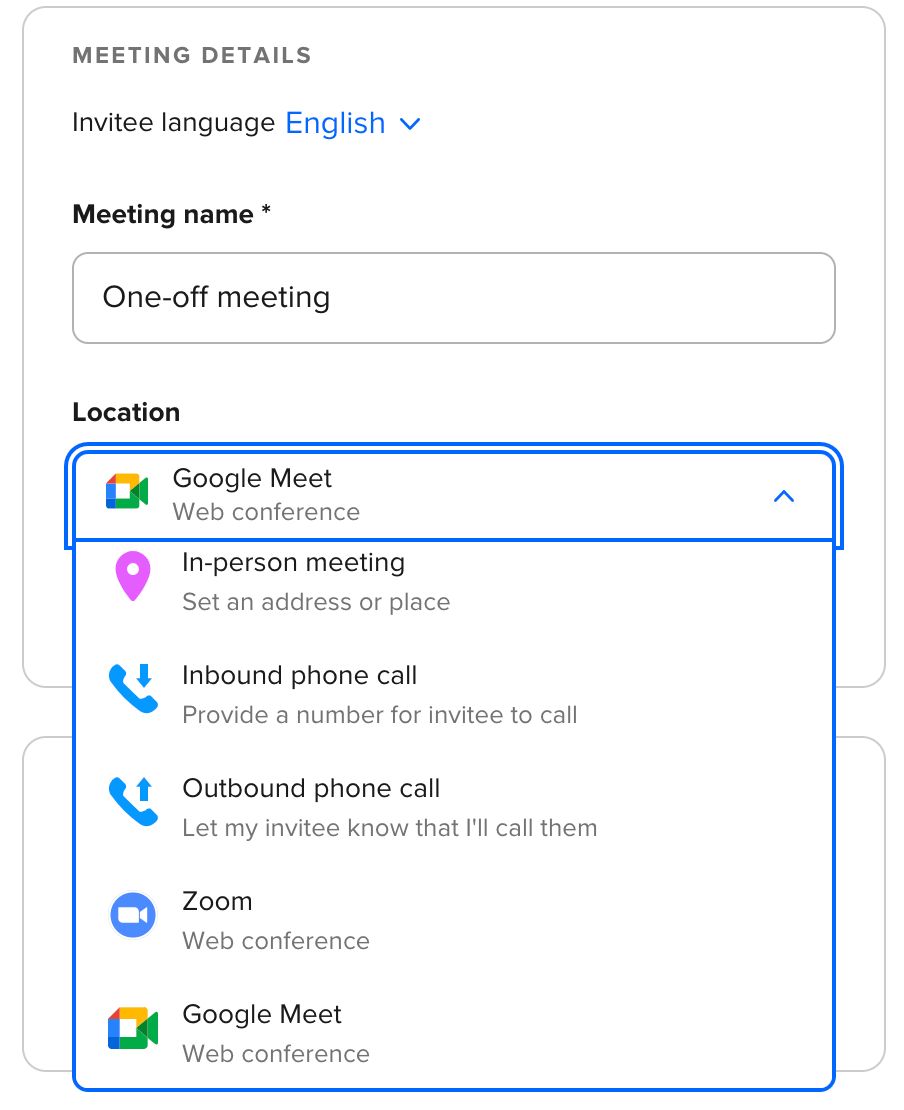
If you are using Zoom there’s a direct integration between Calendly and Zoom which automatically creates an event and sends the customer the link. To set this up you’ll need to log into Zoom from within Calendly to authorise. Follow the instructions in Calendly.
For Google Meet you’ll need to send a link - it’s a more manual process.
You can also use telephone rather than video conferencing if preferred - Calendly will provide the customer your number or ask for theirs depending on what setting you choose.
Once complete go ahead and publish the event.
You’ll be given a link which leads to a scheduling screen that looks like this:
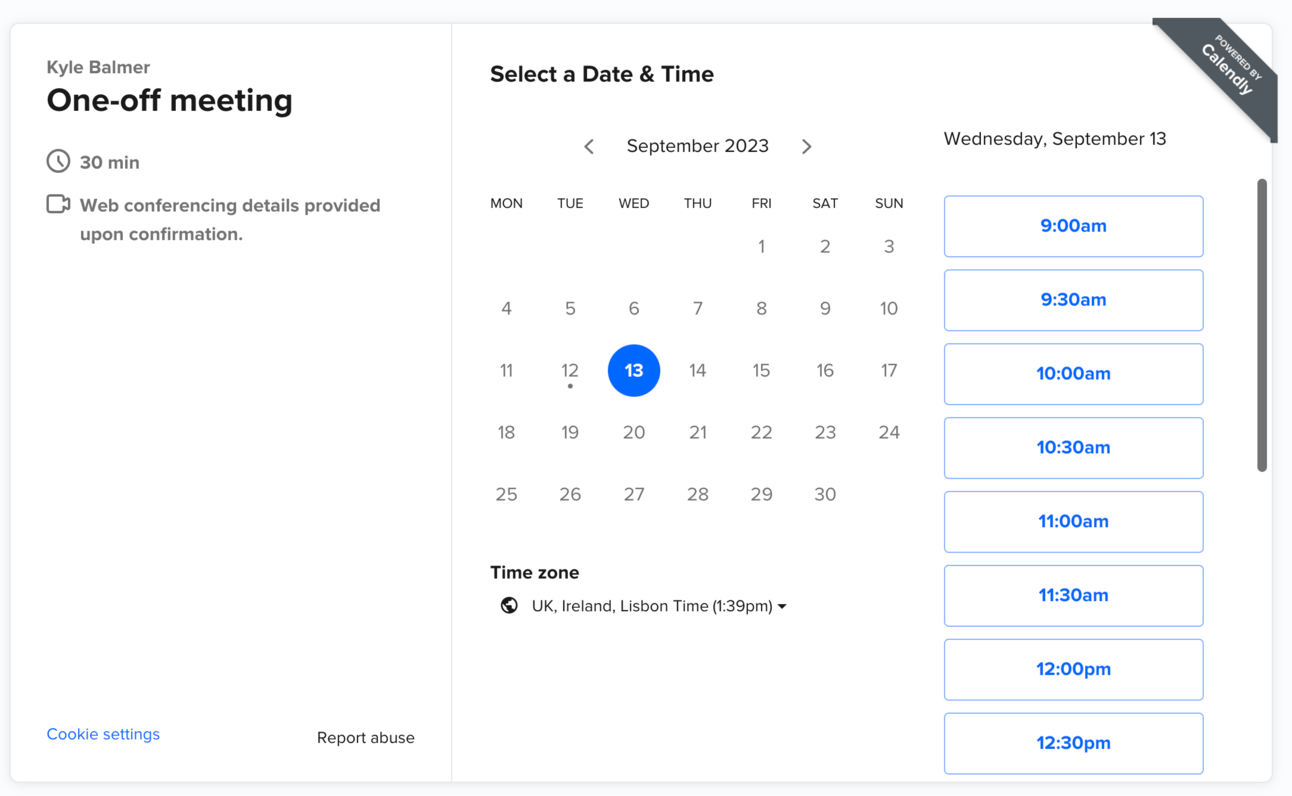
This will show all your availability, date by date, and allow customers to schedule in their calls for you to deliver your service. Perfect!
We now need to add in eCommerce and allow your customer to purchase from you.
We can do this directly in Calendly by connecting to Stripe. However, to do this we need a paid account. If the cost is not a problem for your business I’d recommend this route.
Alternatively here’s another way to do it for free for those who want to keep subscriptions to a minimum.
We can use Gumroad to sell access to our product.
The basic idea here is that our customer will purchase on Gumroad and once they’ve paid they are sent the Calendly link and instructions to book in.
To set this up log into your Gumroad account or create one if you don’t have one already. It’s free to sign up.
Go ahead and create a new product:
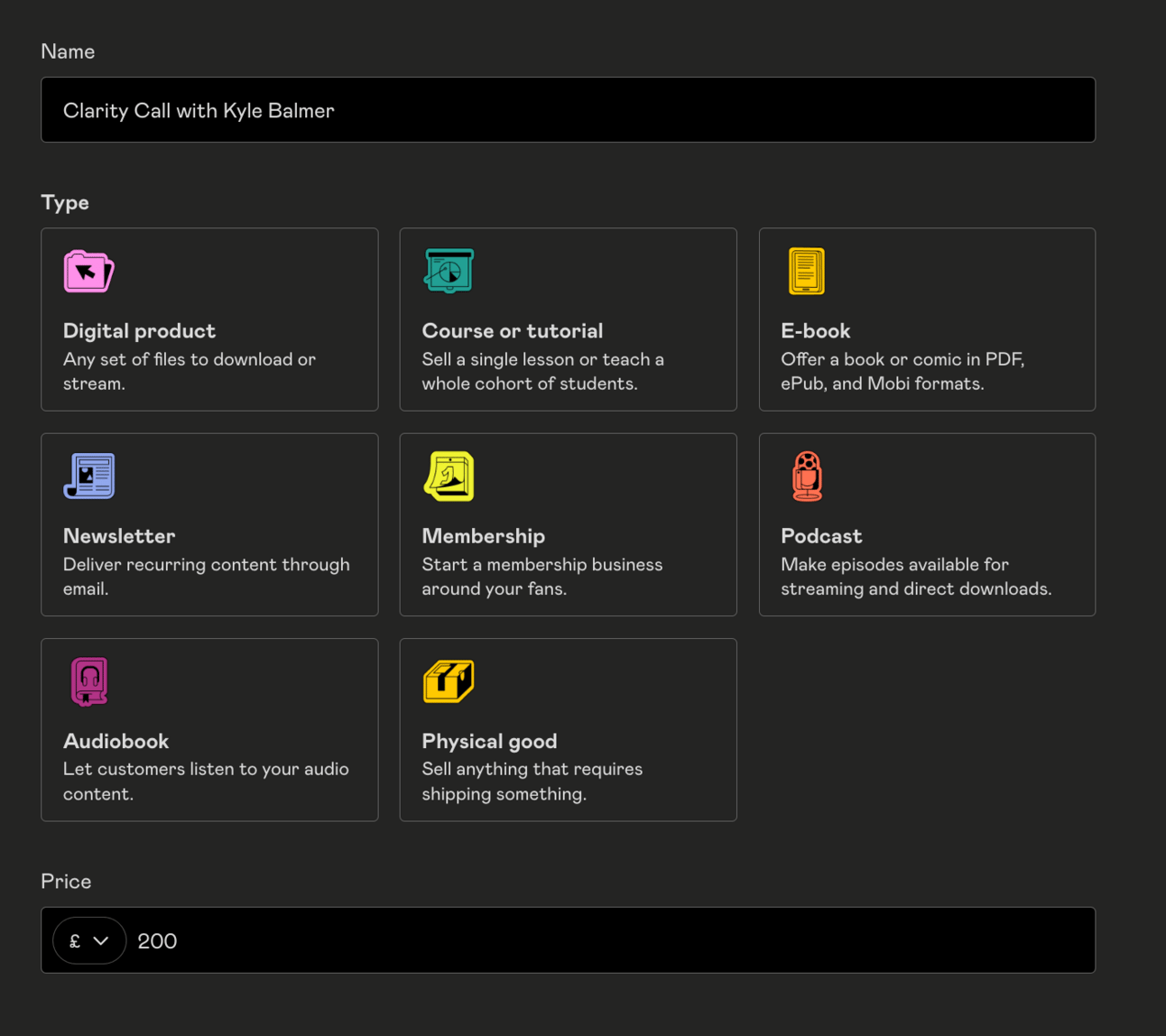
For Type select Digital Product.
Fill out the product name, price, description etc. as normal. Use ChatGPT to help generate a description if needed.
Then in Content simply set the product up like so:
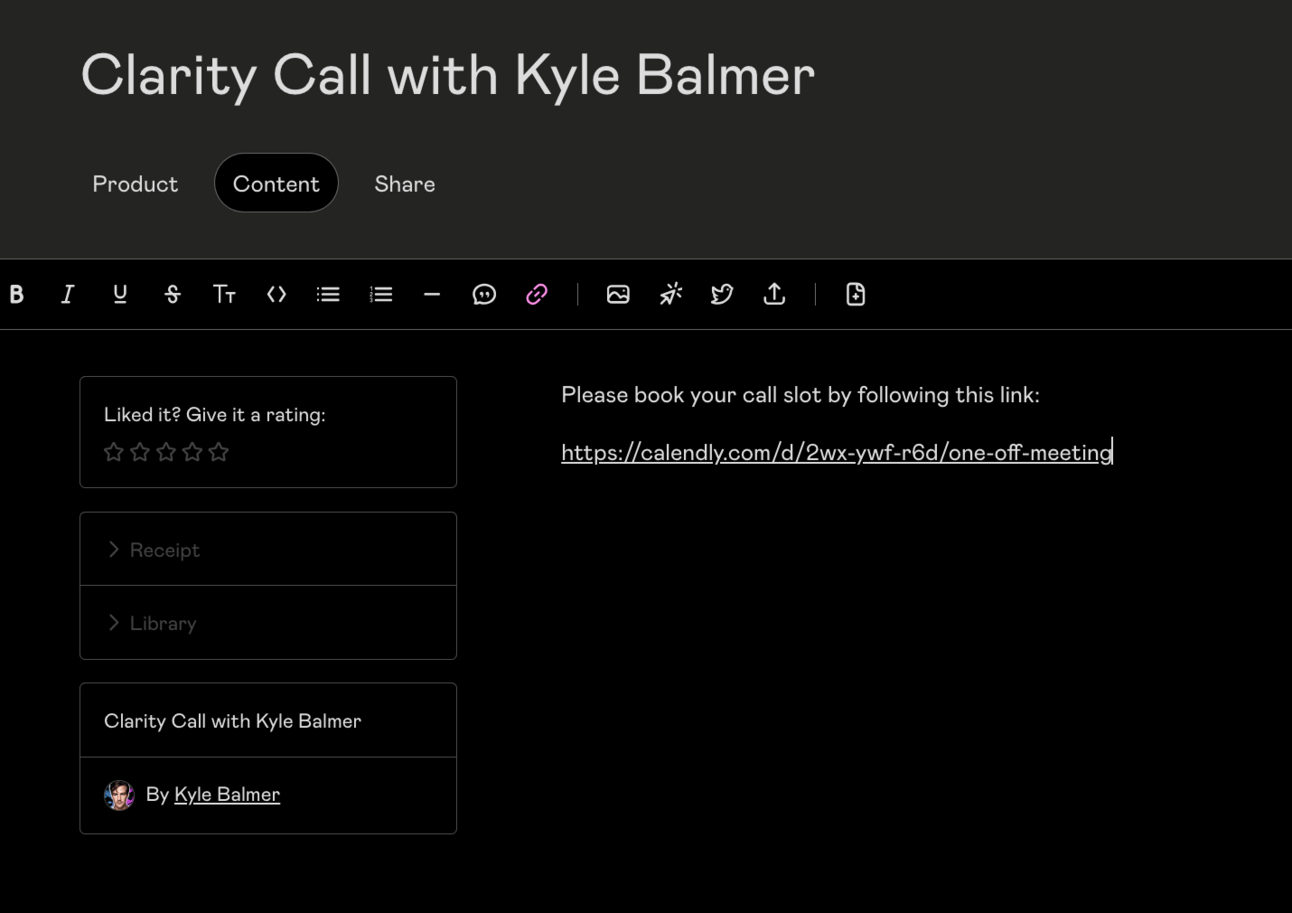
Nice and simple - all we’ve done here is paywall our Calendly link so that only those who buy from us can get to this link.
This is quick and dirty way to set up billing for your service without too much fuss.
Some limitations to be aware of:
Gumroad charge a % of each transaction
You can sell one-off services on Gumroad but not full implementations and complex services. It’s against their Terms of Service
For launching your service offering though this is perfect to get started. Once you’ve got more cash coming in I’d look at getting a paid Calendly subscription.

Subscribe to the Premium Membership to read today’s Premium Prompt on how to add high-ticket services to our product mix.
In this Part we’ve pieced together the “messy middle” - the actual apparatus to run a service business on a day-to-day business.
This stuff isn’t very sexy or fun but it’s hyper important for scaling.
Next we’ll move onto getting the word out and starting to sell your service.
A reminder of what we’re covering this week :
Part 1: Service offer ideas
Part 2: Design your service offer
Part 3: Deploying your service offer
Part 4: Market your service
Part 5: Premium service offer expansion
See you tomorrow Prompt Entrepreneur!
Until then, keep PROMPTING!
Kyle
Now that we have our service offer prepared and the infrastructure in place it’s time to lauch.
In this Part we’ll cover how to kick off a successful launch plan.
Before I kick off though I want to make sure you haven’t missed the waiting list for my course.
Who is this course for?
If you ...
Are stuck in the 9-5 grind and want to get out
Have too many business ideas but don't know where to start
Want a tried and tested framework from a serial online entrepreneur and teacher (me!) of 27,000+ students
Are ready to grab the opportunity of using AI to kickstart an online business in record time
Then this is the course for you. Like, for real for real.
It’s going to be a chunky step by step course and a community where we’ll be working through everything together.
It’s launching in a few weeks and there’s a waiting list.
Already we’re at (quick check) 372 people on the list.
Grab your spot here ==> https://forms.gle/1sJdjCnHhnqucjJc8
To be kept in the loop about launch + special subscriber bonuses.
We are starting by launching your entry level offer, not the core product.
Why?
We want to test the waters with our customers and see if they are willing to buy our services at a lower price point. If yes we’ll move to the Core offer.
Additionally, launching is a skill.
Once you’ve done it a few times you’ll get into the swing of it.
Because of this we’ll use the entry level offer as a way to practice launching a service.
Then when we come to launch the Core service you’ll have nailed down the whole process.
First up let’s get a basic shape for our launch campaign.
As always we want to utilise the social and email channels that we already have in play.
I’ve written other Prompt Playbooks specifically about X/Twitter, LinkedIn and Newsletters. These are all excellent places to build up who you can announce your service to.
If you have these in place already the launch will be much simpler. If not you can lean more heavily on advertising, referrals and affiliate marketing. We’ll discuss referrals and affiliates below.
In general you want to use as many channels as you have active. Here’s a prompt you can use to structure a multi-channel launch campaign:
Act as a social media expert

Structure a launch campaign for my new service offering.

The name of the service is [name] and it is about [description]

Touch on customer problem areas: [problem areas]

Design posts for these channels [list of channels], separate out each channel as a separate column

The posts should follow this structure

Teaser Image
Quote/Testimonial
Countdown
Announcement
Reveal Video
Detail Post
Behind the Scenes
Waitlist
Invitation Graphic
Benefit Spotlight
Waitlist Countdown
Prelaunch
Sneak Peek
User Testimonial/Review
Launch
Launch Day Celebration
Customer Feedback Request
Thank You Post for Early Supporters

Output in a table. Structure the output with channels and description as columns, post type as rows

Write each post or give a short preview for longer posts

No hashtags, no emojis
For this example I used my entry level “Operational Efficiency Audit” service and the problem areas from earlier Parts.
I then chose X/Twitter and LinkedIn as my channels. Feel free to add as many as you actively use.
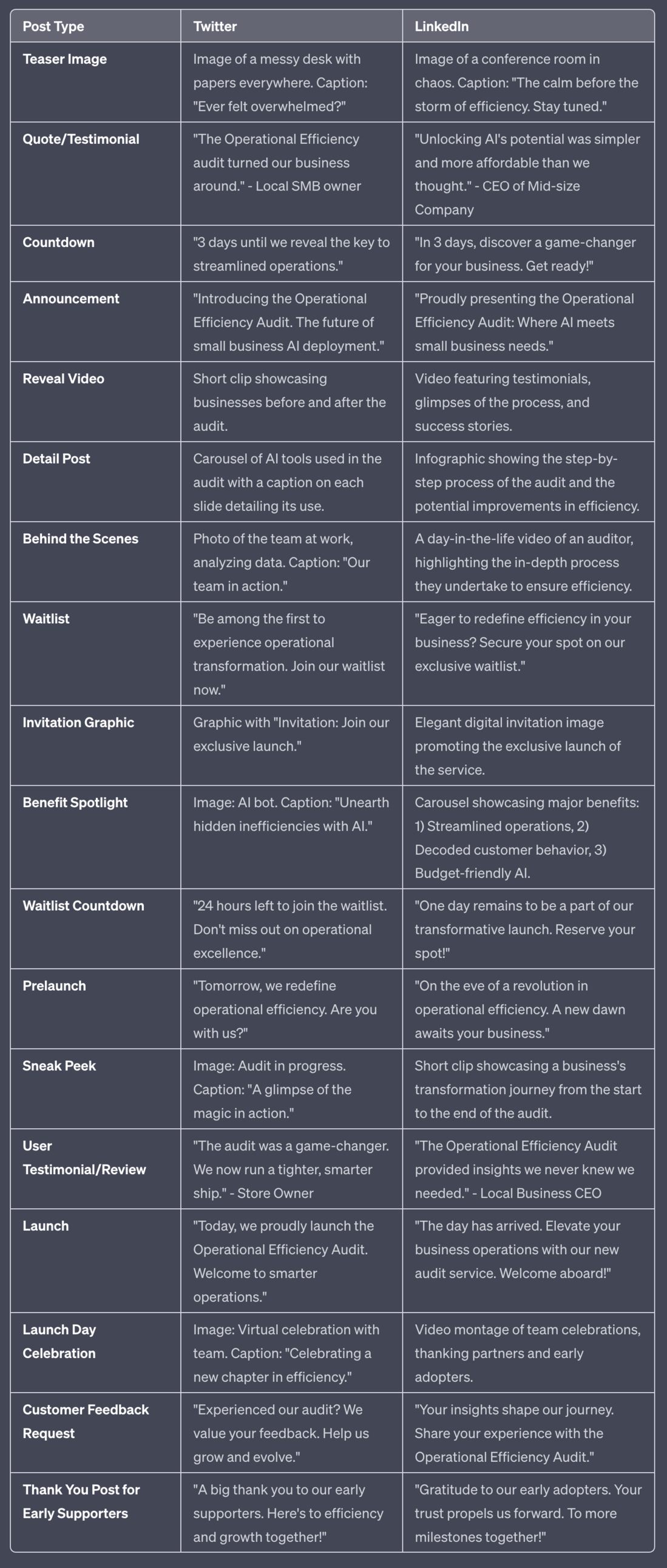
This prompt gives us a basic launch structure to work off. Enough messaging for one a day for 2 weeks.
As always edit these to match your tone of voice rather than use the generic versions.
We’ll now talk a little more in depth about some of the more involved elements of the marketing launch.
A super powerful asset to have early in your launch is a good collection of reviews and testimonials.
Remember the beta testers we had back in Part 2? Make sure to collect up reviews and testimonials from them. Build their thoughts into social media posts or even adverts.
Don’t have any yet?
I’d recommend doing a giveaway as part of your launch plan. And leverage the giveaway into reviews.
Here’s a prompt:
Act as a social media manager

Create a short post for a giveaway

The giveaway is for the service [name]

You'll be giving away [x] free slots, each worth [$]

To apply the audience must comment with why it would be useful for them
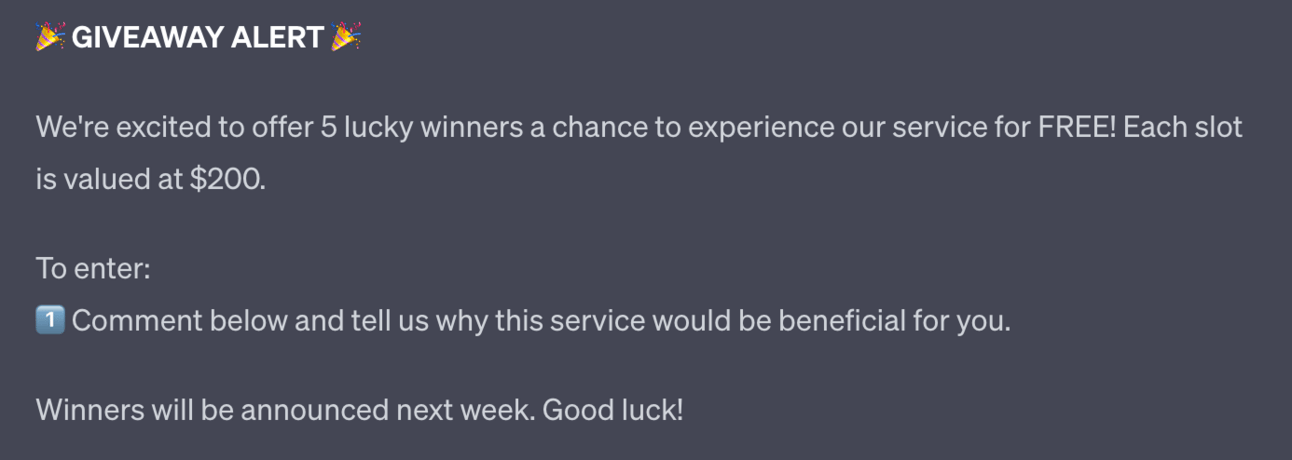
Use this to get some more early doors clients and as part of the deal get video testimonials or, at minimum, text reviews.
Another tactic to deploy during your launch is a waitlist.
A waitlist let’s you create a list of people who are interested in your service before you launch.
It also helps to build up a sense of FOMO as you can release the product first to the people on the waitlist.
To set up a wait list you need a way to collect details. There are lots of excellent tools like Typeform and Jotform that have lots of functionality.
However to keep it simple I’d recommend Google Forms as a super streamlined version. It’s also free.
Head to Google Forms and create a new form.
I’d recommend keeping this as simple as possible - just an email address.
You can ask for more details, including surveying people using multiple choice questions, but my recommendation is to keep this as frictionless as possible. You don’t want to scare people away by giving them too much to do.
Therefore provide a quick explanation of what the form is for and collect the email address.
Then in Responses (the second Tab) set the responses to go into a Google Sheet. This will collect everything up for you in one document, making it easy to use later.
Bonus points - when your waitlist starts to fill up make sure to show everyone!
Here’s what that looks like:
Course waitlist snuck past 250 whilst I wasn't looking!
I'll be releasing some more details this week about timelines + what to expect.
Very excited to share more!
— Kyle Balmer | Prompt Entrepreneur (@iamkylebalmer)
2:28 PM • Sep 11, 2023
Another way to drive traffic to your service offer is by leveraging other people’s audiences.
We can do this via affiliates. Basically we will pay a percent to everyone who sends us a paying customer.
When running an affiliate campaign with products we can be extremely aggressive in the percentage that we give away. I recommend giving away 50% or more at launch.
However with services we need to remember our time is involved!
If we get a big account to promote our offer and suddenly have 1000 sign ups then you are in the hook to provide all that! So make sure you get paid enough!
I’d recommend something closer to 20-30% given to your affiliates and the rest staying with you to deliver the service.
Gumroad makes it simple to set up affiliates.
From your Dashboard click the profile picture in the bottom-left and then Affiliates.
From here you can select the products and services you want to allow affiliates to sell and can set a percentage commission on each of them individually.
Once that’s set up we can send potential affiliates to our affiliate page, the link of which is provided by Gumroad at the top of the page.
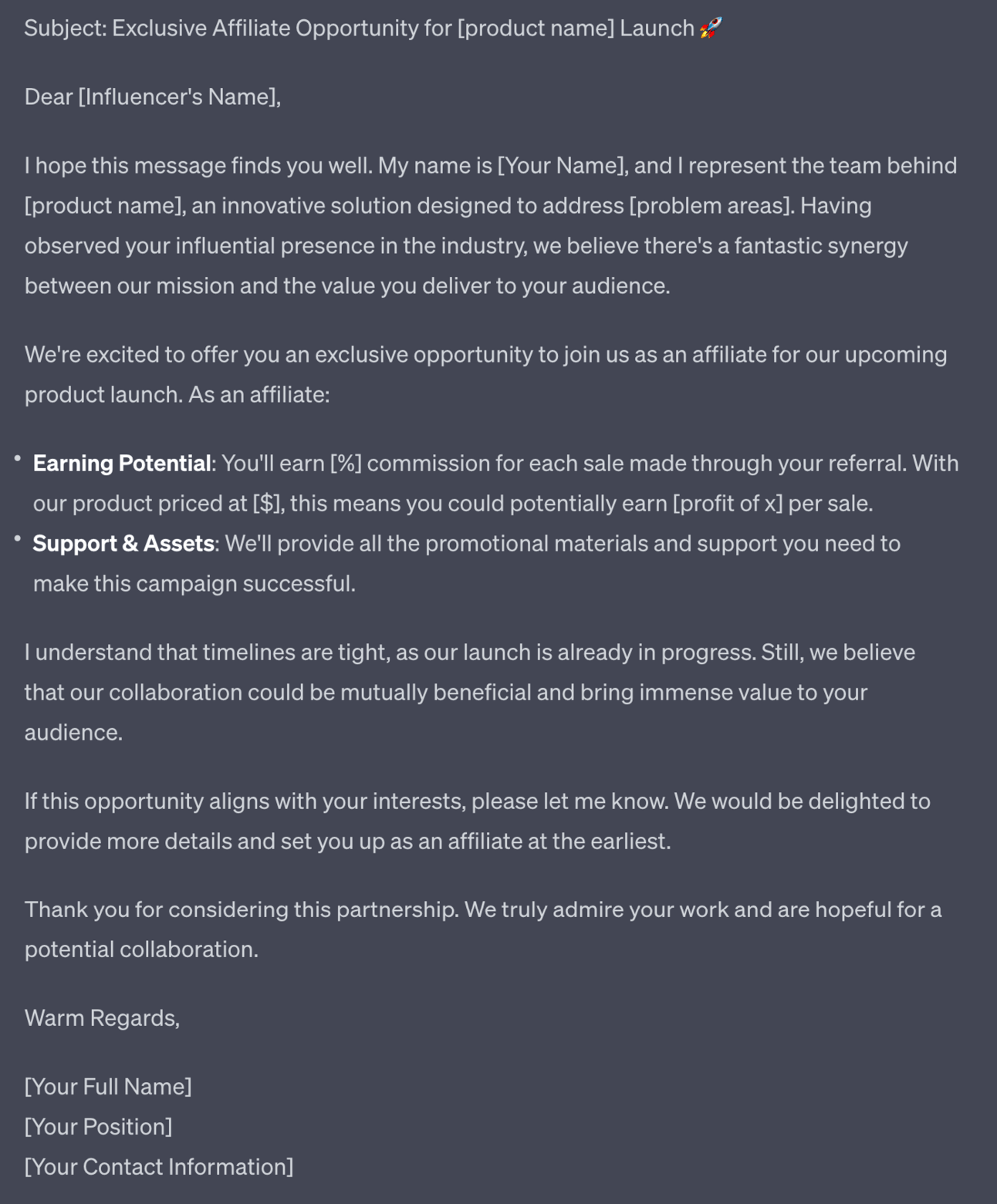
To recruit affiliates we can use this prompt:
Act as an affiliate marketing expert

Write an approach letter to an influencer to invite them to be an affiliate for my new service launch

The product is [name] and it helps people deal with [problem areas]

The affiliate percentage is [%] and the price is [$] meaning they'll make a profit of x

Ask them to connect for more details and to get set up as affiliates, emphasing launch is in progress so timelines are short

Be courteous and concise
Fill in the details or use this under the preceding prompts to automatically pull in the required details.
Referral campaigns are similar to affiliate campaigns but have a different pool of people sending us traffic.
Both give people a percentage of the sale in return for sending you a new customer.
Affiliate campaigns use people who aren’t your customer but have access to your customer - for example other businesses and influencers in your niche.
Referral campaigns use your existing customers to find new customers. It’s more internal.
Once you have your first few customers in the door and have provided a good service reach out to them and ask if they want to refer anyone to you.
Chances are, if you did a good job, they already will want to. All we’re doing with a referral campaign is giving them a percentage of the sale as a thank you!
Setting up a referrer is identical to the process for setting up an affiliate. It’s just they are already customers.
Here’s a prompt:
Act as an referral marketing expert

Write a message  to an existing customer to ask them if they want to refer friends and colleagues

If they found the service valuable and want to tell others about it you want to thank them for that via a referral fee

The referral percentage is [%] and the price is [$] meaning they'll make a profit of x

Ask them to connect for more details and to get set

Be courteous and concise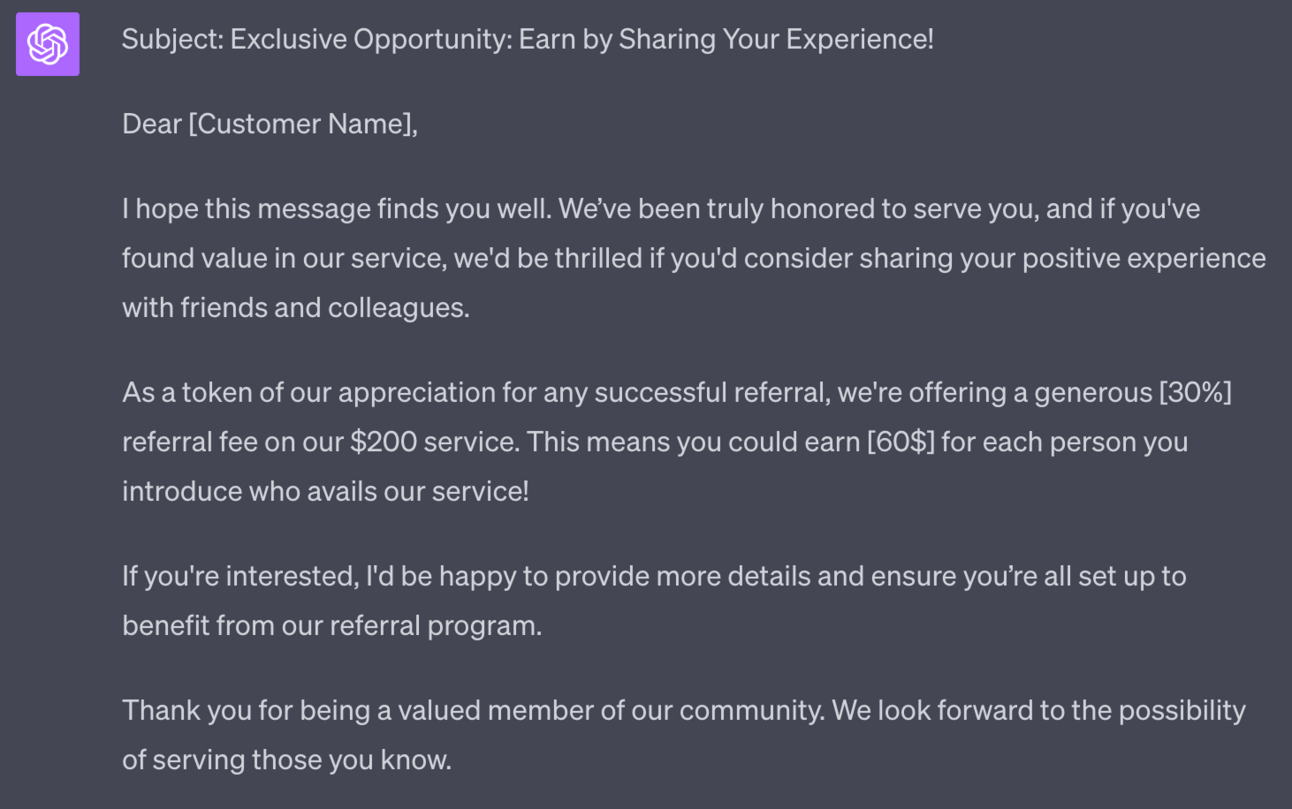
Adjust depending on your niche.
Some niches (money, finance, business) will be more inclined towards money offers.
Others (health, lifestyle, personal growth) will be more inclined towards community and helping each other not only for cash reasons.
Balance your ask appropriately between asking for their help and offering them a reward.

Subscribe to the Premium Membership to read today’s Premium Prompt on how to add high-ticket services to our product mix.
In this Part we’ve built a launch campaign and complemented it with some more advanced tactics like waitlists, affiliate and referral campaigns.
Once implemented you’ll bring in your first customers and start to build a client base.
In the next Part we’ll talk about how we move these customers up our service value ladder into high ticket clients.
A reminder of what we’re covering this week :
Part 1: Service offer ideas
Part 2: Design your service offer
Part 3: Deploying your service offer
Part 4: Market your service
Part 5: Premium service offer expansion
See you tomorrow Prompt Entrepreneur!
Until then, keep PROMPTING!
Kyle
We’ve put together a service offer stack, built out the delivery mechanisms and launched.
Our stack consisted of entry level, core offer and a premium offer.
Here’s a reminder of the example stack from Part 2:
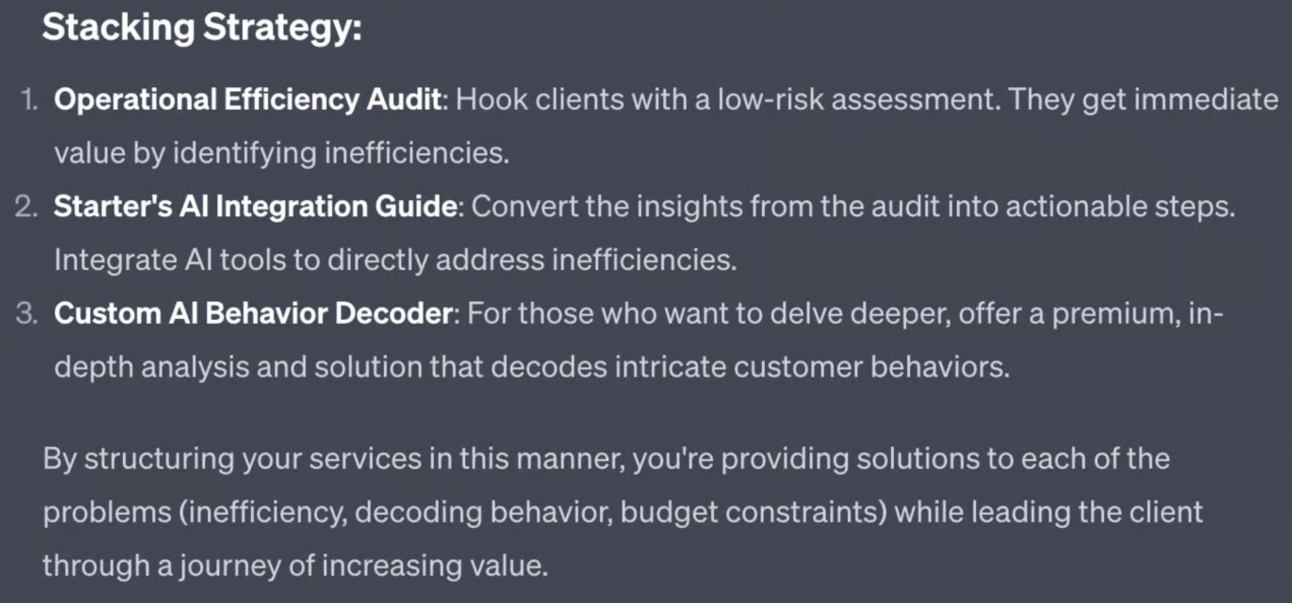
In this Part we’ll look at moving clients up this value ladder and converting basic income into high ticket sales.
We want to sell our core service in two main ways:
Selling entry level customers the core service via upgrade
Direct sales to core service
We’ll look at the upgrade first.
We’ve already launched the entry level service and should have customers.
If we are struggling to acquire entry level customers this is a red flag!
We designed the service stack to solve the same problems for a particular customer type.
If we can’t interest them with the entry level we will struggle to sell the core and premium offers!
Instead of ploughing ahead to the core and premium offer first fix the entry level. It’s a small, lower cost product so pivoting your offer here is much simpler.
If you do have customers for entry level though we now want to upgrade them to the core service.
We designed the entry and core so that there is a natural up-sale. The entry level is the first step, the taster, before the core product solves the problem for the customer.
Act as an expert product and service copywriter

Prepare material to help me upsell customers from an entry level service to my core service offering.

The entry level service is [name]: [description]

The core service is [name] : [description]

Prepare:
- a simple 30 second pitch
- 3 sequential emails to announce, remind and push
- copy for an upsale webpage
For this example I referred back to Part 2 where we design our service stack and filled in the service names and descriptions.
First ChatGPT will output a short pitch:
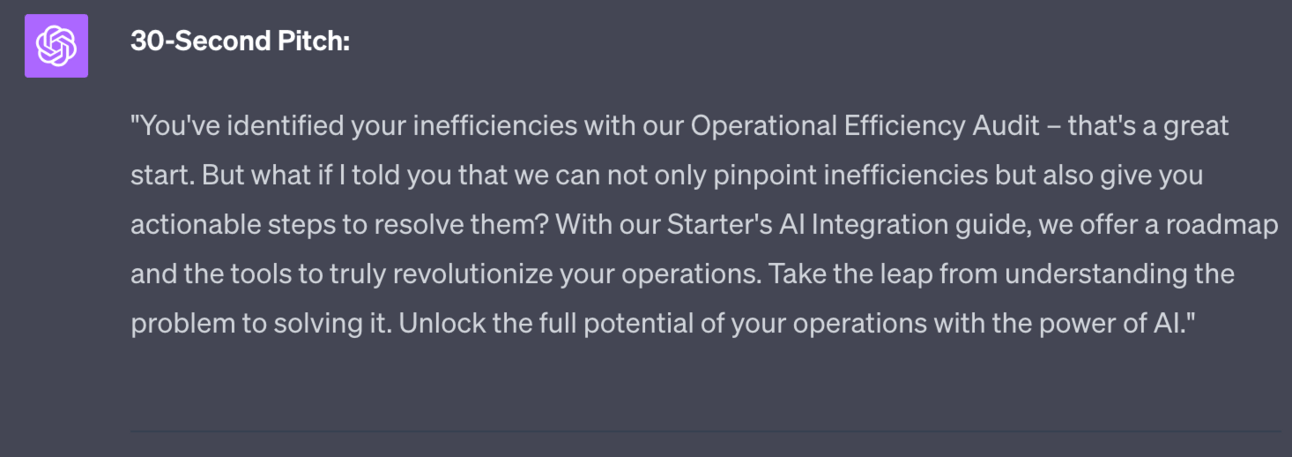
Use this basic pitch as you close out your entry level service. Make sure to rewrite it for your tone and practice delivering it.
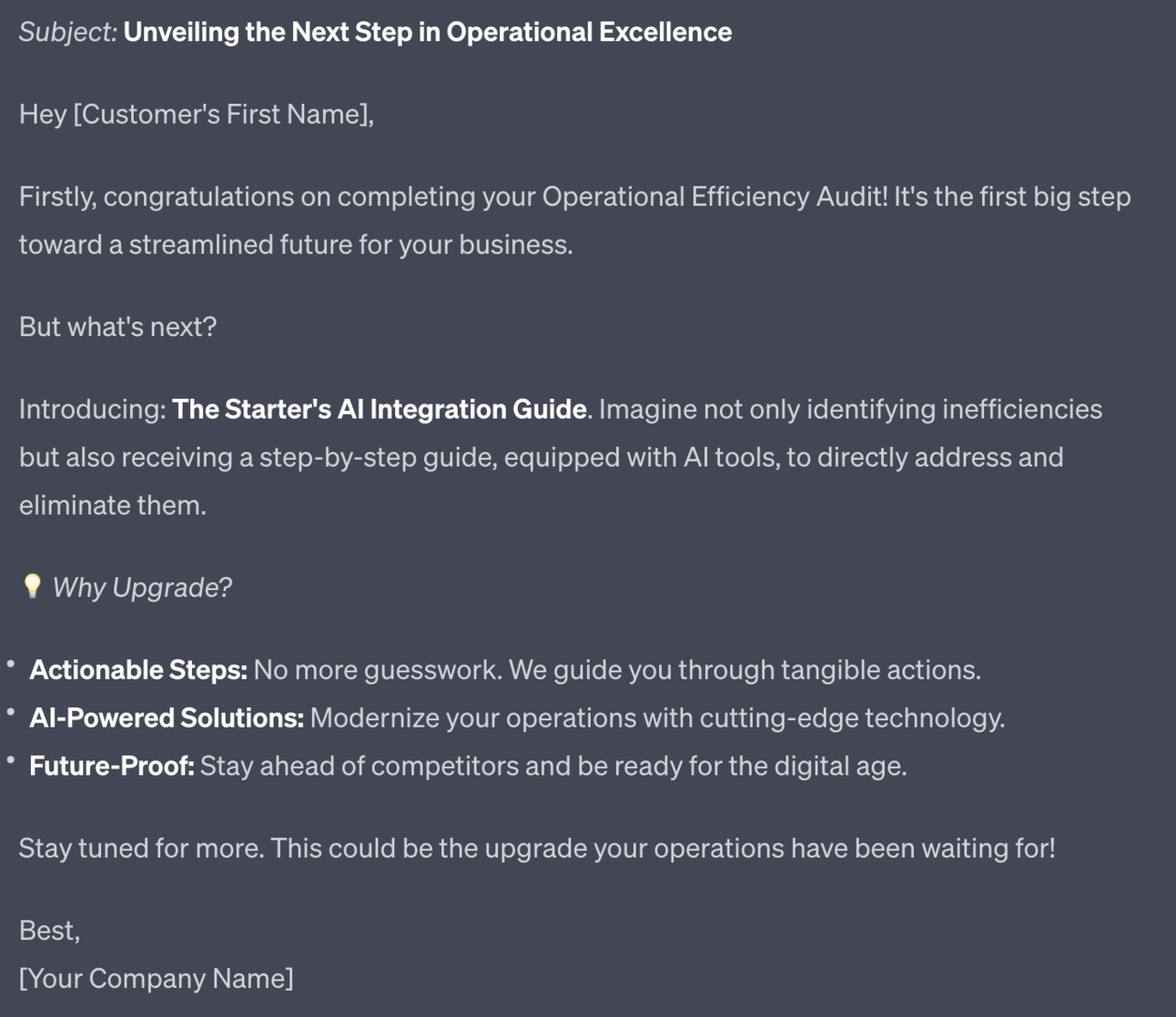
Next is a basic 3 email campaign to announce, remind and finally push for a sale. Adjust these and fill with more specific details. Here’s the first of three:
Finally the prompt generates some basic text for an upgrade webpage:
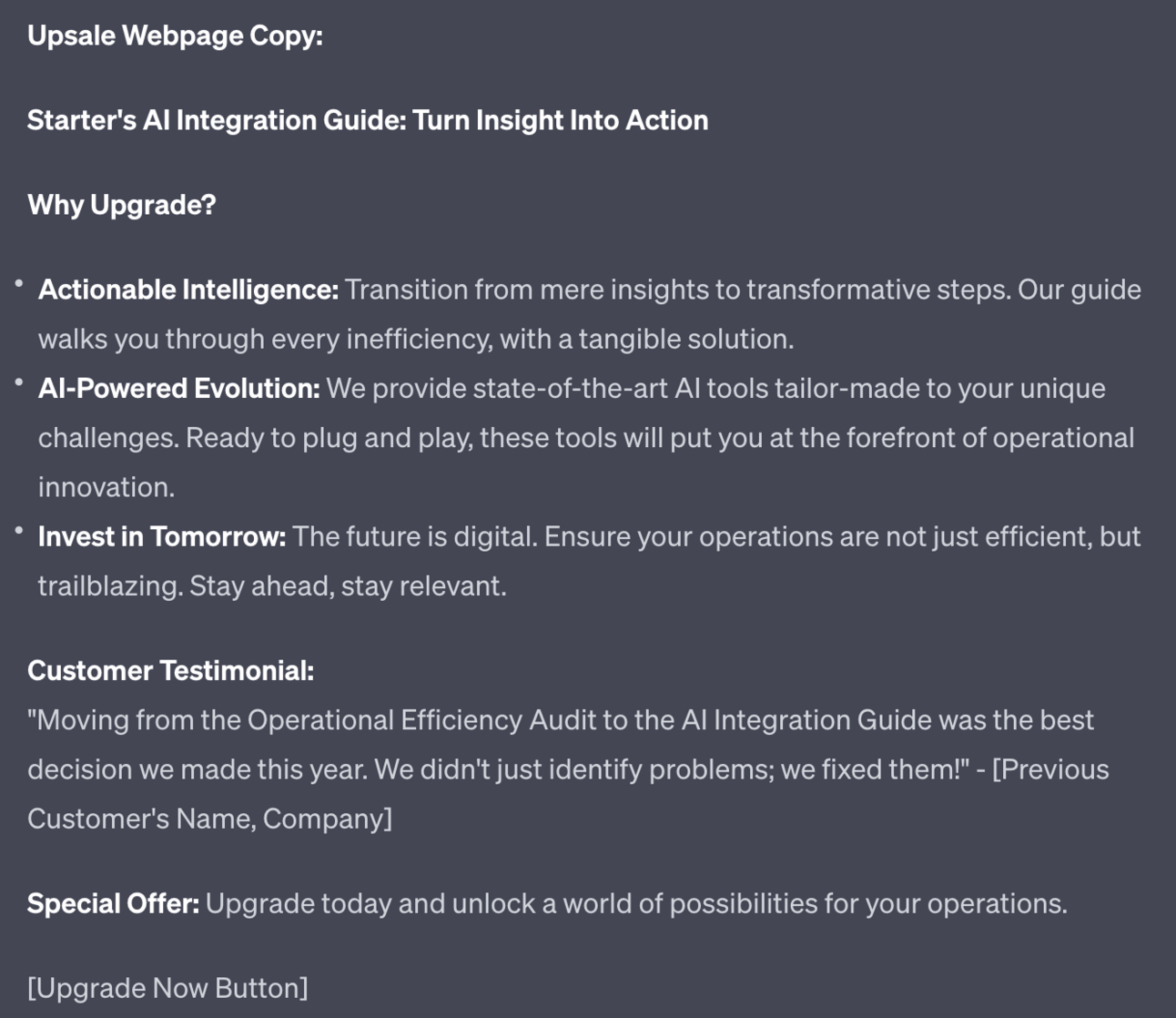
You can use this on a special upgrade version of the Gumroad product that you send specifically to people who have gone through the entry level product.
Perhaps think about offering a discount on this upgrade version too in order to thank loyal customers.
A second option for your core service is to launch it as its own thing.
This means it’s not just the second offer in your stack (ie. entry and then core) but also its own entry point.
This is a harder sale to make because the price of the core offer is higher than the entry level offer. However, because the price is higher there’s more reward for make sales directly at this level.
I recommend running both entry level and core offer in parallel, especially once your entry level offer is generating consistent work and doesn’t require much additional effort.
To launch the core product you run the whole process that we covered in Part 4 again, just with the core product instead of the entry level.
Remember we said that launching the entry level was your practice run? Now it’s time for the real deal!
There’s one addition. Now you want to offer customers of your entry level offer either a free session of the core product or a discounted “early bird” version.
As before we want early beta customers first. This allows us not only to test the service and refine it but also to gather up reviews and testimonials.
This time we are doing it with existing buyers of our entry level product.
If going free make sure to keep the numbers down and make them high value customers whose reviews and testimonials will have a lot of clout.
If launching a beta version discount for the first set of customers - keep the number low for exclusivity.
Here’s a quick prompt for inviting beta testers:
Act as a expert service marketer

Write a short email inviting customers of the entry level offer to beta test the core service

Emphasise limited slots, early bird access with discounts and bonuses to thank loyalty

Use a soft sell as these are existing customers and fans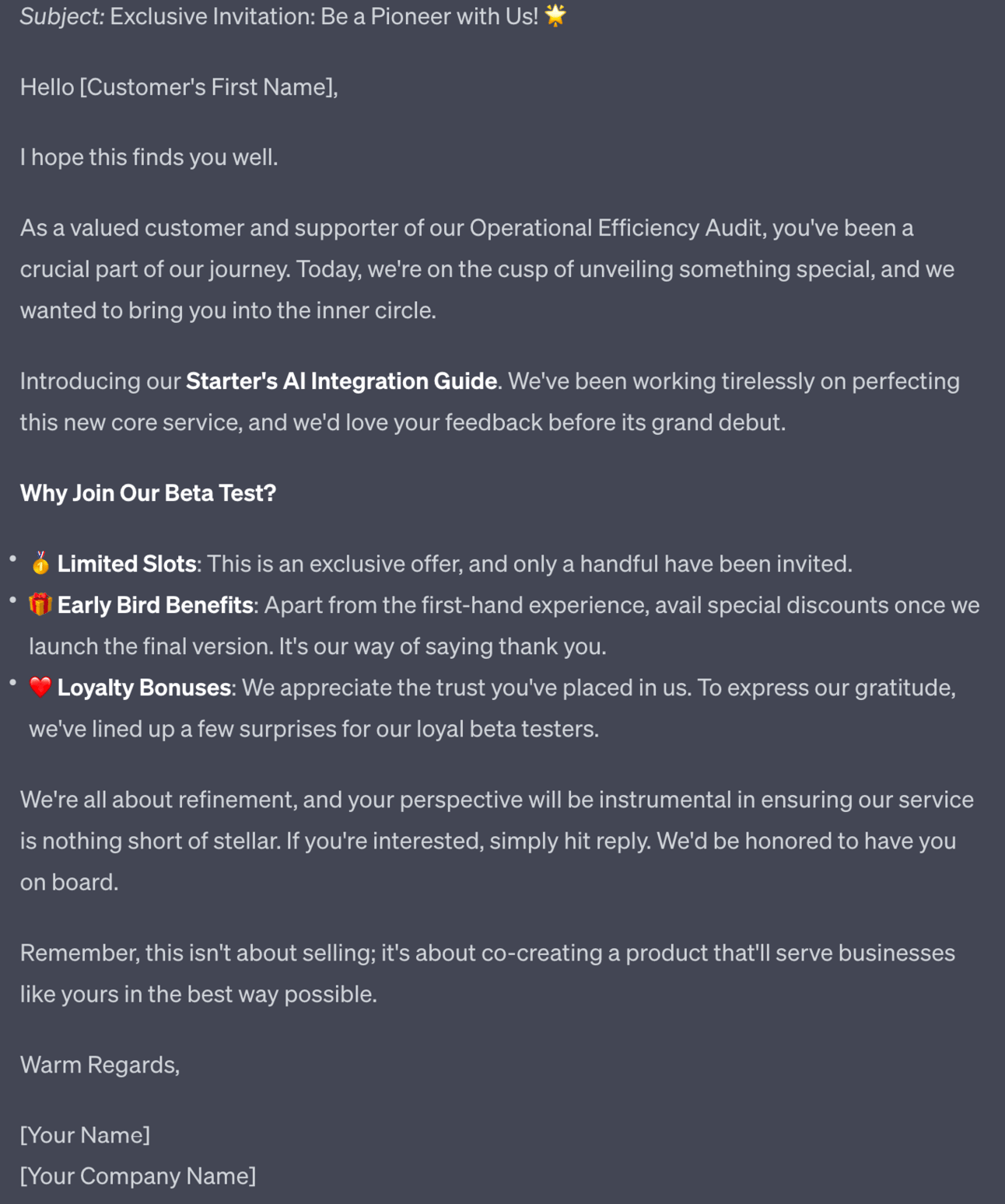
Notice pricing isn’t mentioned - instead we’re just gauging interest. Follow up with whether it’s free or paid, discounted or not.
Once you’ve got traction on your core offer we repeat the process for the premium offer!
We’ve already built the bridge between entry level and core.
Now we do the same from core to premium.
Run through this whole guide to create and market your premium offer and then repeat all the steps in this Part but with core → premium rather than entry → core.
I could rewrite it all for you but there’s really no point! It’s the same steps, just each time stepping up your game.
Each time you create a bigger and better service.
Each time your launch is bigger and better.
We’re simultaneously growing our service offer and our skills in building and launching.
Just repeat the steps but each time a bit bigger, each time building on your existing and growing customer base. It’s a fantastic feedback loop.
Here’s the real secret sauce though.
We designed the service stack to have 3 offers: entry, core and premium.
There’s no need to stop there.
If you are selling the premium offer well then there will be space for another even more premium service to follow on from that.
Go back and find your ChatGPT chat with the original service stack and use this basic prompt to extend:
Give me the next 3 steps

Include higher priced services and recurring cost services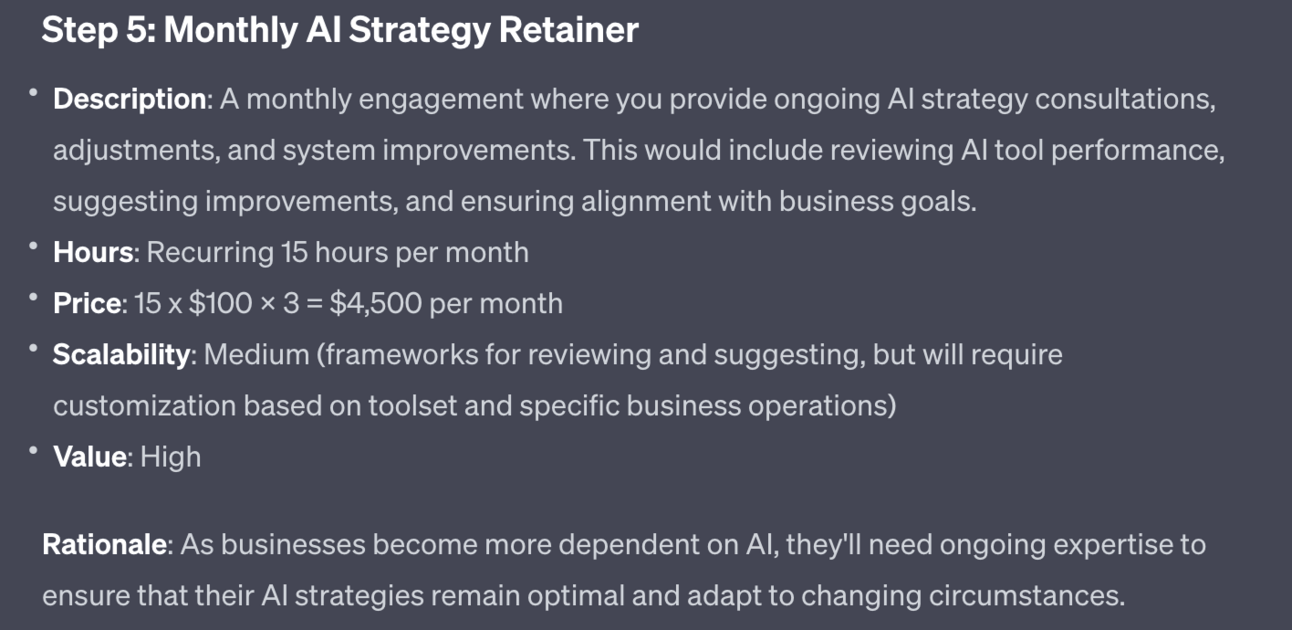
ChatGPT will generate more higher cost and recurring income services. The above is an example of a $4500 retainer service you could add into your stack.

Subscribe to the Premium Membership to read today’s Premium Prompt on how to add high-ticket services to our product mix.
Free Premium trial below.
As you scale up and introduce more and more services you will hit the main challenge with services: time.
You only have a certain number of days per week to provide services. Unlike products services do not scale well. That’s part of why they allow you to charge a lot more.
As you fill your calendar though you’ll hit an upper limit of income from services.
One option here is hiring. That’s definitely a possibility but it’s beyond the scope of this Playbook.
Another is the idea of productised service.
This is a highly standardised service that is sold like a product, with clearly defined parameters and pricing.
Generally it requires very little input from you the business owner. For this reason the process is generally automated.
Here’s the prompt:
[Copy/paste your product name, description]

Explain how I could create a productised automated service

It should require minimal operational input

Explain the steps, tools and deployment plan, giving detail examples

Provide a flowchart of the process, including human steps, tool steps and connections

Highlight who could develop each piece, their role, where to hire as a freelancer. Combine the tasks into as few roles as possible and provide task descriptions for a job posting for each role. 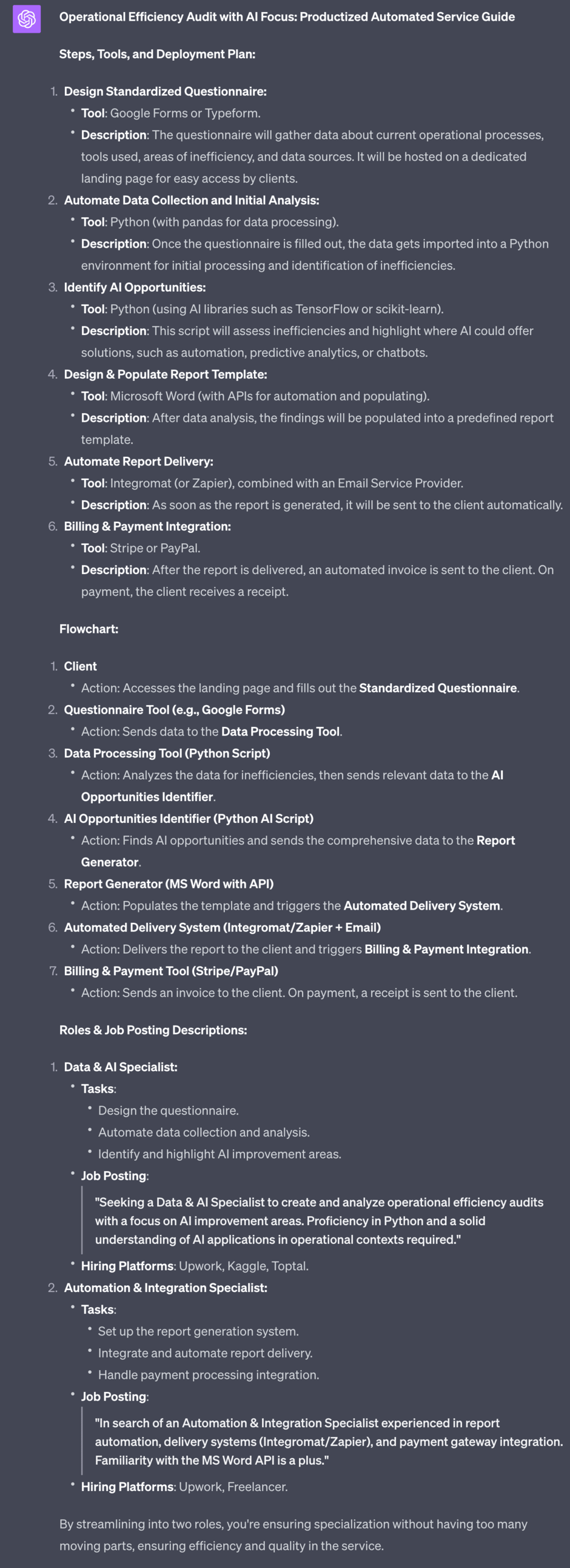
This prompt generates a plan for productising a service including an outline of the process, a flowchart and the roles you’ll need to hire to get the work done.
This is just a starting point obviously but gives you a framework to develop the whole productised service so it can be automated and free up your time.
Throughout this Playbook we’ve put together and deployed a service offering for our business.
We’ve used an approach that will de-risk the whole process- introducing piece by piece and constantly working alongside customers to make sure our offer is valuable.
And you are now in a position to not only extend the service offering but also begin to automate and convert elements into productised services.
A reminder of what we’ve covered this week :
Part 1: Service offer ideas
Part 2: Design your service offer
Part 3: Deploying your service offer
Part 4: Market your service
Part 5: Premium service offer expansion
See you tomorrow Prompt Entrepreneur!
Until then, keep PROMPTING!
Kyle
Unlock the potential of artificial intelligence with our comprehensive playbook, '👨💻 Building Online Services with AI | Prompt Playbook.' This guide is designed to empower entrepreneurs and service providers to leverage AI in creating, marketing, and scaling their online service offerings. Discover how to identify customer needs, design effective service stacks, and transition from entry-level offers to premium services, all while utilizing the power of AI to streamline operations and enhance customer experiences. Transform your business model and achieve greater success with actionable strategies that drive results.
This playbook is designed for entrepreneurs, freelancers, and small business owners who are looking to harness the power of AI to create online services that resonate with their target audience. If you're struggling to differentiate your offerings, attract customers, or scale your business, this playbook provides the insights and strategies you need to overcome these challenges. It's perfect for those who aspire to innovate in the digital space and are eager to learn how to effectively integrate AI into their service delivery models.
No prior AI experience is required! This playbook is designed to guide you through the concepts and applications of AI in service offerings step-by-step.
While results vary based on individual implementation, many users report seeing initial improvements within a few weeks of applying the strategies outlined in the playbook.
Yes! Whether you're in consulting, freelancing, or running a small business, the principles and strategies in this playbook can be tailored to fit various industries.
This playbook includes guidance on how to brainstorm and validate service ideas, making it ideal for those who are just starting out.
Many of the strategies focus on leveraging existing resources and skills, allowing you to implement them with minimal financial investment.