
AI Knowledge
Unlock the potential of artificial intelligence in your business with the '⚖️ Building an AI Power Team | AI Business Playbook'.
Start ReadingIt’s stuff that when reading through people might think “well yeah no shit Sherlock. Of course I can get AI to do that for me…duh”.
And that’s entirely true! Anyone can. AI is that good.
What is harder though is coming up with the initial use cases for AI.
It’s the skill of having a problem in business and immediately knowing the solution is “let’s get AI to help here”.
That’s the skill I want to impart on everyone.
Not the specific prompt, but the skill of using AI to solve problems.
Whether it’s in the newsletter, my videos, consult calls or my workshops this is my aim.
If you start to turn to AI first when solving a business problem then I’ve done my job.
This week is all about that. Giving you a power team of AI experts you can call upon.
We’ll cover:
Part 1: Expertise at our fingertips
Part 2: Legal back and forth
Part 3: Financial scenarios
Part 4: Marketing water cooler
Part 5: Technical show me the problem
Let’s get started:
Expertise at our finger tips
drowning in complexity
control complexity with expertise
building your power team
due diligence
Starting and running a business is complex.
Beyond the idea itself you need to be able to juggle value delivery, operations, marketing, sales, IT/tech, finance, accounting, bookkeeping, legal matters and much more.
It’s this stuff that makes it hard to build a grow a business.
As an entrepreneur you’re wearing so many hats and spinning so many plates that it’s easy to get overwhelmed.
Because no one person can be an expert in all these madly diverse fields….
…the idea and value gets buried under everything else.
It’s for this reason we bring in external expertise.
This could be by hiring someone for a job. This could be by bringing in equity partners.
Or it could be by paying someone for their expertise.
For instance most businesses pay for a bookkeeper and an accountant yearly to manage those aspects of the business.
Or you could pay for consultants, mentors and coaches on a hourly or retainer basis so you can tap into their experience as needed.
I highly recommend you hire experts like this for certain jobs. It’ll accelerate your business by letting you focus on what you do best.
But…we don’t necessarily all have the funds to do this. Especially early in our business.
For instance to get a contract drafted by a lawyer might end up costing you more than you’ve paid yourself in 6 months. Unless you have external funding (and even if you do..) this is not ideal!
For this reason I’m covering how to build a power team using AI this week.

A power team is basically a set of professions or role that work really well together.
In real estate for example it’ll be your mortgage broker, builder, surveyor, tax specialist, realtor, property sourcer etc.
Your exact team will depend on your industry. But there are consistent expert roles:
legal (solicitor/lawyer)
financial advisor
marketing
IT/tech
This week I’ll be covering these roles one at a time and showing you how to use AI to have your own free expert in each role.
I’ll also cover four methods for using AI to get expert advise that you can trust. Specifically:
using iterative prompt chains to secure quality of advice
scenario analysis
informal advisory chats
visual diagnosis of problems
The aim here being to give you a team of expert (and multiple ways to work with them) for a fraction of the price of hiring.
Got to have this bit right. Hell, ChatGPT told me I should. So, following my own advice here it is!
We’re going to be using AI in each case to inform and prepare first drafts of legal documentation, financial analyses, marketing plans and tech recommendations.
If you are making a big (and expensive) decision based off this advice you need to do your due diligence. Hell, you’d do this with human advice too I hope.
I’m going to be showing you (in the next Part) how to vastly increase the quality of your outputs. But still, important work like this needs checking.
For example if we put together a contract with AI (I’ll show you how to do this very successfully) we can still take it to a lawyer to have them “sign it off” as good.
One hour of a lawyer’s time to punch holes and make changes to an already written contract costs a tiny fraction of what you would pay if you had a lawyer prepare a contract from scratch.
You get the same results for 1/20th of the cost because we did pre-production to get us 95% of the way there.
Sounds good?
Let’s get started in the next Part.
Keep prompting,
Kyle
We’re starting strong with the most expensive power team member : legal aid.
I did a quick check and a lawyer in the UK for the sort of work we’ll be covering costs £250/hour (~$320).
If you are a growing business it’s hard to justify that. Thankfully there’s now an alternative.
We’ll look at how we can use AI for legal matters when building a business.
Let’s get started:
Legal Back and Forth
Lawyer GPT?
interviewing technique
iteration technique
First up, the obvious legal disclaimer.
I’m not a lawyer. ChatGPT is not a lawyer. You should still seek legal advice when required.
What we’re talking about in this Part is using ChatGPT as a first step. And then continuing your legal work with a legal professional as and when required.
We’re also not talking about ChatGPT representing you in court or anything like that. We’re talking about using ChatGPT to help with low level legal inquiries and documentation - much like a paralegal would.
And here’s something legal companies probably don’t want you to know. A lot of their work is boilerplate.
Think about it. If a firm specialises in housing deals or employment contracts do you think they are writing each document from scratch each and every time?
Of course not!
They have boilerplate templates and they adjust them each time. ChatGPT isn’t much different here.
This is also partly why the legal industry is one of the most susceptible to AI automation (#2 with 44% of jobs exposed):
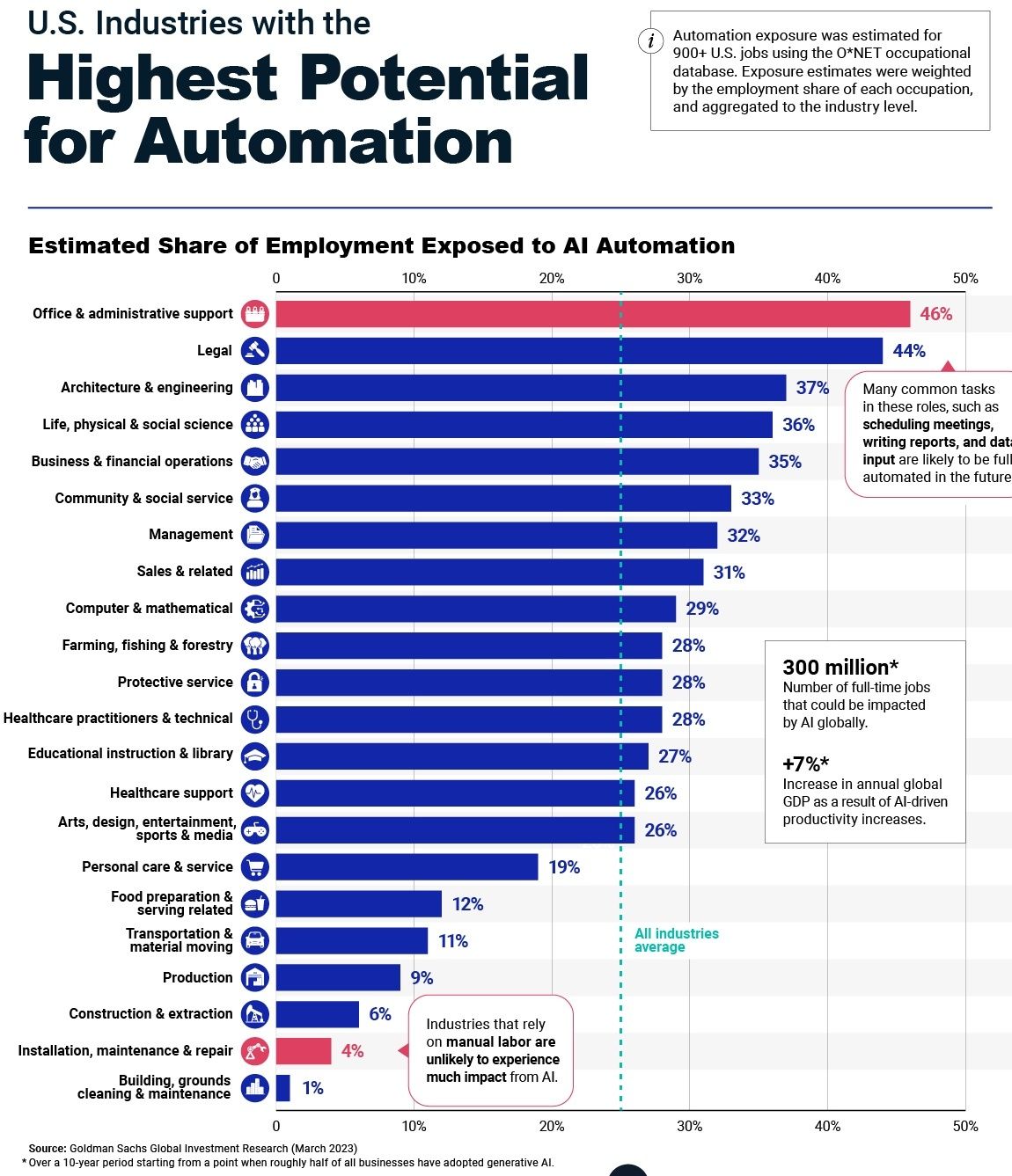
Let’s do this with a simple independent contractor agreement using ChatGPT.
We’re going to explore two techniques along the way: interviewing and iterative.
We’re doing this with a simple independent contractor agreement.
Here’s a prompt:
You are a legal expert helping me to prepare an [independent contractor agreement]

Interview me to collect all of the information you require to prepare this document.
ChatGPT is going to go ahead and barrage you with questions. Here’s the first half:
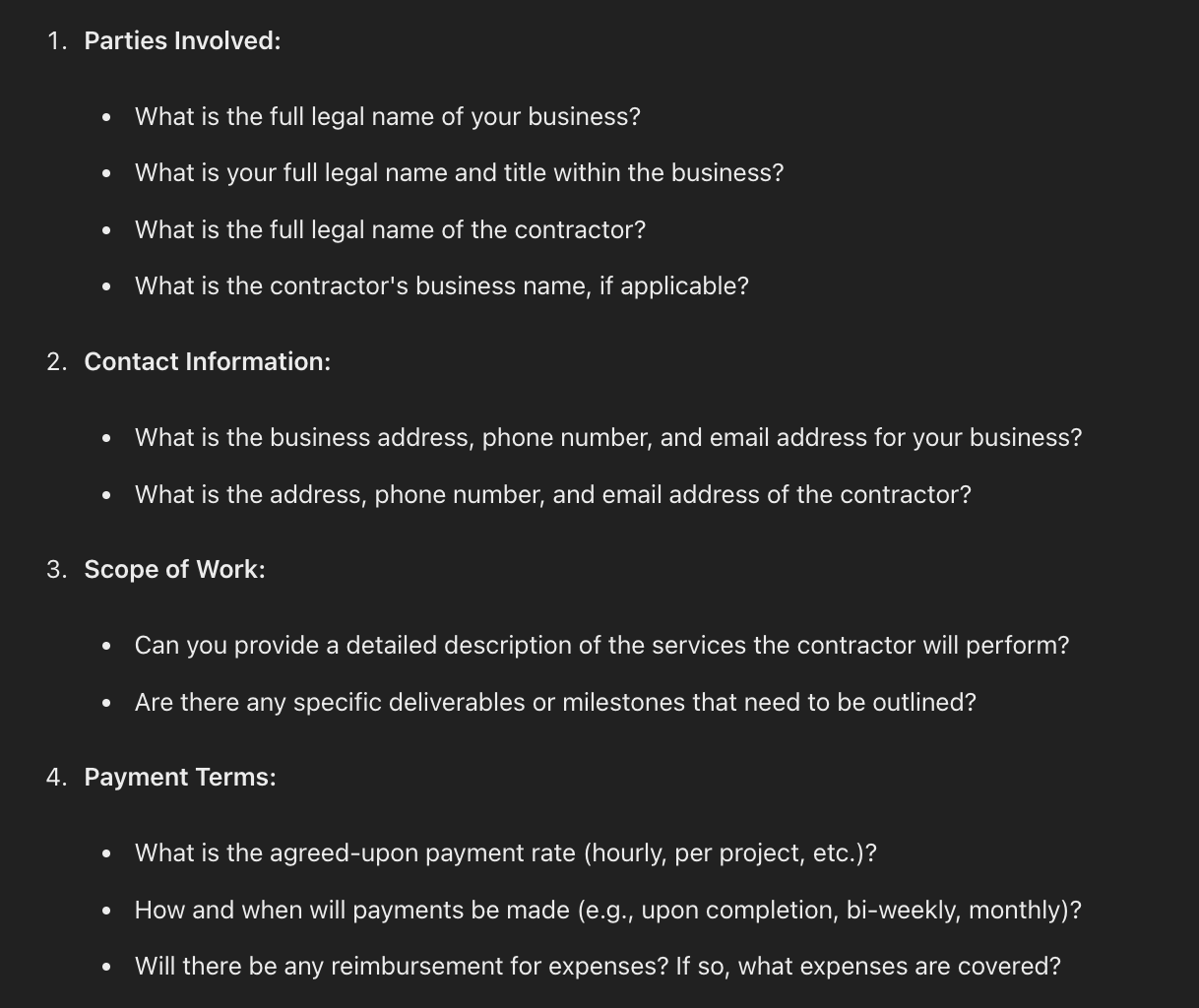
Provide all of the information required. Just as if you were doing this with a law firm.
Don’t know the answer to a question? Ask!
For example “How and when will payments be made?”. Let’s say we don’t know the answer here. I would ask “what’s the standard term in my industry?" and provide some information about my industry.
Once all the information has been collected give a follow up execution prompt:
Write up the agreement in full in standard legal language.ChatGPT will go ahead and prepare a draft for you like so:
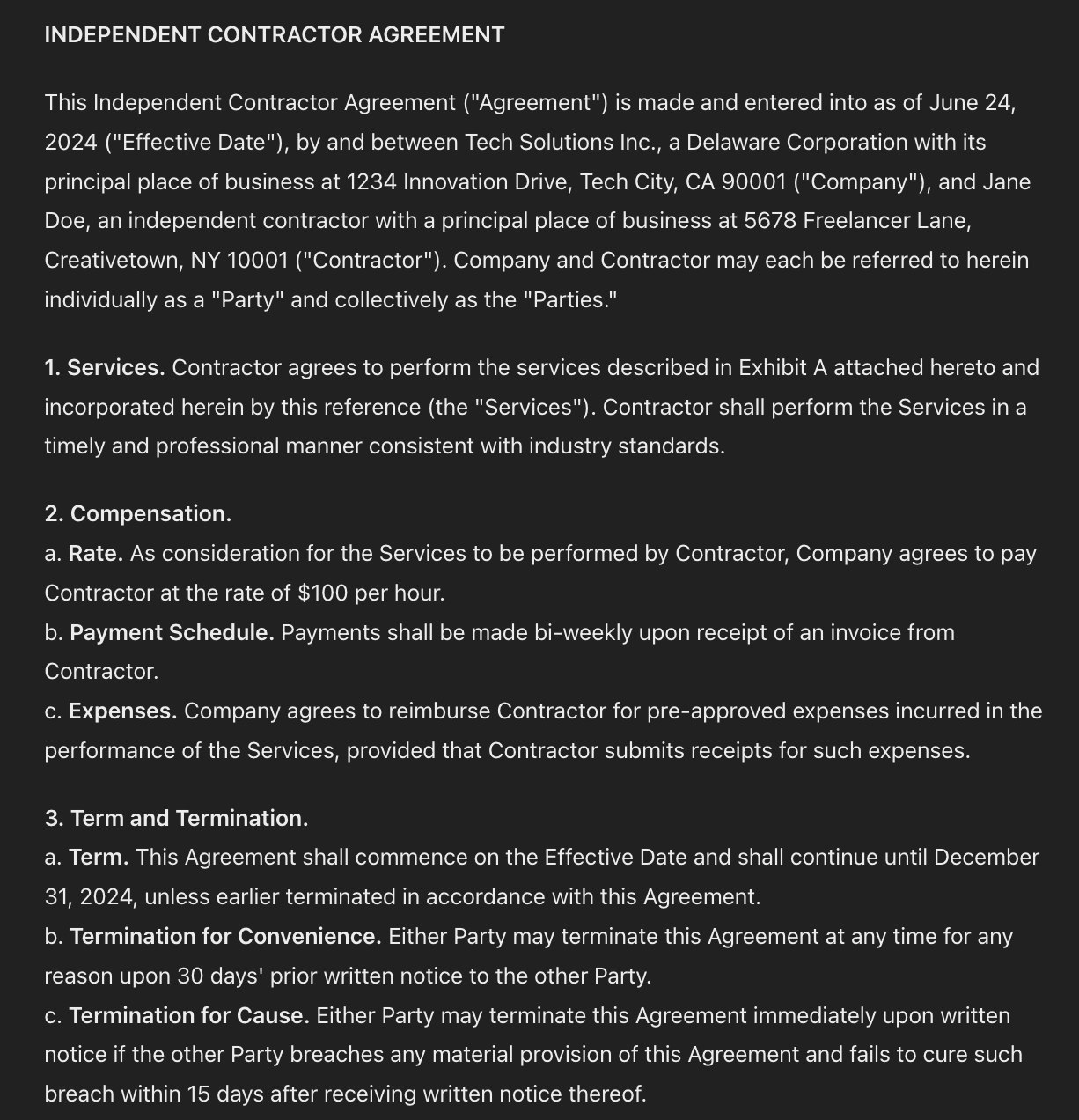
(This agreement has placeholders - yours will have the information provided).
Pretty damn good!
So we’re all done and can send this off now right?
No! This is how people get in trouble with AI.
And this is going to be a legal document. So hold your horses.
What we’ll now do is a process of iterative improvement.
I’m going to copy the whole agreement and bring it to another chat.
Here’s the prompt:
Act as a legal expert. Review this [independent contractor agreement] and provide feedback
Specifically:
1. what is missing from this contract
2. what terms are unattractive for the first party
3. what terms are unattractive for the second party

[copy paste document]
ChatGPT will spin out feedback. Here’s what’s missing:
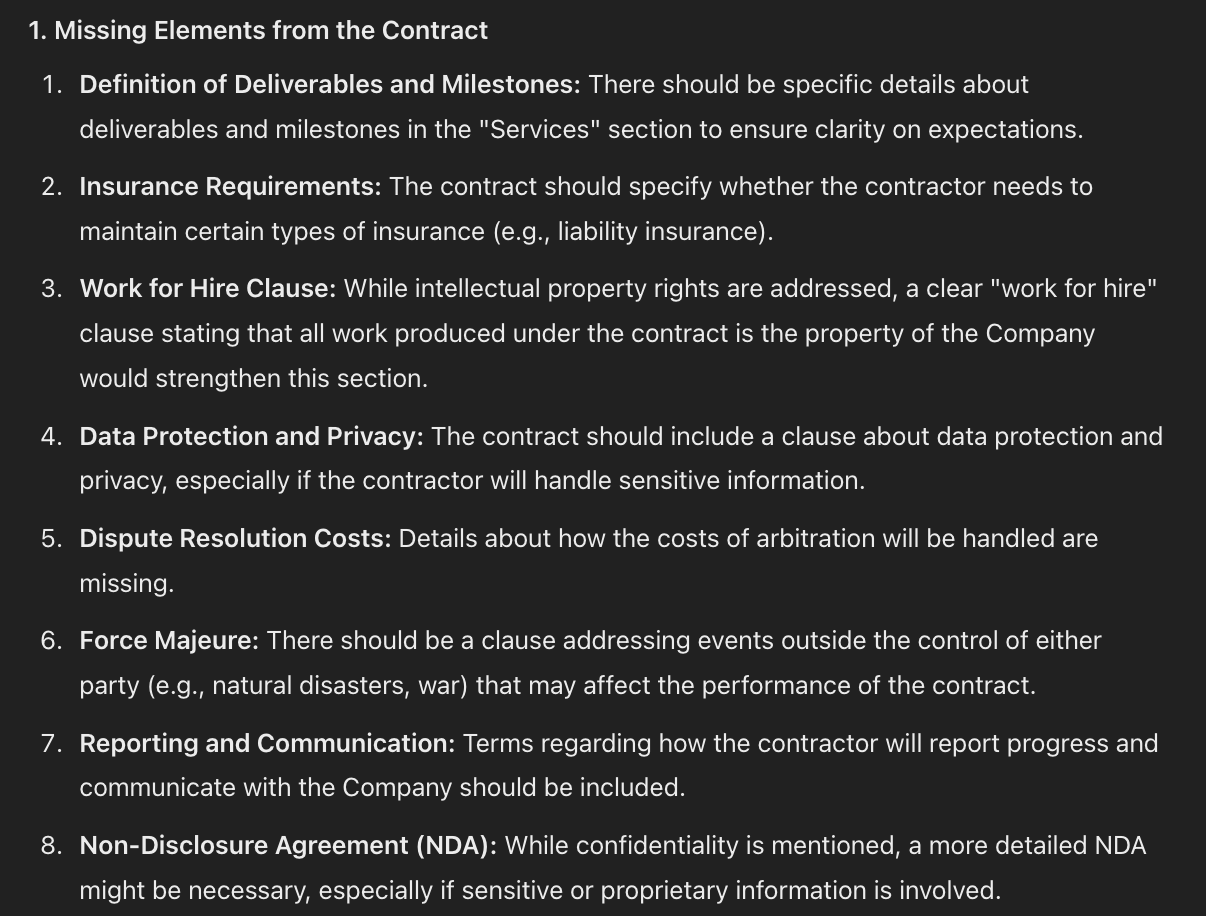
It will also highlight terms and clauses that are unattractive to each party. Here are the terms unattractive to the independent contractor for instance:
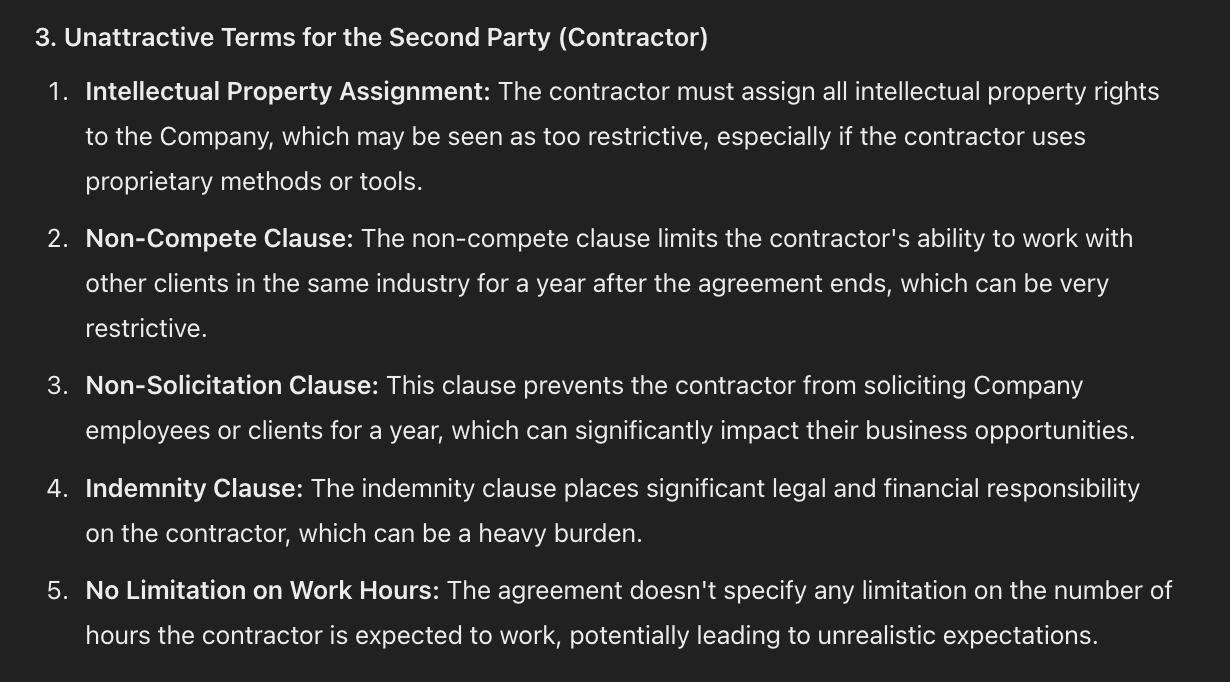
What you are getting here is a legal review of the document.
Go ahead and tell ChatGPT to make changes based on this feedback.
For the missing elements for example you might just say “add all these missing elements” and ChatGPT will redraft.
Once we’ve got a new draft we are going to do the same again.
We copy our new draft and use the prompt above again. Do this in a new chat. The analysis will be run and different problems will be highlighted.
Continue this process, refining iteratively, until the recommendations coming back are so minor it’s no longer worth the changes.
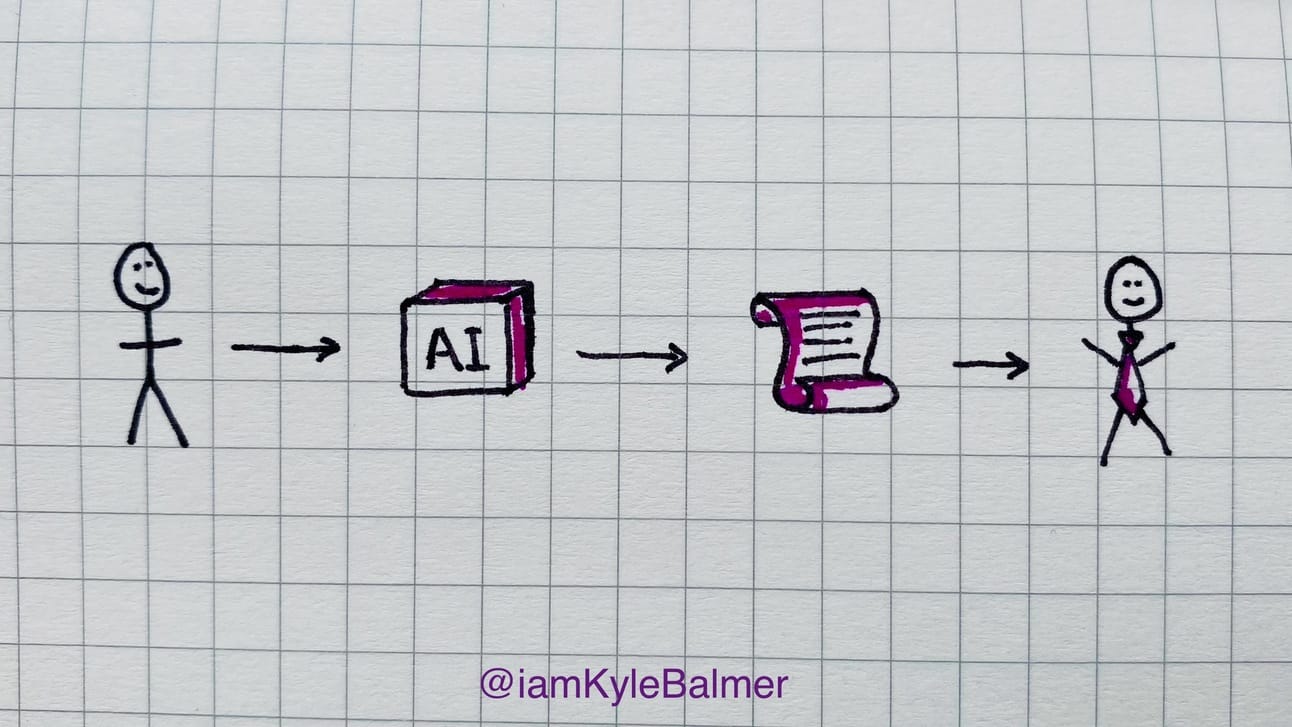
At this point you’ll have a pretty tight document in place.
Depending on the importance of the document you can now send this draft to a legal firm for final checks.
Instead of paying a solicitor £250/hour for 10 hours of work (£2500) I’ll pay £250 for one hour of checking and confirmation.
I recently used this process and got back one very minor emendation from the lawyers. It seemed like they suggested the change because they felt a little silly not having anything to say…
This is not about writing Independent Contractor Agreements.
The exact prompts being used isn’t important in this Playbook.
What’s important is what you are using AI on and how we can get better results through more advanced techniques.
In this Part we used a basic legal document as the example. You can expand this out to any legal document. As well as use it to analyse legal documents given to you by others. This is the broadening of usage horizons we are looking for.
Equally, the two techniques I’ve shown you (interview and iteration) aren’t only for legal work. They can be applied in any field. Want to write a blog article and don’t know how to start? Get ChatGPT to interview you. Then refine the piece by using iterative feedback and improvements.
By doing you move from a basic to an advanced user of AIs like ChatGPT.
Keep prompting,
Kyle
Having someone to talk to about high level financial plans and strategies is extremely valuable.
We’re talking growth plans, pricing structure and how to finance it all. Big picture.
Rather than everyday tracking, monitoring and reporting - ie. accounting and bookkeeping.
Generally the strategic high level ideas would come from the CFO or a high level finance advisor. Which is overkill for newer businesses.
But we’re going to use AI to get us started.
Let’s get started:
Financial Scenarios
start with interview
scenarios and KPIs
sensitivity analysis
financial plan
We’re going to start by having our new CFO interview us. Just like we did in the last Part about our legal queries. We’ll use the interview technique to help ChatGPT gather up the information it needs from us.
Let’s start with that prompt:
As my business financial strategist interview me about my business to collect information

First ask me what my goal is (provide examples) and wait for my answer
Collect my goal first and use it to know what subsequent questions to ask.
Then gather all the information you require to make recommendations
ChatGPT will go ahead and interview you.
Here’s some recommendations I got (first 2 of 10!) for an example of increasing revenue by 25% from 100k to 125k in a year:
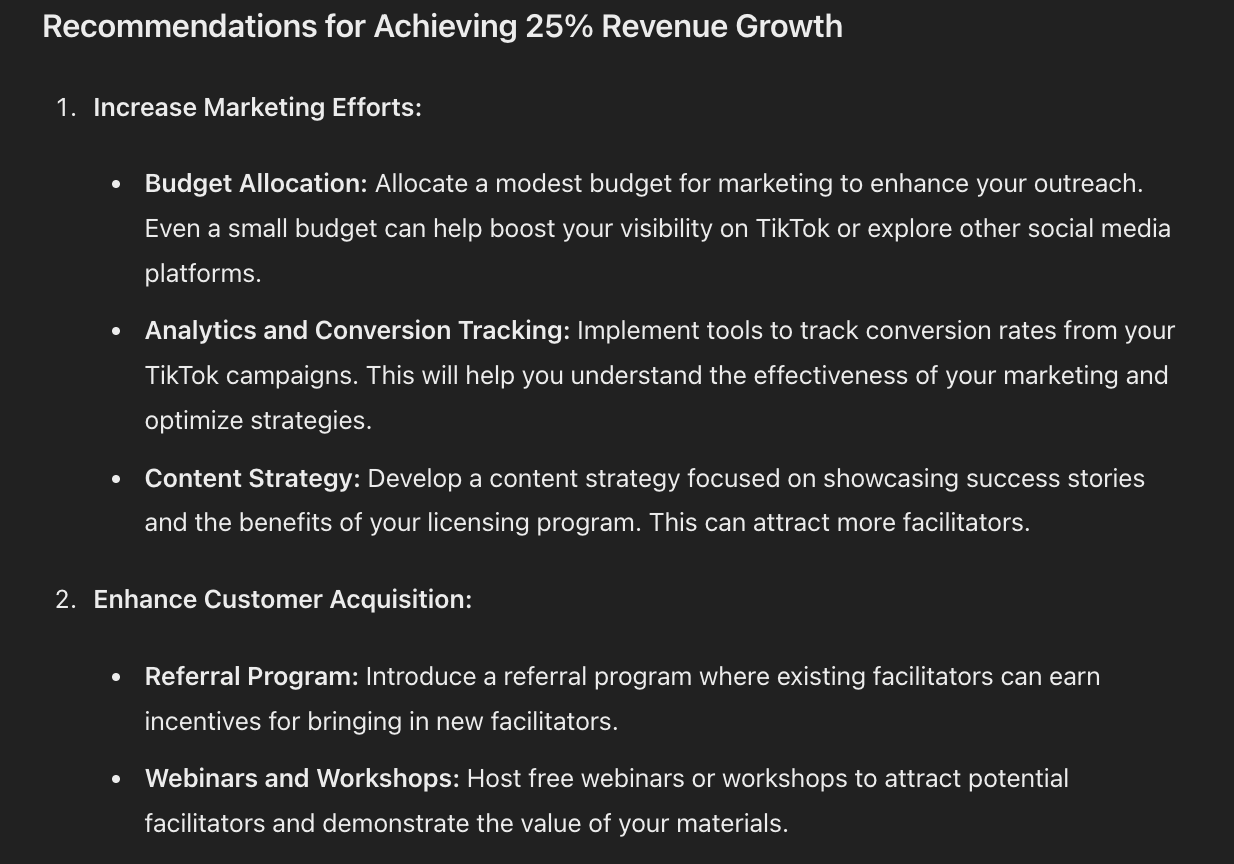
This is already useful. But it’s a little generic. Unlike most users we won’t stop here.
Let’s add some teeth.
Let’s get ChatGPT to make this actionable.
Use this prompt below the current work:
Use your analysis to prepare a scenario analysis
Decide on the KPIs for the businesses and present how they interact
Design a table showing potential scenarios
This will get ChatGPT to work out the main drivers of your business and provide KPIs connected to your financial goal. It’ll also prepare some different scenarios for how your plan could go:
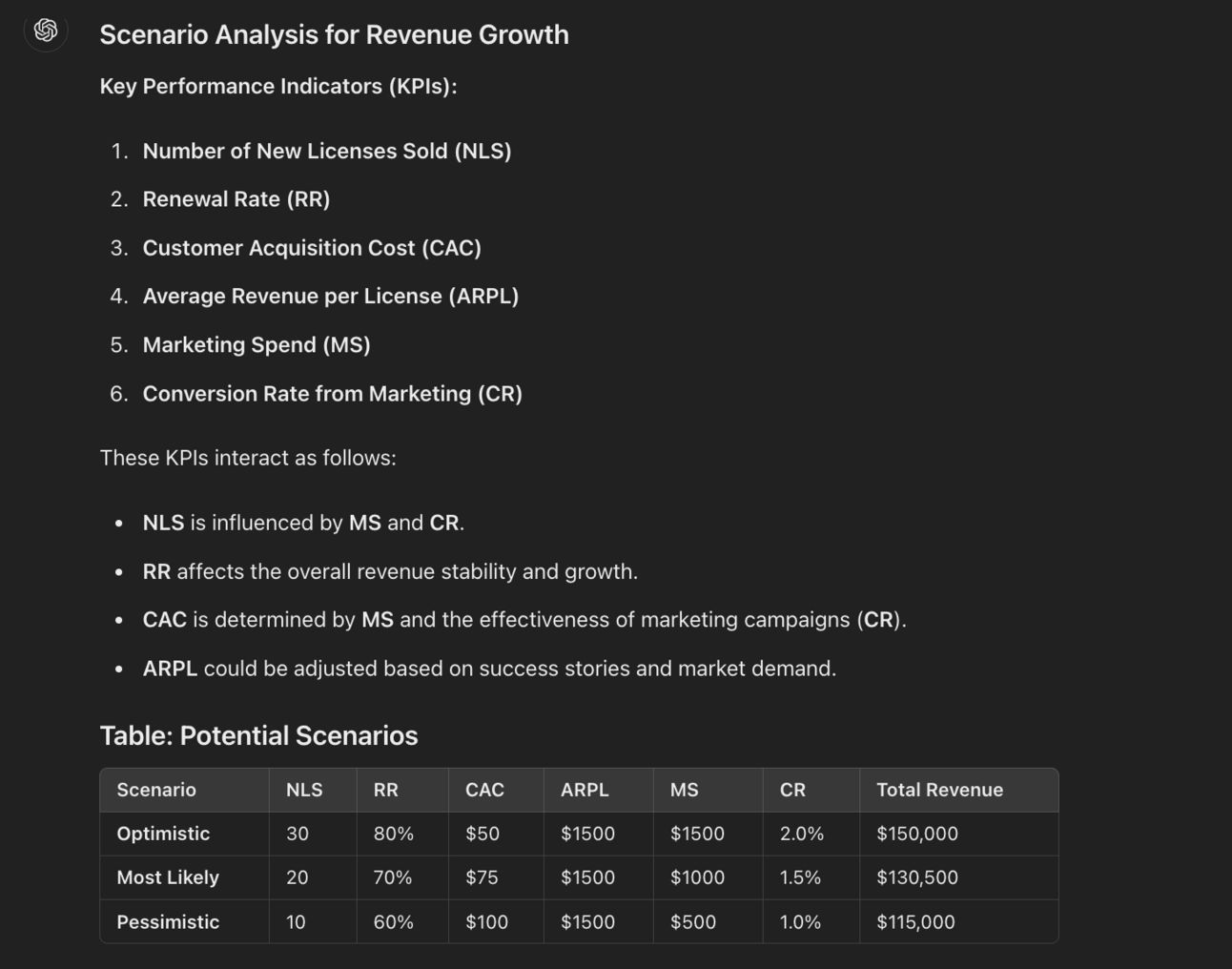
as well as detailed outlines of the scenarios:
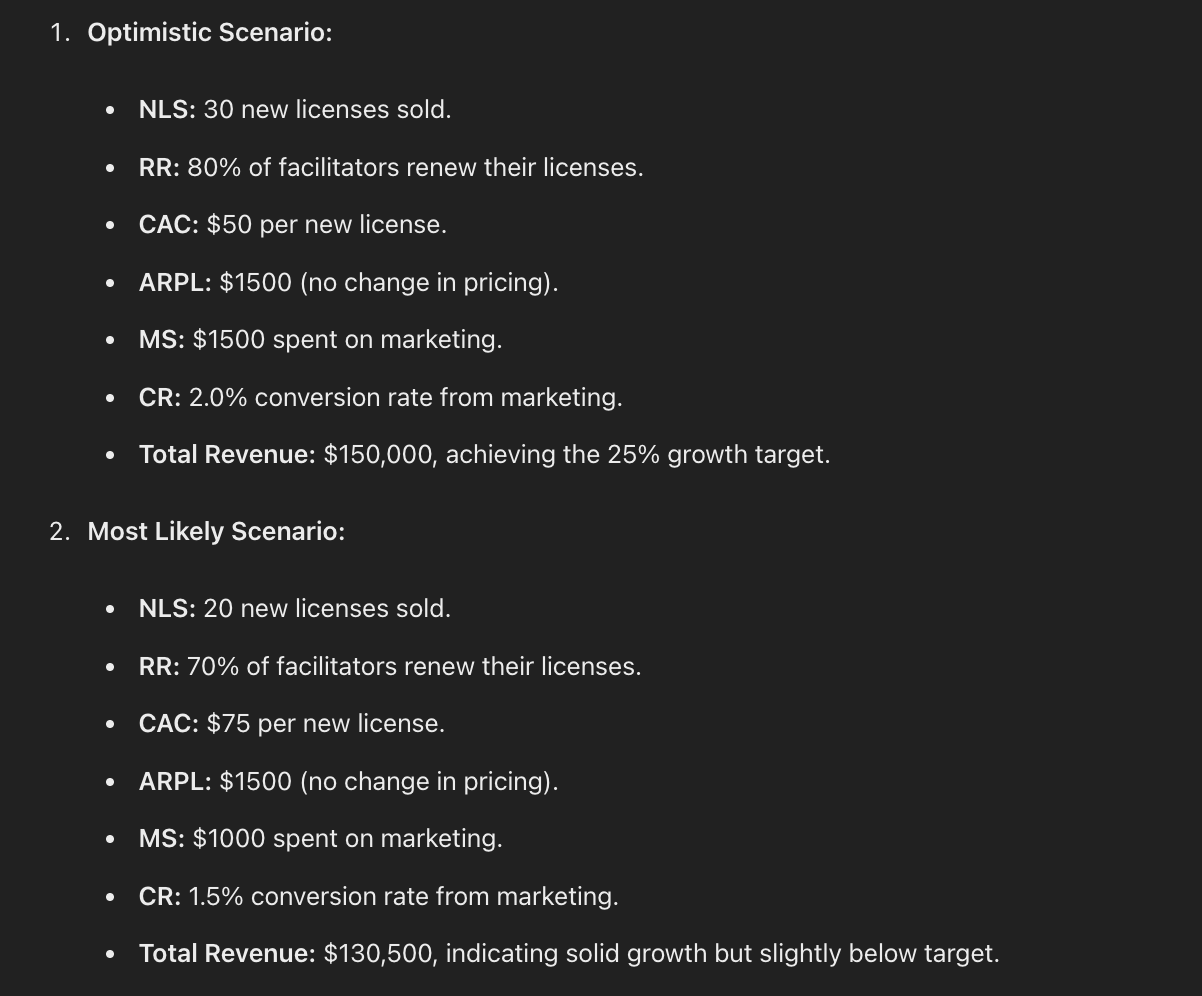
One step further let’s ask for sensitivity analysis so that we can find the points of maximum leverage.
Perform a sensitivity analysis on the variables
List the highest leverage variables
This will lead to ChatGPT adjusting the variables one at a time to find the most impactful:
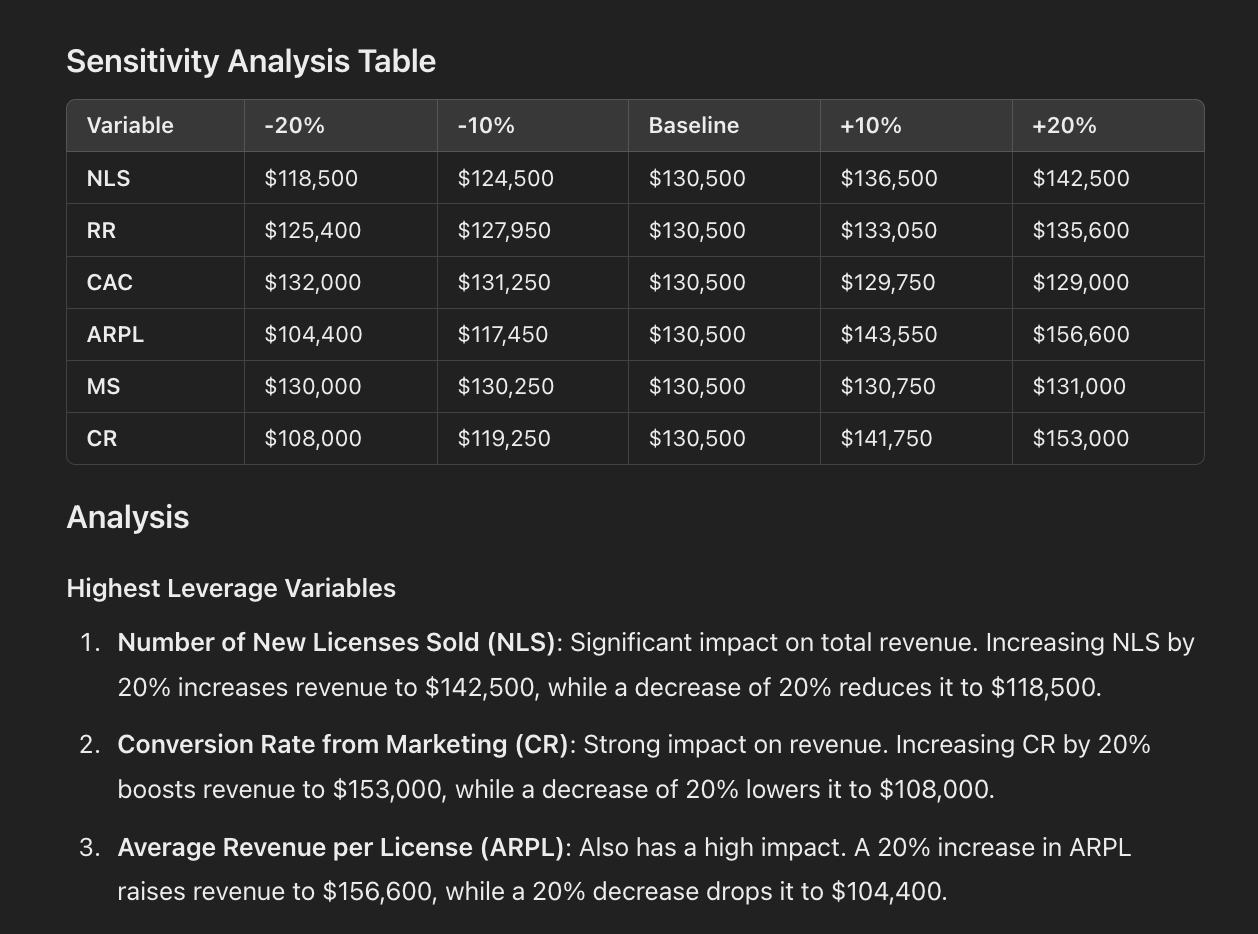
This is incredibly important information for a growing business and the sort of stuff a good CFO would be working out for us - cutting away the cruft and stripping the business to its bare bones.
We can now pull it all together with a concluding prompt:
Using this analysis prepare a full project plan with tasks, timelines and KPIsThis will lead to a month by month financial growth plan for your business that you can actually get to work implementing:
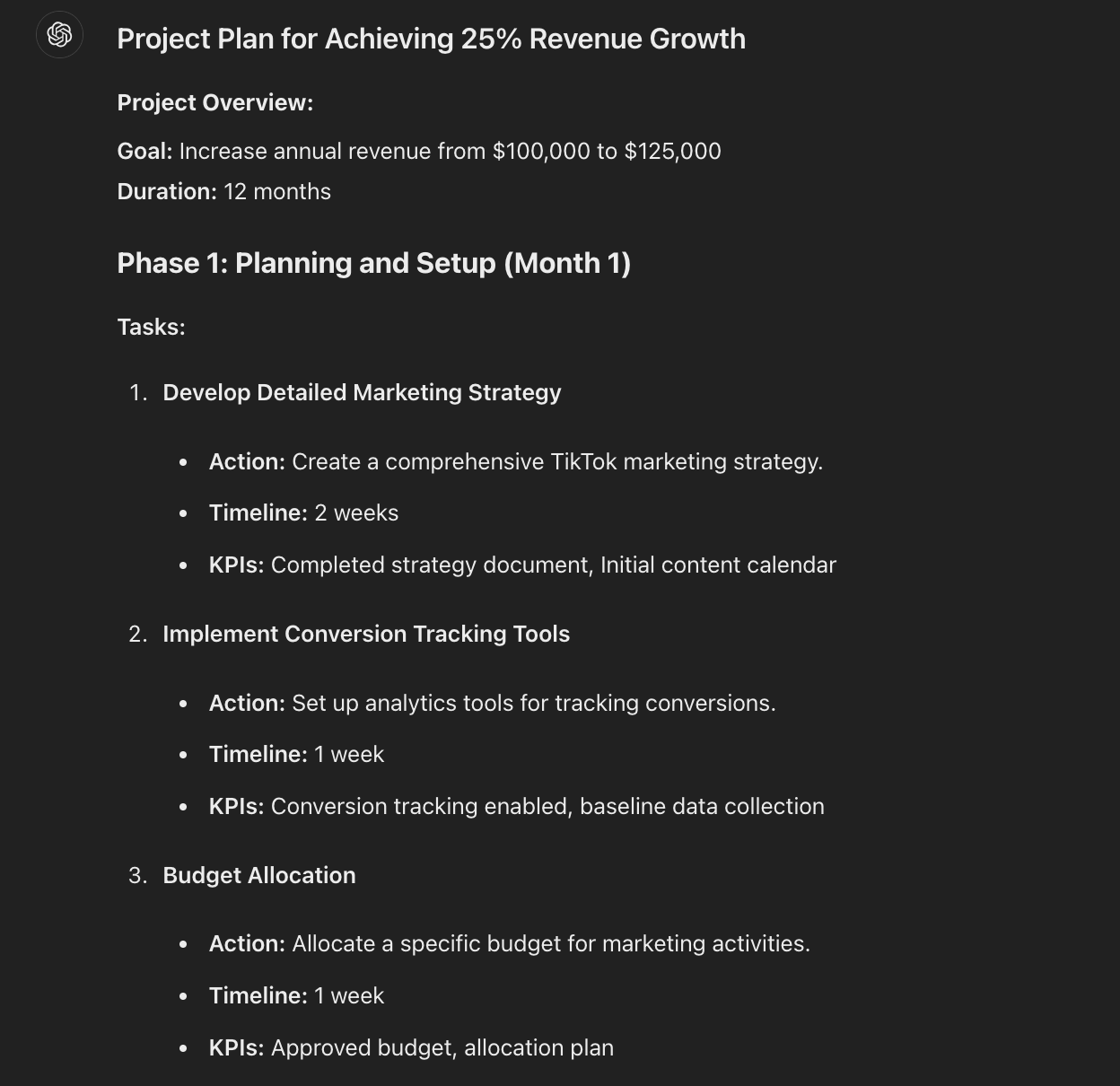
Of course we can ask for each element of these to be detailed into further broken-down steps for us to feed in our project management tool.
What we end up with here is a very detailed financial analysis and breakdown of our business along with a plan for next steps.
Give it a go on your business to see what your AI CFO recommends.
Keep prompting,
Kyle
Sometimes we don’t need to have a full “work session” with ChatGPT and just to run some ideas past it.
Let’s look at how best to put Chat into advisor mode.
Let’s get started:
Marketing Water Cooler
use talk mode
anti-agreeableness
summarise with action
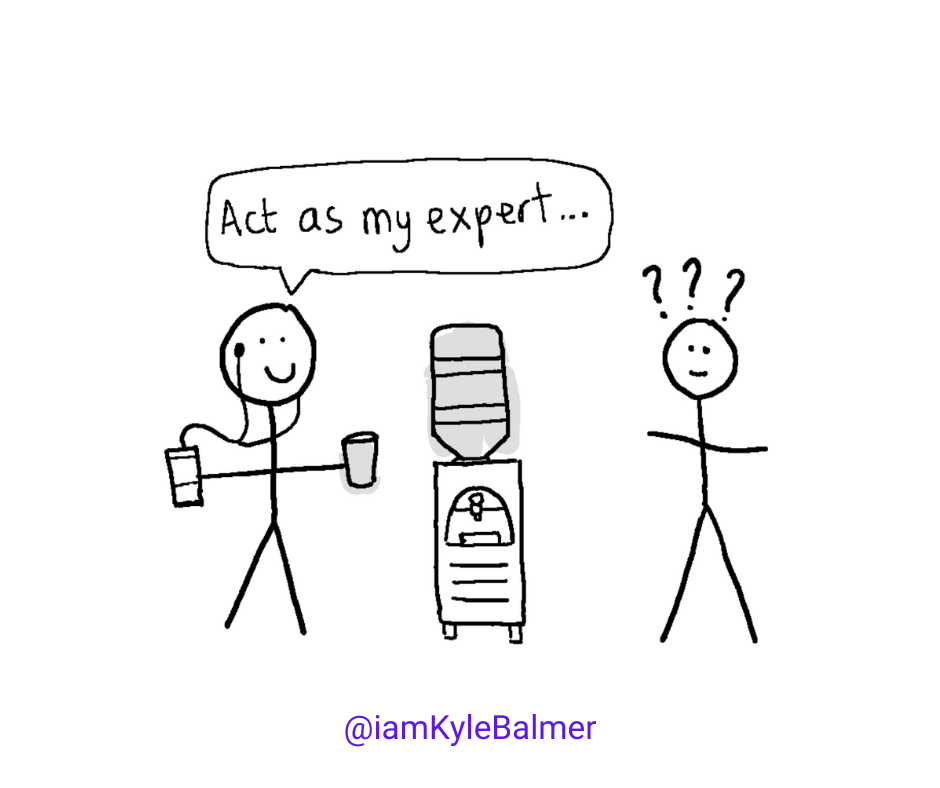
A service I provide to students is marketing mini-consults. Basically I ask students to send me some information and then off the back of that I shoot a quick 5-10 minute video providing an answer.
I’m able to give quick off-the-cuff answer because I’ve worked in digital marketing for years.
A lot of the time that’s all someone needs to remove a block and to get on with implementation. Quick expert advice and off they go.
ChatGPT is the perfect pocket advisor if you need this sort of nudge!
Got a question? ChatGPT can answer for you.
And to make this even more accessible we’ll use voice mode.
Not enough people use ChatGPT’s audio mode which is a crying shame.
I love to walk and talk with ChatGPT. I’ll stick in an airbud and then go for a walk.
On the walk I’ll send queries to ChatGPT and have a full conversation as if I’m chatting with an advisor.
To access the voice mode on your phone tap the Headphone icon. Yes, it’s headphones not a microphone. And no, that doesn’t make sense I agree.
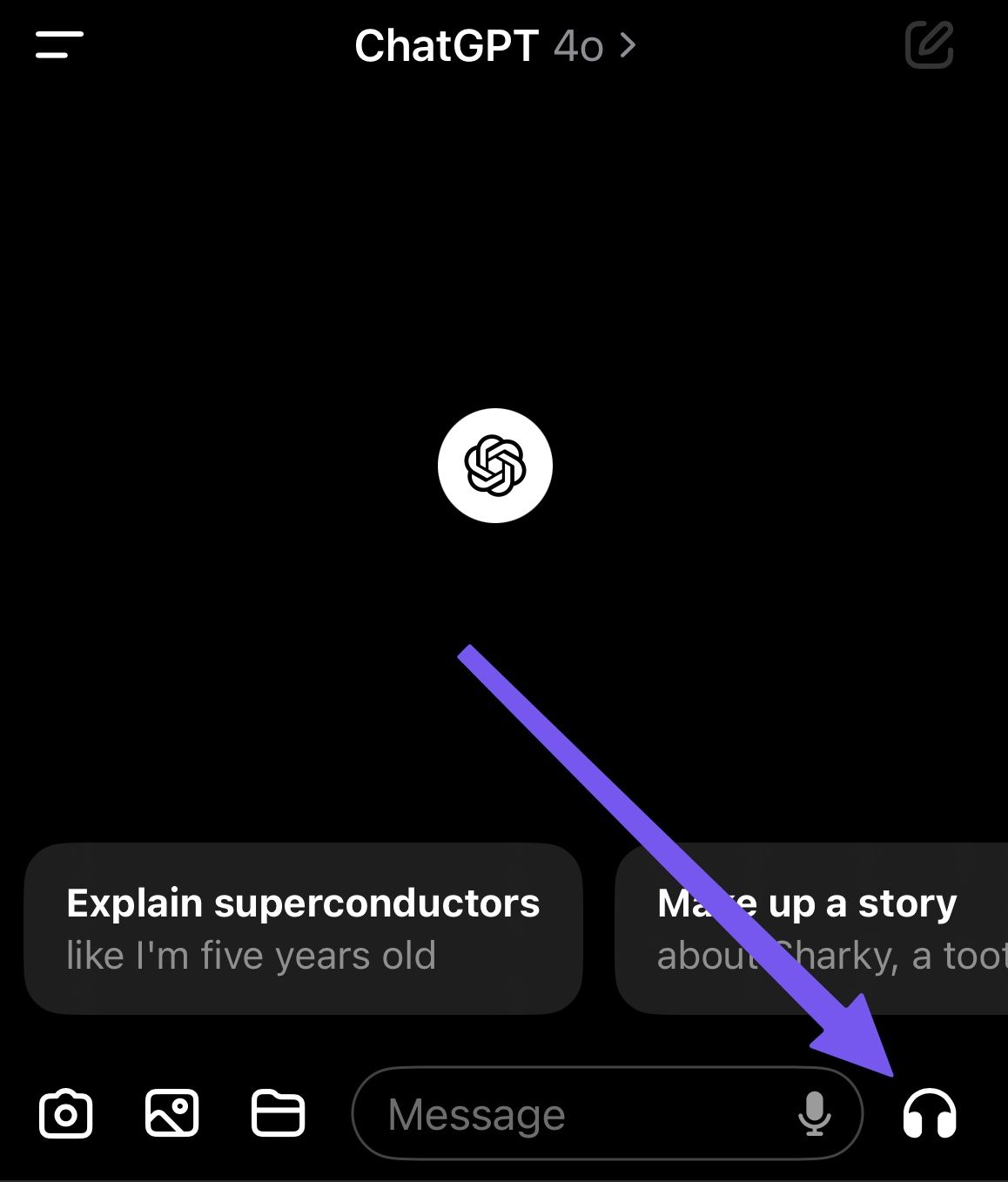
That’ll open up audio mode.
Now this is important. If you talk, then take a break to think, ChatGPT will extremely annoyingly process what you just said.
So, hold down the circle in the middle of the screen, talk and release when you are ready. Much better.
Let’s create a marketing advisor as an example.
Here’s a prompt:
Act as my expert marketing advisor.
First, ask me for my marketing idea.

When you receive the idea I want you to assess my idea.

I want a balanced appraisal. Do not be afraid to be critical but do not be critical by default. Assess my ideas based on best practices. Seek clarification if required. Then provide an analysis.
Wait! Do you need to read this out? That’s inconvenient.
Nope! Here’s another “hidden” or at least non-obvious use.
Start a chat and copy the prompt in as usual. Submit the prompt as usual.
Then press the headphone icon to begin chatting. We can thereby start with a full prompt and then interact with ChatGPT using voice mode. Nice mix.
One major issue with ChatGPT as an advisor is its agreeableness.
Chat wants to do right by us. It’ll often tell us we are right when we are not. It’ll apologise to us when it has no need to do so. It’ll do everything it can to help us out and be valuable.
In the prompt above the final paragraph helps to mediate this overly agreeableness.
It’s insufficient to say “be critical” because ChatGPT will always be critical. So we need to use the above instructions to level out its agreeableness.
However, during your conversation with ChatGPT don’t be afraid to say “you don’t need to agree with me”. If it’s being overly generous simply ask for a more critical appraisal of your ideas.
You’ve been chatting to ChatGPT for the last 5-10 minutes as you enjoy a lovely walk. You’ve spitballed some great ideas. Rejected others. Overall you are feeling much more confident about your plans.
Finish up by saying:
Summarise everything we discussed. Extract the topics and ideas we agreed upon and write up as an actionable plan for me.Then close out your session.
When you are back at your desk pop open ChatGPT and it will have summarised everything you chatted about and put it into a neat plan of next steps.
We’ve covered multiple tweaks here to make our advisor valuable:
we start with a structured prompt that we copy and paste in
this prompt includes “anti-agreeableness” instructions to ensure valuable conversation
we conduct our chat with ChatGPT, going back and forth about the issue
we finalise by asking for an executive summary with action points.
Doing these additional steps vastly improves ChatGPT as an advisor and makes this a stupidly powerful technique.
Keep prompting,
Kyle
Let’s round out the week with our very own technical support agent.
We’ll also explore visual mode in ChatGPT.
Let’s get started:
Technical Show me the Problem
basic queries
first, gather information
send me a photo
Having someone you can ask to help resolve tech problems is a life-saver.
As someone who “works with computers” I’m my family’s go-to tech support guy. So I’m more on the giving end here!
But what can take someone tech-savvy seconds to diagnose and fix could save hours of futile effort otherwise.
Thankfully we can now call on ChatGPT for this assistance. We just need to remember to do so!
Let’s look at a few ways to do this.
First up and most basic, ChatGPT can give advice for most well known pieces of software and hardware out there. You don’t even need to open the manual. ChatGPT has read the manual already!
If you run into a tech block you can generally just ask ChatGPT how to get it done.
For instance I recently had mic problems with my mic sounding too quiet.
I can pop in a simple request like:
My Rode NT-USB is very quiet on my Macbook.

Give me a set of potential fixes. Ask for clarifying information as required.
ChatGPT will offer me a set of potential solutions to work through:
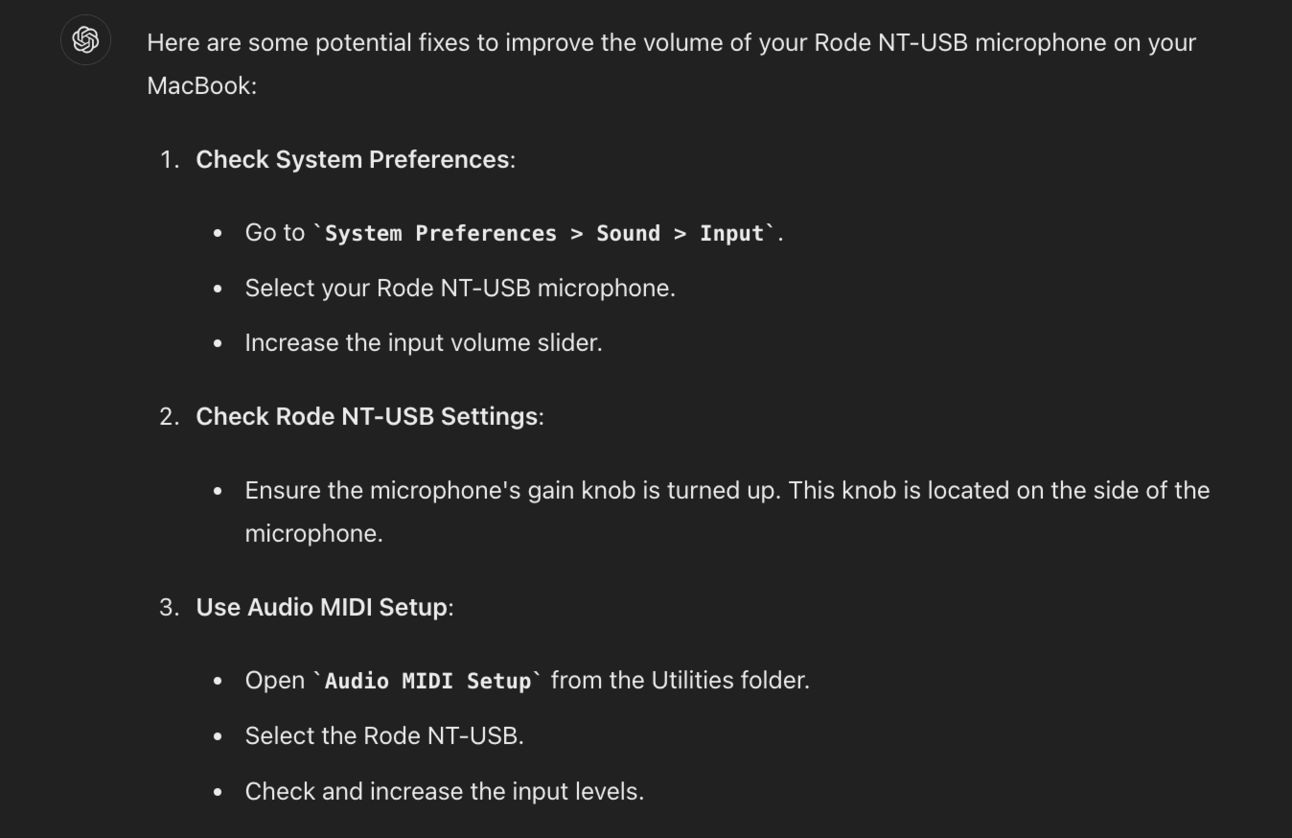
It ended up being using a non-powered USB hub which was ChatGPT’s 6th suggestion!
The above basic query works well if you know roughly what’s wrong and the solution is simple enough.
Sometimes it’s less obvious and you’ll need to provide more information for ChatGPT to be able to give assistance. This happens more in code, website problems or anything more “complex”.
In this case we’ll use a prompt like this:
My website is loading slowly.

Ask me for the details you'll need to be able to diagnose and provide recommendations.

For each tell me how to gather than information for you.

When I've provided it all provide recommendations.
This differs because we are asking ChatGPT to first have us go and collect information. And once we’ve got everything it needs it’ll be able to give suggestions.
This stops it from being too generic. In this case above if I just asked how to speed up my website I’d get a whole load of generic suggestions.
Instead ChatGPT will ask me to go fetch specific information like server response time:
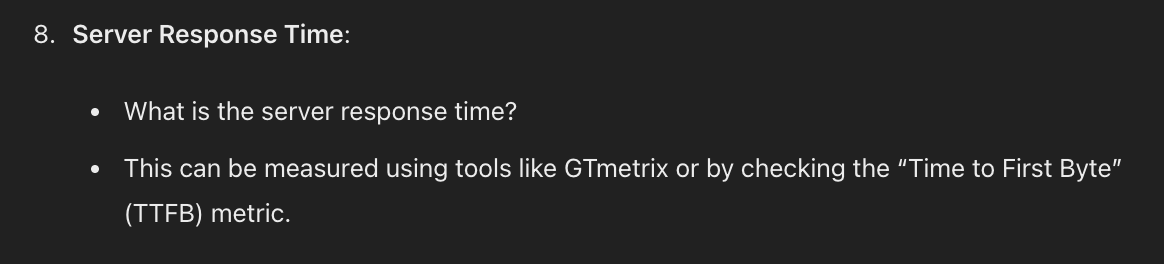
We return to ChatGPT with all this specific information and it’ll actually be able to pinpoint the exact problem we’re having.
OK here’s the really cool one. Sometimes you don’t even need to type it all out with ChatGPT. Sometimes you can just show it the problem and it’ll know what to do.
To do this we can use its vision mode. Tap the camera icon to take a photo or the photo icon to upload one.
For example here’s a photo of a malfunctioning modem:

If we upload this photo and the model number ChatGPT can go ahead and diagnose potential issues.
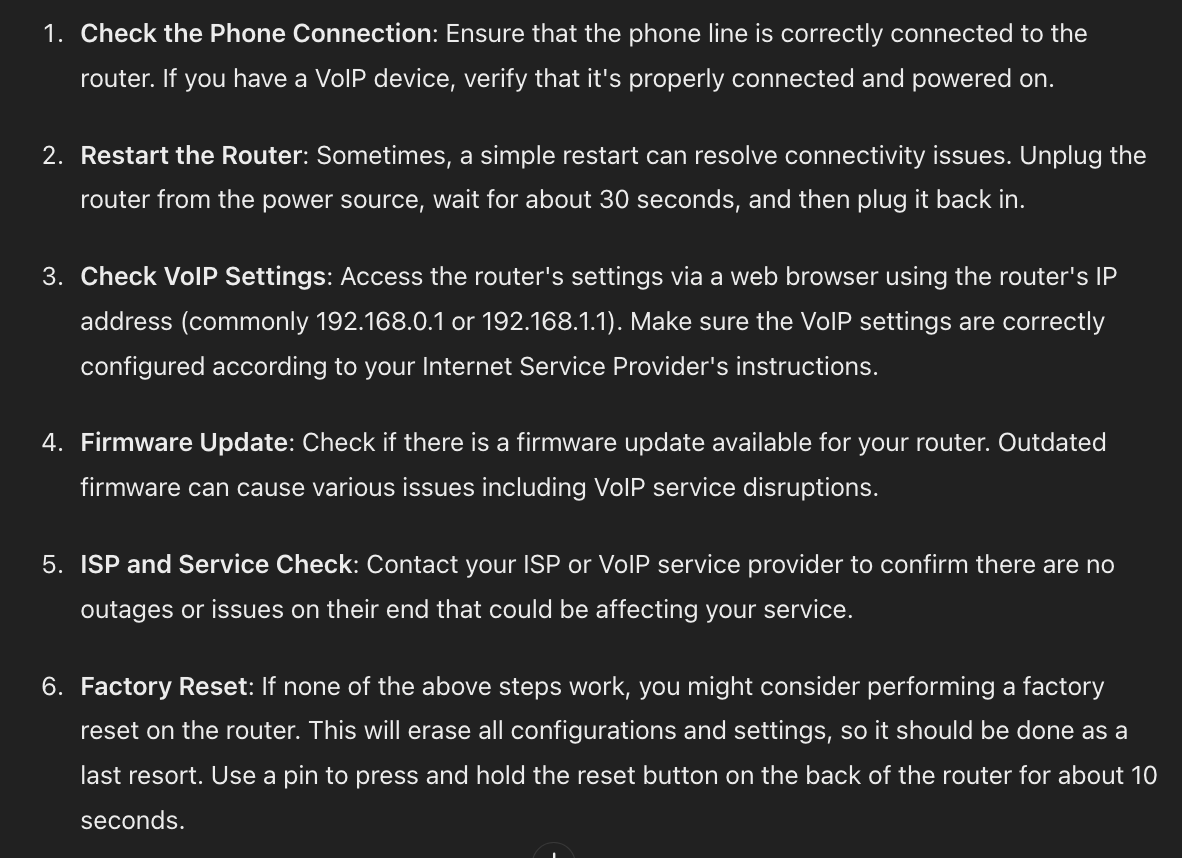
We can also do this with software and code.
For example I noticed some error messages in my site’s code:
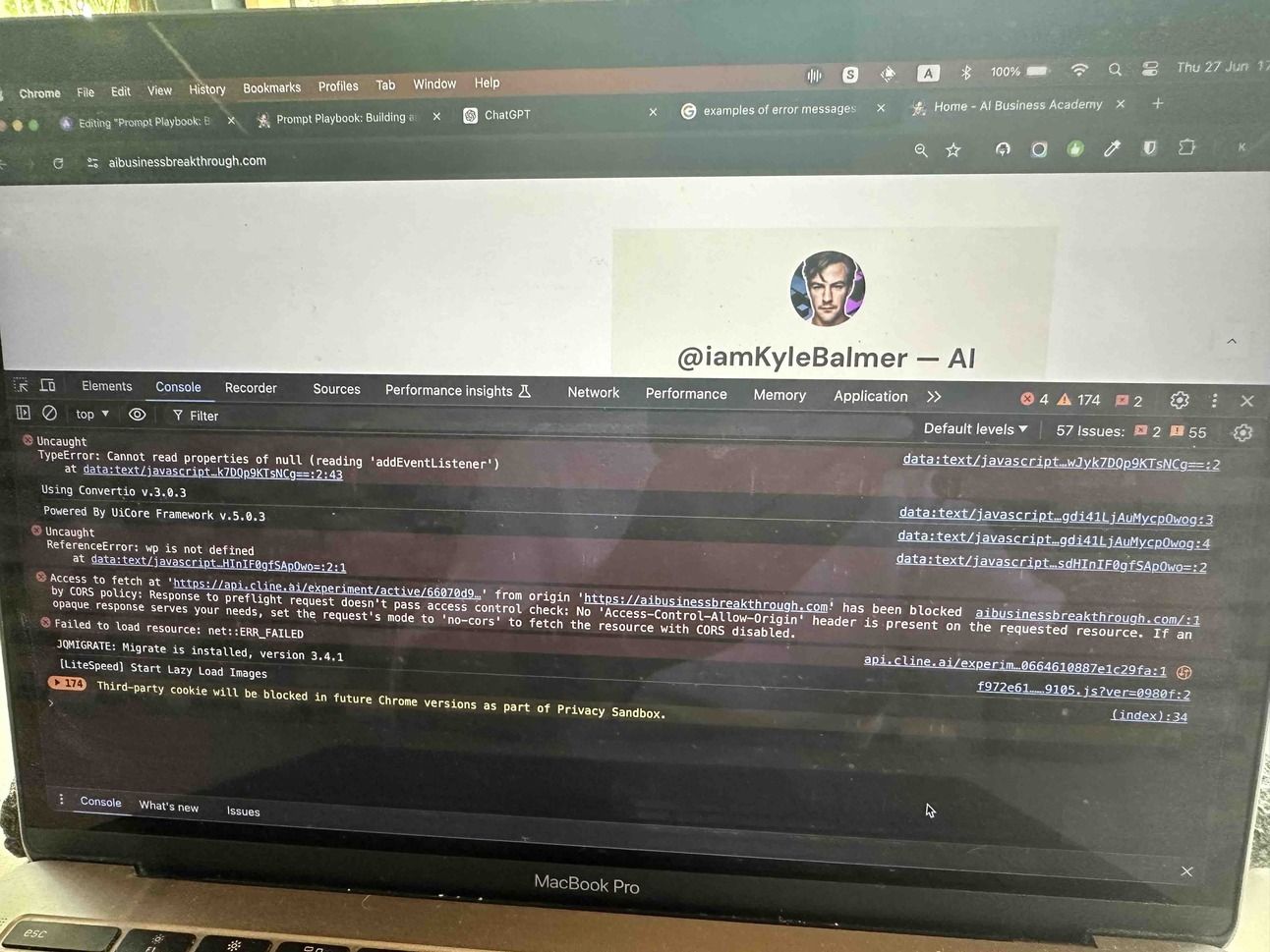
I’ve left this photo deliberately low quality (screen glare included) to show how powerful ChatGPT can be.
I uploaded this photo and asked “how do I fix these website errors” and got a list of the errors, explained:
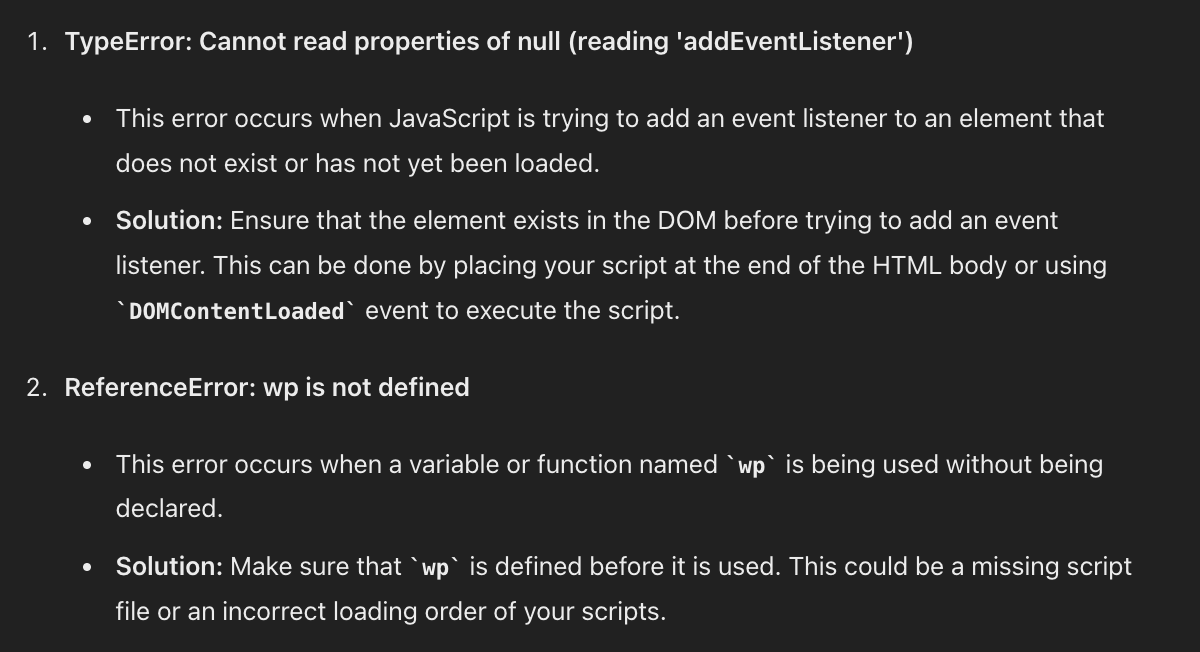
More than this though a set of step by step instructions for the fixes:
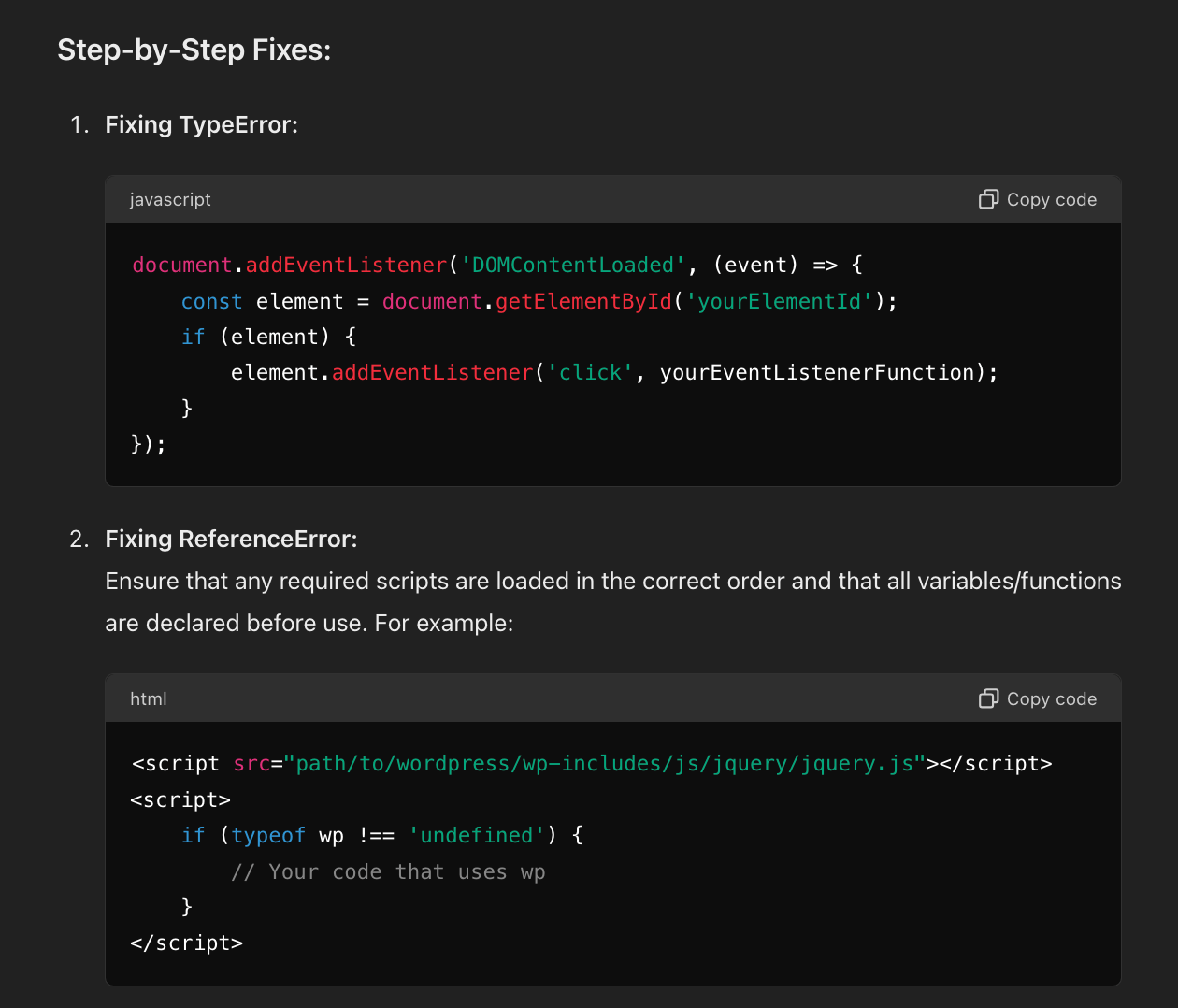
Now, the more context I give ChatGPT the better its recommendations will be . But as a first pass this is already valuable. I would just continue my conversation with ChatGPT, asking for clarification when required, until the error is resolved.
We are talking about IT issues specifically in this Part but more broadly ChatGPT’s visual mode is mega powerful and underused.
I’m currently sitting in a cafe at a cinema and notice the seats are a little (!) worse for wear:

ChatGPT tells me to clean up the leather and then:
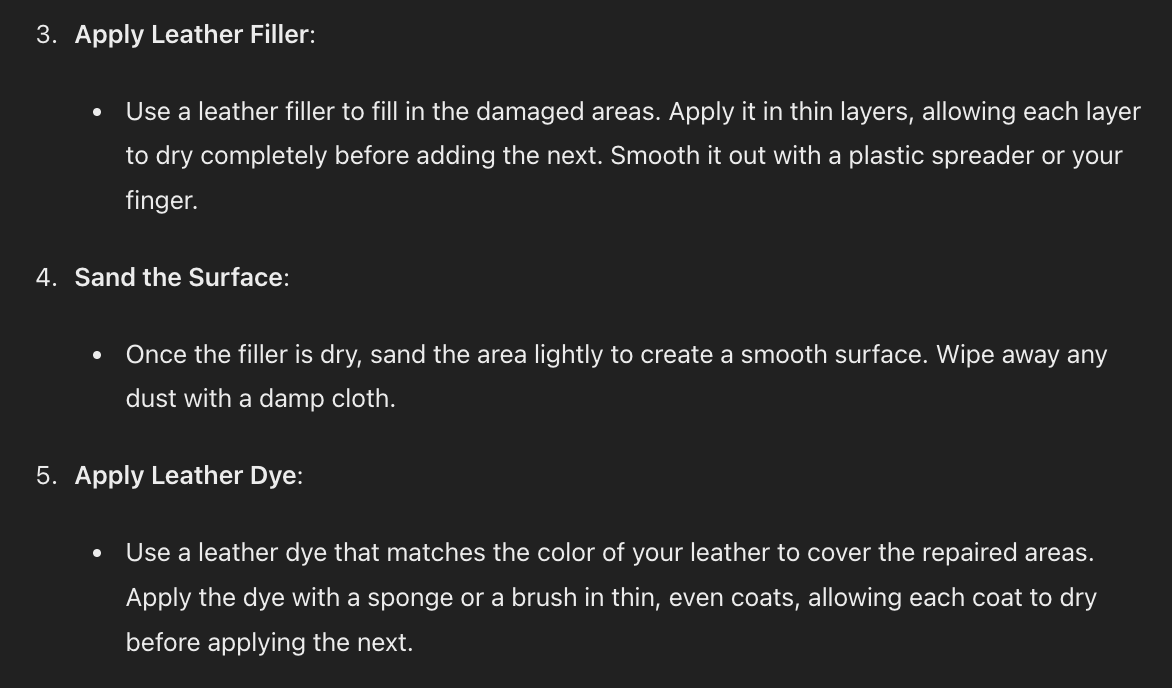
It then (politely) suggests that it may be too late and I should get them replaced or call a professional!
The point here though is that visual mode allows ChatGPT to give us advice on pretty much anything we can take a photo of. If you aren’t taking advantage of it yet make sure to begin adding it into your workflows as a powerful addition.
The purpose of this week was not to give you financial advice or fix your leather sofa. Those are side effects.
Instead, the goal has been to widen out your horizons about just what we can use ChatGPT for on a daily basis.
Most people are still using AI for <5% of what it can help us with. It’s time to start extending the boundaries of what you apply AI to.
Hopefully this guide will point you towards new ways to deploy AI in your work.
Keep prompting,
Kyle
Unlock the potential of artificial intelligence in your business with the '⚖️ Building an AI Power Team | AI Business Playbook'. This comprehensive guide empowers you to harness AI tools to streamline your operations, enhance decision-making, and minimize costs associated with hiring external experts. By creating your own AI-powered team, you'll learn to apply AI solutions to common business challenges, allowing you to focus on what you do best while significantly reducing complexity in your workflow.
This playbook is designed for entrepreneurs, small business owners, and professionals seeking to integrate AI into their operations without breaking the bank. If you're feeling overwhelmed by the complexities of running a business—like managing finances, legal documentation, and technical issues—this playbook is perfect for you. It will equip you with the knowledge and skills to use AI as a cost-effective solution, empowering you to navigate your business challenges with confidence and ease.
No prior experience is required. The playbook is designed to guide you step-by-step through the process of integrating AI into your business.
While implementation time can vary, many strategies can be integrated into your existing workflow within a few hours to a few days.
The playbook will guide you on how to use AI to draft initial documents and analyses; however, always consult a professional for final reviews.
Yes, the principles outlined in the playbook are applicable across various industries, with tailored examples provided for different fields.
The playbook includes troubleshooting tips and methods for obtaining expert guidance through AI, ensuring you're supported throughout the process.