
AI Authority
Unlock the secrets to becoming a content marketing powerhouse with our comprehensive playbook, '📣 Become a Content Marketing Machine using AI.' In this expertly crafted guide, you'll discover innovative strategies to generate an endless stream of content ideas, streamline your content creation process, and leverage AI tools to elevate your marketing game.
Start ReadingIf you follow me on social you’ll probably notice I put out lot of content each week.
And that’s on top of the 1000-1500 word newsletters that I’m writing daily.
This week I want to show you some of the systems and techniques I used to produce helpful content en-masse.
The basic shape of the week will be:
mass content idea generation (today)
creating blog posts
breaking posts into social media
video to go alongside
imagery based on the post
It all ties together.
One idea will lead to a long blog, multiple social posts, a video and images. All tied together, all aligned.
The focus will be very much on authentic personal brand - based on you. Low production requirements. Value over style.
This is the way to win in the creator economy.
We’ll cover:
Part 1: Never ending story
Part 2: First go long
Part 3: Break it down
Part 4: Video overlay
Part 5: Getting arty
Let’s get started:
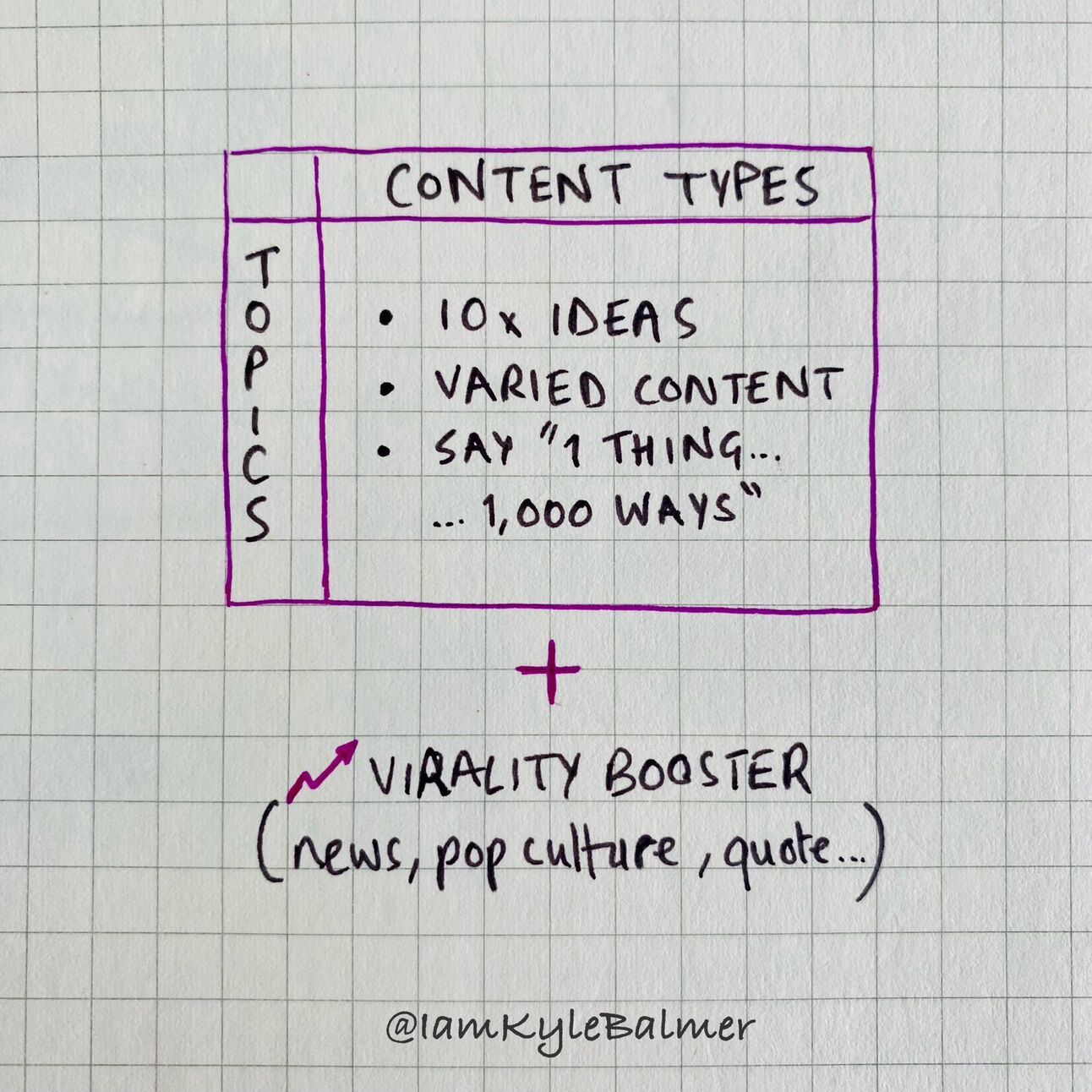
First up we need to eliminate writer’s block. Sitting down and thinking “what shall I create” is a thing of the past.
I’m going to give you a prompt that can generate obscene amounts of ideas.
Will they all be good? Nope! You’ll need to select the best and tweak from there. But you’ll have a lot to work from!
This prompt is based of Dickie Bush’s content matrix. I recommend you go and learn anything and everything you can from him by the way. He’s one of the good ones. His blog + newsletter are the place to start.
Here’s the prompt:
Act as an expert content strategist and writer.

My audience is [audience details]
Their common problems are [list problems]
My business helps the audience to [how you solve problems]

Help me create a content matrix.
X axis = content types: Actionable How-To, Inspirational Advice, Example Breakdown, Contrarian take, Unique Observation, Present vs. Past, Listicle, Social proof about myself, Lessons learned, Benefits, Reasons Why, Common Mistakes

All relate to the topics in the Y Axis.

The Y axis contains my topics:
Generate a list of topics based on my audience, audience problems and how my business helps.

Generate the full context matrix, giving headlines in each cell. Make sure the content types are on the X axis and my topics in the Y axis.
Fill in the specifics of your business. I used the following for this example:
My audience is people starting their first business
Their common problems are what niche, no money, no time, stuck in 9-5, not sure first steps.
My business helps the audience to start  a business by leveraging AI tools like chatgpt
First the prompt generates a list of Topics:
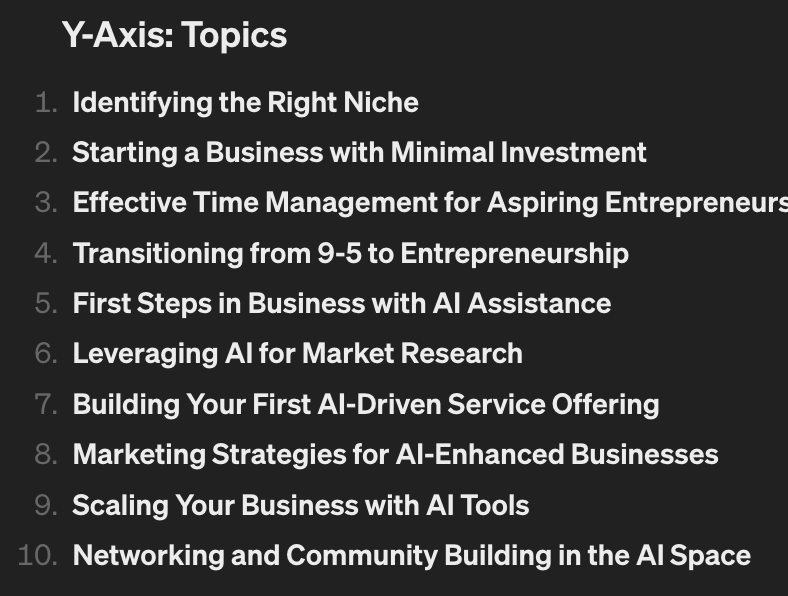
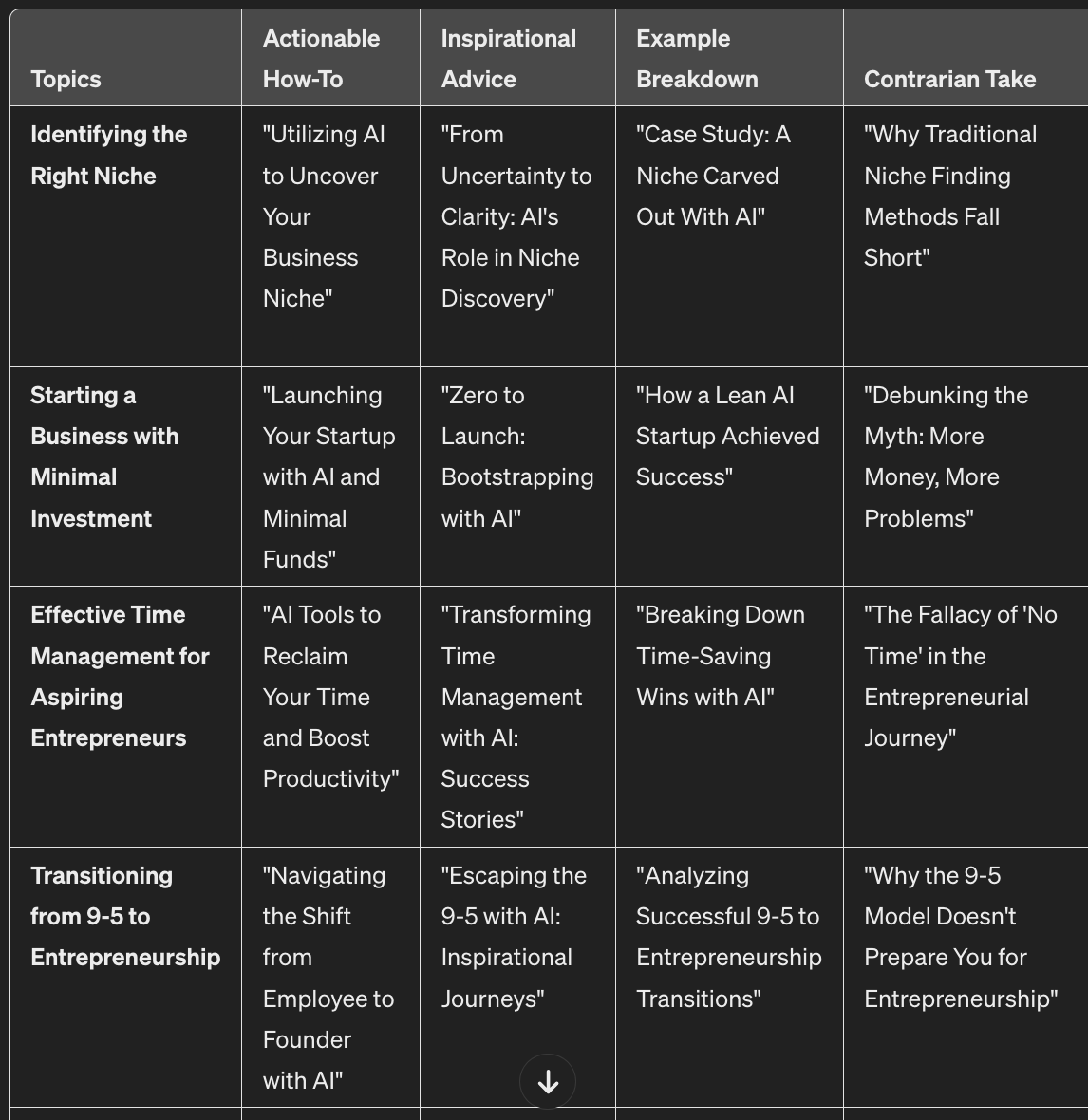
Then it takes the topics and the content types and creates a huge amount of potential content for us:
This is just a snippet of the whole because there are 10 topics and 12 content types for a total of 120 cells.
That’s 120 things you can talk about right there. No more “I don’t have any ideas”.
Copy/paste these ideas into Excel or Notion or your tool of choice.
We’ll be using them in the next Part to generate posts.
FYI if you use ChatGPT Plus ask it for a CSV file and it’ll give you a downloadable version. Cool huh?
An additional powerful method here is to link each of these content ideas to something that’s already popular - a news article, popular social media post or quotation for example.
For this we don’t use ChatGPT. We use Perplexity.
The basic version is free - I recommend checking it out as it’s a very powerful tool.
The idea here is that we can hook into existing popular topics and influencers as well as dropping our own thoughts on these content topics.
For example let’s say I want to cover the topic “Why the 9-5 Model Doesn't Prepare You for Entrepreneurship".
Sure I can give my own thoughts on this (we’ll cover this in the next Part) but I can also link to existing discourse on the topic.
Head to Perplexity (not ChatGPT!) and plug in this prompt:
Give me i) a popular blog article ii) a recent news piece iii) a popular social media post from a well known person in the space and iv) a famous quote on the content topic [paste content topic]Perplexity will do the research for you.
For the content topic I gave it it throws back info from these 25 sources:
Notice there are lots of non-generic sources here - it’s not just boring news sites and wikipedia but instead personal blogs (Gillian Tracey, Kiley Peters), social media posts and even Reddit discussions.
Perplexity also answers the initial request directly in responses like this:
What this gives you is i) a list of resources to have a look at to see what other people are saying and ii) a summary of the main opinions out there.
When we are thinking about preparing content around a certain topic run this to give you the lay of the land and spark more creative ideas for what you could talk about.
This allows us to take each of the 120 ideas from the original content matrix and 10x them by tapping into the existing discourse.
In this Part we’ve looked at how to how infinite content ideas.
Writer’s block is no more. So no more excuses!
In the next Part we’ll build the foundation - the long form post.
Here’s a reminder of the week:
Part 1: Never ending story
Part 2: First go long
Part 3: Break it down
Part 4: Video overlay
Part 5: Getting arty
Keep prompting,
Kyle
In this Part we’ll look at generating the foundation of our content machine - the long-form piece.
Not a writer?
Don’t worry - I’m going to show you how to create non-crappy, non-generic writing using AI.
You know how it’s often easier to criticise than it is to create?
We’re going to harness that!
Using a technique called revision prompting.
Let’s get started:
First up we want to produce a long-form piece of content.
Long-form is basically a blog article, newsletter or short essay. Generally 750+ words.
The reason for this is that we can cascade from long-form to medium and short form easily. We cannot go the other way.
We start with lots of information and break it up into smaller pieces. Large to small. Entropy, baby.
AI is fantastic at the breakdown process of creating lots of smaller content pieces from a large content piece. It’s a powerful use of AI.
This is the linchpin on which this content system is built. And it is why AI is so powerful in content creation.
However, there’s a catch.
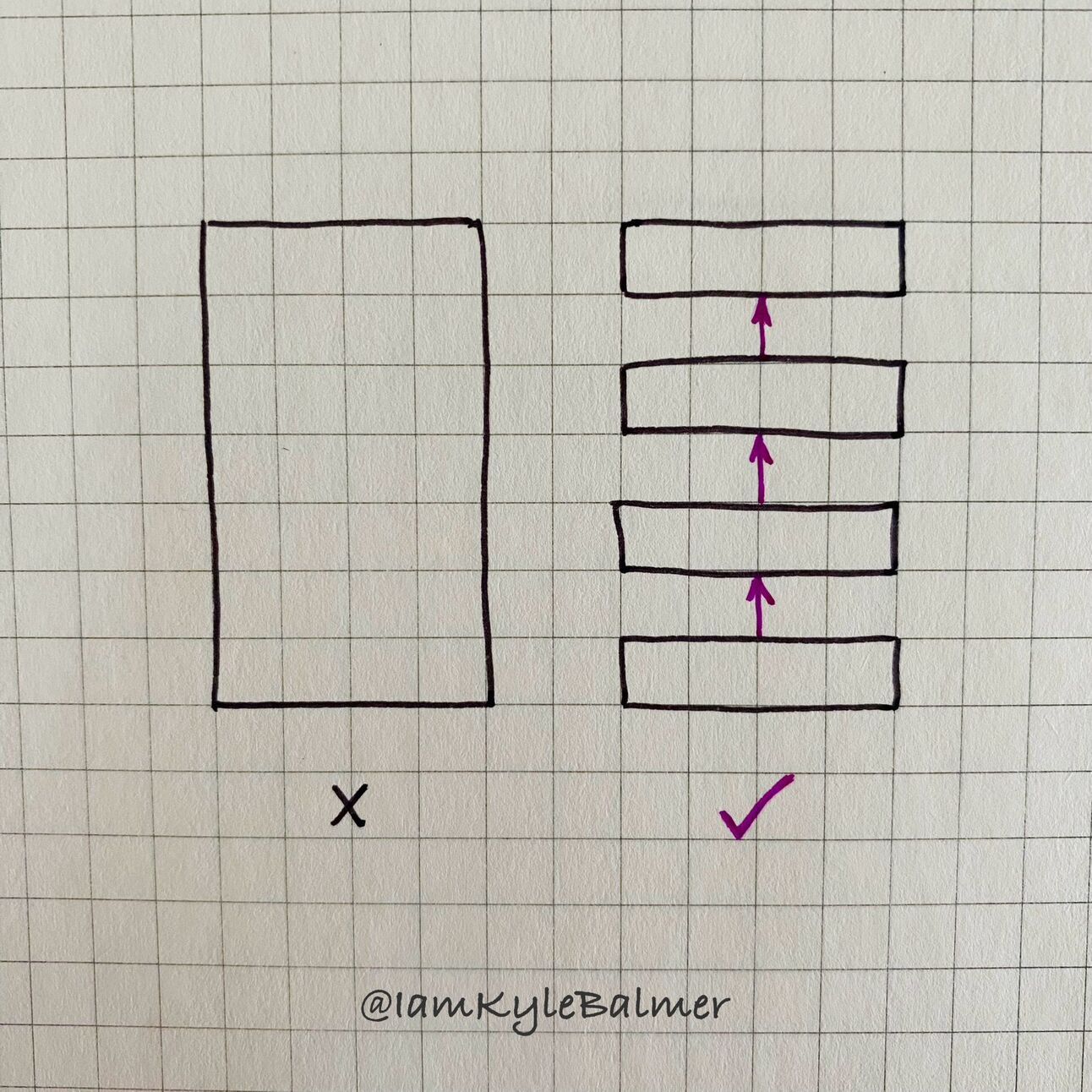
ChatGPT is not good at generating content from scratch.
There, I said it. Sorry AI bros, shoot me.
The content it produces tends to be very generic, very uninspiring and honestly not very enjoyable to read.
Lots of other people will recommend using AI to create newsletters and blog articles.
I do not.
No matter how complex the prompt the results will be uninspiring and inauthentic.
Instead we need to put in human work here at the top of the funnel.
We add our human touch here in the long-form content piece and then allow AI to help with breaking it up into shorter form content (in the rest of this Playbook).
We still save a lot of time and energy. But we will need to put some work in here at the beginning of the process.
Am I going to ask you to write from scratch? If you can - do so.
The higher the quality of the input the higher the quality of the various outputs further down the chain.
But here’s a technique you can embed in your workflow whether you are going to be writing or not.
It’s called revision prompting.
Here’s a prompt to get started:
Topic = []
Content type = []
Title = []
My audience is [audience details]

Prepare a 1000 word blog article.
Do not be generic, include non-obvious and controversial takes
Include a strong hook first sentence
Input the topic, content type and title from the context matrix in the previous Part.
In this example I use:
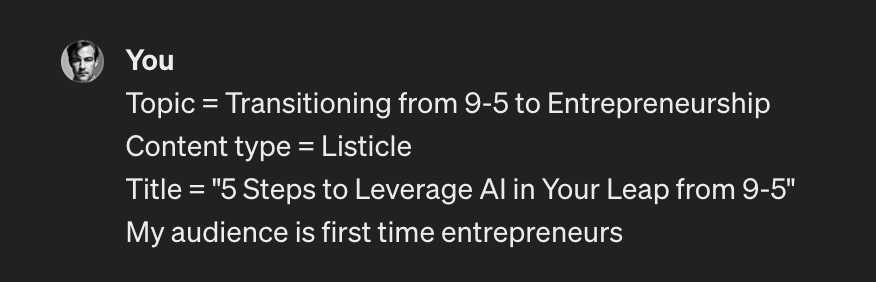
This creates a solid blog article. Here’s the beginning:
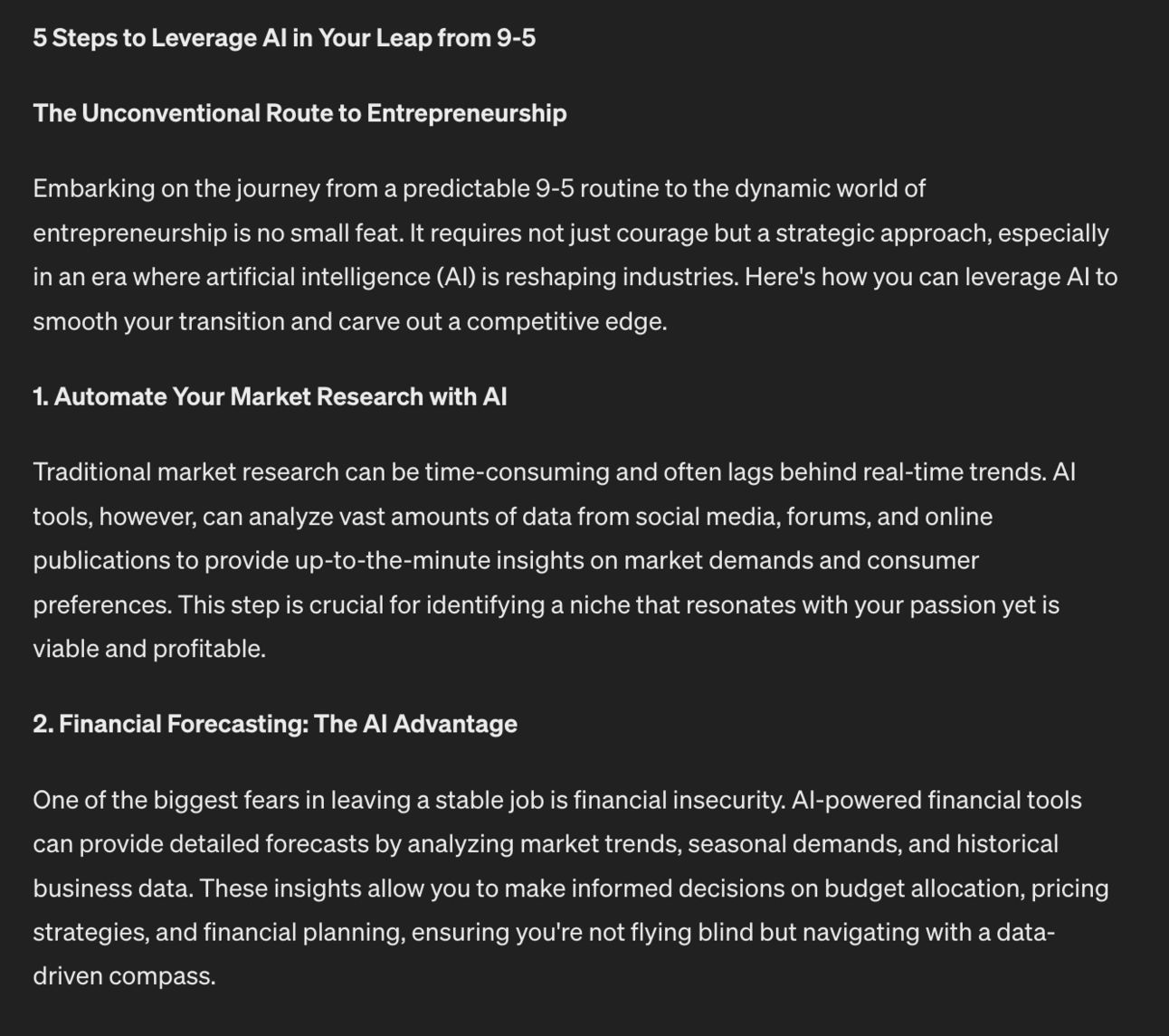
This blog article is perfectly serviceable but not particularly interesting.
What I recommend doing is using this as a jumping off point.
Have you ever noticed how criticising and editing other people’s work is a lot easier than doing so with your own work?
We can use this fact to our benefit.
Go through the output that ChatGPT has given you and criticise it!
Feed the criticism into ChatGPT.
An example - the generated article above is saying that AI is useful for identifying market trends. The point is fine but not very specific.
So I can feed in a criticism like:
Give specific examples and tools. Do not make general sweeping statements.That forces specificity:
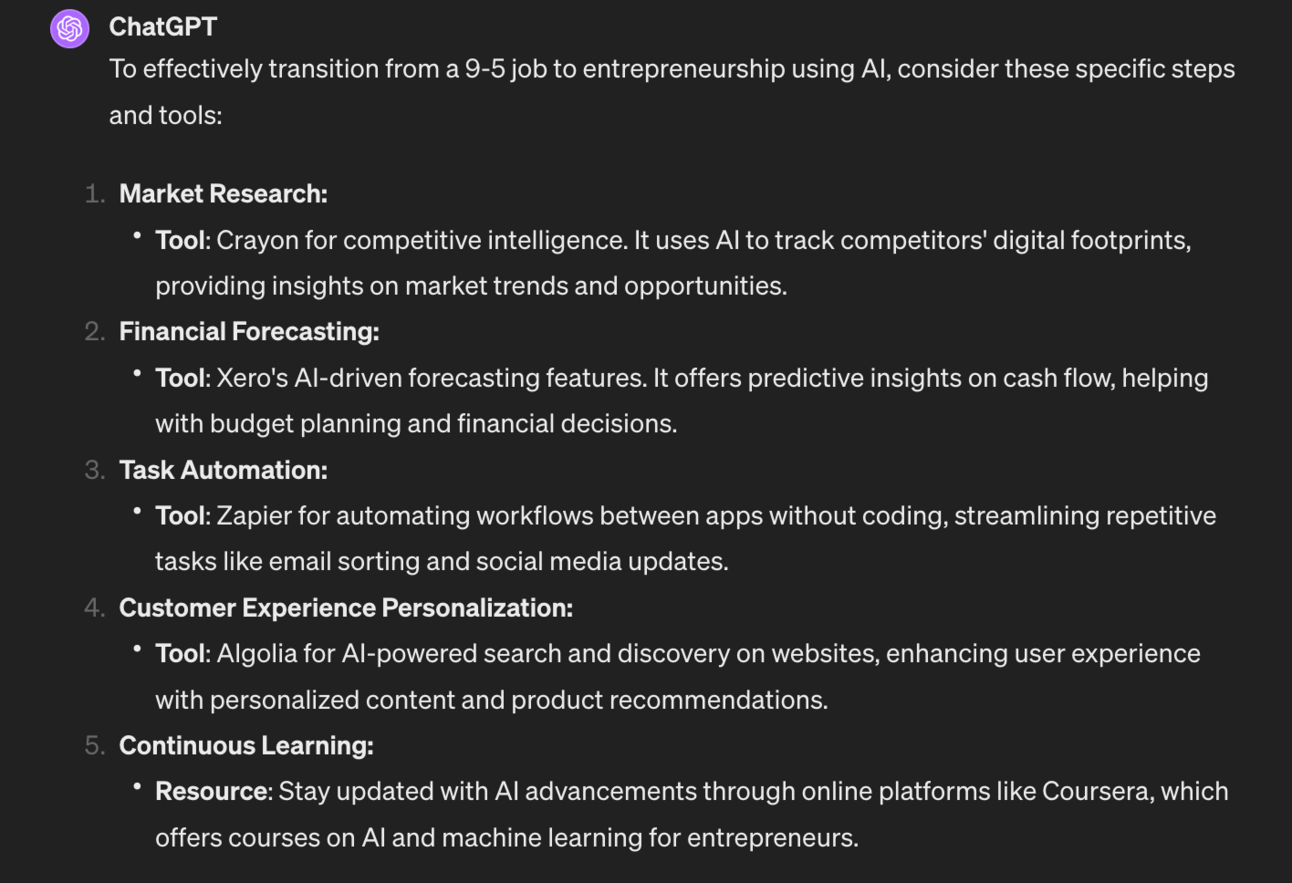
Much better. I’d then tell ChatGPT to add these into the main article. You can do this conversationally with a prompt like “these look good. Add them naturally into the 1000 word blog article”
Continue to do this as many times as required.
Read the article, provide a criticism or suggestion, review the revision and ask ChatGPT to combine the revision with the article. Repeat.
Why don’t we build all of these revisions into the original prompt? Why are you being lazy Kyle?
Some people will teach you to add ALL of these specifications into the original prompt. You end up with a 2000 word mega prompt.
Sometimes this works. But in my experience it’ll still produce something generic. It’s genericness built into the mega prompt!
The only way to truly get the output that you as a content creator need is for you to provide revisions. You know what you want and can tell ChatGPT.
Remember that once you have this one high quality long form content piece we’re going to be able to covert it into many many more using AI. It remains a low time commitment considering the value we’ll get.
So use this method of generating a first draft and then providing corrections to get the article to a place where you are happy with it.
I’m going to give you a list of my top revision prompts.
Try them out and see which lead to higher quality articles. Remember this is subjective to you - so test a bunch and keep a note of the ones you rate the most.
Here are some of my most used:
Simplify
Add a personal story
Quote an expert
Add specific steps
Add historical example
Find stats
Use less floral language
Less robotic sounding
Show both sides
Break this up more
Cut jargon
Add humour
Add a list
Use A vs. B comparison
Ask questions
Add a real world example
Give me 5x beginning hook examples to choose from
End with a CTA
Test these out as you get used to revision prompting. You’ll get an idea of what works best for you over time.
Now that we have a high quality long form piece we’re going to start to break it down into other content pieces over the remaining Parts.
Here’s a reminder of the week:
Part 1: Never ending story
Part 2: First go long
Part 3: Break it down
Part 4: Video overlay
Part 5: Getting arty
Keep prompting,
Kyle
Ever wondered where some creators get all their content?
In this Part we get to the meat. Nom.
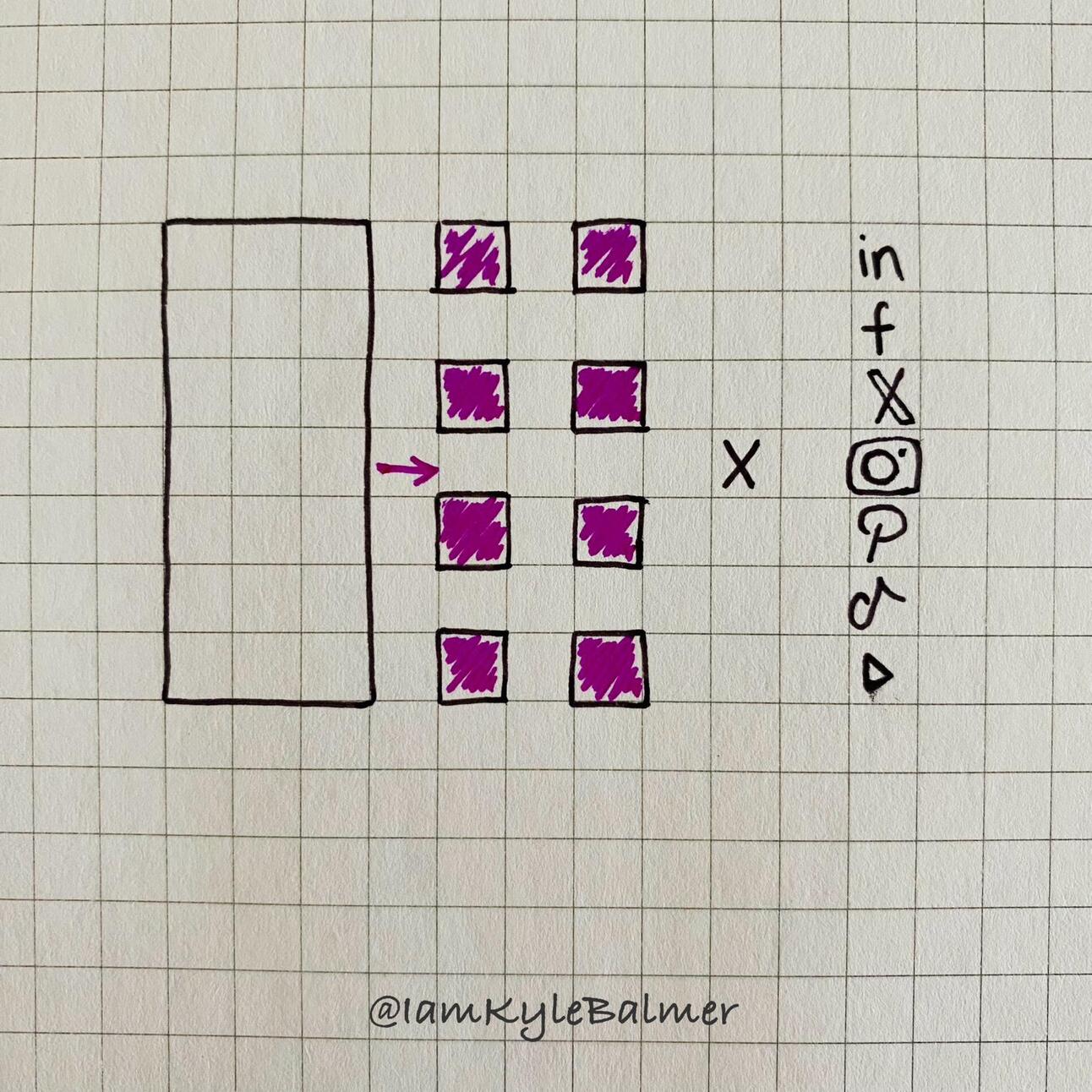
We’re going to take our long-form and slice and dice it into short social posts.
One piece of content to 15 in one fell swoop. Ready?
Let’s get started:
As discussed in the last Part AI is not great at creating content from scratch.
It is however fantastic at breaking content up.
This is called repurposing.
Taking one piece of content and converting it for use in multiple ways.
Specifically we’re going to take our blog article and carve it into lots of short social media posts for X/Twitter, Facebook, LinkedIn or whatever your platform of choice is.
Important: each time we repurpose using AI the quality will decrease.
If we put crap into then we’ll get crap out.
Therefore we need to start with as high quality content as possible.
This is the reason why in the last Part I suggested you using your brilliant human brain to tweak and finalise the long-form content.
We need that first input content to be as good as possible. Otherwise the AI prompt below will turn bad content into eve worse content!
Before we jump in, I’ve covered repurposing in a lot more detail in its own Playbook. You can get access here or via the Vault.
Right, here’s the prompt we’ll use:
Act as a social media content re-purposer

Break the article below this prompt into the specified social media assets

Posts to create:

1. One post announcing new article on blog. Tease the lede to get the click.

2. 3x soundbite posts. Find the most intriguing and/or controversial sentences from the article and extract them as soundbites. The soundbites should trigger discussion. Do not reference the article - the post should be self-contained.

3. 3 x Question posts. Analyse the article for intriguing, controversial or fact-collecting questions to ask on social media. The questions should ellicit debate and allow people to express opinions/. Do not reference the article - the post should be self-contained.

4. 3 x expert authority posts. Analyse the article for strong opinions and convert them into expert statements. These should be authoritative and demonstrate thought leadership. Use strong language to make a statement. Do not reference the article - the post should be self-contained.

5. 3 x  inspirational posts. Focus on how the contents of the article could change the readers life. Focus on the fact that they already have what they need in them, they just need to act.  Do not reference the article - the post should be self-contained.

6. 1 x actionable steps post. Analyse the article and extract a set of steps for people to follow. Do not reference the article - the post should be self-contained.

Do not use emojis, do not use hashtags
Dot use overly elevated, salesy language
Each post should be no more than 280 characters
Return results in a tabular format

Article begins:
[copy/paste long form article]
For this example I’ve plugged in Part 1 of this guide. This led to this output:
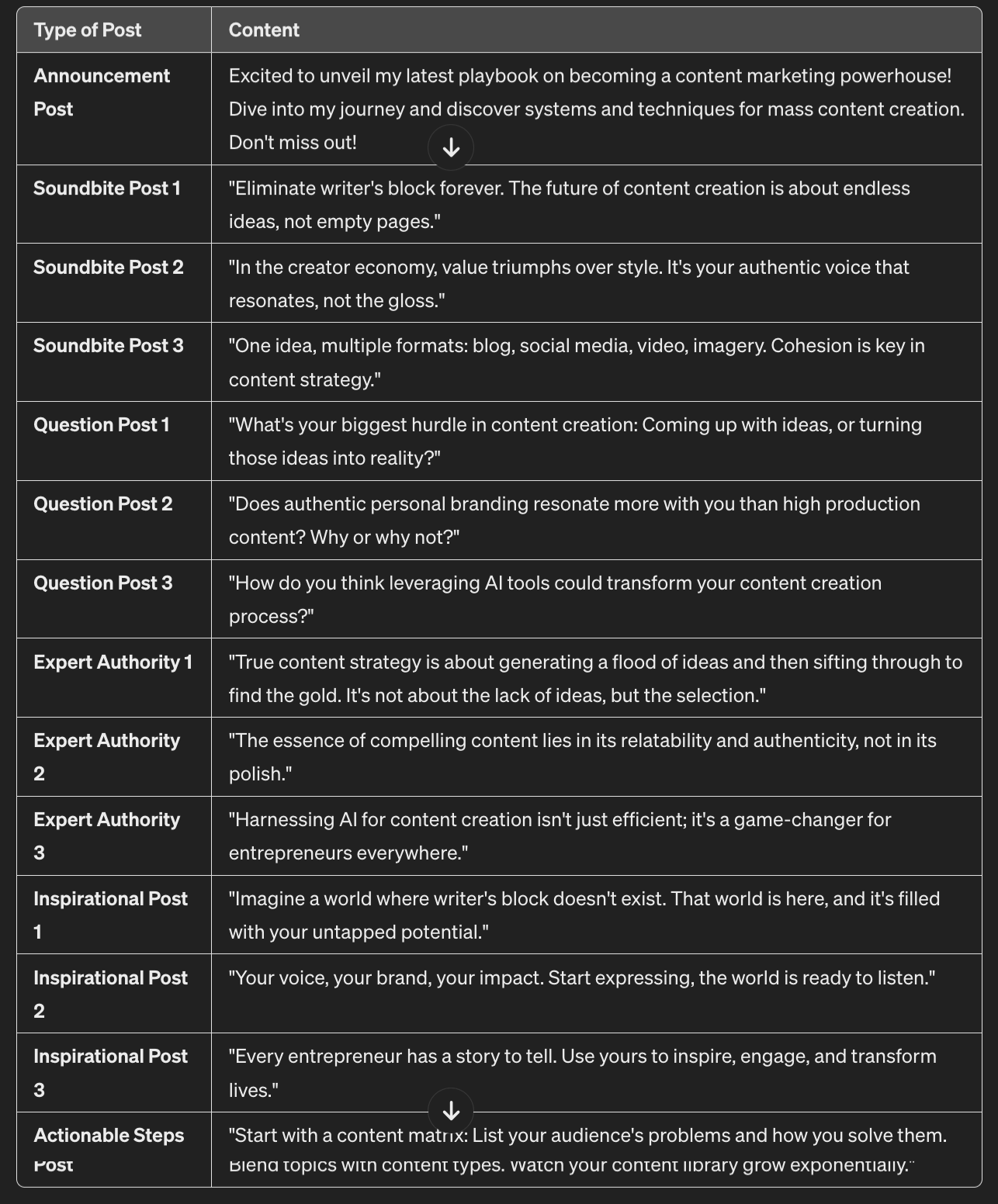
Some of these I’d be happy to post immediately - for example the question posts are good to go.
For others I’d rewrite and work in context. It’s still a lot faster than working from scratch!
As always if there is something about the output that doesn’t work for you then i) tell ChatGPT and ii) adapt the prompt.
Once you’ve done this you’ll be able to easy chunk up any article (created using the method in the last Part) into multiple posts.
Your content production just went up. Waaaay up.
The above prompt makes short form posts which work great on X, Facebook or LinkedIn.
What about creating threads for X or Threads?
Here’s a specific prompt that’ll create a thread format post:
Generate a Twitter thread version of this article

First distill the article to its bare essentials.

Start with a thread hook tweet to tease the content, ending 🧵 Thread:  to announce it's a thread

Follow with a personal story hook (idea. I will adapt)

Then outline the article in a series of <280 character tweets, chained together

Each tweet should encapsulate one basic idea, keep each tweet punchy

Do not use emojis (except the 🧵 in tweet #1). Do not use hashtags

Use natural, non-salesy language
I used the same article again and got this result:
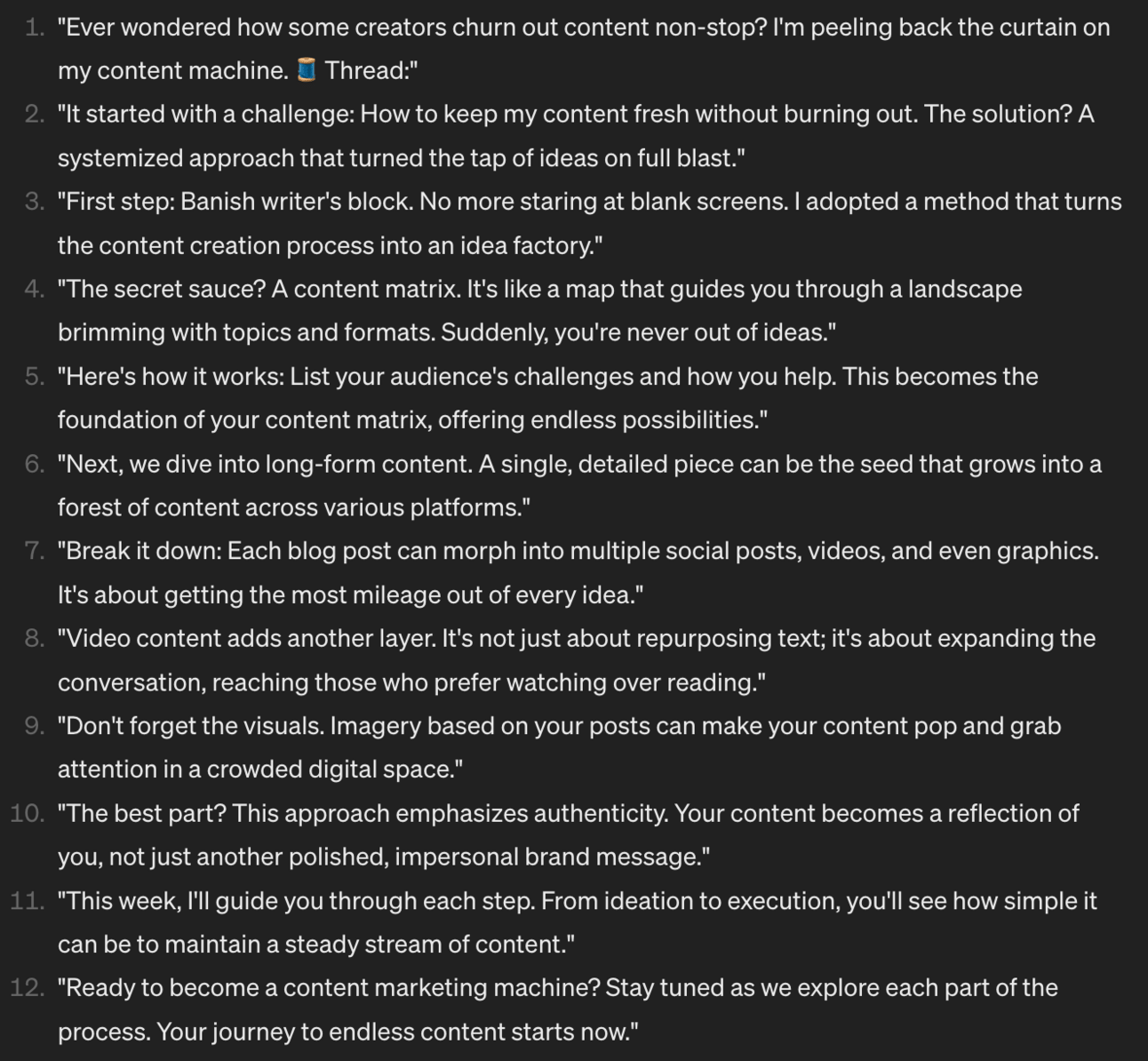
Strong!
The main change I would make it fleshing out the idea of the context matrix more. Specifically by showing images of it.
Otherwise the basic thread is close to be publishable.
We’ve now used AI to go from 1 content piece to 15.
You can actually get a lot more by:
running the prompt multiple times - each time it’ll give you more posts.
or adjusting the number of posts generated by changing the numbers in the prompt
One method here to test is generating a tonne of posts and then hand picking out the best ones. It takes more human time but should lead to higher quality.
In the next Part we’re going to add in another layer - short video!
Here’s a reminder of the week:
Part 1: Never ending story
Part 2: First go long
Part 3: Break it down
Part 4: Video overlay
Part 5: Getting arty
Keep prompting,
Kyle
If nothing else I want you to walk away from this Part knowing you need to start short video ASAP for your business.
I’ve been doing short video for a while on Tiktok, Youtube and just started Instagram.
Here is how Instagram is going:
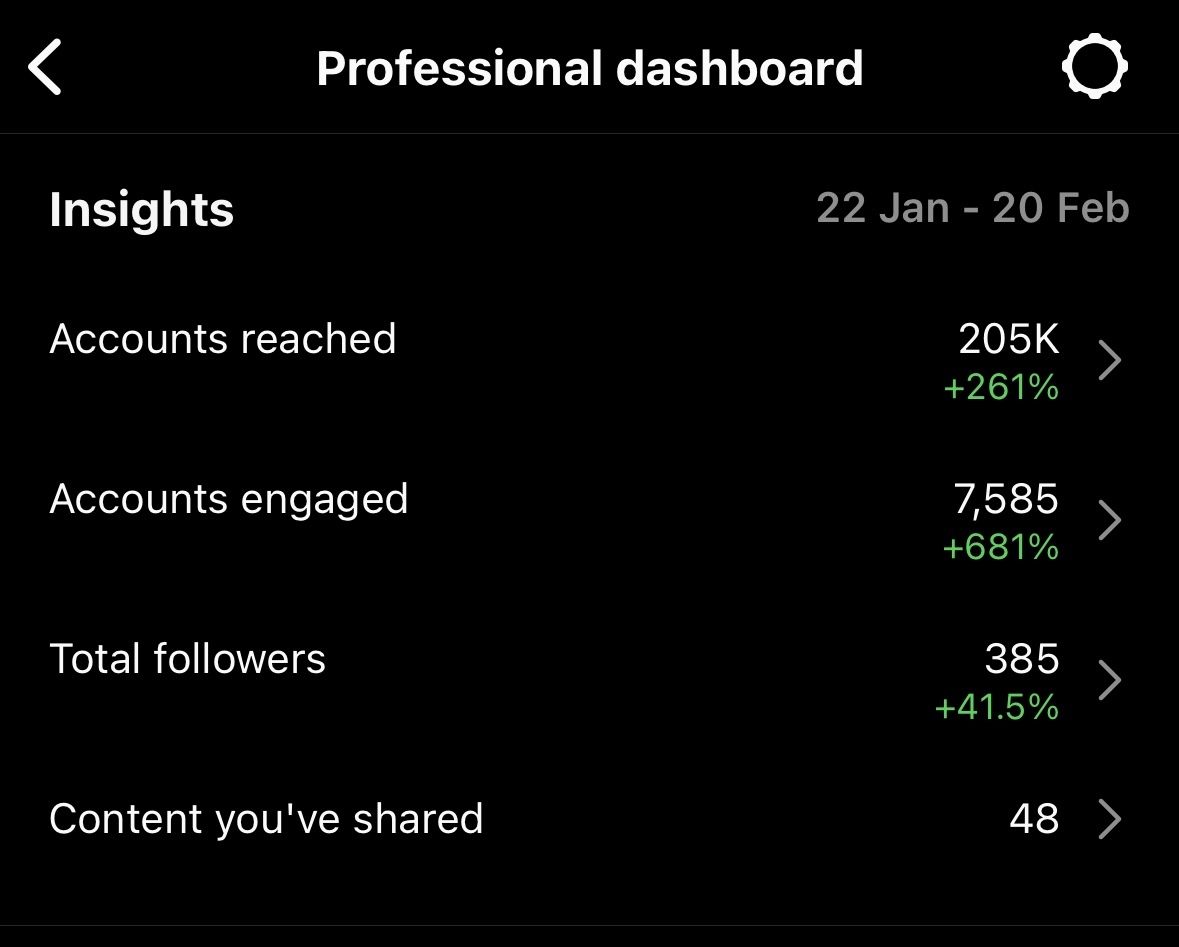
Notice only 385 followers - very small!
But in the last month 205,000+ accounts have watched my videos, 7500+ engaged.
That’s nearly a quarter of a million people. It’s still rising and I expect that quarter mil today or tomorrow.
I have similar examples from early on Tiktok and Youtube too - video, unlike other formats, lets you get in front of lots of people even when your account is small.
I like to call it “popping off” as in “oh, another video has popped off” and is going to the moooooon.

I’ve been (gently!) bullying my partner to get into short video for her coachng company + podcast and she finally did yesterday. Immediately had a video that rocketed to 2000+ views with huge engagement.
She admitted that maybe I was right.
I’m hoping that you’ll also try out short video after this and come to a similar realisation!
Let’s look at how to add short form video into our content mix.
Let’s get started:
First up I’ve written Playbooks on short video before. Both are in the Vault:


These are more in-depth guides about setting up for video production and the specific “newsjacking” strategy I recommend to get started.
In this Part though I want to build on our content repurposing.
We’re going to convert our short posts from the last Part into video scripts.
Head back to the short post ideas we generated in the last Part.
Below these in ChatGPT use this prompt:
Act as a social media script writer

For each of the short posts create a short video script

Each video should be 30 -60 seconds

Start with a strong, engaging, curiosity driving hook

Give me the main talk points, not in full sentences

Do not include stage directions or images
This will generate short video script ideas for each of the posts. Here for example are the talking points for the Expert Authority posts:
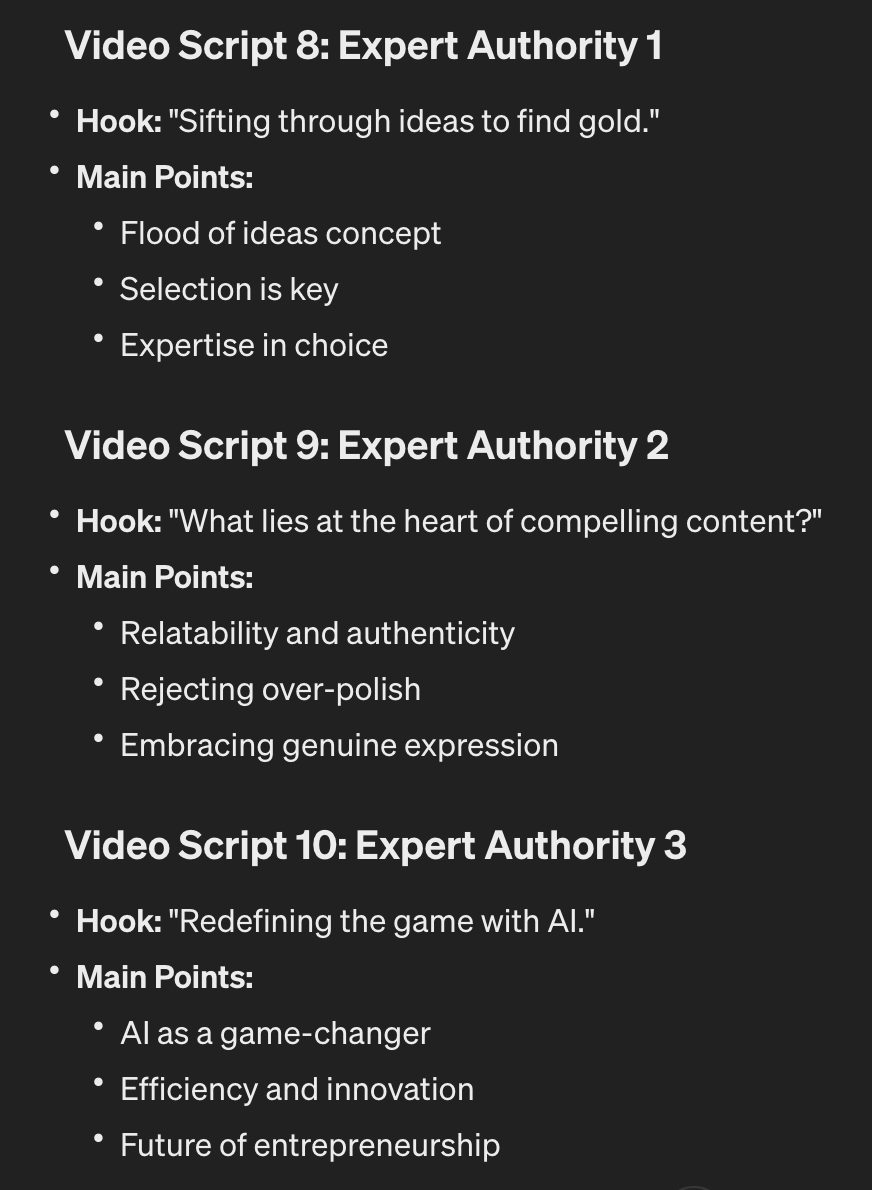
Notice that these give the main talking points. Not a full line by line script.
If you are creating a 30-60 second video (a short) you have very little time to talk. It’ll be over before you know it.
If you have 3 bullet points as above you can talk on each quickly and fill the minute very quickly.
I recommend this approach as it leads to more natural, less stilted delivery.
If you do prefer a full script though review the script ideas and then use this prompt to expand one of the ideas:
For script [number]
Provide a full 60 second script
Give suggestions for supporting 1-2 images
This leads to fuller script:
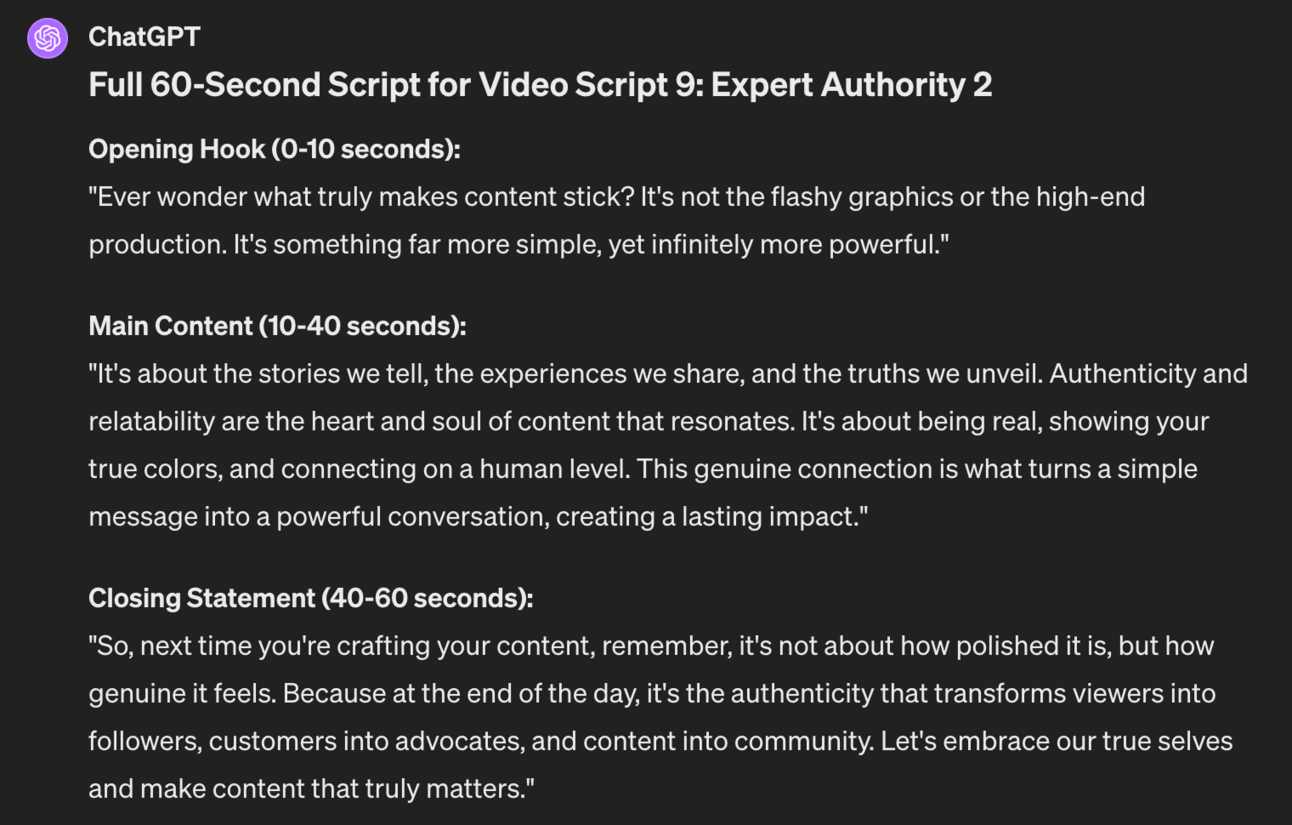
The problem with this sort of script is that it won’t “sound like” you. Not without edits and rewrites. Hence me recommending you starting with a couple of main points and speaking off the dome.
Initially it’s hard. Really hard. But like anything if you practice you’ll develop the skill. The other Playbooks talk about this in more detail than I can here.
For now I recommend you start filming on Tiktok.
Primarily because it has the best recording interface. It allows you to hold the record button, capture a sentence of two, then release record to stop.
If you flubbed the take no problem - hit the x to delete that last clip. If it was a good take move to the next. It’s that simple. The interface makes it super easy to cut out bad takes on the fly.
The name of the game now is to generate short videos alongside your posts.
You don’t need to video all of the posts. Instead read through the posts and think about which ones would be interesting to talk about. Then shoot those ones as videos and drop the rest. Keep it simple. Keep producing.
Still struggling to remember your lines?
Use a teleprompter.
There are lots of monthly subscription apps that have probably been advertised to you.
Ignore those.
Tiktok has a teleprompter built in. It’s just a bit hidden.
Start a new video and click the Effects button the bottom left.
Then the magnifying glass to search filters. Search for, you guessed it, “teleprompter”.
That will give you a teleprompter overlay like so:
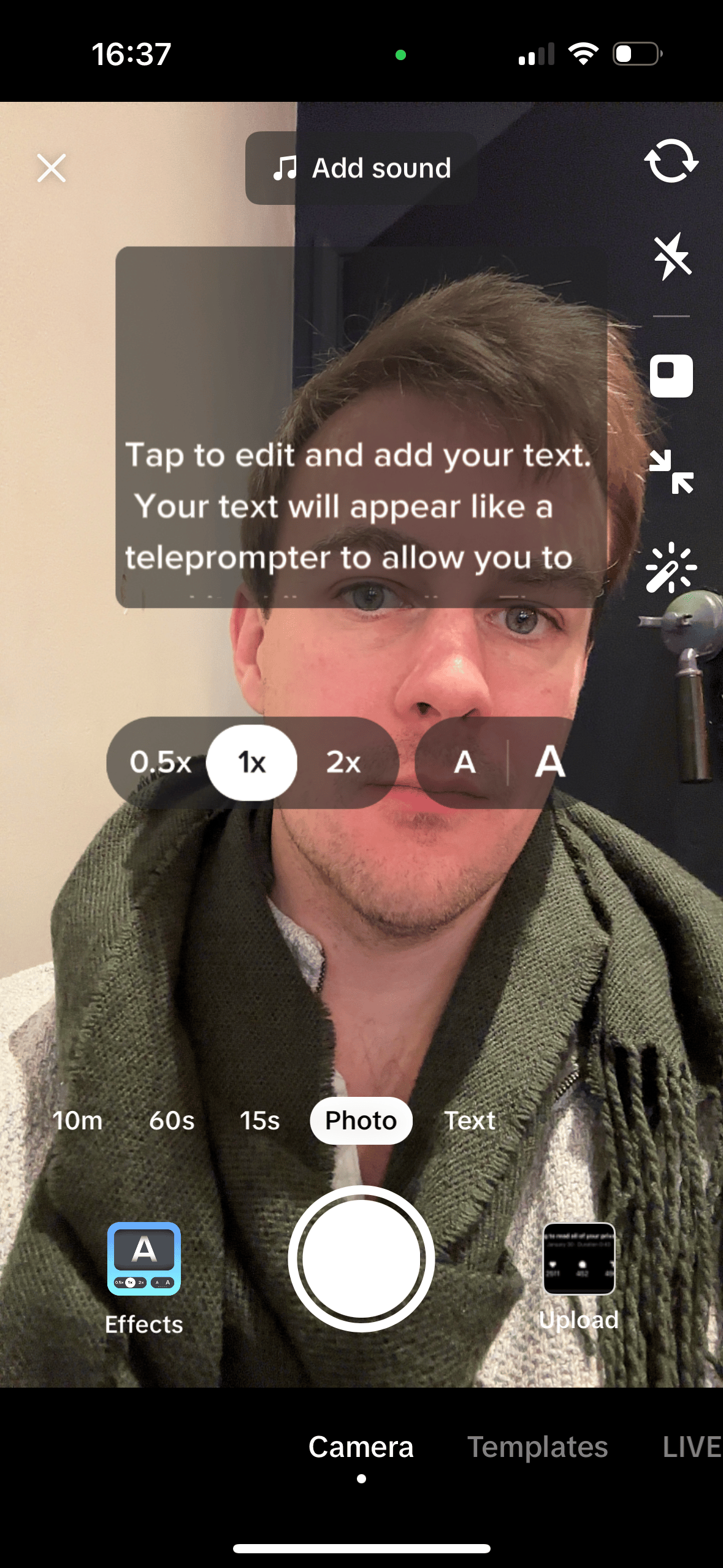
Pretty sweet!
I’d recommend not adding your full script but instead just notes.
This will stop you just reading off your lines. Instead notes allow you to speak naturally and be more dynamic.
I’ve kept this Part light.
You’ve got enough to shoot your first video:
script generator via the prompt
recommendation to use TikTok to record
That is ALL you need. Anything else is procrastination.
Shoot your first few videos using this method and then check out my other Playbooks for more details. Don’t refine your method before starting!
If you want to a few practice runs whilst still being on the hook - drop your video or link to it in the AI Community (comment in today’s post).
Here’s a reminder of the week:
Part 1: Never ending story
Part 2: First go long
Part 3: Break it down
Part 4: Video overlay
Part 5: Getting arty
Keep prompting,
Kyle
It opens up new social channels - specifically Instagram.
It gives us additional assets to use alongside the other formats.
The first is relatively straightforward - your images become the post on Instagram. Add the post text we created previously as the caption et voila you have hit another channel. More exposure, more audience, more revenue.
The second is a little more complex but equally powerful. You can get more creative here.
For instance, you’ll notice that my newsletters include a hand drawn image. It’s another layer of content to reinforce the written long form content.
We also drop the images into social posts like this LinkedIn carousel:
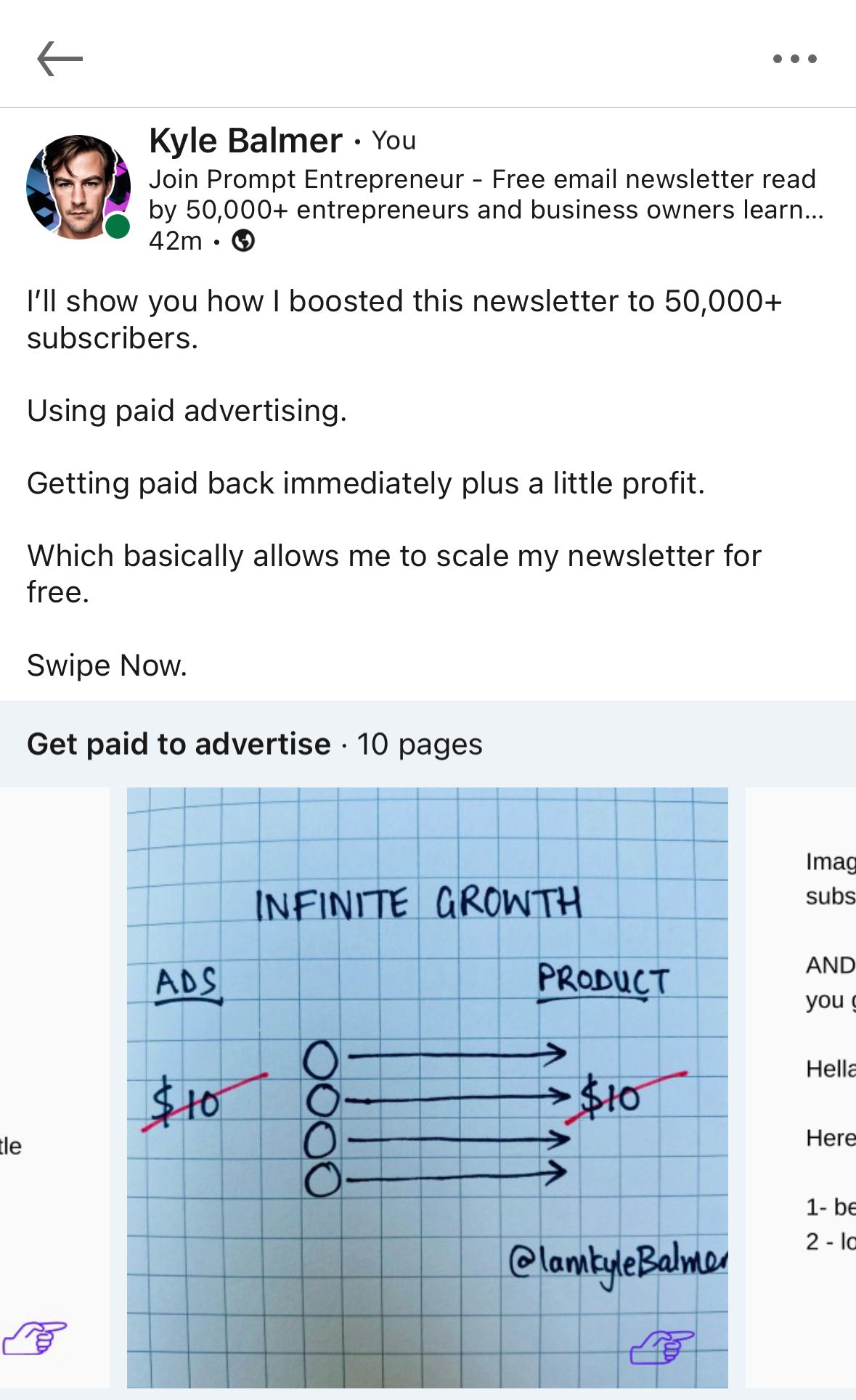
This makes it multimedia in the truest sense - there’s a text post, a carousel with text and a graphic.
I also use the images as backgrounds in video posts.
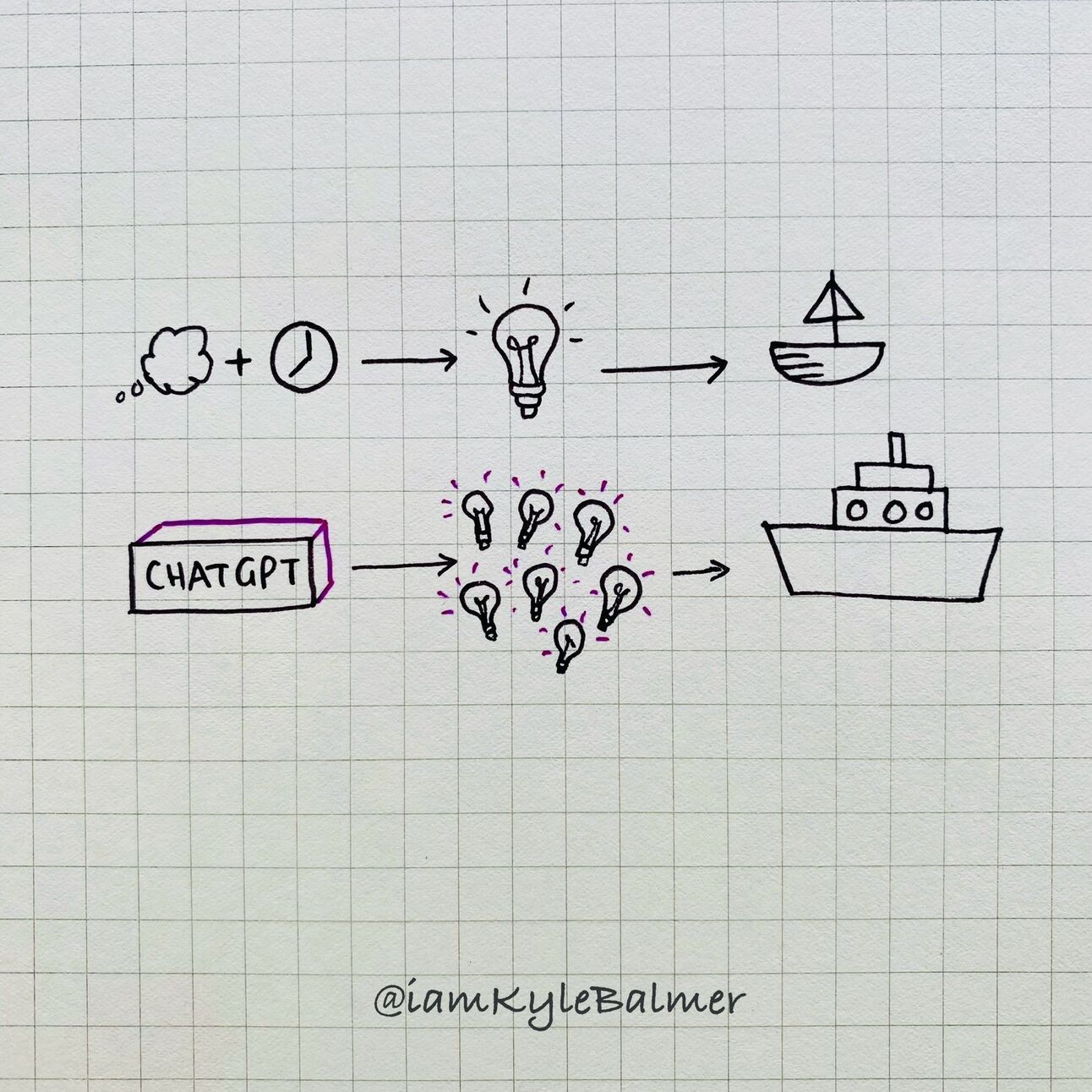
Here’s my biggest tip - do your graphics by hand.
I can’t claim any credit for this. I straight ripped it from Greg Isenberg.
Here is one of his :
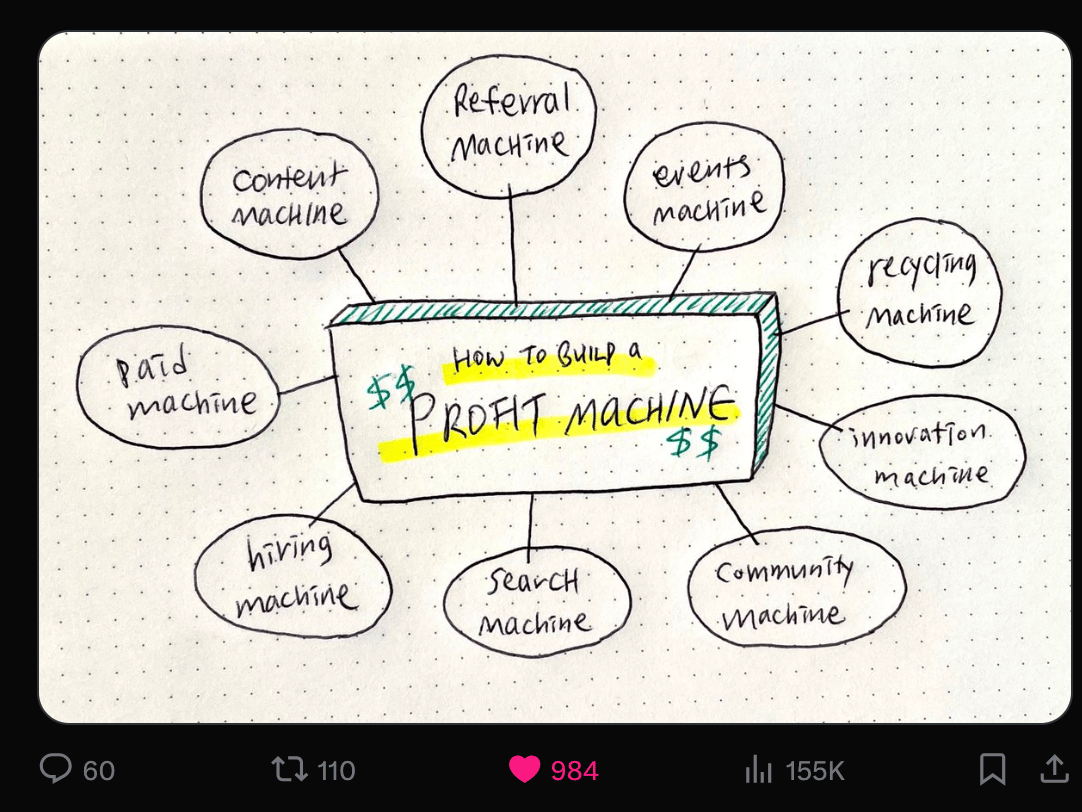
Notice the 155k views? Powerful stuff.
Is it highly produced? Nope!
In fact it looking so basic is why it works.
It “stops the scroll”. People stop to see what it is.
That doesn’t happen if your graphics are highly polished. No-one cares about corporate looking imagery. We see so much of it on the daily that our eyes glide right over it.
So put down Photoshop/Canva and get your pens.
Hand drawn feels like we’re physically sitting with a mentor who is sketching out her ideas for you on a napkin.
I “stole” the idea from Greg and started doing similar graphics for the newsletter. Further proof this method gains attention? A few days later Greg actually featured one of our graphics in his post:
How to build a content machine that works for you 24/7:
A content machine is peace of mind in case you get laid off, need to find customers, want to build something people love or want feedback on an idea
It's your own version of Jeff Bezos’ acquisition of The Washington Post.… twitter.com/i/web/status/1…
— GREG ISENBERG (@gregisenberg)
2:54 PM • Feb 10, 2024
The graphic on the right? That’s one of ours. That post is sitting at a cool 100k views.
Would he have featured it if it had been a written post? Nope.
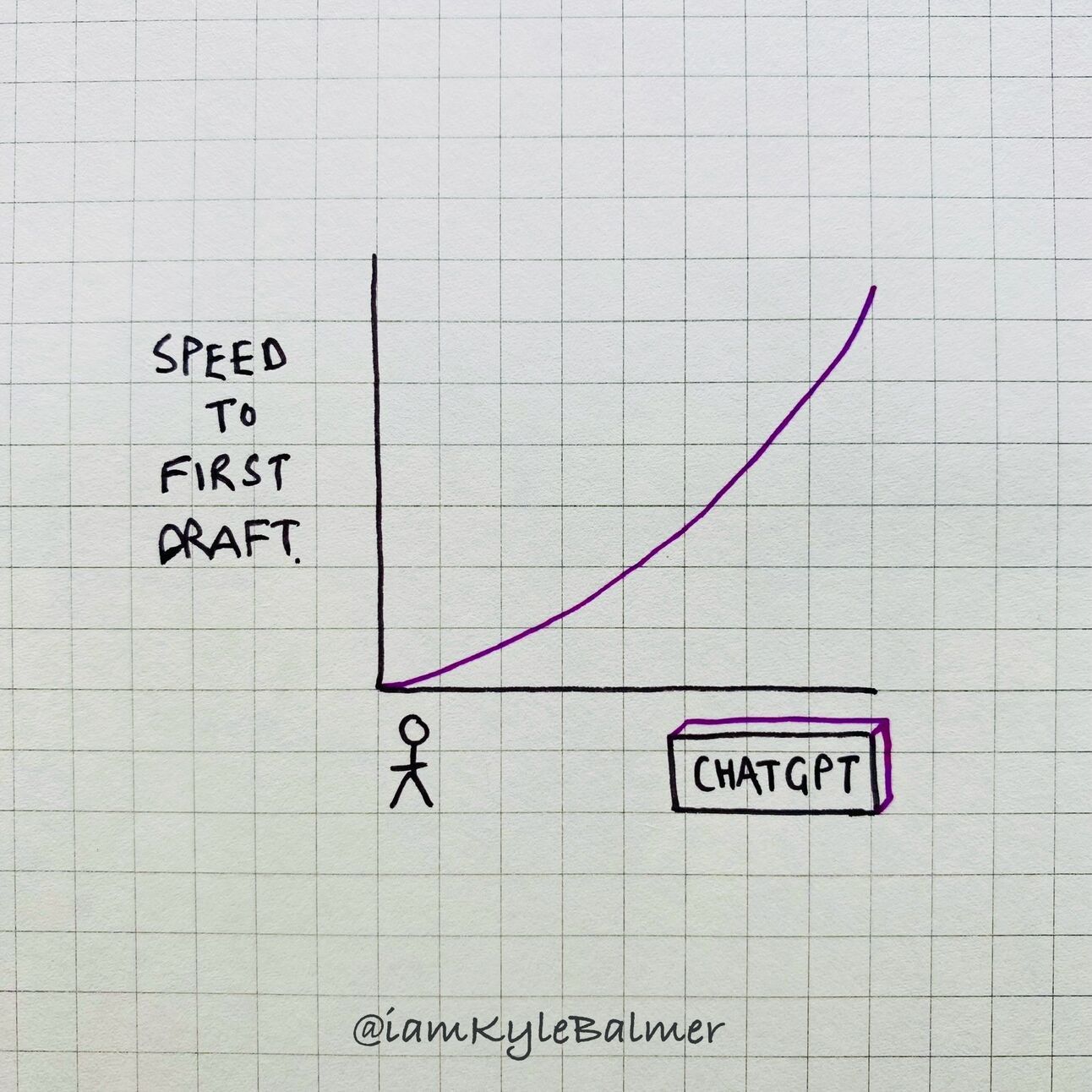
I wish I could tell you there’s an AI tool that’ll do this graphic for you.
There ain’t.
But we’ll use AI to give us ideas for the design.
Here’s a prompt:
Act as a graphic designer

I need a simple line drawing graphic that represents the concepts in the following post

Describe the graphical elements. Do not generate it

Use the graphics of Dan Koe as inspiration

The graphic should be possible to draw by hand - focus on simple geometric shapes, lines and text

[copy/paste post]
I plugged in this post from the last Part ""Your voice, your brand, your impact. Start expressing, the world is ready to listen."
This super simple post led to this graphic suggestion:
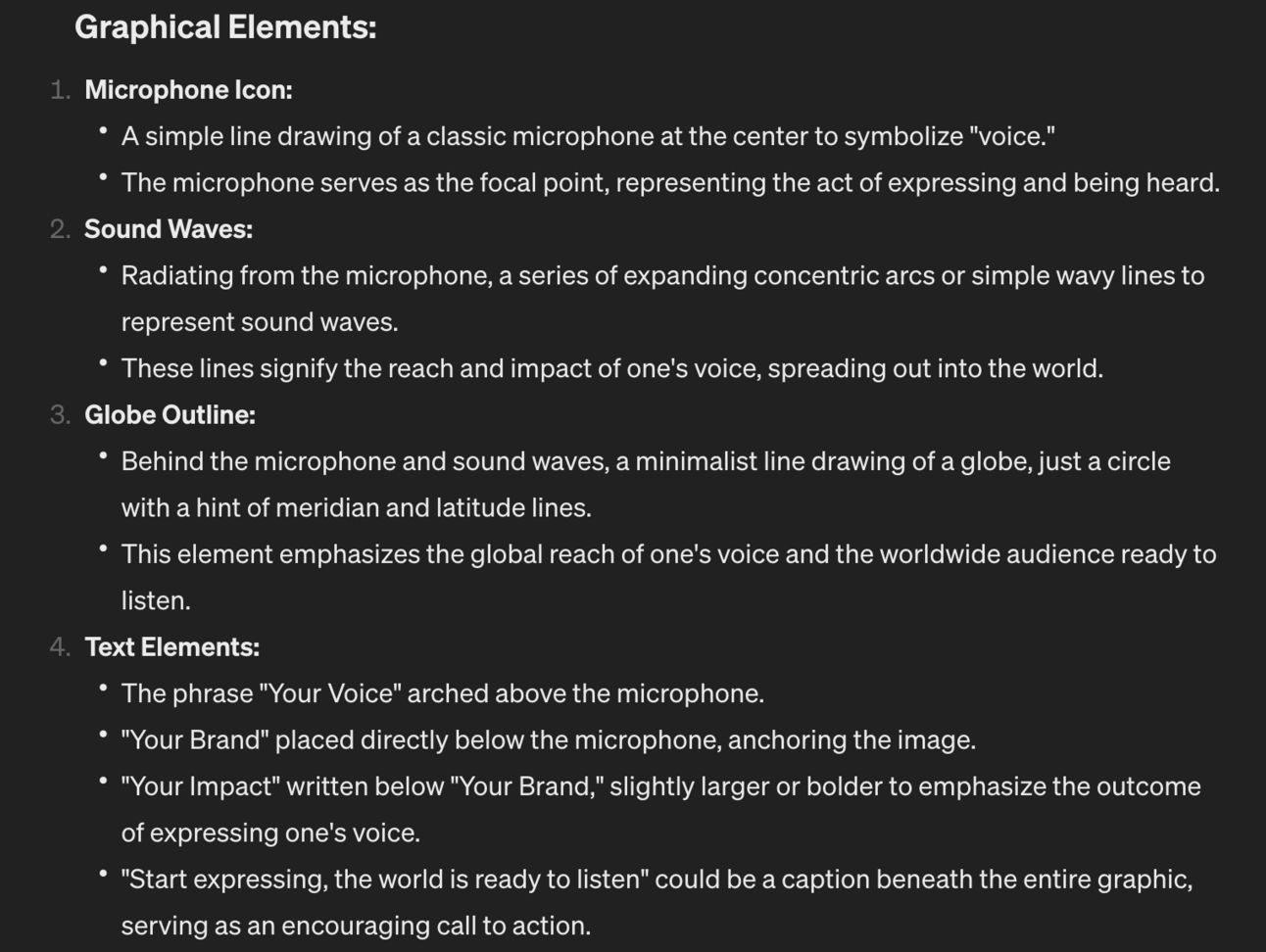
and some style guidelines:
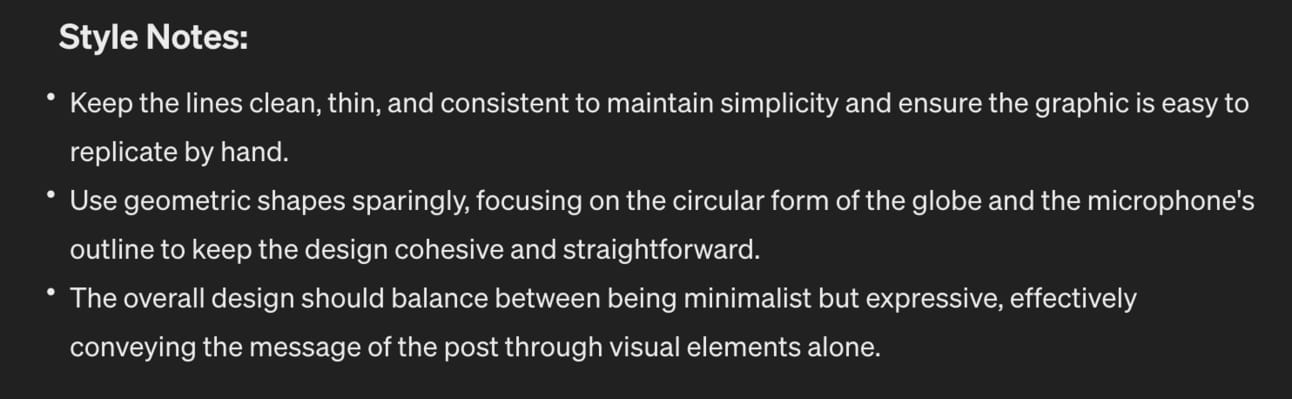
That’s sufficient for you to hand draw the graphic.
I can’t emphasise this enough - keep it simple! Your artistic ability isn’t important here, just use simple lines and shapes.
If you have trouble visualising the instructions you can ask ChatGPT to produce a version:
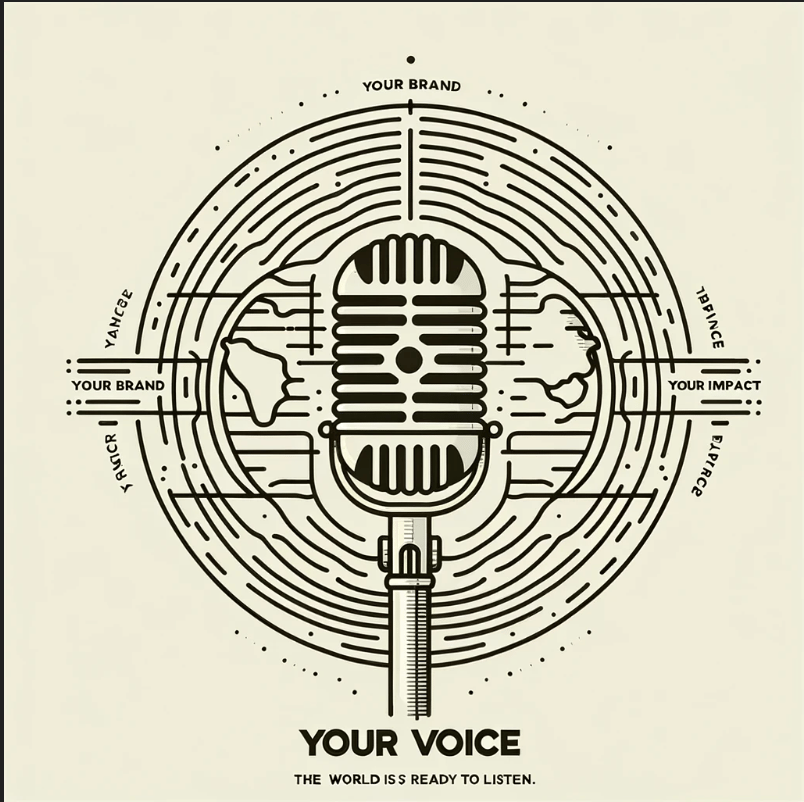
I wouldn’t personally use this graphic straight from ChatGPT but it’s a good way to give you a reference image to then create an image.
This can inspire you to draw your own diagrams:
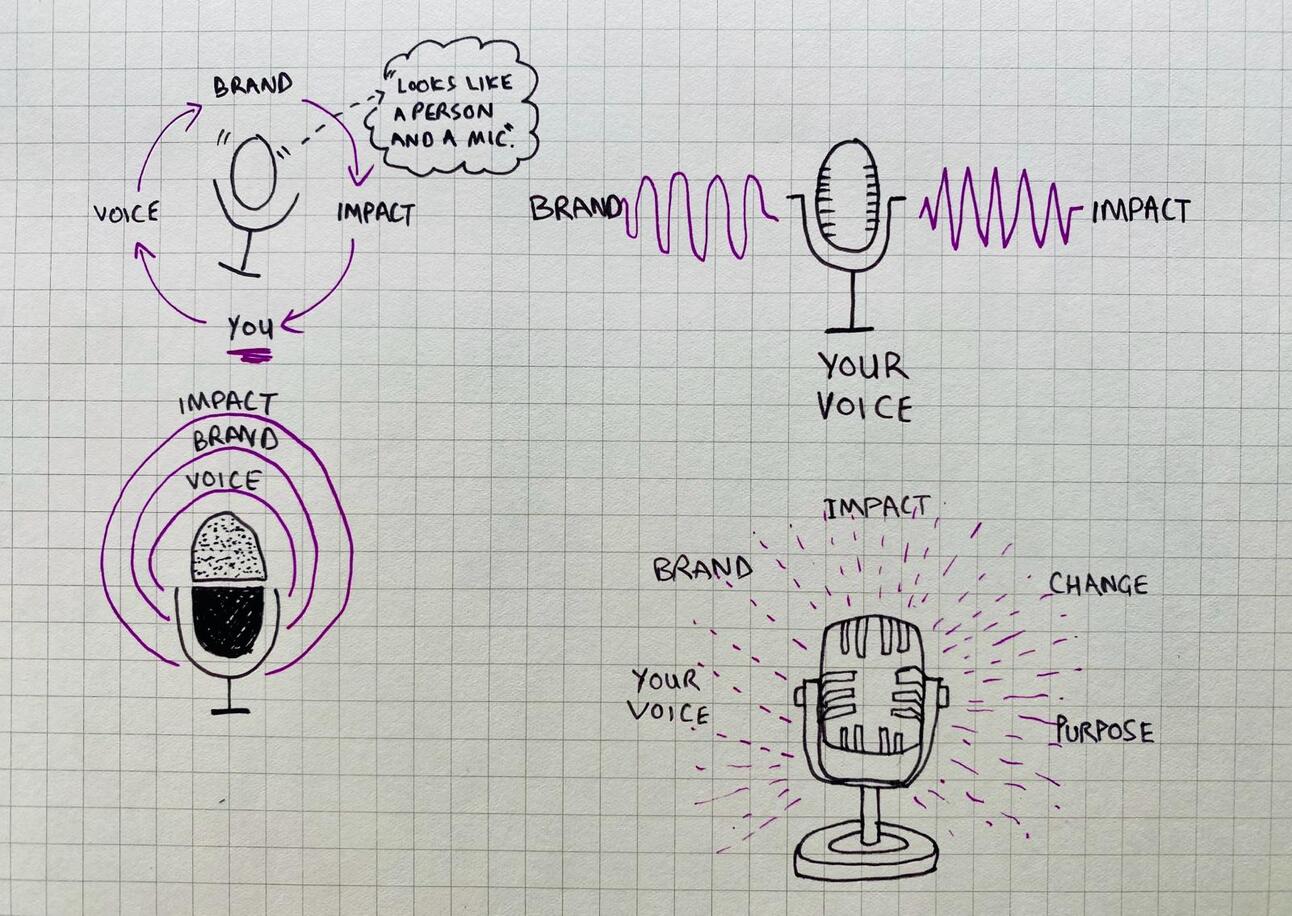
Sketches inspired by ChatGPT version
It’s important to make a mark with your brand.
As well as developing these graphics I recommend working on brand consistency.
Here are some tips:
Super basic but choose a colour and stick to it.
I made light of this this week on X but it’s important:
big update here at Prompt Entrepreneur HQ
after consulting with multiple global branding agencies
we have made our single largest brand investment to date:
a purple pen
join us in celebrating this next step in holistic brand synergistic integration
— Kyle Balmer (@iamkylebalmer)
12:47 PM • Feb 20, 2024
We use purple in our graphics but also elsewhere. Notice how this newsletter email start with 🟣? That makes it easy to pick out in your inbox.
I’d dye my hair purple if my partner wasn’t so against it.
It’s for the brand honey!!
On each of your images drop your social handle. You’ll notice that all mine have @iamkylebalmer on them.
That’s another brand touchpoint.
It’s especially helpful when the images get shared because it means they always point back to me.
Keep it consistent.
We use square graph paper.
Why? Makes it easy to draw proportionately on and also has a “sciencey” feel to it.
Choose a background that makes sense. Something familiar to your audience.
You publish content for writers and authors? Use yellow lined legal pad.
Publish for artists? Try a high quality paper where grain is visible.
Entrepreneurs? Use napkins or literally write on the “back of the envelope”.
Don’t just pick up the closest paper. Choose one type and stick with it.
Over this week we’ve cascaded content from one format to the next.
Following this framework will let you produce huge amounts of content from a single idea.
You no longer have an excuse to not be creating. One idea leads to 20+ content pieces now.
Here’s a reminder of what we covered this week:
Part 1: Never ending story
Part 2: First go long
Part 3: Break it down
Part 4: Video overlay
Part 5: Getting arty
Keep prompting,
Kyle
Unlock the secrets to becoming a content marketing powerhouse with our comprehensive playbook, '📣 Become a Content Marketing Machine using AI.' In this expertly crafted guide, you'll discover innovative strategies to generate an endless stream of content ideas, streamline your content creation process, and leverage AI tools to elevate your marketing game. Say goodbye to writer's block and hello to a thriving content ecosystem that not only engages your audience but also drives measurable results. Whether you're a seasoned marketer or just starting, this playbook will transform the way you approach content creation, making it easier and more efficient than ever before.
This playbook is designed for entrepreneurs, marketers, and content creators who are eager to enhance their content marketing strategies using AI. If you struggle with generating fresh ideas, feel overwhelmed by the content creation process, or want to stand out in a crowded digital landscape, this playbook is your ultimate solution. With actionable insights and practical techniques, you'll gain the confidence to produce high-quality content consistently, helping you connect with your audience and grow your brand.
No prior experience is necessary! This playbook is designed to guide you step-by-step, making it accessible for beginners and valuable for seasoned marketers alike.
The time commitment varies based on your current level of content creation. However, many of the strategies can be integrated into your existing workflow without significant disruption.
Absolutely! The playbook covers creating engaging social media content that complements your long-form articles, allowing you to reach a wider audience.
You'll explore various AI tools, including content generation software and graphic design applications, that can streamline your content creation process.
Yes! The strategies outlined in this playbook will help you build an authentic personal brand that resonates with your audience and enhances your online presence.