🔧 What Actually Makes Codex Different
TL;DR
- •Codex introduces 'Skills' and automation features for coding efficiency.
- •Cloud version now has a desktop app for macOS users.
- •Codex app offers project organization and GitHub connectivity.
With the rapid evolution of AI tools, the introduction of the Codex app marks a significant step for entrepreneurs looking to harness AI for coding tasks. The ability to simplify coding through automation and personalized skills can greatly reduce the learning curve, making AI coding accessible to a broader audience. This is especially relevant now, as more professionals are seeking ways to integrate AI into their workflows without requiring extensive technical expertise.
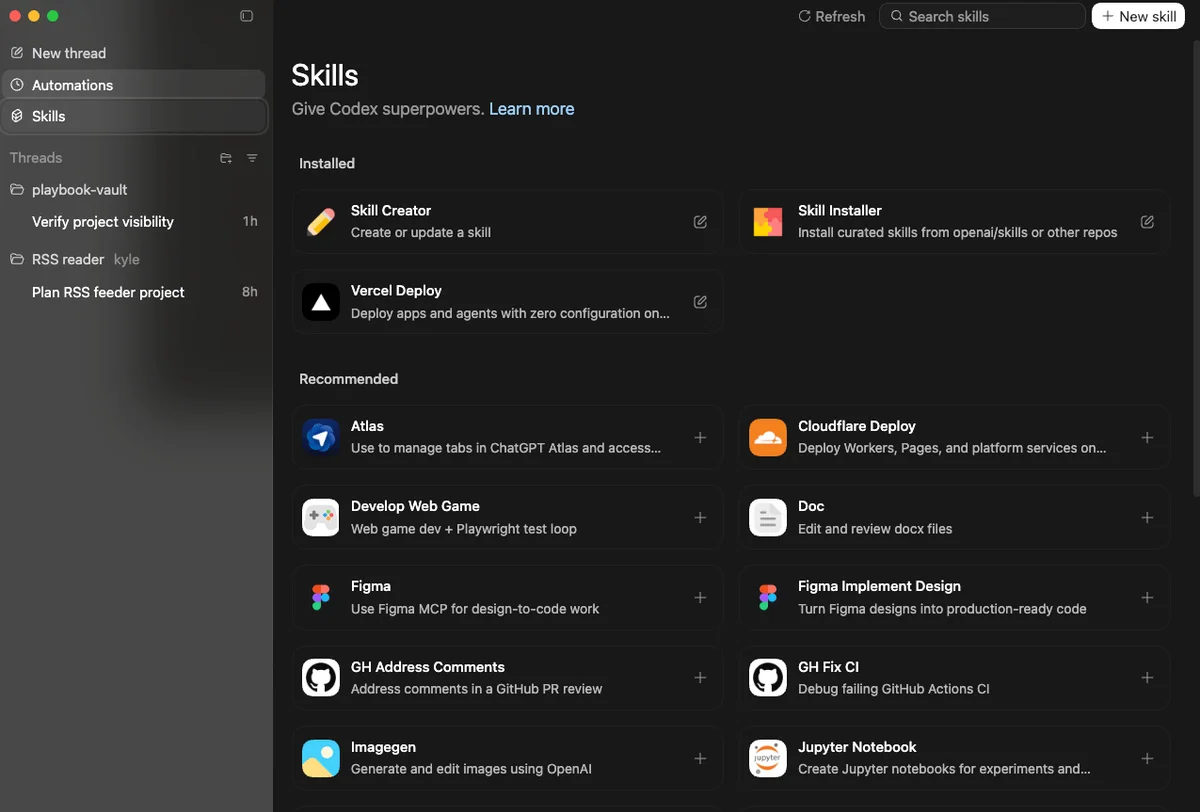
As businesses increasingly rely on technology, tools like Codex can streamline processes, automate repetitive tasks, and enhance productivity. Entrepreneurs who embrace these advancements could find themselves ahead of the curve, able to focus on innovation rather than getting bogged down by the intricacies of coding.
The Key Details
Skills and Automation Features
One standout feature of the new Codex app is its "Skills" function, which allows users to package tools and workflows that Codex can reuse. This means once you teach Codex your preferences or specific workflows, it can execute these tasks without requiring repetitive input. Imagine coding a recurring task just once and letting Codex handle it from then on—this can save you significant time and effort.
Additionally, the automation capabilities allow users to set Codex to run tasks on a schedule, which is a game-changer for those who often juggle multiple projects or processes. These automations can replace manual efforts, ensuring that repetitive tasks are handled efficiently, allowing you to focus on more creative or strategic aspects of your business.
User-Friendly Interface and Project Organization
Unlike the main ChatGPT interface, which can feel overwhelming with endless conversations, the Codex app organizes everything into projects and threads. This structured approach helps users manage their coding tasks more effectively and reduces the chaos often associated with coding projects. You can easily switch between different projects and threads, making it simpler to track progress and collaborate.
Moreover, integration with GitHub for version control is a significant advantage. It enables users to save their work, manage different versions of their projects, and collaborate without conflict, which is crucial for team environments. The ability to export your work to various platforms, like Cursor or Visual Studio Code, means you aren't locked into one ecosystem—this flexibility is highly beneficial for entrepreneurs who may use multiple tools.
Expert Insights from the Livestream
During a recent livestream, Kyle Balmer highlighted the practical implications of the Codex app. He emphasized its potential for multitasking, allowing users to run multiple agents in parallel while keeping tasks isolated. This could lead to a more dynamic and productive workflow, particularly for entrepreneurs who need to manage various coding tasks simultaneously.
Another point of discussion was the speed of Codex compared to other coding models like Claude. While Codex might take longer to complete tasks, its ability to execute them correctly the first time can outweigh the wait, especially for complex projects. This insight is crucial for entrepreneurs considering which AI tools to incorporate into their workflows.
Current Limitations and Future Developments
While the Codex app showcases impressive features, it is not without flaws. For instance, the Skills marketplace was initially non-functional, which can be frustrating for new users eager to explore its capabilities. However, the Codex team was quick to identify and resolve the issue, reflecting a commitment to improving user experience.
The app is currently only available on macOS, with a Windows version expected in the future. This limitation could constrain user access for those on different platforms, but the intention to expand access indicates promising growth for Codex.
Practical Applications for Entrepreneurs
So, what can you do with Codex right now? Here are some actionable insights:
Leverage Skills: Start by exploring the Skills feature. Teach Codex your common tasks or preferences to automate your workflow.
Utilize Automations: Set up scheduled tasks to run in the background. Whether it's data processing or regular updates, automations can free up your time for more important tasks.
Organize Projects: Use the project organization features to keep your coding tasks tidy. This can help prevent overwhelm and boost productivity.
Connect to GitHub: Make sure to integrate GitHub for version control. This is essential for tracking changes, especially if you're working on team projects.
Export Work: Take advantage of the ability to export your work to different platforms. This can help you maintain flexibility in your workflow and collaborate more effectively.
By adopting Codex into your coding practices, you not only simplify the coding process but also enhance your overall productivity. This can lead to quicker project turnaround times and a more efficient work environment.
What's Next
In conclusion, the Codex app represents a significant advancement in AI-assisted coding tools. By providing features like Skills and automation, it empowers entrepreneurs to streamline their coding tasks and focus on what truly matters—their business and creativity. As the app continues to evolve, its potential for transforming how we approach coding will only increase.
Stay tuned for future updates and enhancements that could further improve your experience with Codex. It's an exciting time to explore what AI can do for your entrepreneurial journey!
Key Terms Explained
Codex
OpenAI's coding assistant designed to help users write and understand code more efficiently.
Skills
Reusable tools and workflows that Codex can learn from users to streamline tasks and coding processes.
Automation
The ability to set Codex to perform tasks on a schedule, reducing manual effort in coding operations.
GitHub
A platform for version control and collaboration, allowing users to manage code changes and work together on projects.
Project Organization
The method of structuring tasks, threads, and projects within Codex to improve workflow and reduce clutter.
What This Means For You
Embracing Automation for Efficiency
The Codex app opens doors for entrepreneurs to automate repetitive coding tasks. By utilizing the Skills and automation features, you can reduce the time spent on mundane tasks, focusing instead on innovation and strategy. This shift towards automation not only increases efficiency but also empowers you to take on more projects without the fear of burnout.
Enhanced Collaboration and Flexibility
With GitHub integration, Codex allows for seamless collaboration on coding projects. This means you can work with teams more effectively, ensuring that everyone is on the same page and can contribute without conflict. The ability to export your work to various platforms also provides flexibility in how you manage and present your projects, making it easier to adapt to different workflows.
Conclusion
Adopting the Codex app can significantly impact how entrepreneurs approach coding. By taking advantage of its features, you can simplify your coding processes, enhance collaboration, and ultimately drive your business forward in the age of AI-powered solutions. Stay proactive in exploring how Codex can fit into your business model and take advantage of this innovative tool as it develops further.
Frequently Asked Questions
What is Codex and how does it work?
Codex is OpenAI's coding assistant that helps users write and understand code by automating tasks and providing coding suggestions.
How can I use Codex for my business?
You can use Codex to automate repetitive coding tasks, organize projects, and improve collaboration with team members through GitHub integration.
Is Codex available for Windows?
Currently, Codex is only available on macOS, but a Windows version is expected to be released in the future.
What are the key features of the Codex app?
Key features include Skills for reusable workflows, automation for scheduled tasks, and project organization for improved task management.
How do I get started with Codex?
You can start using Codex by downloading the app via your ChatGPT account and exploring its features for coding assistance.
Sources & References
- OpenAI Codex Documentationofficial
Love AI with Kyle?
Make us a Preferred Source on Google and catch more of our coverage in your feeds.