🖥️ OpenAI's New Codex App: Free AI Coding for Everyone
TL;DR
- •OpenAI launched the Codex desktop app for macOS, available for free until April.
- •Users can create software with ChatGPT accounts, enhancing coding accessibility.
- •The app allows multitasking and automations, though lacks a preview panel.
OpenAI's launch of the Codex desktop app marks a significant stride in making AI-powered coding tools more accessible to everyone, especially entrepreneurs and creators. With over 900 million ChatGPT users, this tool is set to democratize coding further. This is particularly timely as the demand for software development skills continues to rise, and many individuals seek cost-effective solutions to bring their ideas to life.
The ability to create software with a free tool can empower users to prototype applications, automate workflows, and enhance productivity without the steep costs usually associated with coding software. As the app is available for free until April, now is the perfect time for entrepreneurs to explore its capabilities without financial commitment.
The Key Details
The new Codex app operates on macOS and allows users to build software by leveraging AI coding assistance. If you have a ChatGPT account, you can access Codex and start creating applications right away. During a recent livestream, Kyle demonstrated the app's functionality, highlighting its ease of use and rich features.
One standout feature is the ability to run multiple coding agents simultaneously. This means you can work on different tasks at once, which can significantly speed up your development process. Additionally, automations allow you to set background tasks to execute on a schedule, which can help streamline repetitive work.
With the app's introduction, OpenAI has doubled the rate limits for all paid users, enhancing the experience for those willing to invest in the premium plans. This is a strategic move to encourage more users to experiment with the tool and maximize its potential.
Expert Insights from the Livestream
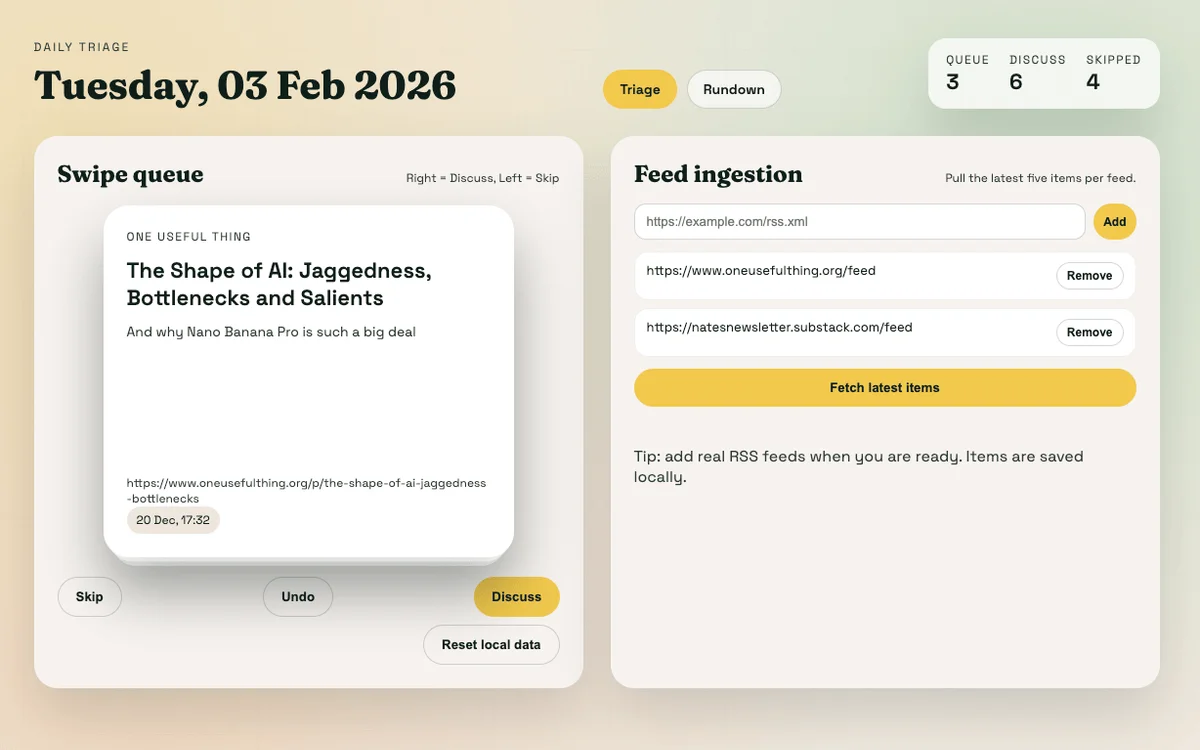
Kyle shared some practical insights during his livestream while building an RSS reader app using Codex. He noted that the app is intuitive enough for those familiar with coding, yet it poses challenges for absolute beginners due to its reliance on terminal commands for previewing projects. This barrier can deter first-time users, suggesting that Codex might still be better suited for those with some coding background.
He also pointed out that while Codex is slower than competitors like Claude Code, it tends to deliver accurate results once the tasks are complete. This slower pace can be beneficial for complex coding projects where precision is crucial, but it may require users to adopt a more patient, set-it-and-forget-it approach.
What You Can Build with Codex
The possibilities with the Codex app are vast. Entrepreneurs can leverage it to prototype applications, automate business processes, or create unique tools that address specific market needs. For instance, the RSS reader Kyle developed is not only a practical solution for content consumption but also a demonstrative project that showcases the capabilities of the Codex app.
Here are a few ideas for what you can build:
Automation Tools: Set up workflows that automate repetitive tasks, such as data collection or reporting.
Custom Applications: Create tailored software solutions for your business, from inventory management systems to customer relationship managers.
Prototyping: Quickly prototype and test ideas for applications before investing significant time and resources into development.
Learning Projects: If you're new to coding, use Codex as a learning tool to explore programming concepts and build your skills.
Potential Downsides
While Codex offers impressive capabilities, there are some drawbacks to consider. One major limitation is the lack of a built-in preview panel, which can make it challenging to visualize your project without running terminal commands. This could be intimidating for newcomers who might not be familiar with coding environments.
Additionally, the speed of task execution may require users to adapt their workflow. While Codex can be a robust tool for developing applications, the slower processing times may not be ideal for rapid iteration, particularly in fast-paced development environments.
Conclusion
OpenAI's Codex app represents a valuable tool for entrepreneurs looking to harness the power of AI in their software development efforts. With its free availability for a limited time, now is the perfect opportunity to explore what Codex can do for your business. Whether you are looking to automate processes, prototype applications, or learn to code, Codex makes it easier than ever to get started.
By understanding its strengths and limitations, you can effectively leverage this tool to enhance your productivity and bring your ideas to life.
Key Terms Explained
Codex
OpenAI's AI coding assistant designed to help users build software applications.
ChatGPT
OpenAI's conversational AI model that provides interactive responses and coding assistance.
Automations
Tasks set to run automatically in the background, streamlining repetitive processes.
Terminal Commands
Text-based instructions used to communicate with the operating system, commonly utilized in coding.
RSS Feed
A web feed that allows users to access updates from websites or blogs in a standardized format.
Rate Limits
Restrictions on the number of requests a user can make to a service in a given timeframe.
What This Means For You
Practical Benefits for Entrepreneurs
The release of the Codex app is a game-changer for entrepreneurs looking to innovate with technology. With its free access until April, users can explore AI coding without financial risk, making it an excellent opportunity for startups and small businesses to leverage AI for software development.
Key Takeaways
Experiment Freely: Take advantage of the free period to experiment with your ideas and build prototypes.
Automate Processes: Use the automation features to save time on repetitive tasks, allowing you to focus on higher-value activities.
Learn and Grow: If you're new to coding, Codex can serve as a learning tool to develop your skills while working on real projects.
Though there are some limitations, such as speed and the need for terminal commands, the potential for increased productivity and creativity is significant. Entrepreneurs should explore Codex as a valuable addition to their toolkit for navigating the evolving landscape of AI in business.
Frequently Asked Questions
What is the OpenAI Codex app?
The Codex app is a coding assistant from OpenAI designed to help users build software applications easily.
How can I access the Codex app?
If you have a ChatGPT account, you can download the Codex app for free on macOS.
What are automations in the Codex app?
Automations are background tasks that can be scheduled to run automatically, helping streamline workflows.
Is the Codex app beginner-friendly?
While it has powerful features, beginners may find the lack of a preview panel and reliance on terminal commands challenging.
What can I build with the Codex app?
You can build various applications, automate tasks, and prototype software solutions tailored to your business needs.
Sources & References
Love AI with Kyle?
Make us a Preferred Source on Google and catch more of our coverage in your feeds.