What Is OpenClaw?
The Operating System for Your Life
Beyond chatbots: Persistent, Proactive, and Sovereign.
Name Change: From Clawdbot to MoltBot to OpenClaw
In January 2026, the project was first renamed from Clawdbot to MoltBotafter Anthropic (creators of Claude) raised concerns about the similar naming. Now it's been renamed again to OpenClaw. Same great project, new name.
Note: Some commands and paths below may still reference the old names during the transition period.
Watch the Full Breakdown
What is OpenClaw? Is it overhyped? Do you actually need a Mac Mini?
What Is OpenClaw?
The AI assistant we were promised a decade ago
OpenClaw is an agent gateway. On the front end you can have an interface like WhatsApp, Telegram, Discord, or Slack. And on the backend you can connect it to any LLM—Claude, ChatGPT, Gemini, Grok, even local models.
The tagline is "the AI assistant that actually does things."
This is the promise of Siri. The promise of Jarvis from Iron Man. An AI that constantly knows what's going on, can reach out automatically, can check on you, can be threaded into your life.
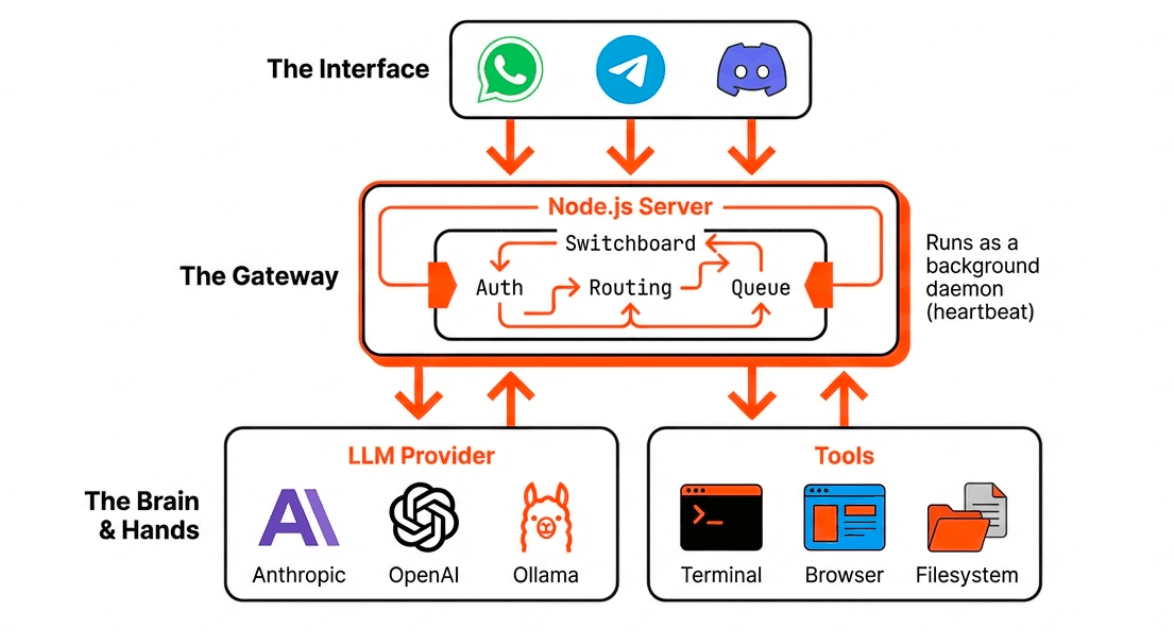
Important: OpenClaw is NOT officially connected to Claude/Anthropic in any way. It's an open-source project by @steipete.
Why OpenClaw Is Different
From passive chatbot to proactive assistant
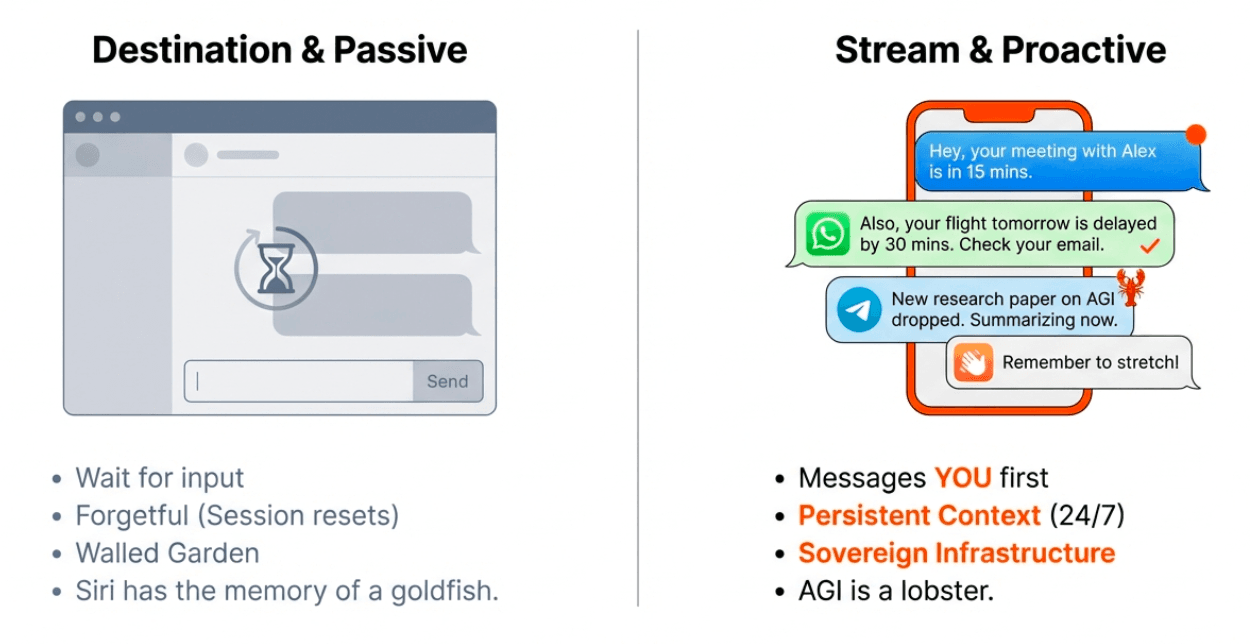
Persistent
Lives 24/7 on a computer. Doesn't die between sessions like ChatGPT. Continues running nonstop.
Memory
Remembers all previous interactions and tasks. Becomes a one-stop-shop for all your work across models and tools.
Proactive
This is the big one. It doesn't wait for you. It reaches out with messages, reminders, daily briefs.
"The first thing my OpenClaw asked is what timezone I'm in so it doesn't disturb me! At 9am it might say 'Hope you enjoy your morning coffee. You said you wanted to do daily reflections—let's do that now.'"
Meet "Henry" — A Real Example
What an autonomous AI assistant actually does
One user named their OpenClaw "Henry" and shared what it does autonomously—without being prompted:
Autonomous Research
Researches specified topics without being asked. Monitors competitors and generates automated reports on their performance metrics.
Self-Improvement
Built its own voice interface. Added new visible elements to improve its own user experience. Continuously evolving.
Overnight Code Generation
Henry monitored Twitter, identified trending features in the industry, wrote the code to implement them, and created a pull request—all overnight while the owner slept. They woke up to finished work ready for review.
This is the difference between a chatbot and an autonomous agent. You give it guidelines and SOPs, and it operates independently—like a 24/7 AI employee that reports back to you.
Critical Safety Warning
Do NOT install OpenClaw on your main computer
I know it's tempting. It's probably what you have at hand. Don't do it.
If you give OpenClaw shell access and something goes wrong, it'll cheerfully wipe your computer. With the number of people rushing into this, I guarantee we'll have horror stories within the week.
Safe Options
- VPS ($5-10/month) — Runs in a data centre, always on, recommended
- Old laptop — Dig out that dusty laptop gathering dust
- Raspberry Pi — Perfect for running 24/7
- Virtual machine — Sandbox it, protect everything
Do NOT:
Give it access to your primary machine. Run it isolated. Don't be the person on Twitter saying "OpenClaw wiped my system boo hoo" while everyone asks "did you give it full access to everything?"
Security Vulnerabilities to Watch For
Prompt Injection
Malicious inputs that trick the AI into executing unintended commands. Be careful what data sources you connect.
Unauthorized Access
OpenClaw may access systems, files, or financial information if given broad permissions. Limit its scope.
Hardening Tool: The ACIP project provides injection protection. Check Anthropic's cookbook for security best practices when running autonomous agents.
You Don't Need a Mac Mini
Ignore the Twitter influencers
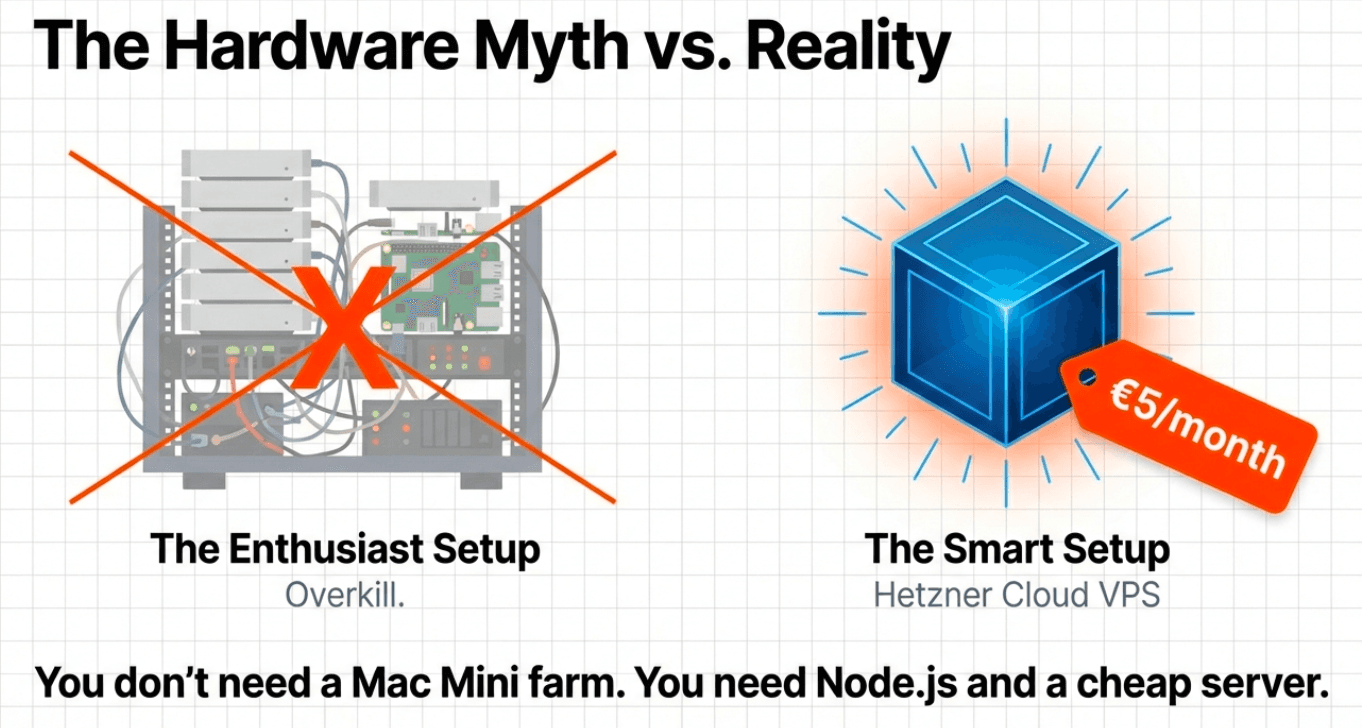
Stop. If you're seeing Twitter influencers saying "go buy a Mac Mini to run OpenClaw"—ignore them.
I've already stopped 2 people today from dropping $1,000 on this! A $5/month VPS handles 99% of use cases. An old laptop works fine. Someone got it running on a Raspberry Pi.
The only reason you'd need a beefy machine is if you're running 50 OpenClaw instances orchestrating together, or running a local LLM that needs serious compute. For most people: absolute overkill.
What Can You Use It For?
Think of it as an executive assistant
Imagine you've just hired a human assistant. What tasks do you give them? That's up to you and what's important for you personally.
Personal Productivity
- Time blocks tasks in calendar based on importance
- Weekly reviews from meeting transcriptions
- Morning briefs with weather, health stats, agenda
- Trending topics and stuff to read based on objectives
Content Creation
- Daily AI news brief every morning at 8am
- Scrapes, filters, and delivers personalized reports
- Learns from feedback on which articles were good/bad
- Research assistant for writing projects
Health Coaching
- Diet coach that asks how you're feeling
- Record calories via WhatsApp
- Reaches out proactively like a personal trainer
- Notices weight trends and suggests improvements
Job Applications / Outreach
- Give it your CV and best practices
- Set criteria for jobs you're looking for
- It applies 24/7 autonomously
- 60-hour task condensed into 30 minutes of setup
Code Review & Development
- Multi-agent code review systems
- Automated pull request analysis
- Monitors repos for issues to fix
- Generates features based on trends
Calendar & Email
- Calendar automation and scheduling
- Email delegation and drafting
- Meeting prep and follow-ups
- Customer success workflows
Home Automation & IoT
- Home automation integration
- IoT device management
- Smart home routines
- Device monitoring and alerts
Browse more use cases at openclaw.ai
Setup Options
Choose the right method for your situation
There are multiple ways to run OpenClaw. Pick based on your technical comfort level and what you have available:
VPS (Recommended)
Hetzner, DigitalOcean, or similar. $5-10/month, always on, isolated from your machine.
Full guide below
AWS Free Tier
Deploy in under 5 minutes. Good for testing. Free for 12 months within limits.
UTM Virtual Machine (Mac)
Free alternative to buying hardware. Run Linux in a VM on your Mac. Great for testing before committing to a VPS.
Raspberry Pi + Cloudflare
Run 24/7 on low-power hardware. Use Cloudflare Tunnel for remote access without port forwarding.
One-time ~$50-80 cost, then free forever
Advanced: Mac Studio clustering with multiple instances is possible for heavy workloads, but this is overkill for 99% of users. Start simple.
Installation & Setup
Visit OpenClaw.ai for the latest installation instructions
Get Started with OpenClaw
For the most up-to-date installation instructions, setup guides, and documentation, visit the official OpenClaw website.
Visit OpenClaw.aiDon't Want to Get Technical?
No-code alternatives for similar automation
If setting up servers and SSH keys isn't your thing, these platforms offer similar automation without the technical configuration:
Launch Lemonade
AI automation platform with visual builder. Great for marketing and business workflows.
Learn Moren8n
Open-source workflow automation. Self-hostable or cloud. Very powerful for technical workflows.
Visit n8nZapier
The classic automation tool. Connects 5000+ apps with no code. Best for simple workflows.
Visit ZapierKey Difference: These tools are great for automation, but they're not the same as OpenClaw. OpenClaw is proactive—it reaches out to you, runs continuously, and can take autonomous actions. No-code tools are typically reactive—they trigger when something happens.
Presentation Slides
15-page visual guide to OpenClaw - The Sovereign Operating System
What People Are Building
Real examples from the OpenClaw community
Here's what developers and creators are doing with OpenClaw:
Resources
Official links and community
Get AI-Ready in 5 Days
Join 250,000+ smart professionals getting AI-ready with jargon-free training. No tech skills required.