
AI playbook
Unlock the full potential of your written content with our playbook, 'Written Content Repurposing with AI.' In today's fast-paced digital landscape, creating engaging content consistently can feel overwhelming.
Start ReadingThank you again for letting me tell you about the AI Business Breakthrough Academy.
Launch went great - thank you to those who supported the launch and are now in the Academy.
We had a vote on Saturday between two different methods of expanding our content production - either writing based content or video based content.
Writing came out the winner with 70%+ of the vote. Sorry video!
This we’ll I’ll focus on giving you a killer system for repurposing written content so you become an absolute machine.
Here’s a quick overview of the week
Part 1: Creating long form content and why repurpose
Part 2: X repurposing
Part 3: LinkedIn repurposing
Part 4: SEO repurposing
Part 5: Systematisation and expansion
Ever followed someone on X and thought “this is great but I’d never have as much time as them to make this much content”?
Some people out there seem hyper productive. Posting 10+ times a day. And all of it quality.
And you’re sitting there struggling to write your single post for the day.
I get it - 100%. I used to be that way too. Sitting looking at a blank screen trying to come up with something from scratch.
And now I’m one of those annoyingly prolific people who, you’d assume, must spend all day everyday on X. In reality I maybe spend an hour a day. Less if I can.
Instead most of my content is pre-prepared and loaded up. And most of the preparation comes from repurposing.
Repurposing is basically taking a single piece of content and chopping and changing it into 5, 10, 50 pieces of content.
Let me show you some recent examples - examples will make this clear.
I published a whole set of newsletters on coming up with a business idea that works for you based on skills, strengths and market realities.
For example one issue had this section:
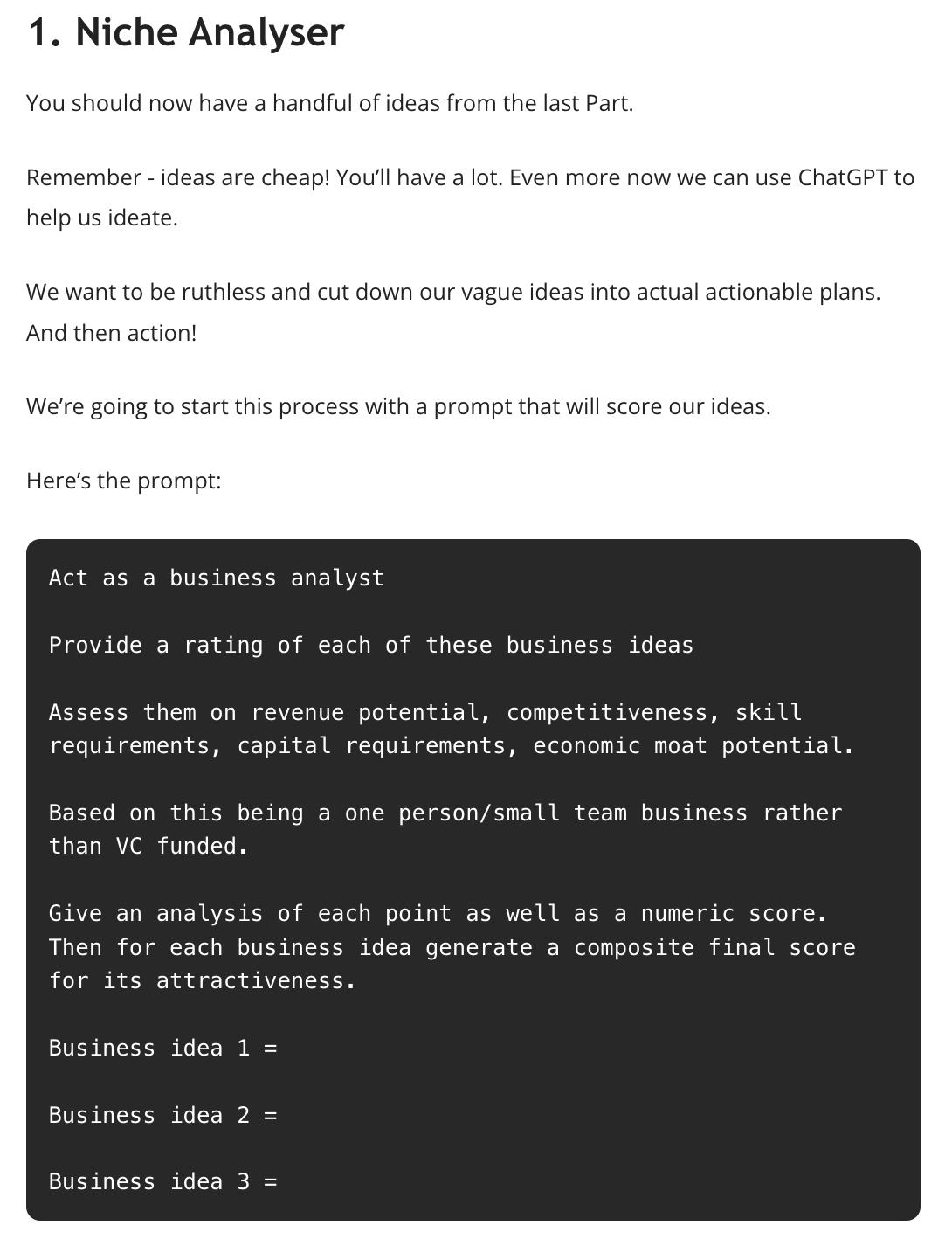
You can see the full article here.
This part of the article was converted into a post on X:
What's the best business niche to pursue?
Here's a Business Niche Analyser tool for you to use
Remember - ideas are cheap! You’ll have a lot. Even more now we can use ChatGPT to help us ideate.
We want to be ruthless and cut down our vague ideas into actual actionable plans.… twitter.com/i/web/status/1…
— Kyle Balmer | Prompt Entrepreneur (@iamkylebalmer)
11:19 AM • Oct 6, 2023
Click through to see the full post and its presentation.
That’s one example of repurposing. Here’s another.
From the same issue I also created a thread:
Don't start untested business ideas.
X/Twitter & Linked IN polls are a great way to quickly test receptiveness to an idea.
Here's how + a quick prompt
— Kyle Balmer | Prompt Entrepreneur (@iamkylebalmer)
11:39 AM • Oct 6, 2023
Again, check the full post to see what threads look like - they are basically a chain of X posts, all one after another.
I also took the content from the same article over to LinkedIn, this time as an article:
You can see the full article here.
Also on LinkedIn this time as a carousel:
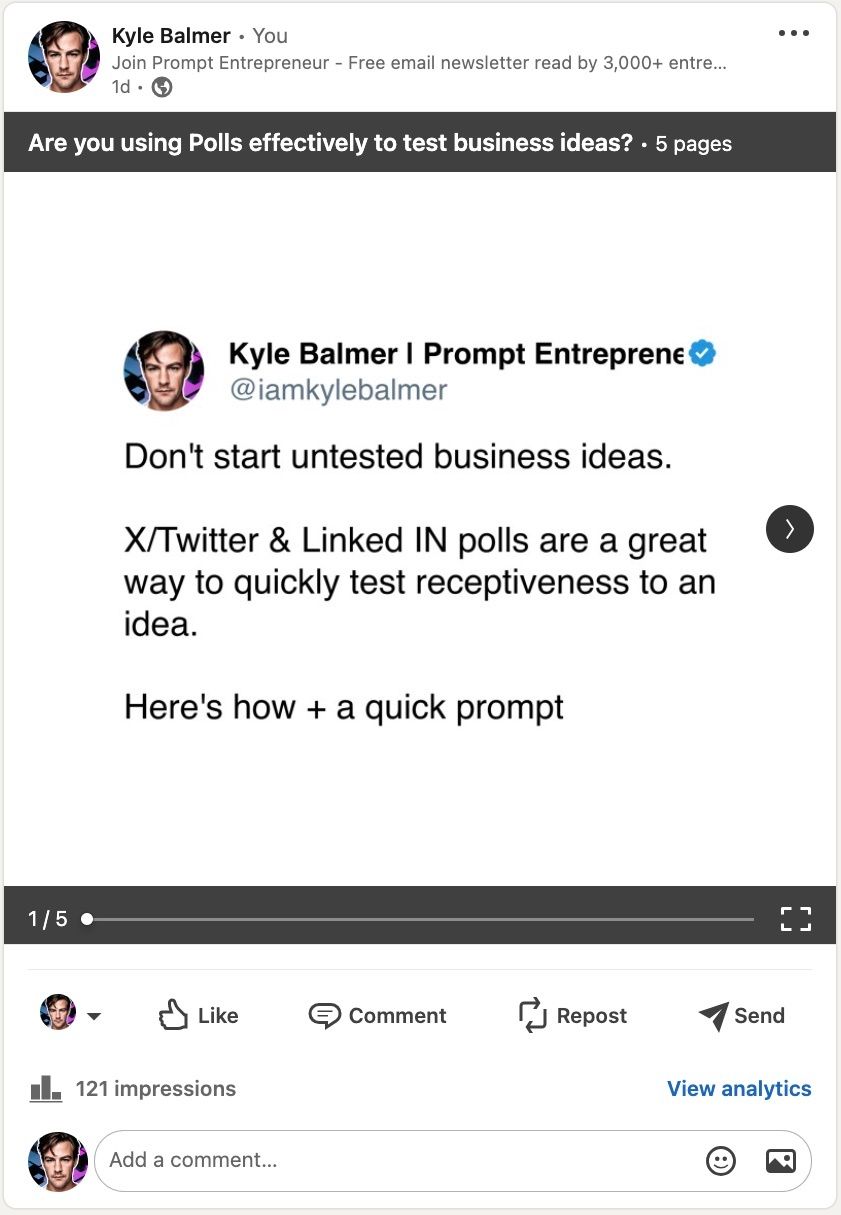
Fun fact - LinkedIn no longer allows the carousel format unless you are paying for adverts. But I’ll show you how to do it in Part 3.
All four of these examples come from the same article.
That particular article had 3 main “sections”.
Each of those sections became multiple repurposed posts.
Just in the 4 formats I’ve shown you here we’d have 3 sections multiplied by 4 formats for 12 posts.
Much easier than trying to write 12 posts from scratch!
This is the focus of this week.
To repurpose content we need to, obviously, have some content!
AI is crap at generating content from scratch. But fantastic at repurposing once we give it something quality.
Here’s the rub though : it has to be quality!
If we give Chat GPT rubbish content to repurpose then… it’s going to make lots of other crap content!
Crap in, crap out. The mechanism in the middle isn’t going to do anything to change that.
We’re just multiplying the volume of poor quality. Pointless.
Instead we need to start with quality.
First up look to your existing quality content. Think about:
your newsletter
your blog
successful X threads
Therefore be creative. Look for any sources of quality information that you have produced.
I personally use my newsletter because it’s the chunkiest, highest quality writing I do each week. I’ve written a Prompt Playbook about newsletter creation if you are interested in setting up a newsletter.
Just make sure that top level content is the most in-detail, highest quality piece in your content marketing.
Don’t have any content yet?
First up, I’d recommend getting your content production to build your Audience up and running before worrying about repurposing.
X is a great place to get started and then a newsletter.
However if you really want to start from scratch and repurpose immediately here’s a prompt to help extract high quality content from your knowledge.
Act as a writing coach.

Ask a series of questions. Retrieve my answer before asking the next question. Then use my answers to structure an authority content piece.

What is the main topic or focus of this content?
Who is the reader?
Do you have a personal story connected to this topic?
What are 3 key points you want to get across?
For key point 1, what evidence or examples help illustrate and prove your point?
For key point 2, what evidence or examples help illustrate and prove your point?
For key point 3, what evidence or examples help illustrate and prove your point?
What comparisons, metaphors or analogies could you make to explain concepts?
What are common myths, misconceptions or counterarguments related to this topic?
What resources or references could you link to for readers wanting more information?
What is your concluding takeaway or call-to-action for readers after reading?

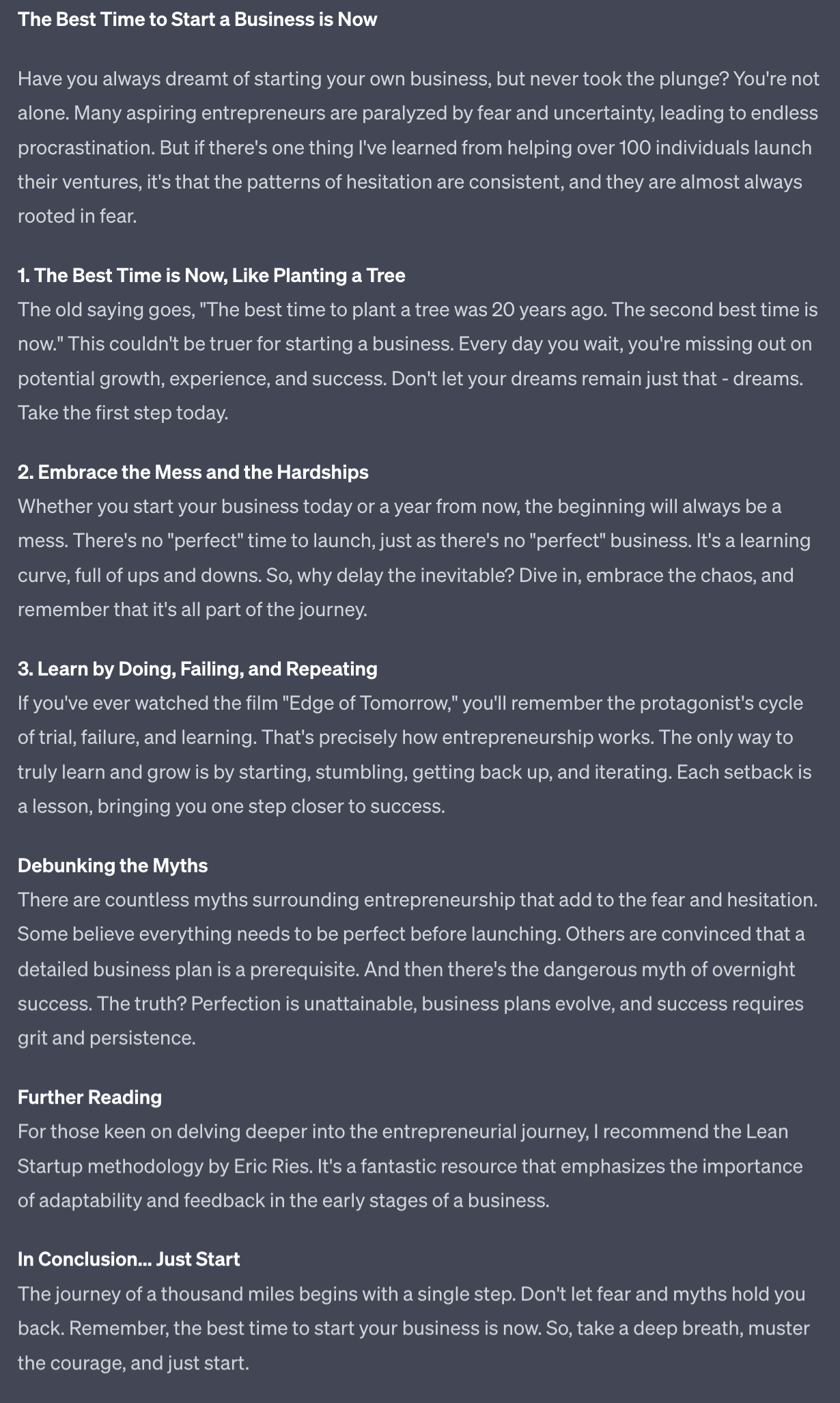
The final piece should be long and detailed. Focus on detail rather than conciseness. I ran this with the main topic “the best time to start a business is now”.
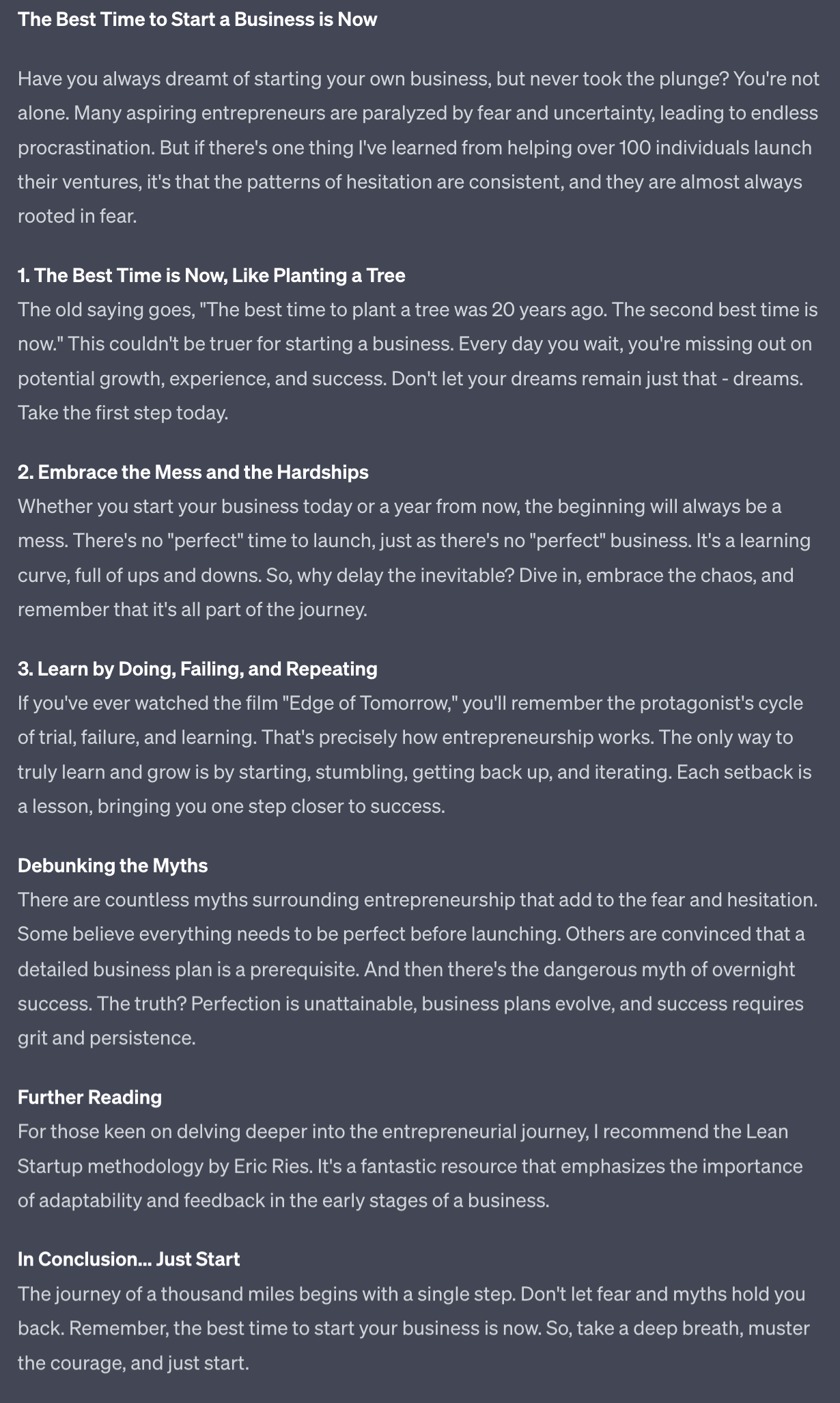
By walking through the questions Chat GPT helps structure a long form expert piece.
Would I post this wholesale?
Personally no.
But it’s a valuable starting point for all the repurposing I’m about to do. It’s a starting point.
One other tip here: if you don’t know the answer to a particular section type “no, write something for me”. For instance if you can’t think of a metaphor to sum up your topic this will prompt Chat GPT to find a metaphor for you - very useful!
Another way to generate content for repurposing really fast is using your voice.
We tend to be really fast on our feet with spoken responses because we don’t have the time to agonise about the answer.
We just talk.
And because at this point we just need content for Chat GPT to work with this is perfect.
Chat GPT will be able to take our spoken inputs and work it all into a neater format for us.
This is generally super helpful for writing blog articles and similar formats but we’re going to be using it here primarily to get starter content for our repurposing.
We’ll use a modified prompt here:
Act as a writing coach.

Ask the first question
When I answer ask if I have more to say.
If yes, collect more information then again ask if I have more to say.
If no, move to the next question.
Then use my answers to structure an authority content piece.

What is the main topic or focus of this content?
Who is the reader?
Do you have a personal story connected to this topic?
What are 3 key points you want to get across?
For key point 1, what evidence or examples help illustrate and prove your point?
For key point 2, what evidence or examples help illustrate and prove your point?
For key point 3, what evidence or examples help illustrate and prove your point?
What comparisons, metaphors or analogies could you make to explain concepts?
What are common myths, misconceptions or counterarguments related to this topic?
What resources or references could you link to for readers wanting more information?
What is your concluding takeaway or call-to-action for readers after reading?

The final piece should be long and detailed. Convert spoken language to written language. Focus on detail rather than conciseness.
Use this prompt on the mobile phone version of Chat GPT and use the voice recording function to deliver your answers instead of writing them.
This prompt has been modified to make it easier to add information piece by piece. The reason for this is that one Chat GPT has received some voice transcription from you you cannot add any more in that same response.
This makes it difficult because you have to get all of your ideas out in one message. I’ve adjusted the prompt so that it’ll give you a chance to add more.
If you find you are able to get all the information you need in just one message then feel free to use the normal prompt above in Step 3.
We should now have a quality, long form piece of content to use in the next Part of this guide.
In the next Part we’ll be starting off with X repurposing.
A reminder of what we’re covering this week :
Part 1: Creating long form content and why repurpose
Part 2: X repurposing
Part 3: LinkedIn repurposing
Part 4: SEO repurposing
Part 5: Systematisation and expansion
See you tomorrow Prompt Entrepreneur!
Until then, keep PROMPTING!
Kyle
In the last Part we sourced long form content that we were going to repurpose.
In this Part we’ll get chopping and changing to repurpose our target content piece into multiple formats for X.
We’ll be aiming to take 1 content piece to 20+.
First up on X we’ll do the simplest piece of repurposing.
This is simply bringing the long form piece into X as a long form post. These used to be called Articles. Before that Notes.
The main thing is that they are longer posts than the normal “tweet” length.
Right now X is prioritising long form content on the platform. This will probably change. The algorithm changes a lot!
But right now it’s a golden opportunity. Especially because not that many people are using this format.
Many struggle to write long format content - it doesn’t come as naturally as shorter posts.
Personally this has never been a problem for me! I write too long if anything!
In the last Part we looked at how to create a long form piece if you don’t have a backlog of them. Refer back here if you need to.
For repurposing into a long form X post we can use this prompt:
Act as a social media writer

Convert this content piece into a social media post.

Retain the length and comprehensiveness of the post.

Focus especially on the first line: the hook. Provide 5 hook examples for me to choose from. Provide these at the top of the output.

Refine the readability, using line breaks after every 1-2 sentences to make reading flow better.

Make 4 image/graphic suggestions, in-line within the content within []

Do not use hashtags. Do not use emojis.

Content piece begins:

[Copy/paste content piece]
For the content piece I’ve used Step one from the previous Part. Here’s the link as a refresher.
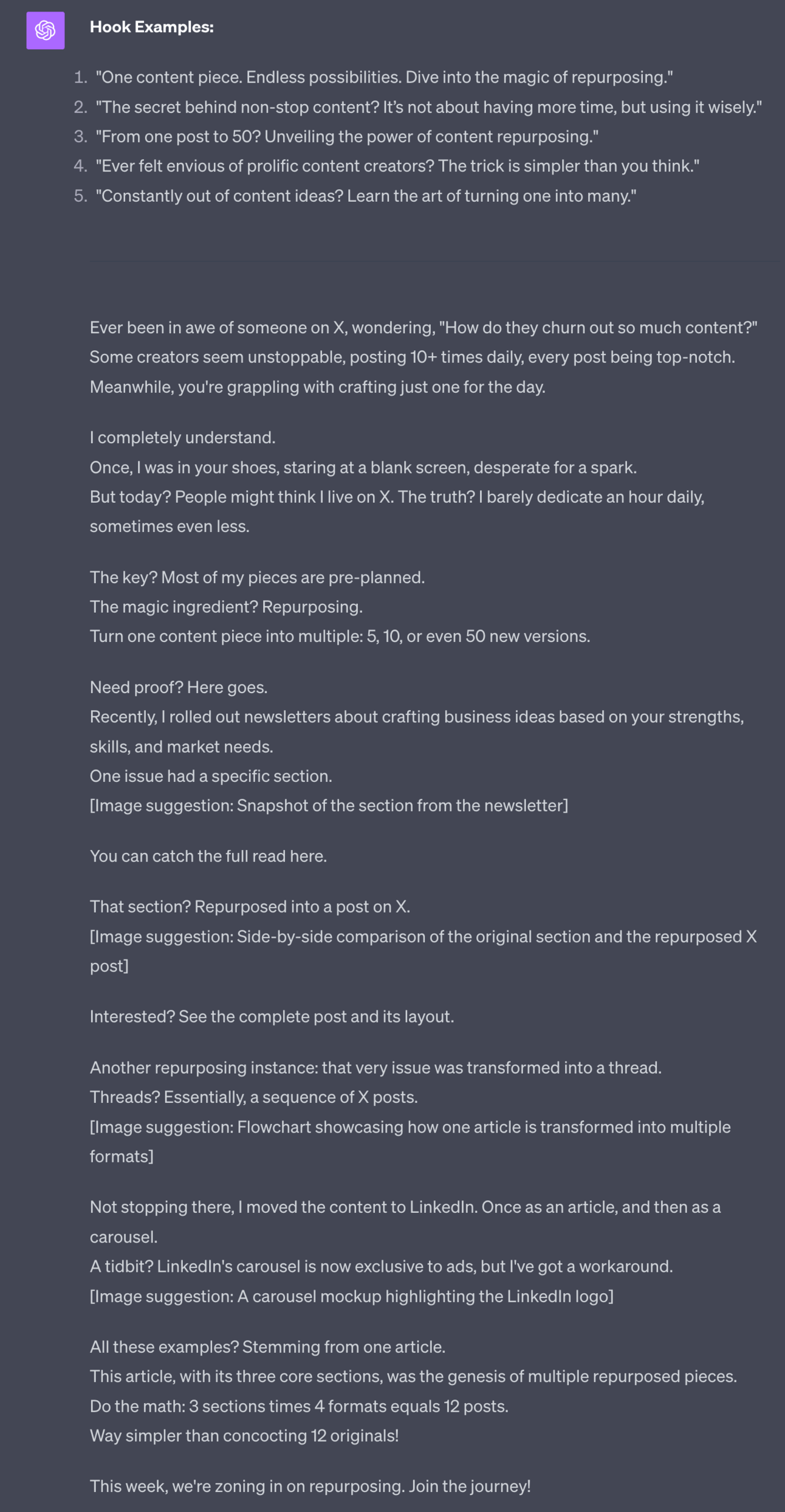
Great stuff - it’s been adjusted for readability, making sentences and paragraphs more punchy.
I also asked for image recommendations. If you already have images from your original content obviously you don’t need these! I use Canva to quickly create images.
Make sure to edit to your requirements - don’t just blindly copy paste!
Here’s the final X post itself for reference. Make sure to check this in order to grasp fully the format.
Ever felt envious of prolific content creators? The trick is simpler than you think.
Some creators seem unstoppable, posting 10-20+ times daily, every post being top-notch.
Meanwhile, you're grappling with crafting just one for the day.
I completely understand.
Once, I was in… twitter.com/i/web/status/1…
— Kyle Balmer | Prompt Entrepreneur (@iamkylebalmer)
12:25 PM • Oct 9, 2023
Next let’s make some X Threads.
These are another way of delivering more content than a single post can contain.
Basically because threads are a series of short posts, one after another.
Here’s an example of the first post in a Thread if you are unclear about the format. Click Read 11 replies on this post to see the rest of the Thread:
Don't start untested business ideas.
X/Twitter & Linked IN polls are a great way to quickly test receptiveness to an idea.
Here's how + a quick prompt
— Kyle Balmer | Prompt Entrepreneur (@iamkylebalmer)
11:39 AM • Oct 6, 2023
I’ll be honest. I hate writing Threads. They are fiddly and annoying to structure and input into the X interface. It’s like writing 10 short posts and having to nail each one - pressure!
So I created this prompt to take long form content and slice and dice it into bitesized chunks.
Here’s the prompt:
Act as a social media writer

Convert this content piece into a series of short tweets.

Each can be no longer than 280 characters. Aim for shorter.
Aim for 10 tweets max.

Each tweet should be short, sharp. One idea, example or action per tweet. Aim for one tweet to flow to the next.

Retain the length and comprehensiveness of the post.

Focus especially on the first tweet: the hook. Provide 5 hook examples for me to choose from. In the first tweet indicate that this is a thread and give reason to continue reading.

Do not use hashtags. Do not use emojis except in hook.

Do not include "" around posts. Provide in an easy copy/paste format.

Content piece begins:
[copy/paste content piece]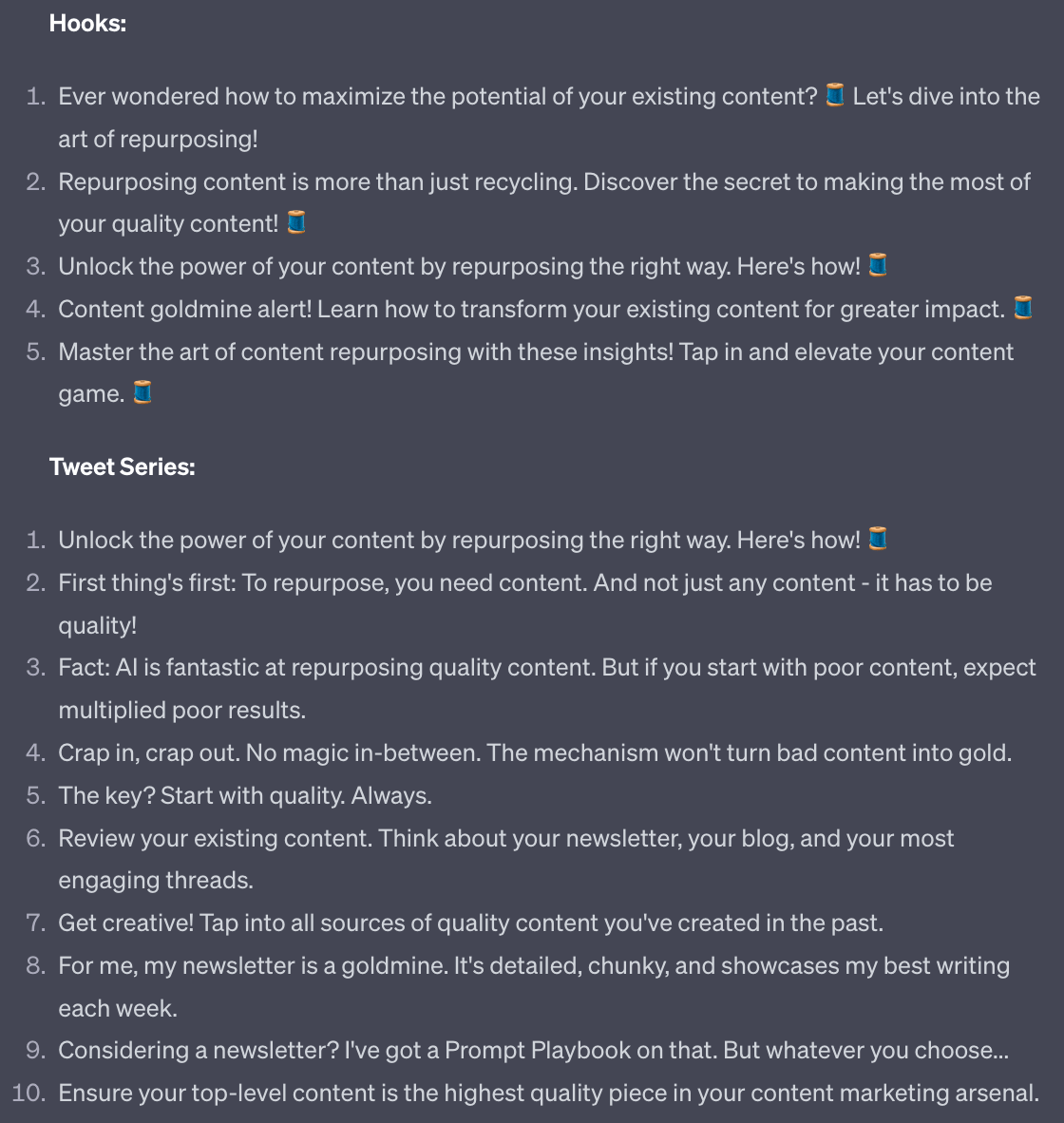
And here’s the actual thread:
Content goldmine alert! Learn how to transform your existing content for greater impact. 🧵
— Kyle Balmer | Prompt Entrepreneur (@iamkylebalmer)
12:56 PM • Oct 9, 2023
You’ll notice I kept the main body of each post but in some cases added a little more or adjusted the structure. Make sure to do this - use the generated version as a jumping off point as always!
The final format we’ll look at for X are short form single posts.
This is your bread and butter on X.
Act as a social media writer

Convert this content piece into individual tweets.

Each tweet should be short, sharp. One idea, example, action or question per tweet.

Generate the following:
5 questions to spark conversation
5 motivational tweets
5 mistakes I've made tweets
5 authority statements

Do not use hashtags. Do not use emojis except in hook.

Do not include "" around posts. Provide in an easy copy/paste format.

Content piece begins:
[copy/paste content piece]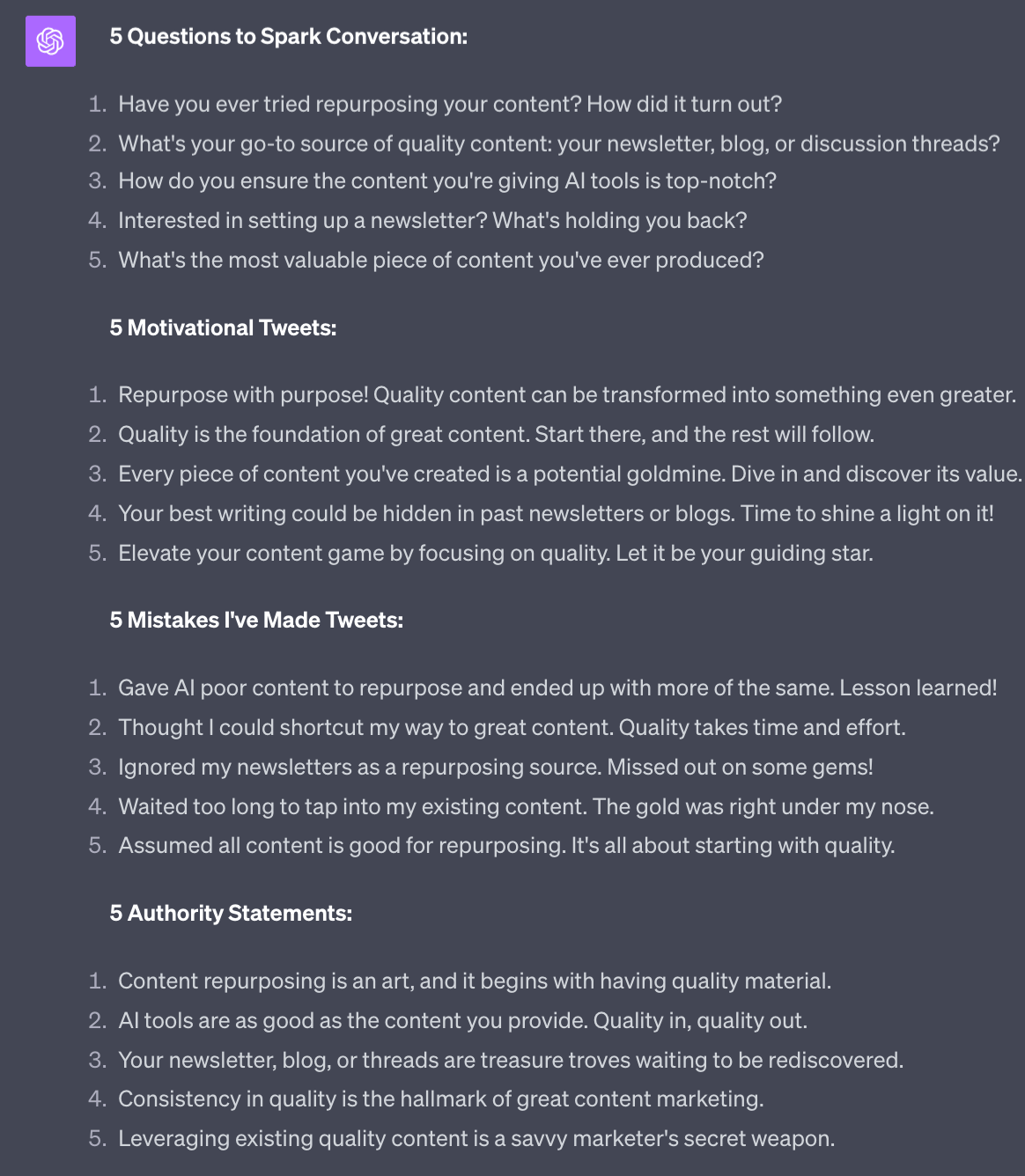
These are some great starter posts. Filter the ones you like and rewrite them in your tone of voice.
The power of these shorter posts is you can “theme” a day or week.
For example all my long form posts, threads and individual tweets can be about repurposing. It creates thematic consistency.
Another tip here - got a particular creator whose style you love? Copy paste 10 of their top tweets into ChatGPT and say “in the style of these” in order to emulate. Of course make sure to give your own spin. Don’t be lazy!

Once you have a good steady flow of long form and threads flowing on X I recommend you have a look at boosting the content.
Both of these formats do very well and for a small budget of $10/post you can send reach skyrocketing.
Obviously make sure that this aligns with your business goals! But if you are following the BATON system in the AI Business Breakthrough Academy you’ll know that building an Audience is the foundational step for creating your Tribe and then making sales.
To boost you can simply press the Promote button next to your post in the desktop version of X.
However this will only boost it to one country. You get to choose the country but it’s still a single location. This is an annoying limitation if you are building a global audience.
Boosting an existing post on Twitter | AI Business Breakthrough Academy
And the full instructions to follow along with
Head to Twitter Ads.
New Campaign
Advanced Campaign
Name your campaign
Set budget - here £10 for 1 day for total of £10.
Choose targeting
I turn off location. This will then show the boost globally.
I use Follower Look a like here to target the followers of certain accounts. Use whatever targeting makes sense for you.
In Ad 1 choose “Use Existing Ad”
Choose the post you want to boost.
Finalise the campaign to launch it.
The key here is “Use existing Ad”. This is only accessible in Advanced campaigns. As I say - hidden away!
Bonus: this boosted post will not show as an “Ad”. It will show as a normal post on your timeline. Just with traffic being sent to it. Nice!
Powerful stuff! Practice with a long form content piece to see what results you can get.
This works because whilst Chat GPT is not very good at original content it’s excellent at rewriting and repurposing.
This gives us a super power - the ability to generated far far more content than before, simply by digging into our existing content archive.
A reminder of what we’re covering this week :
Part 1: Creating long form content and why repurpose
Part 2: X repurposing
Part 3: LinkedIn repurposing
Part 4: SEO repurposing
Part 5: Systematisation and expansion
See you tomorrow Prompt Entrepreneur!
Until then, keep PROMPTING!
Kyle
The first and easiest repurposing you can do it moving short form X posts straight to LinkedIn.
If you aren’t doing this you are missing out on easy, automatic traffic.
No need to even edit or adjust them in any way - what works as short form on X will tend to work on LinkedIn.
Reposting is as simple as copy/pasting content from X over to LinkedIn. You can do this in a batch because LinkedIn has built in scheduling - just set aside some time to copy/paste from X into LinkedIn, scheduling out into the future.
Alternatively you can use a tool like Hypefury or Tweethunter.
Hypefury has built in post to LinkedIn functionality. Tweethunter needs an additional tool called Taplio to post from X to LinkedIn. This makes Hypefury more cost-effective for this particular task.
When scheduling up short form posts in either tool you can toggle whether to post to LinkedIn as well.
Reposting X to LinkedIn will give you a solid base of content flowing into LinkedIn at zero additional effort.
One caveat here - lots of experts say that you should post less to LinkedIn than you would to X. I’ve not actually found this to be the case - the more I post there the better the results.
However, for safety you may want to limit posts to 3 a day, spread out across the day. I’ve never had any problems at that limit.
LinkedIn articles are long form posts that allow you to go into more detail.
These are where you prove your thought leadership and deliver value.
If short form posts are top of the funnel these longer form detailed articles are middle of the funnel. They take more time to read so will have smaller view counts and engagement. But the quality of that engagement will be higher.
I recommend taking your long form X posts and directly converting them into LinkedIn articles.
This is as simple as copy/pasting the content out of X into LikedIn.
To set up an article go to Write article at the top of your homepage:

You’ll be taken to a basic text writing interface. Copy and paste your long form tweet in here.
You will need to re-upload the images. That’s the main workload here.
Alternatively, you may feel that you long form X isn’t quite right for LinkedIn. If that’s the case here’s a prompt to generate the LinkedIn article from scratch for you. Try both and compare results.
Act as a social media writer

Convert this content piece into an article for LinkedIn

Retain the length and comprehensiveness of the post.

Focus especially on the title. Provide 5 hook title examples for me to choose from. Provide these at the top of the output.

Refine the readability, using line breaks after every 1-2 sentences to make reading flow better.

Make 4 image/graphic suggestions, in-line within the content within []

Do not use emojis.

Add LinkedIn hashtags to the bottom of the piece.

As well as the rewritten article also give me a short post to announce the article and get people to click through to read it.

Content piece begins:

[Copy/paste content piece]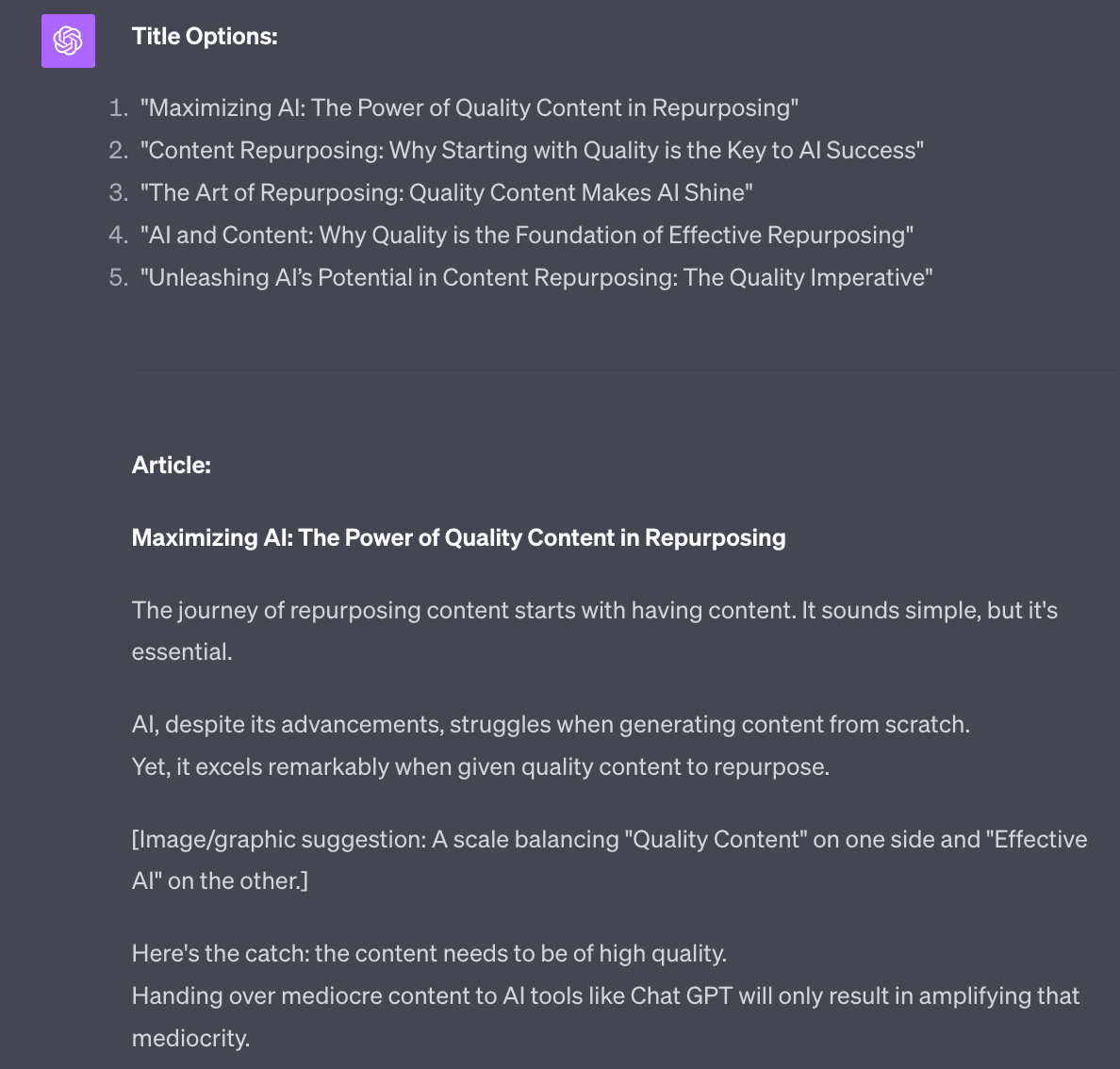
As an addition this prompt will also generate hashtags and some post options:
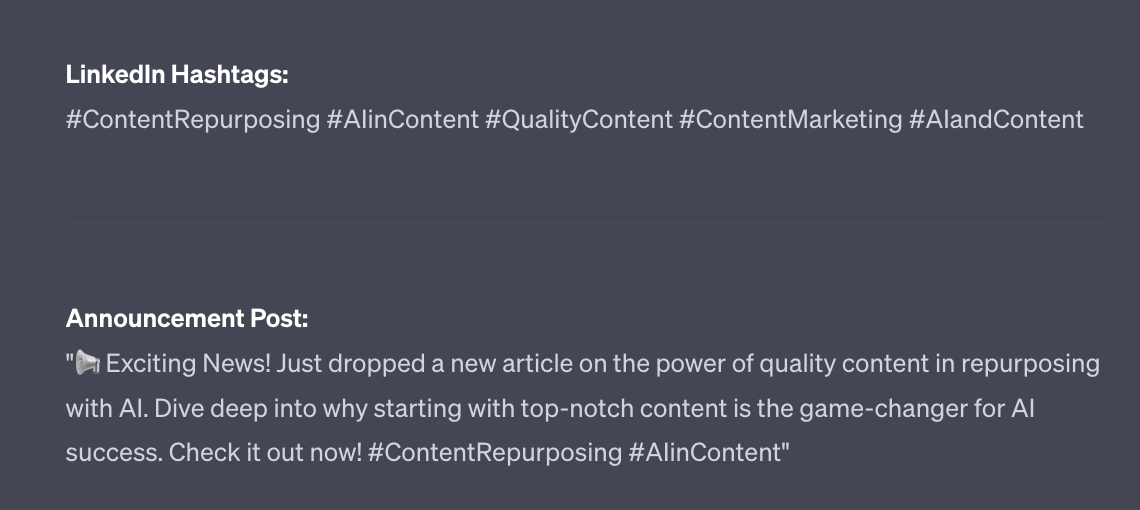
LinkedIn is one of the few platforms where hashtags are still recommended. So make sure to add them to the bottom of the article.
When you post a LinkedIn article you’ll also need to send out a post. The post is what people will see and if they are interested they’ll click through to the article - think of it as an announcement for your new article. The only purpose is to get the click.
I’ve set this prompt up to generate the announcement post too.
LinkedIn Carousels used to be the most powerful format on LinkedIn.
Until they murdered carousels.
The problem was that they were too engaging - people loved them. LinkedIn was for a period flooded with carousels.
LinkedIn stopped them being used as a post format and instead made them only usable as an advertising format. So whenever you see LinkedIn carousels it’s because they are are ads.
Damn!
However - here’s a way to make carousels. A sneaky way.
We’re going to repurpose our X threads and convert them into carousels.
Choose a thread you want to repurpose. I’ll use the Thread we made in the last part.
Head to Tweetpik. This is a free tool that will turn our posts into images.
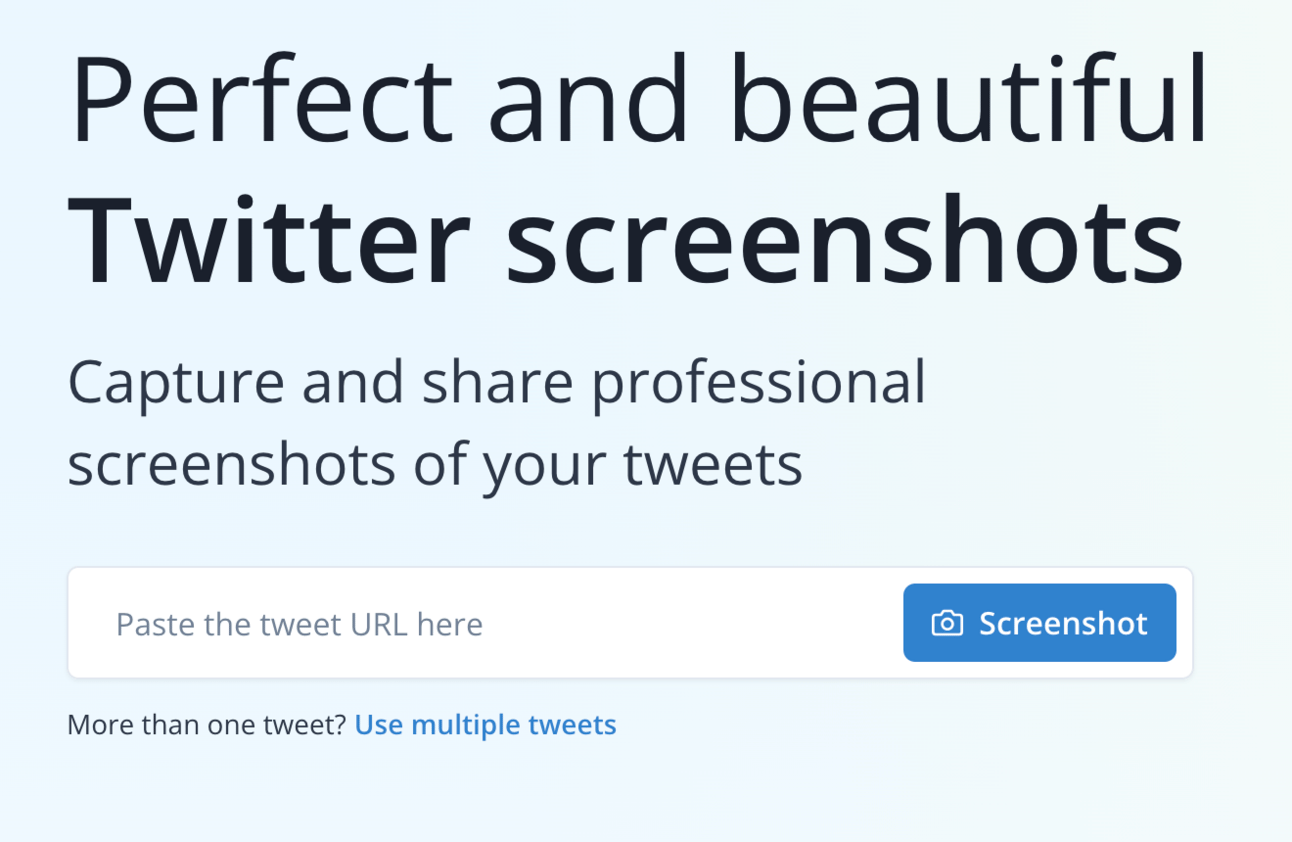
Choose “Use multiple tweets” below the main input bar.
Add each of the posts in the thread’s URL in:
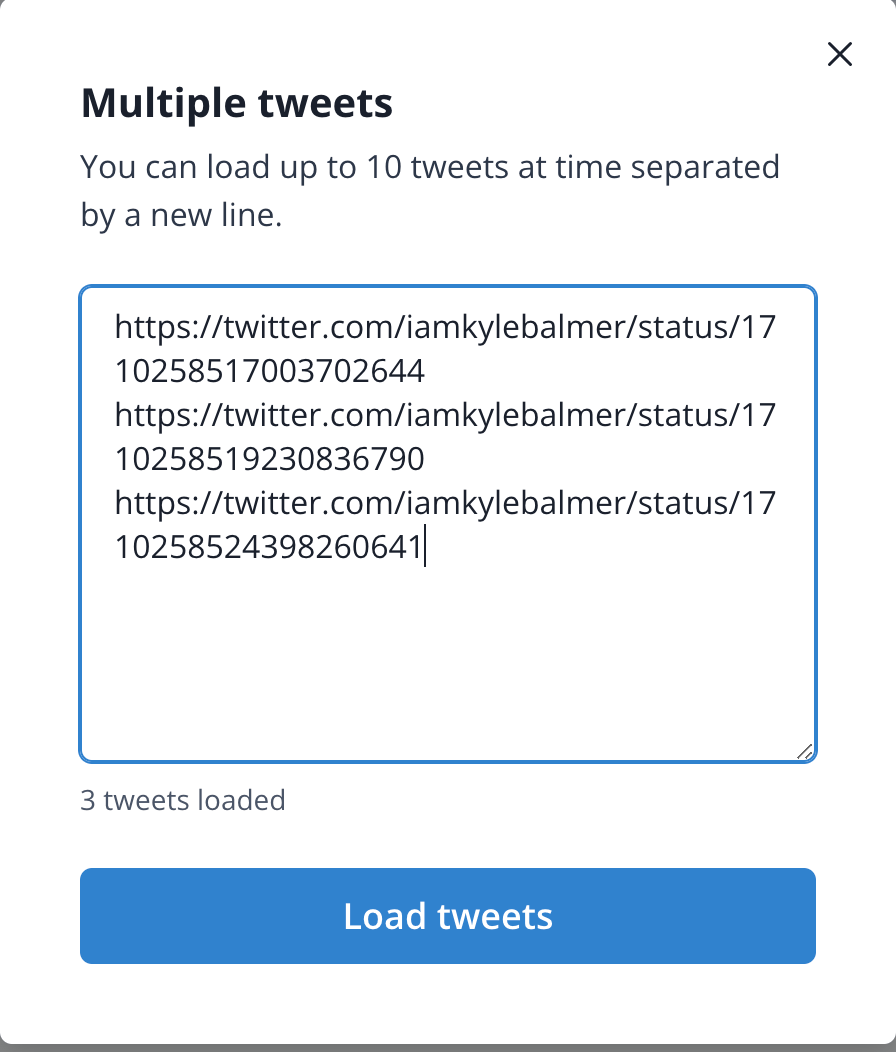
Then hit Load Tweets.
You’ll see this screen next:
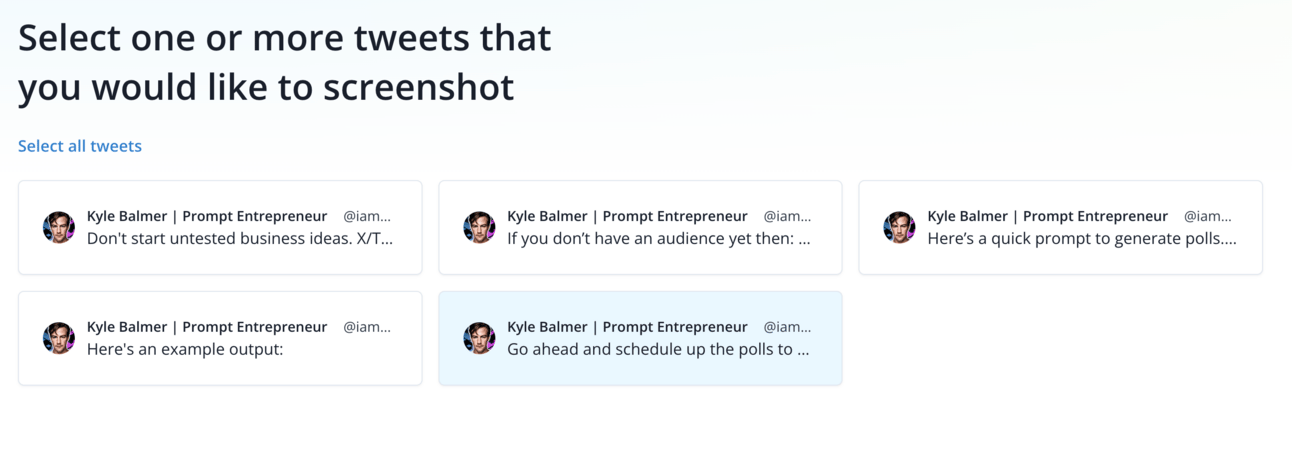
Go ahead and select ALL the posts you’ve just loaded up and you’ll get the final editing screen:
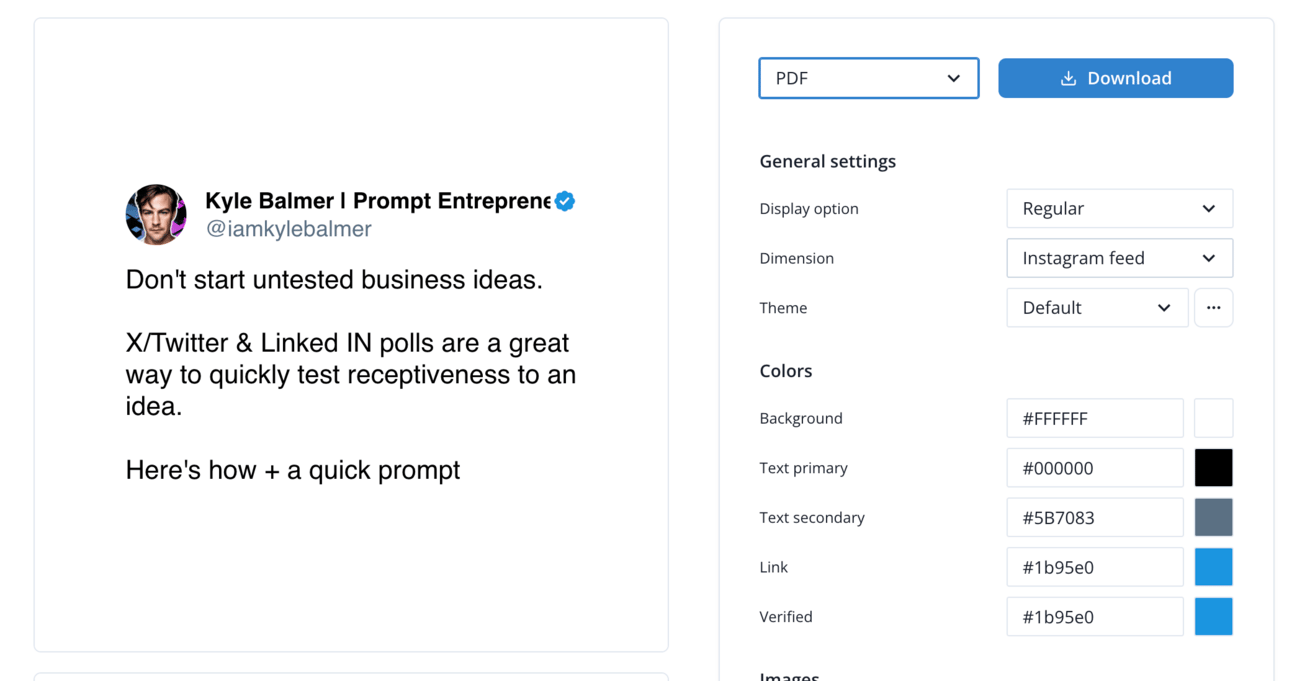
Adjust the design however you like.
Here’s the important part : set the output format to PDF and dimensions to Instagram feed (ie. square).
Download the PDF when ready.
This is the “hack” we’re using - we can recreate the look and feel of a LinkedIn carousel by uploading a square multiple page PDF.
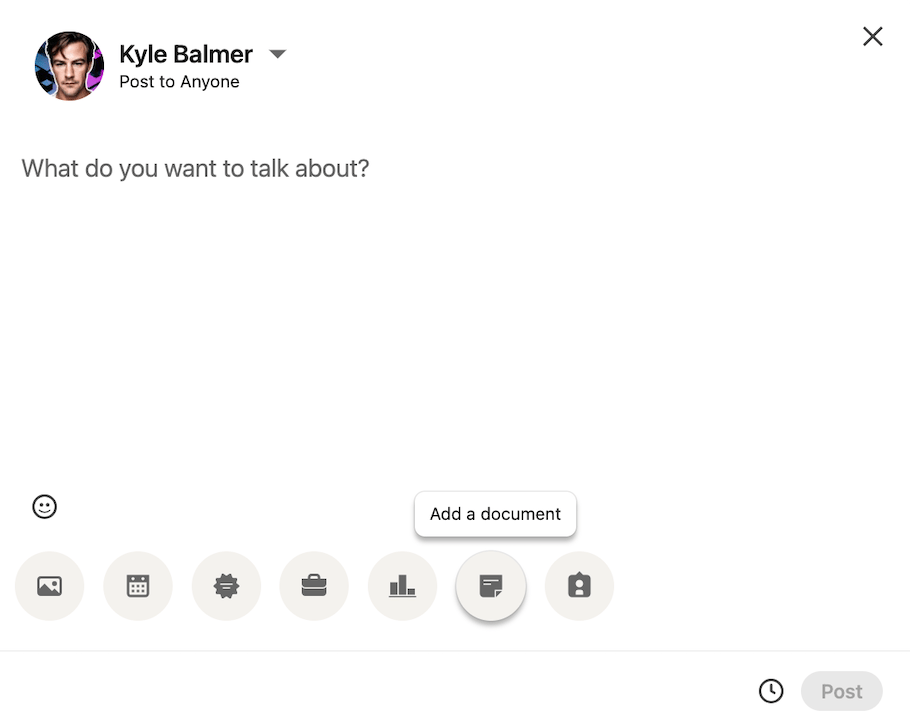
Head to LinkedIn > Start a Post
Then select Add a Document and upload your square PDF.
Boom! You’ve just made a carousel! Here’s what the output looks like in LinkedIn:
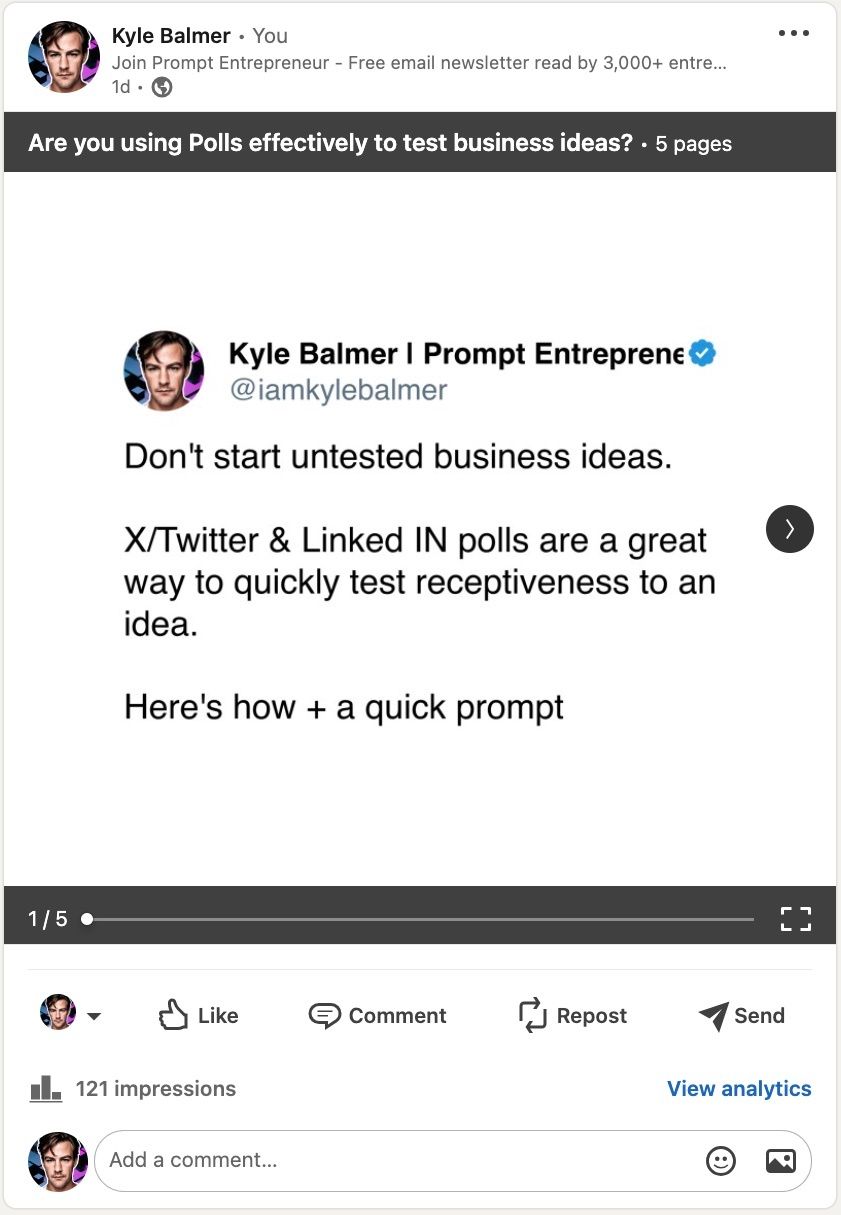
And here’s the link to see it in action: carousel example.
Pretty sweet - we’ve just repurposed an X thread into a LinkedIn carousel, an effective but paid only option on LinkedIn. Now available to us for free.

There’s a feature on LinkedIn that everyone has slept on.
Newsletters.
You probably didn’t even know LinkedIn had newsletters right?
LinkedIn newsletters are powerful for one reason: they allow you to post an article and it is delivered not only to your followers on platform but also directly to their email inbox.
Very powerful stuff.
Combine this with the fact that when you first create a LinkedIn newsletter LinkedIn will tell all of your contacts and promote it for you.
This only happens at launch though.
I have around 10k LinkedIn connections and when I launched a newsletter there I immediately got 1000+ subscribers (10%).
I’d recommend growing your LinkedIn connections first (I’ve written a Playbook on this elsewhere) and when at a decent size kicking off a newsletter.
Then you continue to post long form LinkedIn articles, as discussed, but make them your newsletter articles as well as general public articles. This will immediately deliver the content into inboxes. Very powerful!
If you already have a decent LinkedIn following don’t sleep on this - make sure to go set up a newsletter now before apply the rest of the tips we’ve covered.
To make a newsletter:
Make sure Creator mode is turned on. You can find this in account settings.
Make sure you’ve posted in the last 3 months
Now, go to create an article and this time inside the publishing editor click the option to create a newsletter.
It’s pretty hidden away but well worth the effort!
A reminder of what we’re covering this week :
Part 1: Creating long form content and why repurpose
Part 2: X repurposing
Part 3: LinkedIn repurposing
Part 4: SEO repurposing
Part 5: Systematisation and expansion
See you tomorrow Prompt Entrepreneur!
Until then, keep PROMPTING!
Kyle
All the technical tricks and tactics around this are supplements - nail the content itself and you’ll be golden.
Why do we care about SEO? If you get SEO up and running then Google will send free traffic, in large volumes, to you. For a long time.
I have websites from 10 years ago that make sales purely off people finding the product on Google.
You may be asking - wait, isn’t AI generated content penalised by Google? The answer is yes and no.
No in the sense that Google hasn’t yet caught up and bee able to reliably detect AI generated content accurately enough to penalise it.
But - let’s assume that they one day will be able to. This is the reason why we shouldn’t just wholesale generate SEO content using AI. It will probably get slapped by Google further down the line. Google is smart.
This is why we are not creating content from scratch but instead repurposing existing content that we’ve actually written. AI content is generic and detectable when it’s purely generated by AI.
Instead we’re feeding in the inputs (our own content) meaning that our content will be more hand crafted and “human”.
First up let’s look at repurposing into a simple blog article.
The best source for simple blog articles are single posts that we do well on X and LinkedIn.
You can check your best performing X posts in Analytics or by using a free plugin called Tweet Hunter X (on Chrome). Also you can quickly check each week to see which of the week’s posts had the highest view and comment count - this manual method works fine.
Here’s an example of a simple post of mine that did quite well:
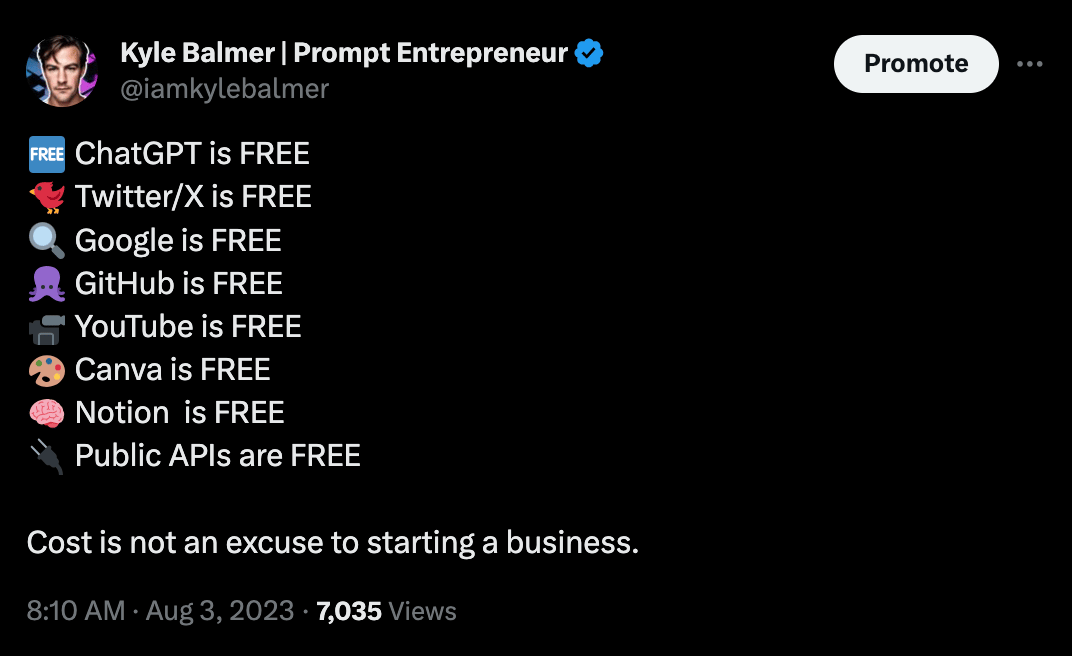
Because this seemed to strike a chord I might want to extend this into a blog article for Google SEO.
Here’s the prompt:
Act as an expert SEO writer.

Repurpose the post I provide into an SEO optimised blog article.

Follow these guidelines:
-Write strong headlines that create curiosity and compel readers to click. Avoid exaggerated clickbait titles.
-Capture attention immediately in the introduction by connecting with readers' interests and pain points.
-Preview the value they will get from reading more.
-Break up long sections of text with images, videos, subheadings, whitespace, and other formatting to make it scannable. Include a visually compelling table of contents.
-Tell a cohesive story focused on the reader's needs and interests. Avoid including irrelevant details just for length.
-Ensure content flows logically, transitioning smoothly between sections. Every word should engage readers and move the story forward.
- Each sections (preceded by a header) should have at least 3 paragraphs.

Produce 750-1000 words.
Do not include html.
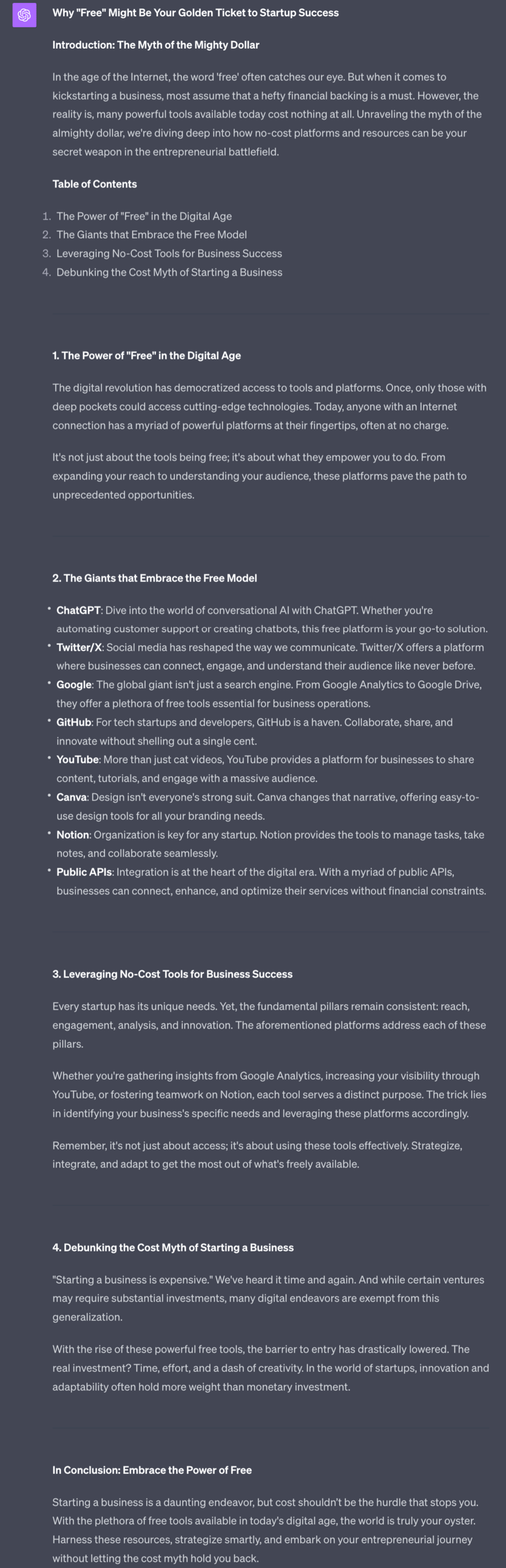
ChatGPT will go ahead and generate a first draft of a blog article for us.
It’s basically fine - it’s captured the main points and is readable.
You could post this blog article as-is. It will help you rank on Google.
But we can do a little better by performing some very basic SEO optimisation.
We’re not going into detail here on SEO because it’s a big subject. I’ve prepared a whole Prompt Playbook elsewhere if you do want to delve in more.
Instead we’re going to do a basic optimisation and be more intentional in our posting.
Under the existing blog post use this basic prompt:
Suggest SEO keywords.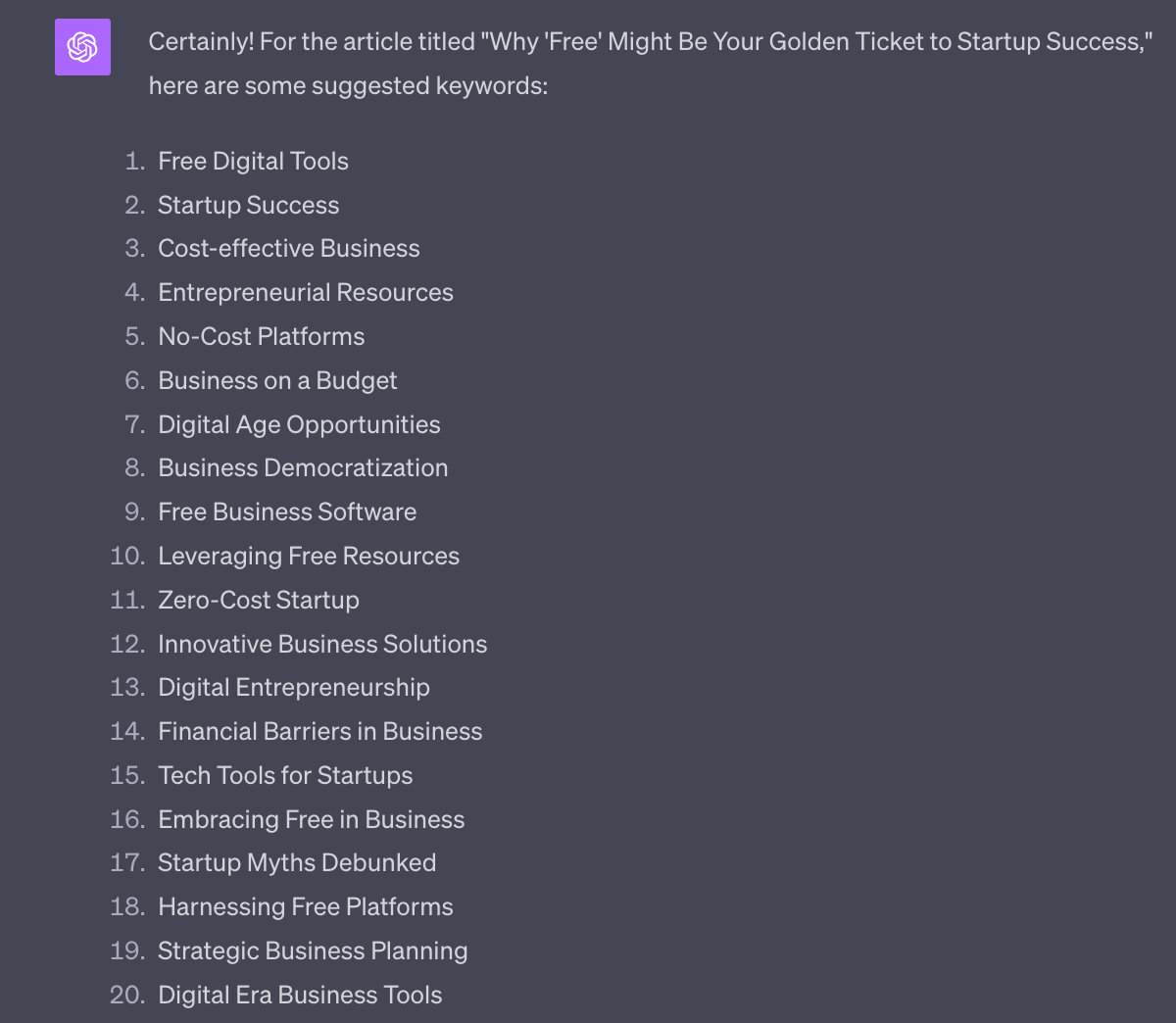
ChatGPT will pull some keywords out of your article.
Let’s then go check their volume - ie. how many people search for these terms each month.
If you have access to Google Ads go ahead and do a volume search here.
Otherwise let’s keep it simple and use https://searchvolume.io/
This is a free tool that will check search volume for you. Copy paste all the keywords into the tool to collect volume:
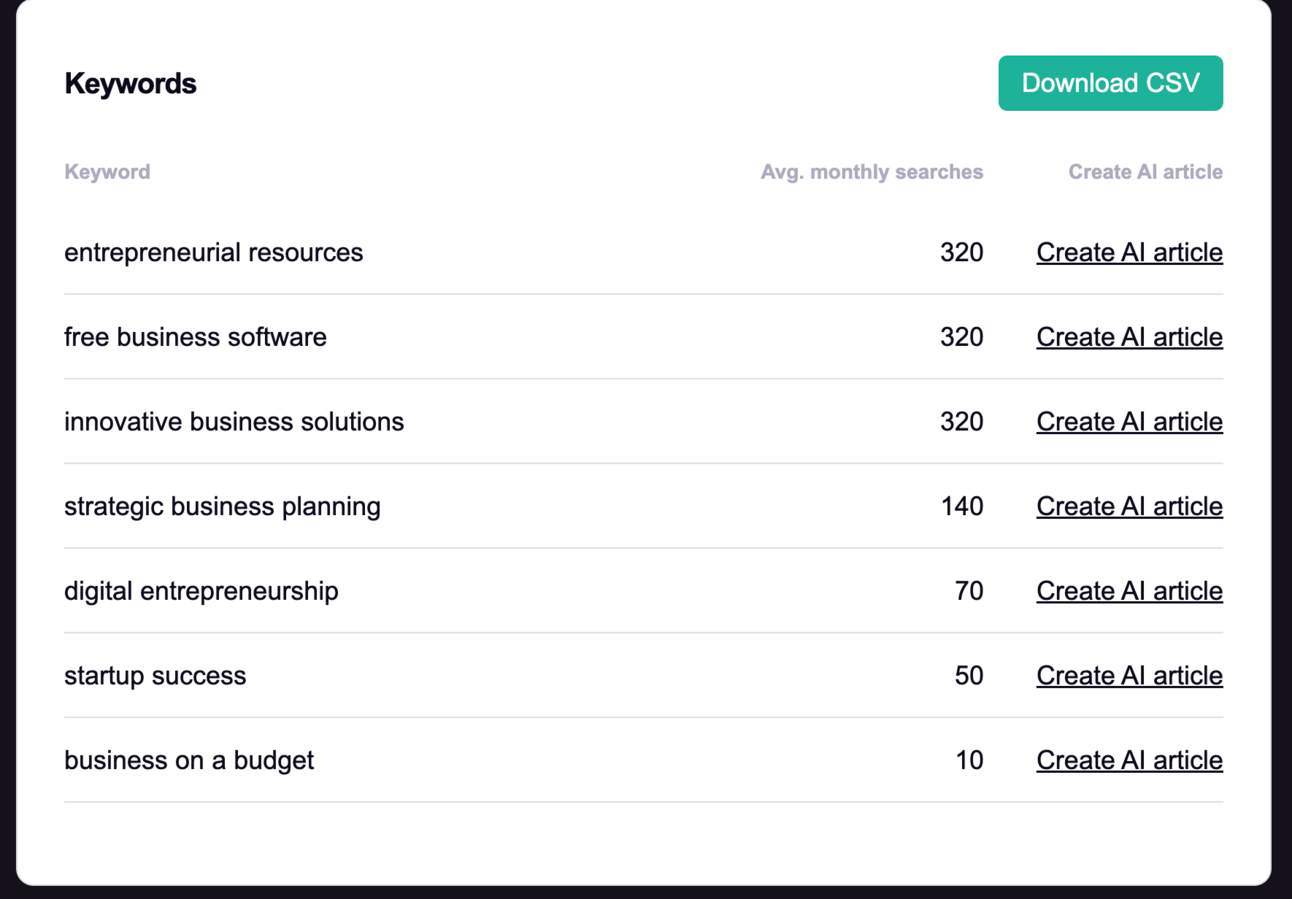
I know grab the top 3 keywords here.
In this case it’s “entrepreneurial resources”, “free business software” and “innovative business solutions”.
We now have to use some judgement - which of these is actually related to our topic. I’d use “entrepreneurial resources” and “free business software” and drop “innovative business solutions”
I now head back to ChatGPT and use this prompt, again below the existing blog article.
Optimise the blog article for:
[copy/paste keywords]

Blend the target keywords into title, headers and body organically.
Do not highlight the keywords
Provide the whole articleHere’s the first part of the optimised article:
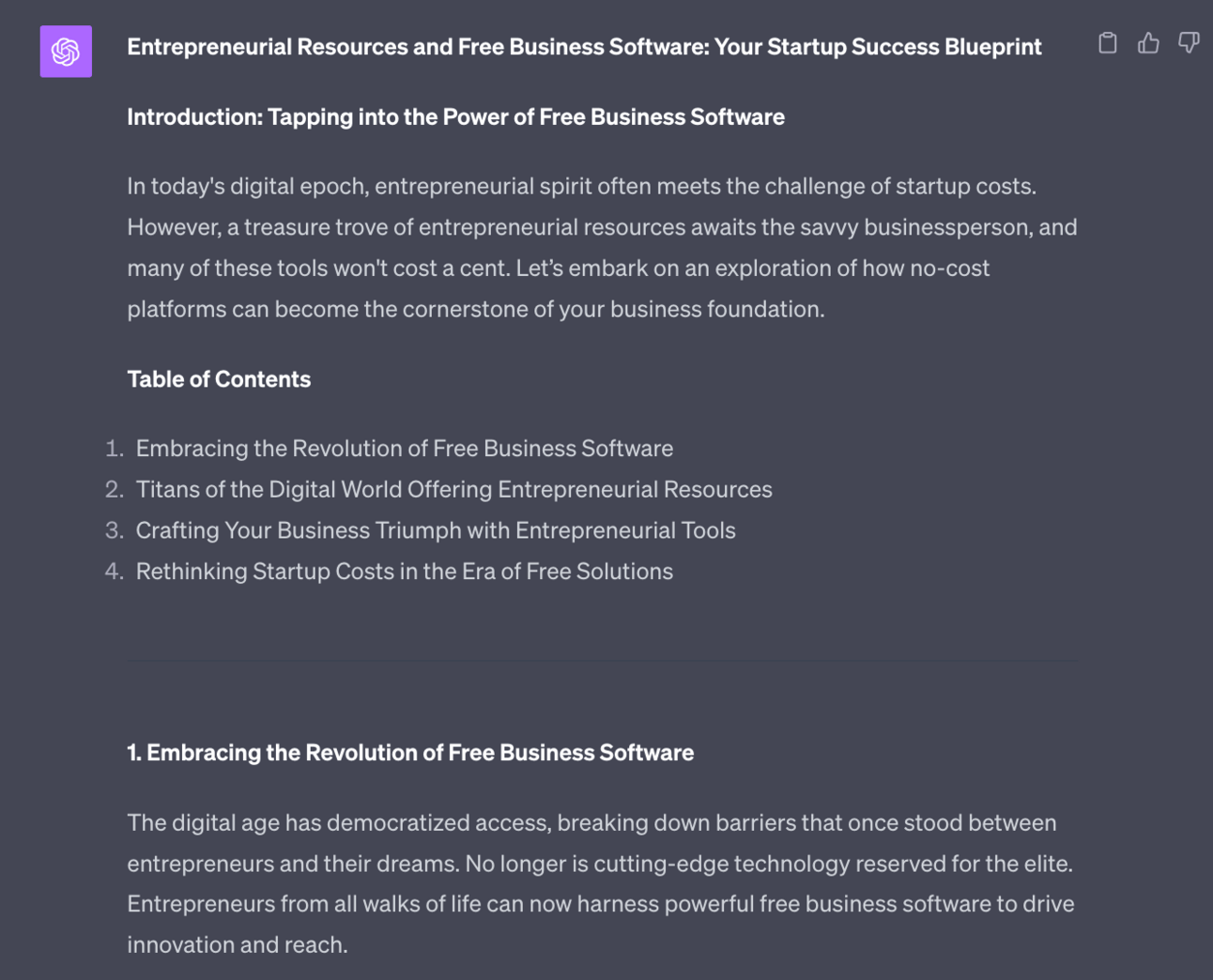
ChatGPT has gone ahead and adjusted the text to make sure that the target keywords appear.
Do final checks and edits and then post to your blog when happy.
The previous steps provide us with solid smaller blog posts that we can fill our blog with on a daily basis.
However, for SEO it’s also useful to produce much longer, quality pieces. Ideally these should be pages that people bookmark and come back to again and again.
The ideal content for these type of blog articles are in-depth how-to guides.
If you have how-to based content on X or LinkedIn (or any other source) then let’s turn it into a long blog post.
Ideally collect up a number of X long form / LinkedIn articles around a single topic.
We can feed in multiple content pieces to give ChatGPT even more content to work with.
Then use this prompt:
Act as an SEO blog writer.

Analyse and synthesis the content pieces I've provided into a coherent long form blog article

Ignore the order I provide the content. Ignore the structure of the content pieces themselves. Use the information from the content pieces to construct a brand new blog article.

Follow these guidelines:
-Write strong headlines that create curiosity and compel readers to click. Avoid exaggerated clickbait titles.
-Capture attention immediately in the introduction by connecting with readers' interests and pain points.
-Preview the value they will get from reading more.
-Break up long sections of text with images, videos, subheadings, whitespace, and other formatting to make it scannable. Include a visually compelling table of contents.
-Tell a cohesive story focused on the reader's needs and interests. Avoid including irrelevant details just for length.
-Ensure content flows logically, transitioning smoothly between sections. Every word should engage readers and move the story forward.
- Each sections (preceded by a header) should have at least 3 paragraphs.

Provide 2000+ words, no less.

Content pieces begin:
For this prompt I provided three long form tweets:
Finding your why
The importance of minimum viability products
How to evaluate business ideas
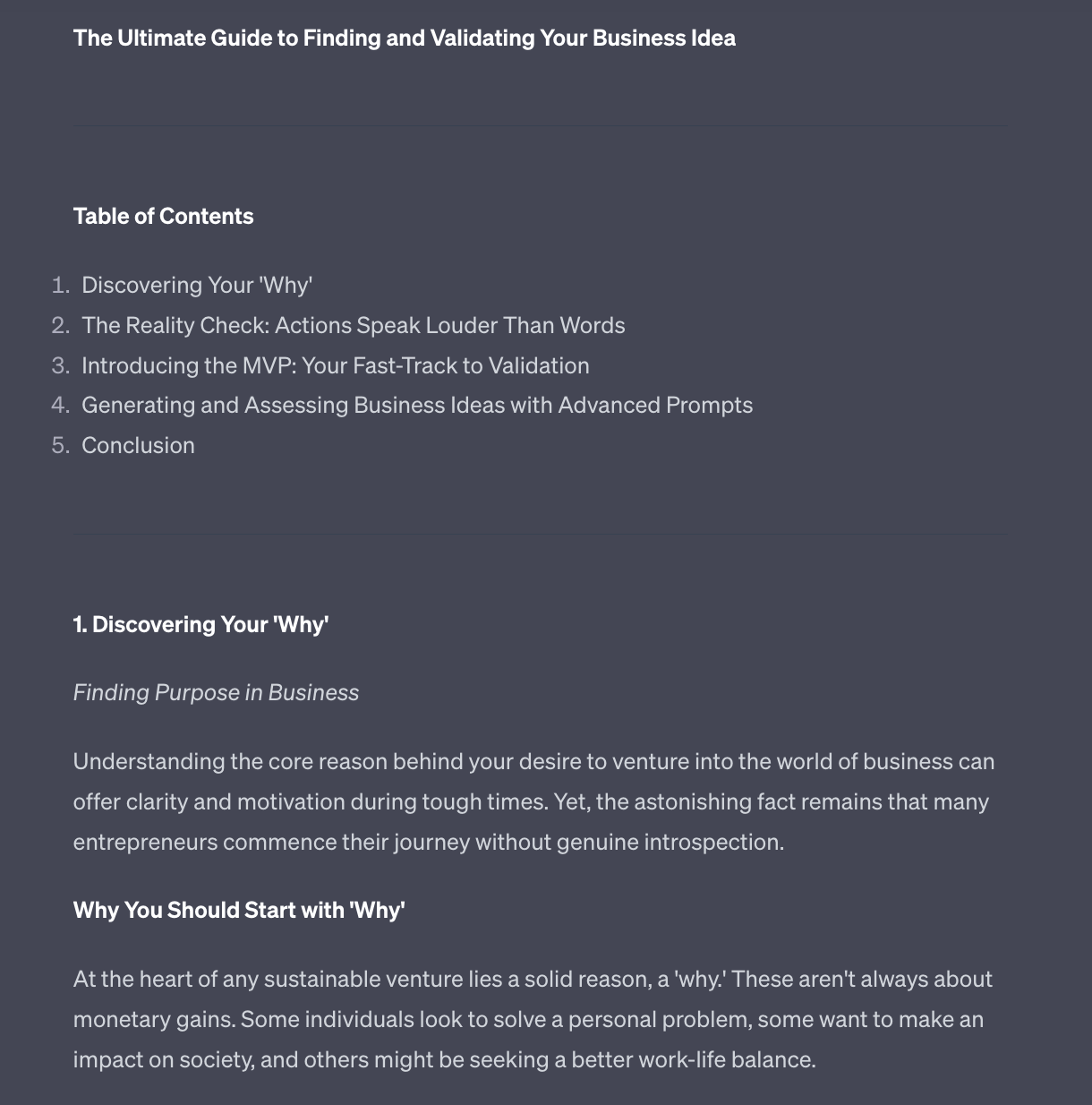
ChatGPT pulled the three long form X posts together into a 2000+ word blog article on “Finding and Validating your Business Idea”. It saw the connections between the different input content I provided and used this to make a mega guide.
One tip - often ChatGPT will not provide the full 2000+ words on its first pass. If it shorts you just give a second prompt saying “Provide 2000 words, no less” and it’ll redo the output.
Once done go ahead and run the same basic SEO optimisation process we ran in step 2 - ask for keywords, check volume, choose best keywords, ask for rewrite.
Then finally make manual adjustments and edits to add your personality and brand.
By now we have some solid short and long blog posts for our website. Great job.
Here’s where we can take it to the next level though.
We can now feed these content pieces back into our repurposing machine.
Remember in Part 1 where we took long form content and broke it up into posts and threads for X?
We can now use the blog articles we just created for that purpose.
Why?
In this Part we chose to create blog articles from our best, most well received content from X and LinkedIn.
These are the most popular topics with our most popular takes and opinions. All converted into blog articles.
By repurposing these blog articles back into posts we are condensing the value - we’re focusing more and more each time on the top content.
We might start off with 100 different topics we want to talk about.
Then find 10 that resonate with our audience.
We then create more content in these 10 topic areas until we find 1 single topic that really resonates.
That becomes our “thing” - from that point on you should only talk about that thing. It’s your niche, carved out over hundreds and thousands of posts.
The iterative loop from:
long form content
to X and LinkedIn posts
finding the most popular posts
repurposing from post to long form blog content
repeat from top
Allows us to hone in each time on what works best, what people want to hear more about and what we need to be specialising in.
So once you have completed the steps here in Part 4 loop back to Part 1 and feed your long form back into the repurposing machine.
We’ve now covered two social platforms (X and LinkedIn) as well as Search via Google SEO.
In the next Part we’ll be tying everything together and talking about expansion.
A reminder of what we’re covering this week :
Part 1: Creating long form content and why repurpose
Part 2: X repurposing
Part 3: LinkedIn repurposing
Part 4: SEO repurposing
Part 5: Systematisation and expansion
See you tomorrow Prompt Entrepreneur!
Until then, keep PROMPTING!
Kyle
In this final Part we’ll look at tying together everything we’ve looked at over the week.
The idea is to get you into a place where you are comfortable with the existing repurposing workflow and that it becomes automatic.
Once it’s easy to run you can think about expanding out to different formats and platforms, always experimenting with what works best for you and your Audience.
First up, if you are deploying all these repurposing methods you need to stay organised and on top of the content flow.
There’s going to be a lot of content and it’s tricky to remember what needs to be processed, what’s ready to post and what’s been published already.
I recommend setting up a basic project management tool to keep track of what is at what stage.
Trello is great for this and also free to get started with.
Personally I use Notion as the “operating system” for most of my business’ organisation.
We run all our content through a templated process that looks like this:
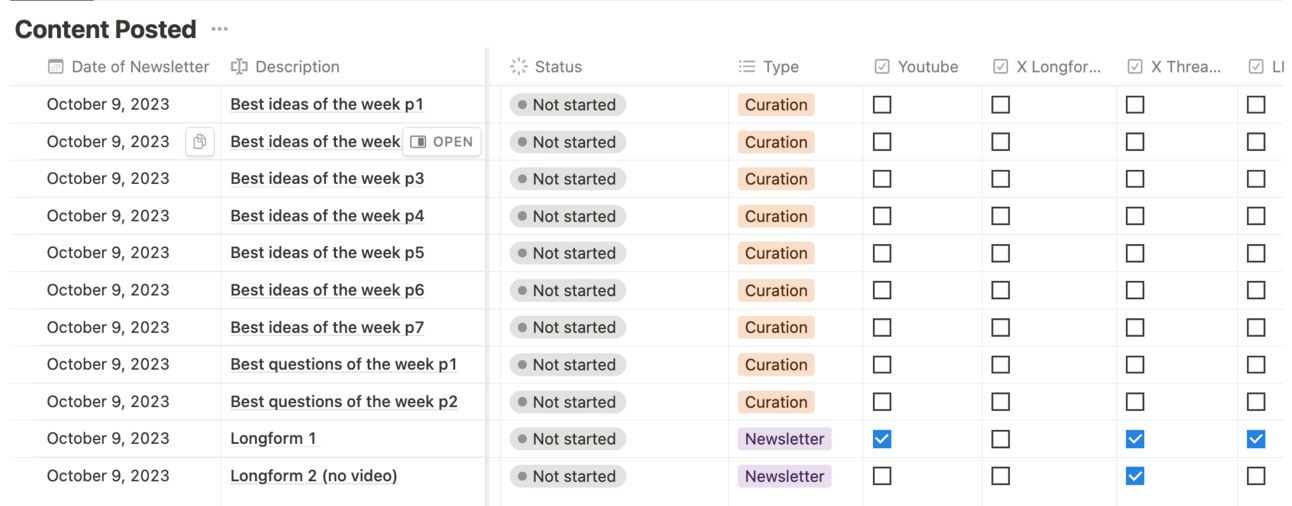
The basic idea is that each input content piece is one row.
Each piece has a status, type and then what channels it has been posted onto already.
As the content is processed and posted we adjust from not started to processing to done and tick all the checkboxes where the content has been published to.
It takes work to set up but will help you in the long run when you are suddenly juggling 20+ pieces of content a day!
If you are subscribed to Premium I’ll share my template with you in the Premium Prompt below.
Whilst it’s great to be able to post up 20+ pieces of content a day over 2-3 different social media networks don’t just do this blindly.
Each time you start a new format of post or a new social media channel post consistently for 4 weeks.
Then take some time to analyse results.
Why not analyse results before that?
I takes time to practice and nail a new format and you need to put in the reps and get the hang of the format before you know if it’s working or not.
Monitor what posts seem to work and which do not. Adapt appropriately.
Also, it just takes time for the algorithm of the various social platforms to notice your new activity. This is especially the case with a new platform.
So be patient and remain consistent.
And then take some time to analyse results.
We want to be disciplined and in it for the long haul but if at the end of 4 weeks the format or platform obviously isn’t work then we need to change tactics. Don’t obstinately keep banging your head against someting just for the sake of it.
You want to see increases in views and engagement over the 4 weeks. It doesn’t have to be huge - don’t expect instant viral success. But there should be an upward trajectory. If there is - keep going.
If not, look at stopping that format or platform and trying another.
Cut the losers and retain the winners.
We’ve covered some specific examples of repurposing - long form to X, LinkedIn and SEO in particular.
But repurposing content has much wider scope - it’s really limited by your imagination how you can move content from one platform to another.
Get into the headspace of always thinking “where else can I use this” when creating content.
And then cycle in new formats and platforms on a regular basis to see which ones lead to engagement.
To get started with expansion though let’s use this prompt:
Act as a content marketing expert.

Brainstorm content repurposing opportunities

I currently create content for [list platforms]

For each platform ask me what formats of content I produce

Using this information make suggestions for
i) other ways to use the existing formats on all my existing platforms, from one platform to the others
ii) ways to use the existing formats on new platforms
For this example I told ChatGPT I use Twitter and LinkedIn and filled in some basic format types.
Remember ChatGPT doesn’t know that Twitter is called X - so make sure to say Twitter for now!
First up the prompt generates ideas for using existing formats on my existing platforms - internal repurposing within what I’m already doing.
For this example I added Twitter and LinkedIn so I get Twitter→LinkedIn and LinkedIn→ Twitter. Add more platforms and you’ll get those permutations too.
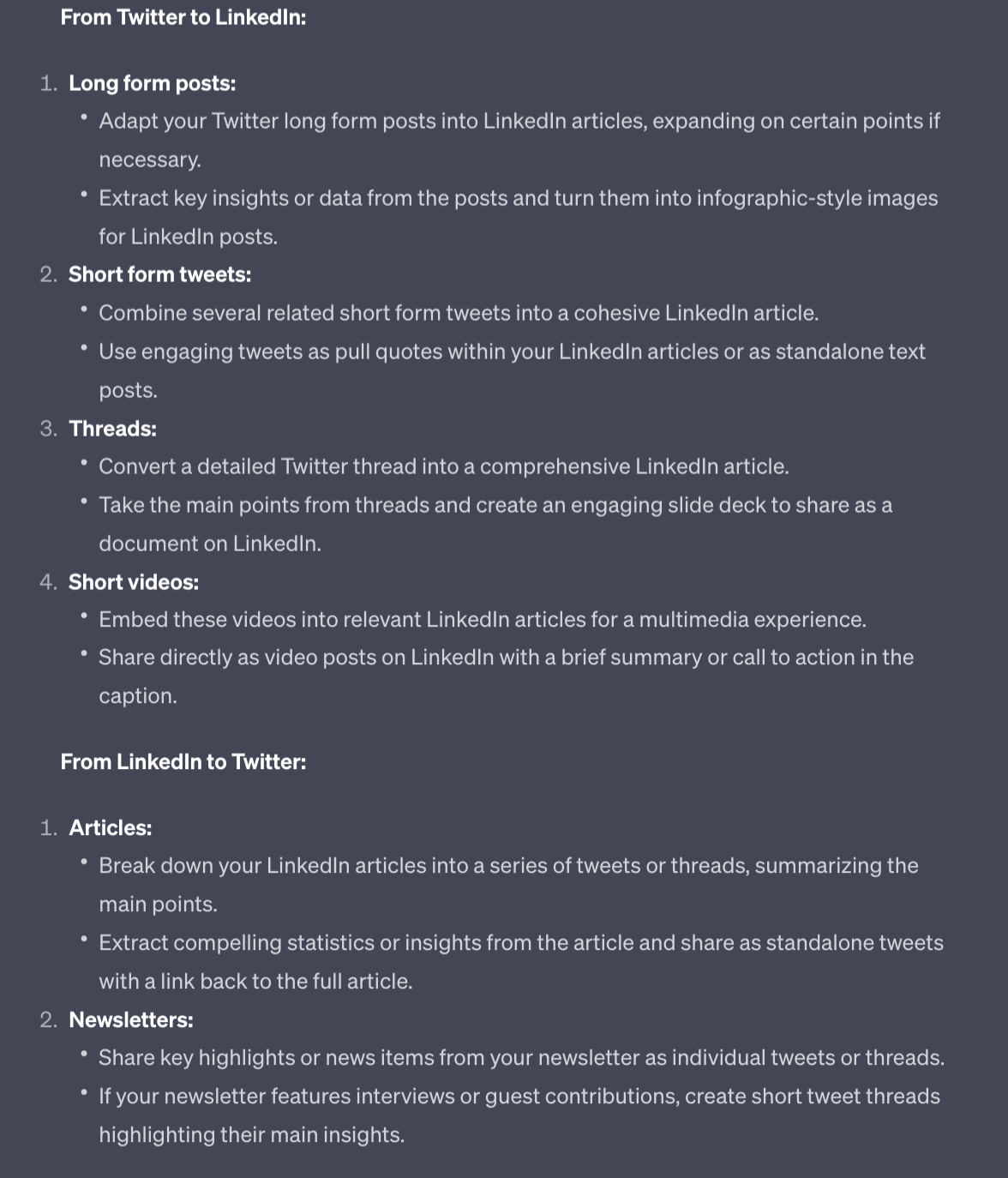
Next the prompt gives us more creative ideas outside of current platforms:
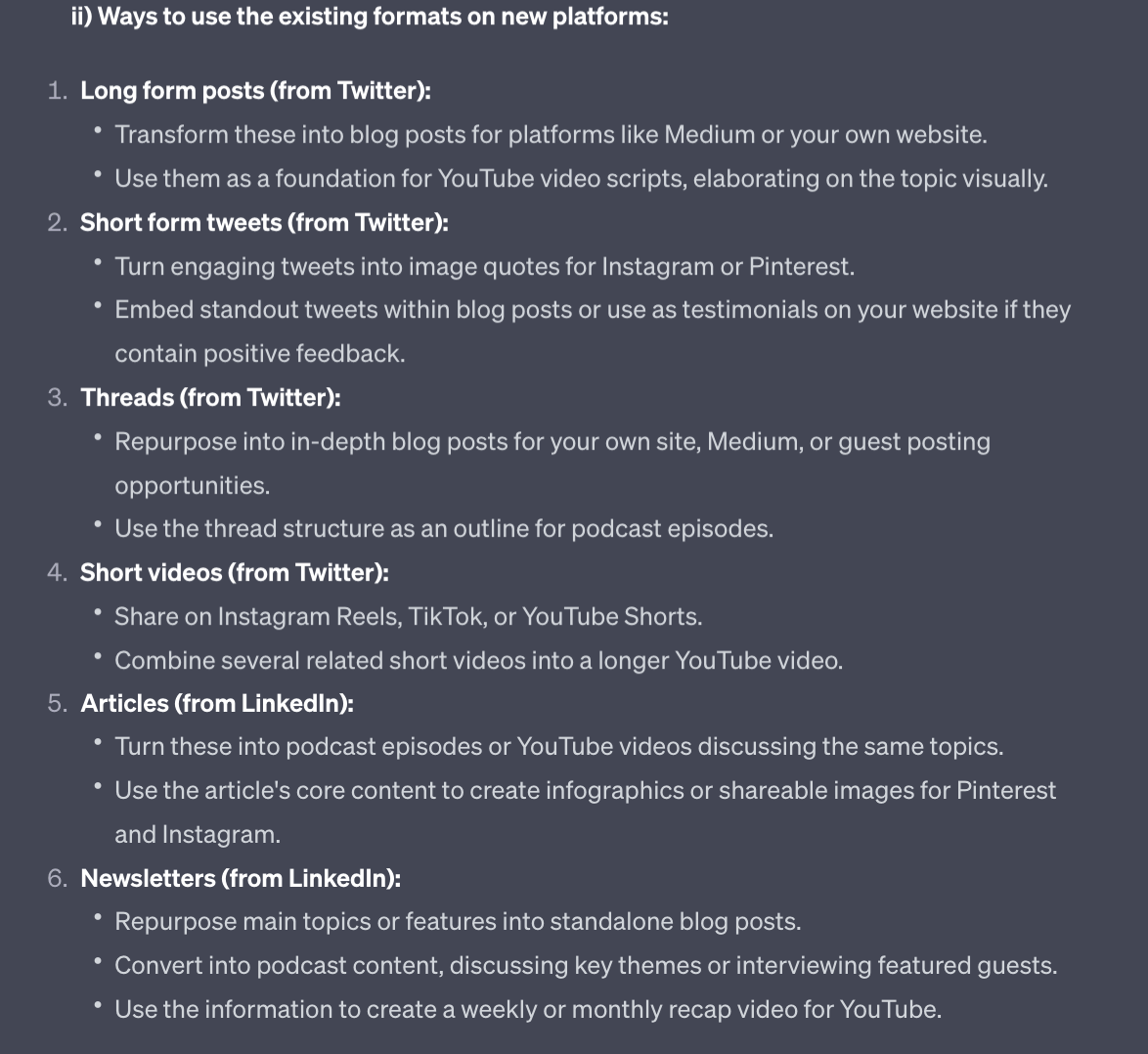
There are some great ones here we haven’t covered - for example posting to Medium for more traffic.
One particular form of repurposing that is important but a little beyond this guide is video repurposing.
Video opens up whole new platforms and Audience building opportunities.
For example all of these Prompt Playbooks go through this process:
newsletter
long form posts of certain steps
short videos based on the long form post
short form videos clipped together into a longer form Youtube video
Here’s an example of a short form video on X:
Content Repurposing Explained: Multiply Your Effort Through Reformats
How I take one newsletter and turn it into 5+ formats, including this video.
— Kyle Balmer | Prompt Entrepreneur (@iamkylebalmer)
5:04 PM • Oct 9, 2023
And here is an example of a longer form video on Youtube:
The basic idea with repurposing from text to video is to:
convert text post into video script
record raw footage
edit and add visuals as required
publish to video focused platforms
It’s not much different to repurposing text to text. But there’s the additional level of recording yourself delivering the content.
Here’s a quick rundown of my setup:
Logitech Brio Stream webcam
Yeti X USB microphone
Tella for video recording
Kapwing for video editing
Very basic but entirely functional! And you can get started with just a phone using its camera.
It’s too much to go into here but I’m happy to cover the whole workflow in another Prompt Playbook.
Here’s a nice simple one for you today!
It’s a template of the Notion document we use to organise all our content.
It’s nothing fancy but it gets the job done.
Duplicate it to your Notion and then you can edit to your heart’s contnet.
Feel free to edit it and add complexity but make sure that it’s still simple enough that you actually use it! Adding bells and whistles is all well and good until it gets in the way of using it.
Over this week we’ve looked at how we take content and chop and change it for a number of different platforms.
We looked in particular at X, LinkedIn and our own blog for SEO.
In this final Part we’ve wrapped up everything by looking at how to continue experimenting with content repurposing.
A reminder of what we covered this week :
Part 1: Creating long form content and why repurpose
Part 2: X repurposing
Part 3: LinkedIn repurposing
Part 4: SEO repurposing
Part 5: Systematisation and expansion
See you tomorrow Prompt Entrepreneur!
Until then, keep PROMPTING!
Kyle
Unlock the full potential of your written content with our playbook, 'Written Content Repurposing with AI.' In today's fast-paced digital landscape, creating engaging content consistently can feel overwhelming. This playbook is your blueprint to transforming a single piece of quality writing into multiple valuable outputs that engage your audience across various platforms. By leveraging AI tools, you'll discover innovative ways to streamline your content creation process, maximize your reach, and enhance your brand's visibility without sacrificing quality or increasing your workload. Dive into the world of content repurposing and become the content powerhouse you aspire to be. Whether you're a solo entrepreneur, a content marketer, or a business leader, this playbook will guide you through actionable strategies to create long-form content, effectively repurpose it for different platforms, and ultimately drive engagement and growth for your brand.
This playbook is designed for content creators, marketers, and business owners who struggle to maintain a steady flow of high-quality content. If you find yourself overwhelmed by the demands of content creation or unsure how to make the most out of your existing materials, this guide is perfect for you. It addresses the common pain points of time constraints and content saturation, offering practical solutions to elevate your content strategy without the burnout. By utilizing AI for repurposing, you'll not only save time but also cultivate a richer content ecosystem that attracts and retains your audience's attention. Whether you're just starting out or looking to refine your existing strategy, this playbook will equip you with the tools and insights needed to thrive in a competitive environment.
No, this playbook is designed for users of all skill levels. We provide step-by-step instructions and practical examples to help you implement the strategies effectively.
The time investment will vary depending on your content volume, but our strategies are designed to streamline the process, allowing you to repurpose efficiently without feeling overwhelmed.
Absolutely! The playbook includes guidance on creating original content and developing a foundation for effective repurposing.
Repurposing allows you to maximize the reach of your content, engage different segments of your audience, and save time by reusing quality materials instead of starting from scratch.
Yes! The strategies outlined in the playbook include techniques specifically designed to enhance your SEO and social media engagement through effective content repurposing.