
With just 51% of the vote Twitter/X Growth using AI beat out LinkedIn Growth!
It was our tightest run race ever but Twitter/X just took it. Twitter/X growth will therefore be this week’s topic.
Again though - I heard you. LinkedIn was very popular so I’ll be covering it in the new future.
Before we dive in - have another free book!
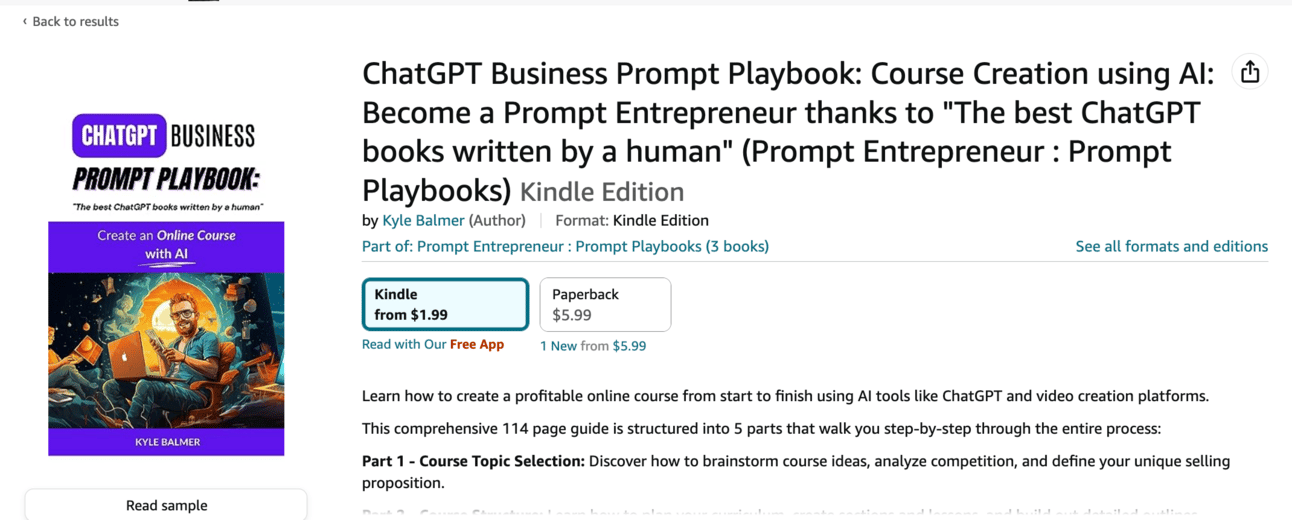
🥳 I’ve published my second ChatGPT ebook over on Amazon:
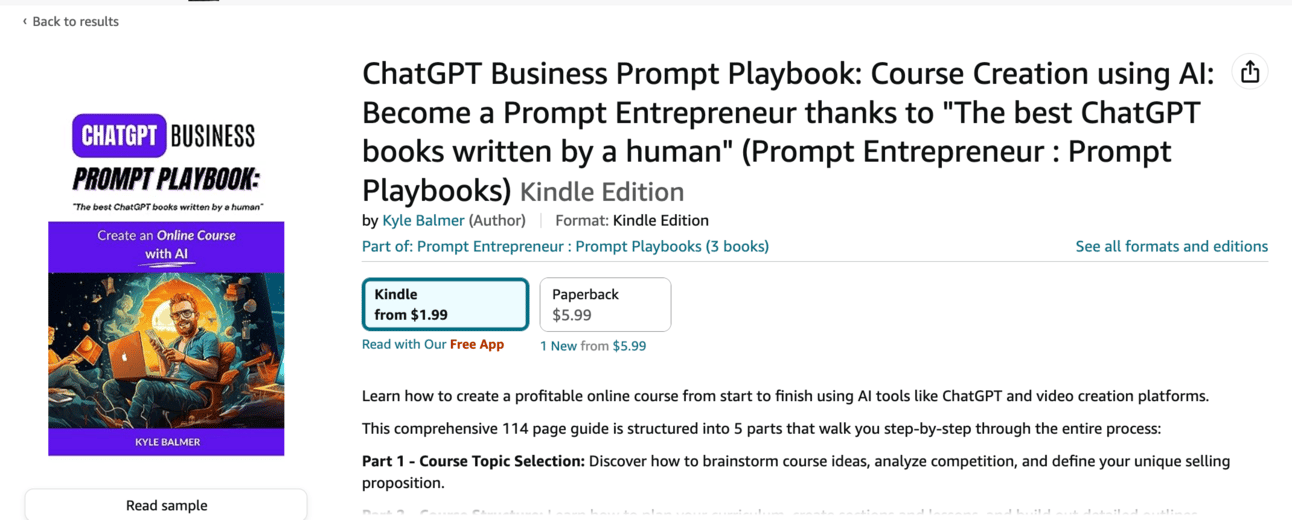
This week, from Monday to Friday it is totally FREE.
No coupon needed. Just head to Amazon and the price will be $0.00.
You can grab your free copy here: Amazon.com (That should redirect to your local Amazon, if not you should see an option to switch to local store).
Also: important. Leave a review, screenshot that review and send the screenshot to kyle@btreetdigital.com or on Twitter https://twitter.com/iamkylebalmer
I’m preparing something very special (secret still!) and will share a free copy with everyone who sends in a review when it’s ready.
OK back to our regular programming:
This week we’re looking at X Growth using AI.
We’re going to look at how to carve out a niche, create unlimited content, engage with the X community, grow a base of followers and finally monetise.
Over the week we’re going to go into detail about:
Part 1: X Niche
Part 2: X Content Creation
Part 3: X Engagement
Part 4: X Growth
Part 5: Monetising X
One of the most fundemental tasks when growing any audience is niching down to an area that we can dominate.
It’s tempting to want to wade in and be “the marketing guy” or “the AI” guy.
But guess what: those spaces have been claimed. Wanting to be the next Gary Vee or Grant Cardone whilst currently being at 0 followers is a fool’s game.
Instead we want to carve out our own space online where we can truly dominate. Once we take over that space we can look to expand up through niches.
For example, using myself, I’m focusing on:
helping entrepreneurs leverage AI as a tool to start and grow online businesses.
It’s not
AI or
online business or
entrepreneurship
Instead it’s a combination sitting between these larger niches.
You need to do something similar to find a space that is i) large enough to be worthwhile and ii) small enough for you to make an impact.
You’re looking for a Goldilocks zone.
To do this generate three lists
What you love doing, your interests and hobbies
What you are good at, your skills
What you get paid for, you work experience and qualifications
And answer these questions
What problems have you dealt with and overcome?
What problems can you help others overcome?
Where do you live?
What’s your demographic?
Act as a Twitter expert.

Help me to define my niche online. Use the concept of ikigai to help me find a niche. It should not be so large that I will be unnoticed - it should not be so small that I cannot monetise my audience.

Ask me the following questions, one at a time.
1. What do you love doing, your interests and hobbies? Minimum 5 items.
2. What are you good at, your skills? Minimum 5 items.
3. What do you get paid for, you work experience and qualifications? Minimum 5 items.
4. What problems have you dealt with and overcome?
5. What problems do you help others overcome?
6. Where do you live?
7. What is your demographic?

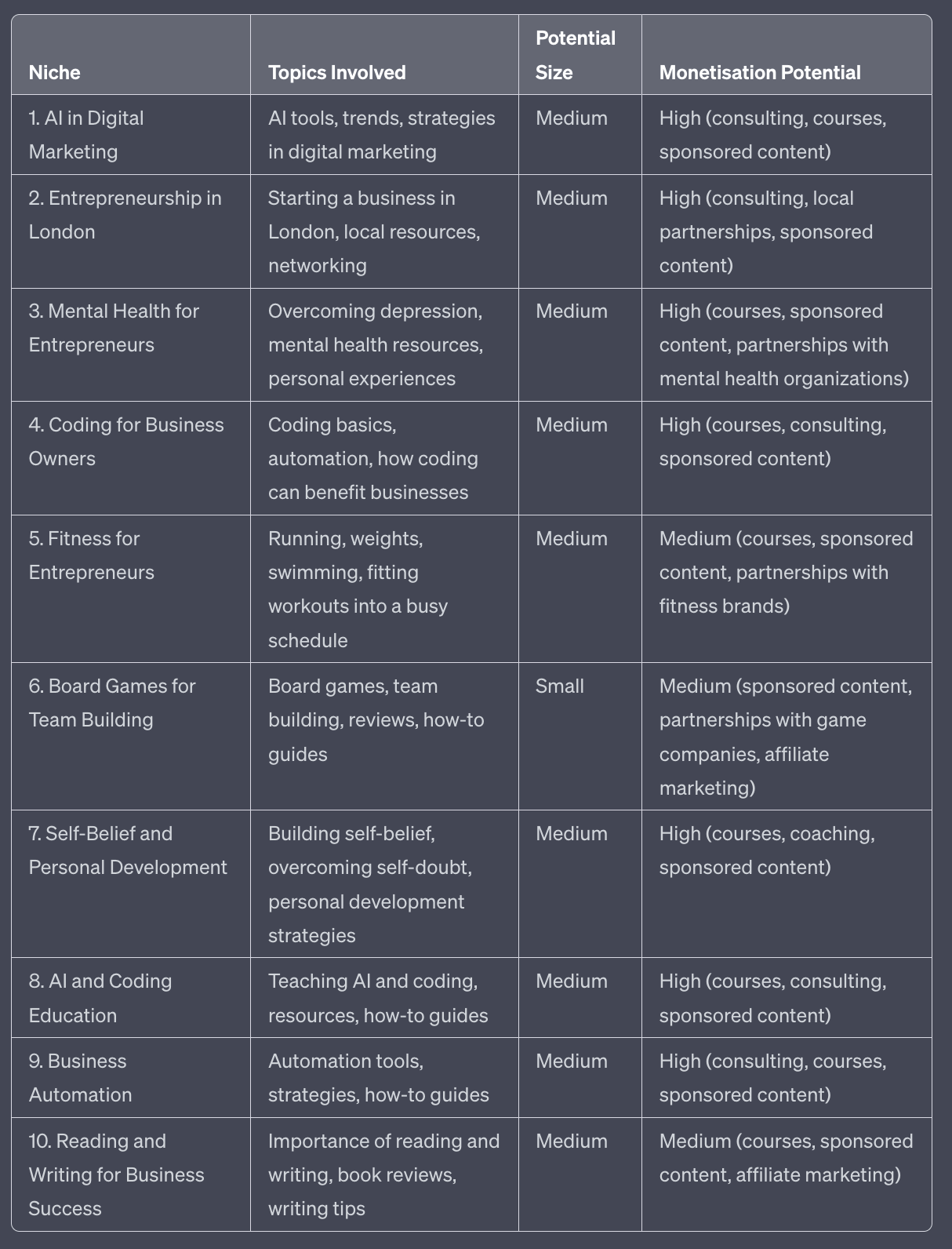
Use the information to generate 10 potential niches for me. Give details of each niche, the sort of topics involved, the potential size of the niche, the monetisation potential of the niche. Provide in a table.
Plug in this prompt and then go through the process with ChatGPT. ChatGPT will ask you questions in a sequence, coaching you through the process.
The more information you provide the better the output - so be sure to go into lots of details.
Here’s an example output. ChatGPT will spit out 10 potential niches along with some supplemental information.
The idea here is to give you ideas for your niche to get started.
Whilst it’s important to carve out a niche you don’t need to get it perfect right now. It’s much better to get started and tweak as you go along.
The reason for this is that you don’t know how audiences will react to you until you get started - how successful your content is will be used to guide our niche as we go along.
So for now choose one that sounds good and move on. We will refine our niche and positioning as we go along - in fact in Part 4 I’ll discuss exactly how we do that.
As always - if none of these sounds exciting ask ChatGPT for more potential niches. Or go back to the beginning of the process and fill in more details whilst going through the process this time.
Armed with a basic niche we now want to see what others are doing in that space.
We do this for a number of reasons
For inspiration about what sort of content works
For targeting who we will be interacting with
For learning and emulating best practices
Numbers 1 and 2 we’ll be looking at in Parts 2 and 3 of this guide.
Right now we’re looking at other accounts in the space in order to learn and emulate best practices.
At this point I recommend you go ahead and set up a handful of X Lists. We’ll be using these later so we may as well set them up now.
You will need an X account to do this. Go ahead and set one up if you don’t have one. You can change your username later so don’t worry too much about the name, bio or any other account details. We’ll cover those.
First head to Lists in the Desktop or App version of X.
Click Create New List on Desktop or the Create List button in the bottom right of the App screen.
Create a handful of lists. My recommendations here:
Under 10k
10k-50k
50-100k
100k+
These are lists for different size accounts. Under 10k is people with under 10,000 followers - ie. Small. Over 100k would be considered “large”.
I personally make my Lists private because these are used specifically for engagement and growth later.
We want to use these different lists to collect up accounts at different stages of their growth. The basic idea will be that we’ll start with engaging with smaller accounts at the beginning and then move from category to category as we grow. We’ll go through in a lot more detail later - for now it’s just handy to have the Lists in place whilst we do this preliminary research.
Next up, we want to start to find other accounts in the space and begin to follow them.
ChatGPT, Claude2 and similar AI models will do a decent job of giving you some accounts to follow. Use a basic prompt like “give me 30 twitter accounts to follow in the ‘AI in digital marketing’ niche” to generate a basic list.
However, due to the fact that training data is not fully up to date in many AI models this information will only get you so far.
Supplement it with a basic Google search for “top [niche] Twitter accounts”. For example “top AI in digital marketing twitter accounts” brings up blog articles and curated lists with account suggestions
Go ahead and follow all of the relevant quality accounts.
Also, add the accounts to their respective List.
To do this
On their account hit the … in the top right of the screen.
Click Add/Remove from Lists
Tap the List you want to add them too. A tick should appear next to the List.
Hit back.
Also, whilst you are on the account look at their Lists.
On their account hit the … button
This time click View Lists. This will show you any Lists they have curated. Look for ones relevant to your niche
In the list click Members to see the full list
Follow any relevant accounts from the List.
Here’s an example in AI:
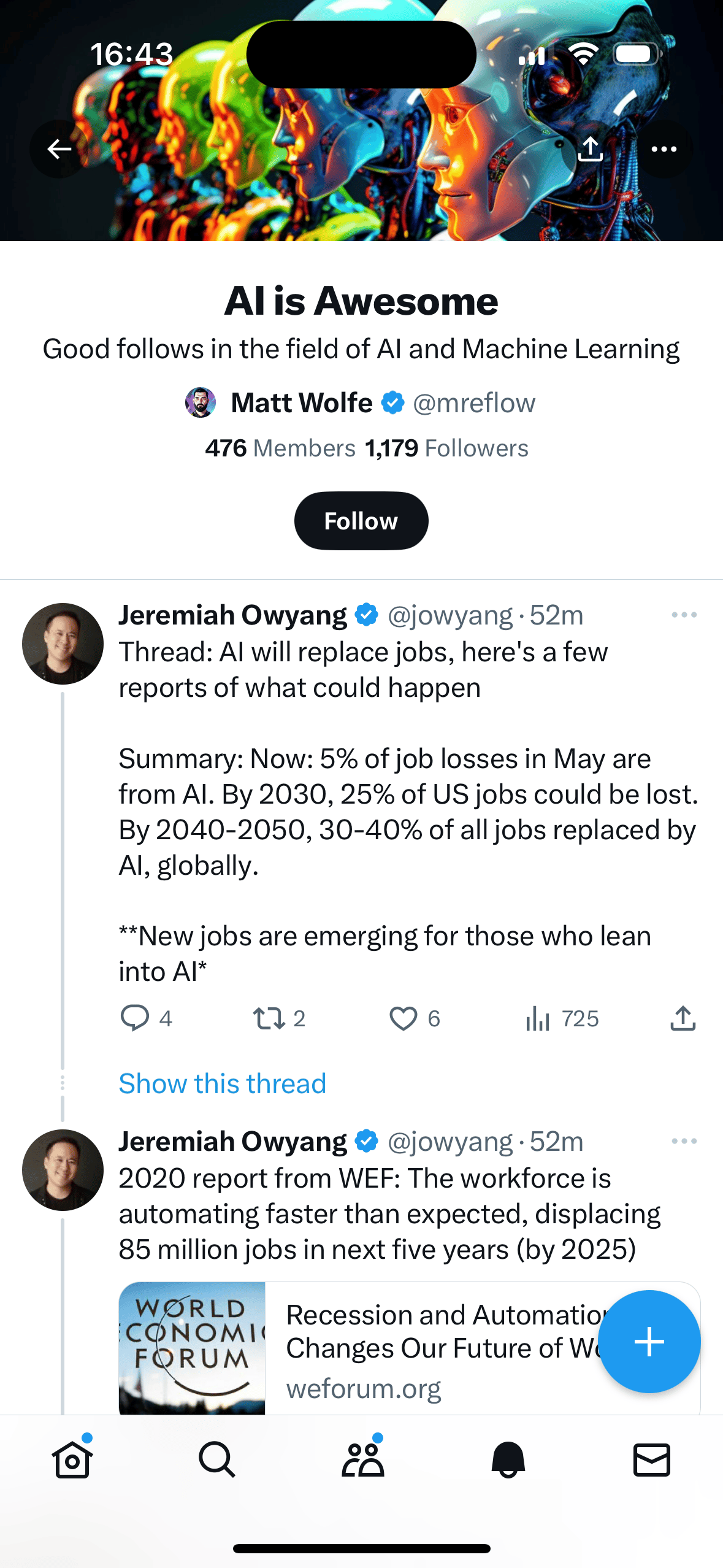
This is a List by @mreflow (Matt Wolfe). He’s already curated 476 other accounts in the AI space. And that List is public.
By clicking on the 476 Members near the top I can see all the accounts and choose to follow some of them. When doing this make sure to also sort them into your own Lists that you made before.
Continue this process of finding relevant quality accounts in your niche until you’ve followed and categorised a few hundred into Lists.
Following them means you’ll also be getting their content in your main feed so you’ll be able to see what they are up to - this will be vital as we move forward. Begin to read, absorb and monitor what everyone else is doing.
Before we start creating anything ourselves though we need to get our profile set up.
Next up we want to use the best practices of similar sized and slightly larger accounts.
We don’t want to try to emulate massive accounts because, well, we’re not massive yet!
What works for them will not be the same as what works for us.
Instead we want to find best-in-class smaller accounts that are around our size or slightly larger.
When starting a new account I like to look at the accounts of others that are around the 10,000 follower mark. These are larger but within reach and thus good models.
Using your lists find 5-10 quality accounts in the space with around 10,000 followers. It doesn’t need to be exact.
How do you know they are quality? Look at their engagement.
If they are at 10,000 followers and all their posts get a few thousand views each time it’s generally a good sign. If they are at 10,000 followers and their posts get hundreds of views (rather than thousands) they have low engagement. This is rough but will work as a rule of thumb.
Once collected, copy and paste their Bios into a document. Here are 5 I gathered as an example
AI Growth Specialist | Electrical Engineer, Ex-Consultant, Ex-Product Manager | Now: Helping you grow your business by leveraging AI →
Architect ➞ Marketer ➞ Creator | Breaking down tech, people & other cool shit | Get smarter in 3 min with my weekly tech breakdown newsletter
I talk about Tech, AI, Productivity, Design, Business & Minimalism. Helping you grow with my digital micro products
Ex-Google Trainer, now your Human Guide to #AI | Mission: Save you 20h/week, simplify complexity, grow your Business/Brand | Overthinker
𝕏 | AI Consultant | MBA | Helping Businesses Leverage AI Solutions for 10x Sales, Profits & Efficiency | I Encourage You to Grow & Be Your Best
Once you have gathered a handful of bios from similar accounts doing well in your niche we will use this prompt:
Act as a Twitter expert.

Write 10 bio alternatives for my account.

The the niche is [niche]
Topics involved are [topics involved]

Use these example bios as best practice guidelines for the format.

[copy/paste example bios]

Once you have decided the format ask me supplementary questions to fill in missing information.
Feed in the niche and topics involved from the first prompt. Feel free to adjust this information as required.
Then copy/paste in the bios of the other accounts. This will give ChatGPT a format to follow. This prompt will use this information to decide on the format of the bio and then it’ll ask extra questions to help fill in the gaps.
Notice that the example prompts I gave had a lot about past jobs and experience - they just happened to have had that format in my niche. Yours will likely have different formats.
Because of these examples ChatGPT then asked me:
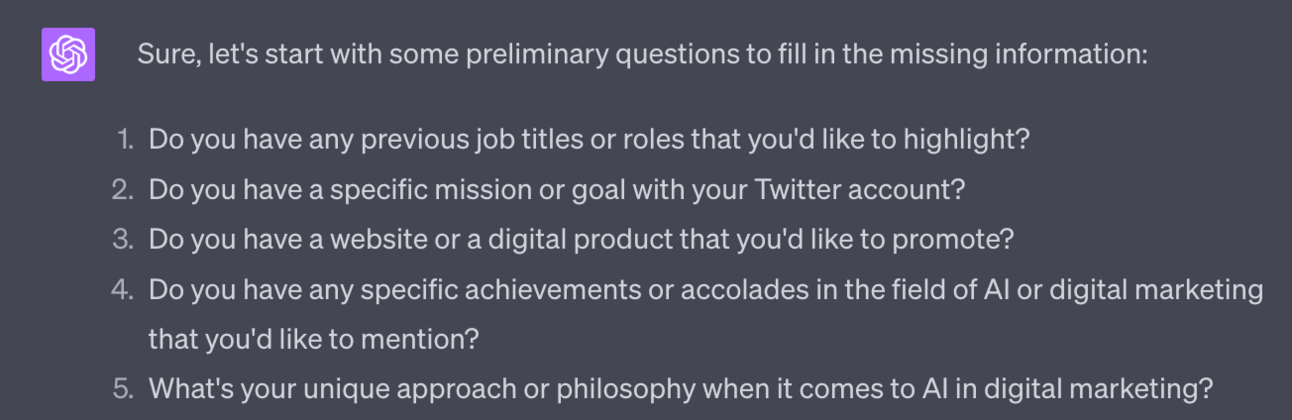
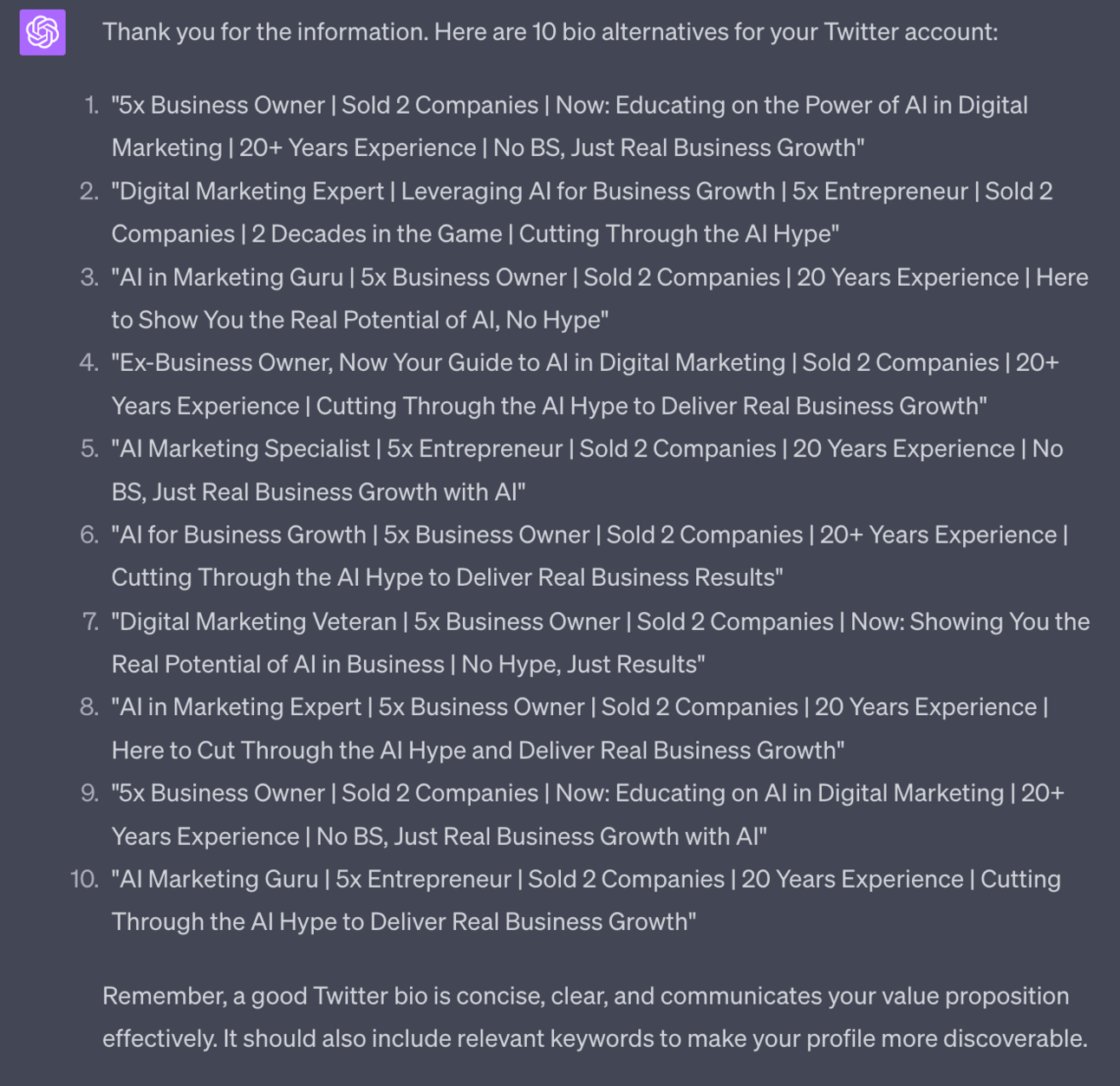
Answer the supplemental questions and then ChatGPT will generate 10x potential bios.
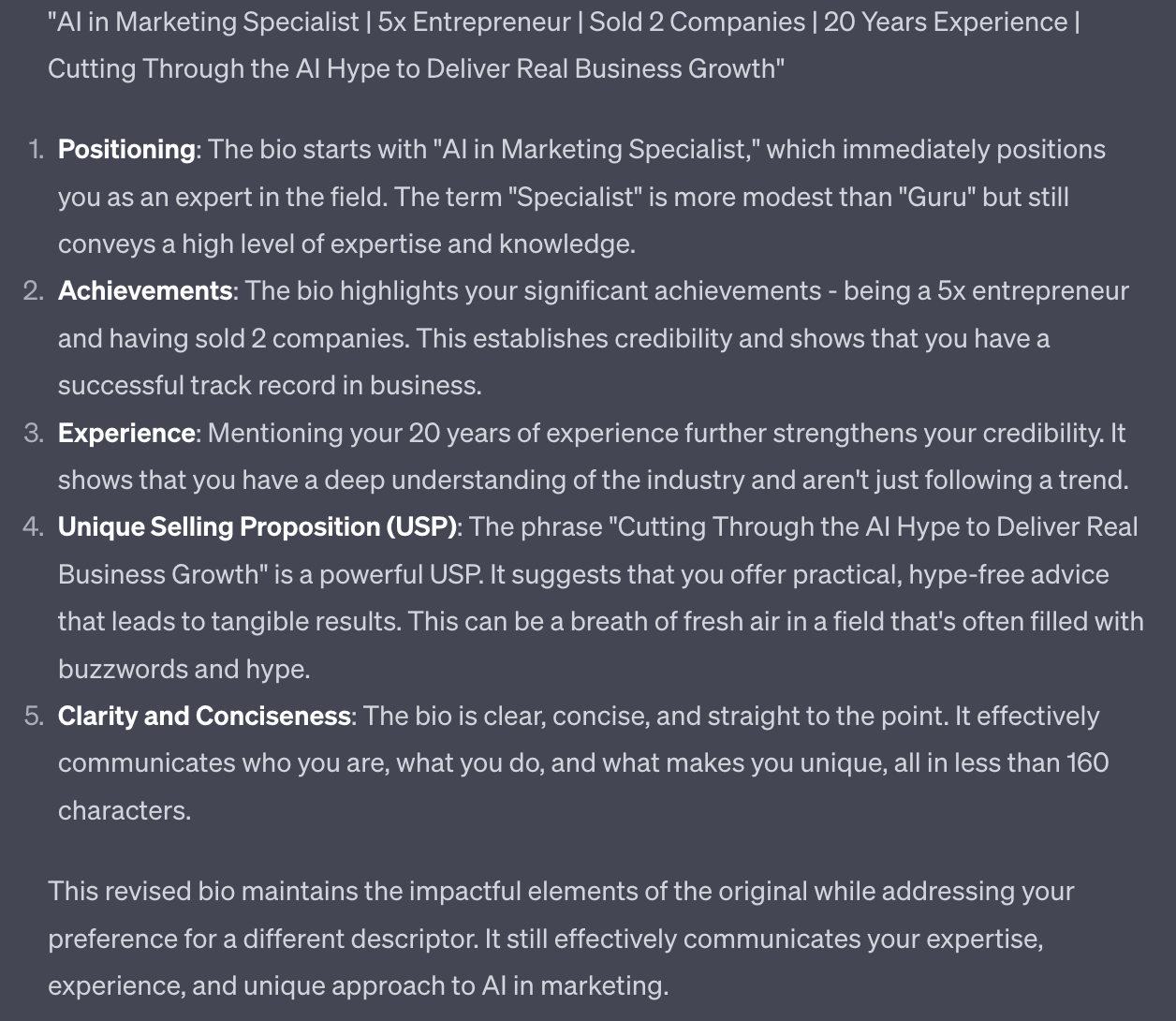
Choose the one you like the most. Unsure? Use a simple follow up prompt like “Analyse these 10 and give me the most impactful. Explain why” to have ChatGPT refine its suggestion.
This gave me:
Now that we have decided our basic niche and have a best practice based bio written we need to name the account.
You may already have a name : great. Go with that.
Or you may want to simply use your personal name or a variation. Perfect. Personal brands are very strong on Twitter.
If you are uncertain of a name though use this prompt for some ideas:
Act as a Twitter expert.

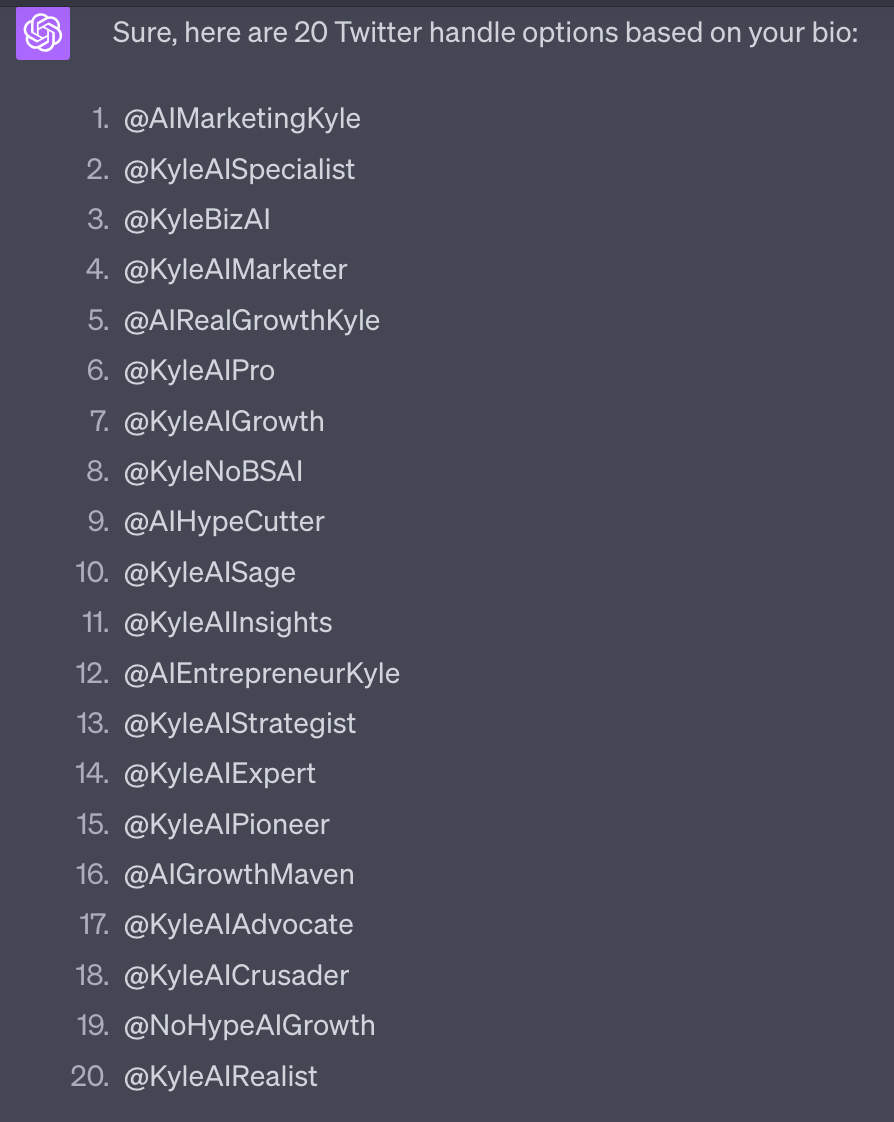
Give me 20 handle options for my Twitter account based on this bio

My personal name is [name]. Use this in some but not all options
Use this prompt directly below your previous Chat about the bio.
Also, delete the section on personal name if you do not want your name involved.
As always ask for more if required and give ChatGPT feedback on what sort of names you like and do not like.
As you go along make sure to check which are actually available. You can do this using Brandsnag or in the change handle menu inside Twitter (Settings and Privacy > Your Account > Account Information). When happy you can change your handle in Settings.
Last two elements to ready up our account before we start publishing in the next Part.
We need a profile picture and a header image.
The profile picture is the circular image (with my face!) that acts as your main graphic representation on X.
The header image is the large rectangular image that appears at the top of your Profile. In my case it’s a simple text header with an arrow I’ve got pointing down to the follow button.
For the profile photo I highly recommend you use a photo of yourself. X is a platform where people talk to people.
If you are like me and hate cameras and photos - good news! You can use AI.
That photo of me above right there? That’s AI generated.
I personally used Retrato which is a phone app. You upload 20-30 photos of yourself and it creates headshots. There’s also Headshotpro for more professional photos.
For the header image we’re going to use our good friend Canva. You can use the free version and their numerous templates to create a great looking header image.
Feel free to also work with a designer on these graphical elements. Just don’t get too caught up. Chances are you’ll need to change these later as you start to work out what’s resonating with your audience and what is not. So don’t be precious and don’t let these be an excuse not to get started.
You should now be in a position where we have the basics of our X account ready to rock and roll.
The purpose of this Part has simply been to get you to a place where you are ready to start creating content without worrying too much about how your account looks, whether you’ve got the right bio and all those other foundational details.
In the next Part we’re going to kick off content creation and get your account rocking and rolling.
Part 1: X Niche
Part 2: X Content Creation
Part 3: X Engagement
Part 4: X Growth
Part 5: Monetising X
See you tomorrow Prompt Entrepreneur!
Until then, keep PROMPTING!
Kyle, Harms and 🤖
PS: 🎁 GIFT BOX! Prompt Playbooks: Share our newsletter with a friend and unlock business ideas supercharged by AI prompts. 🔓 Refer 1 friend and unlock: Facebook Advertising Mastery AND Start an Affiliate Marketing Blog AND Start an Email Newsletter Business. All using AI.
Today we’re jumping into the chunky topic of content creation for X.
I’m going to give you a framework to get started ASAP that will kickstart your content machine and put you in the right position for growth.
Before that….
🥳 I’ve published my second ChatGPT ebook over on Amazon.
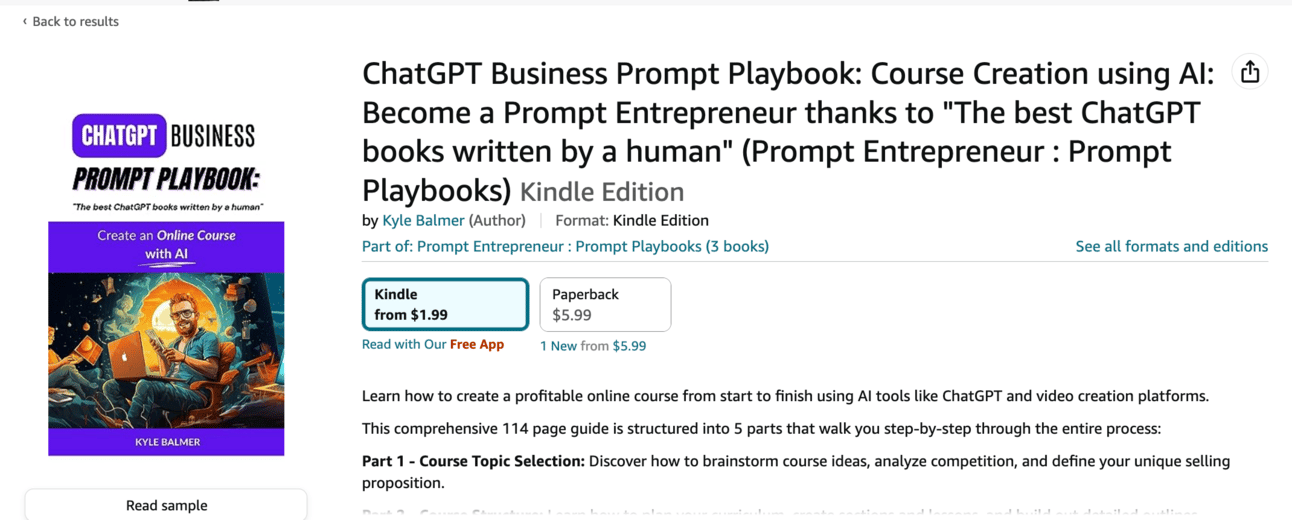
This week, until Friday it is totally FREE.
No coupon needed. Just head to Amazon and the price will be $0.00, down from $5.99.
You can grab your free copy here: Amazon.com (That should redirect to your local Amazon, if not you should see an option to switch to local store).
Also: important. Leave a review, screenshot that review and send the screenshot to kyle@btreetdigital.com or on Twitter https://twitter.com/iamkylebalmer
I’m preparing something very special (secret still!) and will share a free copy with everyone who sends in a review when it’s ready.
First up we want to explicitly state our topics.
I suggest three topics - this gives us a range of topics to talk about without diluting our messaging by talking about far too much.
My topics for instance are AI, entrepreneurship and digital marketing.
You have already thought about this when deciding your niche. We now just want to formalise this into 3 distinct topic phrases. We’ll be using these soon to flesh out our content plan.
If you are unclear what the exact topics are revert to the previous Part 1, step 1 where we generated potential niches. Copy/paste in the niche you chose and use this prompt:
Act as a Twitter expert.

Analyse this niche and provide 10 one-two word Topics that I could talk about connected to the niche.

[copy/paste niche]
In this example I used “AI in Digital Marketing” as the niche.
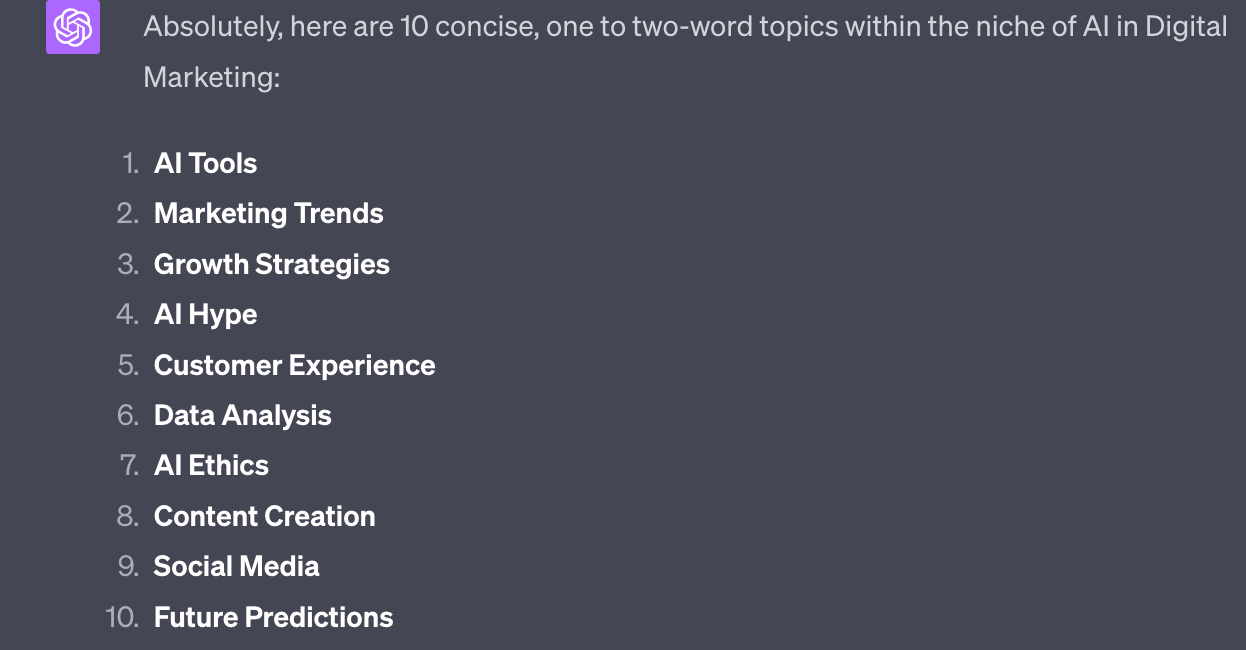
This gives me a handful of related topic areas - they are all broad enough that any single one would be sufficient for the account. But we’re going to go ahead and choose 3 so that we have some more variety and flexibility.
Out of these I would personally go for: AI tools, Growth Strategies and Content Creation.
On your side choose the ones that appeal and make a broad varied mix. Think especially about the intersection between topics - for instance there’s loads I could do between AI tools and business growth strategies.
If you need more topics just ask ChatGPT. And if none of the topics are exciting that’s a bit worrying! This may not be the right niche! Remedy this before pushing ahead.
We now have three topics. The next part of the equation are the content types we’ll be producing. I’ll introduce them here and in the next step we’ll bring everything together.
There are three main types I want to discuss:
Sharable content
Expert opinion
How-tos
First up sharable content.
This is the most base level, beginner content. We design this content to be book-markable, sharable and (hopefully) viral.
It’s the content that surprisingly is the easiest to make and also spreads the fastest. Done well it’ll grow our account quickly.
Why don’t we just do this then?
Because we’re building a business not trying to be influencers. The audience we grow using this sort of content is numerous but lower quality. If you know about sales funnels this is a top of the funnel audience.
They will be happy to share our content but are unlikely to be the sort of people who will later become customers.
What sort of content falls in this category?
Lists are a great example - people LOVE lists, no matter how surface level the content is.
Is there something in your niche that you can list? For example in the AI niche everyone does lists of new AI tools - generally even without trying them first!
If your niche was bodybuilding it might be a list of the most underrated bicep exercises. If your niche is skincare maybe it’s a list of 10 common house hold items that can be used to soften your hands. You get the idea.
Another go-to here are galleries of images - multiple images around a theme.
Later I’ll show you how to look at your niche and see what is working for other people.
Next is expert opinion content.
This is where you, as an expert in your niche, make short pithy statements - short messages but with depth of meaning.
Dan Koe is a particular master of this:
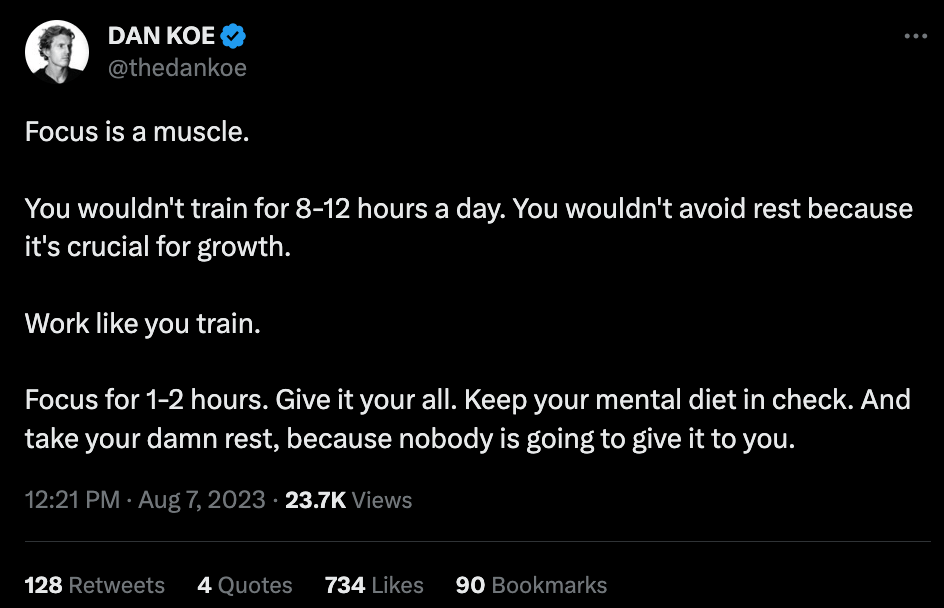
These type of tweets allow you to demonstrate your expertise in the niche via your writing. They are perhaps the “purest” sort of posts on X.
These type of posts sit between the other two types of content we are discussing. They will not go as viral as content that is designed to be shared.
They will not get as many engagements.
But they also show more gravity and expertise than yet another list designed to go viral.
This allows for a deeper connection with our more valuable audience. These are the people who will become customers. We’re building rapport and trust.
These expert posts are therefore a crucial transition to our third content type, How-to content.
How-to content is where we flex our ability and show we really know what we’re talking about. We take on the role of a teacher and a guide and walk people step by step through how they can achieve a certain process.
This content takes the most amount of time to write.
It will also be read by the least amount of people.
Huh, what gives? Why are we doing this?
This is the critical bridge to monetisation which we’ll discuss later in the week. We need to show our audience that we not only know what we’re talking about but we can also help them to achieve their goals with our knowledge.
These type of posts will tend to be long form (ie. 1000s of characters) or a thread.
As you scroll X from now on, checking out other people in your niche, try to see if you can spot these 3 types of content.
We’re now going to come up with a content plan for you in the next step.
Act as a Twitter expert.

Create a content matrix for the following three topics
[copy/paste 3 topics]

For each topic create 4 types of tweets. Create 10 tweets for each of the 3 types of tweets and 3 topics for total of 90 tweets.

The 3 types are:
1. Viral content
2. Expert opinion content
3. How to content
4. Motivational content

Guidelines as follows
#Start viral content guidelines#
Generate ideas for viral tweets for the specified topic.
Focus on Humorous Content, Relatable Experiences, Useful Information, Compelling Visuals, Emotional Appeal, Interactive Content, Personal Storytelling
Example formats include Lists, listicles, galleries.
Make suggestions, do not write the whole tweet. I will ask for full tweet as required.
#end sharable content  guidelines#

#Start Expert opinion content guidelines#
Generate tweet ideas  that demonstrate expertise in the topic.
Focus on confident tone, impactful language, expert knowledge, clarity.
#End expert opinion content guidelines#

#Start How to content guidelines#
Provide an outline of a longer form or thread how to content post about the topic.
 Do not write each tweet, just provide the first hook tweet in full followed by structure of remaining steps.
Focus on engaging hook giving reason to read on, impactful end result, clear explanation, step by step guidance, teaching modality, expert knowledge, clarity.
#End How to content guidelines#

#Motivational content#
Generate full tweets motivating action in the topic area
Short, sharp call to actions to act on the content and information delivered in the other tweets.
#End motivational content guidelines#

Do not use emojis.
Do not use hashtags.

Provide all results in a table with Topics on the horizontal axis and content types along the vertical.
This is a long prompt. All you need to do is plug in your 3 topics though and hit go.
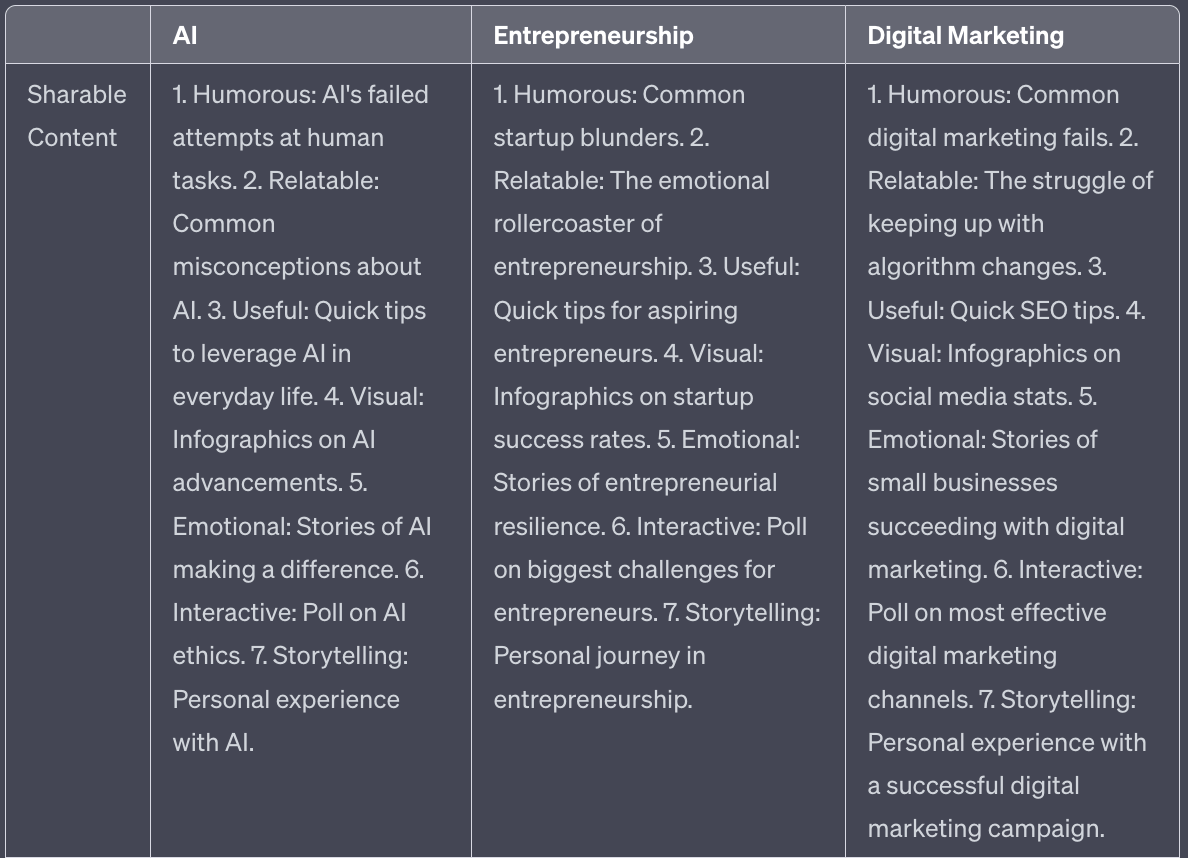
For space this is the output for just the sharable content section.
Notice it gives you brief summaries not the full post. We’ll now flesh out the details.
Once you have your content plan in place you can ask Chat GPT to generate the full text of the posts you want. We could generate everything automatically but we’ll end up with a lot of trash content. Instead we’ll generate individually the ones we want - this allows us to be more focused on quality.
Use the table to choose the most interesting sounding and then this prompt:
Act as a Twitter expert

Using the content guidelines associated with the topic

Give me [content type] [number] for [topic] as a fully fleshed out post/thread

Do not use hashtags or emojis.
Do not provide commentary. Only provide the tweet content.

Refer to the previous guidelines for that content type.
Fill in the details of the tweet you want.
For example “Give me sharable content 1 for entrepreneurship as a fully fleshed out post/thread” would lead to the following output.
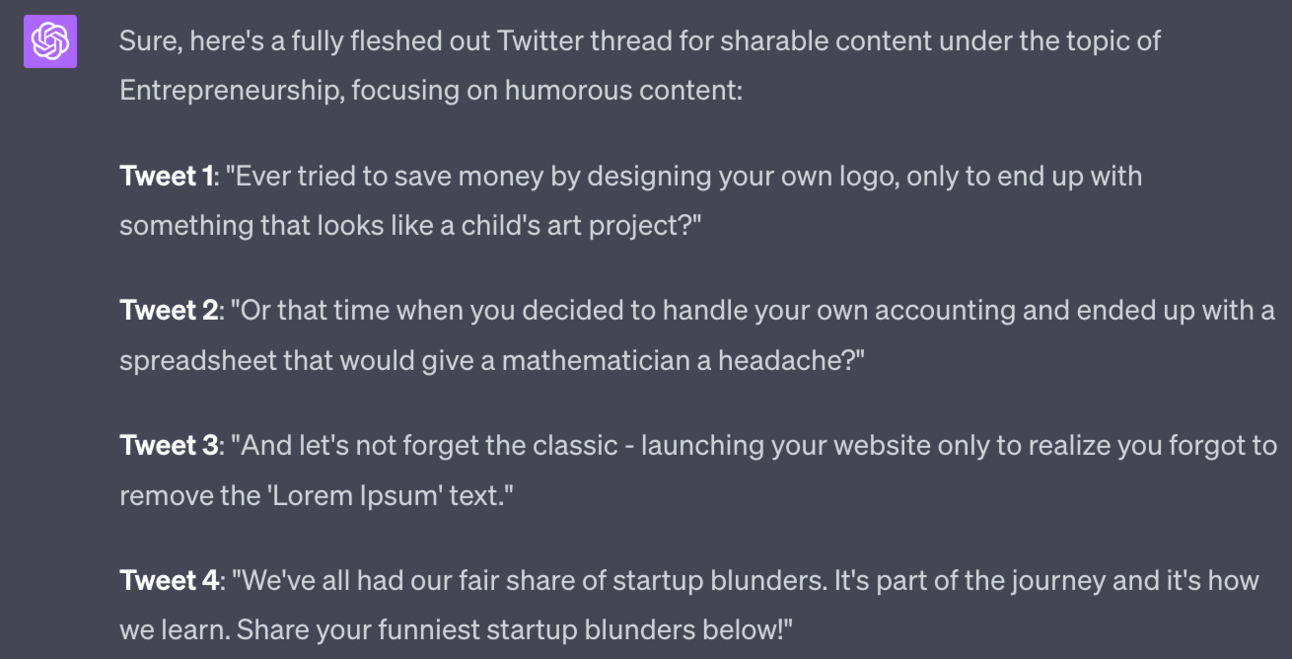
As with all AI content I’d personally suggest doing a rewrite. Use this as a jumping off point for your creativity rather than relying on ChatGPT to do all the work for you.
In this case I’d personally find some awful logos to go with the first post. Or I might even go hard on just the logos - finding 10 terrible logos and then finishing the post with suggesting an AI logo maker.
Use this process to spark creativity - not remove it.
We now have the basis of our content with our three topics and our three core content types.
The prompt above gives you 90 potential posts. And of course you can rerun the prompt to get more - allowing you to generate potentially limitless ideas.
We’re now going to sprinkle in some personality by adding content about you as a person.
Consider this the secret ingredient that adds flavour to your content recipe, as we now infuse it with personal touches, like a master chef adding the final garnish to a delectable dish.
This is optional - if you want to remain anonymous that’s fine. But remember that people connect with people on X (and indeed all social platforms) so by removing your personality you are making life harder for yourself.
For adding more personality in I recommend three additional post types.
First up, humour. Found a good meme related to your niche? Post it. These are super easy to find - google your niche and meme and you’ll likely get hundreds. Also be on the look out for them on X so you can repost. If you find it funny chances are your followers will too.
Similarly if you are naturally funny let that shine - have fun on the platform and make jokes with people. It makes you more human and approachable compared to if you were just pumping out the core content we discussed above.
Second, if you are building something I suggest you look into the idea of “build in public”. Basically this is recording and reporting on what you are doing day to day to grow your business or make your product.
This has the effect of making your audience members part of the journey. It’s a bit like a soap opera where they can tune in daily and see you progress.
At the same time it’s a great way for you to build up excitement for any upcoming launches - people will be following along and so are already primed to become purchasers further down the line.
Building in public means being OK with vulnerability. Be OK sharing roadblocks, difficulties and failures. Ask questions about topics you need help with. Don’t worry about it undermining your expertise - people know you are human and appreciate it.
Third, use X as a daily journal. On holiday? Show your followers. Hit a new fitness goal - tell people. Get them involved with your day to day.
This isn’t the same as being an Instagram influencer. Because you also create other valuable content on your account. You content isn’t just your day to day. The day to day is just additional flavour.
Personally I chat about fitness, the benefits of being self-employed and location independent and (more quirky) board games. You’ll be surprised how popular these “off-topic” topics are!
Another powerful technique to add to your arsenal is rewriting amazing posts that you come across.
Let’s say you see a post by a top author in your space about the best AI tools for iOS. Could you do a similar post, but about AI tools for Android? Absolutely.
Here’s my process:
Whenever I see a post I love I’ll bookmark it.
When I need to add more posts I’ll go to my bookmarks and select the one I want to repurpose.
I’ll copy the text and go to Claude 2. You can use ChatGPT here but I’ve found Claude 2 is better for this task.
Use a basic “rewrite this” prompt with any specific instructions like “rewrite this but for Android rather than iOS”
Make manual edits, add your personality etc. as always
Want to supercharge this method?
Install Twemex. It’s a free Chrome extension. When using X on a browser and you enter someone’s profile the extension will show you their top tweets of all times. See what sort of spin you can put on those top tweets by repurposing them to your niche and adding your own value.
We’ve covered a number of ways to generate content. Now it’s time to put everything in practice.
X wants to see you showing up everyday. So if you can only sustainably post once a day then stick to once a day.
Ideally though aim to post 3-5 times per day minimum. On X the more you post valuable content the faster you will grow - there’s not really a way around that!
You can post manually via Twitter but that means having to hop on several times a day to send posts. This is quite time consuming so it’s better to use a scheduling tool.
I personally use Tweethunter (non-affiliate link: https://tweethunter.io/) to schedule all my posts up front. I’ll spend an hour once a week preparing and scheduling posts for the week.
There are multiple tools like this. I’ve tried a few and like Tweethunter the best. I’d recommend trying out a few and seeing what you like - they all have free trials. Just use whatever works for you.
This Part has given you the tools to get started with content creation.
The key is speed and volume when starting up. You need to be active so you can work out what works best in your niche.
A lot of the tips above you will not be using after a month or two. And that’s perfect!
That means you’ve found better ways to engage and grow your audience. Think of the the guide above as a set of training wheels to get you started. Once you have velocity feel free to drop what doesn’t work.
Indeed we’ll discuss how to use AI to analyse results as well as draw up recommendations for changes in Part 4.
Right now though: get started. Stop planning. Stop waiting for the perfect strategy. Stop delaying until the stars are aligned. Just get moving.
Part 1: X Niche
Part 2: X Content Creation
Part 3: X Engagement
Part 4: X Growth
Part 5: Monetising X
See you tomorrow Prompt Entrepreneur!
Until then, keep PROMPTING!
Kyle, Harms and 🤖
PS: 🎁 GIFT BOX! Prompt Playbooks: Share our newsletter with a friend and unlock business ideas supercharged by AI prompts. 🔓 Refer 1 friend and unlock: Facebook Advertising Mastery AND Start an Affiliate Marketing Blog AND Start an Email Newsletter Business. All using AI.
My second ChatGPT book launched yesterday and is ranking well
Very happy with ranking in Marketing & Sales. That’s a big category.
Let’s see how high they go! ☺️ http
— Kyle Balmer | Prompt Entrepreneur (@iamkylebalmer)
8:30 AM • Aug 8, 2023
Not got it yet? You can grab your free copy here: Amazon.com
Also: important. Leave a review, screenshot that review and send the screenshot to kyle@btreetdigital.com or on Twitter https://twitter.com/iamkylebalmer
I’m preparing something very special (secret still!) and will share a free copy with everyone who sends in a review when it’s ready.
Peace!
I want to introduce the concept of the Dream 100. I read about it in Russell Brunson’s Traffic Secrets and he got it from Chet Holmes’ Ultimate Sales Machine.
I recommend you learn more about the strategy from these books but for now I’ll give a quick summary and some action steps.
The Dream 100 is a list of people who talk to your customers. They are the movers and shakers who your customers follow, engage with and purchase from.
You’ve already started to identify these people in Part 1 where we researched top X accounts, followed them and added them to Lists.
We want to become known to our Dream 100. Doing so opens up doors for us with the person directly and also with their followers.
The basic idea (which we’ll go into in depth) is that for each of these 100 people we are going to:
Follow their account
Like and make valuable comment on their posts
Secure a follow from the Dream 100 target
Open up a dialogue via DM or email
We’re going to work in this order - starting with small actions and building the relationship.
Not only does this make us known to the account owner themselves: it also makes us known to their followers, which in turn will bring them to our profile and make them our followers.
The first step here is simply identifying your Dream 100. You’ve already done this in Part 1. Feel free to add more people. And 100 is rather arbitrary here - it could be more, it could be less.
In terms of tracking your relationship with them you can use a spreadsheet with the columns:
Target
Followed
They responded to a comment
They follow me
They shared my content
DM conversation
Put all 100 account handles in the starter Target column to start and then as you progress your relationship move them from column to column. You can also use Trello for this as a more tactile alternative.
First goal is simply to comment on your Dream 100’s posts.
You want to comment ASAP on their new posts so I’d recommend having notifications turned on. This helps you be on their first, get likes and replies and stay at the top of their comments. This is particularly important if it’s a large account.
What to comment? Something valuable. Do not just say “great post!”. That means nothing. Instead read their post and comment as an expert would.
Here’s a prompt:
Act as a Twitter expert.

Write an insightful and humorous comment in response to this post.

No hashtags.
No emojis.

Post begins:
Here’s an example post I could respond to:
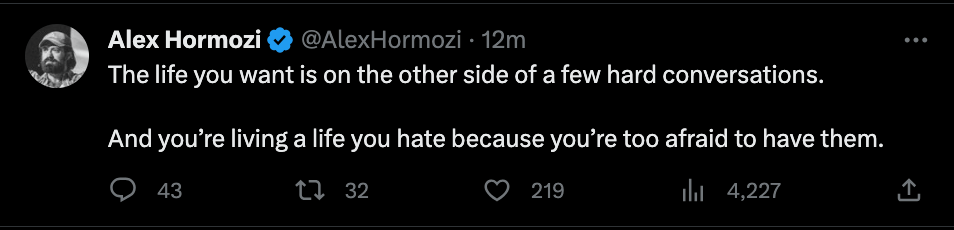
I simply copy and paste the post below my prompt and hit go.

Not bad! I’d manually adjust to better fit my style but the core metaphor of silent suffering is great.
I trimmed it to “we might be expert swimmers in the sea of silent suffering, but chuck us in a puddle of difficult dialogue and suddenly we're drowning”
The results:
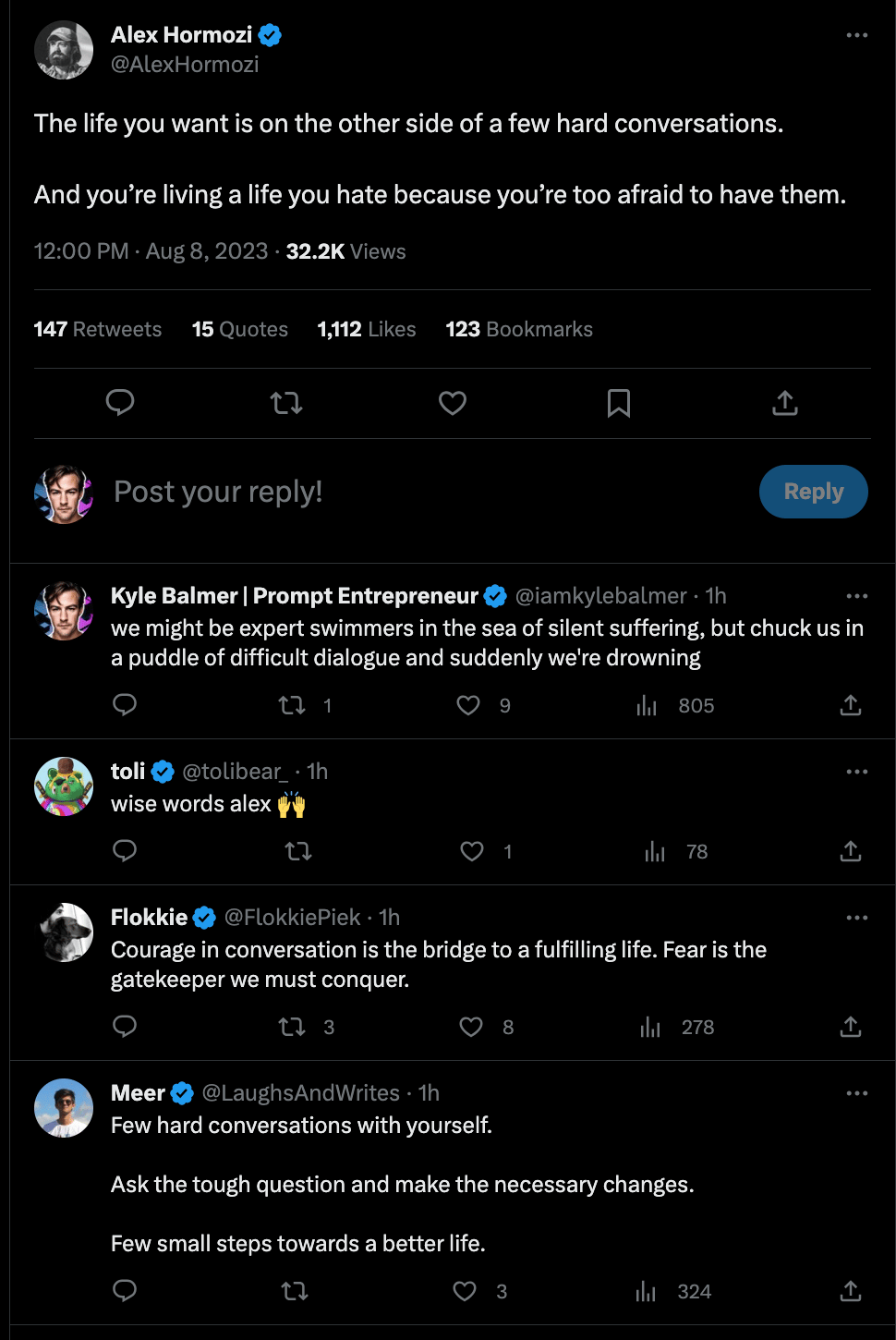
This is 1 hour after posting - there are 805 views, 6 profile visits and 3 new followers. This will increase over time as this is a top comment on the post and will continue to be shown at the top.
Maybe by the end it’ll have picked up ~10 followers. Great! Small but it’s something.
You need to do this on as many posts as possible. It takes time but this primes you for growth.
By commenting on the accounts of the Dream 100 you will start to become visible to their followers. These followers will start to recognise your name and profile icon. They’ll begin to check out your profile. And, if you’ve optimised the profile correctly and have solid content, they’ll follow you.
Your next goals are to:
Get the Dream 100 target to reply to your comment.
Get the Dream 100 target to follow you back
Get the Dream 100 to give you a shout out or share your content
For small accounts you’ll be able to move through these very fast. They’ll also be looking to make connections and friends on the platform.
For larger accounts though it’s a matter of repetition - put in your reps!
This means continuing to comment and interact with their content until you become un-ignorable.
This doesn’t mean spamming them. This means consistently showing up and making valuable comments that their audience finds valuable. Don’t sell, don’t even mention your account. Just give value.
Remember that you are dealing with people here. If you were at a party you wouldn’t go up to someone and try to sell them. Just be cool like the Fonz and play the longer game until you are noticed.
A supplemental method that can be used to speed up progress is preparing content that specifically highlights members of your Dream 100.
Have you ever seen lists of “top fitness instructors you need to be following” or similar content? These aren’t just lists but are aimed to get the attention of the people mentioned in the lists!
By creating a piece of content highlighting the best people you are basically giving them a massive compliment. People love having their egos stroked!
And guess what happens if I do a piece about the top AI influencers?
The top AI influencers share that content with their fans! Of course they do: these posts make them look great and they want to share that social proof with their followers.
Again this works particularly well with small and medium accounts. The big boys and girls get featured all the time so it’s not as special for them.
Here’s a basic prompt to create a thread:
Act as a Twitter expert

Create a "best of" thread about the influencers I provide you with

Begin with a strong hook tweet with a strong declarative sentence + controversial opinion opener followed by details of what's in the thread and why they should read

For each influencer give
The handle , name, follower count
brief description of their topics
why they should be followed

No emojis
No hashtags

Format as a thread with each tweet declared.

#Influencer details begin#
Paste this prompt into ChatGPT then head back to Twitter.
For each person you want to add to your list copy this part of their profile, everything visible in this screenshot:
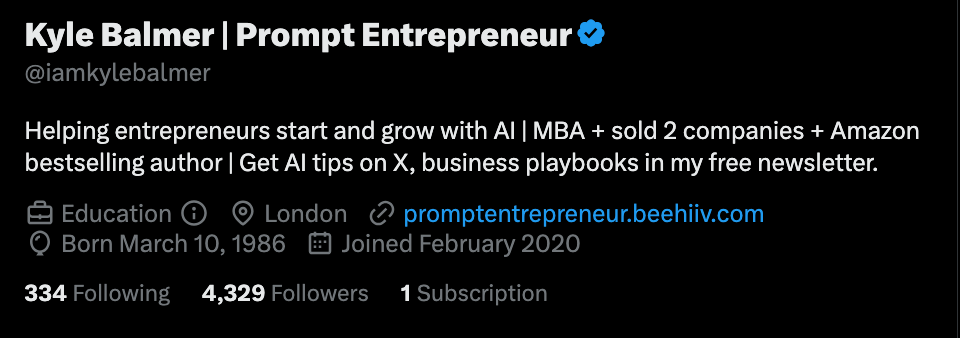
Copy and paste each profile summary below the prompt and hit go when you have them all.
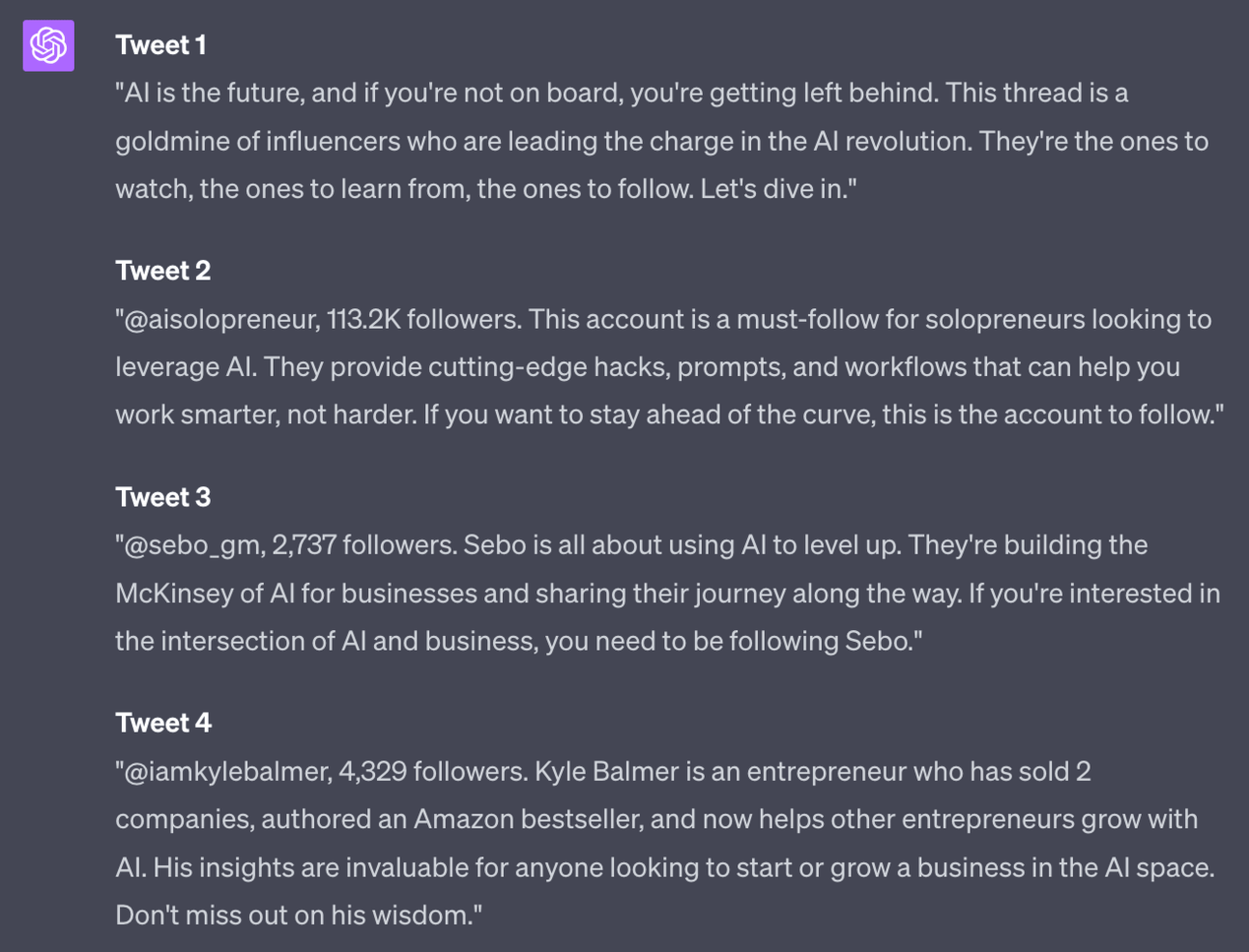
This will spit out a thread of posts, each with a basic summary. Importantly each also includes the handle of the account - this ensures that the Dream 100 target will be tagged and notified about the post.
To make a post like this more visually appealing I’d grab a screenshot of their profile or potentially just their X profile photo.
Using these sort of lists will help accelerate your growth as it’ll hopefully get re-shared by the target accounts to their followers.
As you start to pick up traction you’ll get more and more people commenting on your own posts.
This will be slow going initially - only a very small % of followers will ever comment so when you have 100 or so followers the chance of anyone commenting is low!
Don’t worry though as the techniques above, done consistently, should start to bring in followers which will in turn begin engagement on your posts.
When people do comment on your posts make sure to reply. To everything!
This tells the X algorithm that the post has high engagement. And when it knows a post has good engagement it’s more likely to show it to people. This creates a snowball effect.
Here’s a prompt for quick replies:
Act as a Twitter expert.

Write a personal, warm reply to this comment on my post.
Respond with an insightful or humorous observation
Keep it light and short.

No emojis
No hashtags

#Initial post#

#Comment to respond to#
For this example I used this initial post:
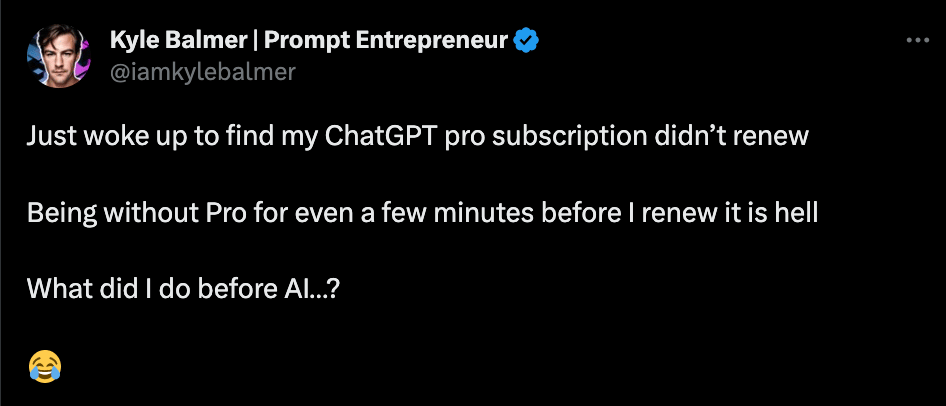
and this comment:


Again, edit to preference.
I would personally remove the “Thanks for your insightful comment. Keep ‘em coming!” as it’s a bit much. But the central Robinson Crusoe / AI Friday simile is strong.
In this Part we’ve looked at how to layer engagement on top of our content creation.
This will start getting our content actually seen and help us begin to build relationships on X.
Content and engagement are the core pillars of our strategy and alone these will allow us to grow our following.
In the next Part however we’ll be discussing some methods to refine our processes and accelerate growth.
Part 1: X Niche
Part 2: X Content Creation
Part 3: X Engagement
Part 4: X Growth
Part 5: Monetising X
See you tomorrow Prompt Entrepreneur!
Until then, keep PROMPTING!
Kyle, Harms and 🤖
PS: 🎁 GIFT BOX! Prompt Playbooks: Share our newsletter with a friend and unlock business ideas supercharged by AI prompts. 🔓 Refer 1 friend and unlock: Facebook Advertising Mastery AND Start an Affiliate Marketing Blog AND Start an Email Newsletter Business. All using AI.
In the previous Parts we’ve set up your basic Content strategy and began Engagement.
Do this consistently and you will grow. That’s almost guaranteed.
However: it will be long, slow, hard work.
If you love being on X creating and interacting that’s fine: just enjoy the process and the organic growth over time.
We are building businesses though. We are not growing an X audience for the sake of it. We want to use the audience to drive our business.
In this Part we’ll talk about a few methods to accelerate growth. You’ve already build a fire that is burning nicely - now we’re just adding more fuel to speed everything up.
But first:
The new book is doing well - we hit #1 in Neural Networks and #2 in AI & Semantics and #4 in Biz Dev & Entrepreneurship on UK Amazon.
Also I got some physical copies!
Just got a couple of paperbacks of my newer books delivered
Looking pretty sweet!
— Kyle Balmer | Prompt Entrepreneur (@iamkylebalmer)
10:25 PM • Aug 8, 2023
Want a free copy? You can grab it here: Amazon.com
The first and fastest way to boost your growth on X is to get verified by signing up for X Premium.
The main advantage for your growth is that you get expanded reach on your own content - basically your posts will be seen by more people each time you post.
In addition, your comments on other people’s posts will naturally be shown at the top.
This is a huge advantage when we are applying our Engagement tactic from the previous Part.
Basically if you are serious about building an audience that you can monetise and drive business with this is non-negotiable. So I won’t spend any more time here!
Our first major growth method is to find out what is working and double down on this sort of content.
This allows us to refine our own growth strategy rather than rely on some “guru” telling us what works and what does not. Because guess what: it changes all the time!
This is why in previous Parts I’ve been careful to give you enough to get started but haven’t tried to tell you that this is “The Way”. Your strategy will depend on your niche, your audience, your content and you.
Instead of trying to force all of that into a one size fits all strategy I’ve instead suggested you start with the basics and then pivot and adjust based on what works. We’re now at the point of analysing and pivoting.
X has its own analytics at https://analytics.twitter.com which will give you some basic info. However, we want to use AI to give us insights.
On the desktop version of X go to More > Settings > Your Account > Download an Archive of your Data
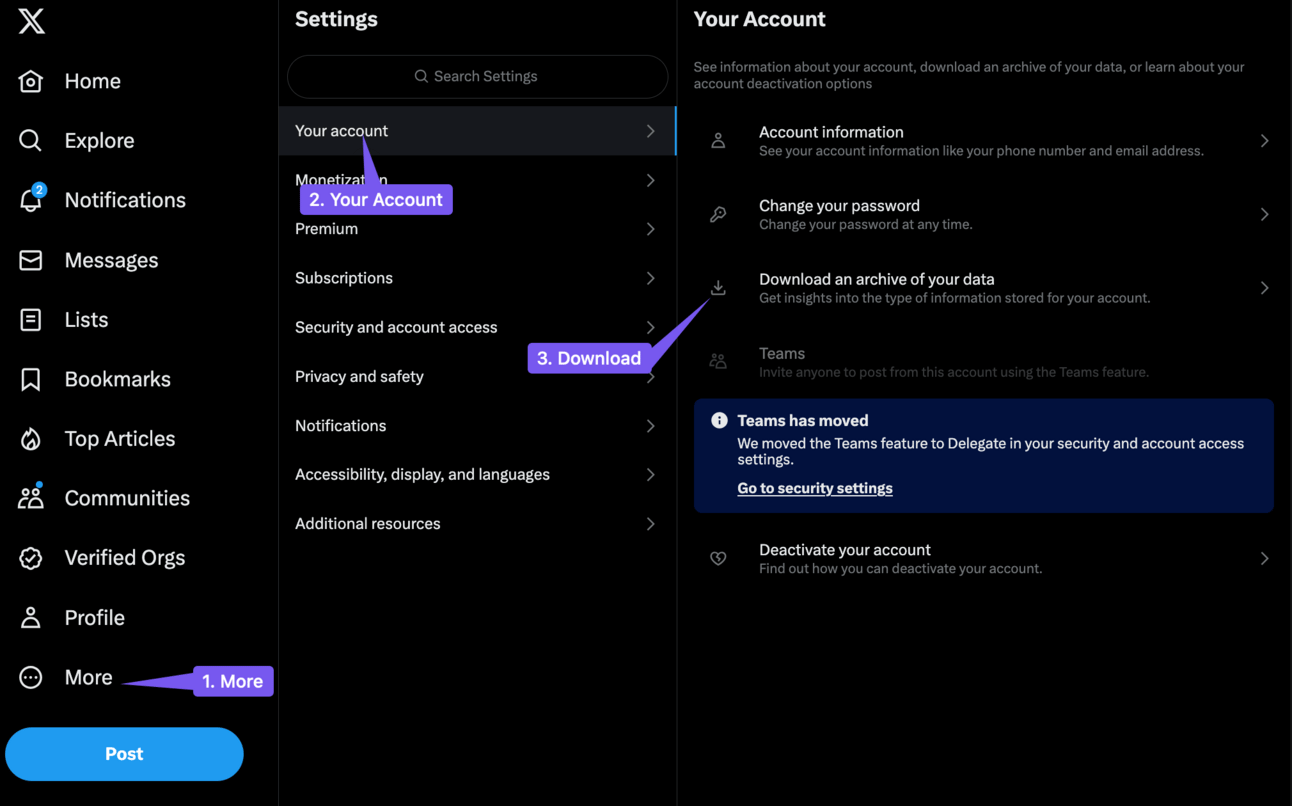
This will give you a CSV record of all your posts as well as all the data surrounding the tweet: date and time, likes, comments, re-posts etc.
We now want to upload this whole file into an AI for it to analyse.
You will need ChatGPT Pro for this step as we need to use the Code Interpreter. This allows you to upload a file for ChatGPT to work on.
Upload your CSV and then use this prompt to begin analysis of your data:
Act as a Twitter data expert

Analyse the attached file of my past activity

Provide answers to the following:
1. Give me the top 3 days to post.
2. Give me the top 5 times per day (any day) to post.
3. What type of post leads to the most engagement by likes, comments and retweets.
4. Tell me my top 10 most engaged posts.
5. What type of post leads to the most profile visits?
6. What type of post leads to the most follows?
7. Which type of post leads to the most link clicks?
8. Which type of post leads to the most website visits (my URL)?

For each of the post type questions above design a "perfect tweet" that will help me replicate the most successful tweets above.
Tip: sometimes Code Interpreter can be temperamental. If you have trouble with the above prompt try asking one question at a time.
There is a huge amount of output so we’ll focus on some highlights.
First, ChatGPT tells me my top days.
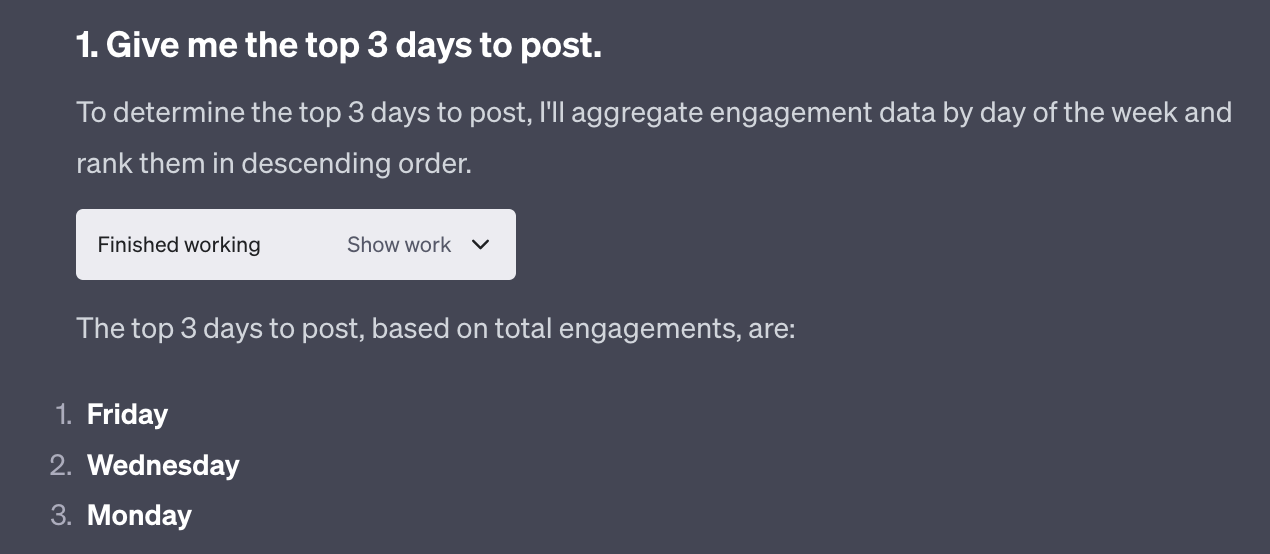
I can dig deeper by asking more questions. For instance if I ask for the “% of weekly engagement per day, controlled for the number of tweets by using average engagement per tweet” I get:
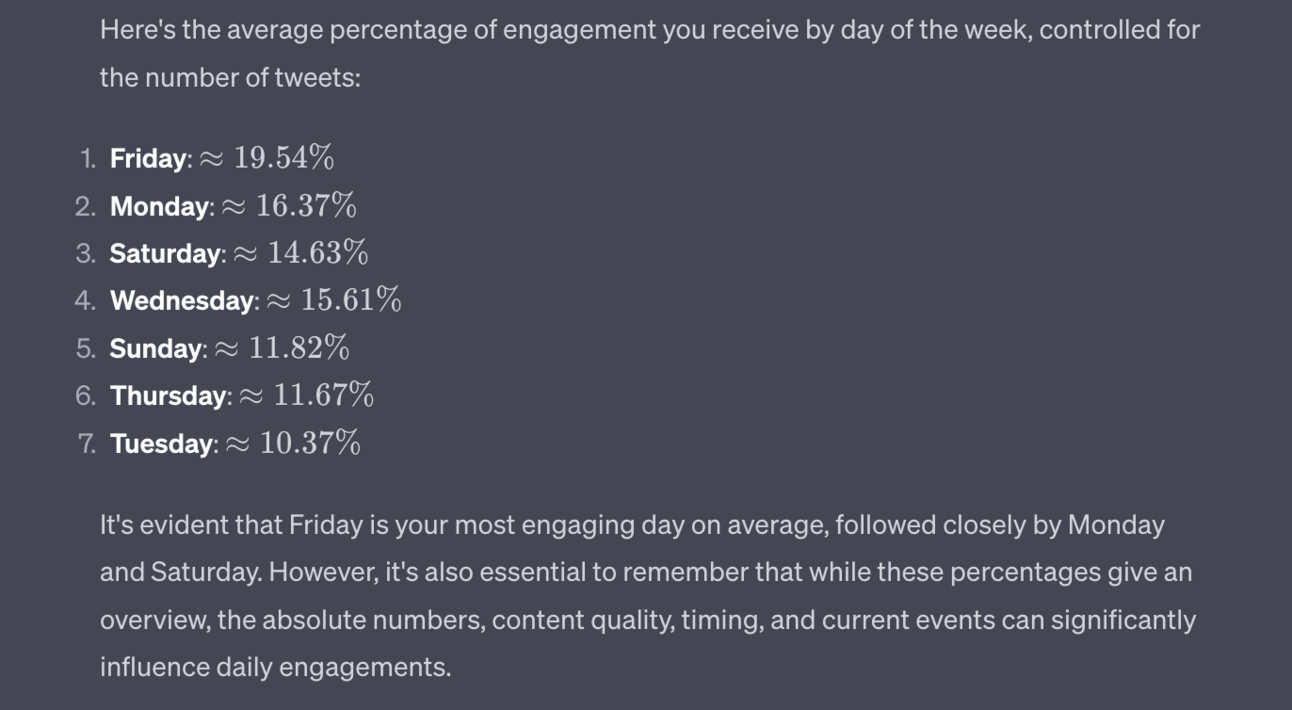
This is a fairly complex task and would take a human a little data wrangling. ChatGPT can just spit out the answer in seconds though- Friday is best, almost double Tuesday. That tells me to go hard on Fridays.
What about posts that drive people to come and follow me?
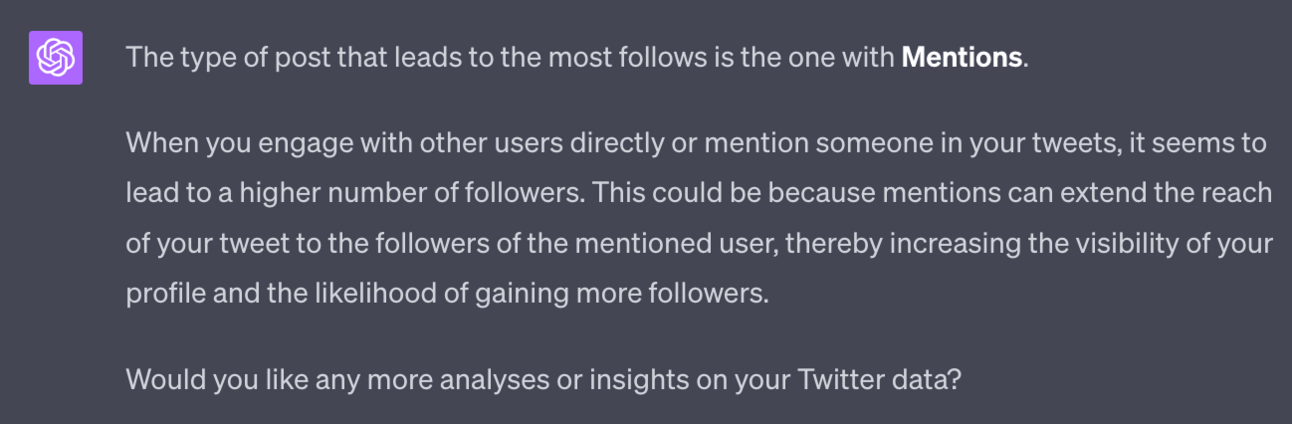
Apparently it’s posts with mentions. These are when I’m directly engaging with larger accounts - which was discussed in the last Part. This tells me that engaging with my Dream 100 works to push growth.
The basic idea here is that you use ChatGPT to find out what works and what is not working. Then do more of the successful tactics moving forward.
If you want a specific growth plan ask “Based on all of the data provided and only the data (do not draw from your past experience) suggest a follower growth plan.”
Repeat this whole exercise about once a month to continuously get new insights. This will allow you to continuously focus on the best growth tactics based on your content and not what some “guru” is telling you.
Next up are engagement groups.
The basic idea here is a group of X accounts who are all in the same space who help each other grow.
For example let’s say you are in a group with 20 other people who all create content in the same niche. When you post something you copy/paste the link into the engagement group and ask people to help boost it.
They’ll like, comment and maybe share your content. Preferably soon after it’s posted. This tells X that the content is valuable and it therefore shows the post to more people.
It’s a way of juicing the algorithm and as such it’s a little bit grey area.
The tradeoff for you is that you also need to like, comment and engage with the content of the other people in the group. It’s a mutual support group where you all need to help one another.
Engagement groups can be really useful early on to get some traction with larger accounts - you may even find that some of your Dream 100 are in the group. Bonus!
Some pointers:
Groups that are too large aren’t valuable. There will likely be lots of junk accounts in there that you don’t want to support. 10-20 is reasonable.
You shouldn’t have to pay for an engagement group. I’m sure there are some good paid groups out there but unless you have strong proof that the ROI will be positive stick with free mutual support groups for now.
Think about setting up your own smaller, niche group. Whilst there are plenty of large groups you may find it more beneficial to work with 5-10 people you really align with in a smaller, more active group.
Finding a group initially is hard. As you grow and make connections though you’ll be invited. This often happens via DMs.
Promoted posts are specific posts you make that you put some cash behind.
This is different to advertising campaigns, which we’ll cover next.
You can promote specific posts via the desktop interface using the promote button.
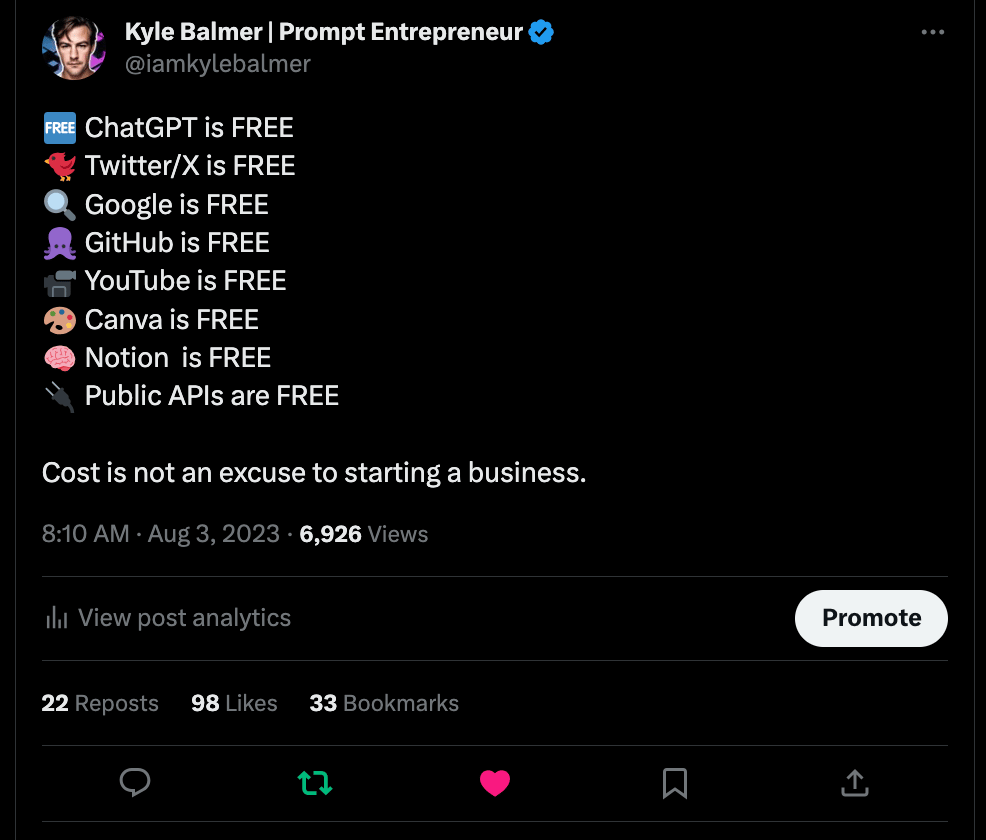
This is important: when you promote a post it is not shown as promoted. It’s an invisible boost.
This is how lots of accounts can make a certain post go “viral” - you simply post something thing and then put cash behind it to ensure if gets a lot of reach.
I’d recommend promoting posts that are already doing well. In the example above you’ll see that the post got ~7000 views organically which isn’t too bad. There’s also a decent level of reposting and bookmarking. This would be a good candidate to place some cash behind to really make it fly.
If you boost a bad post you are just showing a bad post to a lot more people. If you boost an already popular post though you will be showing it to lots of people who will then repost, like, comment and bookmark, further propelling the reach.
Here’s another tip. You can Promote a post that you commented on someone else’s post. Basically you can promote your comment. Sounds confusing? Here’s a screenshot:
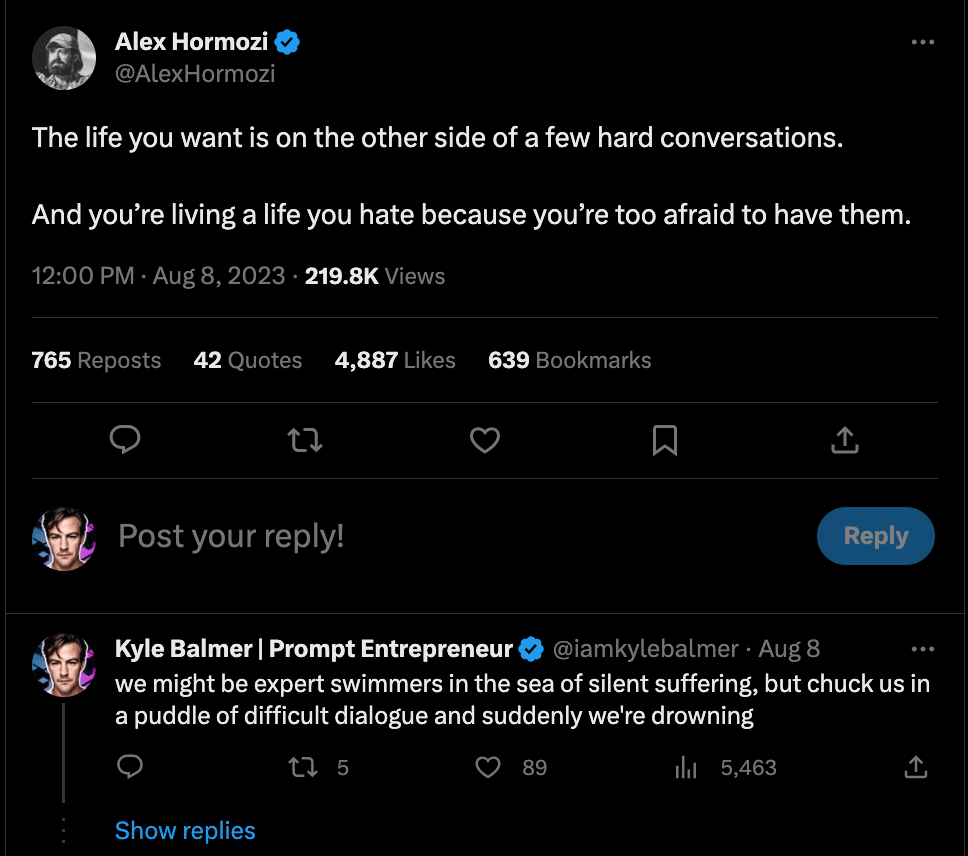
This is the comment I put on a larger account in the previous Part in order to get some visibility.
Here’s the cool thing - I can promote that comment for visibility. That secures me the top comment on that original post.
To do this click your response then Analytics. Inside you’ll see Promote. This is a bit of a “hack” so I wouldn’t be surprised if it disappears one day.
Advertising is our last rapid growth tactic.
Lots of influencers on X do not talk about this. Advertising is a “dirty word” and it is considered cheating in some creator circles.
If this is an opinion you share don’t worry - go ahead and build organically. It’s an entirely valid option. It will just take longer.
If you are open to advertising though that’s great.
Because, guess what: we’re building a business. Growing our audience base is an investment - much like we’d invest in building a website or designing a logo.
What advertising does is also allow us to get over the awkward early stage when we have a few hundred followers.
It doesn’t matter how good your content is when you are tiny. No-one will take you seriously. But as soon as you start to hit a few thousand followers everything ramps up.
This is because humans need social proof. We trust larger accounts because they are large. They are large because they are doing right surely? That’s how our brains work unfortunately!
Unlike Promotions with Campaigns you can set up a range of posts and see which one does best. It’s more complicated to set up but once you’ve found a good fit it can keep running. Promoted posts have a more limited lifespan.
You can set up X advertising here https://ads.twitter.com/
Advertising could be its whole guide so we’ll keep this high level for now.
For your first campaign keep it simple:
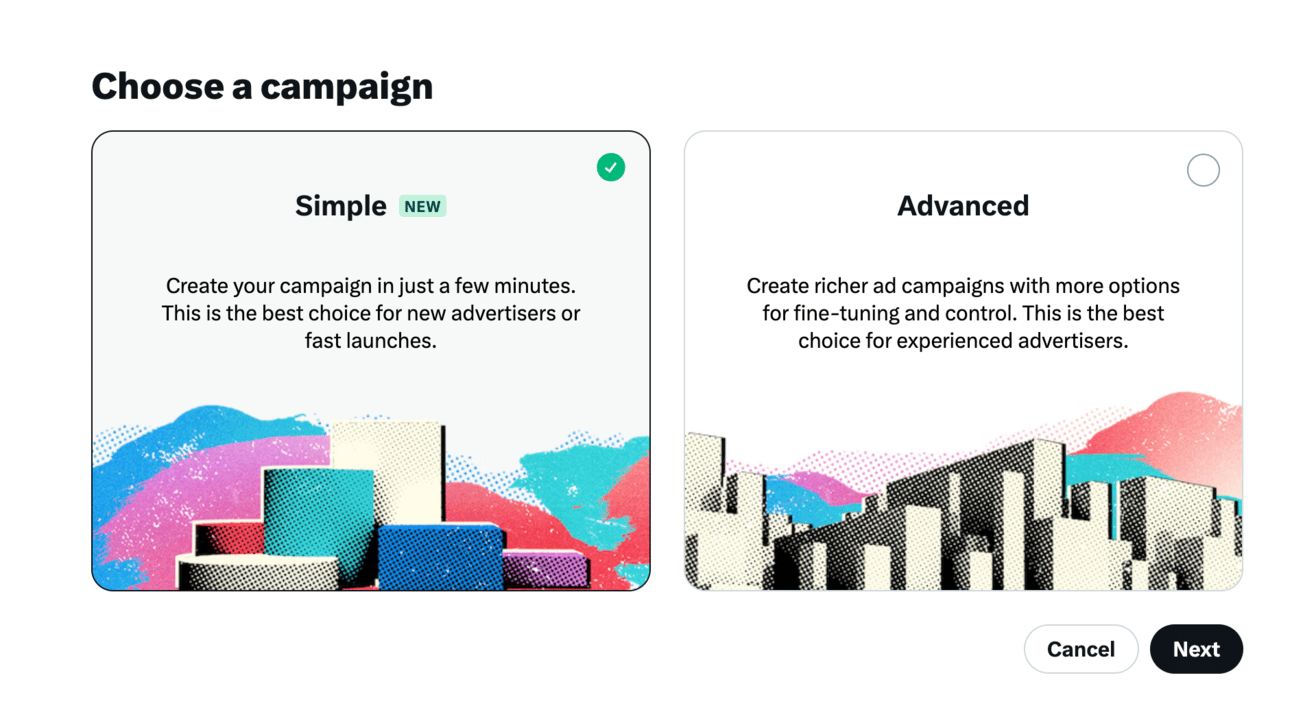
I suggest testing the Reach and Engagement campaigns to see what works better for you. Reach will generally be the better option if the content is really good and likely to be engaged with. Whereas Engagement campaigns force engagement more so can be used with lower tier content. Ideally though all your content should be great!
What content should you put in your ad? This depends entirely on what your objective is here. But considering this guide is focused on growth we’ll stick with that for now.
You want to use a piece of content (or variation) that has previously shown success in bringing you new followers. You can get that information from step 2 above.
You can also try a more direct route of asking people to follow. One of my most successful campaigns like this was super simple.
I found memes that were related to the niche and posted them as the ad’s main image. I then added a super simple text call to action like “How to use ChatGPT and AI to start and grow your business. No fluff only deep dives and prompts. Follow for actionable advice and guides.”
The combination worked to grab attention (using the meme) and then drive followers via the call to action text.
Targeting is the next page in ad setup:
For Demographics I suggest you leave it wide for now. Then once you have run one or two campaigns you’ll be able to see whether Male or Females engaged more as well as the best age groups.
For geographic targeting the same. Leave it blank for worldwide targeting initially and then analyse the data to see which countries lead to the best results.
For targeting one of the most powerful tools is “Follower Lookalikes”. This basically allows you to target the following of other accounts in your niche and pull their followers over to you. Use this to target Dream 100 accounts.
With ads, like with your content strategy, you’ll need to experiment to find what works best with your audience. I suggest doing lots of small $5 tests to collect results and then when you have found a good fit you can increase budgets.
As always you can hire experts in setting up advertising campaigns from sites like Upwork.com if you want expert guidance.
Today we delved into detail about how to accelerate growth on X.
I’ve delivered a range of options for you to explore - some paid, some free. Hopefully some or all of these options will become useful tools in your arsenal.
If you are continuing to produce content and engage with your Dream 100 these additional techniques will 10x your speed and you’ll soon be racking up a solid follower count.
In the next Part we’ll look at how exactly we begin to monetise that following and start generating revenue.
Part 1: X Niche
Part 2: X Content Creation
Part 3: X Engagement
Part 4: X Growth
Part 5: Monetising X
See you tomorrow Prompt Entrepreneur!
Until then, keep PROMPTING!
Kyle, Harms and 🤖
PS: 🎁 GIFT BOX! Prompt Playbooks: Share our newsletter with a friend and unlock business ideas supercharged by AI prompts. 🔓 Refer 1 friend and unlock: Facebook Advertising Mastery AND Start an Affiliate Marketing Blog AND Start an Email Newsletter Business. All using AI.
Today we get into the meat of the week: how to actually monetise an audience.
We’re entrepreneurs and that’s the end goal here on X - to build a business and leverage the attention that a large account gives us.
I’ll walk through a number on “on-platform” alternatives as well as “off-platform” potentials.
Just a quick one.
2nd Amazon book free week ends today (Friday) and then the price goes back up to $4.99.
Last chance to grab a copy for free 👍️. K bye!
Want a free copy? You can grab it here: Amazon.com
The first and arguably most direct way to monetise an audience on X is to set up a premium subscription.
You can set a price, starting at $1, that your followers pay you monthly in order to get exclusive access and content. You get 97% of the subscription revenue directly - X’s cut is very small.
In exchange your premium followers get a special area where you can deliver different and supplementary content.
The key here is working out what to provide and how to make it valuable enough for people to want to pay to support you.
Let’s use a prompt to begin the process of deciding what to put in our Subscription area.
As in the last Part load a CSV of your X activity into the Code Interpreter and use this prompt:
Act as a Twitter expert and carry out these steps.

Analyze the CSV file: Load and understand the structure of the new data.
Popular Content Analysis: Identify the most popular content excluding mentions of other accounts.
Plan for Members-Only Content: Suggest a plan to place the most valuable content in a paid, members-only section.
Suggestions for Additional Content: Based on the data, propose new content ideas for the members-only section.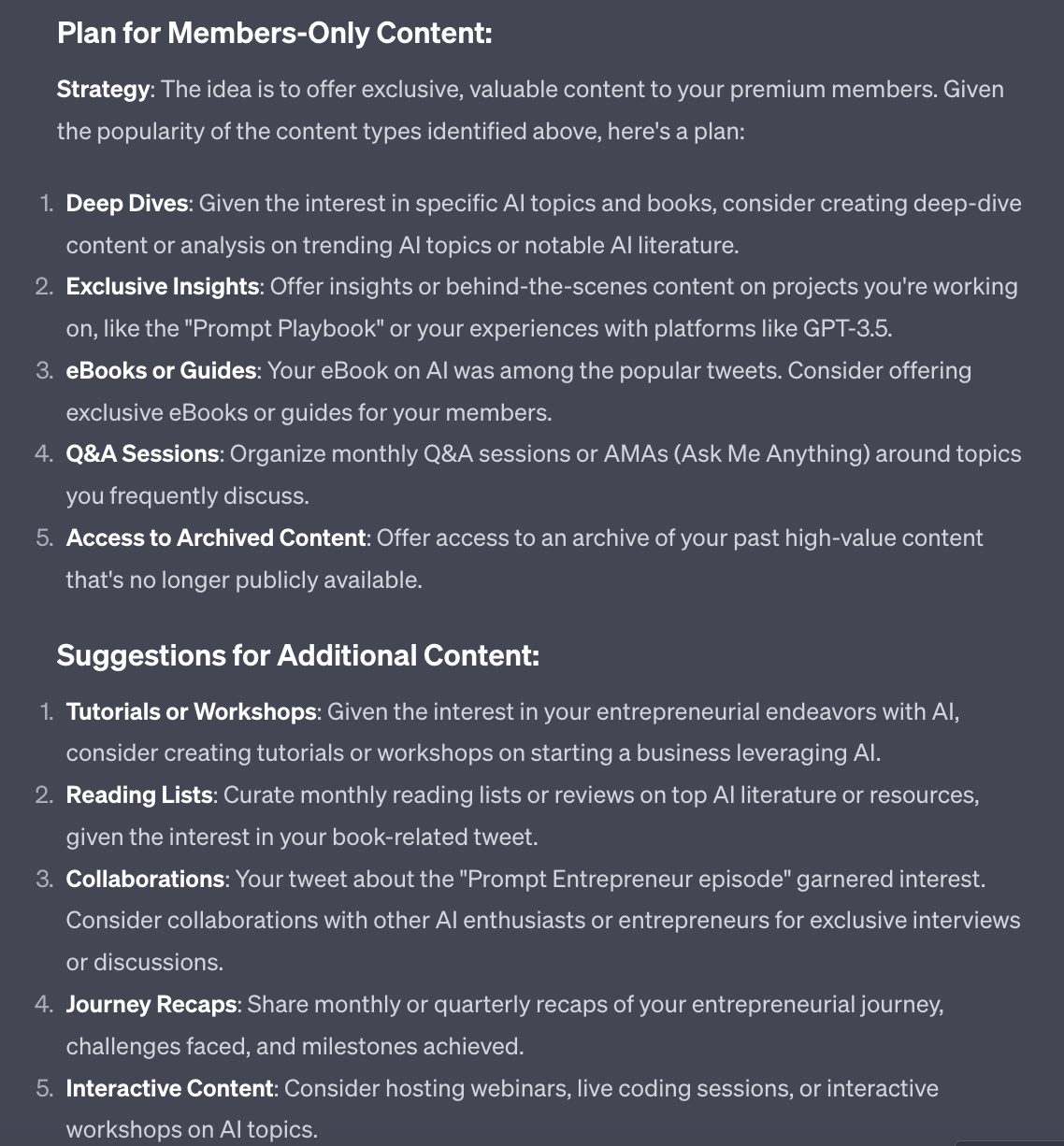
This gives us lots of ideas to start with.
For example in my data it’s the personal posts about what I’m doing on a daily basis, how I’m building my businesses and what I’m learning that seem to do the best.
Therefore using the Subscription as a “Behind the Scenes” look into my life and work makes a lot of sense.
Additionally, talk about my eBooks does well - based on this I could make the eBooks all free for subscribed members.
Additionally this prompt gives you further ideas about what you could do beyond the current content.
Use all of the suggestions ChatGPT comes up with to craft a unique and interesting subscription offer based on what already works.
To actually set up Subscriptions head to Monetisation in the main X menu then Subscriptions. You’ll need to add some basic information and then wait for the request to be reviewed.
Revenue Share gives a portion of the revenue generated from advertising with the original creator.
Let’s say I have a post gets 300 comments. Within those comments X will show advertising. Anyone in my comments section will see the adverts. X gets paid every time someone sees and/or clicks on that advert.
Because the advert is showed in my comment section X now shares a % of the advertising revenue with me.
To be eligible you need to be a fair sized account - this is not open to small accounts. As of the time of writing the minimum limit is 15M organic impressions on your cumulative posts within the last 3 months.
This will change - be sure to check the actual X guidelines.
If you go into Monetisation in X you’ll see Ads Revenue Sharing and whether you are eligible or not. The most up to date requirements will be there.
How to reach the minimum requirements? Grow your account. We’ve already covered how to do this - don’t do anything differently!
Some people will try “engagement farming” - basically aiming to get engagement at any cost, regardless of the quality and whether or not they themselves are putting anything of value into the world.
This works - they will hit the requirements and generate cash simply by spamming memes and motivation quotes. But it’s not a business - it’s a short term ploy only.
Consider Ad Revenue Share an additional bonus rather than your end goal. Focus instead on building a quality account and many more monetisation routes will be open to you - routes that will pay far more in the long run that Ad Revenue Share.
As you start to grow you’ll begin receiving DMs from companies to feature their products.
Anecdotally this started happening with me around 2000 followers. I checked with other people and they agreed it happens around 2000-5000.
Most will approach you wanting free coverage. You have a number of options here.
The first is providing free coverage but ask for a some product that you can giveaway to your followers.
This is a nice win-win where you get something to write about, your followers get free product and the company gets the coverage they want. This works especially well with software as you can simply share codes.
Mechanics wise write a post or thread about the product and mention that you have a certain number to give away. To win one the follower needs to like, share and comment to be entered into the giveaway. After a certain period of time (say, 24 hours) you choose someone at random to give the prize to.
Tweethunter can actually send DMs to winners randomly which makes larger giveaways easier. There’s also WinnerPicker as an external tool. Or simply copy paste all the names into a random picker tool.
I like to use this method with obviously small companies as well as products I actually like.
Second, offer to cover the product but ask what their affiliate structure is. That’s pretty much it : “great, can do. What’s your affiliate structure thanks” is all it takes.
If they have an affiliate programme get signed up so you can receive a % on any sales. Make sure to disclose to your followers that it’s an affiliate link. It’s the legally sound and ethical thing to do.
Third, sponsorship. If your account is larger (10k+) in a valuable niche then the company can sponsor posts.
You can sell a single or package of posts in exchange for payment. Again, make sure to mention it’s a sponsored post.
The exact format of the post will depend on the niche and agreement with the sponsoring company .
How much can you charge for a sponsored post? This is a movable feast - again it depends on the niche (finance posts will cost more than fashion posts for example) and your account size and engagement percentage.
For this I suggest you find and use a calculator - there are lots out there but I like this one.
To give you a rough idea though IZEA run an annual State of Influencer Earnings report and recently found that an account around 10k followers commands $1000-1500 per post.
These three methods are all ones you can use if a company directly contacts you - which they will start doing.
You can also go and find sponsors and affiliate deals yourself. This is too large a subject to go into here but I’ve covered this in other Prompt Playbooks especially the one on Newsletters (for sponsorship) and Affiliate Marking Blogs (for affiliate). Both Amazon affiliate links - see what I did there? 😁
One final, and arguably strongest, route to monetise your audience is via getting them off-platform to purchase your products and services.
You could sell any number of products and services and I can’t cover them all. The other Prompt Playbooks talk about how to set up these various businesses and offerings in detail so refer to those.
What is common between them all though is that it’s much easier to market a product or service if you can get your prospects off X and onto your email list.
You then have direct access to them via email marketing - a much more powerful and reliable marketing method than relying on X. Any product or service can then be introduced.
To get X users off platform and capture their email address one of the best methods is using a “lead magnet”. This is basically a piece of value that acts as a magnet to get the lead (email).
The basic setup I recommend is this:
create something of value in Notion or, more simply, a PDF.
host that valuable asset on Gumroad.
Set the price to $0
Promote on X
Send collected email addresses to your email software, newsletter or simply market from Gumroad
Here’s an example as it’s easier to understand : https://kdgbalmer.gumroad.com/l/Newsletter
That link goes to a Gumroad page where you’ll see the product description.
The price is $0 so all Gumroad does is collect an email address.
The person who signed up can then see a link to your valuable asset - your Notion document or PDF - and access it from inside Gumroad.
The main complication here is creating a valuable lead magnet and making it appealing!
Here’s a prompt, again building off of your X analytics data. Use Chat GPT Code Interpreter and upload a copy of your past X data.
Review this CSV of past Twitter activity

Look for the most engaged with content, ignoring any content with Mentions

Use this to suggest a lead magnet idea that would be appealing to my audience

Create a detailed structure for the lead magnet to help me prepare it

Create a full description of the lead magnet (2000 words) that I will use on its Landing PageHere’s the lead magnet structure:
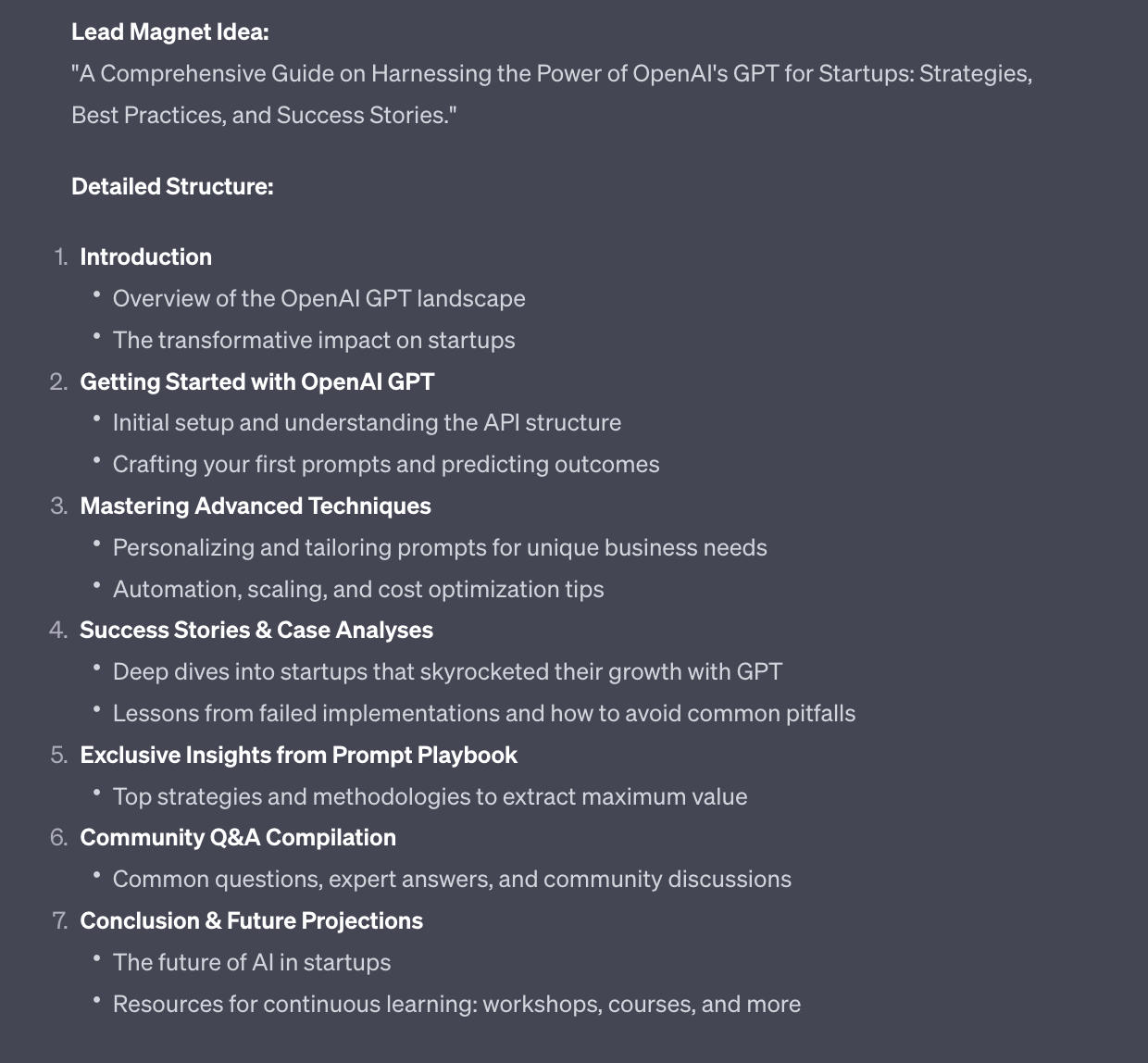
and the Landing Page description for Gumroad:
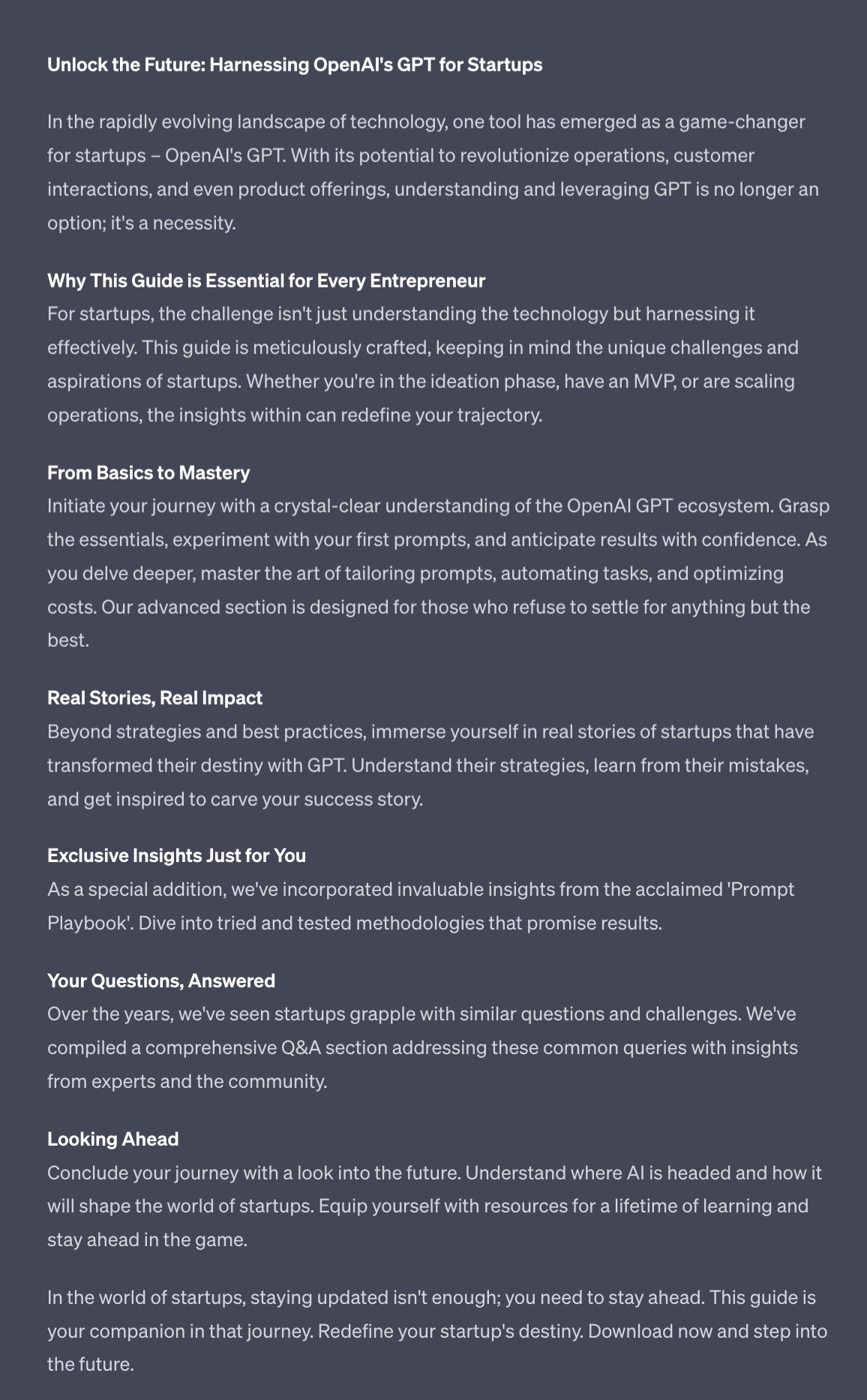
Interestingly enough I’m currently planning a “Basic Starter Guide” just like this already - so ChatGPT’s response is bang on the money!
Do this with your data to get similarly personalised recommendations.
For creation I personally use Notion. You could equally use Google Doc or Word. Then use ChatGPT to help flesh out the sections and get you started.
Once you have a lead magnet ready:
Sign up for a Gumroad account. Follow all the normal account setup, branding etc. steps required.
Create a new product.
Add the description you generated.
Set the price to $0.
For the product’s content add a PDF export of your lead magnet or the published Notion link.
Promote the Gumroad page as a free giveaway on X. I personally always have one such post pinned on my profile as well as promoting actively.
Collect emails in Gumroad and use these emails to market products and services. You can send emails directly from Gumroad or connect your email CRM or newsletter software, depending on what your business setup is.
In this Part we’ve gone through a range of options for generating revenue from your X following.
This is a relatively small and focused list. There will be unlimited other options as you grow. Attention is powerful.
You can leverage your audience for product launches, teaching, consulting, coaching, events, publishing books, running a retreat, launching joint-ventures, raising investment and more.
An audience opens up possibility - it’s up to you to work out what to do with this power.
Until then I’ve delivered a range of options for you to explore and get started with.
Over the last 5 Parts we’ve covered:
Part 1: X Niche
Part 2: X Content Creation
Part 3: X Engagement
Part 4: X Growth
Part 5: Monetising X
You should now have a basic plan for growth and monetisation in mind. And more importantly you have the tools (primarily ChatGPT’s Code Interpreter and a copy of your post data) to make adjustments and decisions.
Rather than give you a generalised one-size-fits-all methodology hopefully equipping you with the impetus to get started and the tools to learn and adapt will help you find your way forward.
The only thing left to say is make sure you share your journey with me on X. I’m @iamkylebalmer and am available to help support your growth! See you there!
See you tomorrow Prompt Entrepreneur!
Until then, keep PROMPTING!
Kyle, Harms and 🤖
PS: 🎁 GIFT BOX! Prompt Playbooks: Share our newsletter with a friend and unlock business ideas supercharged by AI prompts. 🔓 Refer 1 friend and unlock: Facebook Advertising Mastery AND Start an Affiliate Marketing Blog AND Start an Email Newsletter Business. All using AI.
Unlock the potential of Twitter/X with our comprehensive playbook, 'Twitter Growth using AI'. This guide is not just about gaining followers; it's about strategically leveraging AI to create impactful content, engage authentically with your audience, and monetize your presence effectively. Whether you're an entrepreneur, marketer, or aspiring influencer, this playbook will provide you with the tools and insights needed to carve out your niche and achieve sustainable growth on one of the world's largest social media platforms. Get ready to transform your approach to Twitter/X and elevate your brand to new heights!
This playbook is designed for entrepreneurs, marketers, and social media enthusiasts who are eager to harness the power of Twitter/X for business growth. If you've struggled to gain traction on the platform, or if you're unsure how to effectively connect with your audience, this guide is perfect for you. It addresses the challenges of standing out in a crowded space and provides actionable strategies to turn your Twitter/X presence into a profitable venture.
No, this playbook is suitable for beginners and experienced users alike. It starts with foundational concepts and builds up to advanced strategies.
While the time commitment may vary, we recommend setting aside at least a few hours each week to apply the techniques and engage with your audience.
Yes, many of the strategies can be adapted for other platforms, but this playbook specifically focuses on maximizing growth on Twitter/X.
Building a strong presence takes time and consistency. The playbook provides guidance on tracking your progress and adjusting your approach as needed.
Most strategies outlined in the playbook are free to implement, though some monetization options may require initial investment.