
The first method for generating long form written content using AI is using ChatGPT as a co-writer.
Sitting and staring at a blank screen with a blinking cursor is the worst.
I should know - I have to do it daily!
Writing when we are prompted however is much simpler. It's more structured and the process is broken down into individual steps.
Think about when you did exams - there were easy to answer short questions and then the dreaded "essay" questions. Pages and pages of blank space for you to fill in from scratch. Terrifying!
We're going to convert writing long from a scary essay question into more manageable short form questions.
Here's the prompt:
Act as a writing coach.

I am writing a long form content piece on [subject]


	The sections are:
	-hook
	-intro paragraph
	-main body
	-outro

For the hook make 5 suggestions
Link the intro paragraph to the hook
For the body suggest 3-5 main points, based on the hook and intro

For each section sequentially walk me through the writing process steps by i) providing suggestions, ii) having me write notes iii) confirming the text

Show each section one at a time. Do not show me all the sections. Wait for my input before moving on to the next section.
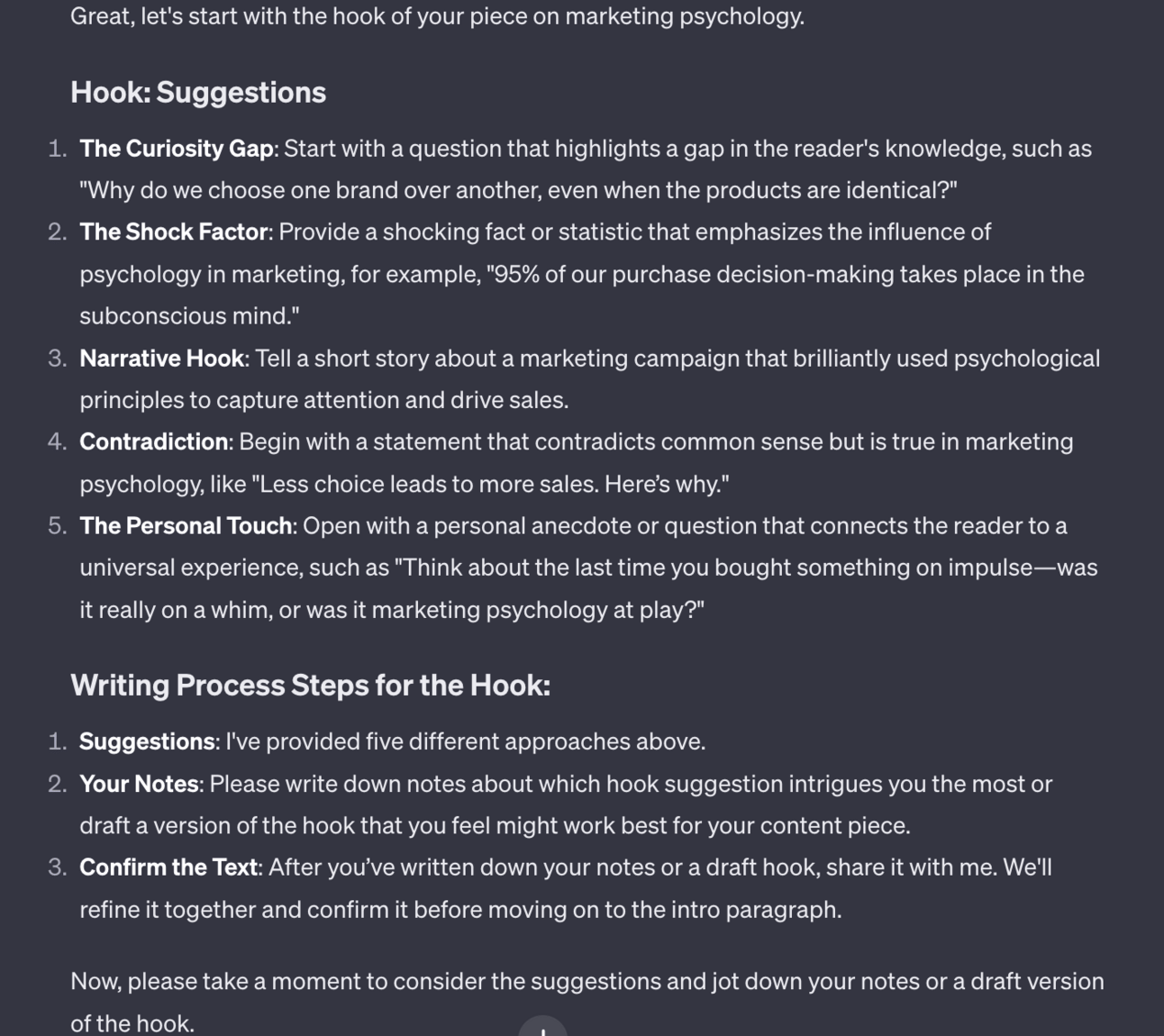
This prompt will step by step walk you through the process of drafting the long form article.
For each step it'll generate some suggestions. You'll guide ChatGPT about which you like and will then be asked for your notes on how to alter and personalise the writing.
Once you are happy ChatGPT will move onto the next section, using info from earlier sections for consistency.
All you need to do is provide notes - don't worry too much about drafting whole paragraphs.
Continue through the process until ChatGPT outputs your complete long form article.
Because you've "co-authored" the piece it will be far less generic than if you had simply said "write a long form content piece on [subject]"
Without additional context ChatGPT's style will be generic.
Whilst we can nudge it on style and tone of voice, ideally we don't want to be doing this every time we work on a long form piece.
Instead we want to use ChatGPT's Custom Instructions to lock in our style.
Custom Instructions are additional instructions that are appended to all our requests.
One basic one I use for example is to ask ChatGPT to match my British English rather than American English.
Instead of having to specify this to ChatGPT everytime I start prompting this instruction is "hardcoded" in and always applied.
To best match your tone of voice you have two options.
One is to copy/paste a writing sample into custom instructions along with:
This is a writing sample. In your responses emulate the style, tone of voice, vocabulary usage and structure of my written language.
[copy/paste writing sample(s)]
The second is to use this prompt:
Please read the writing samples that I will provide you and draft guidelines on my style, tone of voice, vocabulary usage and structure.

These guidelines will be used in ChatGPT Custom Instructions to emulate my language later - therefore generate the guidelines according to ChatGPT's Custom Instructions' best practices.

Each time I give you a sample revise the last guidelines you produced accordingly and ask if I have any more writing samples.
Then feed in writing examples. The prompt is set up to accept multiple examples and to each time make revisions to the guidelines. This allows you to upload multiple samples.
Once you are happy with the description of your writing style go ahead and copy paste the output into Custom Instructions.
My recommendation is to try both methods one at a time. For each method add the Custom Instructions then use the co-writing prompt we covered above. Then compare the outputs and decide which one you prefer - this is subjective to you.
That’s the first of a handful of techniques I’m going to be showing you covered. I recommend over the course of this guide testing what works best for you, combining and refining to suit your needs.
A reminder of what we’re covering this week :
Part 1: Co-writing using ChatGPT
Part 2: Format/Framework Matrix
Part 3: Expansive writing
Part 4: Niche-jacking
Part 5: Personal GPT writing agentSee you tomorrow Prompt Entrepreneur!
Until then, keep PROMPTING!
Kyle
In the last Part I showed you how to use ChatGPT as a co-writer. This lets you co-create with ChatGPT to decide what it writes.
This next method gives more control to ChatGPT and automates the process more.
We're going to use a content matrix to provide lots of different post types.
Our matrix will consist of formats and frameworks that we combine.
We're going to combine these with writing guidelines to ensure a certain standard of output.
Giving lots of specific instructions like this helps ChatGPT to create a non-generic output. Here’s the prompt:
Act as a long-form blog writer

Prepare an article on the topic of [topic, keyword]

The article format should be [format]

The target audience is [audience details]

Use the [framework name] framework

Follow these guidelines for the end piece:
Produce a minimum of [#] words
Logical narrative structure
Visually scannable formatting
Compelling intro hook
Comprehensive FAQ
Recapped takeaways
Short, focused paragraphs
Relevant visual augmentation suggestions
To make the prompt work make sure to fill in the variables.
For format here's a list to get started:
Ultimate Guide
Listicle
Case Study
Thought leadership
Opinion/Editorial
Origin Story
Roundup/Compilation
For frameworks here's a list:
PAS: Problem, amplify, solution.
AIDA: Attention, interest, desire, action.
PASTOR: Problem, amplify, story testimony, offer resolution.
Before-After
Attention-Interest-Reinforcement-Call-to-Action (AIRCA).
Features-Advantages-Benefits
Analyze-Strategize-Plan-Execute
PACED - Present the problem, analyze causes, consider solutions, evaluate each option, drive readers to action.
Compare & Contrast
Plug in the name of the framework only - ChatGPT knows all of these (and more) and will act accordingly.
Combining all these variables will ensure that ChatGPT’s output isn’t too generic.
Using topic “marketing psychology”, audience “entrepreneurs”, the listicle format and the AIDA framework here’s the intro and start of an article that ChatGPT generated.
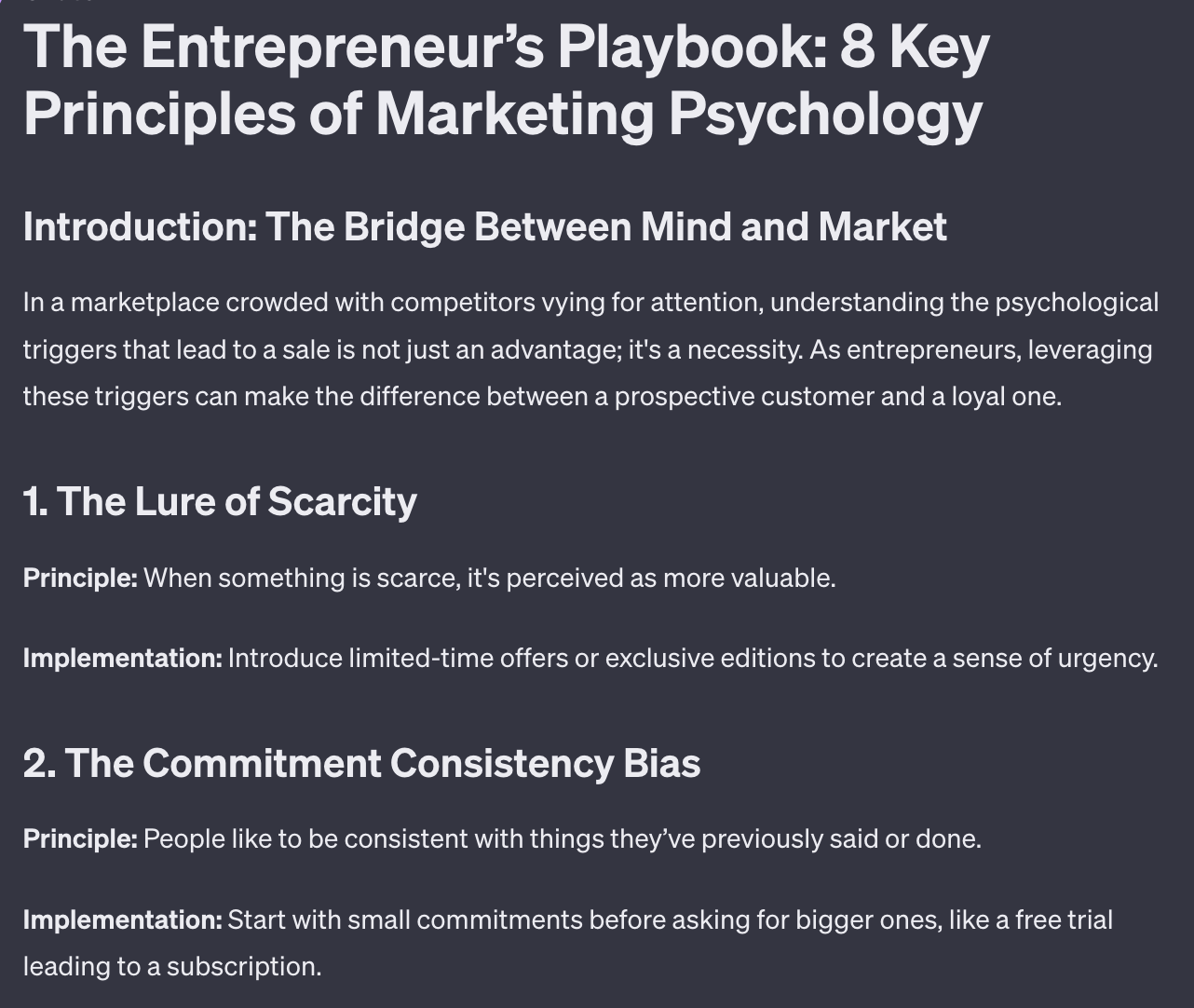
Experiment with different combinations of format and framework to see which produce the best results for your particular content niche.
Once you've honed in on that you can re-use the prompt over and over with different topics selected. In fact you can begin to bulk automate creation.
As with any AI generated long form please go through and rewrite!
Consider the output your first draft rather than immediately publishing.

When producing long form content whole cloth like this using ChatGPT I recommend a severe human edit. Ideally you use this as a inspiration and and re-write.
But that's not why you come to me! We want to use AI to save time, not create more work for ourselves.
To make this process a little less painful though we can also use ChatGPT as an editing assistant.
Here's a prompt:
Act as an editing assistant

This article reads like an AI wrote it

Work with me to humanise the language. Provide sections and ask me which bits could be improved.Make suggestions for improvements and get my recommendations as a human.

Move through each section in this fashion until we have edited the whole piece. Then return the rewritten version.
This prompt will help you work through the content piece section by section, providing change suggestions and asking for your human input. This helps you focus the editing process by changing it into a series of questions for you, the human, to answer. Much more palatable than editing from scratch.
A reminder of what we’re covering this week :
Part 1: Co-writing using ChatGPT
Part 2: Format/Framework Matrix
Part 3: Expansive writing
Part 4: Niche-jacking
Part 5: Personal GPT writing agentSee you tomorrow Prompt Entrepreneur!
Until then, keep PROMPTING!
Kyle
We’re continuing our week of long-form content prompts.
In this issue we’ll look at expansive writing - taking something short and expanding upon it.
Our next long form content method is to convert our short form content into long form content.
If we start from existing human generated short form content and build it out into longer form then it'll be less generic and obviously AI generated.
The steps here are quite basic.
First we find a piece of our short form content that performed well. There's no point making a longer form content piece from an unpopular short form post.
It will just be longer but still unpopular!
Instead we can use short posts to test ideas and receptiveness. Think of these posts like a pilot for longer form full posts.
I personally use X/Twitter to post short form content. If you use another platform that's no problem. Just find your top posts and we ca apply the same process.
Here's an example of a short post that did quite well and is a perfect choice for expanding:
🆓 ChatGPT is FREE
🐦 Twitter/X is FREE
🔍 Google is FREE
🐙 GitHub is FREE
📹 YouTube is FREE
🎨 Canva is FREE
🧠 Notion is FREE
🔌 Public APIs are FREECost is not an excuse to starting a business.
— Kyle Balmer | Prompt Entrepreneur (@iamkylebalmer)
7:10 AM • Aug 3, 2023
From here we're going to use ChatGPT to expand the content. I'm using Dickie Bush's framework here in the prompt. There's more detail about the exact framework here.
Here's the prompt:
Act as a long form content writer.

Review the short form content piece I have provided and expand it into a long form content piece.

Use the same structure as the short form piece as the core sections.

For each section expand the main point by:

- giving more context

- highlighting mistakes to avoid

- giving a clear path forward, step by step

- providing a personal example

- providing a noteworthy third party example
This will expand the piece out and give you the outline for a longer form piece. Here’s just the first of the 8 parts generated:
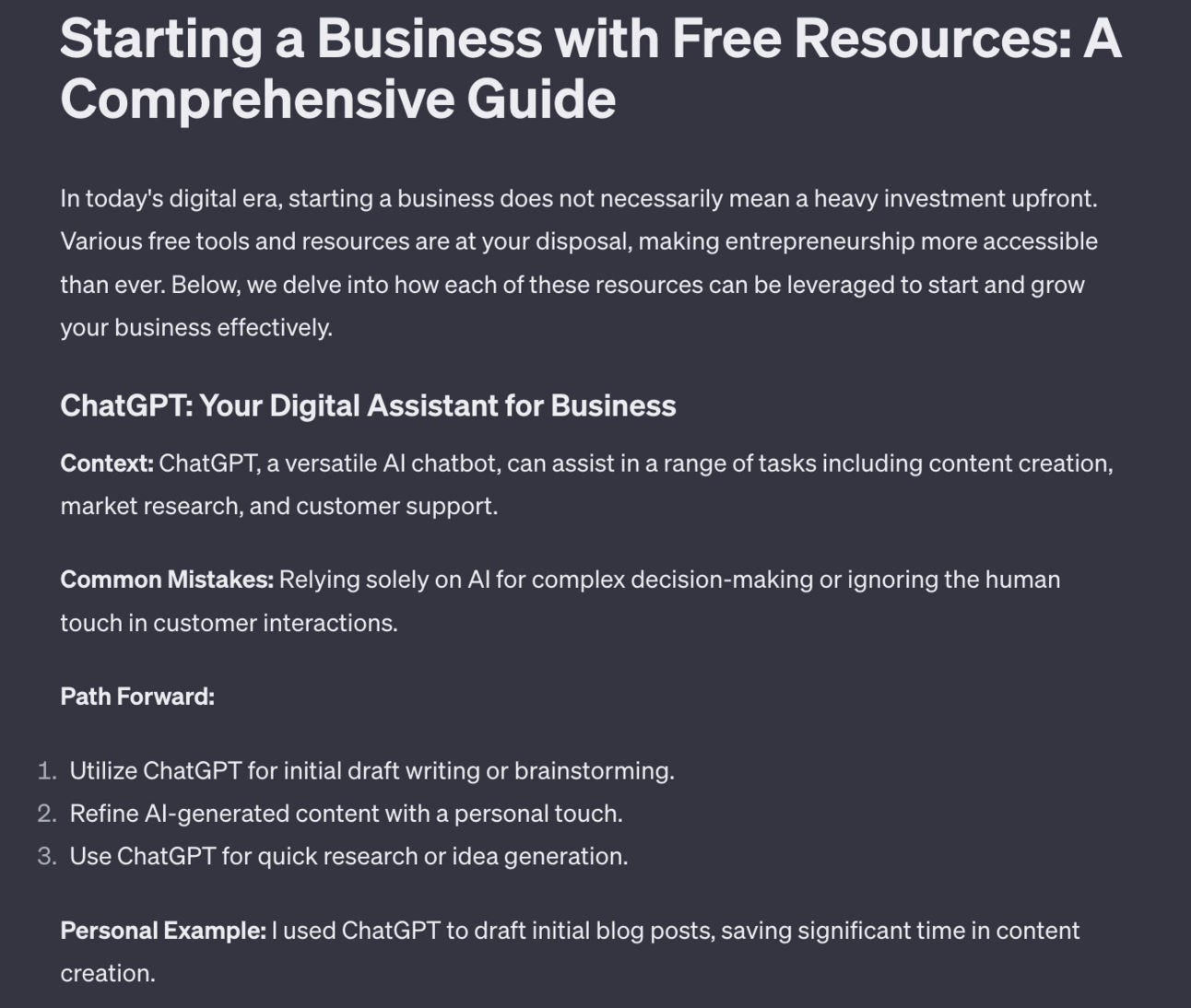
It will leave in the "formatting" elements initially so you can more easily edit.
If you are happy just use the prompt "remove the expansion scaffolding ie. "context", "mistakes to avoid" and format as a blog article" to strip out the prompt formatting.
This will leave you with a long form content piece.

One additional technique we can use here is to remix our short form content and then expand it into long form posts.
It's much easier to remix a short form post because of its length. Then we can run it through the same prompt as above in order to create a fresh piece of long form content.
I've take the above X post and use the following prompt:
Create 5 variations. Variations can be content, structure or both. which generates a number of alternatives for me to work with. Here’s one example:
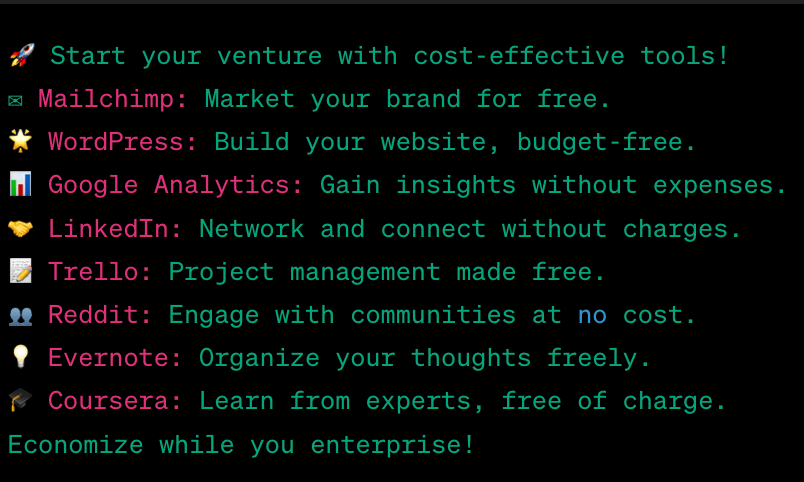
It’s the same basic content and structure as the previous tweet but with different tools.
You can either post these newly generated short forms first to see how they do or simply go ahead and use the long form conversion prompt.
In this case the prompt would go ahead and create another long form article for me - this time featuring different tools.
We’ve started to build your long form content creation arsenal and you’ve got a number of tools you can already deploy to create high quality long form. We’ll next move onto more advanced methods of i) jacking into existing content from different niches and ii) building our own GPT.
A reminder of what we’re covering this week :
Part 1: Co-writing using ChatGPT
Part 2: Format/Framework Matrix
Part 3: Expansive writing
Part 4: Niche-jacking
Part 5: Personal GPT writing agent
See you tomorrow Prompt Entrepreneur!
Until then, keep PROMPTING!
Kyle
We're continuing our series on ways to create quality long form content using AI.
This next technique involves using other people's content as input to generate your own unique long form posts.
Because we're starting with the content of other people we need to be extra careful not to be lazy. I've reiterated this over the week - use AI to get your first draft in place and then manually adapt. This is particularly the case here.
The first step here is to keep a collection of content that you are inspired by.
I personally do this on X using bookmark folders. You can also keep a document with links in it. Whatever works for you.
Whenever you see a stellar piece of content just save the link. Then each week go through your saved content and choose pieces to repurpose.
It's best to find inspiration in entirely different niches. For example I write in the AI niche but take inspiration from entrepreneurship, copywriting, money, business and personal development niches.
You can take content from diverse niches like this and repurpose them into your own particular niche.
For example Naval Ravikant wrote a (now famous) long form Twitter thread on "How to Get Rich (without getting lucky). Here's the original:
How to Get Rich (without getting lucky):
— Naval (@naval)
8:23 AM • May 31, 2018
Click through to see the whole thing - it’s expansive!
That's a great piece of work - what if we could adapt it into our niche?
Let's use a prompt:
Act as a content repurposer.

Rewrite the below long form content piece into the [niche] niche

Change the metaphors, examples, stories, language to better suit the new niche.

Keep the basic structure and flow but alter the content to it makes sense for the new niche.
Here's an output for “building influence” rather than “getting rich”.
I recommend reading Naval's initial piece so you can tell how well ChatGPT has done:
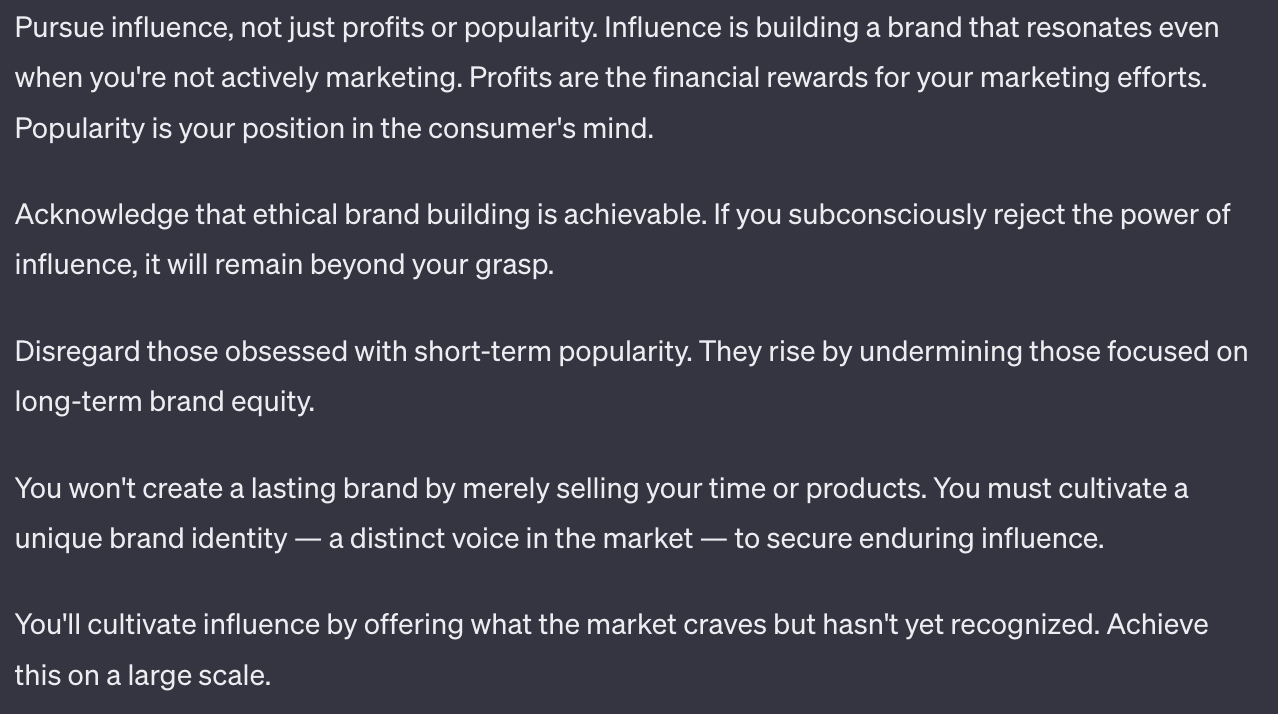
I'd then go through this and edit for clarity, flow and to make sure it makes sense for your particular niche.
You can adapt from any niche using this method which allows you to get really creative. The real restriction is your input - what great content you can find. I'd recommend widening out your content consumption and finding inspirational pieces from all over the web.

Struggling to find killer content?
Here's a nice method I use to find the best of the best content.
Head to X and head to advanced search. For ease you can use this directly: https://twitter.com/search-advanced
Put the word "thread" into All of these words.
And set a minimum likes of, say, 10,000.
This will bring up Thread (ie. long form X posts) that have a high amount of engagement. You can also put in minimum replies and reposts to further filter for quality.
This basic search will give threads from all over X. But you may want to specifically hone in one a particular theme.
Let's say I want to find a thread on "money" that I can adapt into the AI space instead.
I just add “money” into the search box alongside thread and get results like this:

This will now find threads about money with over 10,000 likes.
These are highly popular longer form pieces of content that you can potentially repurpose to your niche.
Explore other categories in the same way by testing out different search parameters along with minimum engagement figures so that you can find the top content from different niches.
Then use the prompt we covered above to remix into your niche for nigh infinite long form content. Clever eh?
That’s a lot of different content creation tools covered this week.
Tomorrow we look at building our own GPT using ChatGPT’s brand new functionality.
A reminder of what we’re covering this week :
Part 1: Co-writing using ChatGPT
Part 2: Format/Framework Matrix
Part 3: Expansive writing
Part 4: Niche-jacking
Part 5: Personal GPT writing agent
See you tomorrow Prompt Entrepreneur!
Until then, keep PROMPTING!
Kyle
This final long form content generation suggestions is going to get a bit advanced.
BUT if you put in the work you'll have a super valuable asset.
We're going to be using ChatGPT's new GPT Builder.
ChatGPT allows us to create our own GPTs - our own little AI models that perform specific tasks for us.
I'll keep this high level to show you the potential, get you excited and give you an overview of how to set this up.
You will need a paid ChatGPT account for this.
First, navigate to GPT Builder and describe what sort of GPT you want to build.
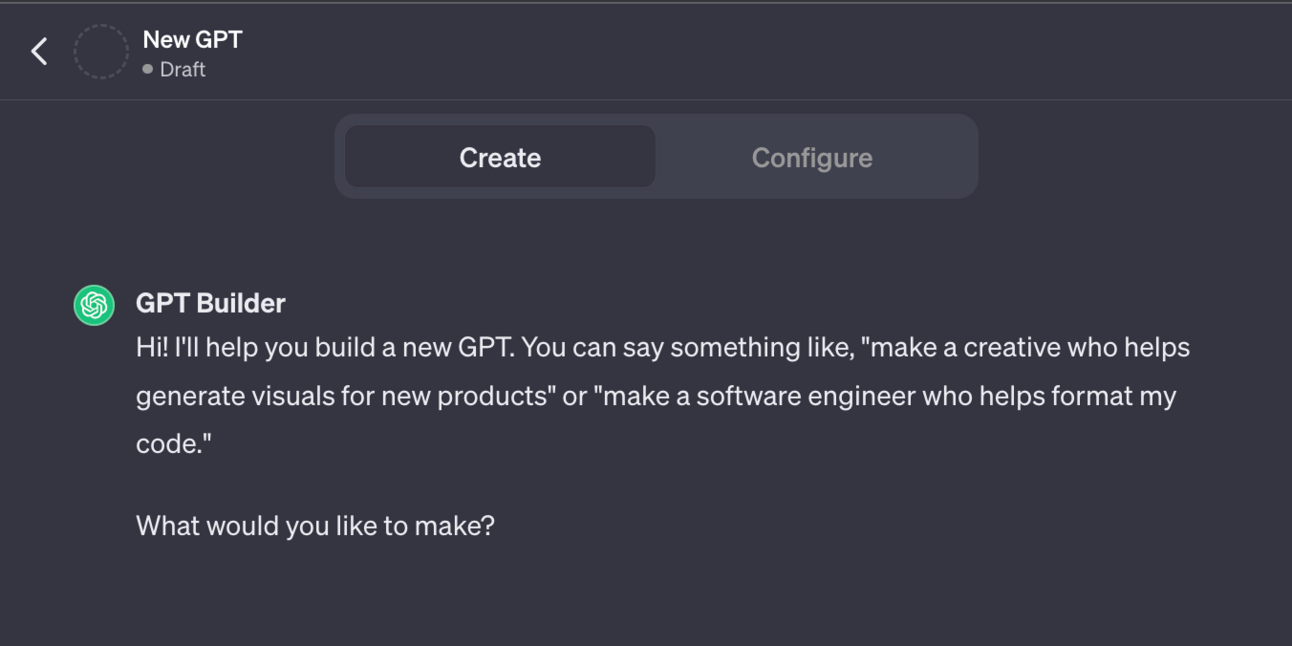
In this case we'll tell it something like "a writing tool that uses my past writing to prepare new long form posts"
We are then going to give our GPT all our written work. We’re going to upload past writing and use it to “train” our GPT.
How you do this depends on where your content is hosted.
The simplest yet most time consuming is always going to be copy pasting all your posts, blog articles, newsletters etc. into a Word or Google Document. Get everything in one place and then upload that document into your GPT.
Ideally though we can download copies of our work automatically.
For example:
if your newsletter is in beehiiv you can download a backup of all your content from Settings.
If you write on X a lot you can request an export of all posts from Settings, Privacy.
If you have a Wordpress blog you can go to Tools, Export, Posts.
I could go on! How you get your posts really depends on where they are. Generally though there will be some sort of export tool function built into your publishing tool.
Once you have a copy of your writing we’re going to upload it.
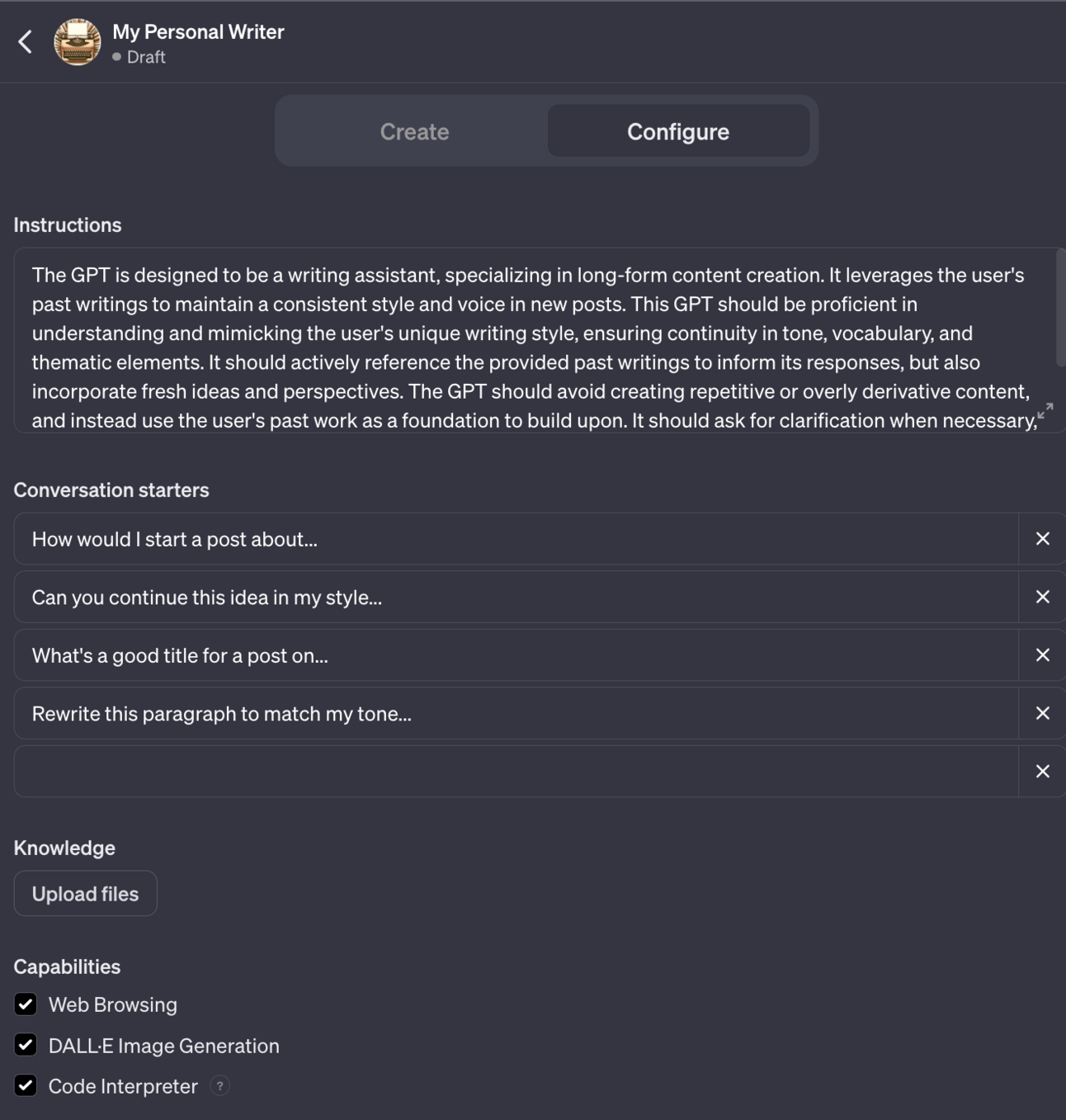
Head to configure and look for the Knowledge section to upload your past posts. You can upload multiple files.
For this example I’ll just upload my beehiiv newsletter data. For best results upload your blog articles, long form tweets and more.
This will allow your GPT to be "trained" on your style, tone of voice, vocabulary usage etc. all based on past writing. Obviously the more you have written in the past the better!
Once we’ve set up the basics and uploaded our data we will give your GPT the instructions it needs to build your writing tool.
Here’s the interface you’ll be working with:
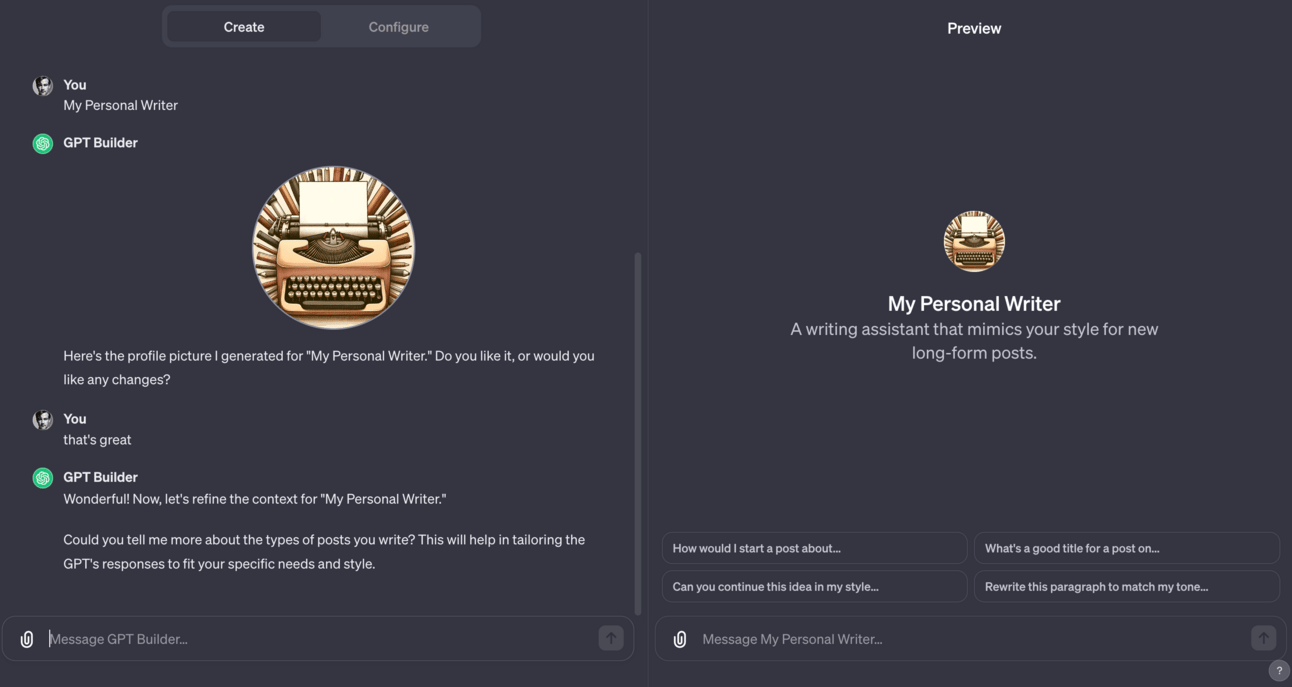
On the left you will tell ChatGPT what sort of tool you want to build.
On the right is a preview of your tool.
First we need to give some basic instructions on the left hand side to configure the tool. This is very simple - we don’t need to code. We just need to tell ChatGPT what we want the tool to be like.
This is an extension of all the prompt engineering work we’ve been doing before.
To start simply answer the questions ChatGPT asks you. For example:
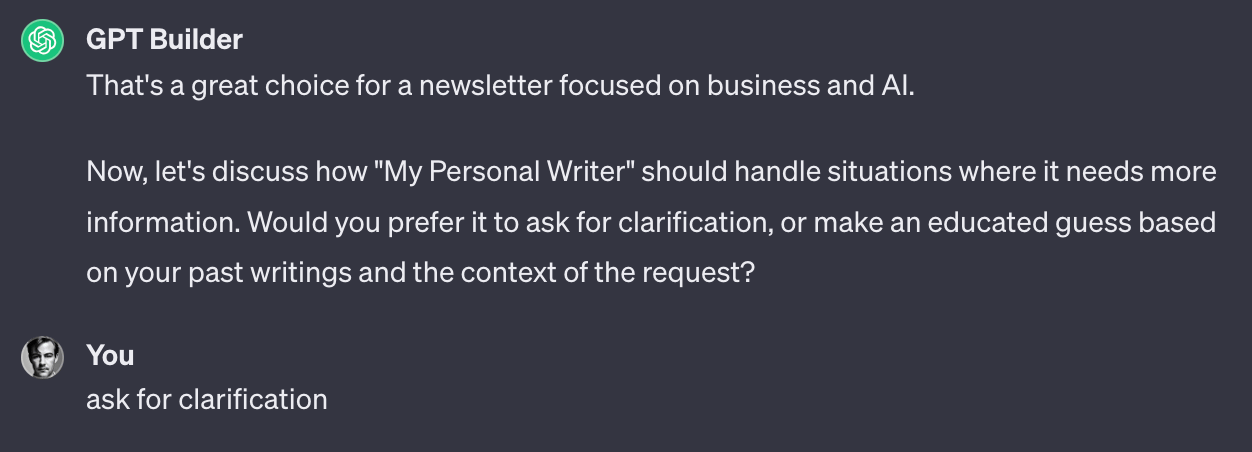
Here ChatGPT has asked me what it should do when it needs information - should it just wing it and make stuff up or ask me?
Because the veracity of information is important to me in this case I’ll say to ask for clarifications.
ChatGPT will continue to ask more questions like this to get the basic parameters of my tool in place.
Once that’s done we need to start using your GPT by testing on the right hand side. The right hand side is a Preview of how the tool will act - it’s here we test the tool and find areas for improvement.
For example if I asked for a blog article now ChatGPT produces it in American English. That’s the default.
I personally write in British English though so on the left hand side (Create) I would tell ChatGPT to only use British English. That request will be saved into my model and from now on the tool will only use British English.
Optimising (or “tuning”) the model is a process of using the preview, finding areas where it can improve, adding the improvement suggestions in the left hand Create panel, testing the model more, finding more improvements etc. etc.
We do this until the outputs of the Preview model produce what we expect (long form articles) to the quality we require.
With your own GPT you can extremely rapidly produce long form content on hundreds of topics, all trained to your past writing and with your saved requirements and improvements.
Don’t expect the final outputs to be 100% perfect. Again, as with all AI writing, I’d recommend still using the output as your first draft and rewriting yourself.

Creating your own GPTs is a very new, very exciting development which only just dropped.
I’m playing around a lot with them at the moment and will be writing a lot more about custom GPTs when I’m back from my holiday. My slightly messed up holiday! See post below:
Well shit. I messed up
Right now I’m meant to be in sunny beautiful Madeira
I’m not
My first holiday all year didn’t work out.Which is dreadful timing considering I’ve been on the verge of burnout for the past couple months
I got to the airport on Friday only to find… twitter.com/i/web/status/1…
— Kyle Balmer | Prompt Entrepreneur (@iamkylebalmer)
9:58 AM • Nov 14, 2023
Because custom GPTs are such a game changer I’m opening up a new space in the community where we can talk about them, share progress, give advice, ask for feedback etc. etc.
This idea came from Joshua, one of the community members. Make sure to follow him on X: https://twitter.com/joshuahaleio Thanks Joshua!
We’ve covered a whole slew of different long form content generation techniques this week. Hopefully at least one or two will be useful in your workflow.
Don’t feel that you need to incorporate them all - instead think of this as a menu of options for you to try and choose from.
As long as you’ve come away with one technique that makes long form content easier then I’m happy!
A reminder of what we covered this week :
Part 1: Co-writing using ChatGPT
Part 2: Format/Framework Matrix
Part 3: Expansive writing
Part 4: Niche-jacking
Part 5: Personal GPT writing agent
See you tomorrow Prompt Entrepreneur!
Until then, keep PROMPTING!
Kyle
Unlock the potential of AI to transform your long-form content creation process with our comprehensive playbook, 'Long Form Content Using AI'. This guide empowers you to leverage cutting-edge AI tools, specifically ChatGPT, as your co-writer. Learn how to break down the intimidating task of writing long-form content into manageable steps, making it not only easier but also more enjoyable. By the end of this playbook, you will have mastered techniques to produce engaging, high-quality articles that resonate with your audience and enhance your online presence.
This playbook is designed for content creators, marketers, and entrepreneurs who struggle with the daunting task of writing long-form content. If you find yourself staring at a blank page, overwhelmed by the pressure to produce engaging articles, this guide is your solution. With practical techniques and AI-driven insights, you'll learn how to streamline your writing process, boost your productivity, and ultimately achieve your content goals with confidence.
No, this playbook is designed for all skill levels. It provides step-by-step guidance, making it easy for beginners to get started.
The time commitment varies based on your pace, but you can start seeing results within a few hours of practice and application.
Absolutely! While the focus is on long-form content, the techniques can be adapted for various formats including blogs, articles, and reports.
While a subscription provides access to advanced features, many strategies can still be applied using free AI tools or trial versions.
Not at all! The playbook emphasizes personalizing AI outputs, ensuring your unique voice shines through in every piece.