AI playbook
Are you ready to take control of your publishing journey and unleash your creativity with the power of AI?
Start ReadingTo publish a book you had to get a publisher interested in your book. This was because to make publishing profitable huge volumes of books would need to be printed at the same time. This reduced the cost per book and made it profitable to publish.
This basically excluded most authors and book ideas - if your book wasn’t a near guarantee to sell thousands and thousands of copies a publisher wasn’t going to touch you.
Hell, even J.K. Rowling was denied by 12 publishers before going on to publish the world’s most successful book series.
Amazon changed that.
Amazon (specifically CreateSpace, a company that Amazon purchased) flipped the model by allow authors to directly self-publish via Amazon.
Basically you can now give Amazon a Word document and when someone buys your book they’ll “print on demand” a single copy of the book and send it to the buyer.
No need to have a publishing run of 10,000 books, all pre-paid for and printed. Each book purchased means one copy printed.
This ease of access was expanded by Amazon Kindle. Now the book doesn’t even have to be printed on paper - it can just be digitally delivered to the customer’s Kindle.
This has opened the flood gate meaning that anyone can publish to Amazon. Amazon calls this service Kindle Direct Publishing (KDP).
For example my Prompt Playbooks are published on Amazon in both paperback and Kindle formats and rank as best sellers:
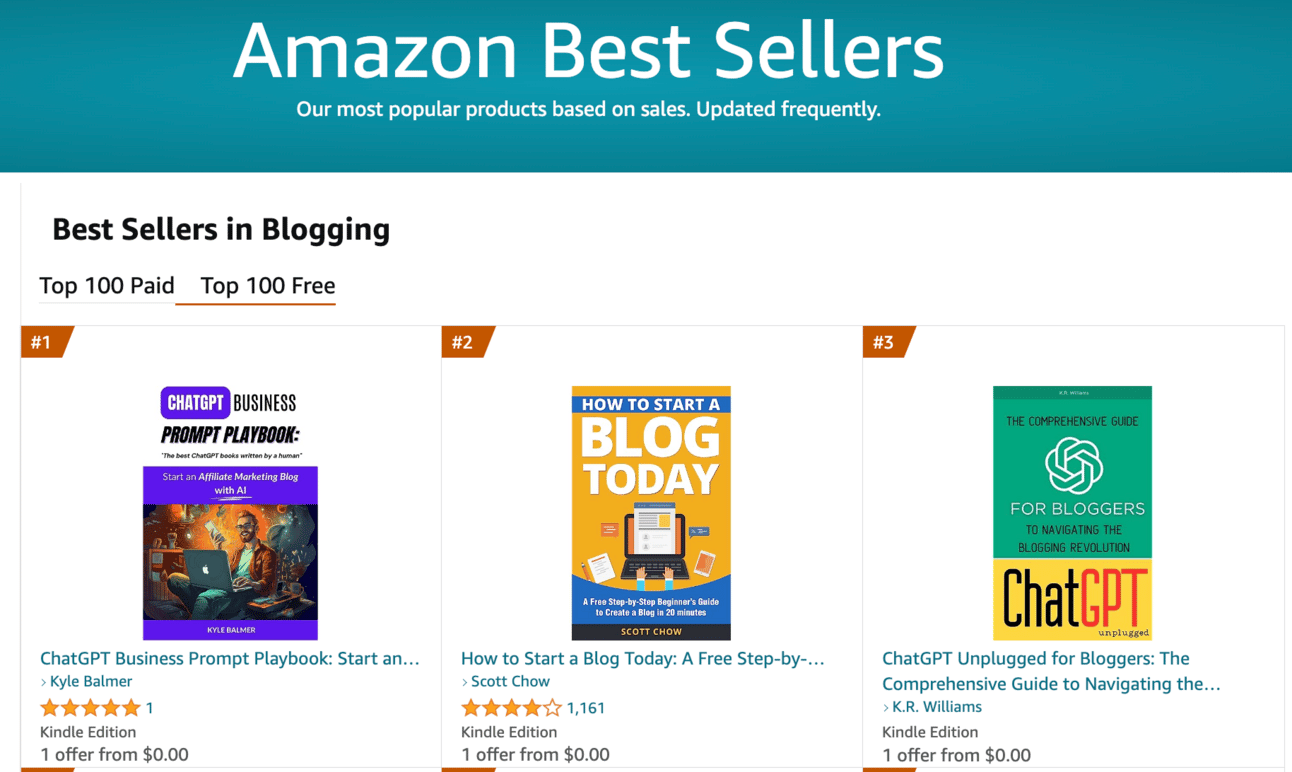
My affiliate blog book sitting at #1 in the Blogging category.
This is a powerful way to both get your message out and build your brand.
And to generate passive income via constant sales.
This week we’re going to be doing a deep dive into how exactly to:
Part 1: Decide your book topic
Part 2: Plan your book
Part 3: Write your book
Part 4: Publish your book
Part 5: Market your book
We are going to be using AI to assist us in writing our book.
We are not however going to have AI write the whole thing. Whilst this is possible the end result will be low quality.
Use this prompt to get started:
Act as a book writing coach.

I am about to write an eBook and need topic suggestions.

Sequentially ask me the following questions, one at a time. Collect my answers.

What are your passions or hobbies?
What are you naturally good at?
What experiences have significantly shaped your life?
What are some topics you always find yourself reading or learning about in your free time?
Are there any subjects you often explain to others or help others with?
What do people frequently ask for your advice on?
What areas do you feel are misunderstood or inadequately covered by existing literature?
What is a topic you would be willing to spend a significant amount of time researching and exploring in depth?
Have you noticed any common challenges or problems people around you face?
If you were to teach a course or seminar, what would it be about?

At the end of the questions use the information you have gathered to generate 10 potential topics that I could write about. Make them diverse to give me a range of options. For each also provide a keyword that describes the topic.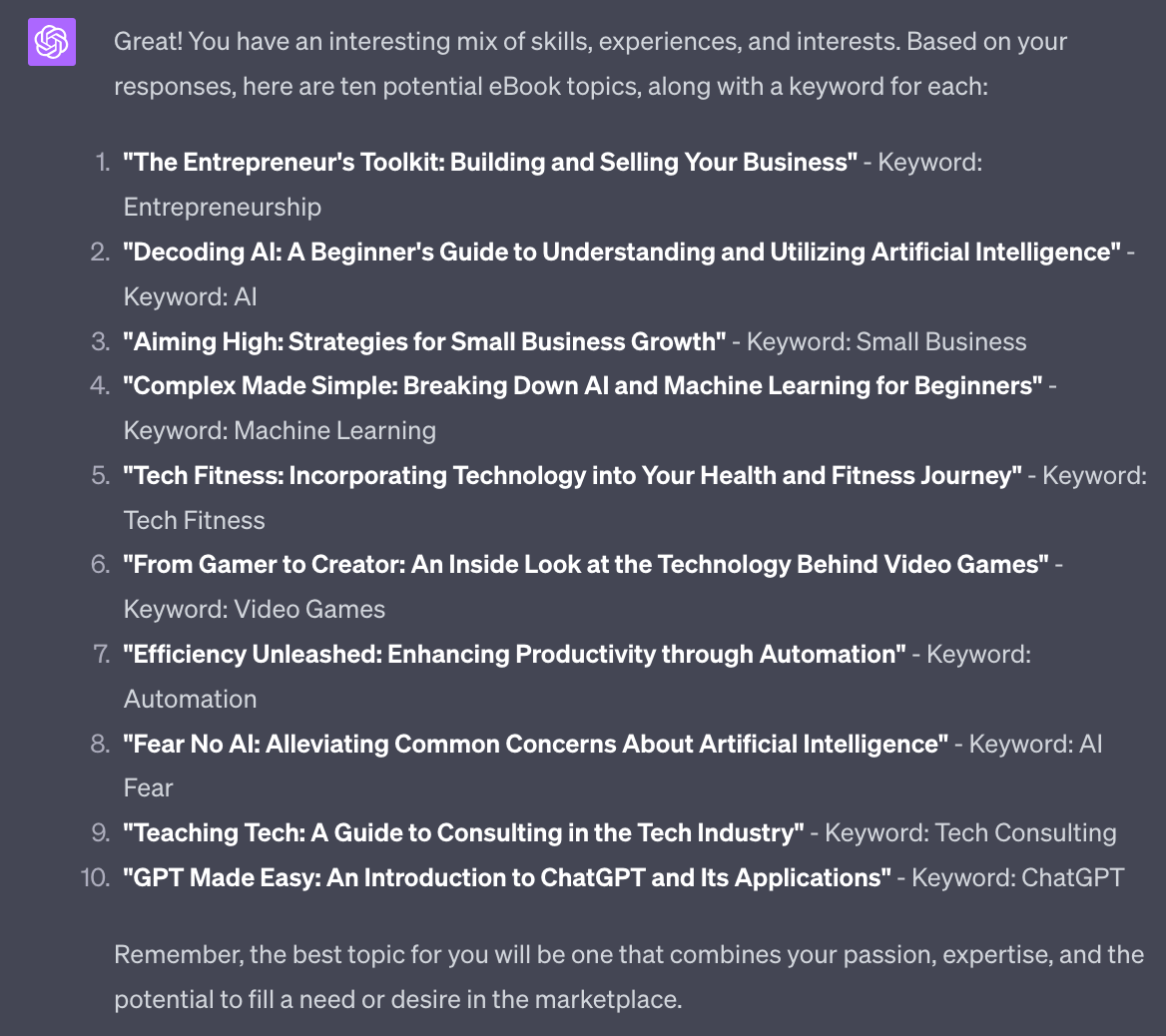
This will spit out a handful of topics and (importantly) a seed keyword. We’ll be using this keyword in the next step as we start to look at Amazon keywords.
For now pick out the ones you like the look of. Need more? Ask ChatGPT to generate more potentials. This should give you more than enough to work with.
Amazon is a big place with a LOT of books.
We need to rise above the rest. We do this i) by having a kick-ass book but also ii) making sure we are competing in a topic that makes sense.
Our topic is determined by our keywords (what people type in search in order to find us) and our Category (what we categorise ourself as using Amazon’s built in categories).
We’ll look at keywords first.
If you have access to a (paid) keyword tool then all the research steps in the rest of this Part can be done easily. I’m writing this guide so that anyone can perform the process so using manual methods.
In the previous step ChatGPT will have given you some starter keywords. For the topics you are interested in head to this tool:
Set Amazon Department to “Kindle Store” and leave country as USA as it’s the largest Amazon market.
Here are the results for the keyword “ChatGPT”
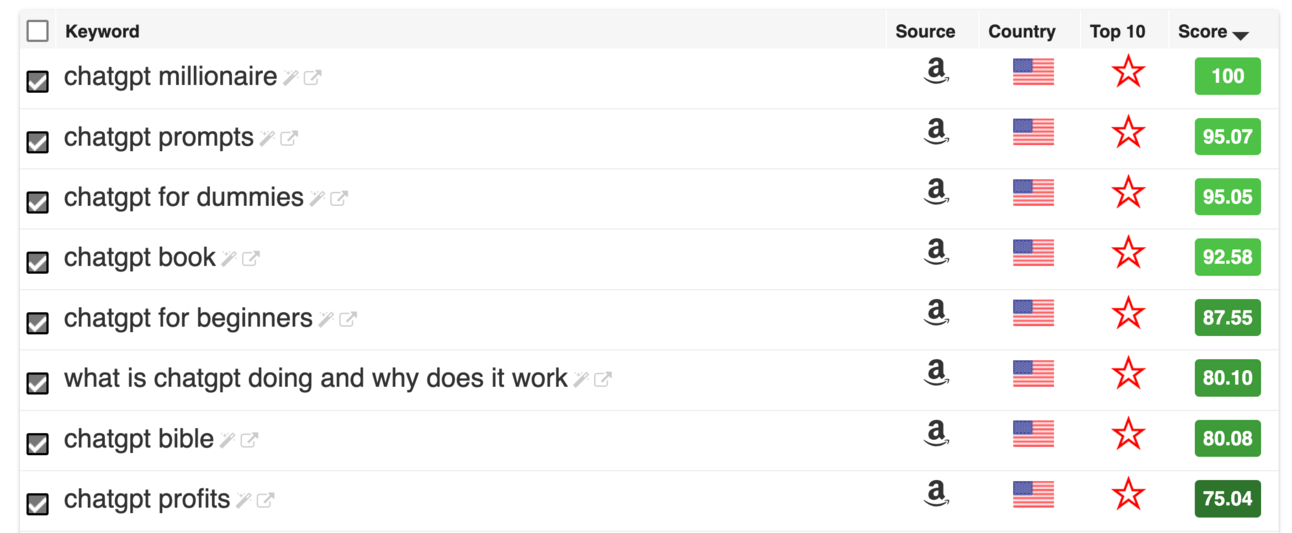
The Score is how popular the search term is.
Go ahead and note down the top 10 Amazon keywords you get from each seed keyword.
So for example from the seed keyword “ChatGPT” I now have the Amazon keywords “chatgpt millionaire”, “chatgpt prompts”, “chatgpt for dummies”, “chatgpt book” etc.
I suggest you remove specific book names and brand names. These are searches people are performing because they are looking for a specific book - and not your book.
So in this example I’d remove “chatgpt millionaire”, “chatgpt for dummies” and “chatgpt bible” which are all specific books. That leaves me instead with “chatgpt prompts”, “chatgpt book”, “chatgpt for beginners” etc.
Do this for each of your potential topics, keeping record of the potential Amazon keywords for each topic. The more topics the more seed keywords and the more Amazon keywords. So to cut down your workload focus on the topics that you are really interested in.
We’re now going to take the lists of Amazon keywords (ie. “chatgpt prompts”, “chatgpt book”, “chatgpt for beginners”) and find our Categories.
Categories are pre-existing hierarcies that Amazon uses to sort its books. We want to find a category that is i) popular and ii) has low competition.
Open up an Anonymous/Private browser. In Chrome this is File > New Incognito Window. This is so our previous Amazon browsing history does not seep into our results.
Now up head to to amazon.com, the US version of Amazon.
Why use the American version? Because we are writing a Kindle book it will be available on all the regional Amazon platforms - UK, France, Brazil, Japan etc.
But US Amazon is the largest single market and will give us the largest platform- therefore it’s critical we do well on US Amazon.
Plug in one of your keywords and set search to Kindle Store:
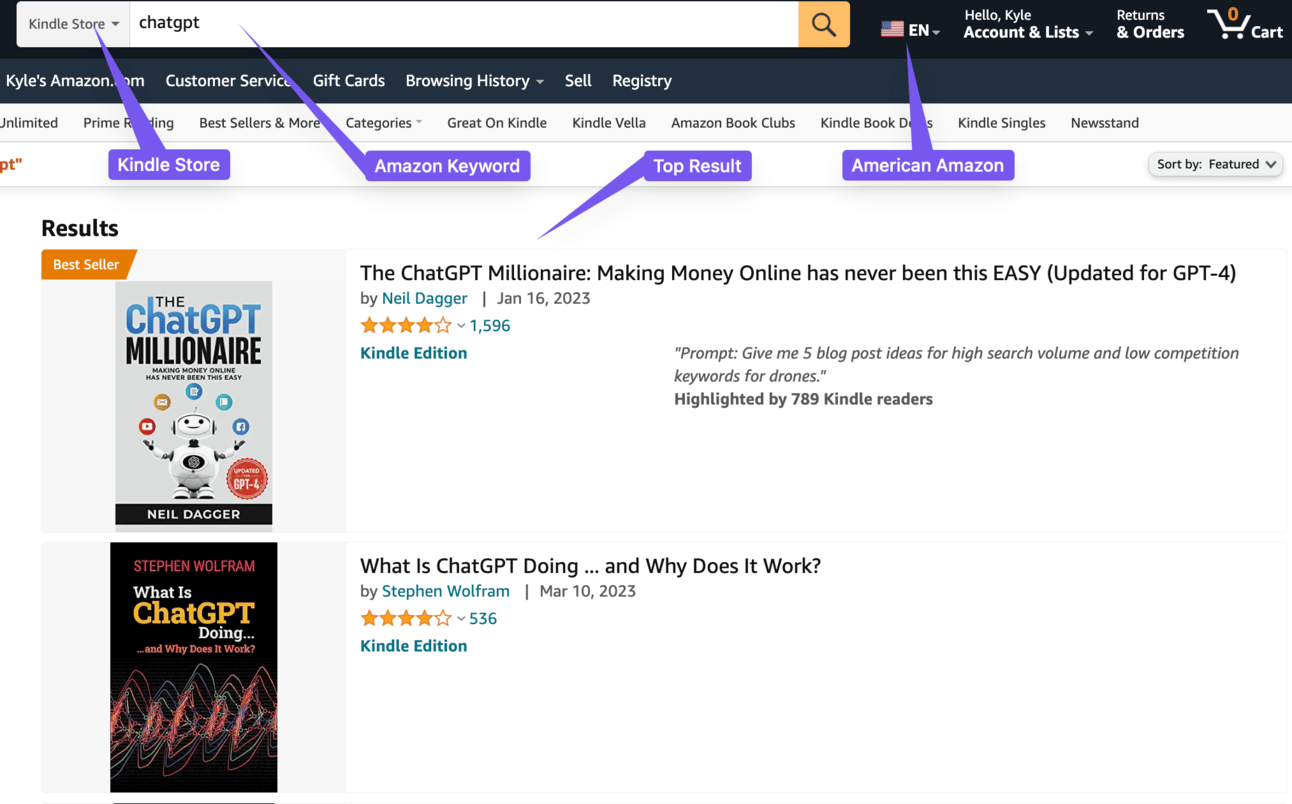
Note: ignore any books that say “Sponsored”. These are not organic placements - they are there because the author is paying for ads.
The top result here is a book called “The ChatGPT Millionaire”. There’s no Sponsored tag next to this listing so it’s really #1 for this term.
#2 is Stephen Wolfram’s “What is ChatGPT Doing…and Why Does It Work?” - an excellent book by the way if you want to know more about the mechanics of AI. The next listings are #3, #4 etc.
Go ahead and open up #1 and find this section of the page:
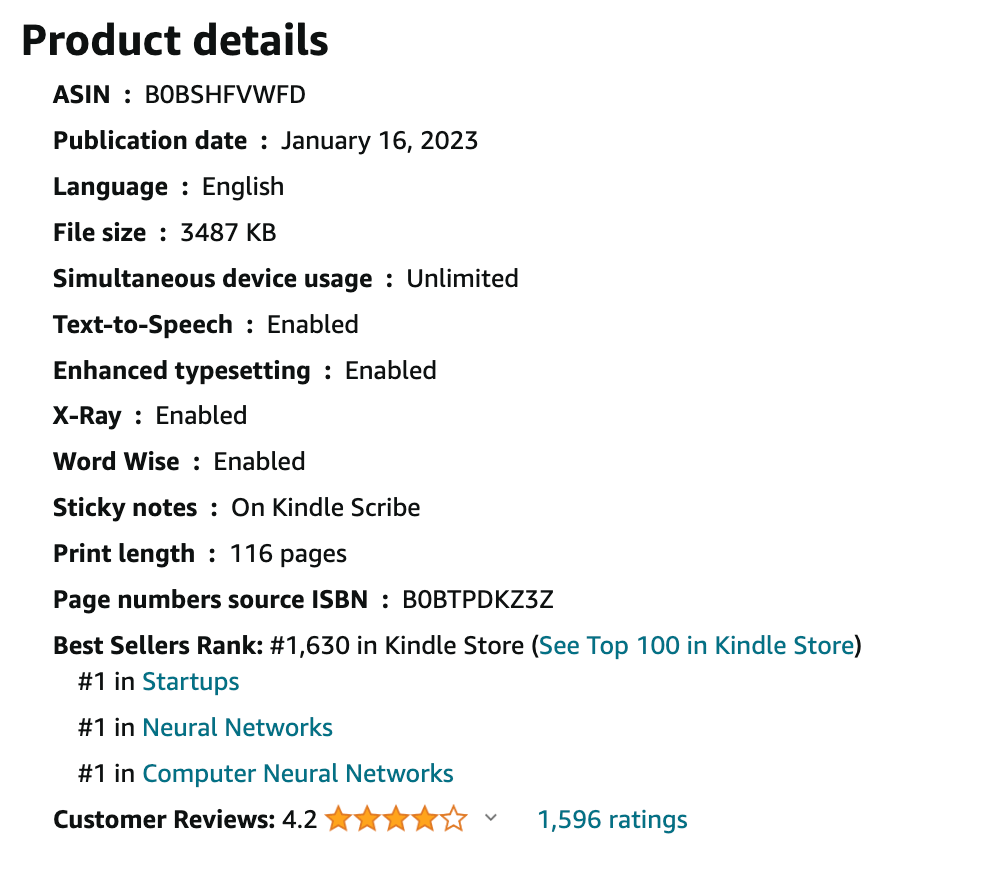
We’re interested in the Best Seller Rank and the categories here.
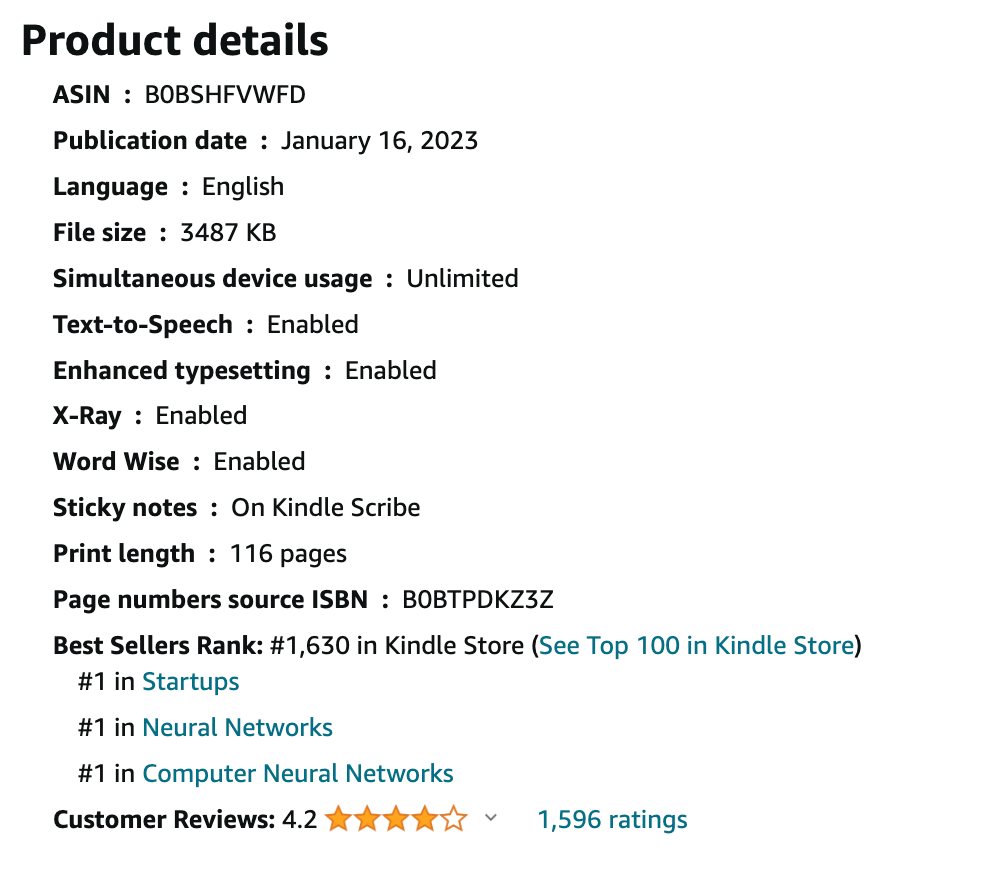
This shows me that this book is #1 in Startups, Neural Networks and Computer Neural Networks. These are Amazon categories.
We can click on the name to see the list of books under this category.
Here’s the results for Startups:
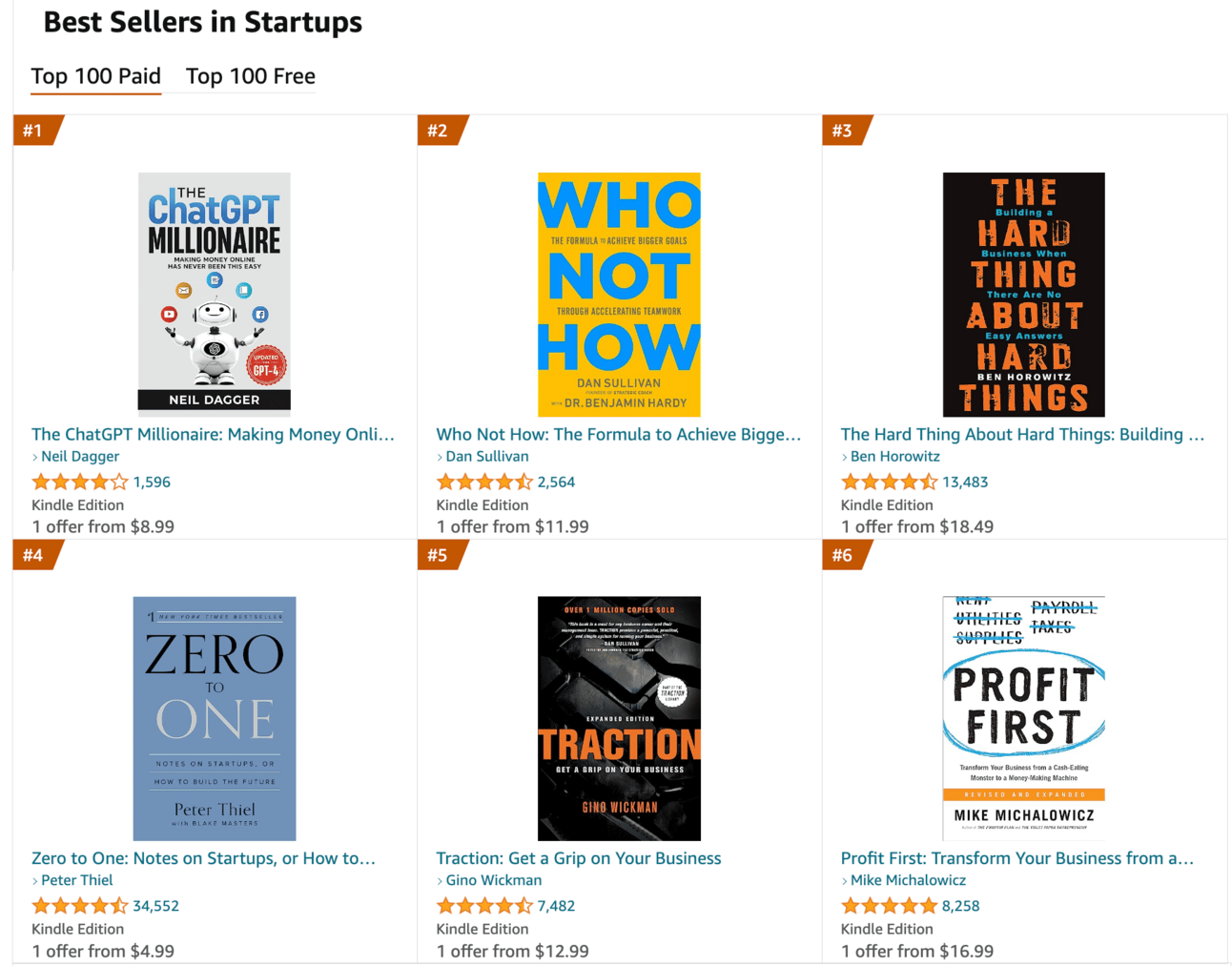
On this same page you can also see the hierarchy of Categories:
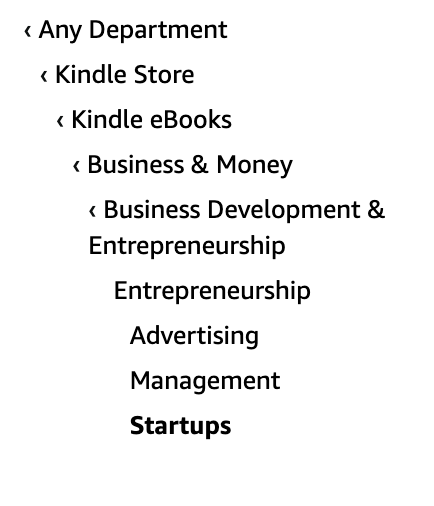
Here you can see the hierarchy is Kindle Store > Kindle eBooks > Business & Money > Business Development & Entrepreneurship > Startups
Generally the further down the hierarchy the category is the more niche. For example Startups is a sub-category of Business Development & Entrepreneurship which it itself a subcategory of Business & Money.
We will not (initially!) be able to get a best seller in a master category like Business & Money. It’ll be too competitive and be full of books with professional publishers, brand recognition and marketing budgets.
A quick check shows that particular category has the likes of The 7 Habits of Highly Effective People. We’re not going to take on that level of competition. Yet!
Instead we’re looking for these sub-sub categories like Startups.
The task for now is:
For each Amazon keyword
Perform and search and get details on the top 5 books per keyword
For each book collect the 3 categories
Save the links
You’ll find there is overlap. For example #2 (Stephen Wolfram’s book) also appears in Neural Networks and Computer Neural Networks. An overlap of 2/3.
Once you’ve collected up all the categories we’ll move on to narrowing down to our target category.
Now we’re going to analyse each of our potential categories and choose our target category.
We’ll do this by working out the relative i) popularity of the category and ii) the competition within the category.
We want to find a category with high popularity and low competition. This will be our best target category.
Now comes the art of the process. We’re going to have to use a little judgement here! Unless you have paid research tools!
If you have access to paid tools this is definitely the place you want to be using them. I personally use KDSpy. Here’s what it looks like in action.
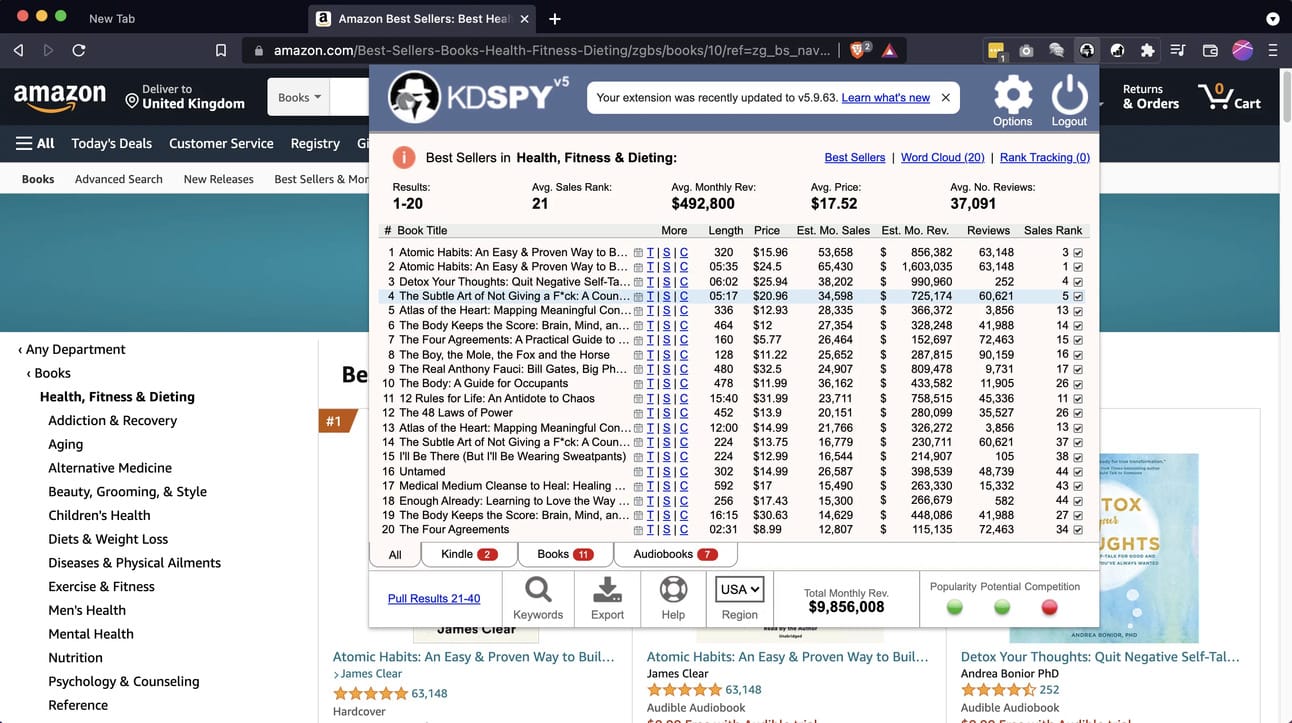
KDSpy will take your keywords or categories and tell you the total sales, the popularity of the topic, the competition and the potential for revenue. It uses a traffic light system (in the bottom right) to make it easy - red is unattractive, green is great niche.
Here you’ll see a niche with ~$10m of monthly revenue, green light for popularity and potential and red light for competition - ie. this is an extremely attractive niche but there’s stiff competition.
Because KDSpy (and similar tools) are paid I want to give you a more manual free method to start with. And when you can justify the investment I’d recommend looking at a paid research tool.
Here’s our manual method.
Start with your first potential category. Make sure you are in US Amazon still.
We want to work out roughly how many books are being sold per month in this category.
Navigate to the first book at find its Best Seller Rank (BSR). It’s just above the 3 categories we collected earlier. Here for example the BSR is #1630 in the Kindle Store.
Head to this calculator website:
We plug in 1630 and eBook to calculate the number of sales:
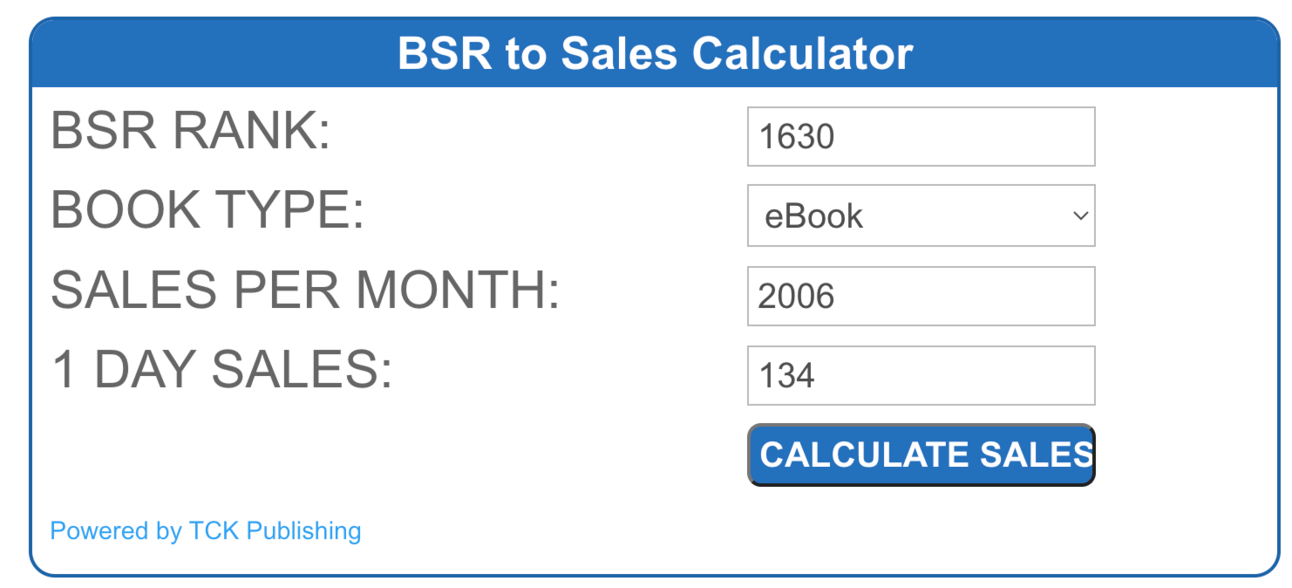
This suggests this book is selling 134 copies a day, 2006 per month. Not too surprising considering it is #1 in Startups, a very high traffic category.
We take note of this figure: Category: Startups, #1, 2006 sales.
We then do this for the top 5 books in the category so we end up with the total monthly sales of the top 5 books.
We then repeat this process for each category. At the end of the process we’ll have the total sales volume of the top 5 books for each of our potential categories.
This gives us the first piece of the puzzle: popularity. Remember we are looking for a niche with i) high popularity and ii) low competition.
We now know which of our potential categories is the most popular, and which is the least, based on the total volume of sales. Solid work.
Next part is competition. This is definitely going to be more judgement based unless you use a tool. That’s fine though as we are just looking for the relative best target category out of the potential categories we have.
For each category:
Check if the top 10 is full of books with 1000s of reviews. If so: it’s too competitive. Seek a narrower sub-category.
Are there lots of sponsored listings? If so it means it is a very popular niche and people are willing to spend money on ads - this means competition.
Check the quality of the listing descriptions and the covers. Are there fully fleshed out descriptions and professional quality cover designs? If so that’s a competitive niche.
Conversely
Lots of books with sub-100 reviews? There’s a space in the market for you.
Bad reviews on the top books? A good sign you can make headway here.
Little to no sponsored listings means people aren’t competing for the niche.
Badly designed covers and poorly written book descriptions means making sales will be easier.
You’ll have to use judgement here. Go through each category looking for these signs and place the category in either High, Medium or Low competition, relative to the other categories.
First time you do this it’ll be a bit faltering but it becomes second nature once you know what to look for.
At the end of this you should have all your potential categories ranked by order of popularity and with a gauge of whether they are high, medium or low competition.
From this you need to decide your primary category. Go for the most popular one you can with Medium or ideally Low competition.
We will be selecting three categories when we publish but for the purpose of planning and writing the book it is best to focus on a single category. So go ahead and choose that category now.
This has been an in-depth process. But rest assured you’ve just done the most important part of ensuring the success of your Kindle book.
It may have taken a long time to get here but believe me it takes even longer to just write a book blind, publish it and hope for the best. Amazon is littered with millions of such books which languish with one or two sales.
We’re instead using this pre-production to put ourselves in the best position for a best selling book.
Right now, after this process, you should have decided your single category.
In the next parts we’re going to take that target category and plan, write and publish the perfect Kindle book.
A reminder of this week:
Part 1: Decide your book topic
Part 2: Plan your book
Part 3: Write your book
Part 4: Publish your book
Part 5: Market your book
See you tomorrow Prompt Entrepreneur!
Until then, keep PROMPTING!
Kyle, Harms and 🤖
PS: Remember to refer a friend to our newsletter and unlock Facebook Advertising Mastery using AI 👇.
First up we’re going to work out the winning formula for a best seller.
We’ll do this by analysing what already works. We’ll look at the top books in our category, see what they are doing and use that as a model for structuring our book.
Here’s the prompt:
Act as a book editor.

You are going to help me analyse 5 bestselling book descriptions to help me extract best practices.

Ask for a book description then analyse the bestsellers book description and extract the information about the structure, features, benefits, length of book.

Then ask for the next book description. Repeat the process of extracting information.

Repeat until you have collected information from 5 books total. Stop at 5 books.

Then use the information from all 5 analyses to compile a "best practices" guide for my book's structure, features, benefits and length to emulate the success of these bestsellers. Give specific examples rather than general advice.
Start with this prompt, hit Enter and ChatGPT will ask for the first of the descriptions.
Copy paste the whole book description from Amazon. Make sure to click “Read more” as details are often hidden. Also make sure to copy the Print Length from just below the main description.
Paste everything in and hit Enter. ChatGPT will process the details of the first book description and then ask for the second book. Continue this until you’ve done all top 5.
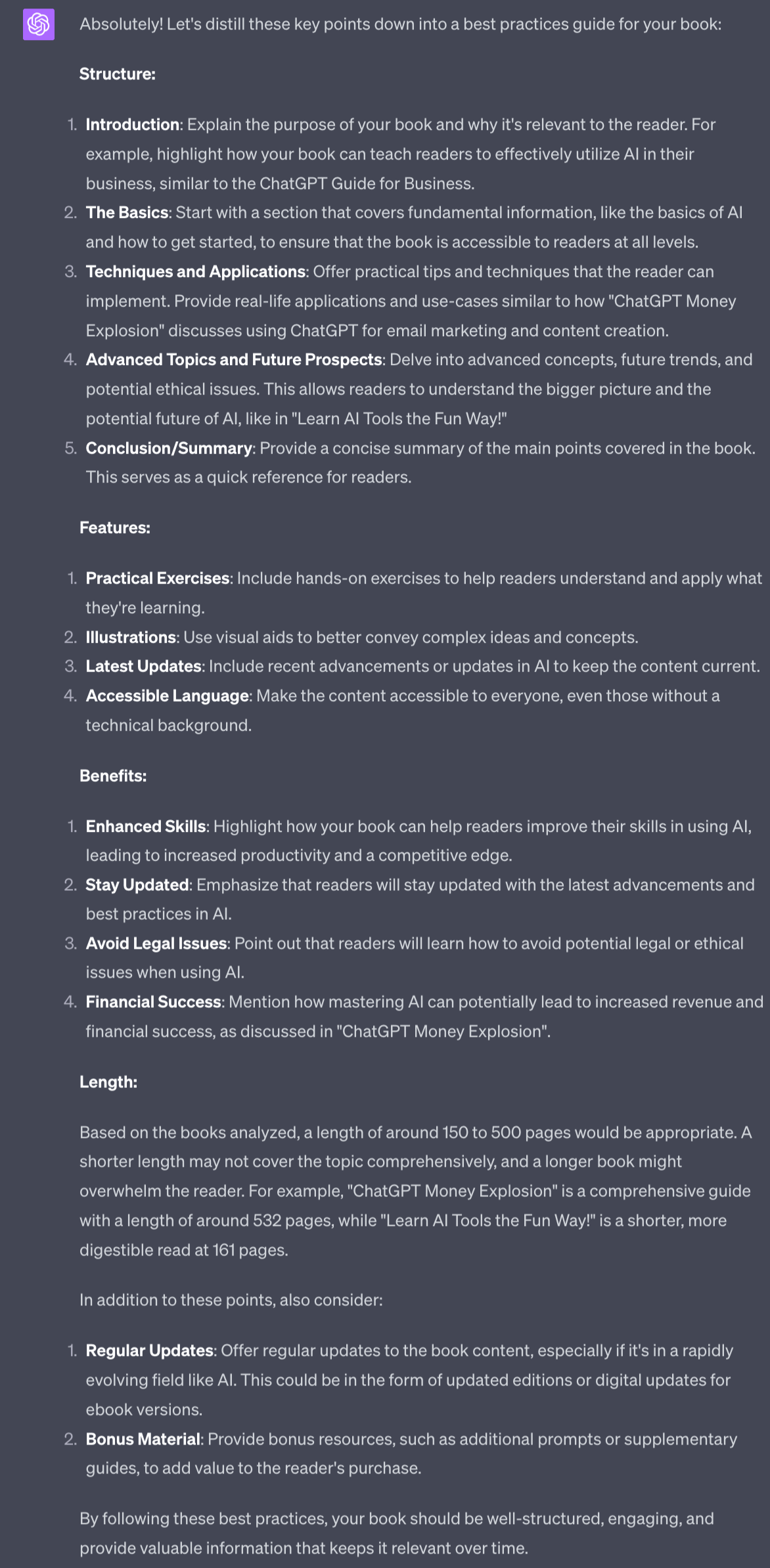
The output gives you a set of best practice guidelines needed to emulate the success of the other best sellers.
We’ll be using this shortly to structure our book. First though let’s layer in reader feedback via the reviews.
We now have some basic guidelines that we’re going to feed to ChatGPT to help us structure the book.
However, the description is written by the author and therefore is (obviously!) biased. They’re going to write about how great their book is because they want to sell copies.
Let’s add another layer of analyse by extracting information from reviews:
Act as a book publisher.

You are going to help me analyse 5 bestselling book reviews to help me extract errors to avoid.

Ask for a book review then analyse the bestsellers book's review. Then ask for the next book's reviews. Repeat the process of extracting information.

Repeat until you have collected information from 5 books total. Stop at 5 books.

Then use the information from all 5 analyses to compile a master list of problems to avoid as well as how best to avoid them. This list should draw from all 5 analyses. Give specific examples rather than general advice.
This prompt will ask you for the reviews for each of the books you are analysing.
Provide it with the 3 star reviews.
Huh? Why? Bit weird no?
The reason we do this is that 3 star reviews tend to give us the most information. 5 star tells us very little - “this book was great, love it, we’re getting married and having babies together”.
1 star reviews conversely tend to be people who are pissed off and don’t provide practical feedback. You’ll see a lot of “didn’t work on my Kindle” or “book is rubbish”. 1 star people don’t give us anything valuable to work with.
The sweet spot is 3 stars - that’s someone who has mixed feelings about the book and tends to write something more nuanced. So go ahead and grab these reviews to copy/paste in.
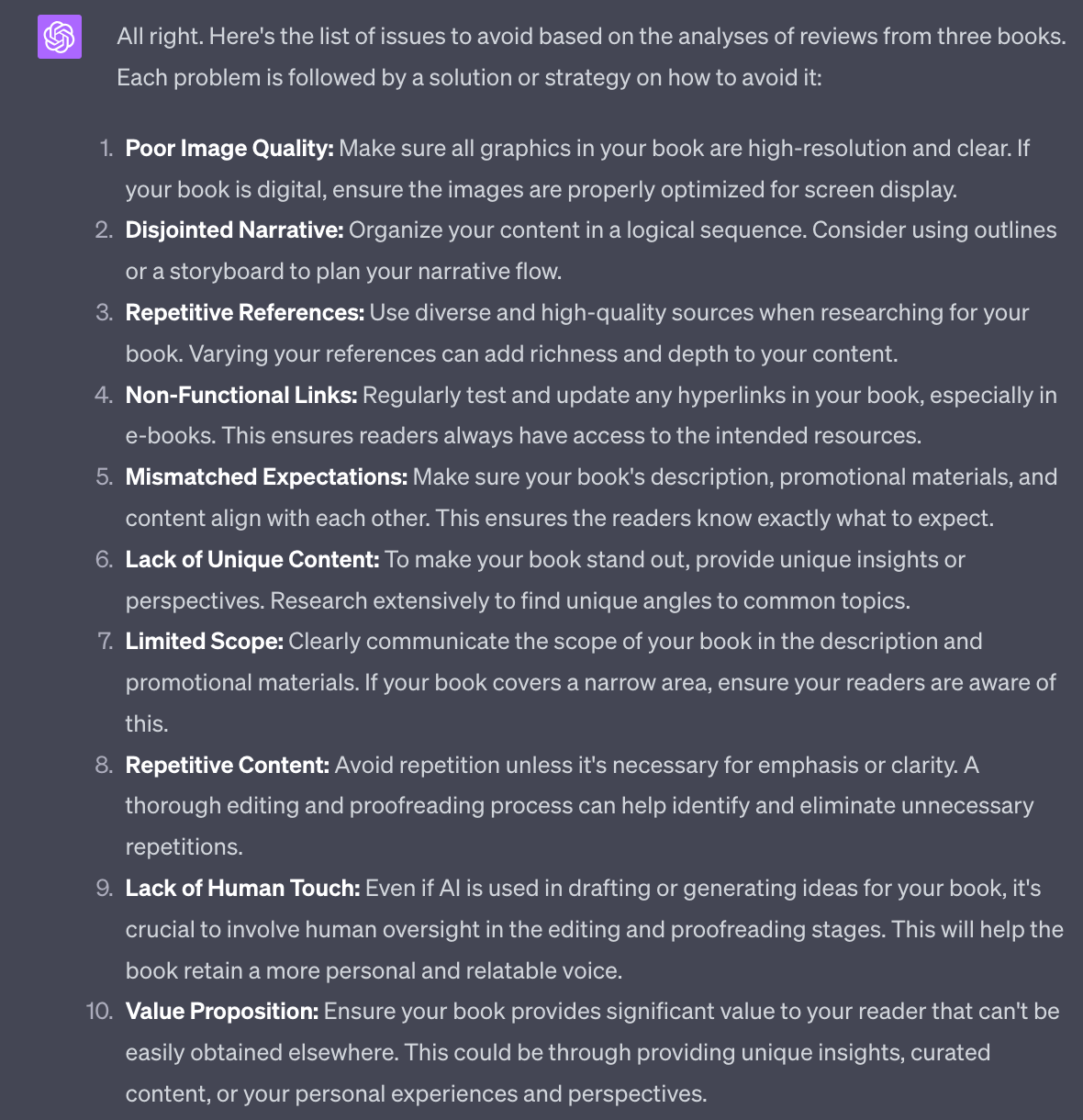
This gives us a list of recommendations based on user feedback rather than purely what the author says about the book. Now we have a more balanced picture of our best sellers.
We’re now going to start pulling together our work from Part 1 and the last 2 steps to generate our book structure.
Here’s the prompt:
Act as a book writer

Help me create a structure for a book

The topic is [Amazon category]

Keywords to include are [top 3 Amazon keywords]

Use these guidelines when structuring the book

#Begin guidelines#
[Copy paste all guidelines]
#End guidelines#

Give me a full book outline with sections, chapters, main points (5) per chapter and any relevant appendices
Grab the Amazon category we decided upon as well as 3 of the top Amazon keywords we researched in Part 1
Also get your guidelines from the last two steps and copy/paste them all in.
This prompt will use all of your pre-production work to generate a book structure.
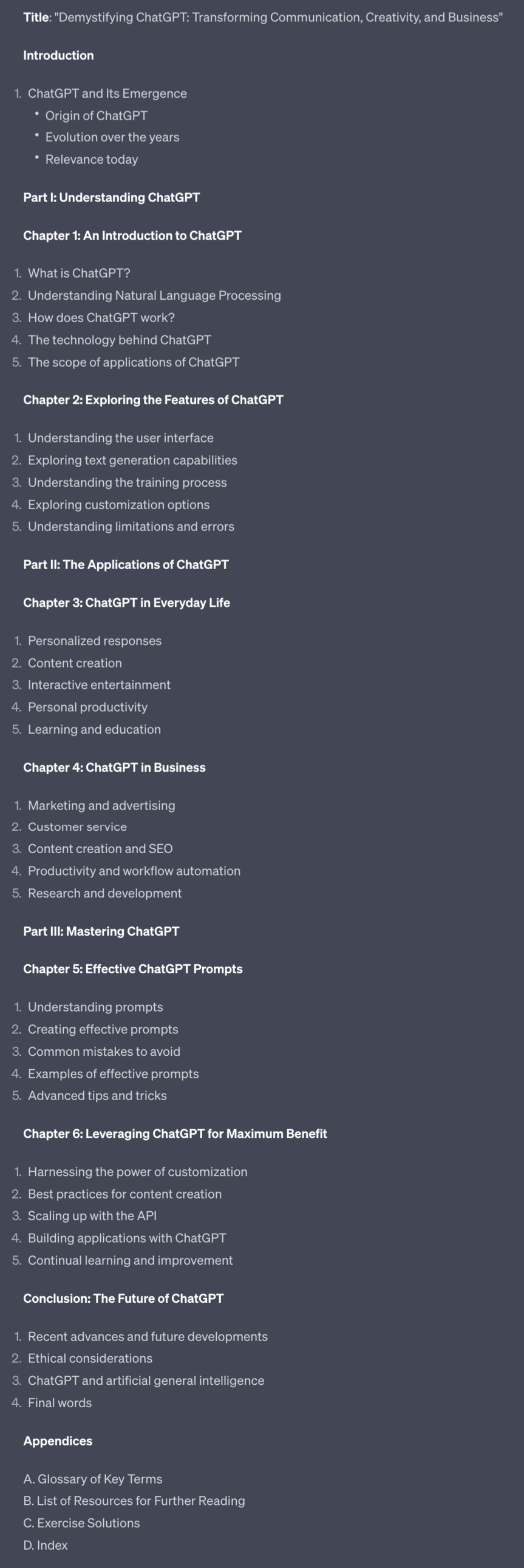
Not bad! We’re getting somewhere now.
By using all the existing bestsellers as models we’ve now created a structure that builds upon them all. We’re going to use this to “stand on the shoulder of giants” and outrank them
Now that we have a basic structure for the book we want to start getting ready for the writing process which begins in Part 3.
I prefer to use Notion for this. You can use whatever writing tool you want. But I do recommend Notion because it's a good way to structure book writing across multiple documents (rather than one looooong Word document).
Notion is free and you can grab it at https://www.notion.so/
Create a new Page. It will look like this:
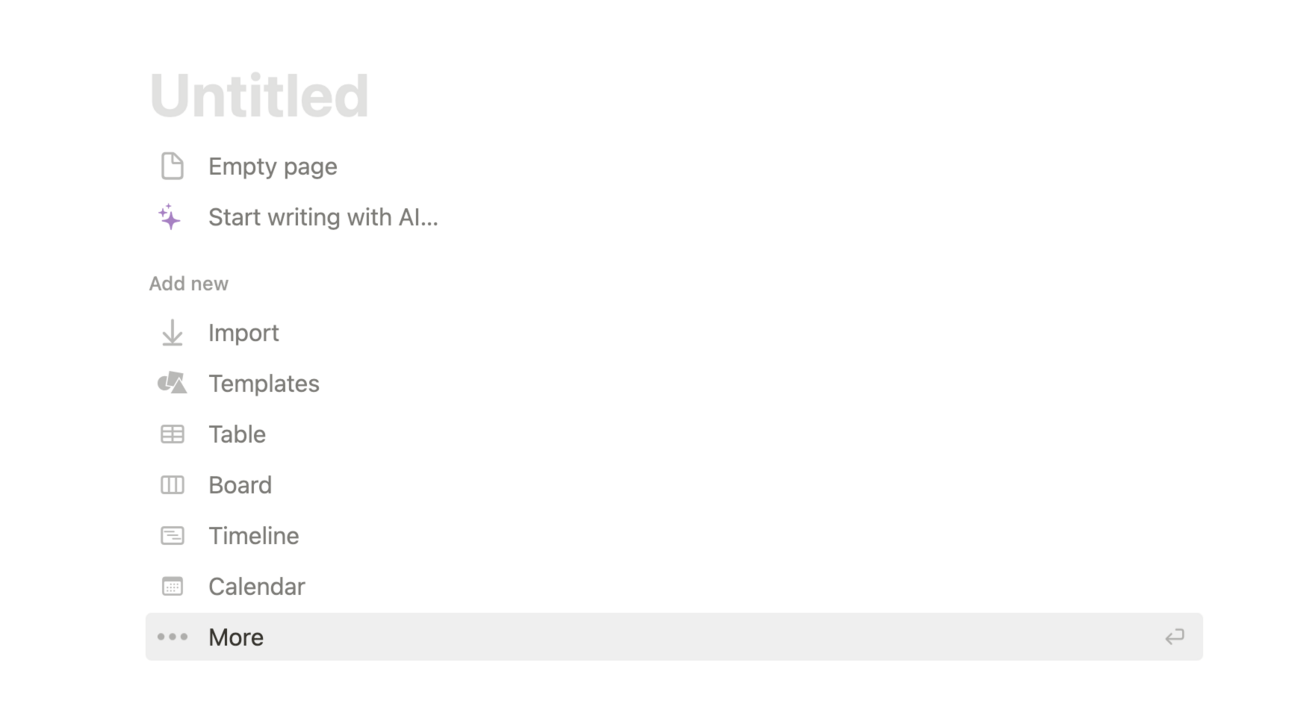
Click on the Empty Page line and copy/paste your book structure into this Page. This is your Master Structure document now.
Here’s the cool part.
Highlight one of the Chapters like this:
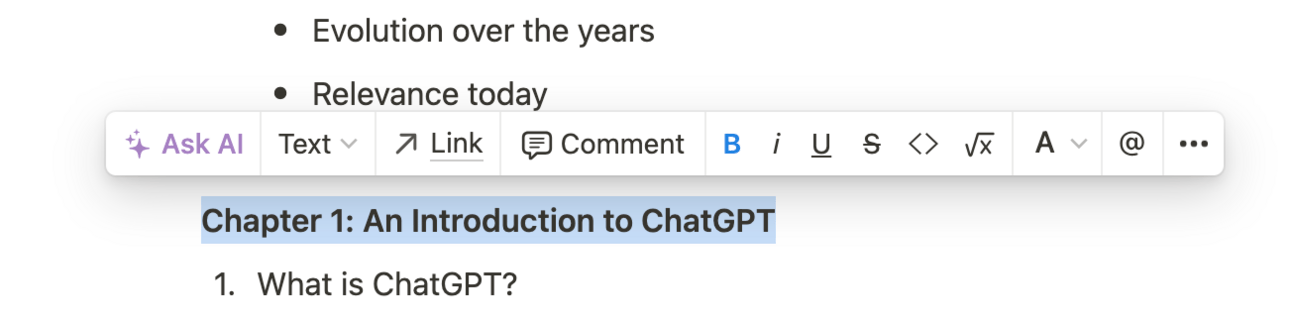
Click on the “Text” dropdown and you’ll see you can change this text into lots of other things.
Go ahead and make it a Page:
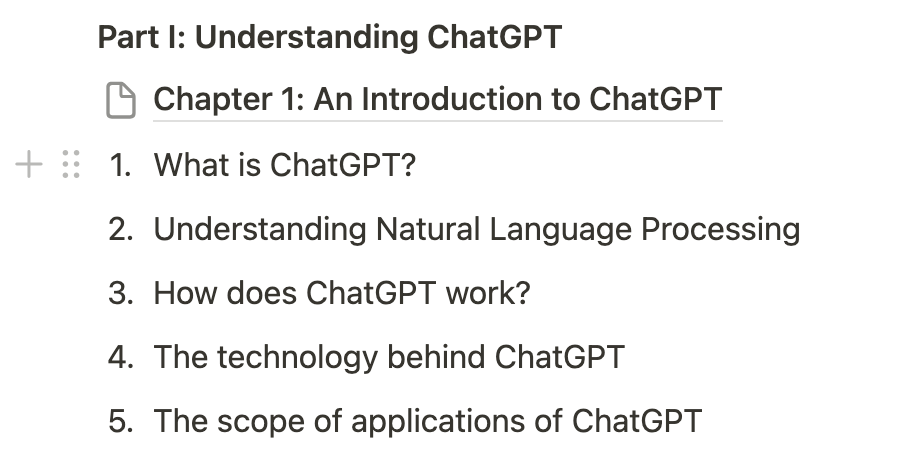
In this example Chapter 1: An Introduction to ChatGPT is now its own Page. It’s a sub-page of the main structure Page. I can now add the content specific to that chapter directly into the Chapter 1 sub-page.
This allows us to keep everything nice and tidy and makes the process of compiling the book a lot easier! Take it from me: someone who has tried to structure books in a single Word document before!
Whilst we’re here also start to remove Chapters and sections you think make no sense. This is the first Editing pass. Removing Sections and Chapters now is much more efficient than doing it after you’ve written them! So go nuts cutting it down early rather than later!
In this Part we’ve continued our pre-production work, learning more and more about the current best sellers in our Category.
We then leveraged that research into finally compiling a structure for our book.
In the next Part we’re going to start the writing process to flesh out the structure and start making it look like a proper book!
A reminder of this week:
Part 1: Decide your book topic
Part 2: Plan your book
Part 3: Write your book
Part 4: Publish your book
Part 5: Market your book
See you tomorrow Prompt Entrepreneur!
Until then, keep PROMPTING!
Kyle, Harms and 🤖
PS: Remember to refer a friend to our newsletter and unlock Facebook Advertising Mastery using AI 👇.
v
In this Part we begin to generate our first drafts, refining and editing them into full chapters.
First we want to align the book’s tone of voice with your own.
This is so we can make our AI generated drafts as close to you own style as possible, reducing the requirement for editing later.
This also helps us make ChatGPT’s output less “generic” and sound less like, well, ChatGPT.
Here’s the prompt
Act as a copywriter.

Read the provided writing sample and take note of the tone of voice, writing style, verbals tics and other unique features.

Use this to generate a style guide that I will use with ChatGPT to replicate the writing style in the future.

#begin writing sample#
[Copy/paste writing sample]
#end writing sample#
Add a writing sample at the bottom of the prompt to give ChatGPT something to work with. Preferably the writing sample should be non-fiction in the same style as you want your book to sound. For instance use a blog article written about a similar subject.
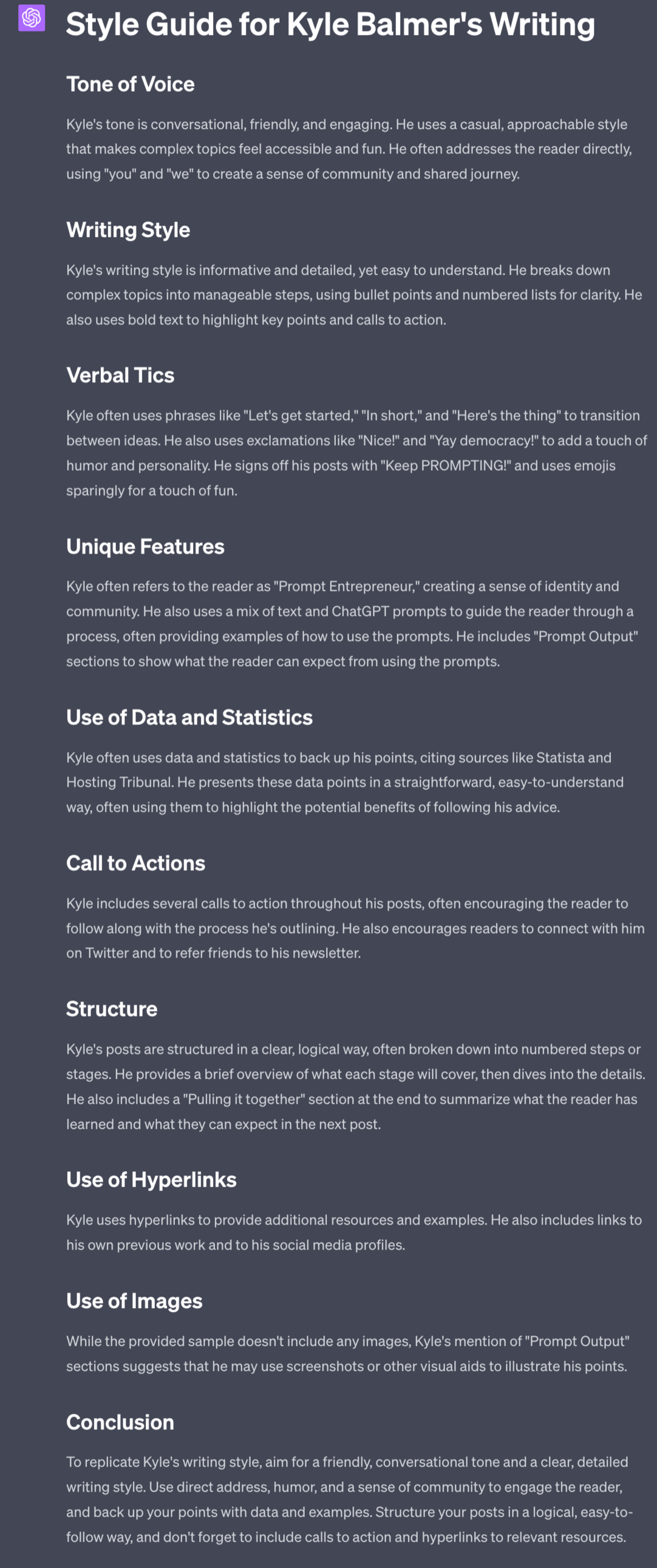
This style guide is based on using Part 1 of this very guide as the writing sample. ChatGPT analyses the content and comes up with a set of guidelines for duplicating that tone moving forward.
Notice I’ve included “verbal tics”. This adds in peculiarities that could be considered negative. For example I know I use a lot of spoken language like “here’s the thing” to start or transition sentences - that’s not good formal language but it is how I speak.
I also overuse exclamation marks! Yay! Something else that ChatGPT has picked up on and will replicate when it drafts chapters.
These sort of tells are what make the writing more human, specifically because it’s not “correct” written language.
Yay!
We’re finally going to start writing. We’ve already done a lot of prep to get to this point so let’s jump straight to it.
Here’s the prompt:
Act as a Kindle ebook author.

The entire chapter and its main points are:

[Copy paste Chapter from Structure document]

Prepare only the subsection [name of section]  Do not write the whole chapter.

Prepare 750 words for this single subsection.

Format for Kindle, using headings, bullet points and other formatting to ensure readability.

Refer to this style guide for writing instructions

#Start style guide#
[Copy/paste style guide]
#End style guide#
For clarity here’s the prompt filled out with the chapter and main points added.
Act as a Kindle ebook author.

The entire chapter and its main points are:

Chapter 1: An Introduction to ChatGPT
What is ChatGPT?
Understanding Natural Language Processing
How does ChatGPT work?
The technology behind ChatGPT
The scope of applications of ChatGPT

Prepare only the subsection What is ChatGPT?  Do not write the whole chapter.

Prepare 750 words for this single subsection.

Format for Kindle, using headings, bullet points and other formatting to ensure readability.

Refer to this style guide for writing instructions

#Start style guide#
[Copy/paste style guide]
#End style guide#
Add in your chapter details as well as the style guide and go ahead and generate.
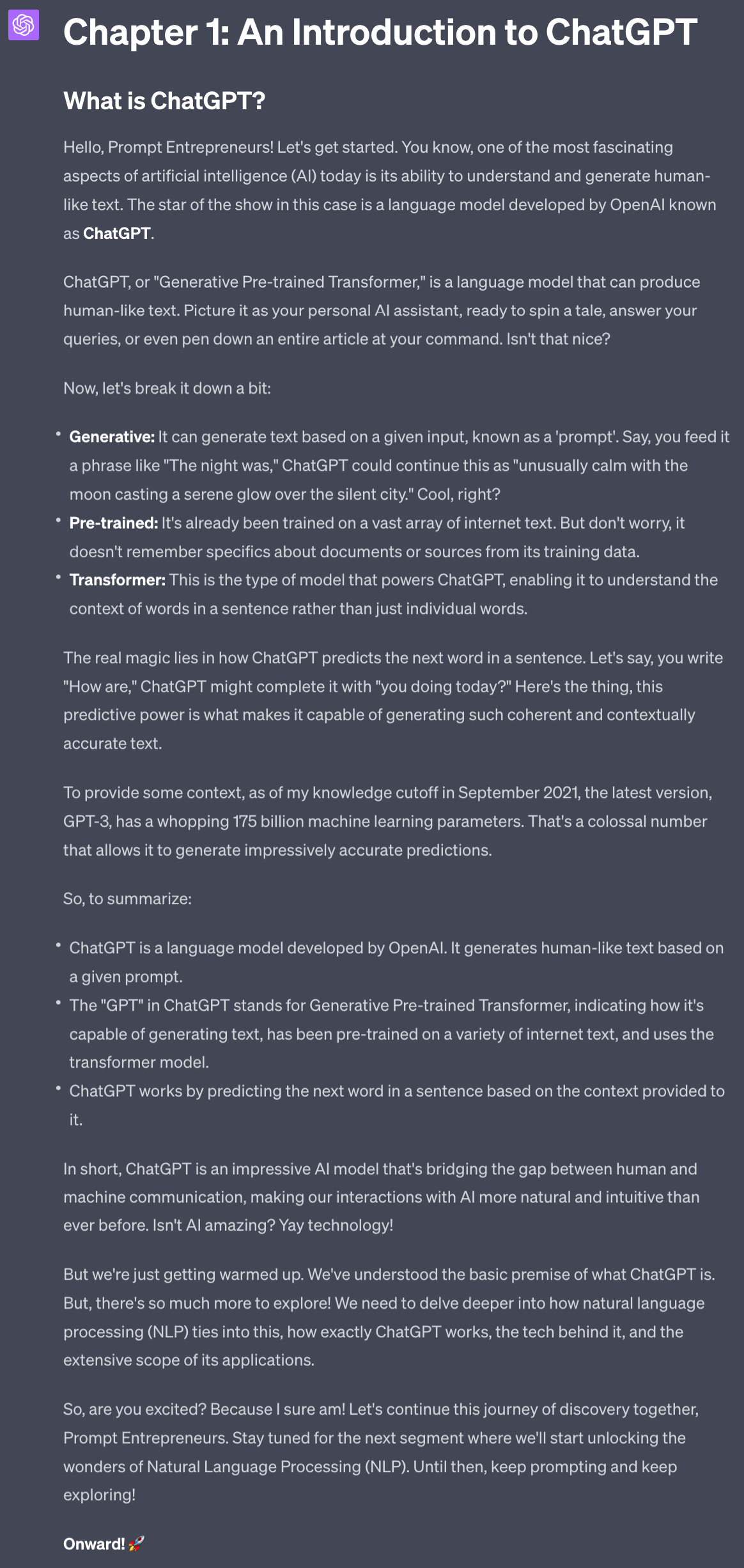
Couple of things to note:
It’s nailed my style - especially the over-enthusiasm!
It’s provided information from only the subsection I stipulated. This is to stop it added too much information and then repeating that same information in subsequent sections.
It knows the contents of the rest of the chapter and mentions NLP is next. The actual text here in the final paragraph is too much - only needs to say “we’ll look at NLP next” rather than teasing it so much. This is because NLP is talked about in the next subsection! But that’s fine because we’ll manually adjusting for things like this.
Before saving the text as our draft we can first run some refinements. Here are a few of my favourites. Choose and use these depending on the actual topic of the particular section.
Here’s one to add metaphor:
Act as a copywriter.

Add a metaphor to this text that will aid the learner in absorbing and memorising the material. 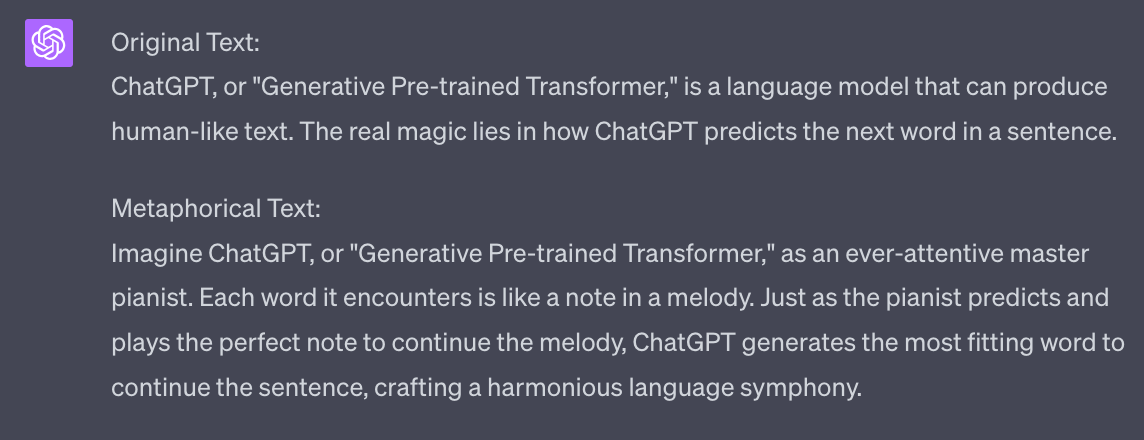
If you like the metaphor ask ChatGPT to add it into the text.
Next one, frameworks
Act as a copywriter.

Add a framework related to the concepts in the provided text.

Use an acronym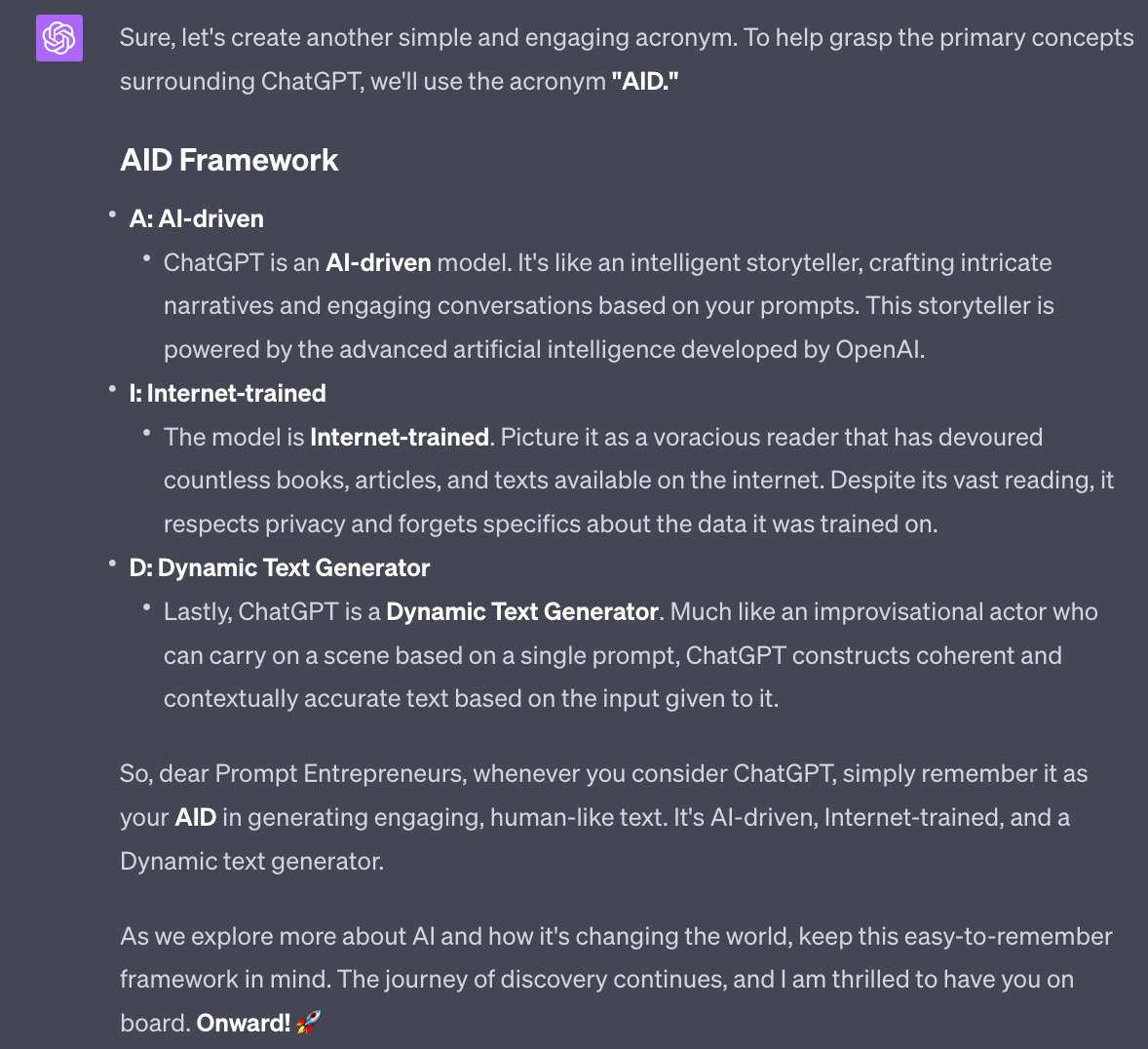
Use this to generate catchy learning frameworks that help your readers absorb the information. This works particularly well in parts of your book where you are describing a process or steps they need to follow.
Next examples and stories:
Act as a copywriter.

Add a personal example or story based on the text provided.

It should be both entertaining and help underline the learning point.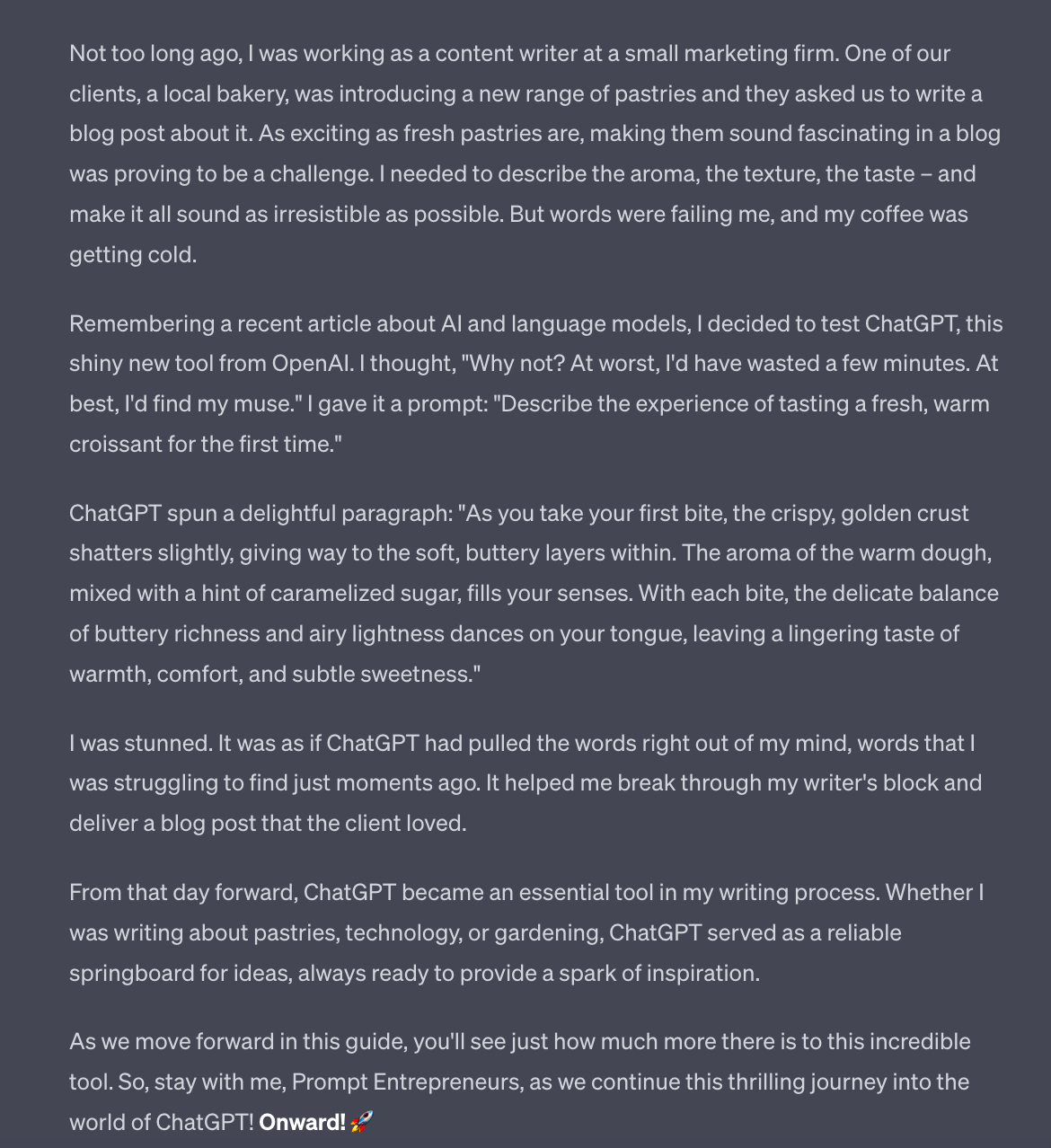
Use stories like this, ideally using your own experiences as a jumping off point early in chapters to build rapport and show that you, like the learner, went through this journey once.
You can also make the stories about other people you know, friends and clients, by specifying who the story should come from.
Once you are done with the basic draft in ChatGPT go ahead and copy the text over into Notion in its pre-prepared document.
In the last Part I showed you how to set up Notion. If you are using another text tool that’s fine - just go ahead and copy the draft over.
Do this for the whole chapter - all parts in one Page.
Optionally, you can now have Notion AI run a round of improvements on your chapter.
Basically, highlight the whole chapter and hit “Ask AI”
You’ll be given this menu:
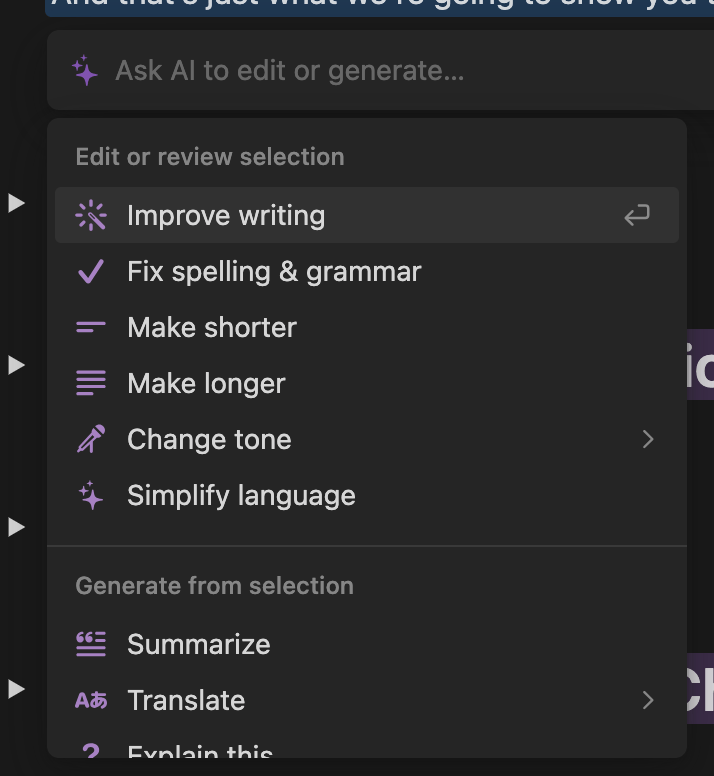
Go ahead and hit Improve Writing and Notion AI will rewrite the whole thing. You can then choose to accept or decline any changes.
You can do this with individual sentences, paragraphs or even whole sections and chapters. The smaller the selection the more control you have but the longer it will take.
Try this out and see if you like the results. If so add this into your workflow.
Once done manually go over the whole chapter. It being in one document will allow you to better see if there are repetitions. Go ahead and delete any repetitions so that information is presented just the once.
You can also now tidy up the transitions from subsection to subsection and generally shape up the whole structure.
Once this is done go through line by line and make edits and changes to your liking. This is time consuming but will make your book more “human” and personal. It’s an essential part of the process.
You should now have your first chapter in a good shape.
Continue onwards, processing each chapter in the same way until you have a fully fleshed out manuscript.
Make sure to keep everything nice and organised in Notion as this will make the next process of exporting and publishing much easier. That’s what we’ll be moving onto in the next Part.
A reminder of this week:
Part 1: Decide your book topic
Part 2: Plan your book
Part 3: Write your book
Part 4: Publish your book
Part 5: Market your book
See you tomorrow Prompt Entrepreneur!
Until then, keep PROMPTING!
Kyle, Harms and 🤖
PS: Remember to refer a friend to our newsletter and unlock Facebook Advertising Mastery using AI 👇.
First up we need to get a Kindle Direct Publishing account.
You can use your Amazon account to log in. Just head to https://kdp.amazon.com/ and follow the registration process until you get through to the Dashboard.
It looks like this:
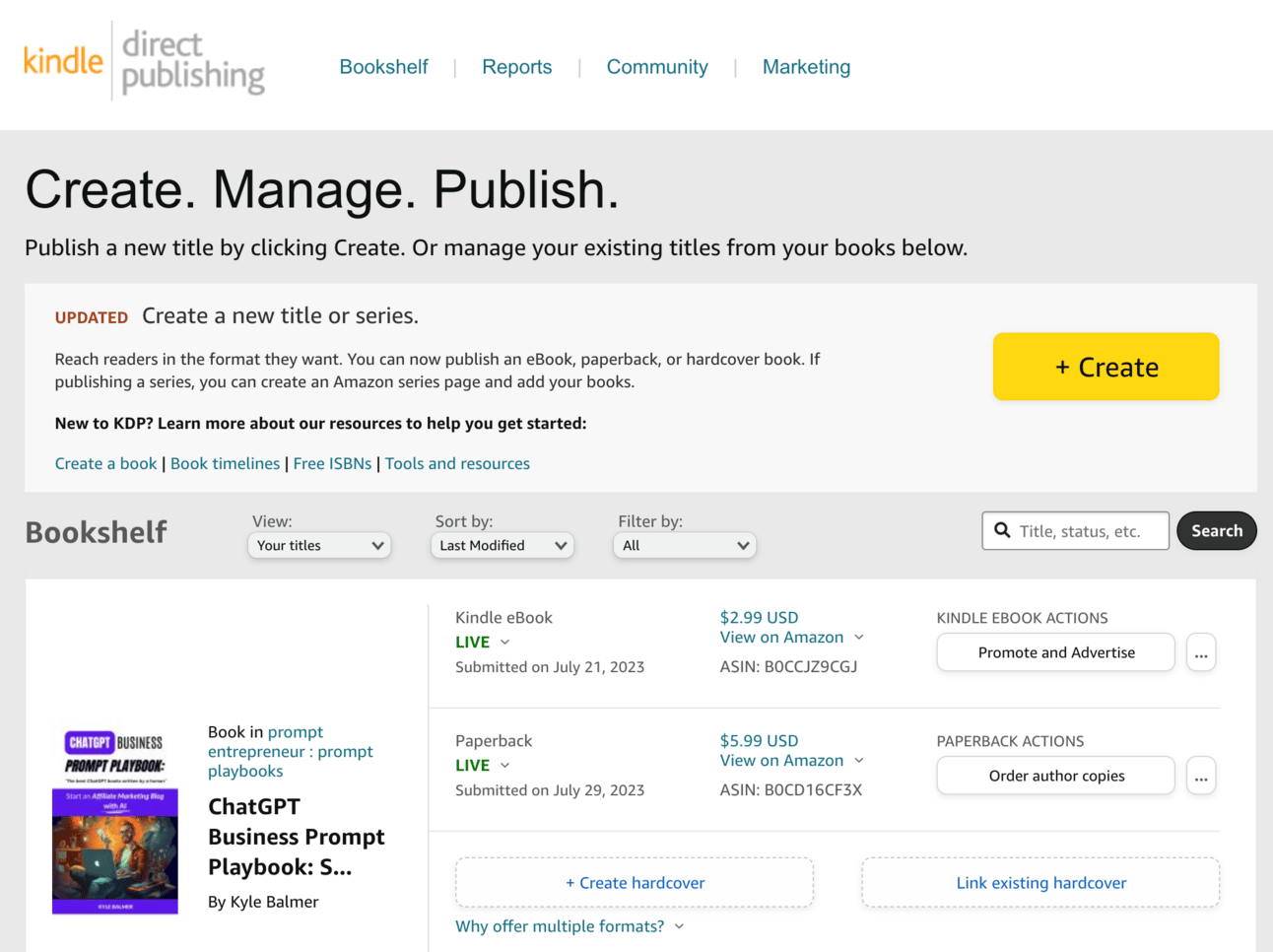
Here you’ll be able to see all your exiting books and edit their details. Once you start making sales you can also see sales results in the Reports tab at the top of the screen.
For now though we want to go ahead and create a new book. We do that by, you guessed it, hitting the huge yellow +Create button. You’ll next see this screen:
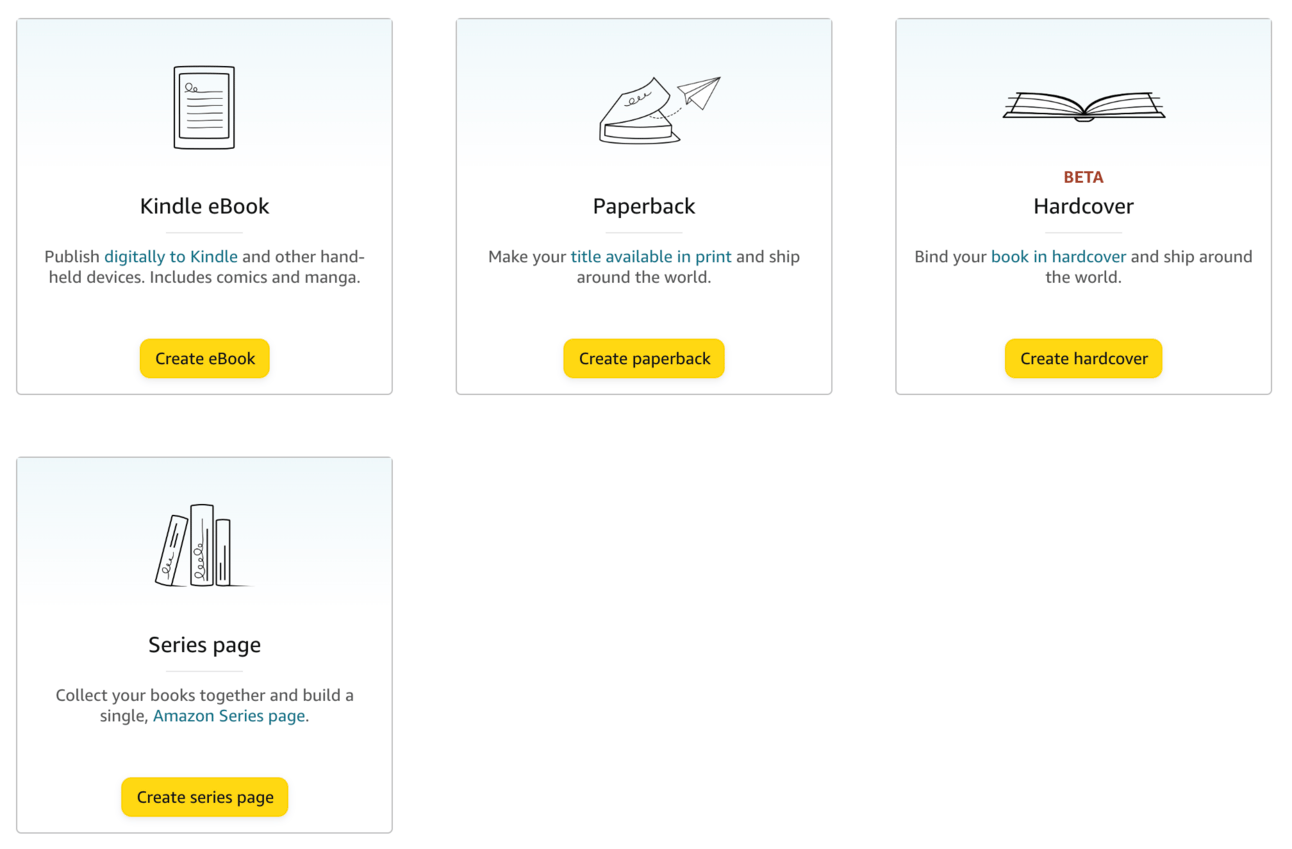
Go ahead and click Create eBook. Once you have sorted out your eBook Kindle version you can look at producing a Paperback version.
Be aware though that creating a paperback is more complex. Without getting stuck in the weeds here the basic difference is that a printed paperback has to be formatted so that every page is designed - you need to make sure paragraphs and headings don’t get weirdly cut off by the page turn.
This is not the case with an eBook which is more “fluid”. Because Kindles allow the reader to adjust their font size what words are on the page will be different for different readers. So we don’t have to worry about designing each page because Kindle will override that formatting anyway!
Now you’ll be in the main book creation interface. There are three main steps:

First up in details we have title and description.
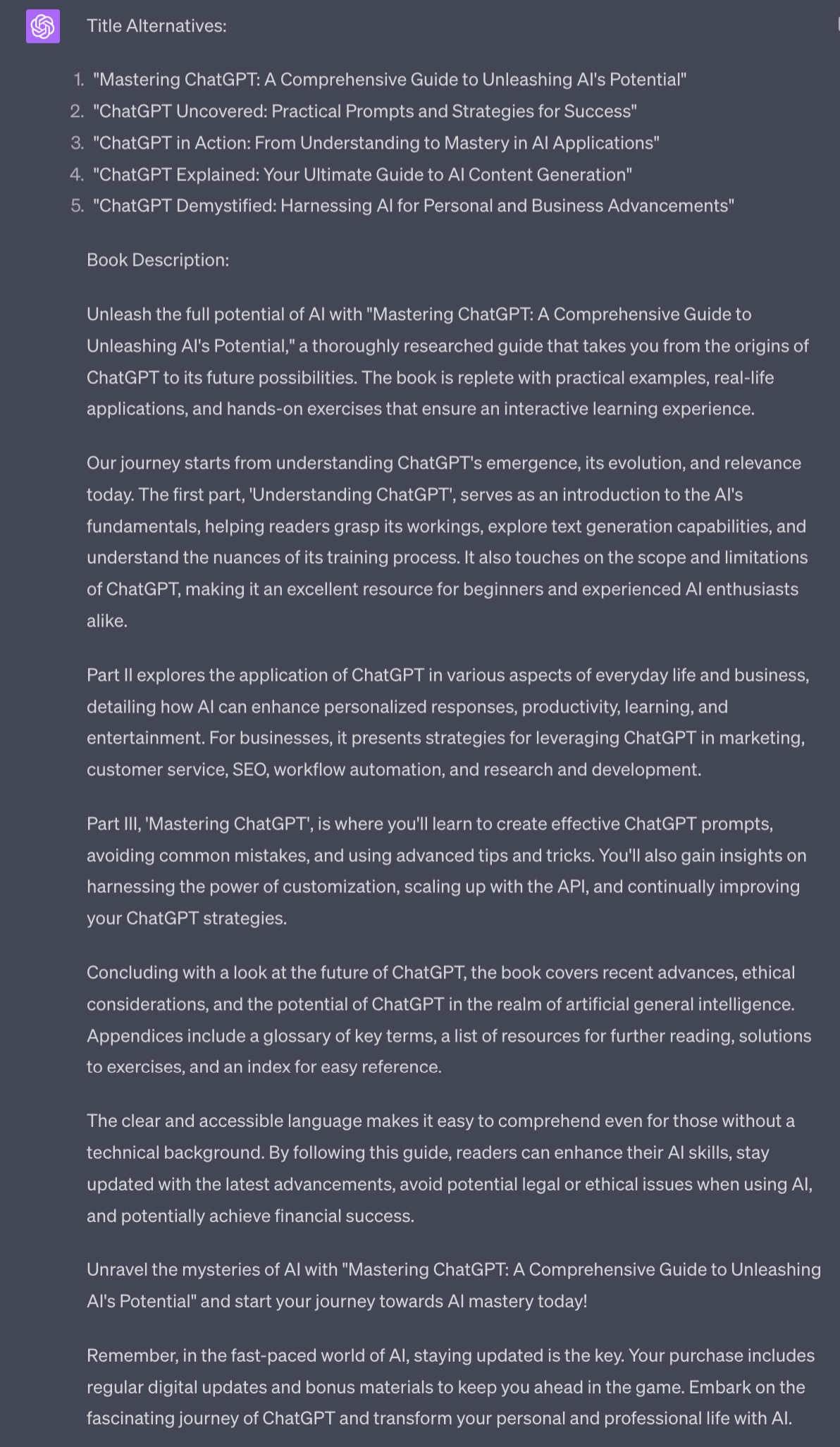
You may already have a title from the previous steps but we’ll use this prompt to generate some variations.
Act as an Amazon SEO expert.

Prepare 5 SEO optimised and eye-catching title alternatives

And a book description of 4000 characters.

For my book about [Category]

Keywords to include are [3 Amazon keywords]

Include the structure of the book, adding benefits of each chapter

#begin book structure#
[Copy paste book structure]
#end book structure#

Use these guidelines when structuring the book description, especially the benefits for the reader and positive comparisons of this book to others.

#Begin guidelines#
[Copy paste best practices and review feedback guidelines]
#End guidelines#
Use information from previous Parts to flesh out this prompt.
For the guidelines make sure to use both the best practices and the review feedback from Part 2.1 and Part 2.2
Lower down in the basic details we fill in more information that will help us get discovered on Amazon:
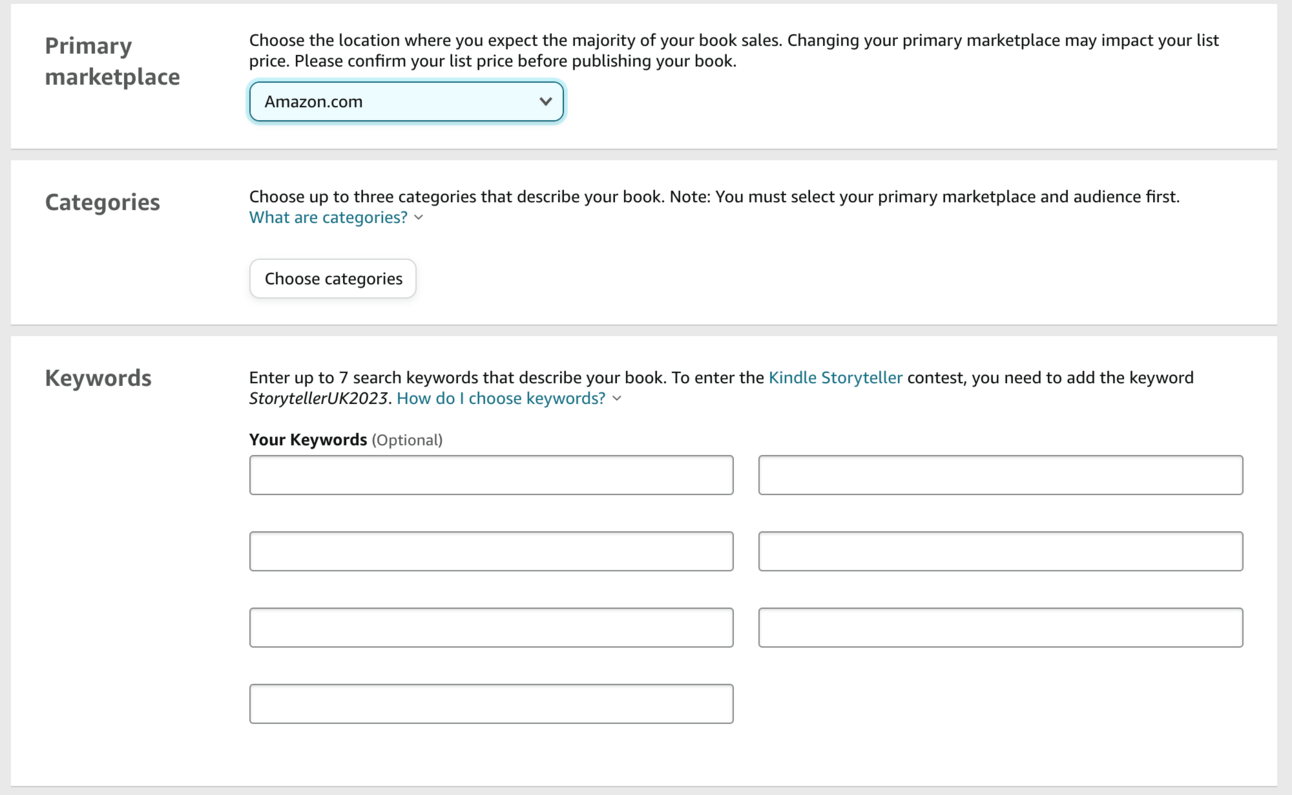
First up set your primary Marketplace to Amazon.com, the US Amazon. This will ensure widest reach. You’ll also be publishing on all the local Amazons but we want to optimise for the largest in the next step where we choose Category.
For category you should already know your primary category from the research process we conducted in Part 1. We’ve been using it as our “Topic” during this process. Go ahead and put it in.
Notice though we have 2 more spaces for category: we can have up to 3. Make sure to use all three!
For numbers 2 and 3 go with your runners-up from the research process in Part 1. We optimised for one throughout the planning and writing process but these additional categories should be close enough to also be valuable to rank in.
If in doubt go for a very niche one, even if the sales volume is low. Why? This will make it more likely that you will hit #1 and can call the book an #1 Amazon book!
For the Keywords you should already have a handful from the research process in Part 1 where we used external tools to check which are popular.
If you need additional keywords use this prompt under the Description you generated in the last step:
Act as an Amazon SEO expert

Analyse this book description

Provide potential Amazon keywords, ranked by effectiveness.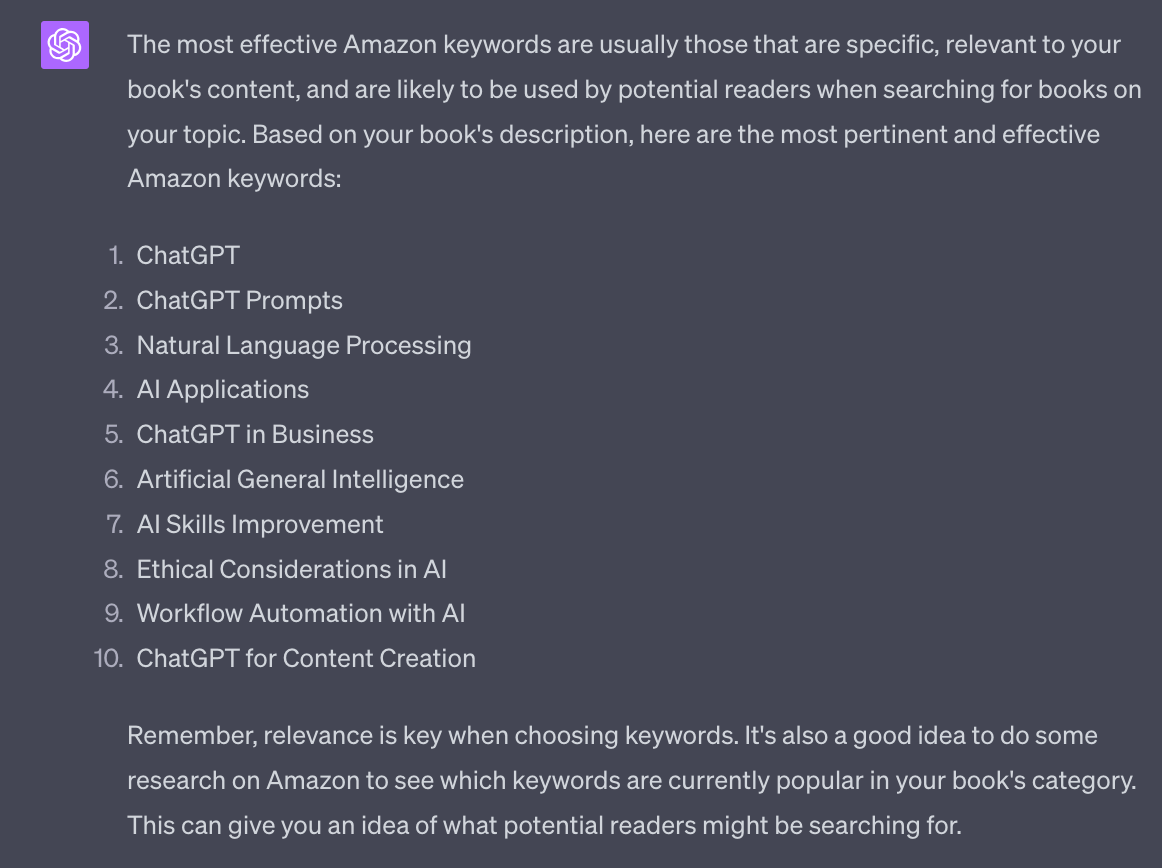
ChatGPT doesn’t have access to real time data but will give good relevant keywords. For example of these I know ChatGPT and ChatGPT Prompts are two of the top keywords.
Next up the actual book manuscript.
We can use the free Amazon tool Kindle Create. It’s available to download for Mac/PC here https://www.amazon.com/Kindle-Create
This is a desktop programme that allows us to format a manuscript.
It accepts Word, Google Doc and Pages documents.
So what we want to do is Copy / Paste everything from Notion into one of these formats.
If you have Mac I highly suggest using Pages as Kindle Create imports Pages files perfectly. Otherwise Word or Google Doc .doc work fine.
Once you’ve copy/pasted everything from Notion to your Word processor go through and check Titles, Headers and general formatting. Then import the document into Kindle Create.
It’s a nice easy to use tool so rather than me waste time walking you through every step I’ll point you to the excellent Kindle Create tutorial here https://kdp.amazon.com/en_US/help/topic/GYVL2CASGU9ACFVU
You can also find cost effective Kindle formatting gigs on Fiverr - a quick check shows gigs for under $10. Highly recommended if you want to skip this step.
Creating a cover for Kindle is nice and simple as it’s primarily just the front image.
Paperback covers are complex because it’s one image that includes front cover, back cover and spine - all with a space for the barcode that will be added.
We’ll focus on a Kindle cover for now - just know that the basic steps for paper are similar.
We have 3 choices here.
We can use Amazon’s cover creator. Its built into the KDP system and allows you to upload an image and overlay the title and author text over the top. It’s functional but doesn’t look professional.
Second, we can hire someone on Fiverr or Upwork. There are many people offering book cover services at reasonable prices. Just make sure to check their portfolios to find someone who’s work you like.
Third, we can use Canva. This is my suggested method. Head to https://www.canva.com/create/book-covers/ to get started.
Canva has hundreds (potentially thousands?) of templates. Most are free but some will only be available to Canva Pro subscribers.
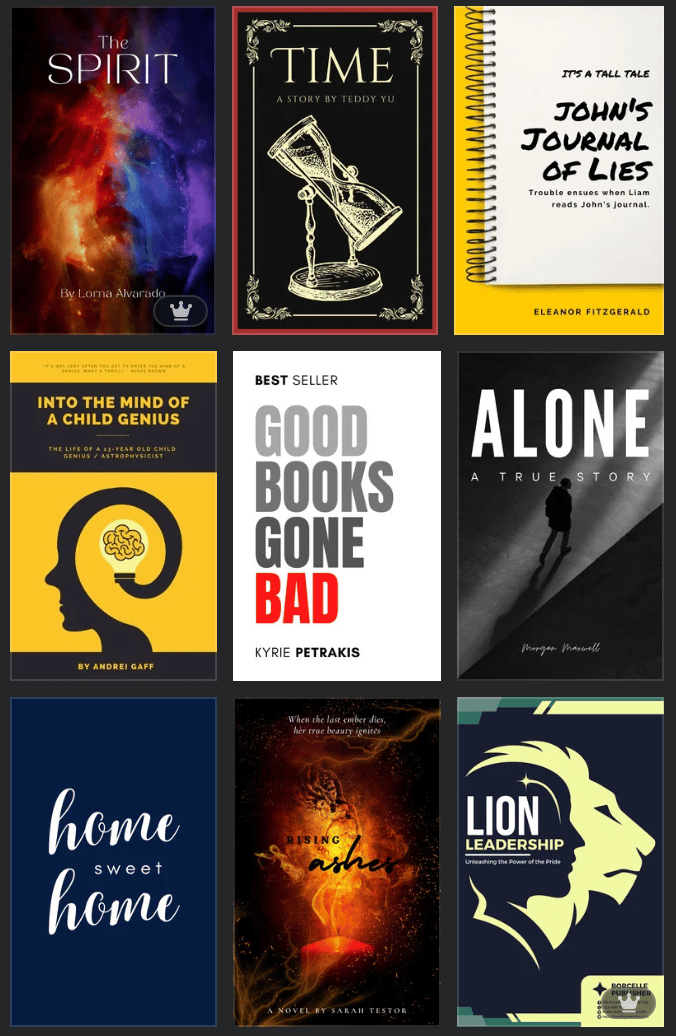
You simply select a template and then can edit by clicking on the element you want to change. The templates also have back covers which makes generating a paperback cover much simpler.
Go ahead and use Canva (or whichever method) to create your cover. Make sure that the export file is TIFF or JPEG and at least the dimensions 2560 height × 1600 width. Canva templates are automatically in the correct dimensions.
The final step before publishing is to set a price.
Your target price should be similar to what your competitors in the category are charging.
However, early on you want to come in at a lower price to help secure the first sales and reviews. The minimum price is $0.99 which will help us gain momentum.
However, be aware of Kindle’s pricing scheme.
If a book is $0.99 (the minimum) you will only get paid 35% royalty on a sale. Once it’s above $2.99 you will get 70% royalty.
For launch though, got for $0.99. I’ll talk tomorrow about why this is when we discuss launch strategy and promotion.
Right now you just need a price set so that the book can go to be reviewed.
When you are happy with all the details go ahead and publish. This will lock off the books from edits so make sure you are happy!
The review process is meant to take a couple of days but it can be up to 10 business days. Unfortunately you don’t really know - it will suddenly just be live one day so make sure you keep checking in!
In the meantime we’ll prep up everything for launch. That’s covered in the next, and final, Part of this guide.
A reminder of this week:
Part 1: Decide your book topic
Part 2: Plan your book
Part 3: Write your book
Part 4: Publish your book
Part 5: Market your book
See you tomorrow Prompt Entrepreneur!
Until then, keep PROMPTING!
Kyle, Harms and 🤖
PS: Remember to refer a friend to our newsletter and unlock our Prompt Entrepreneur Gift Box. This currently includes Notion guides on setting up a newsletter business, an affiliate marketing blog, a Udemy course and Facebook advertising - all using AI. To unlock the Gift Box just share the love with a friend!
In the run up to your launch we need to get our ducks in a row.
Already published? Don’t worry too much - we can still use this strategy. Ideally though we do this launch strategy in the first week after publishing so Amazon gets the signal that this is a great book.
First up, we need to enroll in KDP Select. You can do this during the publishing process or after.
KDP Select gives us a few benefits including expanded reach, higher royalties and the ability to run promotions. For this launch we’re most interested in the 5 day Free Book promotion that it allows.
You can enrol in KDP Select during publishing or manually here https://kdp.amazon.com/en_US/select
Once you’ve enrolled in Kindle Select schedule your free dates. You’ll need to wait until your book is published to be able to do this.
You can do this from your KDP Dashboard in the Marketing tab.
Look for this section:
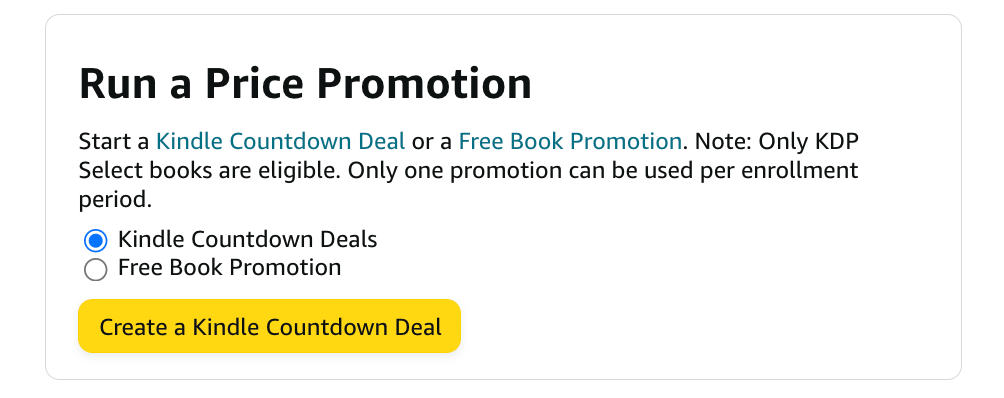
Go for Free Book Promotion and set the free days about a week from now - Monday to Friday. This will give us a decent lead time to complete the rest of the steps.
Now we want to get some good reviews on the book before launch. Your book should be currently set at $0.99 as per the last Part. Gets some friends and family to purchase the book and leave reviews.
Because the book is currently $0.99 I recommend giving a $1 to 20 or so people to go grab your book and write a review. You don’t have to specify a good review but if they are friends and family hopefully they’ll give you good reviews anyway!
Optionally at this point you can also submit your book to free book giveaway sites. There are lots of directories of these online - https://kindlepreneur.com/list-sites-promote-free-amazon-books/ is one example that has a list of them.
These sites will send your free book promotion out to their email lists and social media to get you more downloads. Some of these submissions sites are free, some are paid.
I wouldn’t worry about paying unless you find a very attractive deal. This step is optional and I’d recommend only the free submissions.
Finally, the day before launch we increase the price.
Take it from $0.99 to the price that your best competitors charge - ie. $4.99. Check the competitor pricing and use this as a guide.
What this does is increase the perceived value of the free giveaway - instead of being discounted from $0.99 to $0 we’re going to discount from $4.99 to $0.
We now have 5 days to shift as many free copies as possible.
We want to give away lots of free copies. This will shoot us up the Kindle rankings and help us secure reviews.
How we get the word out depends on our existing marketing channels. Assuming you have an audience already I’d recommend:
Emailing your list day 1 with the announcement
Pushing social media days 1-4
Emailing again day 4-5 with “last call” announcement
If you don’t have an audience you can run paid social media ads or (trickier but powerful) try to get coverage from someone else in the space who likes your work.
One particularly strong method is to find a community who is interested in your topic and start providing value in this space weeks if not months before launch. Obviously this will slow down your launch but it’ll increase the chance of success.
Join a community and start providing massive value. Don’t shill your book. Just be helpful. As you approach launch mention you’ve written a book - ask for feedback. Again you’re not selling it, just making people aware. At launch post to thank the community for helping you put the book together and telling them there are free copies to thank everyone for the assistance.
Finally, the free book giveaway sites mentioned above will be more valuable here if you don’t have an owned audience.
We also want reviews. You’d think that giving away hundreds of copies of your book would lead to hundreds of reviews right? Wrong!
Normally when I give away books for every 100 or so copies I’ll get a single review. People are busy - I get it.
So we need to (ethically!) bribe them a little bit. When doing your giveaway announcements sweeten the deal a bit. Prepare some sort of gift that you’ll give to everyone who sends you a screenshot of their review.
Give them an email or social media account to send the screenshot to and when they hit you up ping them over the gift. Review compliance will go through the roof!
Doing all this combined with choosing a low competition category as discussed in previous Parts should see your book hit #1 in the respective free Kindle category.
As soon as it does: screenshot that!
Spread the news to your followers that the book is #1.
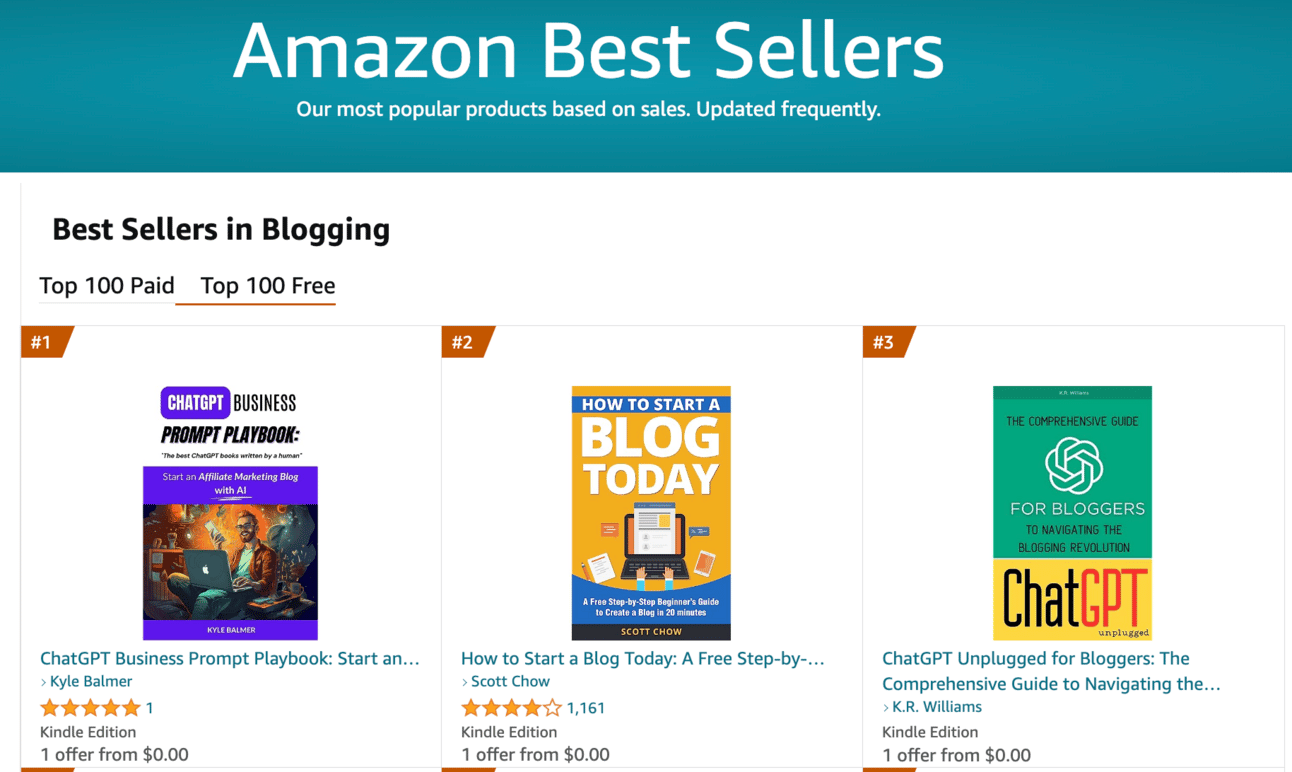
This sort of screenshot is fantastic social proof that your book is doing well. People will see that and want to jump on the bandwagon and get a free copy. Ride that momentum.
Didn’t hit #1?
The category was too competitive or your free giveaway didn’t hit enough copies.
Not a problem - you now know the process and for next time can i) choose a more niche category and/or ii) prepare an audience beforehand.
I can’t guarantee that you’ll hit #1 but I can guarantee that by getting to this point you’ve learned a lot of skills and techniques that will make it much easier next time!
As soon as your free period ends set the price back to $0.99.
We want to transition our momentum from the free Kindle charts to the paid charts so we drop the price.
Hold the lower price until you start ranking on paid. You want to be on the first page for your main keywords and ideally hitting #1-3 in one or more of your categories.
If/when this happens nudge price up to $2.99 so you can received the 70% royalty.
This only holds if your competitors are also around this price point - if everyone is playing at a lower price point you’ll need to as well unless you have something very special.
Feel free to experiment with pricing at this time though - it can be easily switched in the KDP backend.
Once you are out of the initial launch I recommend also looking at some of the other marketing options available in the Dashboard.
The holy grail here are Amazon ads - if you can successful sell a book for less than the cost it takes to advertise it then you can really scale.
There are many other options in this dashboard that are free - A+ content for example is a great way to beef up the look and feel of your listing and “Nominate your book” is a nice bonus way to expand reach.
Take some time to learn about all the options and test them out with your book.
Well done. You’re now a published author. Pretty cool huh?
Hopefully your book is making steady sales and bringing in an automatic income at this point. If it is: celebrate!
If it’s not then you can use the built-in Amazon marketing methods or look to publishing your next book.
With AI the process is so quick that you can take multiple “at bats” without spending months or years writing and editing each one!
I’m currently publishing one book a week which is possible but not recommended unless you are a little bit mad!
You can also use your Kindle books alongside other business ventures and marketing. For instance I use Kindle books primarily to bring people to my newsletter and socials. Or as free giveaways connected to courses and other products.
Remember therefore that even if you don’t currently have a #1 bestseller on your hands you do have a powerful business asset!
A reminder of this week:
Part 1: Decide your book topic
Part 2: Plan your book
Part 3: Write your book
Part 4: Publish your book
Part 5: Market your book
See you tomorrow Prompt Entrepreneur!
Until then, keep PROMPTING!
Kyle, Harms and 🤖
PS: Remember to refer a friend to our newsletter and unlock our Prompt Entrepreneur Gift Box. This currently includes Notion guides on setting up a newsletter business, an affiliate marketing blog, a Udemy course and Facebook advertising - all using AI. To unlock the Gift Box just share the love with a friend!
Are you ready to take control of your publishing journey and unleash your creativity with the power of AI? The '📚 Kindle Direct Publishing with AI | Prompt Playbook' is your ultimate guide to navigating the world of self-publishing on Amazon. This comprehensive playbook not only demystifies the publishing process but also equips you with the AI-driven strategies you need to craft, publish, and market your book effectively. Transform your ideas into bestsellers and build a brand that resonates with readers around the globe, all while generating passive income through continuous sales.
This playbook is designed for aspiring authors, entrepreneurs, and content creators who are eager to share their knowledge or stories through self-published books. If you've ever felt overwhelmed by the traditional publishing process or doubted your ability to publish successfully, this playbook is here to empower you. You'll find practical advice and AI-driven insights that will help you overcome common challenges, enabling you to confidently navigate the self-publishing landscape and achieve your writing aspirations.
No prior writing experience is necessary! This playbook is designed to guide anyone, regardless of their background, through the self-publishing process.
The time commitment varies based on your goals and availability, but the playbook provides a structured approach to help you maximize your efforts efficiently.
While AI can assist in generating ideas and content, it's crucial to maintain your unique voice and perspective, so the playbook emphasizes a balanced approach.
Absolutely! This playbook offers valuable insights on marketing and optimizing your existing book for better visibility and sales.
Yes, the strategies outlined in this playbook are applicable to both fiction and non-fiction authors, making it a versatile resource for all types of writers.