
AI Authority
Welcome to the '🤝 Building a Membership Community with AI | Prompt Playbook', where we delve into the transformative power of AI in creating thriving membership communities.
Start ReadingThis week’s vote was a resounding victory for building a membership community.
Webinars only got 10% of the vote, making this one of the most decisive votes we’ve had at Prompt Entrepreneur!
Poor webinars! 😃
This week therefore we’ll be covering how to set up a membership community for your business.
Communities are a powerful way to build engagement with your tribe in a protected space, away from the busyness of social media where you need to compete for attention.
Additionally communities open up exciting revenue opportunities like membership subscriptions. These allow you to provide consistent value to your membership in exchange for a monthly, quarterly or annual payment.
This works well because it allows you to get paid consistently to provide value to the people you want to serve. You aren’t always chasing growth by launching new products and services but can instead focus on working with and helping your community.
We’ll be covering the following topics:
Part 1: Deciding our community’s value
Part 2: Building the tribe
Part 3: Setting up your membership platform
Part 4: Launching and growing your community
Part 5: Monetising your paid community
Let’s get straight into it and talk about how a membership community will fit into your business.
Before I kick off though I want to make sure you haven’t missed the waiting list for my community.
Good timing eh? 😉 And it’s only 40% intentional!
I’m launching a comprehensive course and community in a few weeks.
With the sole intention of helping you start your first business with the help of AI.
Then this is the course for you. Like, for real for real.
There’s a waitlist to join. Currently it’s over 500 people.
It’s free to hop on the waitlist.
Grab your spot here ==> https://forms.gle/1sJdjCnHhnqucjJc8
to be kept in the loop about launch + special subscriber bonuses.
Because membership communities are not that well-known of a subject it’s useful to first immerse yourself in other communities.
This is both to help us get an idea of what we can do in our community when it launches…
…as well as being competitive research on what other people are doing in our niche.
Lots of communities will be paid.
I’m not suggesting signing up to lots (unless they are useful!) but instead finding ones with free levels and/or detailed webpages that talk about what’s included.
Let’s find some membership communities using this prompt:
Act as a market researcher

Find 20 membership communities in the [topic] space

Provide name, founder(s), basic details, what's included, strengths and weaknesses, price if available.

Return the results in tabular format
In the example below I used “copywriting” as the topic. I’ll continue with this niche over the Playbook.
Here’s a small snippet of the results.
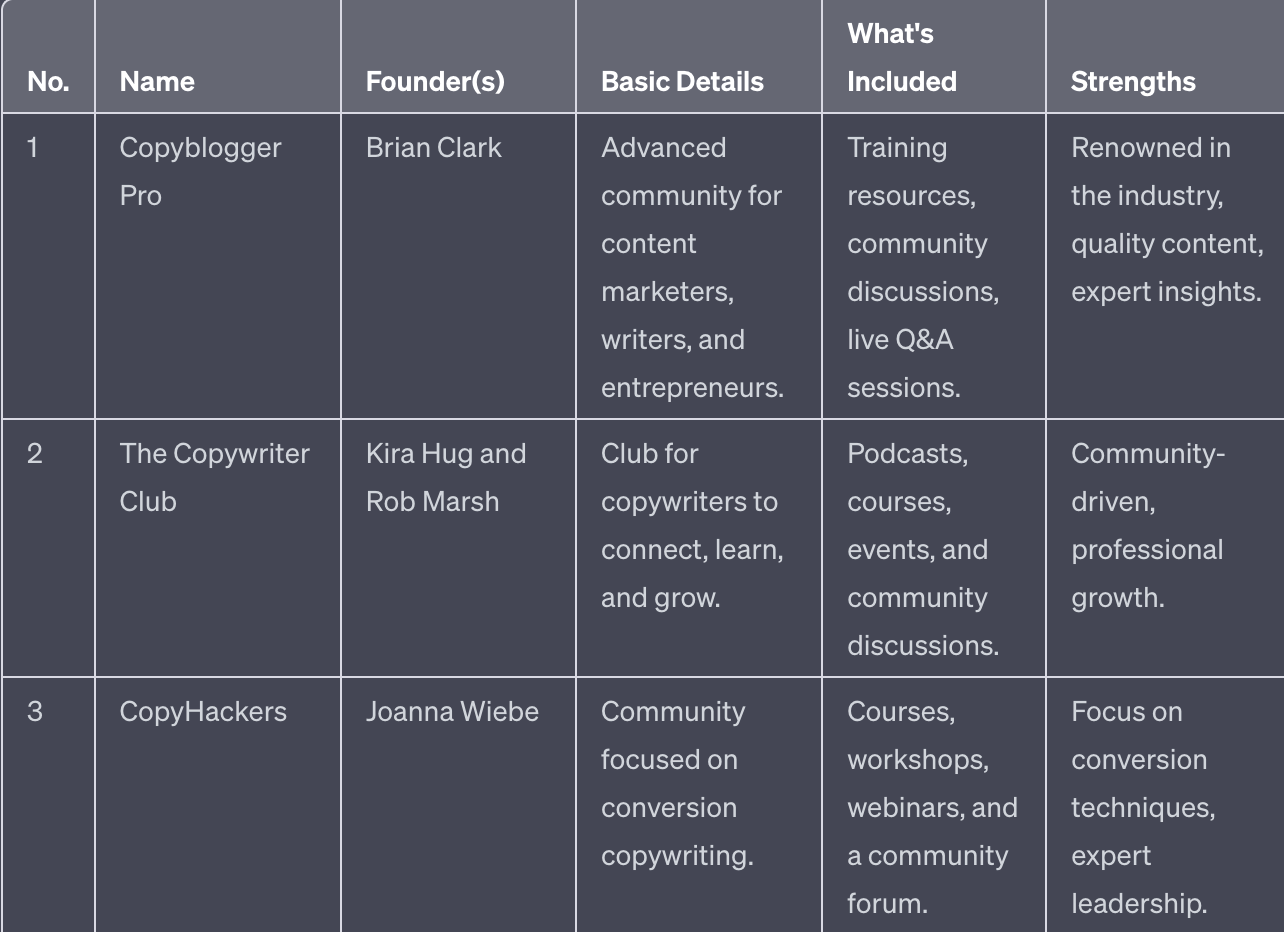
The full results are much more detailed but too much to show here.
Be aware that results will also be affected by the training data cut-off date for ChatGPT. For the most part though this will capture the majority of communities.
Go ahead and visit these communities.
You’ll notice that there’s a broad range of what a community can include.
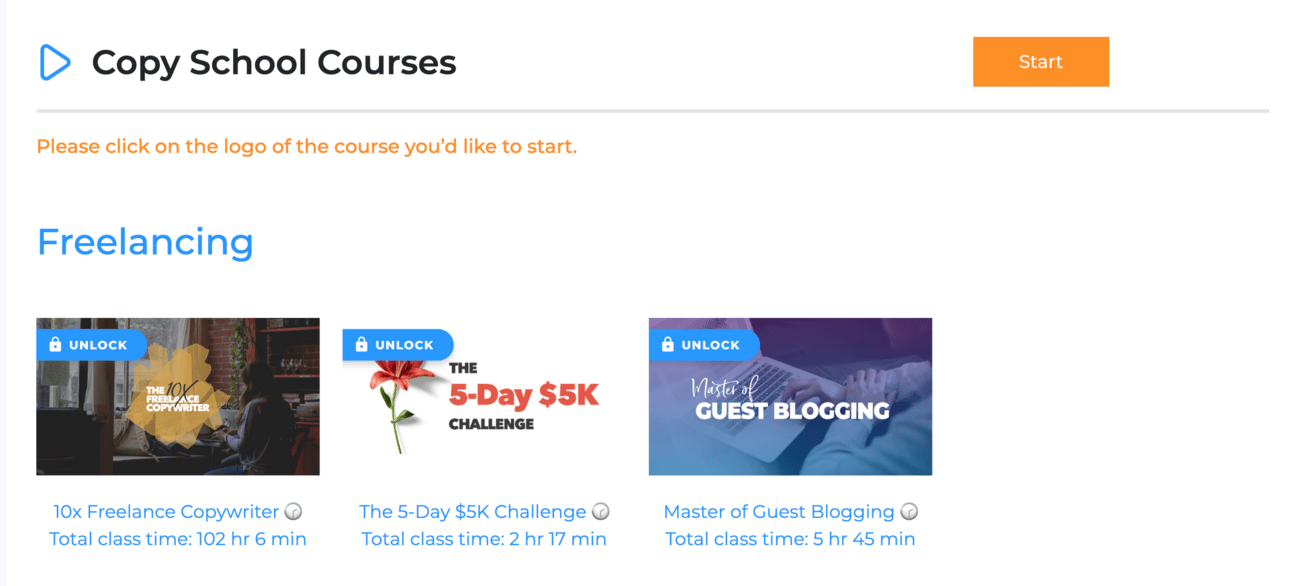
Copy School for Example is very course focused:
CopyBlogger Pro (Copyblogger Academy) on the other hand is more live Q&A and community focused:
Go through each making notes about what’s available on the market.
If they have free courses or free levels of their community go ahead and sign up.
If there are paid communities that look valuable for your business then sign up.
The more your can immerse yourself in what’s already available in your niche the better.
Membership communities all consist of three basic elements:
Platform
Content
Community
The platform is the technology you’ll be using to give people access to your community. We’ll talk about options in Part 3. Lots of people spend far too long on this step but it’s not as important as you think.
The content is what you actually provide in your community. We’ve seen some basic examples above - you could have course material, monthly calls, Q&As etc.
The list of what you can do with your community is really limited by your imagination. We’ll explore this shortly.
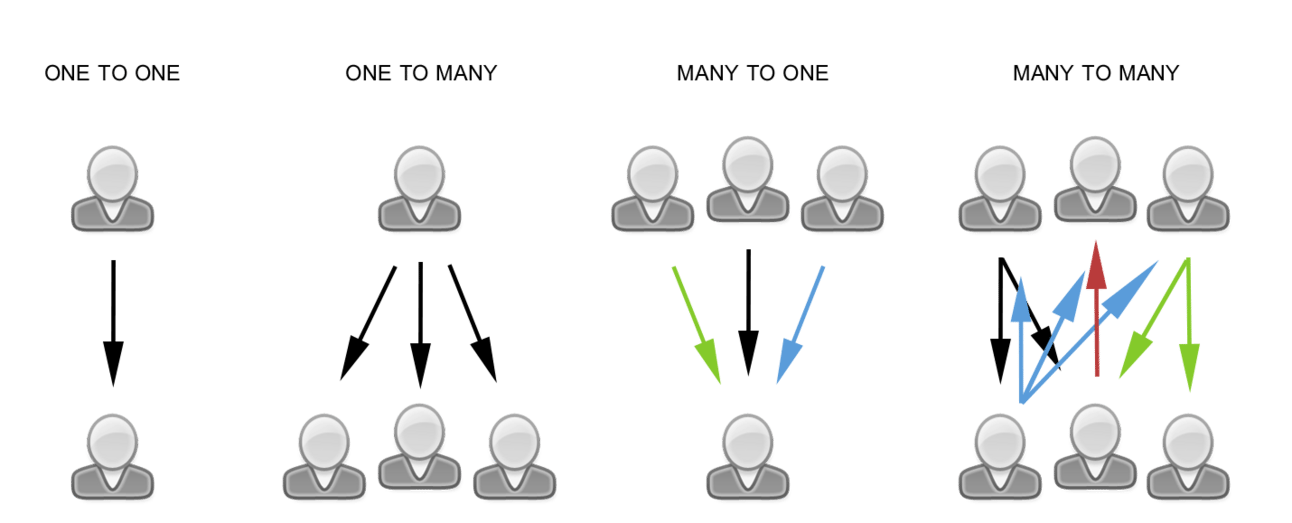
Finally, there’s the community itself. Content is how you talk to members. Community is how they talk to one another in a “many to many” fashion:

A vibrant community will have this sort of interaction. Ideally you want members talking to and helping each other rather than waiting for you.
This takes work but is possible with the right permissions and encouragements in place.
What’s important here is that all these elements (platform, content and community) are serving one goal: providing value to your members.
As with all our other Playbooks this remains the watchword: value. What value does our business produce for our customers?
Value comes from solving problems and achieving goals that our customers have.
We want to structure our community around this. Here’s a prompt:
Act as an expert membership community creator.

My community is about [topic]

My customers main problems are [problem areas]

What content and community features could I provide to best help my customers?
Following on with the copywriting example I’ve used the problem areas of “low revenue, failed launches, procrastination”
ChatGPT will take the problem areas and your topic and generate ideas for what you can include in your community.
There’s a lot here though so we’re going to be more focused in the next step.
The brainstorm in the last step led to an awful lot of ideas.
Could we deploy them all? Probably not! Certainly not for an early community.
Instead we want to focus on what’s valuable for members at different stages of their journey.
This prompt will help us refine the value structure of the business. Use this below the previous work for simplicity or otherwise copy/paste in the past work so ChatGPT has context.
Act as an expert membership community creator.

Structure my membership community into:
1. Free guest access level
2. Core level
3. Premium level

Free guest access should preview value and make people keen to join the core level. It should require no ongoing work once content is in place. It should give guests no access to other members.

Core level is where the core content and community sit. The resources required to achieve their goals are present for the members here. They can work through the content at their own speed. There are limited live interactions, one to many, to help their progress.

Premium level is where members can reach their goals fast with premium resources and features. Higher levels of access to me the community leader. Small numbers of elite members.

For each level provide a name and indicative pricing.
I’ve used this prompt below the existing chat so that ChatGPT can pull in details about the content and community features we brainstormed.
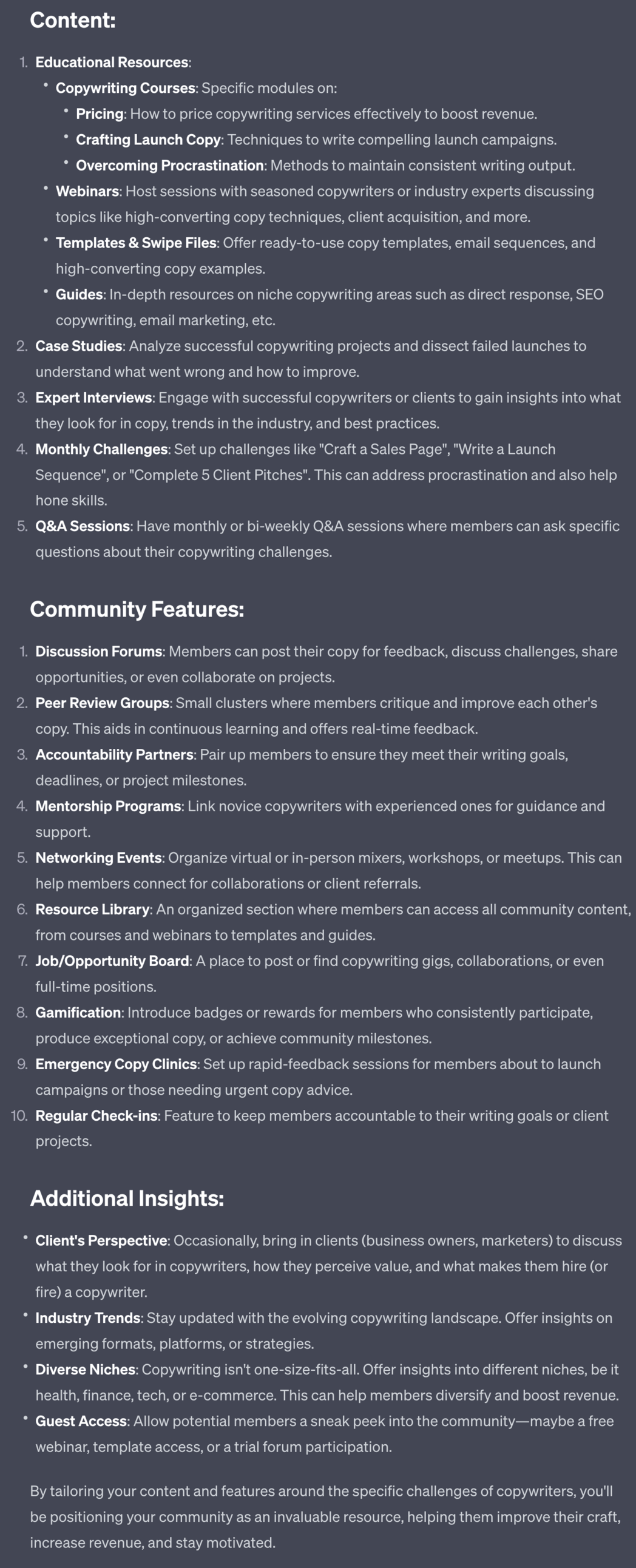
Notice that I’ve locked off community interaction for the free level. The reason for this is reduce spammers getting into the community and being able to message your members. This is optional but I’ve found a useful practice.
The rest of the content and community features have been sorted into 3 levels: free, core and premium. I’ve asked the prompt to also generate some names. These can obviously be changed.
Go through your structure and compare it to what’s already on the market - how does it stack up compared to other communities?
You’re aiming to provide more value and a more realistic route for your members to achieve their goals.
Remove any elements that don’t serve this : if it’s not valuable to the members then drop it.
Free Trial - Premium
We’re providing a free trial of the Premium Prompts. Premium Prompts will be available for members only once our community launches. Stay tuned.
Let’s tie together our market research from the first step with our own community structure to look for potential improvements.
Use this prompt, again below all of the existing work.
Act as a community designer

Refer to the list of membership communities researched above.
And to my own 3 level community structure.

1. Find gaps in the market that my community fills. Provide a list.
2. Find gaps in my course that other many other communities fill that I do not. Provide a list.
3. Adjust my community structure with both 1 and 2 in mind to improve its position in the market.

Provide the full revised community structure. The output is complex so here it is split out into pieces.
First the gaps in the market that your community fills:
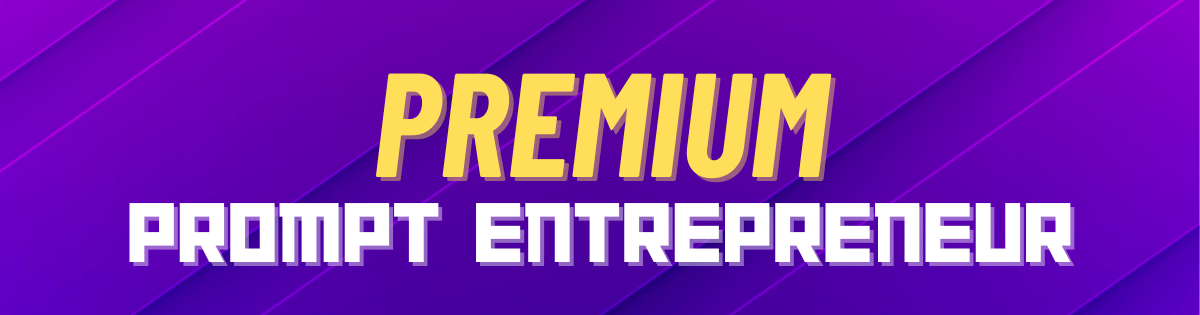
This gives us some strong marketing hooks we can focus on later. Take advantage of these as they offer greater value to members than the current offerings.
Next, potential gaps in our community:
We use this to flag up potential deficiencies that our current community plan has. These are potentials we might want to add.
Finally, a revised version of our community structure that leverages and remedies these points:
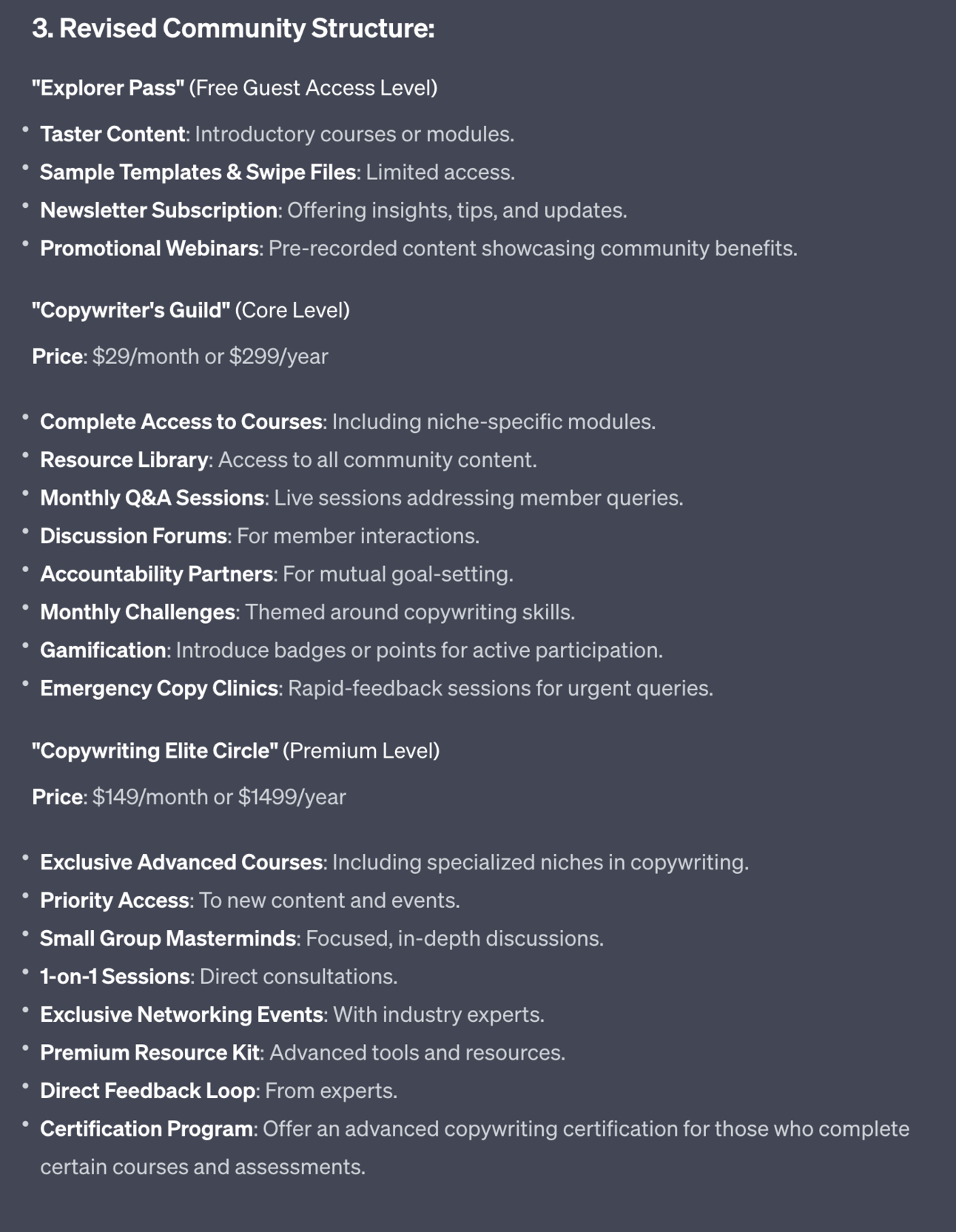
This revised structure takes the points above and folds them in.
Again adjust as required. But know also that we’ll be tweaking our structure as we go along with the building so don’t fret about getting it perfect. As I always say done is better than perfect. Keep moving.
In this Part we’ve built out the basic value structure of the membership community we’ll be building.
In the next Part we’ll be working on our branding and how to make our community more than the sum of its parts.
A reminder of what we’re covering this week :
Part 1: Deciding our community’s value
Part 2: Building the tribe
Part 3: Setting up your membership platform
Part 4: Launching and growing your community
Part 5: Monetising your paid community
See you tomorrow Prompt Entrepreneur!
Until then, keep PROMPTING!
Kyle
Today we’re going to shape up the identity of our community.
We’ll be borrowing on the concept of Tribe here to help define our community identity, what we stand for, what we are against and what the community will help people to achieve.
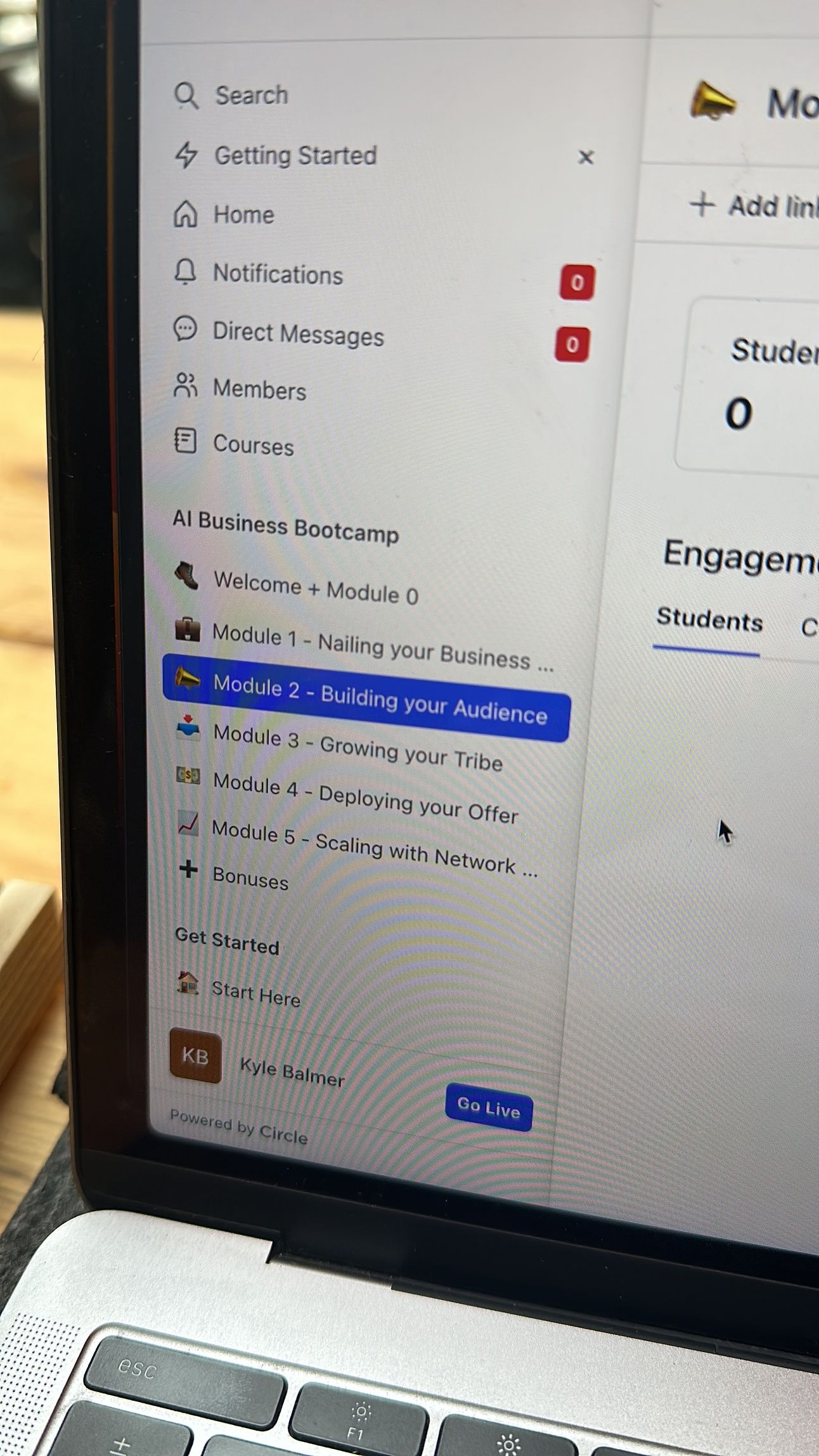
Speaking of communities ours is shaping up nicely. We have our new home and I’m currently building out the course elements.
Here’s the view from the frontlines:
There’s a waitlist to join. Currently it’s over 500 people.
It’s free to hop on the waitlist.
Grab your spot here ==> https://forms.gle/1sJdjCnHhnqucjJc8
to be kept in the loop about launch + special subscriber bonuses.
This Part of the Playbook is about building our Tribe.
But what is a tribe?
I’m borrowing the concept from marketing expert Seth Godin. He defines a tribe as:
A tribe is a group of people connected to one another, connected to a leader, and connected to an idea. For millions of years, human beings have been part of one tribe or another. A group needs only two things to be a tribe: a shared interest and a way to communicate.
Your membership community is a meeting place for your tribe.
You are the leader.
They’ll be connected to you and one another in your community space.
And you’ll have a common idea that’ll you’ll all be focusing on. We’re defining that idea in this Part.
Tribe is also a component of my BATON framework: Business, Audience, Tribe, Offer, Network.
It’s the vital linkage between building up an Audience and making an Offer. Tribe is where we create trust before we try to sell anyone anything.
Remember we’re building businesses. We’re not just building a community for the sake of it - we’re doing so in order to make sales to our loyal fans!
Our community will be built around a big idea.
The big idea is what unites everyone in the community and ties them to your leadership.
Act as a business coach.

Generate a vision, values and mission statements for my business.

My business is in the [topic] niche.

Ask me these questions one at a time. Get my answer, confirm you have received the answer and ask me the next question.

Values:
1. Present me with a list of 5 core values and ask me to rank them 1st to 5th in terms of importance. Repeat this with another 5 values 3 times over.
2. then take the top two values from the previous 3 answers (for 6 total) and present them to me for a final ranking.

Vision:
1.Where do we want to see our business in 5 years or more?
2. What does our desired future look like?
3. What goals and milestones will help us work towards our vision?

Mission:
1. What is the fundamental purpose of our business? What problem are we trying to solve or need are we trying to meet?
2. Who are our key customers and stakeholders? How can we create the most value for them?
3. How will the community fulfil our purpose? What makes us different from competitors?

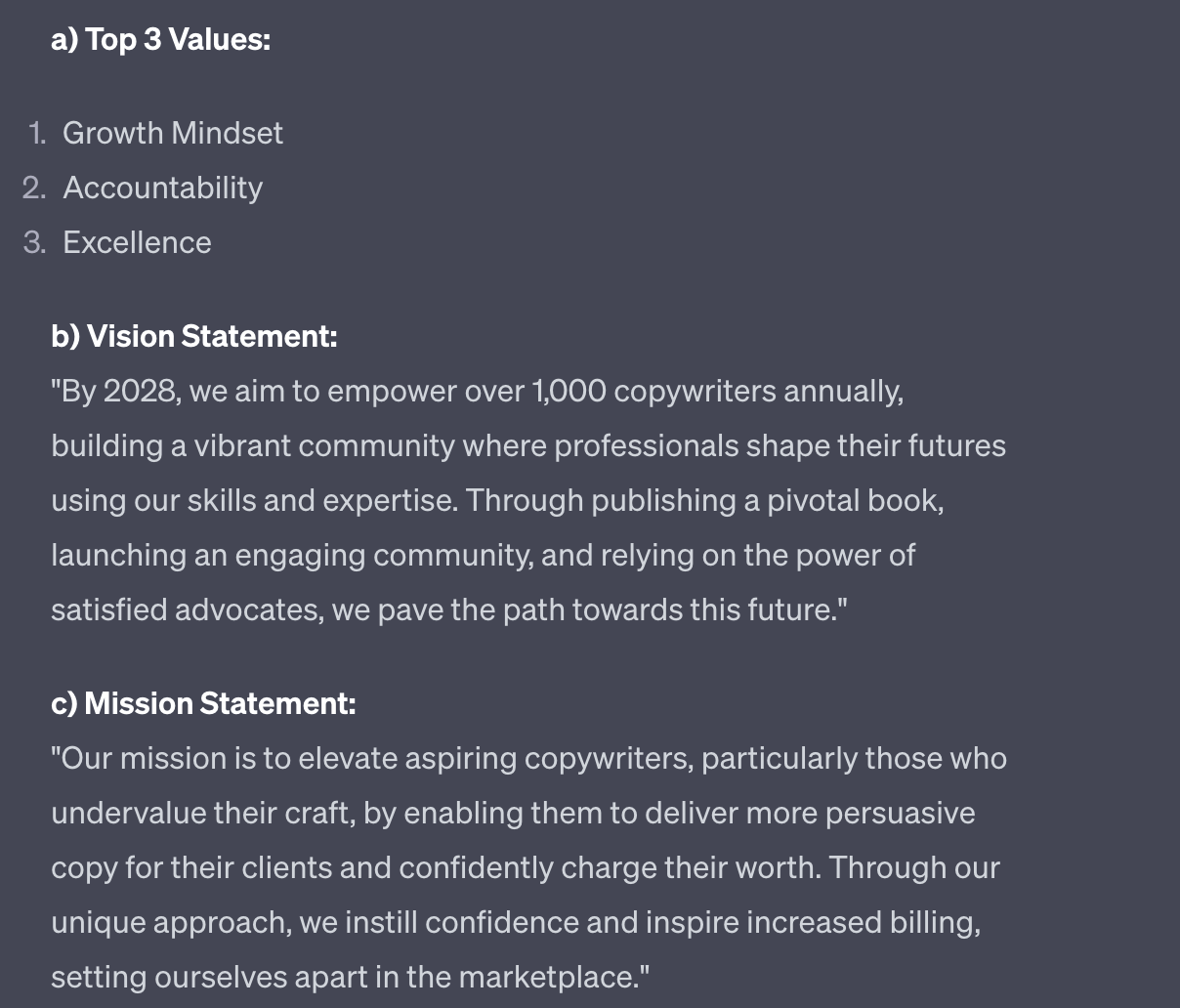
Combine the results into:
a) top 3 values
b) vision statement
c) mission statement
d) a combined one sentence encapsulation of the "big idea" our business represents
I ran this prompt using the example copywriting business we used in the last Part.
Big Idea statement:
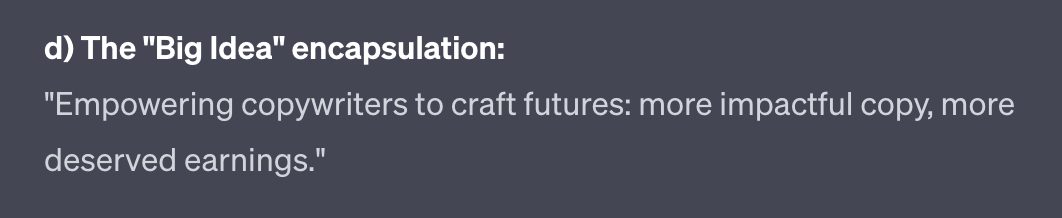
The Big Idea statement here is the primary outcome we need.
It should excite you. If it doesn’t excite you it won’t excite the members of your community.
Remember this is the Big Idea that will unite the community to each other and themselves. So make sure it rings true to you.
Every strong tribe has an enemy.
Think Coca Cola vs. Pepsi, iPhone vs. Android, Nike vs. Reebok.
Adherents of one side wouldn’t be seen dead supporting the other.
The strongest brands evoke this sort of loyalty.
Having a common enemy is the strong cement that will bind your tribe.
Now don’t worry - the enemy doesn’t need to be an individual person or competitor. I’d advise against this sort of personal attack.
Instead I suggest your common enemy be more abstract.
Some force that holds back your members and stops them reaching their full potential.
Based on this Big Idea, give me 10 potential 'common enemies' that I can use to create an 'us against them' mentality.

The common enemies should be abstract concepts , sociological structures, old-fashioned traditions, unthinking behaviour, accepted but incorrect norms. 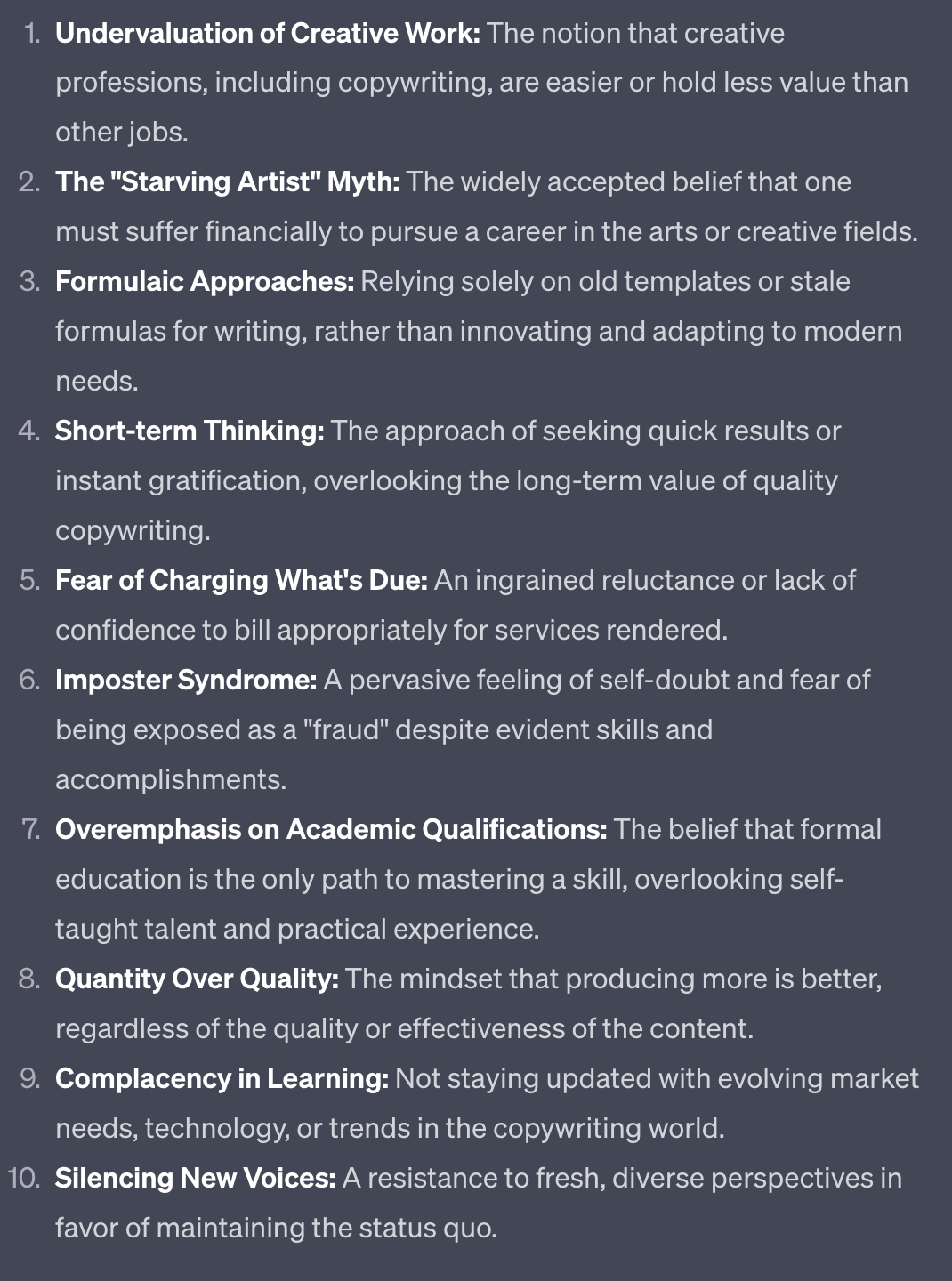
This prompt takes the Big Idea that you just generated and turns it into a list of 10 potential common enemies that you can turn your community against.
Select a common enemy that resonates or alternatively ask for more until you get a good candidate.
Now we’re going to combine the work from the last Part (our course structure) with the work we’ve just done on our Big Idea and common enemy.
Grab your community structure from the last Part and copy/paste it into this prompt:
Act as a membership community marketer.

Use the Big Idea and common enemy [chosen common enemy]

along with the course structure I provide below

To generate a description on how my community serves the members and helps them achieve their goals.

[Copy/paste community structure]
I’ve used the common enemy “fear of charging what’s due” and then copy/pasted the whole community structure from yesterday below the prompt.
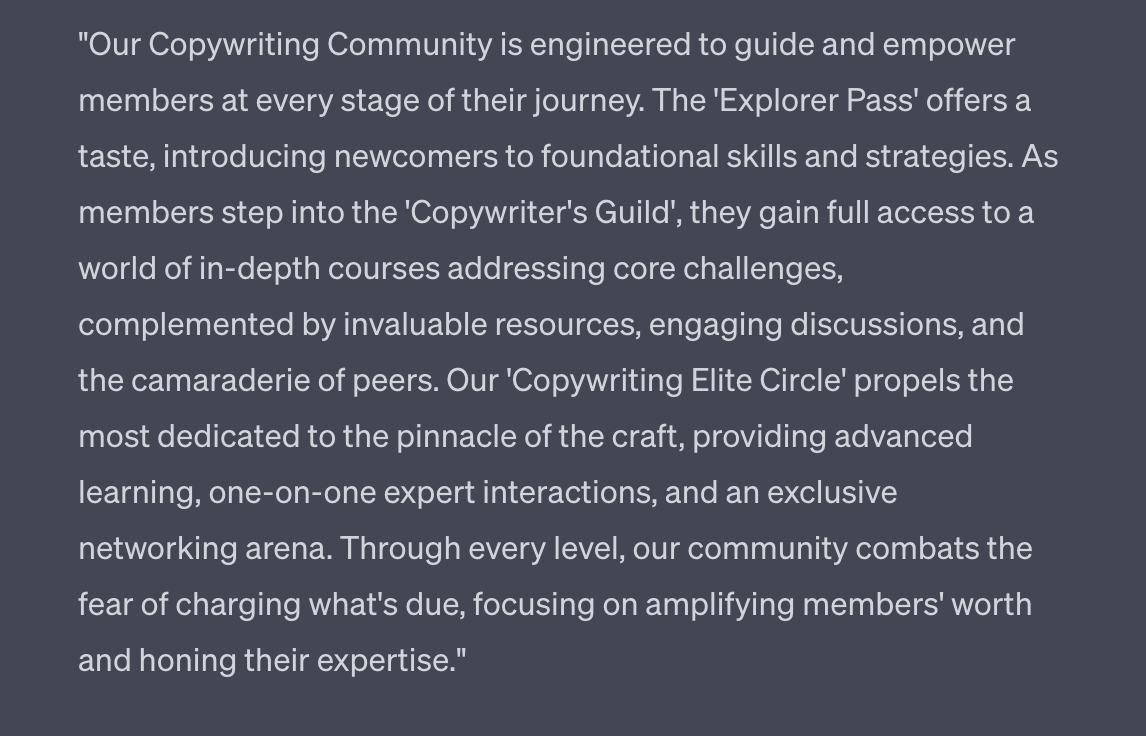
This encapsulates all the previous work into a nice short description that becomes your primary pitch, explaining what it is your community will do for its members.
Finally, we want to tie everything together with a name.
There’s power in a good name.
And it allows our tribe to distinguish themselves from others.
Let’s use this prompt below all the other work we’ve been doing in this Part:
Act as a marketing copywriter.

Based on the description above

Generate 10 possible names for my members to call themselves

The names should be used to strongly identify members and distinguish them from others who are non-members

Focus on single word names that are easy to say.
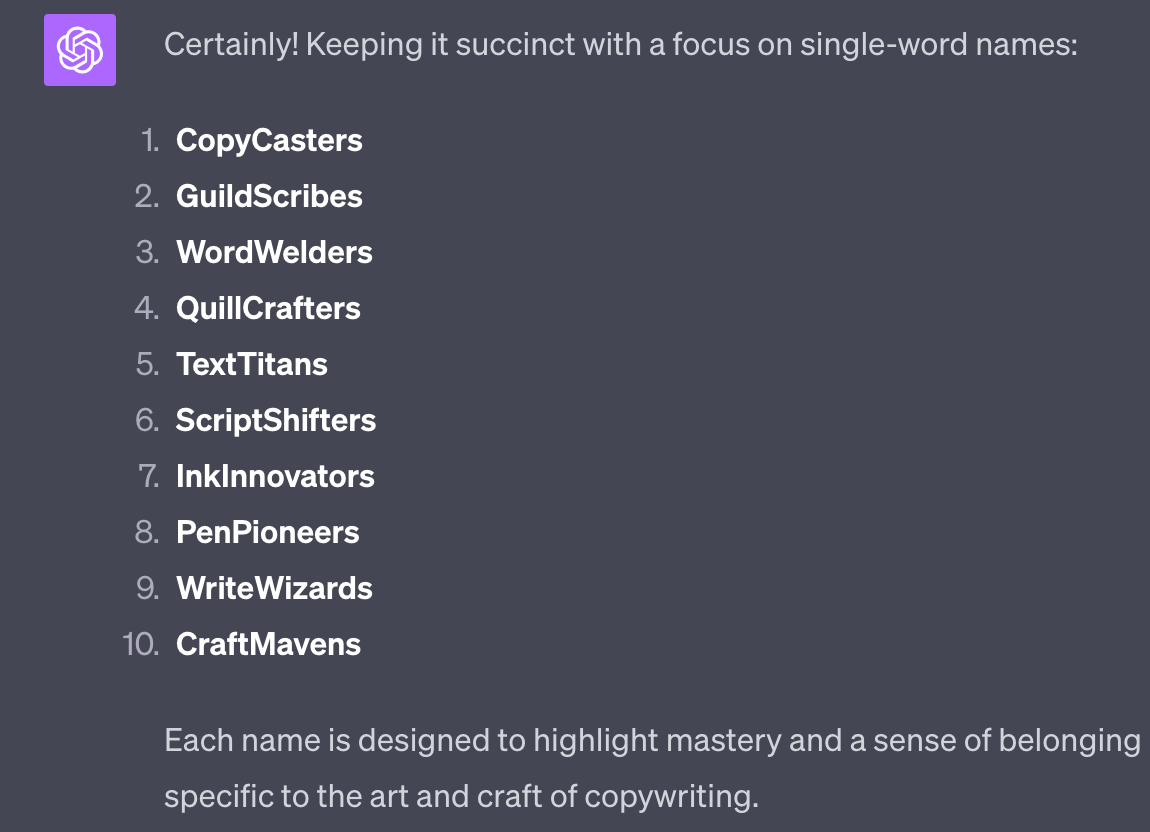
From ChatGPT’s first suggestions provide changes and recommendations.
For example upon seeing these I would specify to ChatGPT to i) focus on the fact it’s digital writing and we don’t use quill and ink anymore and ii) give shorted suggestions.
Continue your dialogue with ChatGPT until you have a name you like.
Free Trial - Premium
We’re providing a free trial of the Premium Prompts. Premium Prompts will be available for members only once our community launches. Join the waitlist here https://forms.gle/1sJdjCnHhnqucjJc8
Let’s generate a manifesto for our business and community.
A manifesto is a document that encapsulates our business in a set of powerful affirmative phrases.
Here’s a good example:

Thankfully ChatGPT already knows about some great manifestos. I tested out which it knows and which it doesn’t and loaded some good examples into this prompt:
Write a manifesto for my business

Use the business manifestos of Underarmour, Nike, Nespresso, The North Face and Apple as examples. Do not mention these brands.
Use this beneath the prior work from this Part to automatically populate with all the required information.
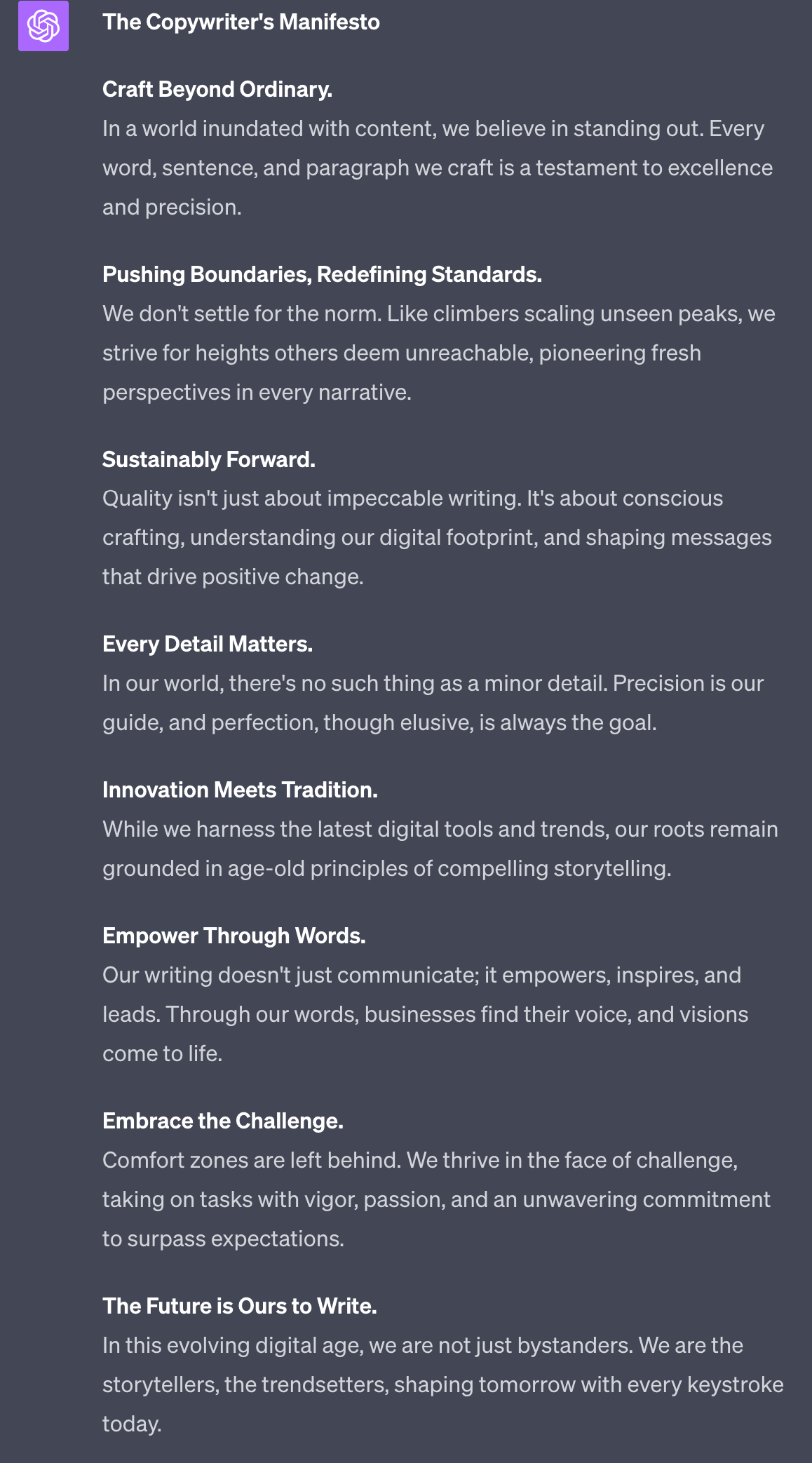
Pretty good!
If you want a more visual manifesto then check the “infographic” section of Canva for the most relevant templates.
In this Part we’ve shaped up what our community stands for and how we’re going to differentiate ourselves from others.
In the next Part we’ll be setting up the technical infrastructure required to host our community.
A reminder of what we’re covering this week :
Part 1: Deciding our community’s value
Part 2: Building the tribe
Part 3: Setting up your membership platform
Part 4: Launching and growing your community
Part 5: Monetising your paid community
See you tomorrow Prompt Entrepreneur!
Until then, keep PROMPTING!
Kyle
In this Part we’re going to translate all our work into an actual joinable membership community.
We’ll discuss available tools, decide a platform and get the basics in place ready to receive your members.
The tool I’ll be mainly discussing in this Part is the one I’m building our AI Business Academy in.
So it’s a great way to check out how a community is built and run.
There’s a waitlist to join. Currently it’s over 500 people.
Hop on the wailist here ==> https://forms.gle/1sJdjCnHhnqucjJc8
to be kept in the loop about launch + special subscriber bonuses.
Our first big task is to choose how we are going to host our community.
There are three basic categories here:
free, using non-community focused platforms
self-hosted, self-built
premium, using a community focused platform
Free options include hosting your community in a WhatsApp, Telegram or Discord group.
These tools are free to use and give you an instant community group out of the box. Discord in particular has a full set of community admin features.
The main issue with these sort of platforms ism that are built primarily for free communities - not for membership communities.
We’re building our community as part of our business - to sell access to the higher tiers of the community and be able to sell other products and services. Free tools like Discord limit our ability to do so.
Self-hosted, self-built communities are generally built on a website using Wordpress or a similar technology.
A good example is Wordpress with Buddypress and Buddyboss. I’ve personally used this option a few times and it works well whilst remaining cost-effective.
However, it’s also a lot more technically complex! If you are the sort of person who can build your own community then go for it.
If you need to first upskill to learn how to build a community don’t waste your time. Your time can be far better spent working on your business in higher impact areas.
Finally, premium options. The big two here would be Circle or Mighty.
These are paid platforms that are specifically for building membership communities.
Both are great platforms and will likely cover your needs.
I recommend you review the features and pricing of both of them alongside your community structure to check if what you need is provided.
You can also use this prompt to assist you:
Act as a technology advisor.

Compare this feature description of an online membership community business I am building against the the feature sets of two tools I am considering.

Here is the structure of the community:
[copy/paste community structure]

Here is the feature list of tool 1:
[copy/paste features]

Here is the feature list of tool 2:
[copy/paste features]

Provide a tabular matrix of features requires vs. features that each tool provides.

And a written analysis of which tool would best suit my business needs.
For the features of the tools go to the Pricing page or whichever page has the most detailed feature list. Simply copy and paste the whole page into ChatGPT. ChatGPT will be able to sort the details out.
You may find that ChatGPT hits input limits. If this is the case use GPT-4 Advanced Data Analysis tool or Claude2. Or alternatively ask ChatGPT to run one analysis at a time and then combine results into the final table and analysis.
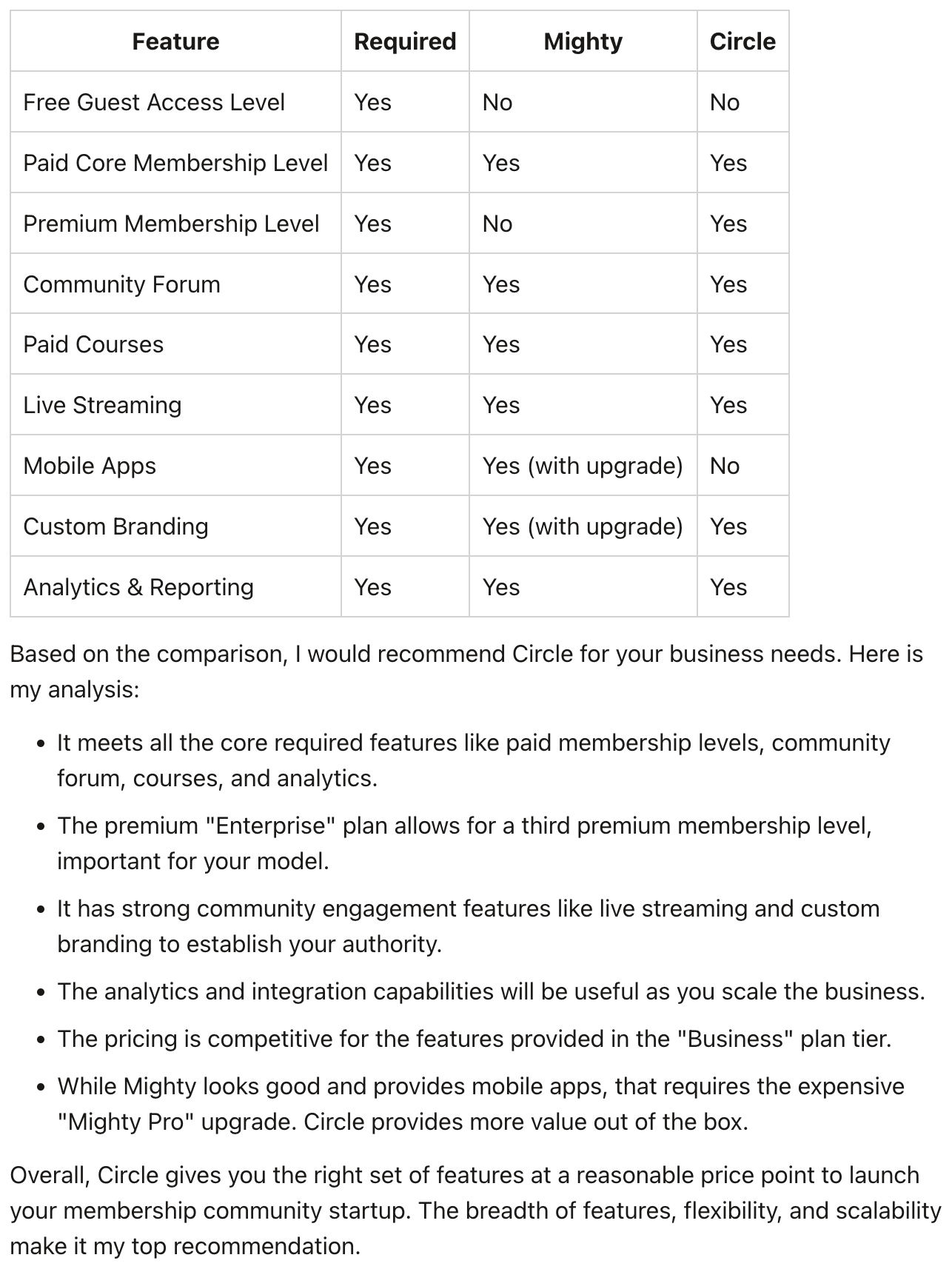
In this output I fed in the specific course structure of the Copywriting Academy community that I’ve been using as an example.
This shows that Circle is the better choice for the specific requirements of that community.
Make sure to sense check this with manual investigation as ChatGPT can miss details.
I know for example that Circle has a mobile app that allows all users to access the community easily on a phone. But ChatGPT has missed that in its analysis. Remember to check results before making big decisions!
For the rest of this Part I’ll be using Circle for the examples. That said, the basics are the same whether you are using Circle, Mighty, self-hosted or a free platform like Discord.
Set up an account and go through the basic walkthrough of naming the community, adding a logo and other standard procedures. Circle has good articles on doing all this so I won’t waste your time repeating it all!
Once the basic setup is done one of the main tasks we need to tackle is setting up the structure of our community.
We do this through the channels.
Each channel has a specific function.
For example we might have one channel to welcome new members, another to announce up coming live sessions and one to talk about industry news.
The purpose of channels is to split the chat into different areas so that members stay on topic.
The alternative here is a WhatsApp group where everyone basically talks about anything and everything all at once. Chaos.
We will not only set up our channels but also group them by our tiers - free, core and premium. This lets us get the backbone of the community in place.
Here’s a prompt to get started:
Act as a membership community management expert

Based on the provided community structure

Suggest the groupings on Channels and channel categories.

[copy paste community structure]
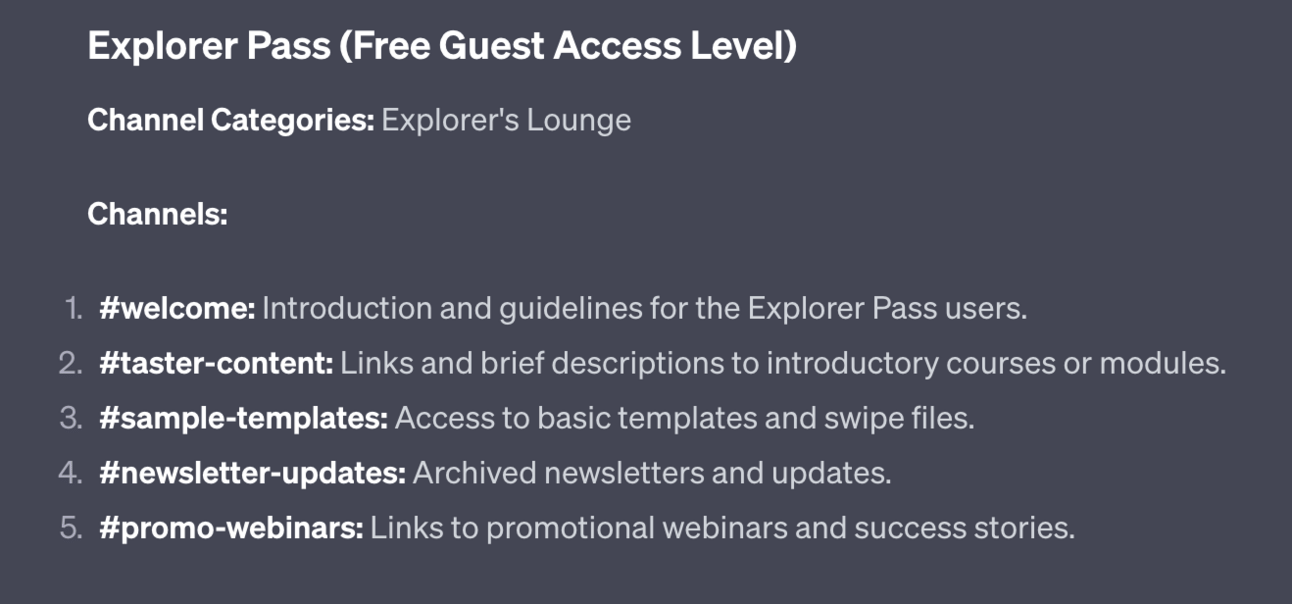
First up ChatGPT gives us our free access level. This one is nice and simple with a Welcome, taster, swipe file, newsletter and webinar channel.
I would change the names of these to make them sound less salesy. For example I’d change “Taster-content” to “Start here” and “promo-webinars” to simply “webinars”.
In Circle we would now create an Space Group called “Explorer Pass” and then individual Spaces for each of the channels:
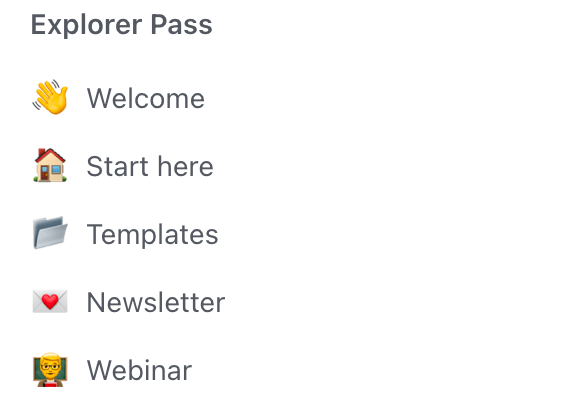
In Circle you can set the type of Space. Here I’ve used Chat for “Welcome” and Events for “Webinar”. The rest are basic Posts type Spaces.
The terminology for this will be different in Discord, Mighty or whatever tool you choose to use but the basic idea will be the same - a way to split your content into channels.
ChatGPT also gave me the core and premium levels. Here’s the core level:
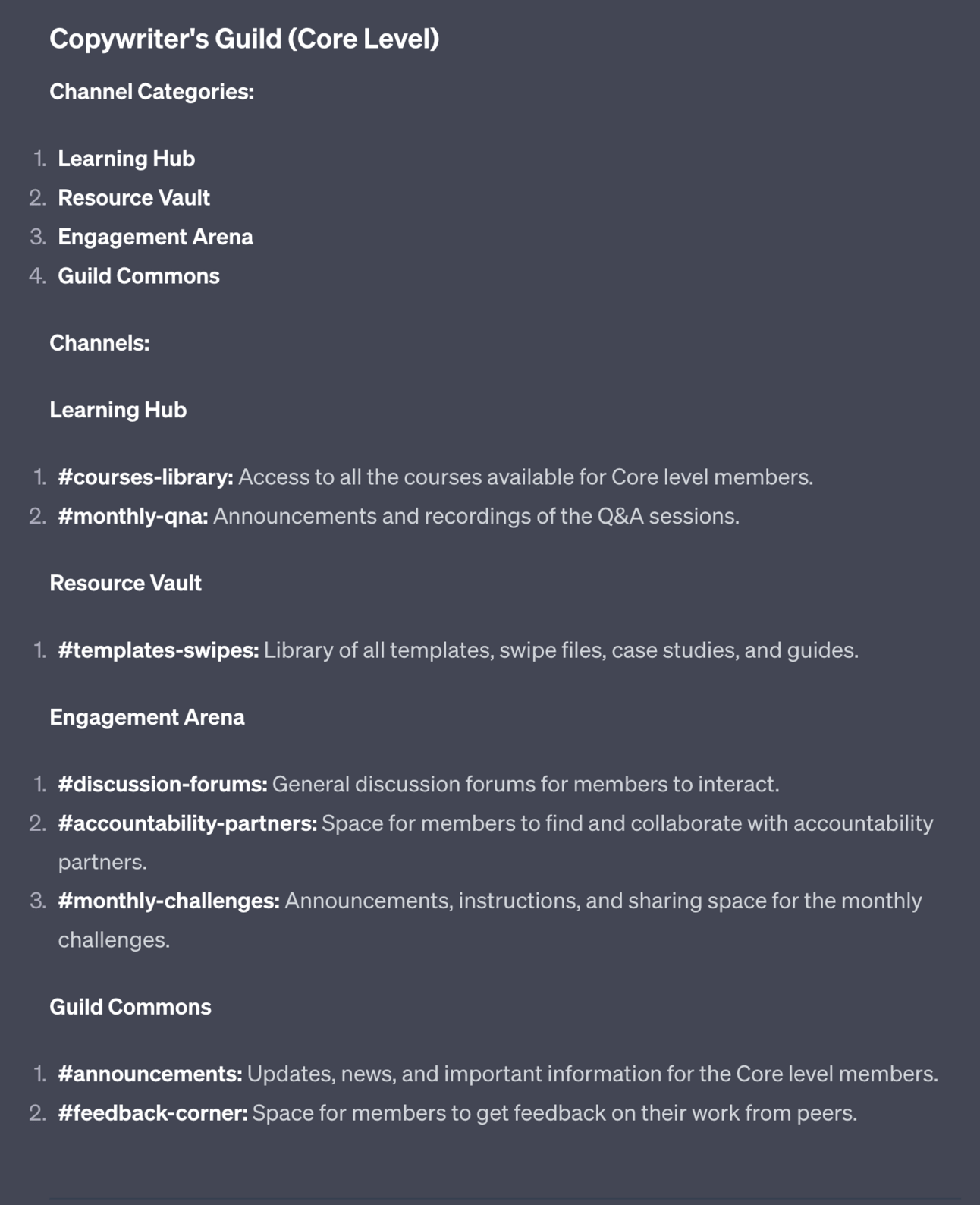
Notice that this is split into 4 Categories (Space Groups in Circle) rather than 1. This makes sense - there’s a lot more detail here at the paid level so channels are more broken up across different categories.
Continue to build out your community structure based on the channels provided by ChatGPT.
For most channels we want to have a “Sticky” post that introduces what the channel is and what it should be used for.
This post will stay at the top of the channel, hence sticky.
Writing these posts can be time consuming when making this many channels. So let’s use a prompt to get the basics done.
Use this below your existing work on the channel structuring for ease:
Act as an expert community manager.

Write a sticky post to help new members orientate to the channel [#channel-name]

Use the following community details for context in your post but do not explicitly refer to these details:

[copy paste values, vision, mission, big idea]
Copy and paste in the values, vision, mission and big idea that we generated in the last Part.
Plug in the channel name that you want to generate text for. In this case it’s #welcome.
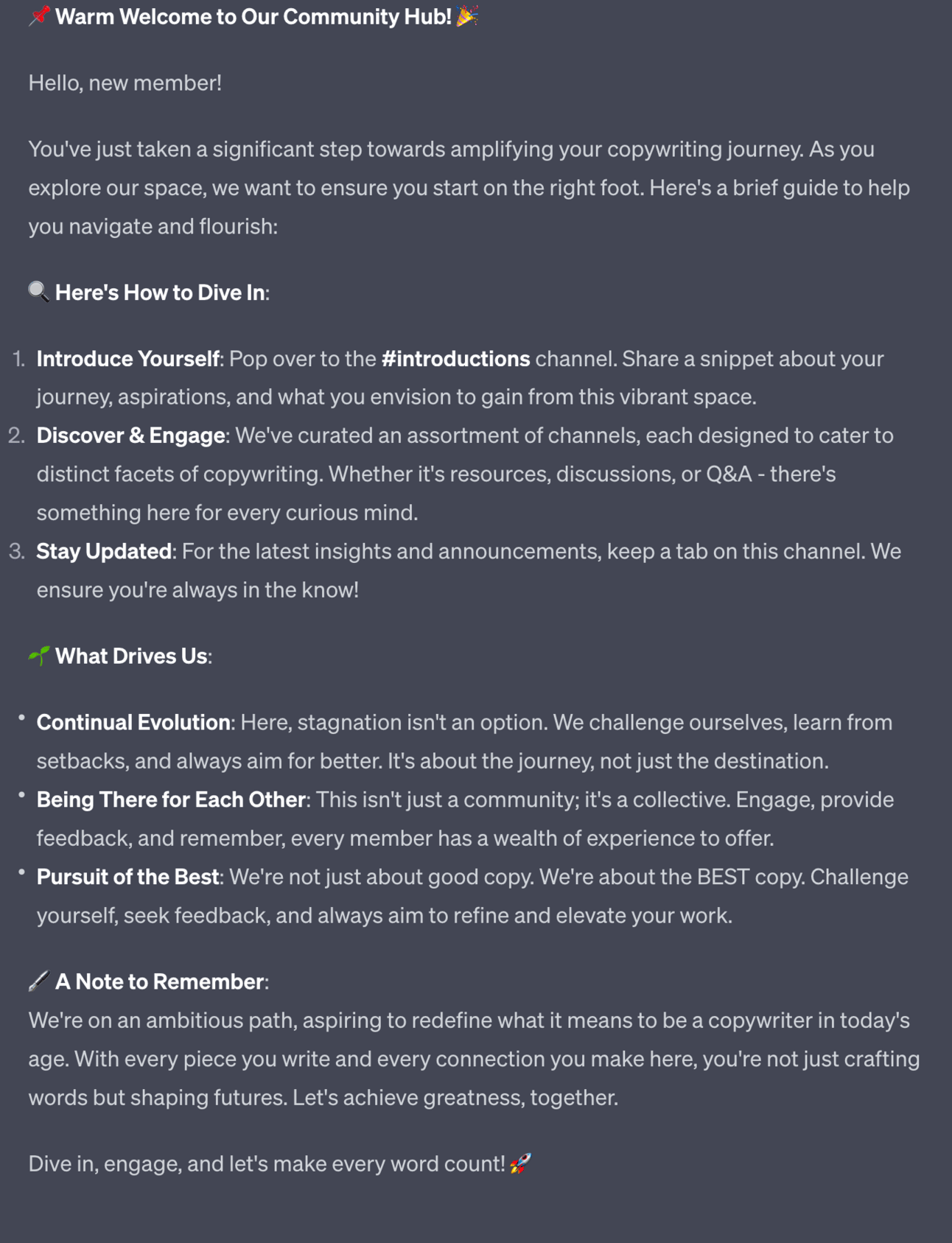
Continue to run this process with different channel names to get all of the sticky posts you need.
You now need to set up tier levels so that some content is available for free and others require payment.
For free Spaces do this:
Select the Space
Click the dropdown next to the Space name
Find Customise
In Customise you can set Access to “Open”
This allow any member (free and paid) to access the Space.
For paid levels we need to set up billing with Stripe or a similar tool.
Once set up:
Select the Space
Click the dropdown next to the Space name
Find customise
Set Access to Private
Go back to the dropdown
Select Paywall
Set up payment details
Repeat for each Space
Once that’s done we’ve done the main mechanical parts of setting up our community!
Free Trial - Premium
We’re providing a free trial of the Premium Prompts. Premium Prompts will be available for members only once our community launches. Join the waitlist here https://forms.gle/1sJdjCnHhnqucjJc8
A strong early asset in your community is having a short course that your new members can work through.
A lot of membership community tools, Circle included, have strong LMS (Learning Management System) tools in place.
Having a very short, easily consumable course at the front end of your community allows you to do several things at once:
introduce yourself, personally, on video.
provide a hit of early, easily digestible value
hammer home the values of the community
hint at more exciting features in higher levels
Here’s a short prompt to generate a video series. Use this below your existing work from before or alternatively copy/paste in your community structure:
Based on the community structure

Design a short 3 video course.

Each video is 5 minutes, straight to camera, no slides required.

The purpose should be to engage new members, provide some core value and excite them about the higher levels of the community. 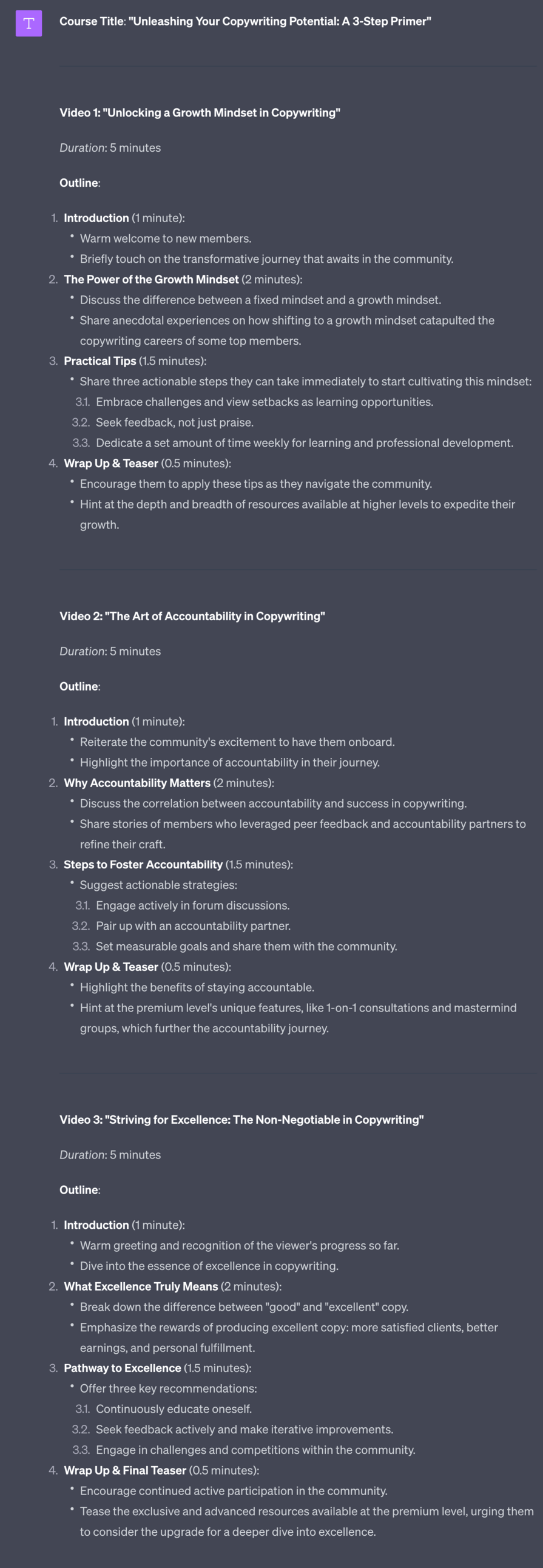
If you need to you can ask ChatGPT for full scripts too. I recommend just using these notes and talking to camera though. It’ll lead to a more natural video.
These videos don’t need to be a highly produced course - it’s simply an introduction series so people can settle in. The more authentic the better!
If you do want to produce a fully fledged course (using AI to make the process easier) I’ve written a detailed guide - you can find the PDF, Notion document, checklists and more in your member’s area.
In this Part we’ve got the basic machinery in place for our community.
Next up we’re going to start building the real value of the group by adding people! We’ll be covering launching and growing the community in the next Part.
A reminder of what we’re covering this week :
Part 1: Deciding our community’s value
Part 2: Building the tribe
Part 3: Setting up your membership platform
Part 4: Launching and growing your community
Part 5: Monetising your paid community
See you tomorrow Prompt Entrepreneur!
Until then, keep PROMPTING!
Kyle
In this Part we’re going to launch our community and begins its growth.
We’ll focus on the free community - in the next, and final, Part we’ll look at the paid community and how we monetise.
Well this is awkward.
I’m talking about launch strategies for a community whilst launching my own community!
I’ll be talking about some of the strategies I’ll be using for my own launch during this guide. I’m a bit of an open book like that! At least you can see it in real time alongside this guide.
My community (and course) is launching in a few weeks. We’ll be helping you start your first online business, using AI to supercharge your speed and efficiency.
There’s a waitlist to join. Currently it’s over 500 people.
Hop on the waitlist here ==> https://forms.gle/1sJdjCnHhnqucjJc8
to be kept in the loop about launch + special bonuses.
We’re going to launch our free community before the paid community.
We do this for a few reasons:
to iron out any technical kinks before we are charging
to make the community busy and vibrant for new premium members
to get the community out of the weird “ghost town” effect of being brand new
If you aren’t doing a free community no worries. A lot of the steps here are relevant for the community as a whole - just adapt them as required.
In the next Part we’ll cover the transition from free to paid.
Right now make sure that the content in your free area is in place. What this exact content is depends on your community structure and what you’ve decided to include in your free tier.
In the example we’ve been following the free tier consists of:
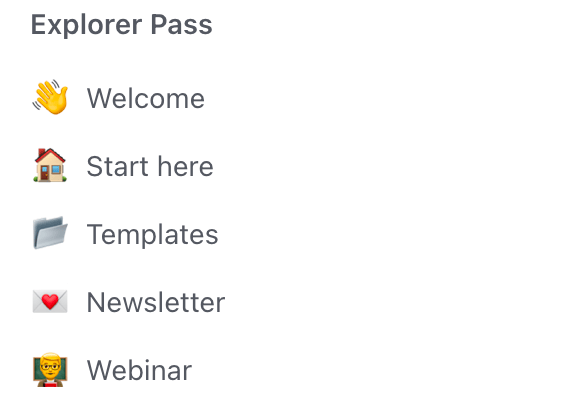
Let’s run through these as an example. These are examples only - you will likely have drastically different elements!
For Welcome I’d add a sticky post which I generated in the last Part. The point here would be to say hello to new members and encourage them to post a hello post. This will be their first action in the community.
In Start Here I’ll have another sticky post, this one orientating the new members about what’s available, how to access it and what the basic rules of the community are. I would lock this Space so that people cannot themselves post - it’s just a static single post with my Start Here message.
In Templates in my course structure I’ve promised a set of copywriting templates as part of my free package. Make sure that any “gifts” like this are completed before members start arriving. We want to make sure we fulfil all promises. If these assets aren’t ready then remove the channel in the community until they are.
In Newsletters I’d put a few past archive issues to make sure that the Space doesn’t look empty. No need to put the whole archive. Instead just make sure to add new newsletter issues moving forward.
In Webinar I would add details of the live webinar, when they are, how long they are, how to access them etc. As a side note a great benefit of Circle is that it has its own webinar live streaming and meeting rooms so there’s no need for an additional Zoom subscription.
Go through all your free tier elements and make sure that everything is in place before letting anyone in.
Have you ever turned up to a party exactly on time? Or worse, early?
I do this all the time.
Mainly because I want to go home early. But that’s another story!
Being the first to a party is always a bit awkward. You’re all there to have a good time but when there are 2 or 3 people it’s a little weird.
It’s the same with a community. And it’s just something we need to get over.
Set up a basic waitlist for your community.
Google Forms is sufficient for this. Ask for name and email as that’s what Circle needs to create a new account.
Share your waiting list via your social media, newsletter and any other channels you have available to you. If you don’t have these in place then i) I recommend you get going on building your Audience ASAP! and ii) you can supplement lack of audience with paid adverts for your waitlist.
Once your waitlist has a decent amount of people (50+) then:
announce you are about to open the community via email and social.
add all the waitlist members at the same time.
email them all with their login details (Circle will do this) and a “come join the community” message
be active as they all arrive in the community
This helps you get past the awkward trickle of members as everyone will be allowed in at the same time.
Also think about some way to reward these members. Maybe a special “founding member” or “charter member” title, tag or badge. Some way to reward their early adoption so that it’s visible to other members.
Initially you’ll need to start and run most of the engagement in the group. During early stages you are basically the host of the party.
Later this commitment can decrease - as people start to talk amongst themselves. But initially you are the centre point and need to put in the work to make everyone comfortable.
Seed initial discussions and groups yourself until more members start participating organically.
Questions work great here, as they do in real life! Ask people about themselves. Use conversation starters to get people chatting.
Here’s a quick prompt for ideas:
Act as a membership community manager.

My community is about [topic]

Generate 10 conversation starting questions that I can use to spark conversation.
Notice that this prompt is quite broad - we’re not feeding in details about our community but instead keep it wide using just a topic.
I’ve used “copywriting” as the topic here.
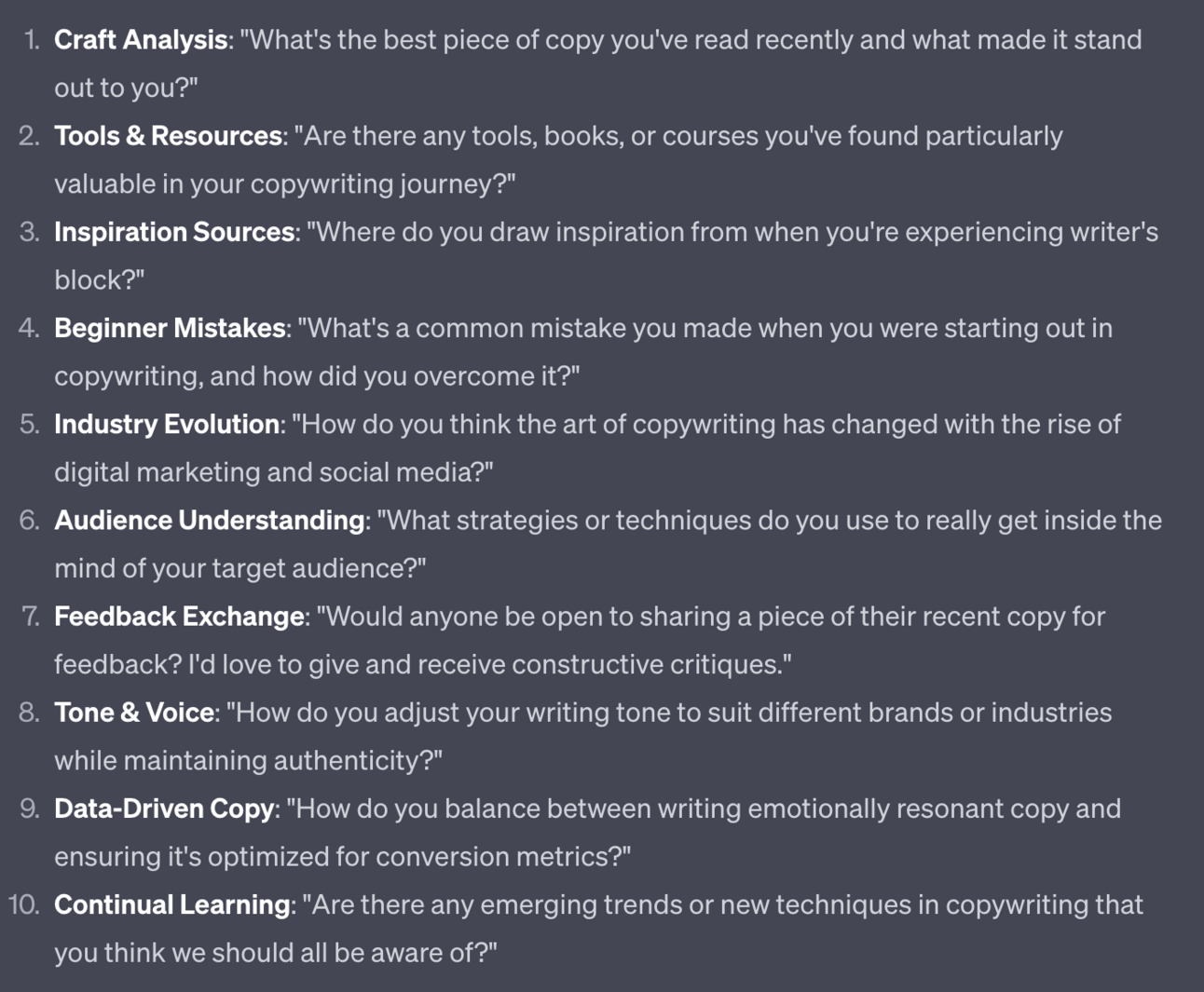
ChatGPT generates a set of conversation starters for our industry.
I recommend posting the question, getting a few answers and then giving your own take. You want to show thought leadership but not so early that you’ll cut off the discussion. Be the host not a dictator.
Once you have basic interaction up and running in your community we need to use that to leverage FOMO.
We want to tease what our Tribe members receive to our Audience members - ie. people who follow us on social media but have not yet joined the community.
Screenshot particularly good discussions, images, interactions from inside your community and post them onto social media.
Anonymise the people involved unless they are happy to be featured - ask first as some will be happy to have their name/brand talked about.
The main idea here is to show that there is an active, valuable community happening behind closed doors. And that all the audience member needs to do is hop into the free community to become part of it.
Need more ideas for generating FOMO?
Below the above prompt use this:
Act as a membership community marketing manager

Give me 10 ideas of content I can extract from my community to use to generate FOMO so people want to join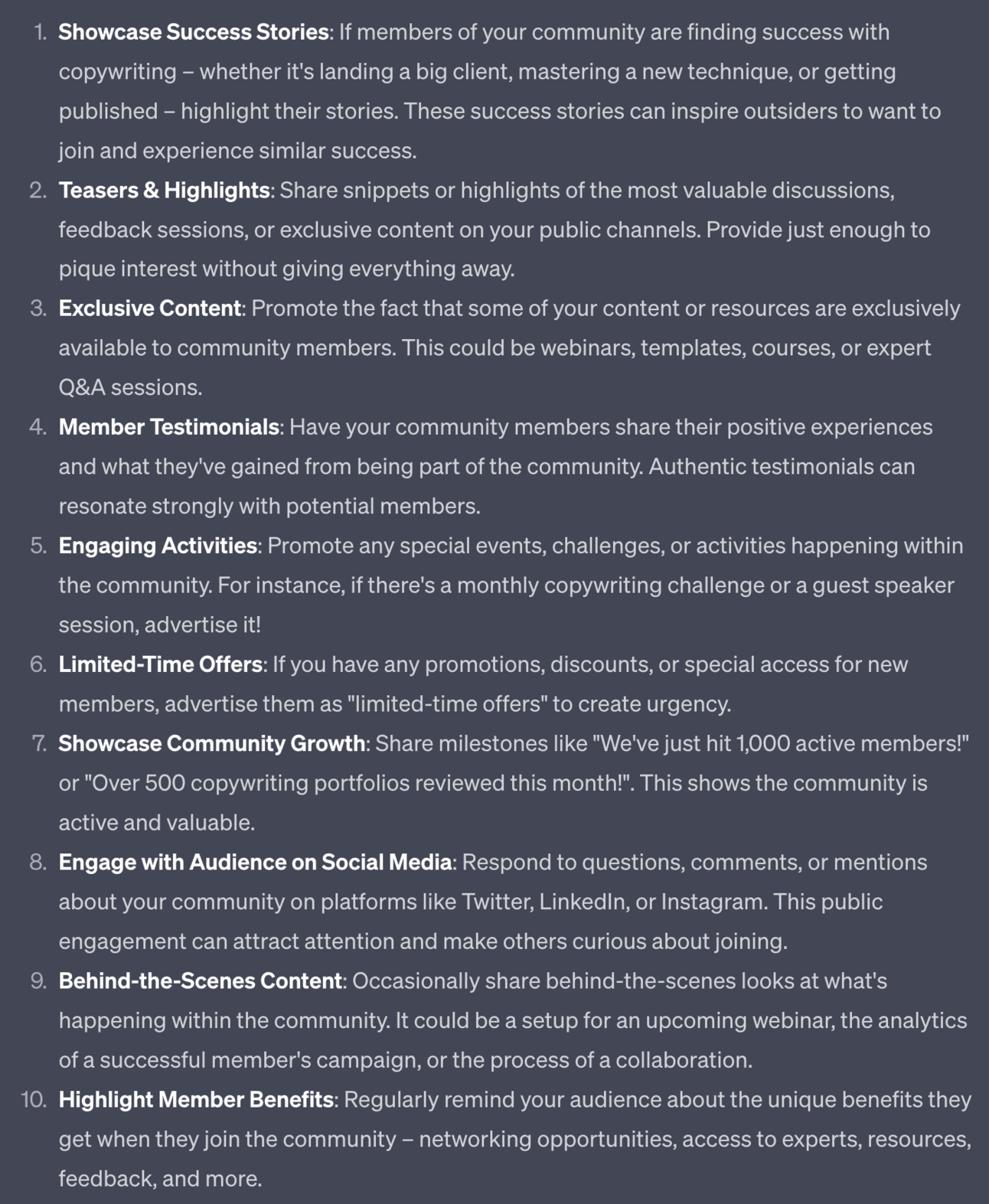
This prompt will build on the topic provided before and give you some more ideas. Just be on the lookout for interactions that appear in your community that fit these type of formats.
Use these posts to ensure more people from your audience keep coming into your community. Add these FOMO posts into your regular audience content rotation.
Free Trial - Premium
We’re providing a free trial of the Premium Prompts. Premium Prompts will be available for members only once our community launches. Join the waitlist here https://forms.gle/1sJdjCnHhnqucjJc8
Once you’ve got your main members settled in you’ll start to see who the most active people are.
These are the members who respond to all your questions, interact with other members and post themselves. Likely they’ll also have worked through any content you provided - Circle will show you analytics like this.
I recommend offering these people early access to your paid community - either for free or at a steep discount.
This group of fans can become the beta testers for the paid community and your evangelists.
We want them in the paid community first so that:
we can test functionality of the paid community with our biggest (and most forgiving!) fans
we can collect reviews and testimonials from them
they can tell free members about how great the paid tier is
Here’s a prompt to reach out to them:
Act as a membership community marketing manager.

Write a personal message inviting a top member of the free community to the soon to be released paid community.

Thank them for being a top member of the community - this offer is a thank you

Offer them [free / % discount] access

[Copy paste core tier details]
Add the core tier details from your course structure to give more context.
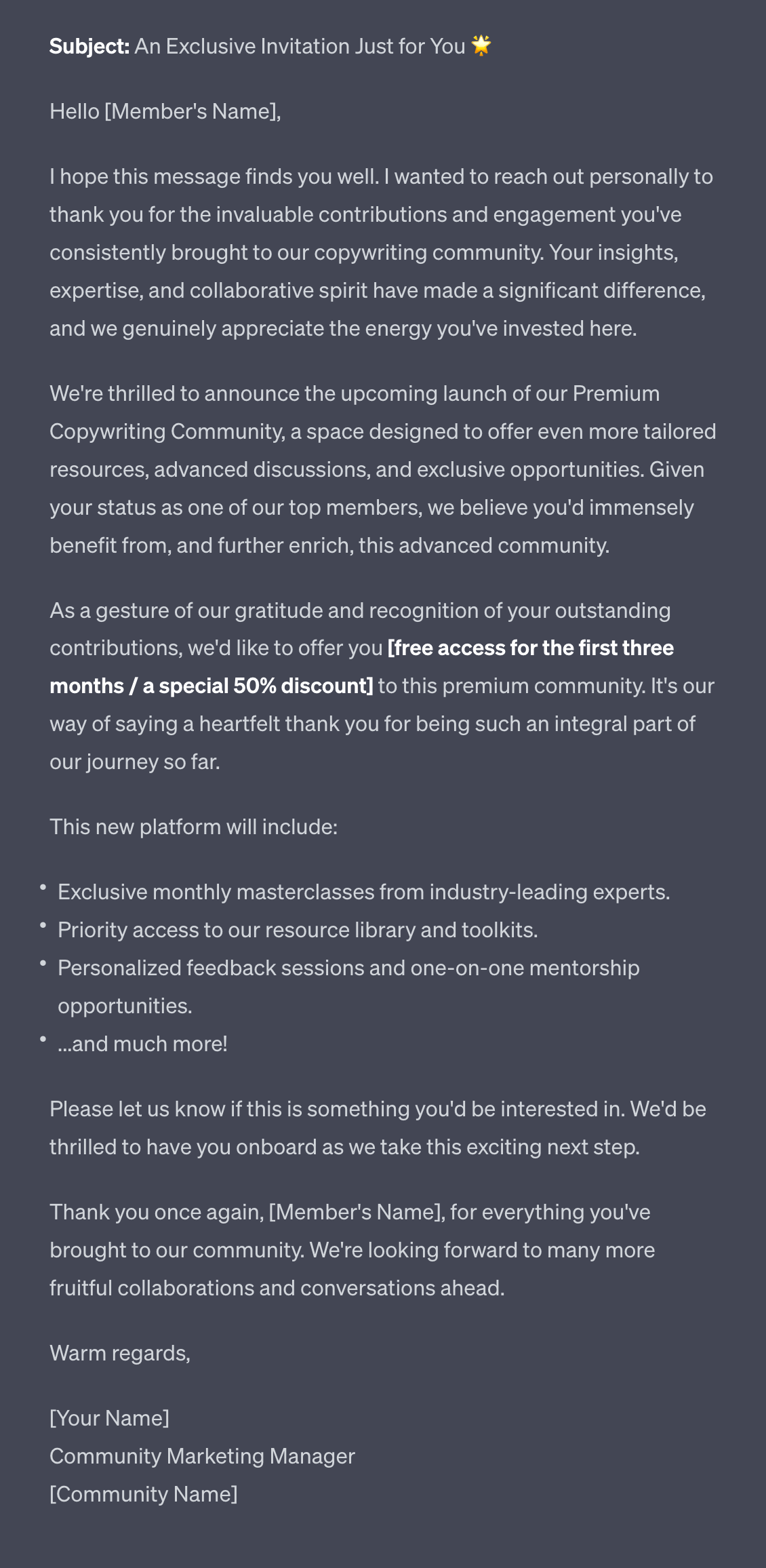
Send these messages individually to the small number you’ve selected. Add personal details too - you have been interacting with this person so this should be possible. Mention how the paid community could aid them specifically, based on what you know of their journey.
In this Part we’ve launched the initial free tier of the membership community. This is a big first step.
In the next Part we’ll look at launching and moving people into the paid levels of the community.
A reminder of what we’re covering this week :
Part 1: Deciding our community’s value
Part 2: Building the tribe
Part 3: Setting up your membership platform
Part 4: Launching and growing your community
Part 5: Monetising your paid community
See you tomorrow Prompt Entrepreneur!
Until then, keep PROMPTING!
Kyle
In this Part we’re wrapping up the process and completing the business model by adding on our paid levels.
This is where membership communities come into their own as a strong stable source of recurring revenue.
Thank you to those of you on Twitter/X who helped with the vote I posted.
I asked whether you prefer courses with text, video, audio or a bit of everything. Specifically what sort of course format helps you actually finish the course and apply what you learn!
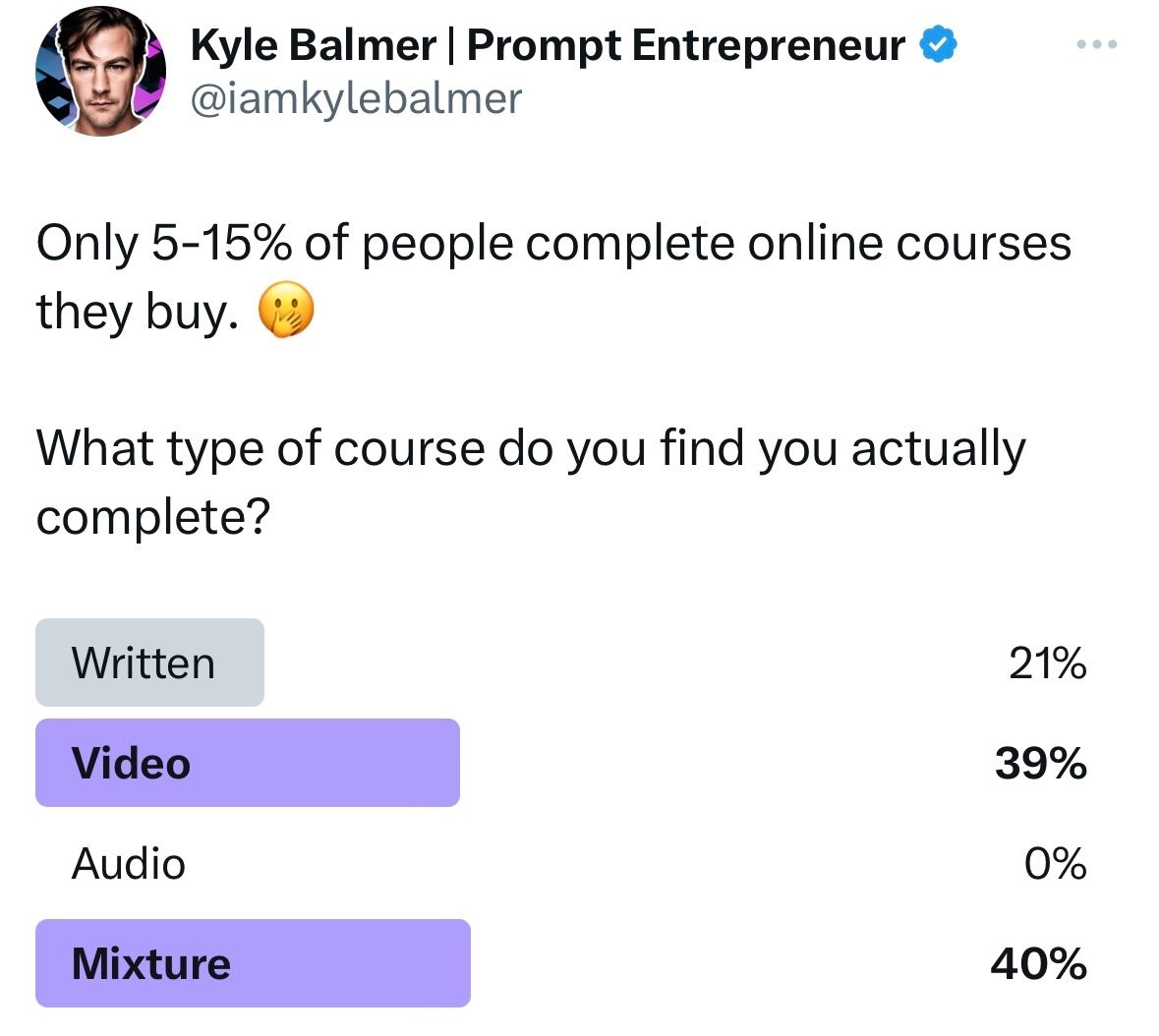
Looks like a mixture + video are the top results.
Which means I’ll be adding more video into the course!
You’ll be seeing a lot more of my face it seems! 😁
There’s a waitlist to join. Currently it’s over 500++ people.
Hop on the waitlist here ==> https://forms.gle/1sJdjCnHhnqucjJc8
In Part 1 we put together our structure using ChatGPT, notes from other communities and our own experience.
Now that you have a free level though you have access to a much better source of market intelligence - your actual members!
Who better to ask about what they want in a paid community?
In the run-up to launching a paid community:
Pay attention to what people most engage with. This will give you hints about what will do well in the paid version.
Run surveys and polls, directly asking people what they’d like to see. Let people know that their response is directly connected to what you’ll build for them. You’re serving them and they know best what they need. So make sure to listen!
Launch small tests of your paid features in your free tier. Make sure that people know they are just tests. For example you might do a live Q&A session to test how valuable they are for members. If there’s a lacklustre response don’t include them in your paid tier!
Use your free community to adjust features in your paid tier. Always think about what would be most valuable for them - and then how you can achieve it.
As we did with our free community we’re going to set up a waitlist.
The reasons are similar - we want to start collecting information about who is interested.
For example right now I’ve got a waitlist open for my upcoming course and community and it has over 500 people on it.
Waitlists are useful for a couple of reasons.
First, they tell you to go ahead and build! If I only had 10 people on the waitlist that would be a good sign to not launch the community! With 500 though I’m fairly confident I can make sure it’s a vibrant valuable community for all involved.
Second, you can now contact these people with updates on how the course is going. This will be behind the scene snippets, sneak peeks on what they can expect and other tantalising details.
As an example I dropped info on the detailed workbook that will be included in the course to make sure that people actually follow through:
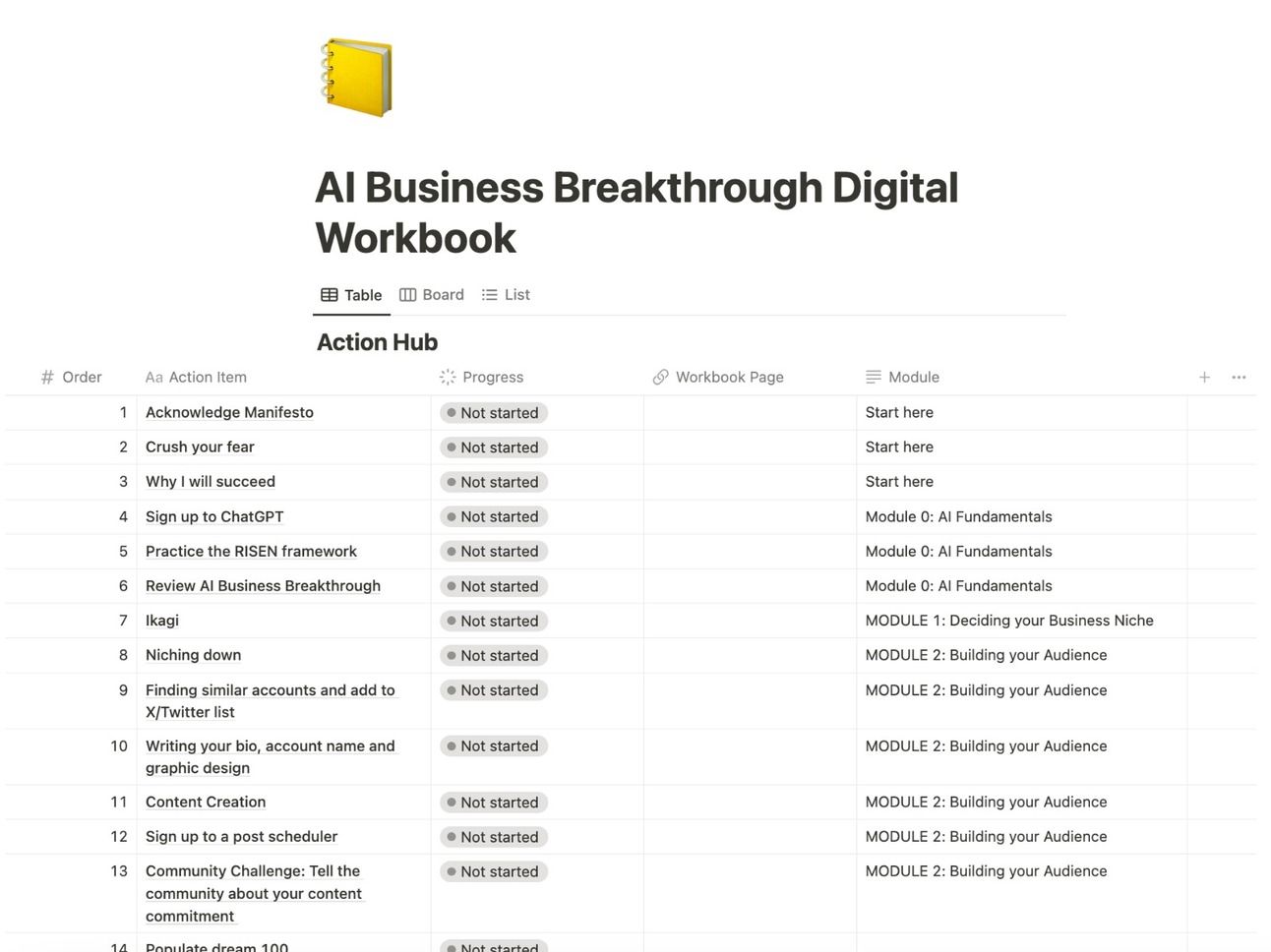
I shared this on X (and now here in this newsletter!) to show people what they can expect and get them excited.
Third, you can build FOMO. The more people you have on your waitlist the more others will want to join. They don’t want to miss out.
Obviously for this to work you need to tell people how your waitlist is going. Give them updates. Notice how I’ve mentioned 500+ people in my waitlist. That’s for exactly this reason! 😛
Additionally you can offer bonuses to people who join your waitlist. Lots of people will buy when you launch even without joining a waitlist. If you talk about additional bonuses from joining the waitlist this is a good way to nudge people from just passively waiting for launch to actively joining the waitlist.
A note on discounts. Some people like to launch with discounts for the first paid members. This is a mistake - financial discounts cause people to discount (mentally) the importance of what they are buying.
In the case of communities and courses this means that they are less likely to participate. Because it was “cheap” then it’s worth less in their mind and they won’t be as active.
You’ve probably seen this in action if you’ve ever entered a free community. Were you active? Probably not! But for sure you would have been more active if there was a price attached - this instantly increases perceived value and makes it more likely that you’ll be an active member. Which makes it more valuable for you the user.
This is important for you early members because you want them to the most excited, the most active members of your community moving forward. They set the tone. So you need their buy-in and commitment. Discounts ruin this.
For the actual mechanics of the Waitlist, Google Form is still sufficient. If you want something more designed and flexible Typeform is excellent.
With the free community it’s fine to use a basic sign up page.
For our paid course though we need a proper sales page. This page will be what leads to someone making the decision to become a member.
We can build lock-screens in Circle but they are very basic and not very sales orientated.
We can also use Gumroad which has a direct Circle integration but again the page itself can’t be customised.
And obviously if we aren’t using Circle but another community platform these sales page tools won’t help us!
Instead I recommend setting up a custom sales page for your course sales.
If you are handy with tech and design (or have the cash to hire a developer) I’d recommend building a full sales page using Wordpress or a similar tool.
If you are looking for something simpler then Carrd is a great option. You can build a beautiful sales page for free using Carrd or upgrade from $9/year (yes, annually, not monthly) for additional features.
The main benefit is that Carrd is specifically for sales landing pages - simple one page sites.
To generate the copy for your page use this prompt:
Act as a sales page copywriter

Create a long form sales page for a premium membership community.

Focus on the features and benefits of the free and core tier but do not talk about the free level. Instead make them part of the core paid tier.

Use the Hook, Story, Offer framework

Use this product structure:

[copy/paste Free and Core tiers Community Structure]

Incorporate this context but don't mention it explicitly:

[copy/paste mission, vision, values, big idea] This generates a very long (full sales page) output so I’ll just provided a snippet:
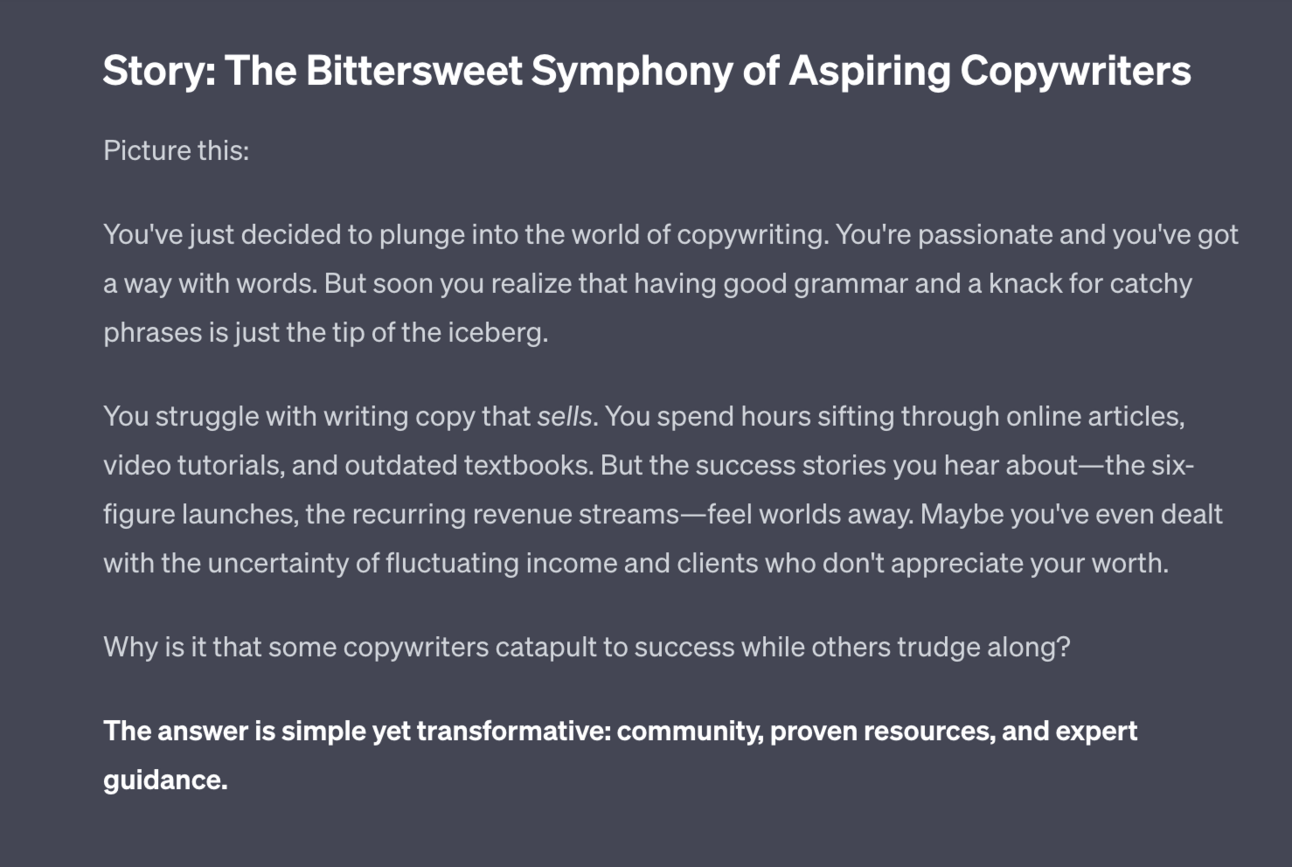
The page follows the Hook, Story, Offer framework - the output above shows the story section.
Use the output as your first draft. If in doubt about what should go in the page refer back to the competitive research you did before and see what they included. Adapt the most relevant additional sections onto your page.
Once you have your waitlist full and sales page ready you are ready to launch.
As with launching the free community make sure that all of the assets mentioned in your paid community are present. Create them as required so that everything is ready when your first customers arrive - we need to make the best first impression.
For the launch campaign you’ll be primarily relying on email - this is why we’ve been collecting emails for our waiting list!
Use this prompt to generate drafts for the email campaign:
Act as a sales email copywriter

Prepare an email campaign to launch the membership community.

Prelaunch Emails:

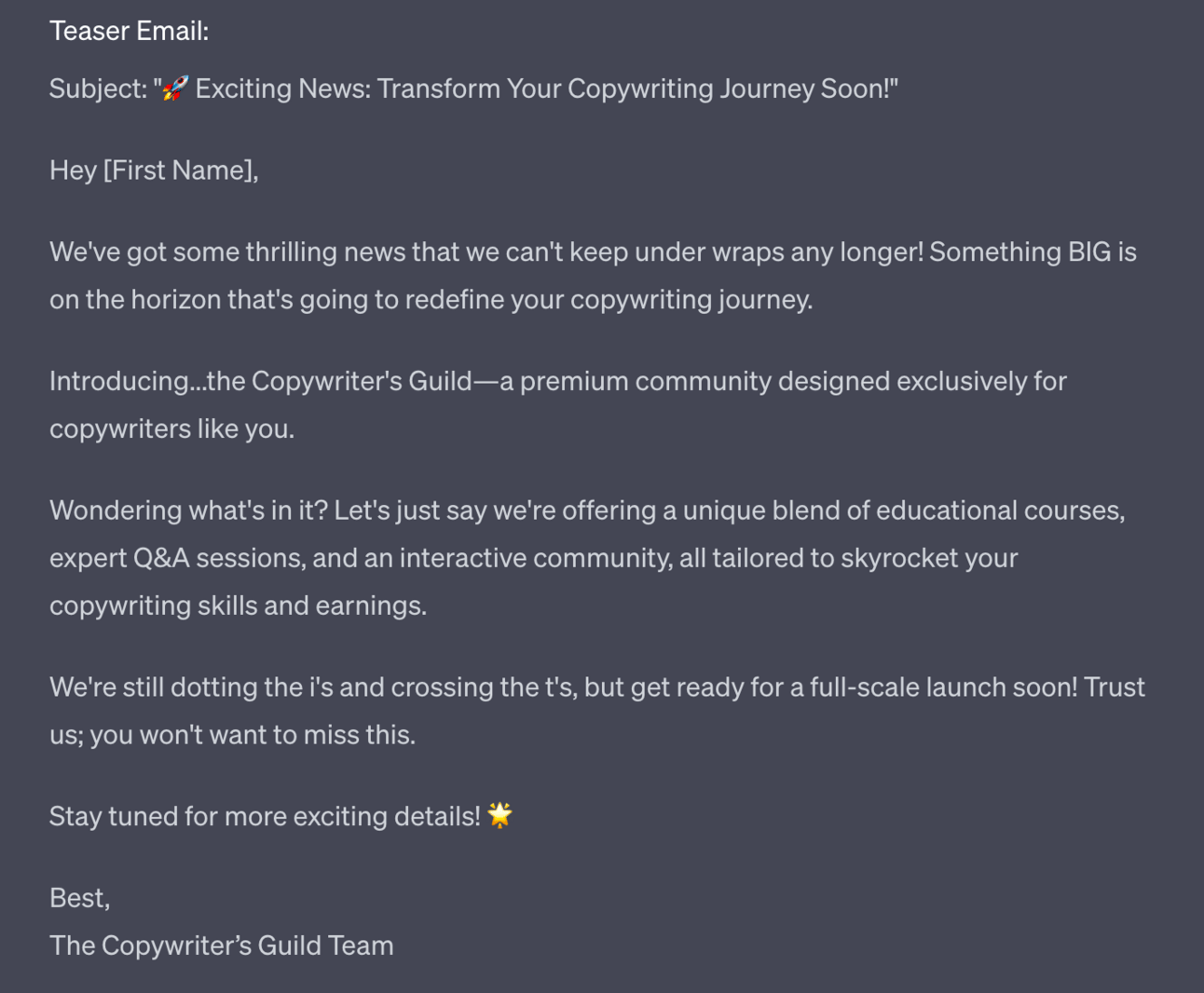
Teaser email - Build excitement by announcing the new community is coming soon. Share a few details but don't give everything away. Encourage people to stay tuned for more info.
Sneak peek email - Give members a sneak peek into some of the benefits of joining, the types of content/community, etc. Share testimonials from early members.
Reminder email - Send a reminder that the full launch is coming up soon and to keep an eye out for it. Include date of launch.
Launch Email:

Launch announcement - Announce that the wait is over and the community is now live! Share link to join. Go over membership details like pricing, benefits, what's included, etc. Emphasise value. Include testimonials. Add urgency with limited time offer or bonus for joining early if applicable.
Post-Launch Emails:

Onboarding email - Send after new member joins. Share tips for getting started, guide to using community platform, introductions to other members, etc. Make them feel welcomed.
Engagement email - Send ideas for how to get engaged in community. Share upcoming events, prompts for introducing yourself, participating in discussions, etc.
Feedback email - Ask new members for any initial feedback, impressions, suggestions, or questions. Make it easy for them to share thoughts.
Milestone email - Send for milestones like one week, one month, etc. Celebrate progress, highlight key benefits, share community stats, and reiterate value of membership.
Use this below the last prompt to pull in the same structure and business details as well as to create linkages with sales page you created.
Again this creates too much to show in full detail here. 10 emails in total. Here’s the first email:
We’re going to close the loop now.
Once you have the core paid tier launched you should have recurring revenue coming in. Depending on how many members you have this could be substantial.
200 paid members at $29/month means recurring $5,800/month which is a good solid income in most countries. Get that to 1000 members and you’ll be at $29,000.
The other thing we can do now is launch our premium level. We designed this in the initial course structure.
Launching the premium level is exactly the same as launching the core level - we run the same process that we just talked about in this Part. This time with a higher level and a higher price.
Expect smaller membership numbers at each higher level - this is normal!
If you have 1000 paying members at core paid level you might get 50-100 at the premium level.
The premium level should help these members reach their goals faster and easier - it’s much higher value for them.
But this also costs a lot more, hence the lower number of people who will sign up. It will provide more access to you, a scarce resource and you need to price this appropriately.
Only launch a premium level when your core level is up and running and sustainable. Don’t break your promises to your core members just because you can make more from higher priced tiers - it’s a bad look!
Instead remember who got you to where you are.
And make sure that they get to where they need to go as well!
Look after your members first and foremost and you’ll do just fine.
We’ve now reached the end of the process! As always - well done for sticking with it.
Membership communities are very exciting because they allow you to provide value to a small group of people who really want to hear from you. And get paid sustainably for doing so. Win win.
They are a strong addition to any business where you have built up authority and a name in your niche, both for the revenue they themselves can generate and for the additional sales opportunities that come from having a tight-knit group of ultra-fans.
Here’s a reminder of what we’ve covered this week :
Part 1: Deciding our community’s value
Part 2: Building the tribe
Part 3: Setting up your membership platform
Part 4: Launching and growing your community
Part 5: Monetising your paid community
See you tomorrow Prompt Entrepreneur!
Until then, keep PROMPTING!
Kyle
Welcome to the '🤝 Building a Membership Community with AI | Prompt Playbook', where we delve into the transformative power of AI in creating thriving membership communities. In this playbook, you'll discover how to engage your audience in a protected, vibrant space that fosters meaningful interactions and opens up exciting revenue opportunities. Say goodbye to the chaos of social media and hello to a focused environment where you can consistently provide value and grow your business sustainably through membership subscriptions.
This playbook is designed for entrepreneurs, business owners, and content creators looking to leverage AI to build a membership community. If you're struggling to maintain engagement on traditional platforms or are overwhelmed by the demands of social media, this playbook offers a clear path to creating a focused environment. You'll find the tools and strategies necessary to transform your audience into a thriving community, ultimately leading to greater loyalty and consistent revenue.
No prior experience is required! This playbook offers step-by-step guidance suitable for beginners and seasoned professionals alike.
Implementation time varies based on your current resources and community size, but you can expect to see initial results within a few weeks of following the outlined steps.
Absolutely! A smaller, engaged audience can often lead to a more tight-knit community. This playbook provides strategies tailored to communities of all sizes.
Yes! This playbook covers various monetization strategies to help you create a stable source of recurring revenue.
While this playbook is self-contained, joining the community can provide ongoing support and networking opportunities with fellow entrepreneurs.