AI Knowledge
Welcome to the '♻️ Blueprint Prompts' playbook, your ultimate guide to revolutionizing the way you and your team interact with AI.
Start ReadingLet me tell you about one of my client who runs a digital marketing agency.
Last month, she noticed something that made her want to bang her head against the wall: her team of 12 was spending hours every week writing and rewriting AI prompts for the same basic tasks.
Manually. Each and every time.
Content briefs, social media posts, client reports - everyone had their own way of asking AI to do these things. Some worked brilliantly, others... not so much. Eek.
Sound familiar? Whether you're a solopreneur dreaming of your first hire or managing a team of 100+, I bet you're seeing the same thing.
Everyone's reinventing the wheel, over and over again. Doesn’t matter if it’s just you or your whole team - it’s wasteful!
This week we attack the problem head on with Blueprint Prompts.
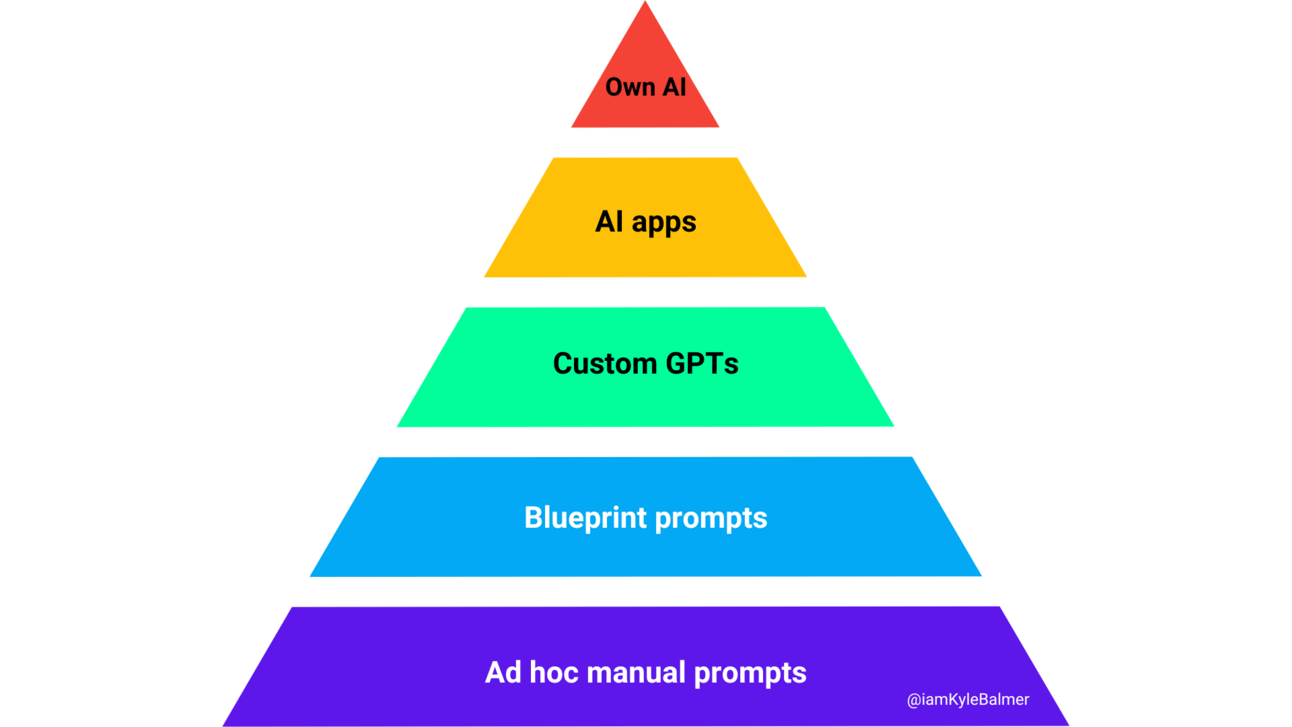
Let’s get started:
Blueprint Prompts
Why most businesses are wasting precious time with AI
The hidden cost of prompt chaos across your team
How blueprint prompts can transform your operations
Real ROI calculations that'll make you sit up straight
The system we're building together
Let's do some quick math that might make you uncomfortable. Don't worry, I'll keep it simple:
Average time spent writing/tweaking prompts per task: 10 minutes
Tasks per day that could use a template: 5
Working days per month: 20
That's 1,000 minutes (16.7 hours) per person per month spent just figuring out how to talk to AI.
Now multiply that by your team size:
Just you? 16.7 hours.
Just you and a VA? That's 33.4 hours
Team of 5? 83.5 hours
Team of 20? 334 hours
Oh oh. Adding up isn’t it? Let’s add a cost to it.
At even a modest $30/hour, that's costing you:
Small team (2): $1,002/month
Medium team (5): $2,505/month
Larger team (20): $10,020/month
Ah. We have a problem!
And we haven't even talked about the cost of inconsistent outputs, training new team members, or the opportunities lost while everyone's faffing about with prompts. Yes, faffing - that’s the technical term, promise. I have an MBA!
What if instead of everyone writing their own prompts, you had a library of tested, proven templates that:
Capture your company's voice
Work consistently
Can be used by anyone on your team
Get better with each use
This is what we call blueprint prompts. They're like your company's own AI playbook.
If we look at the level of AI they are a step above just using ad hoc, type in when you need them prompts:
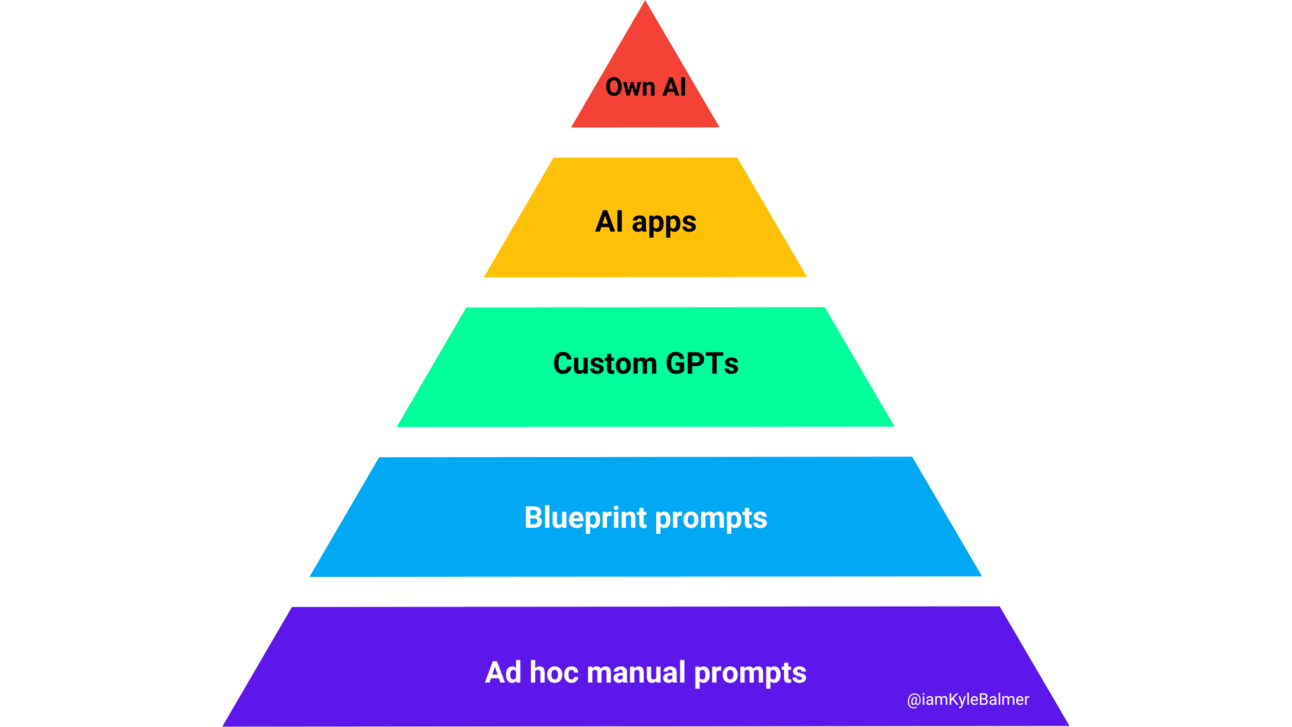
Blueprint prompts are reusable and can be saved into a library, reused by your whole team and built into workflows. It’s a step up from basic amateur usage and moves us towards automating and streamlining our business.
Here's a real example from my own business. We used to spend hours crafting social media posts. Each one needed:
Engaging hook
Value-packed content
Call to action
Right tone of voice
Hashtag research
Now we have a Blueprint prompt that turns a basic idea into a fully-formed post in seconds. Not sometimes. Every time.
Here's what that saved us:
30 minutes per post → 2 minutes
10 posts per week
4.7 hours saved per week
18.8 hours saved per month
At $30/hour = $564 monthly savings on just ONE task
And that's just social media. Think about all the repeatable tasks in your business:
Customer service responses
Meeting summaries
Project briefs
Sales follow-ups
Content outlines
Market research
Competitor analysis
Every single one of these can be templatised, optimised, and rolled out across your team.
Over the next four parts, we're going to build your blueprint prompt system from the ground up:
Part 2: Creating your first Blueprint prompt (with templates you can and should steal)
Part 3: Testing and refining your prompts until they're bulletproof
Part 4: Getting your team involved (because they know their jobs best)
Part 5: Using AI as a prompt engineer
Whether you're a solopreneur planning for growth or managing a large team, this system scales with you. The principles stay the same - we're just adjusting the implementation based on your business size. Hell, if you are a one person band for now you’ll be building the foundations for growth!
Do you want 60+ AI Business Courses…
just like this one?
Keep Prompting,
Kyle
A common problem I have with clients is that their first forays with AI are…disappointing.
They'd spent cash on premium subscriptions but were still struggling with basic prompts.
"I just can't get consistent results," they said. Classic case of having all the ingredients but no recipe.
Classic PEBCAK*
Then I showed them my RISEN™ (RISEN® in UK) framework.
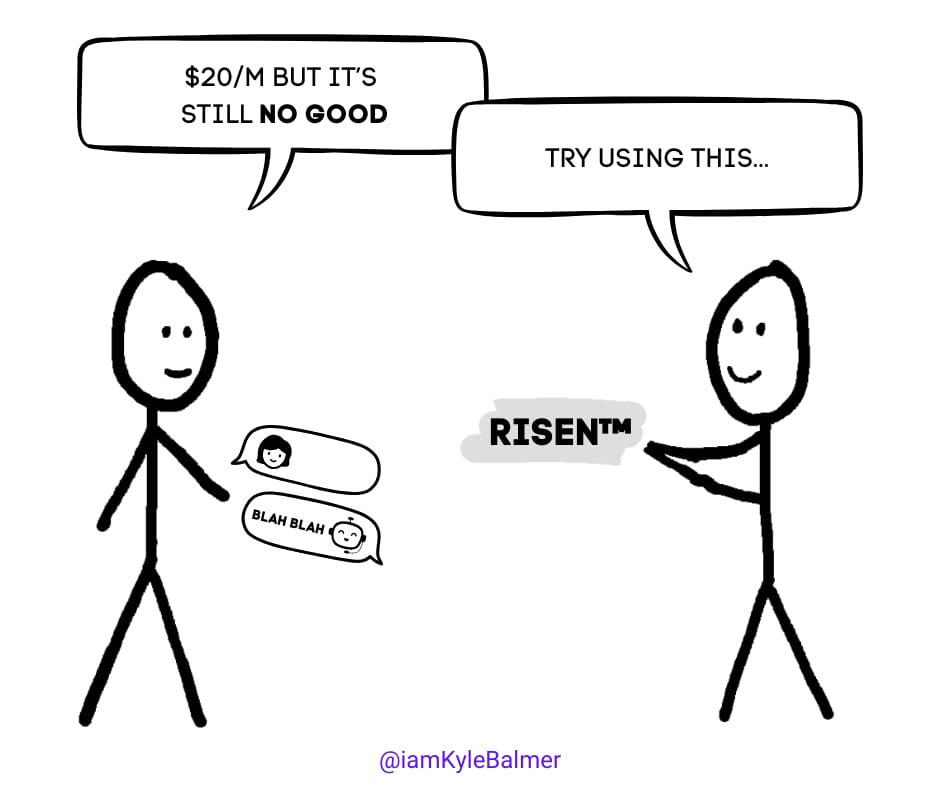
Within an hour, they'd created better prompts than they had in months of trying. Today, I'm going to show you exactly how to use it - and better yet, I'll give you a prompt that will build prompts FOR you. Fancy.
Let’s get started:
Why most prompts lack structure (and why it matters)
The RISEN™ framework explained
A master prompt that builds prompts for you
How to use and adapt the framework
Here's what most people do when creating a prompt template: they take whatever worked once and save it.
Job done, right? Wrong.
That's like taking a photo of a sandwich and calling it a recipe. Just because you can see the end result doesn't mean you know how to recreate it reliably.
A proper blueprint prompt needs a proper structure. That's where the RISEN™ framework comes in...
Before I share the master prompt, let's break down what makes a great prompt:
R - Role: Who/what is the AI pretending to be?
I - Instructions: What specific guidance does it need?
S - Steps: What enumerated steps process should it follow?
E - End Goal: What's the desired outcome?
N - Narrowing: What constraints and refinements make it better?
Think of it like a job description. You wouldn't just tell a new employee "do marketing stuff" - you'd give them a clear role, instructions, steps to follow, goals to achieve, and boundaries to work within.
Here's a prompt that will help you create prompts. It’s built around the RISEN™ framework.
It all gets a bit meta here. We use a prompt to make our AI a prompt engineer to help us write a prompt…
It uses the RISEN™ framework to gather information and then builds a custom prompt for you:
You are an expert prompt engineer who helps businesses create effective AI prompts using the RISEN™ framework. Your goal is to gather information and create a customised prompt through a step-by-step dialogue.

Begin by explaining: "I'll help you create a custom AI prompt using the RISEN™ framework. I'll ask you questions one at a time about your needs. After gathering all information, I'll craft a prompt for you."

Then, ask these questions one at a time, waiting for a response before moving to the next:

ROLE:
1. "What type of expert or professional should the AI embody for this task?"
2. "What tone or style should this expert use?"

INSTRUCTIONS:
3. "What are the main requirements or guidelines the AI needs to follow?"
4. "Are there any specific formats or structures to maintain?"

STEPS:
5. "What are the key steps or phases in completing this task?"
6. "What should happen first, next, and last?"

END GOAL:
7. "What's the primary outcome you want from this prompt?"
8. "How will you know if the result is successful?"

NARROWING:
9. "What should the AI specifically NOT do?"
10. "Are there any constraints or limitations to consider?"

After gathering all responses, create a prompt using this structure:

"You are a [ROLE] who [key characteristics].

Your task is to [main instruction].

Follow these steps:
1. [First step]
2. [Second step]
3. [Continue as needed]

The goal is to [end goal].

Constraints and requirements:
- [List constraints]
- [List requirements]
- [List what NOT to do]"
Seems like a lot. First time maybe. But i) it allows us to make a reusable Blueprint prompt and ii) once we’re used to the method it’s fast.
Let's see it in action. Say you want to create a prompt for writing customer service emails. Here's a real example:
Input to the master prompt:
Role: Senior customer service representative
Tone: Professional but warm
Main requirement: Follow company guidelines
Format: Email structure
Steps: Acknowledge, Solve, Follow-up
Goal: Satisfied customer who feels heard
Constraints: No generic responses
Related playbooks includes: Social media automation, App building, AI assistants, AI power team, AI writing workflow, ChatGPT crash-course, and more.
Obviously the more context you give it the better. But for this example this is sufficient.
The master prompt would then create a custom prompt like this for you:
You are a senior customer service representative who combines professionalism with genuine warmth. Your communication style builds trust while solving problems efficiently.

Your task is to craft customer service email responses that follow company guidelines while providing personalised solutions.

Follow these steps:
1. Acknowledge the customer's issue with specific details from their message
2. Provide a clear, actionable solution
3. Add any preventive advice for the future
4. Close with next steps or follow-up information

The goal is to resolve the customer's issue while making them feel valued and understood.

Constraints and requirements:
- Every response must reference specific details from the customer's message
- No generic or template-style responses
- Always include at least one proactive suggestion
- Never promise anything outside company policy
Remember, the RISEN™ framework is just a skeleton - you don't have to use it exactly as shown! The key is having a systematic approach to prompt creation rather than just winging it.
Prompt engineering is really just a highfalutin’ phrase for “communicating with an AI”. So RISEN™ is a communication framework first and foremost.
Right now, focus on getting that foundation in place. Create at least one solid prompt using the master prompt I've given you. Don't worry about making it perfect - that comes tomorrow when we dive into testing and refinement.
Just like a chef needs their mise-en-place before cooking, we need our basic prompt structure sorted before we can optimise it.
For now, get your hands dirty with the framework. Build something basic but functional.
Tomorrow we'll put it through its paces and see where it needs strengthening.
Keep Prompting,
Kyle
Last month, I thought I'd created the perfect prompt for generating social media content. The outputs looked amazing. The structure was spot on. Everything seemed great...until I gave it to my team.
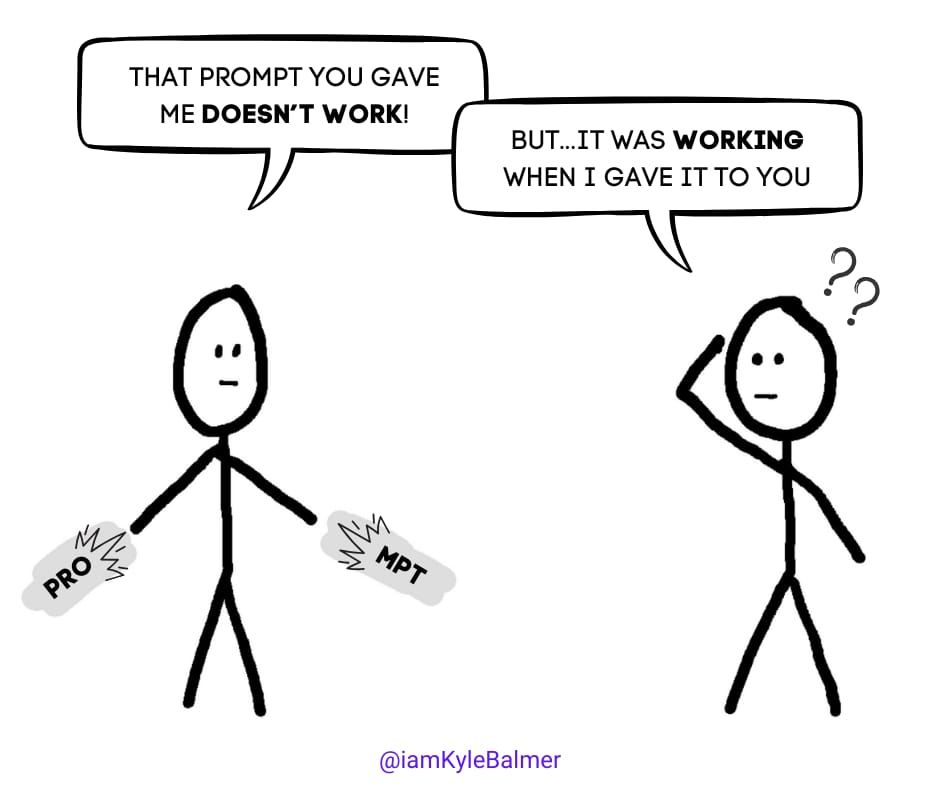
Within hours, they found about a dozen ways to break it. Posts that went off-brand. Responses that missed the mark completely. One particularly creative team member even got it to swear somehow (which was impressive consider Claude is pretty prurient, but not exactly what we were going for).
This is exactly why we test. Because what works perfectly in your hands might fall apart in someone else's.
We need to bulletproof our Blueprint prompt.
Let’s get started:
Any idiot can make a prompt work once
Three levels of testing
How to know when to pivot vs persist
Real examples of prompt refinement in action
Testing isn't just about making sure your prompt "works."
Any idiot can do that. Once!
Instead this is about about making sure it works consistently, reliably, and in the hands of different users. Here are three methods that I use in order.
First, we need to make sure the prompt produces reliable results when used repeatedly.
Remember that LLMs (Large Language Models) like ChatGPT are not deterministic.
Putting in the same input will not lead to the same output each time. This isn’t a deterministic mathematical equation. LLMs are instead probability-based which means that each time you’ll get a slightly different output.
The key is to make sure that this probabilistic variability is acceptable!
Here's how:
Run the exact same input 5 times, in new chats so that there is no “memory”
Compare the outputs side by side
Look for inconsistencies in:
Tone
Structure
Level of detail
Adherence to guidelines
If you're getting wildly different results with the same input, your prompt needs more work. You can either edit or scrap the prompt. But…how do you know when to keep refining a prompt versus starting fresh?
Here's my rule of thumb.
Persist if:
The core outputs are mostly right but need tweaking
Issues are consistent and identifiable
Team feedback points to specific improvements
Edge cases are the main problem
Pivot if:
Basic outputs are consistently off-target
Issues are random and unpredictable
Team feedback suggests fundamental problems
The prompt frequently goes off-rails
You’ll get a feel for this as you go along honestly. Especially the more you work with a model like ChatGPT or Claude. You’ll know when it’s just got the wrong end of the stick and so it’s time to rewrite!
Now it's time to try and break your prompt.
Yes, really. It’s going to come close to breaking point out in the wild anyway. So let’s stress test it now, try to break it and use the breakpoints to further refine.
Here's what to test:
Empty inputs
One-word inputs
Extremely long inputs
Off-topic inputs
Edge cases specific to your business
For example, if you're creating a customer service prompt, try:
Angry or abusive customer scenarios
Technical queries
Policy exceptions
Non-native English inquiries
Multiple issues in one query
Basically try to capture all the ways humans will be interacting with the prompt. Whether it’s internal (you and your team) or external (customers and users). Obviously with the external testing you need to be much more rigorous!
Document every way the prompt breaks. This is gold for refinement. Embrace the destruction!
Now we get scientific. Our prompt is basically good to go and we want to finalise it. Take your prompt and create a variant with one major change. For example:
You are a customer service expert who provides friendly, solution-focused responses...and its Variant :
You are a customer service expert who prioritises clear, step-by-step solutions while maintaining a friendly tone...Make sure there is ONE and only one difference in play. This allows us to tell what is actually causing differences in output.
Test both versions with the same inputs. Compare:
Output quality
Consistency
Handling of edge cases
User feedback
Use the variant you prefer (the winner). Then try new A/B variant testing to test again. Again choosing the winner. Repeat as many times as you can (/want to!) to really polish the prompt.
Let’s run an example to make all this clearer.
Let's look at how we refined our social media blueprint through testing:
Version 1:
You are a social media expert who creates engaging business content...
[Rest of original Blueprint prompt]
Test Results:
Outputs were too generic
Brand voice inconsistent
No clear hook pattern
Meh. Generally our first pass will always be underwhelming. That’s fine. It’s why we refine!
Based on those results we’ll add in some instruction and steps to make the content more “specific” and interesting. Imagine you are a teacher and a student has come to you with a writing sample. What would you tell the student to help them improve? Tell the same thing to the AI!
Version 2 (added constraints in Narrowing):
You are a social media expert who creates engaging business content. You always:
- Start with a surprising statistic or challenging question
- Use industry-specific examples
- Include one actionable takeaway
- End with a discussion-provoking question
[Rest of prompt]
Test Results:
Better hooks
More specific content
Still lacking brand voice
Getting there but it felt a bit like an AI was writing it! So..let’s add some tone of voice and brand guidelines to help it match our style. We might try something like this.
Version 3 (added voice guidelines):
[Previous prompt plus:]
Brand Voice Guidelines:
- Authoritative but approachable
- Use "we" and "our" to build community
- Share insights from experience
- Avoid jargon unless necessary
Final Results:
Consistent brand voice
Engaging hooks
Specific, valuable content
Good engagement prompts
Understand the basic flow? Now it’s over to you. Use your Blueprint prompt from the last Part and work on i) breaking it and ii) refining based on what broke!
Take your prompt from Part 2
Run it through all three levels of testing
Document every issue you find
Create one refined version
Test again
and…if necessary, again!
Remember, the goal isn't perfection - it's reliability. You want a prompt that works consistently across different users and scenarios.
Keep Prompting,
Kyle
I'm standing in front of 150 professionals at a major tech company, about to kick off an AI workshop. The room's a mix of excitement and... is that fear I see? Absolutely.
Because here's the thing - implementing AI isn't just about the technology. It's about the people.
I'll never forget one participant's comment: "I thought you were here to tell us how to replace ourselves with AI"
By the end of the day that skeptical gentleman had changed his tune. More on that later.
That's what today's all about - turning AI from a threat into a superpower for your entire team.
Let’s get started:
Why top-down AI implementation often fails
Getting your team excited, not worried
The systematic approach to team AI adoption
Building a sustainable prompt library
Creating a culture of AI innovation
Based on the last Parts of this Playbook you are becoming a prompting master. Feels great eh?
To truly achieve leverage though we shouldn’t be the only one using these tools. We need our team on board.
This is easier said than done.
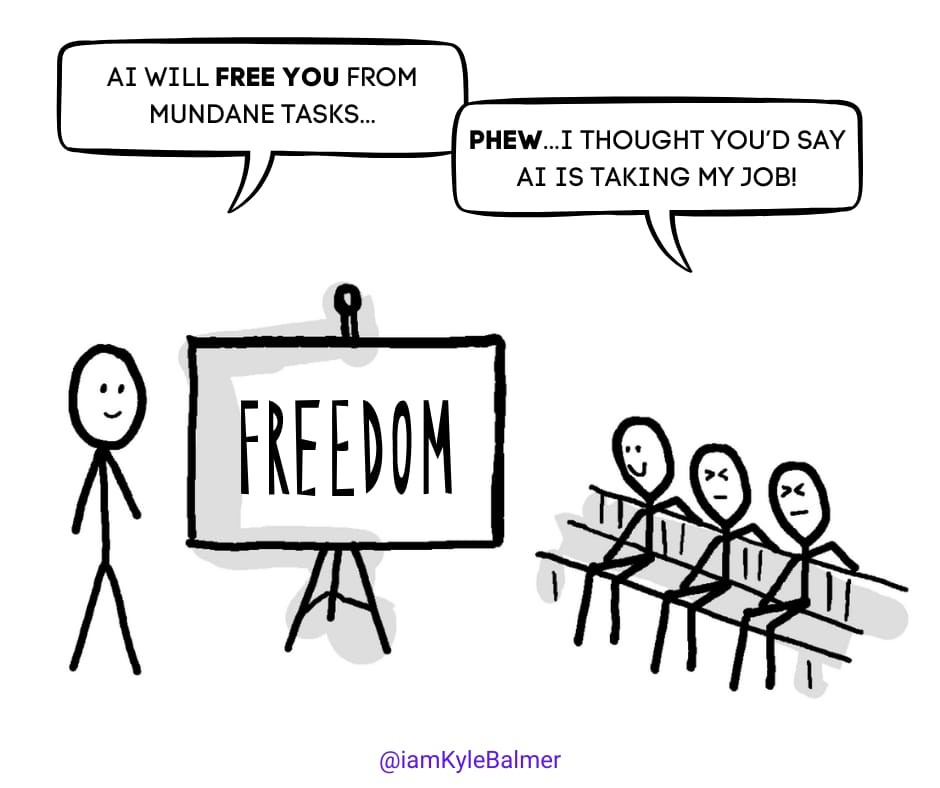
Before you even think about prompts you need to address the elephant in the room: fear.
Your team might be wondering if AI is going to make them redundant. It's a natural (and valid) concern, and ignoring it won't make it go away!
Instead, flip the script. Show them how AI can free them from the mundane parts of their job. I always start with a simple exercise: ask them to list their least favourite tasks. You know, the ones that make them want to bang their head against the wall.
Frame AI as a way to get rid of these ball-ache tasks. They won’t necessarily believe you yet but we’ll get there!
Second, get your team proper AI accounts. Yes, I'm talking about paid accounts. It's the best $20 per month per staff member you'll ever spend.
Why? Because free accounts mean you aren’t helping AI make its best impression. Paid accounts give you access to better models and fewer frustrating limitations.
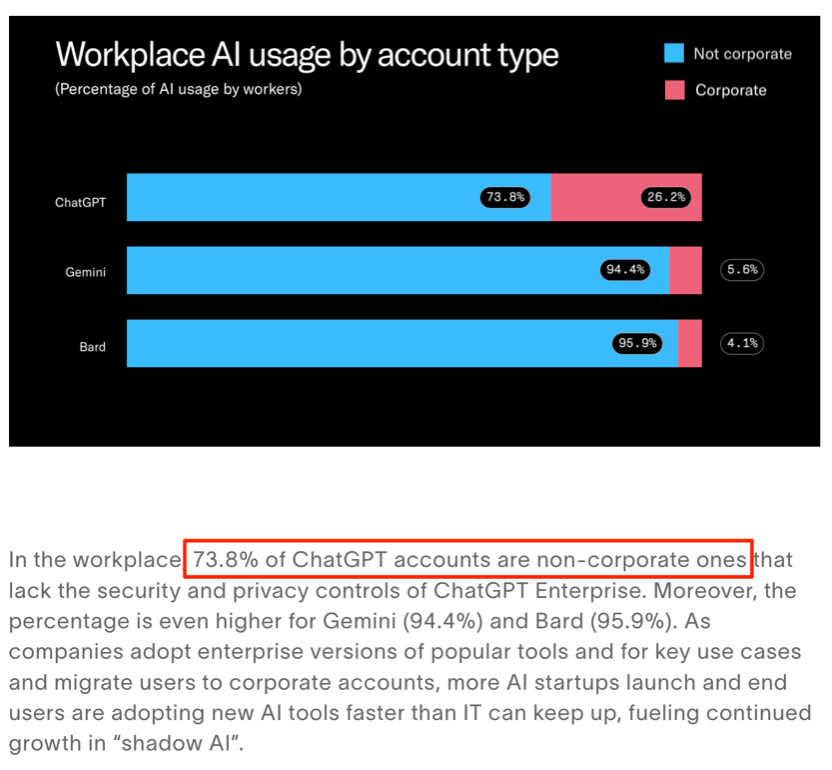
Also: security and data protection. Paid accounts mean that your company data isn’t going to the AI companies for training their models - you can secure your data. Right now ~70-80% of work is being done on free/personal accounts, meaning all of that data is leaving the company:
Third, once you've got the tools sorted, it's time for some basic prompt engineering training. Basically get them training on the RISEN™ framework or something similar.
But here's the key: don't overwhelm them. Start small, let them experiment, and watch the magic happen.
This is where it gets interesting. Once your team starts using AI, they'll naturally gravitate towards certain tasks. Let them! This organic adoption is far more powerful than any mandated approach.
Set up weekly shares where team members can discuss their AI wins. Create a space where they can refine their prompts together. Internal cross pollination is much better than you trying to tell them what to use it for! At least for initial uptake.
Once you've got that organic momentum, it's time to get more systematic. This is where we bring in the quadrant framework. It's a simple 2x2 matrix:
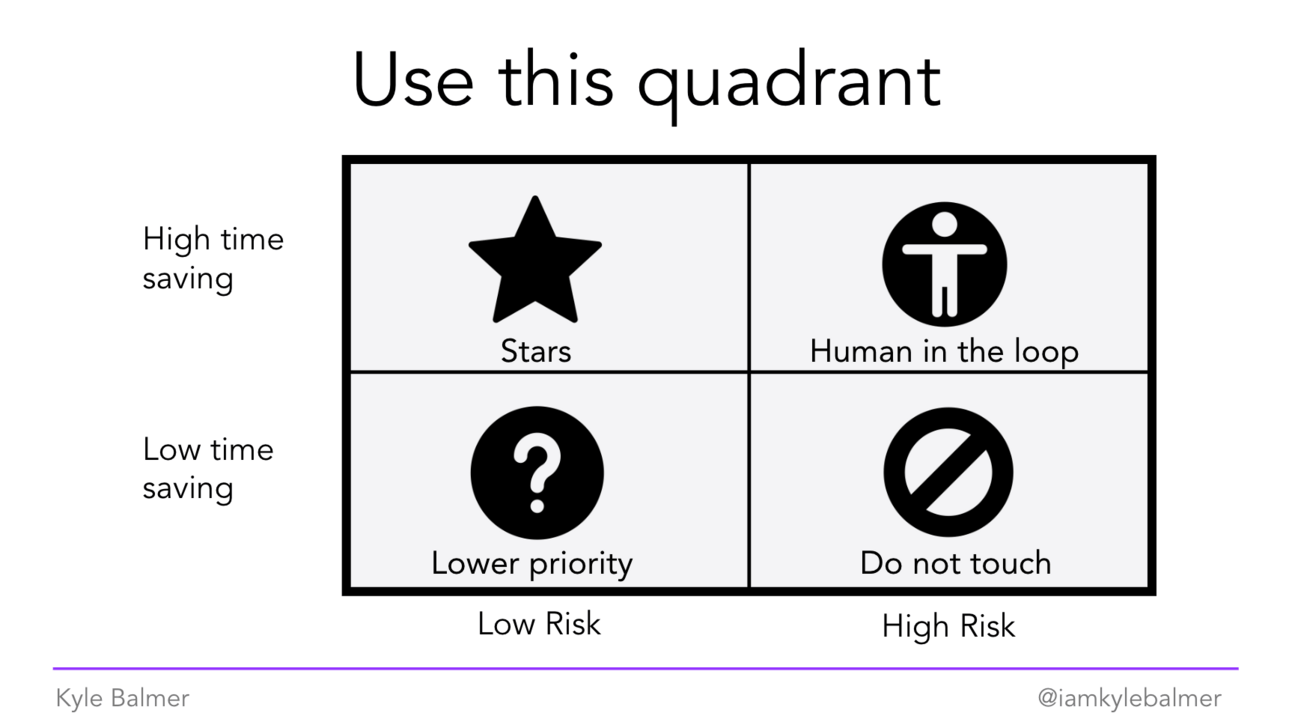
Run workshops with your team to plot their tasks on this matrix. The sweet spot? High time savings, low risk. That's where you start building your prompt library (and then onward and upward to custom Apps etc.)
Your prompt library shouldn't be a static document. It should be a living, breathing thing that grows with your team. Set up a simple system where team members can:
Add new prompts
Refine existing ones
Share success stories
Document limitations
Make it accessible, make it searchable, but most importantly, make it theirs.
I personally use Notion for my prompt libraries but use whatever makes sense in your company. Whatever the team members are most likely to use!
Next up we're diving into something really interesting: using AI to improve our prompts. We'll look at how to build automated systems for analysing, testing, and refining your prompts. Think of it as having an AI prompt engineering assistant on your team.
Keep Prompting,
Kyle
I see comments like this on my videos all the time.
Often they aren’t as polite!
And you know what? They've got a point. Why have we spent all this time learning about prompt structure, testing, and team implementation when we could just ask AI to write our prompts?
Are we dummies?
It's a fair question. And an even better one: why didn't I mention this approach right at the start?
Here's the thing - using AI to help write prompts is absolutely valid.
But (and it's a big but) you still need to know what you want the AI to create. The core skill of prompt engineering isn't writing fancy prompts - it's communication!
And if you're asking AI to write a prompt for you, guess what? You still need to communicate what you want!
We're just moving up a level.
Instead of being the worker writing the prompt, we're becoming the project manager giving the requirements. And any good project manager knows that clear requirements are the difference between success and a very expensive mess.
Let’s get started:
Why AI-assisted prompt writing works
Moving from prompt writer to prompt architect
Building systematic improvement loops
Future-proofing your approach
AI is brilliant at pattern recognition and structural analysis. Which makes it great for writing out initial prompts.
It can often spot weaknesses in prompts that we miss because we're too close to the problem.
But we still need to communicate what it is we want the initial prompt to actually do. We still need to communicate what we want. Thankfully with the right prompt we can get AI to extract this info from us!
The Prompt Writer Prompt:
You are an expert prompt engineer. Your task is to create a prompt based on my requirements.

Please ask me questions one at a time about:
1. The specific task the prompt should accomplish
2. The desired output format and style
3. Any constraints or requirements
4. Examples of good and bad outputs

After gathering this information, create a structured prompt following RISEN™:
Role - who/what the AI should be
Instructions - what it needs to do
Steps - how it should do it
End Goal - what success looks like
Narrowing - constraints and limitations

Wait for my response to each question before proceeding.
See what we did there? We're using AI to help write prompts, but we're controlling the process and applying the RISEN™ framework. We're the architects, providing the specifications and requirements. But the AI actually puts everything together for us.
Great starting point but we can do more!
But writing prompts is just the start. Here's where it gets really powerful - using AI to improve existing prompts:
The Prompt Analyser:
You are a prompt optimisation specialist. Analyse this prompt for:
1. Clarity of instruction
2. Potential ambiguities
3. Missing constraints
4. Edge cases not covered
5. Structural improvements

Prompt to analyse:
[Insert prompt here]

Provide specific suggestions for improvement in each category, explaining the reasoning behind each recommendation.
This creates a feedback loop: write, analyze, improve, repeat. Each iteration gets better because we're learning from actual usage and potential issues.
Our AI will give us some feedback and you can manually rewrite or use a simple command like
Apply those recommendationsto improve your prompt.
Want to really test your prompts? Have AI try to break them.
Remember we previously did this manually to fit the limits of what our Blueprint prompts could do. Now let’s have AI attack our prompts.
You are a creative prompt tester. Your goal is to find ways this prompt might fail or produce unexpected results.

Consider:
1. Unusual input scenarios
2. Potential misunderstandings
3. Ways the prompt could be misused
4. Performance under stress

Prompt to test:
[Insert prompt here]

For each potential issue, explain why it matters and suggest how to prevent it.
Again once problems have been identified you can fix yourself or ask the AI to apply recommendations.
The real power comes when you start chaining these tools together. For example:
Use the Prompt Writer to create your initial prompt
Run it through the Analyser
Feed it to the Edge Case Explorer
Take those insights back to the Prompt Writer
Repeat until satisfied
You're not just writing prompts anymore - you're architecting prompt development systems. Fancy eh?? Check you out.
Here's what most people miss about AI-assisted prompt writing: it's not about removing human input, it's about enhancing it.
We still have to do the initial communication of what we are looking for. That part we can’t skip - the AI doesn’t work independently (yet!).
You still need to:
Understand the business context
Know what good output looks like
Recognise when to constrain vs when to allow flexibility
Judge when a prompt is actually working
Think of AI as your prompt co-pilot. It can help spot issues, suggest improvements, and even write base prompts. But you're still the captain, making the key decisions about what works for your specific needs. Without a captain who actually knows where they want to go the co-pilot is useless.
We've covered a lot of ground in this Blueprint prompt Playbook .
We started with the foundations - why reusable prompts matter and how they can transform your business operations, especially when viewed through ROI calculations.
Then we dove into the RISEN™ framework, giving you a structured approach to creating prompts that actually work. Not just once, but reliably and repeatedly.
Testing and refinement came next, because a prompt that works for you needs to work for everyone. We learned how to methodically improve our prompts through testing.
Team implementation followed, because the best prompts come from the people who'll actually use them. We saw how collaborative prompt development leads to better adoption and results.
And finally, we explored using AI to help us create and improve our prompts. Which brings us to an ironic truth: all this learning about prompt engineering actually makes you better at using AI to write prompts. Because ultimately, it's all about communication:
With your team about what they need
With AI about how to create it
With users about how to use it
That's the real secret to success with AI - not fancy prompts or complex systems, but clear, effective communication at every level.
Keep Prompting,
Kyle
Welcome to the '♻️ Blueprint Prompts' playbook, your ultimate guide to revolutionizing the way you and your team interact with AI. In this playbook, we tackle the common challenge of prompt chaos that plagues digital marketers and businesses of all sizes. With practical strategies and proven templates, you'll learn how to streamline your AI interactions, saving time and boosting productivity. No more reinventing the wheel—let's unleash the full potential of AI in a structured, efficient way that transforms your operations and delivers real ROI. Whether you're a solopreneur or managing a large team, this playbook provides actionable insights and step-by-step guidance to create reusable, effective prompts that capture your company’s voice and ensure consistent, high-quality outputs. By the end, you’ll be equipped to enhance your AI utilization, reduce wasted hours, and empower your team to work smarter, not harder.
This playbook is designed for digital marketers, team leaders, and business owners who are tired of the inefficiencies caused by inconsistent AI prompts. If you find your team spending excessive time on prompt writing and struggling with varying results, this playbook is perfect for you. It addresses the pain points of wasted resources and missed opportunities while providing a clear path to a more efficient and organized approach to AI utilization. Whether you’re a solopreneur preparing for growth or managing a team of 100+, '♻️ Blueprint Prompts' equips you with the tools to improve communication with AI, enhance team productivity, and ultimately drive better results for your business.
No prior experience is necessary! This playbook provides foundational knowledge and step-by-step instructions to help you get started.
Each part of the playbook is designed to be digestible and can be implemented at your own pace. Expect to dedicate a few hours per week to practice and refine your prompts.
Absolutely! The principles and templates provided can be adapted for various content types, including social media posts, reports, and customer service responses.
Yes! The strategies discussed scale seamlessly, making it an excellent resource for teams of any size.
This playbook focuses on creating reusable prompts and collaborative systems, ensuring consistent results and significantly reducing wasted time.