
AI Authority
Unlock the power of your brand's unique voice with the 🗣️ AI Brand Voice playbook.
Start ReadingI know I’ve certainly used AI to help with cards, speeches and other everyday writing I need to do.
This has become the norm. Increasingly so.
Will we forget how to write ourselves? Maybe! There’s a phenomenon in China called 提笔忘字 - basically means “pick up the brush, forget the word”. People now type so much in China (on phones primarily) that handwriting the characters becomes difficult! Something similar may happen with our own writing!
So...should we just not use AI to write? At all? Maybe! That's one approach.
But we are entrepreneurs. We use tools to accelerate ourselves and our customers. And if we're going to use these tools - which let's be honest, we are - we need to use them well.
That means learning how to properly capture and replicate our tone of voice. Whether it's for personal writing or business content, if we're going to leverage AI, let's do it right! Nothing worse than i) losing our ability to write and ii) replacing it with something generic and rubbish! Ha!
And this is exactly what's keeping marketing directors and business owners up at night. They're not debating whether to use AI anymore - they're wrestling with how to use it effectively to maintain a consistent brand voice across hundreds of pieces of internal and external content each month. This opens up opportunities for us!
Let's get started:
Sponsor
Why traditional approaches are failing
Two clear paths to profit
Why 2025 is the perfect time
What you'll learn this week
Let's talk about brand voice.
It sounds a bit fancy (probably to allow brand consultants to charge a lot - sorry brand guys!). It's what makes your content distinctly "you", whether that's professional and authoritative, casual and friendly, or anywhere in between.
It's more than just how you write - it's your company's personality coming through in every piece of communication.
For entrepreneurs like us, this matters more than you might think. Every social media post, every newsletter (like this one!), every email to customers - they're all opportunities to reinforce who we are as a brand.
Getting this right consistently is crucial, especially as we scale our content production. I personally use AI to help write thousands of words daily across multiple channels, but it has to sound like me. The systems I'll show you this week are exactly what I use to make that happen.
But here's where it gets really interesting.
This isn't just about our own businesses.
My AI consulting students keep reporting the same thing: brand voice is often the first project clients want to tackle with AI.
Clients want a tool that can write blog articles, social posts, internal comms and match their past work and brand guidelines.
It makes perfect sense - it's tangible, it's valuable, and it shows immediate results.
It’s something that clients know AI can do but don’t necessarily know how to build. AKA: perfect for us to come in and build for them!
Now, traditionally, companies try to maintain their brand voice through expensive consultants and lengthy brand guidelines. You know the type - 80-page PDF documents that cost £30,000 and end up gathering digital dust in some shared drive. I was working with a marketing team last month who had exactly this problem. Beautiful brand guide, but ask any team member when they last referenced it? Crickets.
But at the same time companies want to produce written content at scale - it’s the key to content marketing.
And they are very willing to pay for it.
Let's run some real numbers from a modest content calendar:
Monthly needs:
4 blog articles (1500 words each)
20 social media posts
Time & Cost:
Writing & tone checking: 35 hours
Total cost with freelancers/agency: £2,300+
And this is a relatively small content load - many companies produce 3-4x this amount across all their channels!
What if you could go to them with a tool that costs, say, £2000. That can generate new content exactly matching their tone of voice? Yeah…easy sell right there.
Key is that they have existing content. And we use this to replicate their tone of voice. We aren’t starting from scratch. This is key - and the focus of the next Part.
This presents two clear opportunities for us:
Write consistent content at scale
Maintain your voice across all channels
Train team members faster
Reduce editing time massively
Scale your content without losing your personality (kinda the whole point!)
Easy £2,000+ starter projects
Quick implementation (2-3 hours once you know the system)
Immediate, demonstrable results
Natural upsell to larger AI projects
Even if you want to do this mainly for other people I’d highly recommend deploying a system for yourself and own company first. It’s a good way to practice and have a great first case study. Plus…you’ll be selling something you genuinely know how to do which…is normally a good idea!
A year ago I wouldn’t have written this Playbook. It would have been, frankly, useless.
Why now then? Simple: the AI got better. A lot better.
A year ago, our options for replicating our tone of voice were … limited. The models weren't sophisticated enough, and we couldn't effectively use our own data to train them.
Now? We have access to incredibly powerful models AND we can feed them our existing content to capture our unique voice. Meaning it’s the perfect time to deploy a consistent tone of voice system.
Over the next four parts, we're going to build these systems step by step:
Part 2: The Content Goldmine How to gather and analyse existing content to capture brand voice DNA
Part 3: Voice DNA Extraction Creating the perfect prompts for voice replication
Part 4: Deployment Options Implementing across different AI platforms (ChatGPT, Claude, custom solutions)
Part 5: Training for Success Building, testing, and refining your voice system
And remember all of this can be deployed for yourself and your own business and then (if you want!) for other businesses for easy consultation gigs.
Keep Prompting,
Kyle
It’ll be fun - I promise! OK…fine it’s a bit dry. But it’s super important!! Sorry!
And when it goes wrong it’s pretty funny.
I worked with someone who was horrified by what their brand new AI tool was producing. They'd spent weeks building a system to write social media posts in their company's voice, but something was... off.
Every single post ended with "Thank you for reaching out! How would you rate my response today?” or some variant.
Bizarre, right? Totally inappropriate for social media.
After digging into their training data, we discovered the culprit. Instead of feeding the AI with their best marketing content, they'd used thousands of customer service chat logs.
The AI was faithfully replicating the tone and structure of those support conversations - complete with that signature service agent sign-off.
It was doing it’s job perfectly well! But it had been given the wrong information to work from. Not it’s fault really!
This is a perfect example of the cardinal rule of AI training: Garbage In, Garbage Out (GIGO). Your AI assistant can only be as good as the content you feed it.
Let's get started:
The GIGO principle of AI training
Purpose-driven content collection
Personal vs. company voice considerations
Your content inventory checklist
Tools and methods for efficient collection
In the world of AI, there's a simple but powerful principle: what you put in determines what you get out.

Feed your tool outdated, off-brand, or irrelevant content, and you'll get outdated, off-brand, or irrelevant outputs. It's that simple.
Most of us get this. But that doesn’t necessarily mean we know how to action it. This Part of the Playbook is here to give you a specific action plan and a checklist. Converting best intentions into actually solid data.
This is especially important for brand voice. When you're building an AI system to replicate a tone or a voice, the examples you provide are everything.
The AI has zero inherent understanding of what makes your voice unique - it can only analyse and replicate patterns from the content you provide. Our source data is everything.
Before you start gathering content, you need to answer a crucial question: What exactly will you use this AI voice model for?
Different use cases require different types of content:
Social media posts need casual, engaging content examples
Blog articles need more in-depth, informative content
Customer service responses need empathetic, helpful language
Internal communications need clarity and appropriate formality
This alignment is critical.
Yes you can make a general purpose assistant that can do all the outputs.
But guess what? It’s not going to be as good as focused individual tools.
If you must combine everything into one tool you’ll need to label your inputs explicitly (ie. making it clear what is a transcript, what is a blog article, what is from an interview) and then also adjust your output prompts to specifically use certain sources.
It’s doable! But adds complexity. For now I’d recommend creating focused single purpose tools - one for social media, one for newsletters, one for email responses, one for customer service etc. etc.
Next consideration is whether this is using personal or company tonality. This questions comes after the usage question from before. We need to define usage first then what type of tonality.
The source collection process differs significantly depending on whether you're capturing your personal voice or a company's brand voice.
For your personal voice:
The process is simpler - any authentic content you've created works
Focus on content where your natural voice shines through
Include both formal and casual examples for flexibility
Consider how your voice changes across different contexts
For a company voice:
Be more selective and strategic
Identify what tonality the company wants to project
Get stakeholders to provide their "gold standard" examples
Consider brand guidelines
OK those are the two main factors in play - purpose and tonality.
To help you create a tailored collection checklist, I've created this prompt that you can use with ChatGPT or Claude:
You are an AI voice training expert helping me collect content for an AI brand voice project. Based on my specific needs, create a detailed content collection checklist.

Ask me questions to determine the following:
- Purpose: What will the AI voice be used for? E.g., "Writing social media posts" or "Creating blog articles"
- Voice type: Personal or company voice

Then generate a list of potential content sources that'll be used as examples to capture brand voice.

For each content type in your checklist, please include:
1. Description of what to look for
2. Why this content type is valuable
3. Minimum recommended quantity
4. Specific elements to pay attention to
5. Red flags or content to avoid
This prompt will generate a customised collection checklist tailored to your specific needs.
Obviously the next question is how to extract each type of data. And honestly - it depends a lot depending on what it is! Let me quickly run through the main options!
Your company website is often the most polished representation of your brand voice. Here's how to capture it effectively:
Manual copy/paste: For smaller sites, simply copy and paste content into a document, organising by page type. Works perfectly fine and AI can strip out the “formatting” elements no problem.
Web scrapers: For larger sites, tools like Octoparse or ParseHub can extract all text content automatically. I used Octoparse personally.
Browser extensions: SingleFile or Save Page WE can save entire webpages with their structure intact.
Blog articles often contain the richest examples of your brand voice in action. They're typically longer-form content that addresses topics in depth.
Generally manually copy/pasting isn’t viable here. A scrape works but there are some additional methods here.
Collection methods:
Direct access: If you have CMS access, export articles directly
RSS feeds: Use an RSS reader to collect posts
Spoken content can provide excellent examples of natural voice patterns, especially for conversational tones. Super helpful for personal tone of voice, especially because when transcribed podcasts give your thousands of words. Here are your options for transcription:
Paid services:
The YouTube Trick: If your content is on YouTube, here's a free hack:
Upload your video (privately if needed)
YouTube will auto-generate captions
Download the .srt file
Convert to text using an online converter
Or use OpenAI’s Whisper model via the API.
When processing transcripts, clean up filler words and false starts unless these are part of the voice you want to capture. AI can do this for you - no need to do manually.
Social posts often showcase your most conversational, engaging voice. Collection approaches vary entirely by platform:
Twitter/X:
Use the archive download feature in settings (do this in advance as it takes a while to be processed!)
Tools like Tweepi or Twitonomy for more organized collection
LinkedIn:
Request data export from privacy settings
For company pages, manually collect top-performing posts
Instagram:
Use Creator Studio to access post copy
Third-party tools like Iconosquare can export captions
Facebook:
Page content can be exported via Creator Studio
Personal content via Facebook's "Download Your Information"
All of these work with text. What about video posts?
You can use Apify or similar tools to mass scrape posts.
This is how I personally do it - Apify to scrape videos and their subtitles, throw transcript of video post over to ChatGPT to clean up then send it into an Airtable. Very cost effective and you can basically strip mine a company’s post (or your own!) into a table in minutes.
With all this content collected, you need a system to organise it effectively:
Create a central repository:
Google Drive folder
Notion database
Dedicated project in tools like Airtable (allows tagging etc.)
Categorise by content type:
Create separate documents/sections for different content types
Include metadata for each piece (source, date, performance if known)
Tag content by voice characteristics:
Formal vs casual
Persuasive vs informative
Technical vs simplified
Emotional tone (inspiring, authoritative, friendly)
This organised approach will make the next step - voice extraction - much more effective.
If you are just doing this for your own voice tool (rather than a client) you can probably get away with just dumping everything into a Google Drive. We don’t need the same level of precision and sorting because it’s all our voice. We can play more fast and loose.
How much content is enough? Here are my recommendations:
For personal voice: 25-50 samples across different content types
For company voice: 50-100 samples across relevant channels
Minimum of 10,000 words total
At least 5 examples of each specific content type you want to generate
These are rules of thumb. Got more? Fantastic. As long as quality is solid more is generally better!
In Part 3, we'll take all this organised content and extract the DNA of your brand voice. We'll create powerful prompts that capture the essence of your voice and allow any AI to replicate it consistently.
Keep Prompting,
Kyle
About a year ago, I was absolutely convinced I could build an AI that could write in my voice.
I gathered hundreds of my newsletters, social posts, and articles. I spent days organising everything, sorting, filtering and tagging it all nicely.
The result? Complete rubbish.
Sounded like ChatGPT with a few more swears. And ellipses. I do love ellipses…
No matter what I tried, the AI output felt generic. It might mimic a turn of phrase here or there, but it never quite captured... me.
I gave up on the whole concept. AI just wasn't ready for this particular task.
I also saw lots of people touting AI clones and the like and everything I played with was … disappointing!
Fast forward to today, and everything has changed. Funny that! Change in the AI world? Who’d have thunk?
What was impossible just a year ago is now not just possible but surprisingly straightforward. The latest models from OpenAI and Anthropic (hugs for Claude) have made genuine tone of voice replication accessible to anyone.
So even if you've tried this before and failed - now is the perfect time to try again.
Let's get started:
Why Projects are the game-changer for tone of voice
Building an analysis prompts that actually work
Creating your master voice instructions
Testing and refining your voice system
There's one feature that's completely transformed the voice replication process: Projects.
Both Claude and ChatGPT now offer Project spaces where you can:
Upload multiple files (all that content you collected in Part 2)
Create custom instructions that tell the AI how to use those files
Have the model reference specific examples when generating content
This is dull but revolutionary.
Instead of trying to stuff everything into a single prompt (which never worked well!), we can now create a permanent environment where the AI has constant access to all your voice examples.
Here's the straightforward process we'll follow:
Upload all your collected content to a Project (in ChatGPT or Claude) as a knowledge base
Create an analysis prompt that examines the entire knowledge base
Use the output to create custom instructions for the Project
Test and refine with real content creation tasks
Let's break down each step.
Both Claude and ChatGPT handle Projects slightly differently, so I'll cover both.
Go to claude.ai/projects
Click "New project"
Name it something clear like "[Your Name/Brand] Voice Project"
Click "Upload files" and add all your collected content
We’ll create custom instructions in the next step
Go to chatgpt.com
Click "+" next to Projects
Give the project a name
In the Configure tab, upload your files with the Add File button:
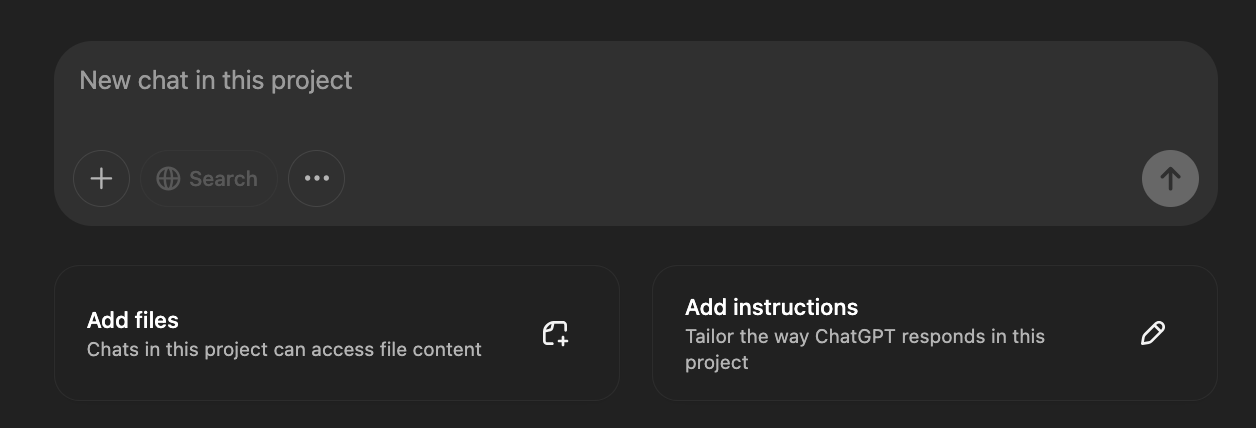
You'll create the Instructions in the next step.
Now comes the magic. We'll create a prompt that analyses your entire knowledge base and extracts the patterns that make your voice unique.
Here's the prompt I've refined over dozens of projects:
I need you to analyse all files in the knowledge base to create a comprehensive brand voice guide. This guide will serve as custom instructions for this project, helping you write in this exact voice in future conversations.

Process:
1. Thoroughly analyse all content in the knowledge base
2. Identify distinct voice patterns, writing style, sentence structures, vocabulary, and tonal qualities
3. Note both consistent patterns and how the voice adapts across different contexts
4. Create a structured brand voice guide with specific examples from the knowledge base

Your guide should include:

VOICE OVERVIEW:
- 3-5 sentence summary of the overall voice
- 5-7 key personality traits with evidence
- Overall writing style (formal/casual, direct/indirect, etc.)

LANGUAGE PATTERNS:
- Sentence structure preferences (length, complexity, variation)
- Paragraph construction
- Transition techniques
- Distinctive punctuation or formatting choices

VOCABULARY ANALYSIS:
- Frequently used words/phrases
- Unique expressions or catchphrases
- Words/phrases that are deliberately avoided
- Technical vs. simplified language choices

TONAL VARIATIONS:
- How tone shifts across different topics
- How tone adapts to different audiences
- Emotional range and how it's expressed

RHETORICAL DEVICES:
- Preferred storytelling techniques
- Use of questions, analogies, metaphors
- Humour style (if present)
- How complex ideas are explained

SPECIFICS TO EMULATE:
- Opening techniques
- Closing techniques
- Transitional phrases
- List/example structures
- Call-to-action approaches

CONTENT EXAMPLES:
- Include at least 10 specific quoted examples from the knowledge base that perfectly capture the voice
- For each example, explain what makes it representative

FORMAT:
- Create this as a comprehensive reference guide
- Use sections and subsections for clarity
- Include direct quotes from the knowledge base as examples
- Add notes about when/how to reference the knowledge base for specific voice elements

This guide will become the custom instructions for generating content in this exact voice. Be thorough and specific, as this will be the foundation for all future writing.
This prompt asks the AI to perform a comprehensive analysis of your content, looking for patterns at every level - from word choice to sentence structure to rhetorical devices.
If you’ve fed it enough information it’ll be quite spooky!
Take the output from the analysis prompt and refine it into custom instructions for your Project.
For Claude:
Go to your Project top level and look for this:
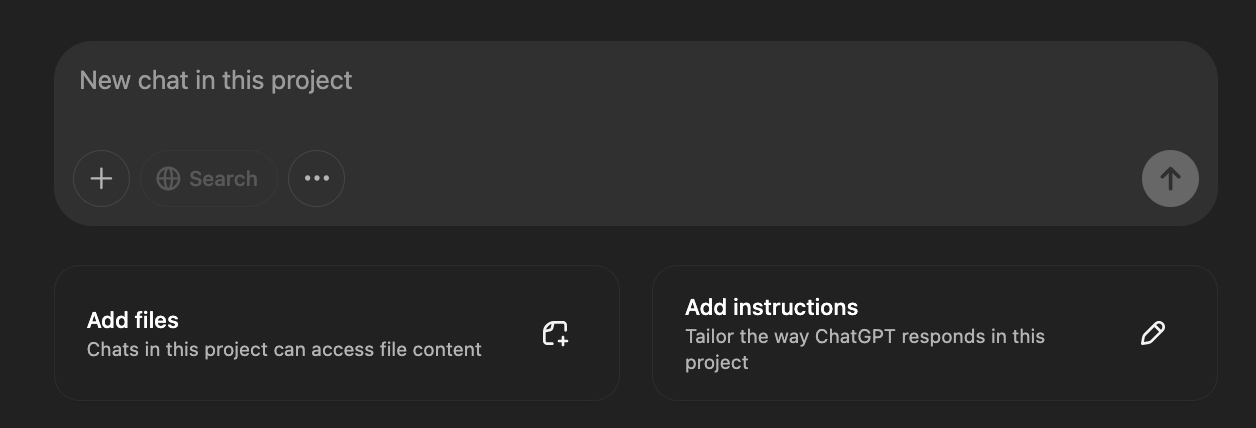
Click Set Project Instructions
Copy/paste in your tone of voice guide from the prompt.
Add any additional notes about how you want Claude to use the knowledge base (see below)
For ChatGPT:
Inside your project look for the Add Instructions button:
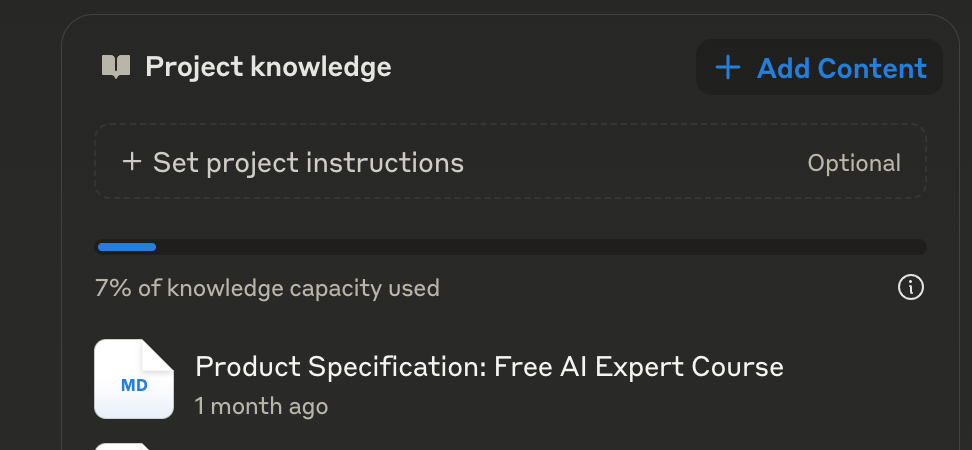
Paste the voice guide into the "Instructions" section
Add any specific guidance about referencing the knowledge base (see below)
Here's a crucial addition to make to the instructions:
When asked to write content in this voice, always:
1. Reference the knowledge base for similar examples first
2. Follow the patterns identified in this guide
3. Explain your approach if asked, citing specific examples from the knowledge base
4. Maintain this voice unless explicitly instructed otherwise
Add this at the TOP of custom instructions and then copy/paste in your voice guide from above. This addition ensures the AI knows when and how to use the voice guide you've created.
What we've built is essentially a specialised writing system with two key components:
A data source / Project Knowledge (all your uploaded content)
Custom instructions (your voice guide)
Together, these create a powerful system that can consistently replicate your voice across any content type.
The beauty of this approach is that the AI can now reference specific examples from your knowledge base when creating new content. If you ask it to write a social media post, it will look at similar posts in your uploaded content to ensure the tone and style match.
We don’t have to put ALL the references in a mega prompt (thus filling the chat memory instantly!). Instead we have our references in place and a prompt that can tell our AI to refer to them when needed.
Now that we've extracted your out tone and voice created a basic system, it's time to explore deployment options. In Part 4, we'll look at different ways to implement your tone of voice system, from custom GPTs to API integration and more.
Keep Prompting,
Kyle
In the last Part we built an early version of our tone of voice tool - using Projects.
We kept it nice and simple using Projects so we could i) create a knowledge base and ii) create an instruction prompt off the back of the knowledge base. Solid.
If you are using your tone of voice tool personally - just for you - then you can actually skip to Part 5. You’ve got what you need!
If however you want to expand who can access the tool (say, your marketing team) OR if you are building for an organisation then this Part is vital. We’re talking deployment.
The perfect tone of voice model isn't worth much if the right people can't access it when they need it.
Let's get started:
Choosing the right deployment path
Decision framework for implementation
Platform comparison and limitations
Step-by-step setup guides
Future-proofing your voice system
Before we dive into specific platforms, we need to answer some crucial questions about how your tone of voice system will be used. The right deployment option depends entirely on your specific needs. No one size fits all here.
Let's start with a decision framework to guide your choice:
Who's it for?
Just for yourself/personal use?
For a client as a deliverable?
For your company's internal teams?
Who needs access?
Single user (just you)
Small team (2-5 people)
Larger organisation (6+ people)
Usage context:
Private/internal use only
Customer-facing/public use
Mix of both
Technical requirements:
Need for integration with other tools?
Budget constraints?
Technical expertise available?
Content security:
Sensitivity of data being processed
Privacy requirements
Regulatory considerations
To make this process easier, I've created (you guessed it!) a prompt that will give you personalised deployment recommendations specifically for our voice system approach:
You are an AI deployment strategist specialising in brand voice systems. Help me determine the optimal deployment option for my AI brand voice model based on my specific needs.

Context: I have built a tone of voice replication system consisting of:
1. A knowledge base of multiple uploaded documents (potentially hundreds of files)
2. Custom instructions derived from analysing these documents
3. A system that references specific examples from the knowledge base when generating content

Ask me the following questions one by one, waiting for my response to each:

1. Who will be using this voice system? (Options: Just me personally, My business team, A client's team, Other)

2. How many people need access to this system? (Options: Just 1, 2-5 people, 6+ people)

3. What is your budget for this deployment? (Options: Minimal/free options only, Moderate budget, Enterprise budget)

4. What is your technical comfort level? (Options: Non-technical, Some technical knowledge, Technical expert)

5. How will the content be used? (Options: Internal use only, Public-facing content, Both)

6. How many documents does your voice knowledge base contain, and what's their approximate total size? (Options: Few small documents, 10-50 medium-sized files, Large document library)

7. How important is the ability to easily update your voice knowledge base over time? (Options: Not important, Somewhat important, Very important)

Based on my answers, recommend the best deployment option(s) for my specific voice system needs. For each recommendation, include:
- Platform name
- Why it's suitable for my voice system implementation
- How it handles my knowledge base and custom instructions
- Basic setup steps
- Limitations regarding document handling and reference capabilities
- Approximate cost

Present the top 3 options in order of recommendation, with clear reasoning for each ranking.
This prompt will help you narrow down your options based on your specific needs. Use it with any AI assistant (it doesn't need to be your voice model!) to get personalized recommendations.
Now let's look at the main deployment options available. Obviously there are more than these (and the prompt above will help you discover them) but let’s orientate ourselves to the main options.
Best for: Personal use, individual creators, simple deployment needs
Pros:
Easy to set up
No technical knowledge required
Free or low cost (ChatGPT Plus subscription)
Sharable (via CustomGPT “store” or Link)
Cons:
No team collaboration features
Low memory / context window (can’t add too many documents)
Less control over the model
Setup process:
Create a Custom GPT (requires Plus subscription)
Upload your voice examples
Add your voice guide as instructions
Set visibility to "Just Me" or "Anyone with the link"
Cost: Free (with limited capabilities) or $20/month (ChatGPT Plus)
Best for: Small teams, collaborative workflows, long-form content
Pros:
Better file handling than ChatGPT
Can share with team members (on team plan, not standard plan!)
Excellent for long-form content
Cons:
Team sharing requires higher-tier subscription
Less widespread adoption than ChatGPT
Fewer integration options
Best for: Quick deployment, non-technical users, client deliverables
Pros:
Purpose-built for tone voice replication
User-friendly interfaces
Ready-made sharing and collaboration
Cons:
Less customisable
Recurring subscription costs
Popular options:
Delphi.ai (easy custom chatbots)
Launch Lemonade
Cost: Typically $20-500/month depending on features and scale
Best for: Technical users, complex needs, integration requirements
Pros:
Maximum flexibility and control
Can be integrated with existing systems
Scalable to enterprise level
Cons:
Requires technical expertise
Development time and costs
Ongoing maintenance
This is all in flux obviously. So what works now as a deployment option may not be ideal 6 months from now.
Generally though with AI everything is becoming easier, more accessible and better. Change is good!
As you decide on your deployment option, keep in mind that this space is evolving rapidly:
ChatGPT will likely improve sharing features
Claude is expanding team capabilities
New platforms are emerging regularly
All you can do right now is build using whatever makes sense at this point in time.
Thankfully your knowledge base and custom instructions will remain useful on different platforms in the future - all that prep work we completed in the last Parts remains valuable.
In our final Part we'll focus on training and refinement. How to make your tone of voice model better by giving it feedback.
You'll learn how to systematically improve your tone of voice system through feedback, testing, and iteration. For either your personal tool or for clients.
Keep Prompting,
Kyle
You spend hours hammering away, screwing stuff in, swearing and sweating.
And can’t get the damn thing up.
Would you throw it away? Just because you can’t get it done immediately? Smash the bugger up and throw the pieces out?
Nah. Well, I hope not!
Same goes for your tone of voice tool. It might not be perfect immediately. It probably won’t be! Do you drop the project?
Think about it: If you hired a new copywriter who got your voice 80% right on their first assignment, would you immediately fire them?
Of course not. You'd give them feedback. You'd help them understand what wasn't quite landing. You'd train them.
The same principle applies to your AI tone of voice system. That first output isn't the final product—it's the starting point of an iterative training process. Just like a new team member, your AI needs guidance, feedback, and time to really nail your voice.
Let's get started:
Why your first outputs won't be perfect (and that's okay)
The systematic training approach
Offline vs. online testing strategies
Creating effective feedback loops
First up: your initial outputs won't be perfect. This isn't a failure of the process—it's a natural part of it.
Even the most sophisticated AI systems need training and refinement. Hell, that’s what makes them so good! What we're building is a feedback loop, not a one-time setup. The magic happens through iteration.
It’ll probably look a bit like this:
First round: 60-80% accuracy - a bit meh
After targeted feedback: 80-90% accuracy - ok workable.
After multiple iterations: 90-95% accuracy - wow this is solid!
Ongoing refinement: 95%+ accuracy - BINGO!
The best news? This improvement happens quickly. Quicker than with humans!
We'll tackle training in two distinct phases:
Offline Testing: Controlled environment, simulated tasks
Online Implementation: Real-world application with monitoring
This approach lets you refine in a safe space before deploying your voice system in actual production scenarios.
When to make a switch? If you are building this for yourself then you’ll likely go live a lot earlier. If building for a client then you’ll do more testing and refining up front. It depends!
Offline testing means giving your system tasks that mimic real-world needs but aren't actually used in production. It's like a dress rehearsal or a dry run. So many good metaphors here! Or similes? You know what I mean!
To properly test your voice system, you need a diverse set of challenges. Here's a prompt to help you generate appropriate some test tasks to start with:
You are an AI testing specialist. I need to create a comprehensive set of test scenarios for my brand voice AI system. The system will be used for [describe your intended use cases].

Please create 10 diverse test tasks that will thoroughly evaluate the AI's ability to replicate my brand voice across different contexts, tones, and content types.

For each test task:
1. Provide a clear prompt I should give to my AI
2. Explain what specific aspects of voice this test evaluates
3. Include a baseline for success (how to know if it passed)

Make sure the test set includes:
- Different content lengths (short, medium, long)
- Varying emotional tones (positive, neutral, challenging)
- Different content types (based on my intended use cases)
- Edge cases that might be particularly challenging

The goal is to identify where the AI excels and where it needs improvement in capturing my brand voice.
Use this prompt to generate a comprehensive set of test tasks tailored to your specific needs.
Now - what to do with these tasks?
Here's the exact process for systematically improving your custom instructions:
Provide your current custom instructions and one of the test tasks to the AI
The AI completes the task based on those instructions
You give specific feedback on what wasn't right about the voice
The AI updates your custom instructions based on your feedback
You implement the updated instructions and repeat
We are basically stress testing our tone of voice AI with tasks. And each time telling it what it did well and what it sucked at. From that we get new custom instructions to work with.
This creates a tight feedback loop where each iteration improves your voice system.
Here's a prompt you can copy and paste to start this refinement process:
You'll help me refine my input custom instructions for better voice accuracy. Follow these steps:

1. First, I'll provide my current custom instructions and a test task as inputs.
2. You'll complete the test task using those instructions. Complete the task only and provide no additional information.
3. After seeing your response, I'll provide feedback
4. You'll then update my input custom instructions based on that feedback

When I provide feedback, analyse it carefully to identify patterns and issues with the voice. Then create updated custom instructions that address these issues.

Present the updated instructions in a clear, formatted way that I can easily copy and paste into my system. Use the same basic  formatting and structure as the input - just with amendments based on my feedback. Do NOT explain the changes - provide only the reworked custom instructions with no additional information

INPUTS begin:
Current Custom Instructions:
[PASTE YOUR CURRENT CUSTOM INSTRUCTIONS HERE]

Test Task:
[ENTER A TASK YOU WANT THE AI TO COMPLETE]
This prompt is a little complex. All you need to know is you copy and paste in your current custom instructions which we created in Part 2 and one of the tasks from above.
Run all of this in your Project, CustomGPT, API model or otherwise deployed tool so it has full access to your knowledge base.
This will run a process and spit out a reworked set of custom instructions.
Take these new custom instructions and add them into your deployed model.
Then run another task. And another. And another.
Each refinement cycle typically takes just a few minutes but dramatically improves your results. Most voice systems require 3-5 cycles to reach excellent accuracy. It’s well worth the investment of time.
When you're satisfied with the refinement, simply copy the final updated instructions into your voice system configuration and you as done for now!
Now comes the crucial part: providing effective feedback. Here's what makes feedback effective:
Poor feedback: "This doesn't sound right. Try again."
Effective feedback: "This is too formal for my brand voice. My writing typically uses contractions (I'm vs. I am), shorter sentences, and more conversational transitions. The paragraph structure is good, but the word choice feels stiff. Reference my blog posts from March for better examples of how I discuss technical topics."
The key elements of effective feedback:
Be specific about what's off
Provide examples of what works better
Reference specific documents in your knowledge base
Focus on patterns, not just individual words
If in doubt imagine you are a teacher providing writing feedback to a student. Keep it simple and focused.
Once your offline tests are consistently producing good results, it's time to implement your voice system in real-world scenarios.
Start small:
Begin with lower-stakes content (internal documents, draft emails - depending on your use case obviously)
Have a human review outputs before they go public(!!!!)
Gradually expand to more visible channels
(Optional) And remove human checking as you progress and feel comfortable.
Even in production, the training doesn't stop. Here are some pointers though, especially if deploying for a client.
Regular Reviews: Schedule weekly or monthly reviews of AI outputs. These reviews can become more infrequent over time until you can more or less forget about them.
User Feedback: If multiple people use the system, collect their impressions
Content Audit: Periodically compare AI content against human-created content
Knowledge Base Updates: Add new examples as your brand evolves. Ideally automatically - ie. scrapes of the website on a scheduled cron job.
Model updates: when a new version of the model drops make sure that the tone of voice tool still works. And (if you want) update to the newer model. Rerun the refinement process each time as different models will react differently.
We've covered a lot of ground in this 5-part series. Let's recap the entire journey:
Part 1: We explored why brand voice matters in the AI age, examined the limitations of traditional approaches, and identified the massive opportunity for AI-powered voice systems.
Part 2: We learned how to gather, organise, and prepare voice examples across different content types, creating the raw materials for our voice system.
Part 3: We extracted the “essence” of your voice by creating powerful prompts that analyse your content and create custom instructions that capture your unique patterns.
Part 4: We looked at different ways to deploy your voice system, from simple personal setups to team-wide deployments, helping you choose the right approach for your needs or those of your clients.
Part 5: We looked at how to finalise our model and get it ready for launch, establishing a systematic training approach to refine your voice system through iterative feedback.
This project, whilst not a trivial amount of work (!), will leave you with a super powerful daily use tool. Whether you're using it to scale your own content creation or offering it as a service to clients you’re in a great place.
Keep Prompting,
Kyle
Unlock the power of your brand's unique voice with the 🗣️ AI Brand Voice playbook. This comprehensive guide delves into how AI can enhance your content creation, ensuring that every piece resonates with your audience while maintaining your brand's personality. Whether you're an entrepreneur looking to streamline your writing process or a marketing director tasked with overseeing content consistency, this playbook equips you with the strategies needed to leverage AI effectively without sacrificing authenticity. Say goodbye to generic outputs and hello to a tailored approach that speaks to your audience and reflects who you are.
This playbook is designed for entrepreneurs, marketing directors, and content creators who struggle with maintaining a consistent brand voice across diverse content types. If you're tired of generic text and want to enhance your brand's personality in every piece of communication, this playbook will provide you with the tools and insights you need. It's perfect for those who understand the value of AI but are unsure how to harness its power effectively to create authentic and engaging content.
No, this playbook is designed for users at all levels, from beginners to advanced. You'll find step-by-step guidance on implementing AI tools.
While initial implementation may take a few hours, you'll start seeing results in content consistency and engagement within weeks as you refine your AI systems.
While having existing content is beneficial for training AI, the playbook includes strategies for developing a foundational voice from scratch.
Absolutely! The principles in this playbook are adaptable to any industry, making it suitable for a wide range of businesses.
Yes, you'll gain access to a community of like-minded individuals where you can share insights, ask questions, and receive ongoing support.