📓 What NotebookLM Actually Is
TL;DR
- •NotebookLM uses only user-provided sources, unlike other AI models.
- •It creates tailored outputs like presentations, reports, and quizzes.
- •Great for learning and teaching new subjects effectively.
As AI tools continue to evolve, entrepreneurs are constantly seeking innovative solutions to enhance productivity and learning. One such tool making waves is NotebookLM, a product by Google designed to cater specifically to users looking for a customizable learning experience. Unlike traditional AI models like ChatGPT or Claude, which rely on pre-existing training data, NotebookLM allows users to input their own sources, making it a versatile option for those aiming to learn or teach effectively.
This shift toward user-driven content is significant. In a landscape where information overload is common, having a tool that can distill knowledge from specific inputs can streamline the learning process. Entrepreneurs and educators alike can leverage this functionality to create personalized content that resonates with their target audience.
What Is NotebookLM?
NotebookLM is a unique AI tool that sets itself apart from mainstream models by only utilizing sources that users provide. This means you can feed it PDFs, audio files, images, YouTube videos, websites, and Google Drive documents. The AI then generates outputs, such as presentations or quizzes, based solely on these inputs, ensuring that the information is relevant and tailored to your needs.
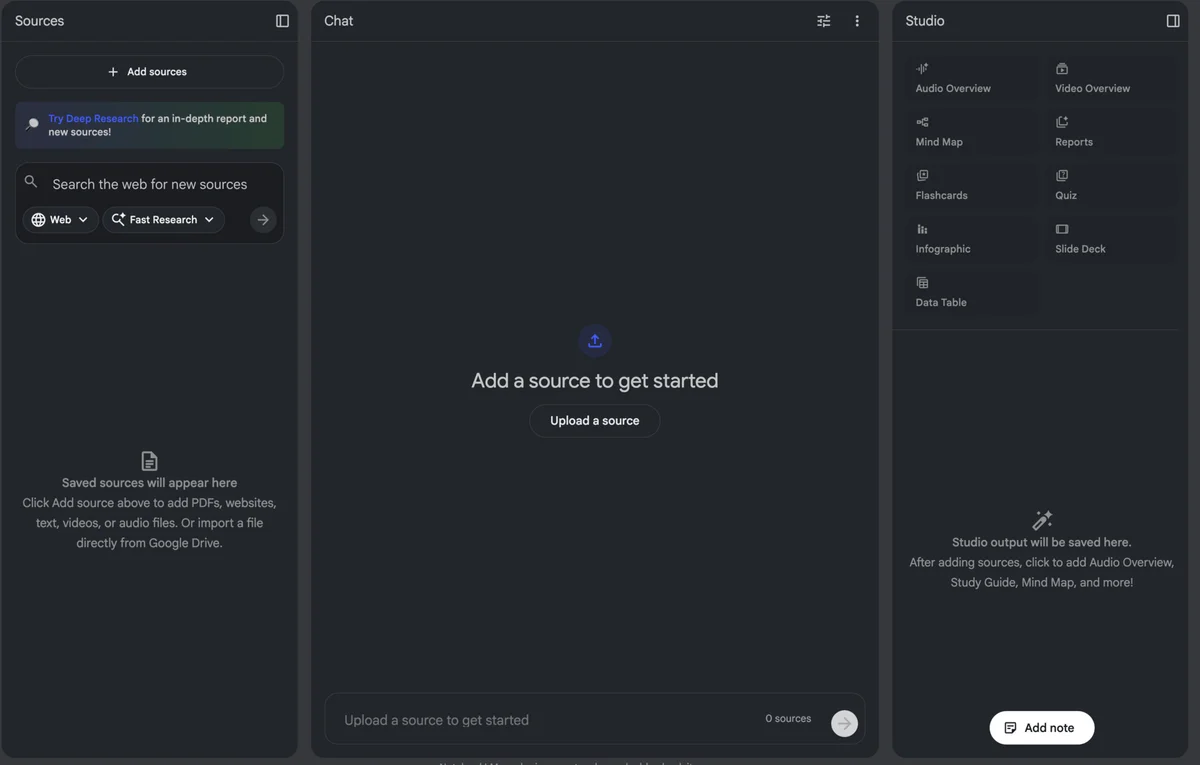
The interface consists of three main panels: the Sources panel on the left for inputting your materials, the Chat panel in the middle for interacting with the AI, and the Studio panel on the right where you view and create outputs. This structured layout is intuitive and facilitates a seamless workflow, allowing users to focus on learning and content creation without unnecessary distractions.
Unique Features for Learning and Teaching
One of the standout features of NotebookLM is its ability to generate various types of outputs. Users can create presentations, reports, infographics, quizzes, and even audio podcasts, all based on the sources they've uploaded. This multimodal capability enhances the learning experience by catering to different learning styles—whether you prefer visual aids, written content, or auditory learning.
For instance, if you're studying a complex subject, you can compile relevant articles, videos, and documents, then let NotebookLM generate a study guide or flashcards. This approach not only aids retention but also encourages active learning, which is essential for mastering new topics. As mentioned during a recent discussion, utilizing NotebookLM for creating educational content can also help solidify your understanding of a subject by teaching it to others, embodying the Feynman technique of learning through teaching.
Practical Applications for Entrepreneurs
For entrepreneurs, NotebookLM presents a wealth of opportunities. Here are some practical ways to leverage this tool:
Content Creation: Use the AI to generate informative blog posts or presentations for client meetings based on specific industry sources. This can save time and ensure that the content is accurate and relevant.
Training and Workshops: If you conduct workshops or training sessions, NotebookLM can help you create tailored materials that reflect the needs of your audience. By feeding it resources related to the training topic, you can produce comprehensive guides and engaging presentations.
Market Research: Entrepreneurs often need to stay updated on industry trends. By using NotebookLM to compile and analyze relevant articles and reports, you can generate insights that are crucial for making informed business decisions.
Expert Insights from the Community
During a recent livestream, the tool was highlighted for its unique approach to education and knowledge acquisition. Users have been able to create impressive assets like AI-generated presentations in mere minutes, showcasing the tool's efficiency. The emphasis on curating high-quality sources reinforces the idea that what you put in directly influences the quality of what you get out—this mantra of "garbage in, garbage out" applies here as well.
Moreover, the interactive capabilities, such as the ability to engage with your sources in a chat format, make the learning process dynamic. This engagement can lead to deeper understanding and retention of the material, ultimately benefiting those looking to master complex subjects.
Getting Started with NotebookLM
If you’re interested in trying out NotebookLM, getting started is simple. You’ll need a Google account to access the platform, and the good news is that it's free to use. Once you log in, you can begin creating notebooks by uploading your sources and exploring the various output options available. Experimenting with different types of content will help you discover what works best for your learning style or business needs.
In conclusion, NotebookLM represents a significant advancement in the realm of AI tools, particularly for learning and teaching. By allowing users to ground their knowledge in specific, curated sources, it provides a tailored learning experience that can be invaluable for entrepreneurs and educators alike. Don’t miss out on this opportunity to enhance your productivity and knowledge acquisition—explore NotebookLM today!
Key Terms Explained
NotebookLM
A Google AI tool that generates outputs from user-provided sources, enhancing learning and content creation.
Feynman Technique
A learning strategy that involves teaching a concept to reinforce understanding and mastery.
Multimodal AI
AI capable of processing and generating multiple types of data, such as text, audio, and images.
Google Drive
A cloud storage service by Google that allows users to store files and collaborate on documents online.
ChatGPT
An AI model by OpenAI designed for conversational interactions, utilizing vast training data to generate responses.
Claude
An AI model by Anthropic, known for its conversational abilities and ethical considerations in AI development.
Gemini
What This Means For You
Tailored Learning Experience
For entrepreneurs and educators, the ability to customize learning materials using NotebookLM can significantly enhance the educational experience. By inputting specific sources, you can create content that directly addresses your audience's needs, leading to more effective learning outcomes.
Actionable Takeaways
Experiment with Different Formats: Try generating various types of educational content to see what resonates best with your audience.
Focus on Quality Sources: Ensure the materials you input are credible and relevant to maximize the effectiveness of the AI's outputs.
Leverage for Business Growth: Use NotebookLM to create training materials or presentations that can help you engage clients or train employees efficiently.
This tool represents a fantastic opportunity to streamline your learning process and produce high-quality educational materials that can set you apart in your field.
Frequently Asked Questions
What is NotebookLM used for?
NotebookLM is used for generating customized educational content and outputs based on user-provided sources.
How can I access NotebookLM?
You can access NotebookLM for free using a Google account. Just search for it online.
What types of outputs can NotebookLM generate?
NotebookLM can generate presentations, reports, quizzes, infographics, and more based on the sources you provide.
How does NotebookLM differ from other AI models?
Unlike other models, NotebookLM uses only the sources you provide, ensuring tailored and relevant outputs.
Can NotebookLM help with learning new subjects?
Yes, NotebookLM is designed to enhance learning by allowing users to upload materials and create customized study aids.
Sources & References
- Discussed at 00:36official
Love AI with Kyle?
Make us a Preferred Source on Google and catch more of our coverage in your feeds.