🛠️ Three Ways to Access Claude Code
TL;DR
- •Claude Code now offers three access methods for users.
- •Web interface is the easiest but less powerful option.
- •Terminal access provides the most control for tech-savvy users.
As AI tools like Claude Code gain popularity, understanding how to access and utilize them becomes essential for entrepreneurs. Claude Code has emerged as a powerful coding assistant, capable of simplifying complex programming tasks and even extending beyond traditional coding applications. However, its initial access methods have posed challenges for non-technical users. This article explores three ways to access Claude Code, highlighting the practical implications of each method for entrepreneurs looking to streamline their projects or enhance their coding capabilities.
The Key Details
Claude Code is designed to be a versatile tool for not just programmers but anyone tackling complex projects. While the installation command might look intimidating to many, there are increasingly user-friendly alternatives available.
Option 1: The Terminal (Most Powerful, Most Intimidating)
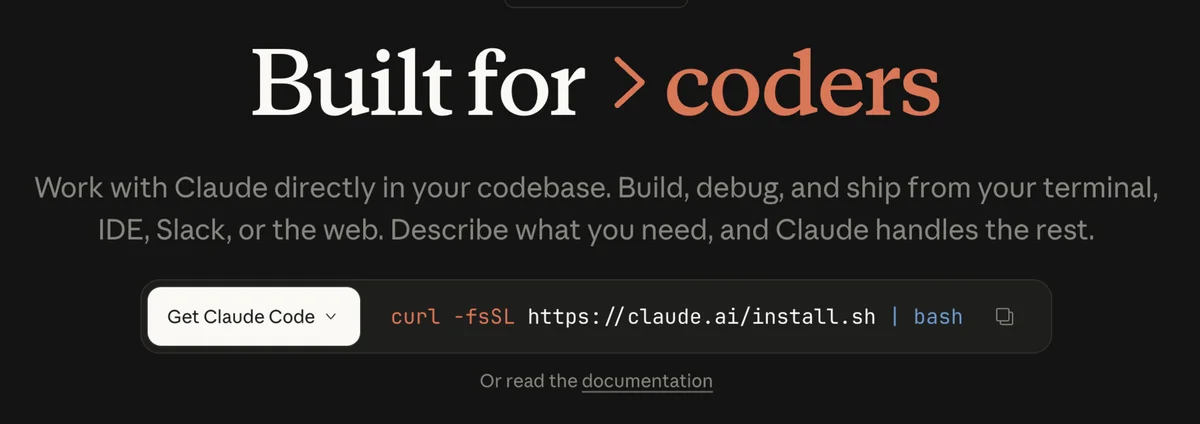
For those familiar with command line interfaces, this is the most direct way to access Claude Code. You simply copy the installation command—something like curl -fsSL https://claude.ai/install.sh | bash—into your Terminal (Mac) or Command Prompt (Windows). While it may seem daunting, it’s actually more straightforward than it appears for those who have experience with command lines. This method offers maximum control and flexibility, making it ideal for developers or tech-savvy individuals.
Option 2: VS Code or Cursor (Middle Ground)
If the Terminal feels too intimidating, Visual Studio Code (VS Code) provides a more visually grounded alternative. This free, open-source development environment lays out your files and folders in a user-friendly interface. You simply install the Claude Code plugin and start working in a more accessible environment. Alternatively, Cursor offers a similar interface, albeit at a cost of around £20 per month. Both options allow you to leverage Claude Code with a more approachable setup while retaining substantial functionality.
Option 3: The Web Version (Easiest, But Less Powerful)
The most accessible method for newcomers is using Claude Code directly in your browser at claude.ai. You'll need a paid plan and a GitHub account to start. This version closely resembles chat interfaces like ChatGPT, making it easy for users to engage without a steep learning curve. However, it's important to note that the web version may not deliver the same power and efficiency as using it in a terminal or development environment. It serves as a great starting point for those looking to familiarize themselves with Claude Code's features.
Expert Insights
During a recent livestream, Kyle Balmer emphasized the importance of starting with the web version if users feel overwhelmed. He suggested gaining comfort with Claude Code's capabilities before moving on to more powerful options like VS Code or Terminal. This gradual progression can be beneficial, especially for those who may feel intimidated by coding or technical setups. Kyle's advice underscores the idea that accessibility should not be sacrificed for power, and entrepreneurs should focus on what works best for them at their current skill level.
Practical Implications for Entrepreneurs
Understanding how to access Claude Code can empower entrepreneurs to harness its capabilities effectively. Here are a few practical implications of these access methods:
Increased Productivity: Utilizing Claude Code can significantly speed up coding tasks, enabling entrepreneurs to focus on strategic aspects of their projects rather than getting bogged down by technical details.
Diverse Applications: Claude Code isn’t just for coding. It can assist with project management, research, and data analysis, making it a versatile tool for various business needs.
Skill Development: By engaging with Claude Code, users can also enhance their technical skills, which could lead to better decision-making when hiring or collaborating with developers in the future.
What's Next?
As AI tools continue to evolve, entrepreneurs should remain proactive in exploring and adopting these technologies. Claude Code presents an opportunity for those looking to streamline processes and enhance productivity. Whether you choose the Terminal, a development environment like VS Code, or the web interface, the key is to start experimenting and integrating AI into your workflow.
Don't let intimidation hold you back; the future of AI tools is here, and with Claude Code, you have the chance to be at the forefront of that change.
Key Terms Explained
Claude Code
A coding assistant developed by Anthropic designed to help with programming tasks and project management.
Terminal
A command line interface where users can input commands directly to the operating system, often used for software installation and management.
Visual Studio Code (VS Code)
A free, open-source code editor developed by Microsoft that provides a user-friendly interface for coding and software development.
Cursor
A modern code editor that enhances the coding experience with additional features and a user-friendly interface, available via subscription.
GitHub
A platform for version control and collaboration that allows developers to manage and store their code in repositories.
What This Means For You
Increased Accessibility
The introduction of multiple access methods for Claude Code makes it more accessible to a wider range of users. Entrepreneurs without technical backgrounds can now engage with powerful AI tools without feeling overwhelmed. The web version provides an entry point that encourages experimentation and learning.
Streamlined Processes
By integrating Claude Code into their workflows, entrepreneurs can streamline complex tasks, whether it’s coding, project management, or data analysis. This efficiency can lead to significant time savings and allow users to focus on higher-level strategic tasks.
Empowerment Through Learning
Using Claude Code can empower entrepreneurs to develop their technical skills over time. As they gain confidence and familiarity, they may choose to explore more advanced methods of access, ultimately enhancing their overall productivity and capability to leverage AI in their business operations.
Frequently Asked Questions
How do I install Claude Code?
You can install Claude Code via the Terminal using a command, through VS Code with a plugin, or directly on the web.
Is the web version of Claude Code as powerful as the Terminal version?
No, the web version is easier to use but less powerful than the Terminal or development environment versions.
Do I need coding experience to use Claude Code?
While some familiarity with coding helps, the web version is designed for beginners to get started easily.
What can I do with Claude Code?
Claude Code can assist with programming tasks, project management, data analysis, and more.
Can I use Claude Code for non-coding projects?
Yes, Claude Code is versatile and can be applied to various projects beyond coding.
Sources & References
Love AI with Kyle?
Make us a Preferred Source on Google and catch more of our coverage in your feeds.